

The best business phone system for a remote team is a cloud platform that behaves the same whether an employee is at a desk, on a laptop at home, or on a phone at an airport. That is now within reach of almost every company: the FCC lists under 0.5 Mbps as the minimum for a single call, so home internet is rarely the obstacle. The real questions are which platform fits your team, how it is secured, and who sets it up and supports it when something breaks. This guide covers what to look for, reviews the leading cloud phone platforms for distributed teams, flags the red flags that catch buyers out, and gives you a framework to choose with confidence.
- Cloud is the category: remote teams need a cloud VoIP or UCaaS platform where the business number follows the user across desk phone, desktop app, and mobile app.
- Internet is rarely the blocker: a single call needs under 0.5 Mbps (FCC). What matters is latency at or under 150 ms, jitter under 30 ms, packet loss under 1 percent, and Quality of Service.
- The leaders are mature: RingCentral, Nextiva, Zoom Phone, Microsoft Teams Phone, Dialpad, and Ooma Office each fit a different type of team. There is no universal winner.
- Match the platform to your stack: already in Microsoft 365 or Zoom? Start there. Want built-in AI notes? Look at Dialpad. Want simple and cheap? Ooma.
- Security is a requirement, not a feature: TLS and SRTP encryption, multi-factor authentication, and toll-fraud monitoring, per NIST SP 800-58.
- Deployment decides success: the difference between a system people love and one they fight is number porting, network setup, and support, which is where a managed partner earns its keep.
What’s in This Guide
- Why Remote Teams Need a Different Kind of Phone System
- How We Evaluated: What to Look For
- The Best Business Phone Systems for Remote Teams
- Side-by-Side: Which System Fits Which Team
- How to Choose: A Decision Framework
- Red Flags When Evaluating a Provider
- Why Deployment Matters More Than the Brand
- Frequently Asked Questions
- Methodology and Sources
Why Remote Teams Need a Different Kind of Phone System
A traditional office phone system assumes everyone is in the same building, wired to the same box on the wall. A remote or hybrid team breaks that assumption completely. People work from home offices, coffee shops, client sites, and different cities, and the phone system has to make all of that invisible to the customer on the other end of the line. That is why the category that matters here is cloud calling, delivered as VoIP or as a fuller UCaaS platform, rather than any on-premises hardware.
The defining feature is that the business number follows the person, not the place. A well-designed cloud system rings an employee’s desk phone, desktop softphone, and mobile app at the same time, lets them send business texts from the company number, and transfers calls between colleagues in different cities without dropping them. To the caller, a distributed team sounds exactly like a team sharing one office. That single-identity behavior is the whole point, and it is what separates a real business phone system from a pile of personal cell phones.
The good news for buyers is that the plumbing underneath is mature and light. A single conversation is a tiny amount of data, so the home internet connections your team already has will almost always carry business calls. The work that remains is choosing the platform that fits how your people actually operate, and making sure the network conditions and security around it are right. For the full technical picture of what a connection needs to carry voice cleanly, see our guide to what your network needs to run VoIP well.
See UCaaS Built for Remote and Hybrid Teams
Source: FCC Broadband Speed Guide | FCC: VoIP and Cyber Security
How We Evaluated: What to Look For
Before naming any platform, it helps to fix the criteria that actually matter for a distributed workforce. These are the same criteria we weighed in the reviews below, and they double as your own shopping checklist. A phone system can look impressive in a demo and still fail a remote team if it falls short on any one of them.
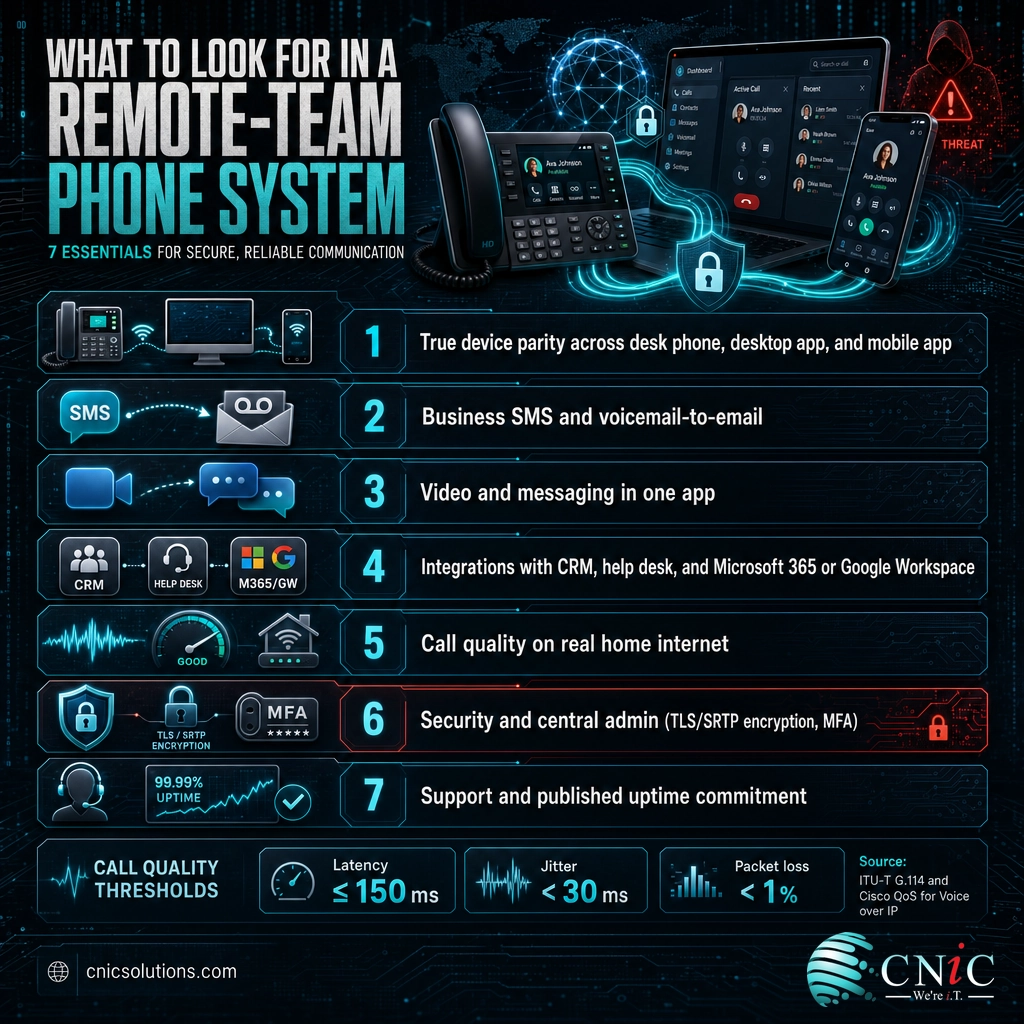
- True device parity: the desk phone, desktop app, and mobile app all make and receive calls on the business number equally well, with transfers that do not drop.
- Business SMS and voicemail: employees text customers from the company number, and voicemail reaches them wherever they are, including voicemail-to-email transcription.
- Video and messaging in one place: for most remote teams, calling, chat, and video meetings in a single app beats stitching three separate tools together.
- Integrations with your stack: the system should log calls and surface contacts in the CRM, help desk, and Microsoft 365 or Google Workspace tools your team already uses.
- Call quality under real conditions: a mobile app that handles transfers, business SMS, and reconnection gracefully on consumer internet, not just on a perfect office network.
- Security and administration: encryption of signaling and media, multi-factor authentication, and a central admin console to add, remove, and control users remotely.
- Support and reliability: a published uptime commitment and responsive support, because when the phones are down for a remote team, the whole company is unreachable.
Two technical thresholds sit underneath all of this and decide whether any platform will sound good. Voice is unforgiving of delay in a way that email and web pages are not, so the network each remote worker sits on has to keep one-way latency at or under 150 milliseconds, the ceiling the ITU sets for natural conversation. Alongside it, jitter should stay under 30 milliseconds and packet loss under 1 percent, per Cisco’s voice quality guidance. Meet those and any of the platforms below will sound clear; miss them and even the best platform gets blamed for problems the network caused.
If the copy of criteria feels abstract, remember the practical test: could a new hire in another state be productive on the phones the day they start, using the laptop and mobile device they already own? A system that passes that test is a system built for remote work. For a closer look at the call-quality issues that trip distributed teams up in practice, see our breakdown of the call-quality problems remote workers hit most and how to fix them.
Source: ITU-T Recommendation G.114 | Cisco: Quality of Service for Voice over IP
The Best Business Phone Systems for Remote Teams
The platforms below are the ones that consistently show up as leaders for distributed teams. Rather than rank them one to six, we have grouped each by the team it fits best, because the honest answer to “which is best” is “best for what.” All are cloud-native, all put the business number on every device, and all are mature, reliable products. The differences that matter are the ecosystem each one lives in and the extras each one leans into. Pricing and exact features change often, so treat the notes as direction and confirm current details on each provider’s official site.
RingCentral: Best for Growing Teams That Want Everything in One Platform
Best for: mid-sized and scaling teams that want calling, messaging, video, and a deep integration library under one roof.
RingCentral’s official site describes one of the most established all-in-one cloud communications platforms, and it earns its reputation on breadth. It combines phone, business SMS, team messaging, and video meetings with a large catalog of integrations, which makes it a common default for companies that expect to grow into more features over time.
- Strengths: broad all-in-one feature set, a mature mobile and desktop app, a wide integration ecosystem, and a well-known published uptime commitment.
- Consider if: you want maximum capability and are willing to spend a little more time on setup and administration to get it. Very small teams may find it more platform than they need.
Nextiva: Best for Teams That Want Calling Plus Customer Experience
Best for: service-driven teams that want reliable voice paired with customer-experience and workflow tools.
Nextiva’s official site positions the product around combining business communication with customer-experience features and a strong reputation for support. For a remote team whose phones are a front line to customers, that support-first posture and the move toward unified customer workflows are the draw.
- Strengths: reliability, well-regarded customer support, and a direction that unifies voice with customer-experience tooling.
- Consider if: your phones are customer-facing and you value responsive support and an all-in-one customer-experience roadmap over the absolute lowest price.
Zoom Phone: Best for Teams Already Living in Zoom
Best for: teams that already run their meetings on Zoom and want calling in the same familiar app.
If your remote team already opens Zoom for every meeting, adding Zoom Phone puts business calling inside a tool people use daily. The value is continuity: one interface for video and voice, one login, and a learning curve close to zero for staff who are already comfortable there.
- Strengths: tight integration with Zoom Meetings, a familiar interface that lowers training, and a clean mobile and desktop experience.
- Consider if: video is your team’s center of gravity and you want calling to live in the same place, rather than adopting a separate phone-first platform.
Microsoft Teams Phone: Best for Microsoft 365 Organizations
Best for: companies already standardized on Microsoft 365 that want calling built into Teams.
For organizations that run on Microsoft 365, Microsoft Teams Phone adds business calling to the Teams app your staff already use for chat and meetings. The appeal is a single vendor for identity, management, and communication, which simplifies administration for a distributed workforce. Whether it beats a dedicated voice platform depends on how much you rely on advanced call handling, which we cover in our comparison of how a dedicated VoIP platform stacks up against Microsoft Teams Phone.
- Strengths: calling inside an app your team already uses, single sign-on and central management through Microsoft 365, and simplified vendor consolidation.
- Consider if: your team already lives in Teams and you value one login and one admin surface over a specialized, phone-first feature set.
Dialpad: Best for Teams That Want Built-In AI
Best for: teams that want automatic call notes, transcription, and analytics without bolting on extra tools.
Dialpad leans into artificial intelligence, with features like live transcription and automatic call summaries built into the calling experience. For remote teams that lose context when a call ends, having a written record and searchable transcript generated automatically can be a meaningful time-saver.
- Strengths: built-in AI transcription and call summaries, a modern and clean interface, and analytics that give managers visibility into distributed calls.
- Consider if: you want the AI note-taking and coaching features as a core part of the platform rather than a separate purchase.
Ooma Office: Best for Small Teams That Want Simple and Affordable
Best for: very small teams that need dependable calling without a large feature surface or a big budget.
Ooma Office focuses on straightforward setup and a low entry cost, which suits a small distributed team that wants a professional business number, mobile app, and core calling features without paying for enterprise capabilities it will never use.
- Strengths: simple setup, low entry pricing, and the core calling and mobile features a small team actually needs.
- Consider if: you are a small team that values simplicity and cost over a deep integration ecosystem or advanced contact-center tools.
Also worth a look: beyond the six above, platforms such as 8×8, GoTo Connect, and Vonage are credible cloud options, particularly if heavy international calling or a specific budget point is your deciding factor. The evaluation criteria stay the same: device parity, the integrations you need, call quality on real connections, and security. Shortlist by fit, then trial with a small group before you commit the whole company.
Explore Our Hosted Business Phone Systems
Source: RingCentral official site | Nextiva official site | Zoom Phone official site | Microsoft Teams Phone official site
Side-by-Side: Which System Fits Which Team
The table below distills the reviews into a quick reference. It is deliberately about fit rather than a scorecard, because for a phone system the wrong question is “which is best overall” and the right question is “which is best for a team like mine.” Use it to build a shortlist, then verify current pricing and features on each provider’s site.
| Platform | Best for | Known for | Consider if |
|---|---|---|---|
| RingCentral | Growing all-in-one teams | Breadth of features and integrations | You want maximum capability and room to grow |
| Nextiva | Customer-facing teams | Reliability and support | Your phones are a front line to customers |
| Zoom Phone | Zoom-first teams | Voice inside the Zoom app | Video is your center of gravity |
| Microsoft Teams Phone | Microsoft 365 shops | Calling built into Teams | Your team already lives in Teams |
| Dialpad | AI-forward teams | Built-in transcription and summaries | You want automatic call notes and analytics |
| Ooma Office | Small, budget-minded teams | Simple setup and low cost | You need core calling without the extras |
Notice that no single platform sweeps the table, which is exactly the point. The deciding factor is almost never a feature checkbox that only one vendor has; it is which ecosystem your team already lives in and how the system will be deployed and supported. Two companies of the same size can rightly choose different winners.
Source: Dialpad official site | Ooma Office official site
How to Choose: A Decision Framework
With the criteria and the shortlist in hand, the decision usually resolves quickly once you match your situation to a starting point. The framework below is not a substitute for a trial, but it points most teams toward the right two or three options to test.
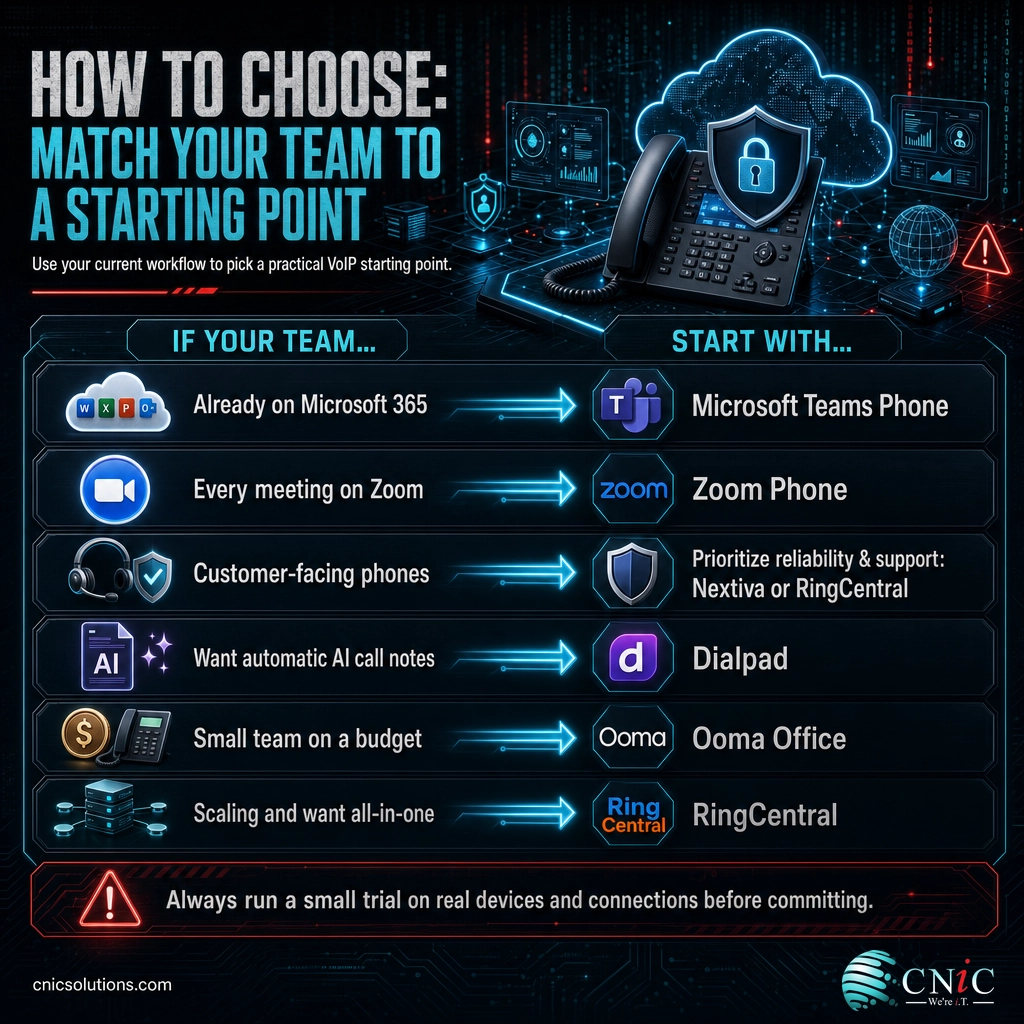
- If your team already runs on Microsoft 365, start with Microsoft Teams Phone and compare it against one dedicated voice platform to see whether you need richer call handling.
- If every meeting already happens on Zoom, start with Zoom Phone for the continuity, and confirm it covers your calling and SMS needs.
- If your phones are customer-facing, prioritize reliability, support, and customer-experience features, which points toward Nextiva or RingCentral.
- If you want automatic call notes and coaching, put Dialpad on the shortlist for its built-in AI.
- If you are a small team on a tight budget, start with Ooma Office and only move up if you outgrow it.
- If you expect to scale and want one platform for everything, RingCentral is the safe all-in-one default.
Whatever the shortlist, run a real trial before committing. Put the platform in the hands of a few employees on their actual home connections and devices, and test the unglamorous things that break in practice: transferring a call, sending a business text, joining from a mobile app on cellular, and reconnecting after the Wi-Fi hiccups. A platform that handles those gracefully for a small pilot group will handle them for the whole company. When you are ready to move, our step-by-step VoIP migration checklist takes you from a chosen platform to a clean cutover.
Talk to Us About Business Telecommunications
Source: FCC: VoIP and Cyber Security
Red Flags When Evaluating a Provider
Choosing well is partly about spotting the warning signs that a platform or a plan will not serve a remote team. The issues below are the ones that surface after the contract is signed, when they are harder to fix.
Watch for these before you commit:
- A weak mobile app. If the mobile experience is an afterthought, remote workers will route around it with personal cell phones, and you lose the single business identity that was the whole reason to buy. Test the app first, not the desktop client.
- No published uptime commitment. A provider that will not commit to a service-level agreement for availability is telling you something. For a remote team, phones down means the company is unreachable.
- Vague answers on security. If a provider cannot clearly say that signaling is encrypted with TLS and audio with SRTP, and cannot explain how it monitors for toll fraud, treat that as disqualifying.
- Long, punishing contracts with early-termination penalties. The cloud model is supposed to be flexible. Multi-year lock-in with heavy exit fees works against you if the fit turns out wrong.
- Unclear number porting. If a provider is cagey about how it will port your existing business numbers, expect pain during cutover. Porting should be a defined, supported process.
- Support that disappears after the sale. Ask what support looks like at 2 p.m. on a busy Tuesday, not just during onboarding. Remote teams cannot walk down the hall to fix a phone.
None of these are exotic. They are the predictable gaps between a system that demos well and one that holds up for a distributed workforce over years. Asking about them directly, and testing the mobile app and porting process in a trial, screens most of them out before they become your problem. Because the phones are also an entry point to your data, weigh each option against your broader security posture, which our team can help you assess and harden across the business.
Source: NIST SP 800-58: Security Considerations for Voice Over IP Systems | CISA: Cyber Threats and Advisories
Why Deployment Matters More Than the Brand
Here is the part most roundups skip: for a remote team, the platform you pick matters less than how it is deployed and supported. The leaders reviewed above are all capable products. The reason two companies can buy the same system and have opposite experiences comes down to the work around it, the network readiness on each connection, the number porting, the Quality of Service settings, the security hardening, and the support when something goes wrong at the worst possible moment.
Where a managed IT partner fits. We are not tied to a single vendor. Our role is to help you choose the platform that fits your team, then run the deployment end to end: assessing each remote worker’s connection, porting your numbers cleanly, configuring Quality of Service and security, integrating the system with the tools you already use, and supporting your people afterward so the phones stay out of your way. The result is that you get the benefit of the right platform without absorbing the deployment risk yourself.
That is the difference between buying a phone system and having one that works. A distributed team feels every rough edge, so the setup and support are not overhead; they are what turns a good product into a reliable business tool. If you would rather focus on your business than on porting numbers and tuning networks, that is exactly the work a managed IT partner takes off your plate.
Source: Cisco: Quality of Service for Voice over IP | NIST SP 800-58
Frequently Asked Questions
What is the best business phone system for remote teams?
Do remote workers need special internet for a business phone system?
How much do business phone systems cost per user?
Can employees keep one business number across all their devices?
Is a cloud phone system secure for remote work?
What is the difference between VoIP and UCaaS for remote teams?
Methodology and Sources
How this guide was built
Platform selections reflect the providers that consistently appear as leaders for remote and distributed teams across current industry roundups, evaluated against the seven criteria set out above: device parity, business SMS and voicemail, integrated video and messaging, integrations, real-world call quality, security and administration, and support and reliability. Platform descriptions are kept general and directional; specific plans, pricing, and features change frequently, so confirm current details on each provider’s official website before purchasing. We do not sell a single platform, and no vendor influenced these selections.
Technical thresholds are drawn from primary standards rather than secondary write-ups. The single-call broadband floor is from the FCC Broadband Speed Guide. One-way latency guidance follows ITU-T Recommendation G.114, and jitter and packet-loss targets follow Cisco’s Quality of Service design guidance for voice. Security recommendations follow NIST Special Publication 800-58, “Security Considerations for Voice Over IP Systems.” Pricing ranges describe the general market at the time of writing and are not attributed to any single vendor; verify current figures on official pricing pages.
- FCC Broadband Speed Guide
- ITU-T Recommendation G.114: One-Way Transmission Time
- Cisco: Quality of Service for Voice over IP
- NIST SP 800-58: Security Considerations for Voice Over IP Systems
- FCC: VoIP and Cyber Security
Last Updated: August 2026

related posts
What Is Calendar Phishing and How to Prevent It
October 13, 2026Calendar phishing is a scam that hides a malicious link inside a calendar invitation instead of…
What Is BYOD? Bring Your Own Device Explained for Businesses
October 13, 2026BYOD (Bring Your Own Device) is a policy that lets employees use their own personal devices,…
What Is an IP Address? A Plain-English Guide for Business
October 12, 2026An IP address (Internet Protocol address) is a unique number assigned to every device on a…
What Is an Evil Twin Attack? How Fake Wi-Fi Hotspots Steal Your…
October 12, 2026An evil twin attack is a fake Wi-Fi hotspot that copies the name of a network…