

Google Workspace and Microsoft 365 are the two dominant productivity suites for business, and there is no universal winner. Microsoft 365 is the safer choice for teams built on desktop Office, complex documents, and a Windows environment; Google Workspace is the safer choice for cloud-native, collaboration-first teams that want lower IT overhead. The right answer depends on how your people actually work.
If you are choosing between Google Workspace and Microsoft 365, you have already noticed the problem: nearly every comparison online declares a winner, and they do not agree. That is because the honest answer is not “which suite is better” but “which suite fits your business.” Both are mature, secure, and capable enough to run a company on. The differences that actually decide the question are practical ones: whether your team needs the power of desktop Excel or the fluidity of real-time browser collaboration, how you want cloud storage allocated, what your compliance and security obligations are, how built-in AI is priced, and how well each suite fits the systems you already run. This guide compares the two on each of those fronts with current, sourced pricing, then gives you a clear framework for picking the one that will serve your business best.
Key Takeaways
- There is no universal winner. Both suites can run a business well. The decision comes down to how your team works, not which brand is bigger.
- Entry pricing is identical. Google Workspace Business Starter and Microsoft 365 Business Basic both cost $7 per user per month on an annual commitment. The cost story diverges higher up the ladder.
- Microsoft wins on desktop power and Windows fit. Full desktop Excel, Word, and Outlook, plus native Active Directory and device management, favor Windows-heavy and document-heavy teams.
- Google wins on collaboration and simplicity. Browser-first, real-time editing and lower IT overhead favor cloud-native, remote-first, and fast-growing teams.
- AI pricing is the 2026 differentiator. Google bundles Gemini into its business plans at no extra charge, while Microsoft 365 Copilot is a paid per-user add-on.
- Configuration beats brand on security. Both platforms are secure by design; most incidents come from how the suite is set up, not which one you chose.
What’s in This Guide
Understanding the Landscape
Google Workspace and Microsoft 365 do the same core jobs: business email on your own domain, documents and spreadsheets, shared calendars, video meetings, chat, and cloud file storage, all administered centrally. If you only look at the feature checklists, they can seem nearly interchangeable, and at the level of “can my team send email and edit a spreadsheet,” they are.
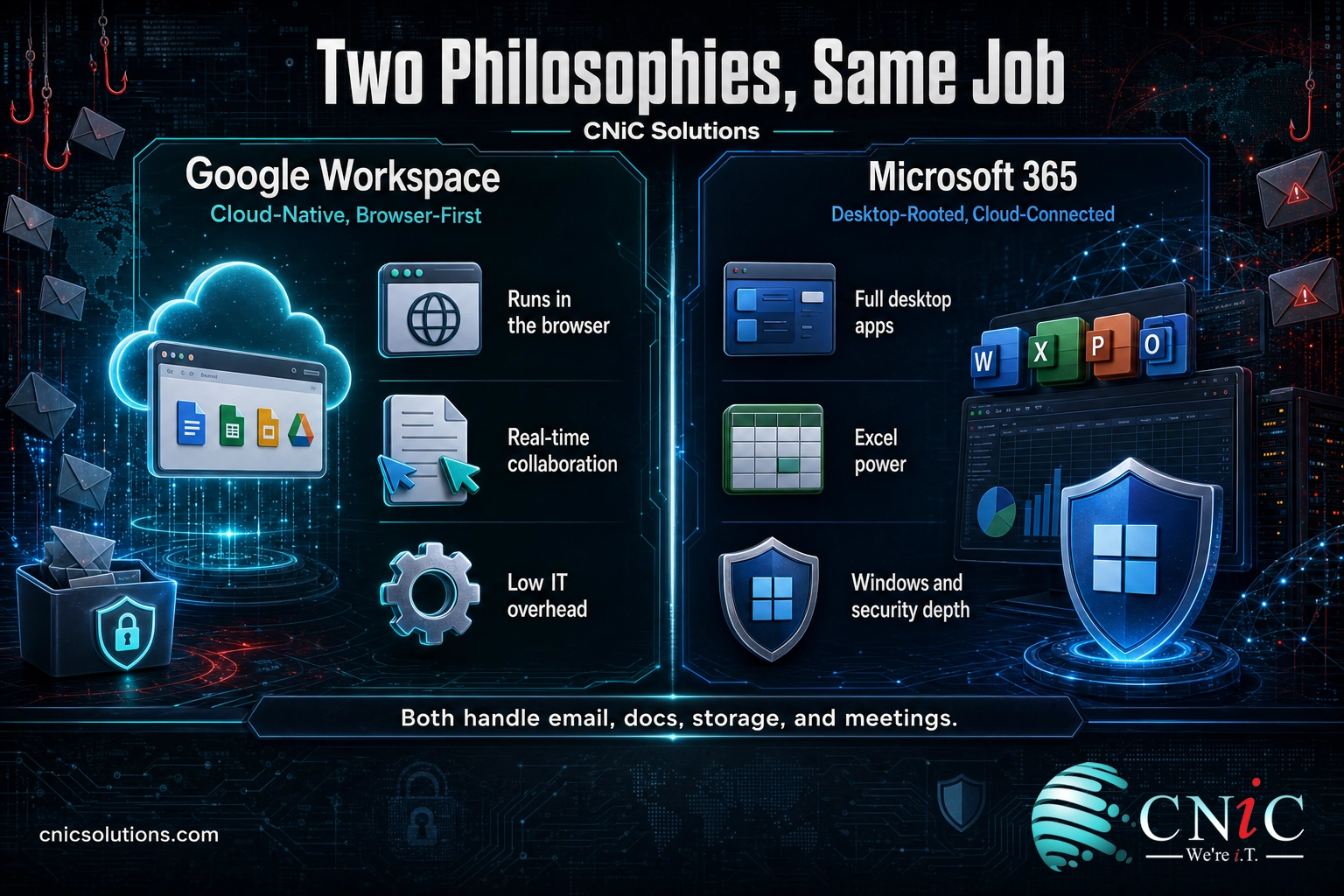
The suites diverge in philosophy, and that is what makes the choice matter. Microsoft 365 grew out of the desktop Office applications that have run business computing for decades, then wrapped them in cloud services. It is built to be powerful and deep, with the full weight of installed Excel, Word, and Outlook behind it. Google Workspace was born in the browser. It is built to be simple, collaborative, and cloud-native, with real-time co-editing and near-zero local software to maintain. Neither approach is wrong. They are optimized for different kinds of teams.
It also helps to remember that you are not just choosing an email and documents provider. Each suite carries a surrounding ecosystem of apps that your team will lean on daily. On the Microsoft side that means Teams for chat and meetings, SharePoint for shared sites and intranets, and the Power Platform for low-code automation, all wired tightly to the Office apps. On the Google side it means Meet for video, Chat and Spaces for messaging, and tools like AppSheet for no-code apps, all built to work in the browser. Both ecosystems are broad and capable; the question is which one your people will find natural, because the suite you pick becomes the daily software environment for your whole company, not just its inbox.
That is the real question in front of you: not which product has more features, but which philosophy matches how your business operates. A construction firm running heavy estimating spreadsheets on Windows workstations and a remote-first marketing startup collaborating from six cities have genuinely different right answers. Both platforms live in the cloud, so this is also, underneath, a decision about your broader move to cloud-based operations, and it is worth making deliberately rather than by default.
Google Workspace: Overview, Strengths, and Limits
Google Workspace is the business version of the tools most people already know from personal Google accounts: Gmail, Google Docs, Sheets, Slides, Drive, Calendar, and Meet, delivered under your own company domain with central admin controls, more storage, and business-grade support. Everything runs in the browser, on any device, with nothing to install and keep patched.
How it works
Because Workspace is cloud-native, the collaboration model is its defining feature. Multiple people edit the same document at the same time, seeing each other’s cursors and changes live, with every version saved automatically. There are no files emailed back and forth and no “final_v3_reallyfinal” confusion. Administration is handled through a single web console, and because there is no local software footprint, IT overhead stays low. Google bundles its Gemini AI assistant directly into Gmail, Docs, Sheets, and the rest of the suite on business plans.
Key strengths
- Real-time collaboration is native, not bolted on. Simultaneous editing, comments, and sharing are the core of how the suite works, which suits teams that build things together.
- Low IT overhead. Nothing to install, patch, or maintain on each machine. A small team can run it with minimal internal IT.
- Built-in AI at no extra charge. Gemini assistance is included in business plans rather than sold separately.
- Pooled storage. Storage is shared across your organization, so heavy users draw from a common pool instead of hitting a rigid per-person cap.
Key limitations
- No true desktop power apps. Sheets and Docs are excellent for everyday and collaborative work, but for advanced spreadsheet modeling, macros, and heavy formatting, they do not match installed Excel and Word.
- Weaker fit with legacy Windows environments. Businesses deep into Windows Server, Active Directory, and specialized desktop software may find Microsoft’s ecosystem integrates more naturally.
- Compatibility friction. Complex Office files can lose some formatting or advanced features when opened in Google’s apps.
Best for: Cloud-native, collaboration-heavy, and remote-first teams, startups, and organizations that want minimal IT overhead and AI included in the price.
Source: Google Workspace official pricing page
Microsoft 365: Overview, Strengths, and Limits
Microsoft 365 is the subscription that pairs the familiar desktop Office applications, Word, Excel, PowerPoint, and Outlook, with cloud services: business email through Exchange, file storage in OneDrive and SharePoint, and Microsoft Teams for chat and meetings. On the higher business plans you get both the installed desktop apps and their web versions, so people can work either way.
How it works
Microsoft 365 gives each user the full installed Office suite on their computer, backed by cloud sync and online co-authoring. The depth of the desktop apps is the draw: Excel in particular remains the standard for serious financial modeling, pivot tables, and macros, and Word handles long, heavily formatted documents that browser editors struggle with. For businesses already running Windows, Microsoft 365 ties in through Azure Active Directory, giving single sign-on, group policies, and centralized device management out of one ecosystem. The higher-tier Business Premium plan folds in advanced security tools, Microsoft Defender for Business and Intune device management, aimed at companies with stricter protection and compliance needs.
Key strengths
- Unmatched desktop applications. For power users, nothing matches installed Excel and Word for complex work and precise formatting.
- Deep Windows and Active Directory integration. Native single sign-on, device management, and identity through Azure AD suit Windows-based organizations.
- Advanced security bundled at the top tier. Business Premium includes Defender for Business and Intune, valuable for regulated industries.
- Predictable per-user storage plus generous mailboxes. Every plan includes 1 TB of OneDrive storage per user and a large Exchange mailbox.
Key limitations
- More to manage. Desktop software, updates, and a richer feature set mean higher IT overhead than a browser-only suite.
- AI costs extra. Microsoft 365 Copilot is a paid add-on on top of a qualifying plan rather than an included feature.
- Collaboration is capable but less effortless. Real-time co-authoring works well, but the cloud-first fluidity is not as central to the design as it is in Google’s suite.
Best for: Document-heavy and spreadsheet-intensive teams, Windows-based organizations, and businesses with strict security or compliance requirements.
Source: Microsoft’s official Microsoft 365 business plans
Head-to-Head Comparison Table
The table below lines the two suites up on the criteria businesses weigh most. Prices are per user per month on an annual commitment, current for 2026.
| Criteria | Google Workspace | Microsoft 365 |
|---|---|---|
| Design philosophy | Cloud-native, browser-first | Desktop-rooted, cloud-connected |
| Entry plan | Business Starter, $7 | Business Basic, $7 |
| Mid plan | Business Standard, $14 | Business Standard, $14 |
| Top SMB plan | Business Plus, $22 | Business Premium, $22 |
| Desktop apps | Web and mobile only | Full installed Office (Standard and up) |
| Cloud storage | Pooled: 30 GB / 2 TB / 5 TB per user by plan | Fixed 1 TB OneDrive per user, all plans |
| Collaboration | Real-time co-editing is core | Capable co-authoring, desktop-centric |
| Built-in AI | Gemini included on business plans | Copilot is a paid add-on |
| Advanced security | Cloud-native admin and endpoint controls | Defender + Intune on Business Premium |
| Best environment fit | Chrome, Android, cloud-first | Windows, Active Directory |
| IT overhead | Lower | Higher |
Sources: Google Workspace pricing | Microsoft 365 business plans

The Five Decisions That Actually Matter
Feature lists are long, but only a handful of differences decide the outcome for most businesses. Here are the five that carry the real weight, with a clear winner for each and, more importantly, the conditions under which that winner is right for you.
1. Desktop power vs. cloud collaboration
This is the fault line the whole decision runs along. If your team builds complex spreadsheets, runs financial models, uses pivot tables and macros, or produces long, precisely formatted documents, installed Excel and Word are still unmatched, and that is Microsoft’s home turf. If your team’s work is collaborative, with several people shaping the same document at once, Google’s real-time, browser-native editing is smoother and faster to work in. Winner: Microsoft 365 for raw application power; Google Workspace for live collaboration. Decide which of those two your people do more of, because it will define their day.
2. How cloud storage is allocated
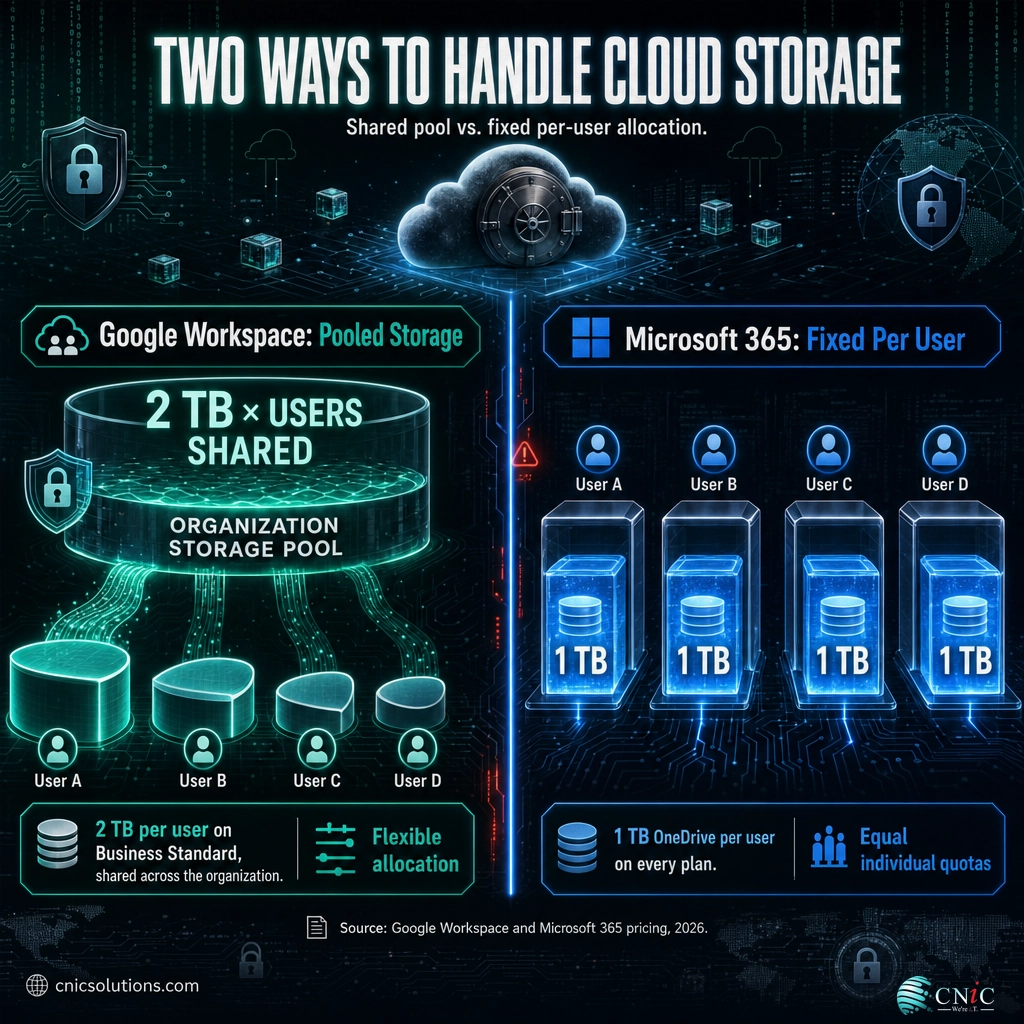
The two suites handle storage differently in a way that matters at scale. Microsoft 365 gives each user a fixed 1 TB of OneDrive storage on every plan, simple and predictable. Google Workspace uses pooled storage: the organization gets a shared pool (for example, 2 TB per user on Business Standard) that everyone draws from, so heavy users can use more while light users use less, and nobody hits an individual wall while headroom sits unused elsewhere. Winner: depends on your team. Pooled storage is more efficient for mixed usage; fixed per-user storage is easier to reason about and guarantees each person a full terabyte.
Included Cloud Storage on the Mid-Tier Business Plan (Business Standard)
Sources: Google Workspace pricing and Microsoft 365 business plan pricing, 2026. Google’s storage is pooled across the organization; Microsoft’s is a fixed allocation per user.
3. Security and compliance
Both platforms are secure at the foundation, backed by two of the largest security operations in the world. The practical difference is what comes bundled and how well it maps to your obligations. Microsoft 365 Business Premium includes Microsoft Defender for Business and Intune device management, an advantage for Windows-heavy shops and businesses under frameworks like HIPAA or CMMC that want integrated protection and control from one vendor. Google Workspace answers with strong cloud-native administration, context-aware access, and endpoint management built for a browser-first world. Winner: Microsoft 365 for bundled advanced security and regulated environments; Google Workspace for cloud-native simplicity. Whichever you choose, the security you actually get depends on turning the controls on and configuring them correctly, which is where a managed cybersecurity program earns its place.
Myth: “Whichever suite we pick, the platform keeps us secure.” Both Google and Microsoft secure their infrastructure, but they operate a shared-responsibility model: they protect the platform, you are responsible for configuring your tenant, managing identities, enforcing multi-factor authentication, and controlling access. Default settings are a starting point, not a finished security posture, and most business email compromises trace back to weak configuration and stolen credentials, not a flaw in the suite. Picking the “more secure” platform and leaving it at defaults is how organizations end up breached on software that was perfectly capable of protecting them.
4. Built-in AI: the 2026 differentiator
A year ago, price and features decided most of these comparisons. In 2026, AI has moved to the center, and this is where the two suites diverge most sharply on value. Google bundles its Gemini AI assistant into Workspace business plans at no additional charge, so the writing help, summaries, and data analysis in Gmail, Docs, and Sheets come with the subscription you already pay for. Microsoft takes the opposite approach: Microsoft 365 Copilot is a separate paid add-on layered on top of a qualifying plan. Industry analysts have framed Google’s move as direct pressure on Microsoft’s AI pricing. Winner: Google Workspace on AI value, clearly, as long as Gemini’s capabilities meet your needs. If your team wants Copilot’s specific strengths inside desktop Office, Microsoft’s tools are powerful, but you will pay a per-seat premium for them.
Sources: Google Workspace pricing (Gemini included) | Forrester analysis on Gemini in Workspace | Microsoft 365 Copilot pricing
5. Price and total value
On the headline numbers, the two suites are strikingly close. Entry plans match at $7 per user per month, mid-tier plans match at $14, and the top small-business plans match at $22, all on annual commitments. Because the base prices are nearly identical, price alone rarely decides the question. The real cost differences hide in the extras: whether you need installed desktop apps, whether advanced security is bundled or added, and above all how AI is priced, where Google’s included Gemini can meaningfully undercut the cost of adding Copilot across a team. Winner: a near-tie on base price; Google Workspace pulls ahead on total value once bundled AI is counted, while Microsoft 365 justifies its cost for teams that genuinely use the desktop and security depth.
Sources: Google Workspace pricing | Microsoft 365 business plans

Decision Framework: Choose the Right Suite
Set the marketing aside and match the suite to your reality. Run through the two profiles below; most businesses recognize themselves clearly in one.
Choose Microsoft 365 if you:
- Rely on advanced Excel work, macros, pivot tables, or long, heavily formatted documents.
- Already run Windows, Active Directory, or specialized desktop software.
- Operate under strict compliance requirements and want advanced security and device management bundled in (Business Premium).
- Have staff who strongly prefer installed desktop apps over browser tools.
- Want the deepest, most established application feature set and will use it.
Choose Google Workspace if you:
- Work collaboratively, with teams shaping documents together in real time.
- Are cloud-native, remote-first, or growing fast and want to scale without IT drag.
- Want to minimize internal IT overhead and software maintenance.
- Value built-in AI included in the price rather than as a paid add-on.
- Are already comfortable in Gmail, Chrome, and Android.
If your team is genuinely split, run a short pilot before you commit everyone. Put a small, representative group (a power spreadsheet user, a heavy collaborator, and whoever handles admin) on the suite you are leaning toward for a few weeks of real work. A pilot surfaces the practical friction that feature charts never show: how a key file behaves, whether staff adapt quickly, and where your existing tools plug in. It is far cheaper to learn that in a controlled test than after you have moved the whole company.
Two honest caveats. First, “we have always used Outlook” is a real factor, not a trivial one: staff familiarity lowers training cost and resistance, so weigh it. Second, the choice is not permanent. Businesses migrate between the two suites in both directions, and email, files, and calendars can all be moved, so a well-run platform migration is entirely achievable if your needs change. The goal is to pick well now, not to pick perfectly forever.
What CNiC Solutions Recommends
After deploying and managing both platforms for businesses across a range of industries, our guidance is consistent: choose the suite that matches how your team actually works, not the one with the flashier feature list. For document-heavy, Windows-based, or compliance-bound organizations, Microsoft 365 is usually the stronger long-term fit. For collaborative, cloud-native, and cost-conscious teams that want AI included, Google Workspace is often the better value. Both will serve a well-run business well.
The more important point is one most comparisons skip: the platform you pick matters far less than how it is deployed, secured, and maintained. We routinely see businesses paying for security features in plans they never turned on, storage misallocated, access left too open, and no backup of the cloud data they assume is safe (both suites protect against their own outages, not against your accidental deletion or a ransomware event, which is why an independent backup and recovery plan matters on either platform). That is where an IT partner changes the outcome. CNiC Solutions helps you weigh the choice against your existing systems and goals, migrate cleanly without downtime, configure security correctly from day one, and keep the whole environment managed. If you want that decision made with an expert rather than a coin flip, our Virtual CIO guidance and day-to-day managed IT services cover it end to end.
Get expert help choosing and managing your cloud suite
Frequently Asked Questions
Is Google Workspace or Microsoft 365 better for a small business?
Is Google Workspace cheaper than Microsoft 365?
Can I switch from Google Workspace to Microsoft 365 later?
Does Microsoft 365 include desktop Office apps and Google Workspace does not?
Which platform is more secure, Google Workspace or Microsoft 365?
About This Comparison and Its Sources
This comparison reflects Google Workspace and Microsoft 365 business offerings as of 2026. All pricing and plan details come from the vendors’ own published sources: plan names, per-user pricing, and storage figures are taken from the Google Workspace official pricing page and Microsoft’s Microsoft 365 business plans. The AI comparison draws on Google’s inclusion of Gemini in Workspace business plans, Forrester’s analysis of that move, and Microsoft’s Microsoft 365 Copilot pricing, which sells Copilot as a paid add-on. Prices are per user per month on annual commitments and can change; confirm current figures on the vendors’ pages before purchasing. Recommendations are CNiC Solutions’ own, based on deploying and managing both platforms for client businesses.



related posts
What Is Network Penetration Testing? Types and Process
October 25, 2026Network penetration testing is a controlled, authorized simulation of a real cyberattack on your network, run…
What Is NIST Compliance? Frameworks, Requirements, and Who Needs It
October 25, 2026NIST compliance means aligning your organization's security program with the cybersecurity standards published by the National…
What Is MFA? How Multi-Factor Authentication Protects Your Accounts
October 24, 2026Multi-factor authentication (MFA) is a security method that requires two or more separate proofs of identity…
What Is Mobile Device Management (MDM)? A Guide for Businesses
October 24, 2026Mobile Device Management (MDM) is software that lets an organization remotely enroll, configure, secure, and monitor…