

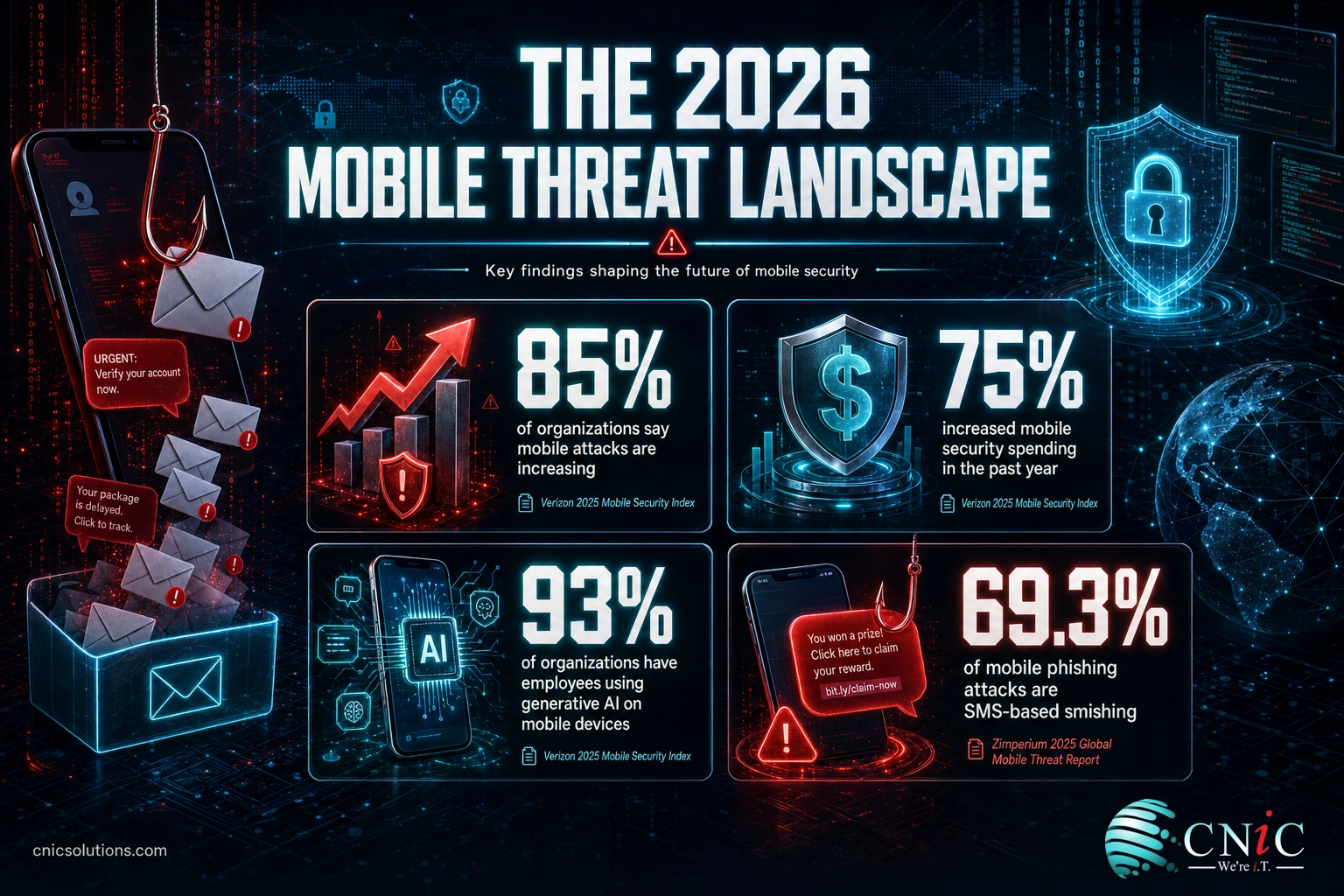
Choosing mobile security software for business comes down to two decisions: how you will manage the devices, and how you will defend them from attack. The stakes are rising fast. In Verizon’s 2025 Mobile Security Index, 85 percent of organizations said mobile attacks are increasing, and 75 percent raised their mobile security spending in the past year. This guide breaks the market into four clear categories, compares six leading platforms with real pricing where it is public, and gives you a framework for picking the right combination for your business.
- It is two products, not one. Nearly every business needs a management layer (MDM or UEM) plus a threat-defense layer (MTD). Comparing single products against each other is the most common buying mistake.
- The threat is mainstream now. 85 percent of organizations report rising mobile attacks and smishing makes up 69.3 percent of mobile phishing, so this is no longer an enterprise-only problem (Verizon; Zimperium, 2025).
- Management tools have public pricing; threat defense is quote-based. Microsoft Intune starts at $8 per user per month and Jamf Now at $4 per device; Lookout, Zimperium, Check Point, and SentinelOne price by quote.
- Match the tool to your device mix. Microsoft-managed fleets, Apple-first shops, and BYOD-heavy teams each have a clearly better starting point.
- Deployment is where value is won or lost. The software only protects you once it is enrolled, configured, and monitored, which is why many businesses have an MSP implement and manage it.
What’s in This Guide
- Why Mobile Security Software Matters in 2026
- The Four Categories of Mobile Security Software
- How We Selected These Tools
- Quick-Reference Comparison Table
- The Best Mobile Security Software for Business
- How to Choose the Right Mobile Security Software
- How CNiC Implements and Manages These Tools
- Frequently Asked Questions
- Sources and Methodology
Why Mobile Security Software Matters in 2026
The phone in your employee’s pocket now holds the same access as the laptop on their desk: email, files, chat, banking approvals, and single sign-on. Attackers have noticed. Zimperium’s researchers describe a shift to a mobile-first attack strategy, and the data backs it up.
Verizon’s 2025 Mobile Security Index found that 85 percent of organizations believe mobile device attacks are on the rise, and that 75 percent increased their mobile security spending over the prior year. The same study reported that employees in 93 percent of organizations use generative AI on their mobile devices, and that 64 percent of respondents named data compromise through generative AI as their top mobile security concern. Despite that, only 17 percent had implemented specific controls against AI-assisted attacks.
The attack that reaches the device most often is not exotic malware, it is a text message. In Zimperium’s 2025 Global Mobile Threat Report, SMS-based phishing (smishing) accounted for 69.3 percent of all mobile phishing attacks, and the report found that nearly half of mobile devices worldwide run outdated or unsupported operating systems, a gap attackers actively exploit. Verizon’s data shows how effective these lures are: 80 percent of organizations have run smishing simulations, and in almost four in ten of those tests, up to half of employees engaged with the malicious link.
The cost of getting this wrong keeps climbing. IBM’s 2025 Cost of a Data Breach Report put the average U.S. data breach at an all-time high of $10.22 million, and a lost or stolen device that is unmanaged, unencrypted, and unable to be wiped remotely is one of the cleaner paths to that outcome. That is the outcome mobile security software exists to prevent, which is why it belongs in the same conversation as your broader business cybersecurity strategy.
Source: Verizon 2025 Mobile Security Index | Zimperium 2025 Global Mobile Threat Report | IBM Cost of a Data Breach Report 2025
The Four Categories of Mobile Security Software
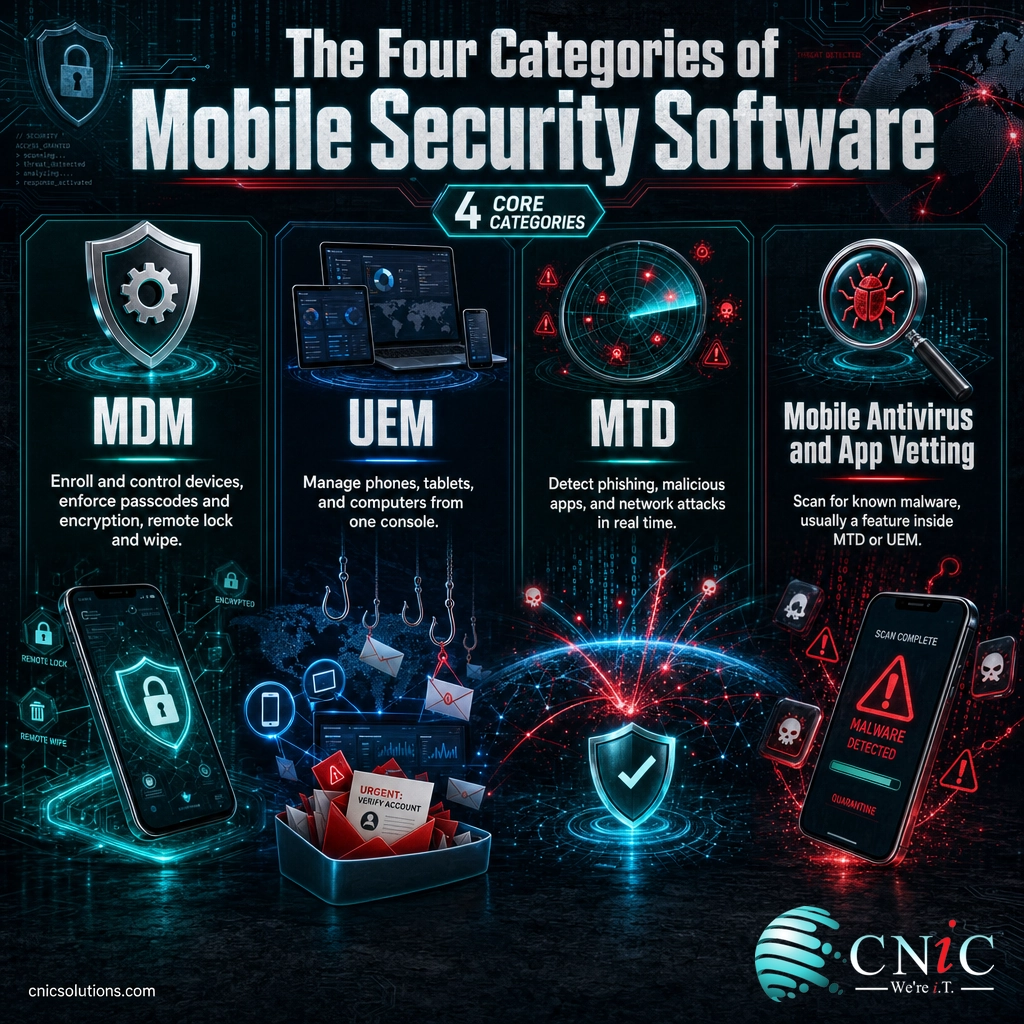
The fastest way to compare products fairly is to know which job each one does. “Mobile security software” is really four overlapping categories, and most vendors specialize in one or two of them. Buying without this map is how businesses end up with two tools that do the same thing and a gap where the real risk lives.
Mobile Device Management (MDM)
MDM is the control layer. It enrolls a device, then enforces the rules: mandatory passcodes and encryption, app installation and removal, configuration profiles, and the ability to remotely lock or wipe a device that is lost or stolen. MDM is what turns “my employee has a phone” into “my business controls what that phone can do with company data.”
Unified Endpoint Management (UEM)
UEM is MDM grown up. It manages phones, tablets, laptops, and desktops from a single console with one set of policies. For a business that wants one team and one dashboard covering every device, UEM is usually the more sensible foundation than a phone-only MDM. Microsoft Intune and Omnissa Workspace ONE are examples of platforms built for this scope.
Mobile Threat Defense (MTD)
MTD is the detection layer, and it is the piece most businesses are missing. Management tools set policy, but they do not watch for attacks in real time. MTD does: it flags phishing links before they are tapped, identifies malicious or risky apps, and detects man-in-the-middle attacks on untrusted Wi-Fi. Lookout, Zimperium, Check Point Harmony Mobile, and SentinelOne Singularity Mobile all sit in this category.
Mobile Antivirus and App Vetting
Traditional mobile antivirus scans for known malware and unsafe apps. On modern iOS and Android it overlaps heavily with MTD, and standalone consumer antivirus rarely satisfies a business. Treat on-device malware scanning as a feature to look for inside an MTD or UEM platform rather than a separate purchase.
Myth: “We have an MDM, so our phones are secure.” Management is not detection. An MDM can require encryption and enforce a passcode, but it will not stop an employee from tapping a smishing link or installing a malicious app, and those are the attacks doing the damage. With smishing at 69.3 percent of mobile phishing and half of devices on outdated operating systems (Zimperium, 2025), a management tool without a threat-defense layer leaves your most common attack path wide open.
Source: Zimperium 2025 Global Mobile Threat Report | Microsoft Intune documentation
How We Selected These Tools
CNiC Solutions deploys and manages mobile security platforms for businesses across regulated and non-regulated industries, so this list reflects what we look for when we recommend a tool to a client, not a pay-to-play ranking. We evaluated each platform against six criteria:
- Coverage of the four categories, and how clearly the vendor states what it does and does not do.
- Platform support across iOS, Android, and, where relevant, Windows and macOS.
- Threat-defense depth: phishing, malicious apps, and network-layer detection, not just policy enforcement.
- Fit for business device models, including corporate-owned and bring-your-own-device (BYOD) with employee privacy respected.
- Integration and manageability, especially the ability to connect management and threat defense so they act together.
- Pricing transparency and total cost, counting both the management and threat-defense layers.
The CNiC Fit Score below is our own editorial assessment of how well each platform serves a typical small-to-midsize business against these criteria. It is a practitioner’s opinion, not a third-party benchmark.
Quick-Reference Comparison Table
| Tool | Category | Best For | Pricing | CNiC Fit Score |
|---|---|---|---|---|
| Microsoft Intune | UEM / MDM | Microsoft 365 shops | From $8/user/mo (bundled in E3, E5, Business Premium) | 4.7 / 5 |
| Jamf | Apple MDM + MTD | Apple-first fleets | Jamf Now $4/device/mo; Jamf Pro from ~$3.67/device/mo | 4.6 / 5 |
| Lookout Mobile Endpoint Security | MTD | BYOD phishing and threat defense | Custom quote | 4.5 / 5 |
| Zimperium MTD | On-device MTD | Regulated, privacy-sensitive orgs | Custom quote | 4.5 / 5 |
| Check Point Harmony Mobile | MTD | Existing Check Point environments | Custom quote | 4.4 / 5 |
| SentinelOne Singularity Mobile | MTD (XDR-linked) | Unified endpoint and mobile telemetry | Custom quote | 4.4 / 5 |
The Best Mobile Security Software for Business
1. Microsoft Intune (UEM / MDM)
Microsoft Intune is the unified endpoint management platform inside the Microsoft ecosystem, managing phones, tablets, and computers from one console. For any business already standardized on Microsoft 365, it is usually the natural starting point because the licensing, identity (Entra ID), and policies are already in the same place.
Key features:
- Cross-platform management for iOS, Android, Windows, and macOS from one console.
- App protection policies that secure company data on BYOD devices without full enrollment.
- Conditional access tied to device compliance through Microsoft Entra.
- Remote lock, wipe, and configuration enforcement.
- Mobile Threat Defense connector to feed risk signals from a partner MTD into access decisions.
Pricing: Intune Plan 1 lists at $8 per user per month and is included in Microsoft 365 E3, E5, F3, and Business Premium, so many businesses already own it.
Best for: Businesses already running Microsoft 365 that want one management platform for every device.
Limitations: Intune manages devices but is not itself a mobile threat-defense product; real phishing and app-threat detection still requires a connected MTD. Deep Apple management is also less granular than a dedicated Apple platform.
2. Jamf (Apple MDM + Jamf Protect)
Jamf is the standard for managing Apple devices. Jamf Pro handles enrollment and management, while Jamf Protect adds endpoint and mobile threat defense, so an Apple-first business can get both layers from one vendor built specifically for the platform.
Key features:
- Same-day support for new iOS and macOS releases.
- Zero-touch deployment through Apple Business Manager.
- Jamf Protect for on-device threat detection and content filtering.
- Strong BYOD support with account-driven enrollment that separates work and personal data.
- Jamf Now tier for very small teams needing basic management.
Pricing: Jamf Now is $4 per device per month with the first three devices free; Jamf Pro for business is roughly $3.67 per device per month and up depending on scale and device type.
Best for: Apple-heavy or Apple-only businesses that want management and threat defense from one Apple specialist.
Limitations: Windows and Android support is limited compared to a true cross-platform UEM, so mixed fleets usually pair Jamf with another tool.
3. Lookout Mobile Endpoint Security (MTD)
Lookout is a dedicated mobile threat defense platform with one of the largest datasets of mobile apps and threats in the industry. It is built to protect the device layer itself, which makes it a strong fit for BYOD programs where you do not fully manage the hardware but still need to stop phishing and malicious apps.
Key features:
- Phishing and content protection that inspects links across apps, not just the browser.
- App risk analysis backed by a large mobile app dataset.
- Device and network threat detection, including risky configurations and man-in-the-middle attacks.
- Device-grouped alerting that helps security teams triage faster.
- Privacy-conscious design suited to employee-owned devices.
Pricing: Quote-based and scaled by device count. See the Lookout Mobile Endpoint Security product page.
Best for: BYOD-heavy businesses that need serious phishing and app-threat defense without managing the device.
Limitations: Lookout is threat defense, not device management, so it complements rather than replaces an MDM or UEM. Pricing requires a sales conversation.

4. Zimperium Mobile Threat Defense (MTD)
Zimperium is a mobile-only security company whose MTD engine runs on the device itself and can detect threats without sending data to the cloud for analysis. That on-device, privacy-preserving model is why it is common in regulated and privacy-sensitive industries, and why its annual threat research is widely cited.
Key features:
- On-device detection engine that works offline and preserves privacy.
- Detection across device, network, phishing, and malicious-app vectors.
- Integrations with major UEM platforms to automate a response, such as quarantining a risky device.
- Strong fit for compliance-driven environments (healthcare, finance, government).
- App-vetting tooling for organizations that build their own mobile apps.
Pricing: Quote-based. See the Zimperium Mobile Threat Defense product page.
Best for: Regulated or privacy-sensitive businesses that want detection to happen on the device.
Limitations: Like other MTD tools it does not manage devices, and its depth is aimed at organizations willing to configure it well rather than plug-and-play micro-businesses.
5. Check Point Harmony Mobile (MTD)
Check Point Harmony Mobile is the mobile threat-defense component of Check Point’s broader security platform. It protects against app, network, and OS-level threats, and it is especially compelling for businesses that already run Check Point elsewhere and want mobile alerts in the same console.
Key features:
- App, network, and device (OS) threat protection in one agent.
- Zero-day phishing and malicious-link protection.
- Traceable device context and event history for faster triage.
- Integration with Check Point’s wider security management for unified visibility.
- Conditional access enforcement through UEM integration.
Pricing: Quote-based. See the Check Point Harmony Mobile product page.
Best for: Businesses already invested in the Check Point ecosystem that want mobile in the same pane of glass.
Limitations: Its best value is realized inside a Check Point deployment; as a standalone MTD the pricing and management overhead are harder to justify.
6. SentinelOne Singularity Mobile (MTD)
SentinelOne Singularity Mobile brings mobile threat defense into the same platform as the company’s endpoint and XDR products. For a business that wants mobile detections reviewed alongside laptop and server telemetry in one investigation workflow, that unification is the main draw.
Key features:
- On-device, autonomous threat detection for iOS, Android, and Chrome OS.
- Mobile signals unified with endpoint and cloud telemetry in the Singularity platform.
- Phishing, malicious app, and network attack detection.
- Zero-touch deployment through leading UEM platforms.
- Useful for teams that already run SentinelOne on their computers.
Pricing: Quote-based. See the SentinelOne Singularity Mobile product page.
Best for: Businesses standardized on SentinelOne that want mobile in the same XDR console.
Limitations: The mobile module is newer than some specialist MTDs, and the value is highest when you already own the broader SentinelOne platform.
How to Choose the Right Mobile Security Software
The right stack is not the longest feature list, it is the shortest path to covering both management and detection for the devices you actually have. Work through these questions in order.
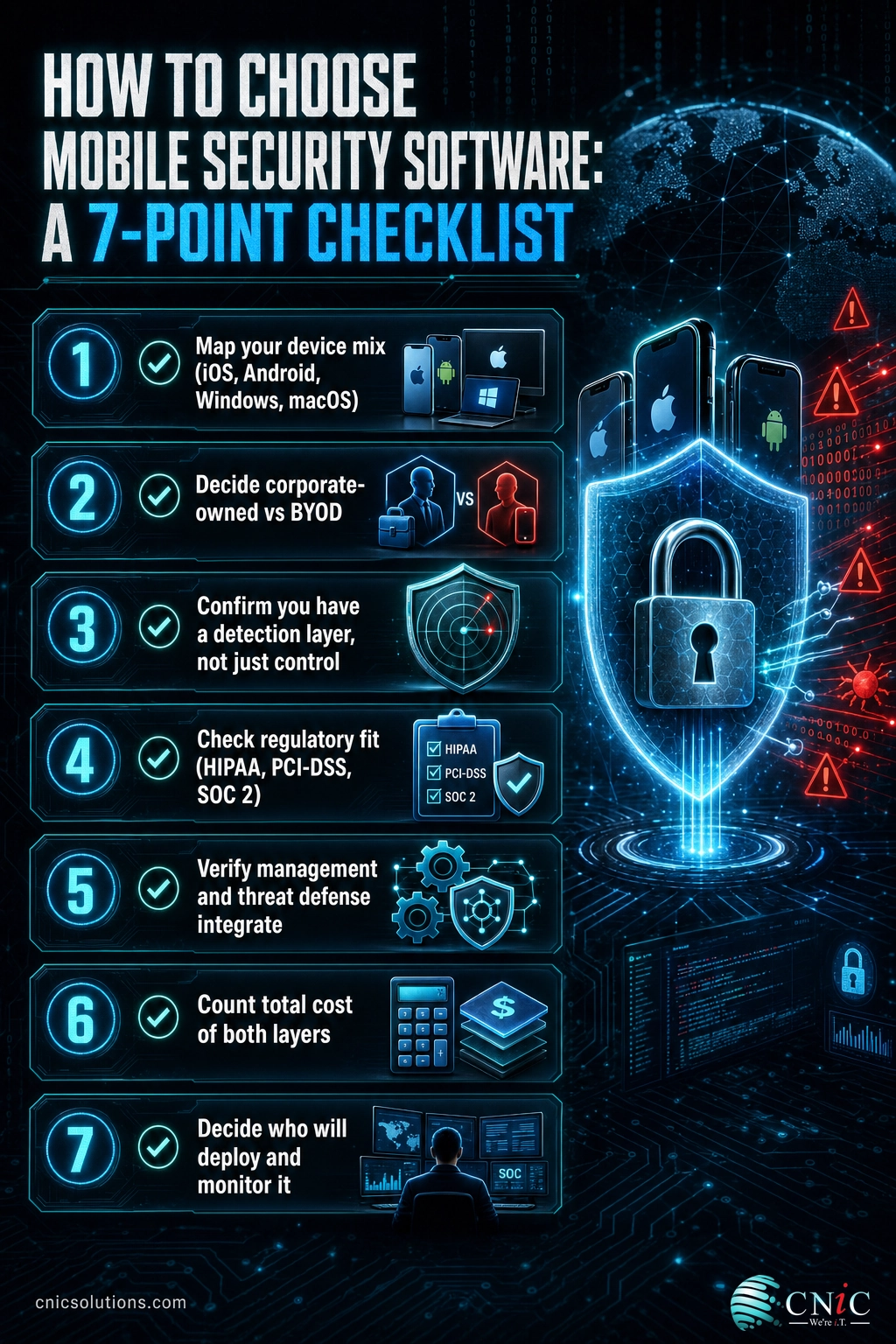
1. What is your device mix? A Microsoft 365 business usually starts with Intune. An Apple-only shop starts with Jamf. A mixed fleet leans toward a cross-platform UEM plus an MTD that covers every platform.
2. Corporate-owned or BYOD? BYOD raises the privacy bar. You want app-level protection and threat defense that secures company data without surveilling the employee’s personal device. This is where dedicated MTD like Lookout earns its place.
3. Do you have a detection layer, or just a control layer? If you only own an MDM, you have the most common gap in the market. Add MTD before you add anything else.
4. Are you in a regulated industry? Healthcare, finance, and legal businesses should weight on-device, privacy-preserving detection and evidence trails, and confirm the tool supports their framework, whether that is HIPAA, PCI-DSS, or SOC 2.
5. Will management and detection talk to each other? The strongest setups connect the two so a failed security check automatically restricts access. Confirm the integration exists between the specific products you are considering.
6. Who will run it day to day? Software that is bought but never fully deployed protects no one. Decide whether you have the internal capacity to enroll, tune, and monitor it, or whether a managed provider should own that.
That last question is the one businesses underestimate most. Verizon’s 2025 data shows the readiness gap clearly: employees use generative AI on mobile in 93 percent of organizations, yet only 17 percent have controls against AI-assisted attacks. The tools exist; the deployment and monitoring are what is missing.
Mobile risk vs. readiness across organizations (Verizon 2025 Mobile Security Index)
Awareness and spending are up, but the control gap remains wide. Source: Verizon 2025 Mobile Security Index.
If you are specifically comparing device-management platforms for a smaller team, our companion guide to the best MDM solutions for small business goes deeper on the management layer, and pairs naturally with the threat-defense options above. A remote-wipe capability is also only as good as your data backup and recovery plan, so weigh the two together.
Source: Verizon 2025 Mobile Security Index
How CNiC Implements and Manages These Tools
CNiC Solutions is not a software vendor, we are the managed IT and cybersecurity partner that selects, deploys, integrates, and monitors these platforms for you. That matters because mobile security software only works once it is enrolled on every device, configured to your policies, connected so management and detection act as one system, and watched for alerts that need a response.
For businesses without a full-time security team, we act as your outsourced technology leadership, choosing the right combination for your device mix and compliance needs, and folding mobile into your wider security program rather than leaving it as an island. If you would rather hand the whole thing off, our team can run it as part of your managed IT service.
Let CNiC Manage Your Mobile Security
Talk to a Virtual CIO
Frequently Asked Questions
What is mobile security software for business?
Do businesses really need mobile security software if they use iPhones?
How much does mobile security software cost?
What is the difference between MDM, UEM, and MTD?
Can one tool cover mobile device management and threat defense?
Sources and Methodology
Methodology
This guide is a vendor-neutral buyer’s resource. CNiC Solutions receives no payment from the vendors listed, and inclusion reflects platform capability and business fit, not commercial relationships. Statistics are drawn from Tier 1 primary sources published within the last year. Pricing figures are taken from vendors’ own published pricing where available and were current at the time of writing; quote-based platforms are marked as such because the vendor does not publish list pricing. The CNiC Fit Score is an editorial assessment by CNiC Solutions based on the six selection criteria above and reflects our practical deployment experience, not a third-party rating.
Primary sources:



related posts
Zero Trust Statistics for 2026: Adoption, Maturity, and Breach Impact
November 3, 2026Zero trust has become the default security strategy on paper, but not yet in practice. Okta's…
What Is ZTNA (Zero Trust Network Access)?
November 3, 2026Zero Trust Network Access (ZTNA) is a security service that grants a verified user access to…
What Is XDR (Extended Detection and Response) and How Does It Protect…
November 2, 2026Extended detection and response (XDR) is a security platform that collects and correlates threat data from…
What Is Zero Trust Security? A Guide for Small Businesses
November 2, 2026Zero Trust security is a cybersecurity model built on one rule: never trust, always verify. Instead…