

A fake Venmo email is one of the easiest ways for a scammer to reach you, because it lands in the one place you check without thinking: your inbox. Email is now the single most common way scammers contact their victims, according to the Federal Trade Commission, and phishing was the most-reported cybercrime in the country in 2024. A Venmo scam email works by borrowing the app’s name and urgency to rush you into clicking a link, logging in on a fake page, or sending money “back.” The good news is that spotting one takes about eight seconds once you know where to look. This guide shows you the exact red flags to check on every Venmo email, what a real Venmo message looks like, and what to do if you already clicked.
- Who this is for: anyone who uses Venmo, including business owners and employees who send or receive payments through it, no technical background needed
- What you need: the ability to expand a sender’s name and hover over a link in your email app
- Time to learn: about 8 minutes, then a few seconds applied to each suspicious email from now on
- Skill level: beginner, this is awareness, not technical setup
- Real Venmo emails come from an @venmo.com address and use your real name, not a generic greeting
- Email was the most-reported way scammers contacted people in 2024, for the second year in a row, per the FTC
- Phishing and spoofing were the most-reported cybercrime of 2024, with 193,407 complaints to the FBI
- The most common Venmo email hooks are frozen-account warnings, fake “you received a payment” notices, and refund or verification requests
- Venmo will never ask for your password, verification code, or banking details by email
- Never act on the email itself. Confirm any activity by opening the Venmo app, then forward scams to phishing@venmo.com and delete them
- If you clicked, change your password from another device, enable two-factor authentication, and report it fast
What’s in This Guide
- Why Venmo Scam Emails Are So Common
- Step 1: Check the Sender’s Real Email Address
- Step 2: Read How the Email Greets You
- Step 3: Hover Over Every Link Before Clicking
- Step 4: Distrust Urgency and Account Threats
- Step 5: Be Suspicious of Surprise Payments and Refunds
- Step 6: Never Share Passwords, Codes, or Bank Details
- Step 7: Verify in the App and Report the Email
- When to Call a Professional
- Troubleshooting: I Think I Already Fell for One
- How to Avoid Venmo Scam Emails for Good
- Frequently Asked Questions
Why Venmo Scam Emails Are So Common
Venmo is one of the most widely used payment apps in the country, which makes its name a perfect disguise. Scammers do not need to breach Venmo to use it against you. They only need to copy its logo, borrow its tone, and send an email that looks close enough to the real thing. Because almost everyone recognizes the brand, a fake Venmo email gets opened, and that is half the battle for an attacker.
Email is where these attacks start. In 2024, email was the most commonly reported way that scammers first contacted their victims, for the second year running, according to the Federal Trade Commission. That same year, U.S. consumers reported losing $12.5 billion to fraud, a 25% jump over the prior year. Phishing, the broad category that Venmo scam emails belong to, was the single most-reported cybercrime in the country.
These emails succeed for the same reason all phishing does: they are built to make you act before you think. A Venmo scam email is not a technology problem, it is a timing problem. The scammer wins in the few seconds between when you read the message and when you click. Slow that moment down and the whole scheme falls apart. If you want the wider picture of how these messages are built, our guide to the warning signs in any phishing email covers the fundamentals that apply here too.
Most-Reported Cybercrime Types by Complaint Volume (FBI IC3, 2024)
Source: FTC 2024 fraud data | FBI IC3 2024 Annual Report
Step 1: Check the Sender’s Real Email Address
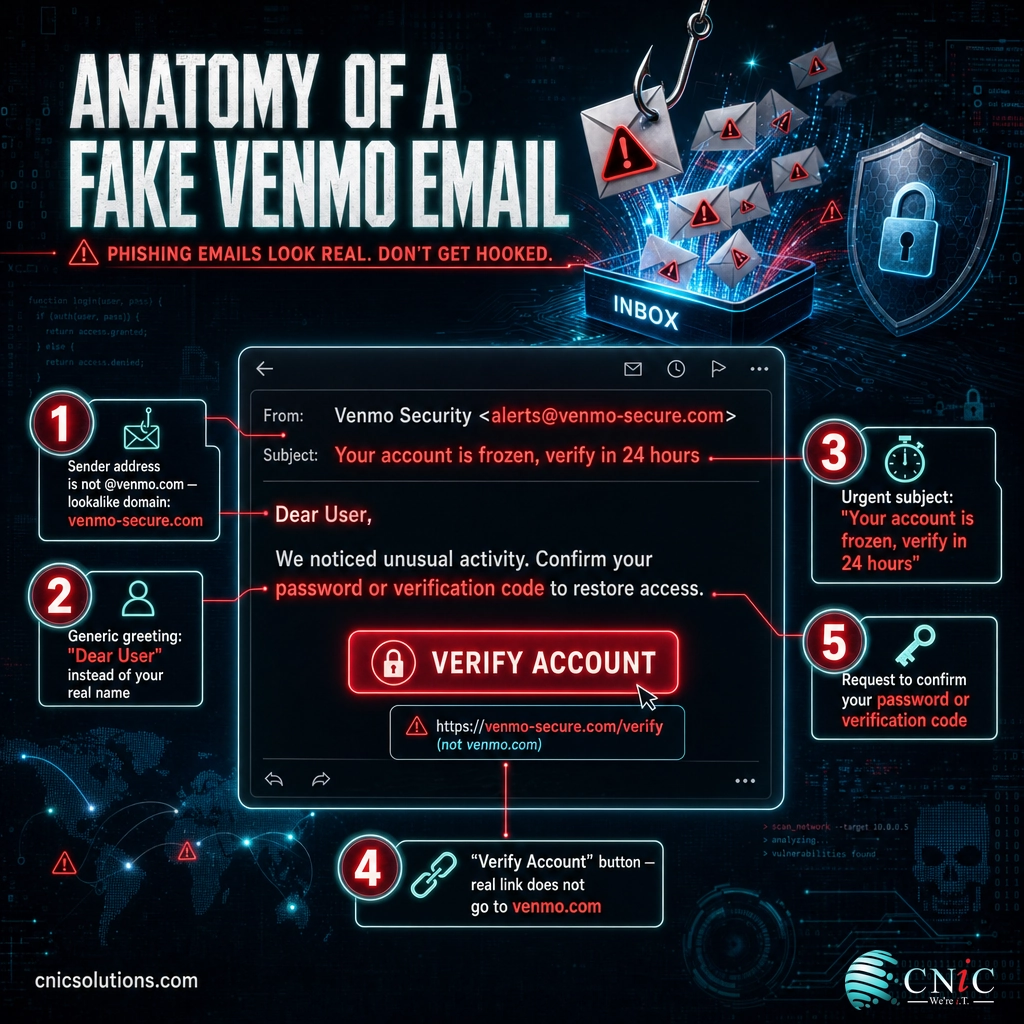
What to do: Do not trust the display name. On a phone, tap the sender’s name; on a desktop, hover over or click it to reveal the full email address. Read the part after the @ sign, character by character.
Why this step matters: The display name is the easiest thing in an email to fake. A scammer can set it to “Venmo” or “Venmo Support” while sending from a completely unrelated address. Genuine Venmo email comes from an address ending in @venmo.com, so the domain is your most reliable tell.
Watch for three patterns. First, a public domain pretending to be Venmo, such as a message from venmo.support@gmail.com. Second, a misspelled or lookalike domain like venmo-secure.com, venrno.com with an r and n instead of an m, or venmo.com-verify.net. Third, the word Venmo buried inside a longer address, such as service@venmo.account-alerts.com, where the real domain is the last part before the slash, not the brand word in the middle.
What success looks like: You can say the exact domain the email came from out loud, and you have confirmed it is venmo.com, letter for letter, not a lookalike.
Step 2: Read How the Email Greets You
What to do: Look at the first line. Real Venmo emails address you by your first and last name, or by your business name for a business profile. Be suspicious of impersonal greetings.
Why this step matters: Scammers usually send the same email to thousands of addresses at once, so they cannot personalize the greeting. A message that opens with “Dear User,” “Dear Customer,” “Hello Venmo Member,” or your email address in place of your name is a strong sign it is a mass-sent scam.
Personalization alone is not proof of safety. If your name has leaked in a past data breach, a scammer may have it. But a generic greeting on a supposed account notice is a reliable red flag, and it costs you nothing to notice.
What success looks like: You confirm the email uses your real name the way Venmo actually has it, and you treat any generic or mismatched greeting as a reason to stop and verify.
Step 3: Hover Over Every Link Before Clicking
What to do: Move your cursor over any button or link and pause without clicking. On a desktop, the true destination appears in the bottom corner of your screen or in a small tooltip. On a phone, press and hold the link to preview the address, then cancel. Compare that real address to the sender’s claimed identity.
Why this step matters: The visible text of a link, even a big “Log In to Venmo” button, is just words. It can point anywhere on the internet. The real destination is the truth, and you can see it before you commit to clicking.
A genuine Venmo link goes to venmo.com or a venmo.com subdomain. Be wary of a destination that does not match, a long string of random characters, or a shortened link that hides where you are going. Credential-harvesting pages, fake login screens that steal your password, are the most common payload behind a scam Venmo link.
What success looks like: Every link’s real destination is on venmo.com. If you cannot verify a link, you skip it entirely and open the Venmo app yourself instead of clicking.
Step 4: Distrust Urgency and Account Threats
What to do: Notice how the message makes you feel. If it triggers panic, an account is frozen, a large payment is pending, your card will be charged, treat that pressure as a warning sign in its own right.
Why this step matters: Urgency is the engine of the scam, not a side effect. When an email says you must “verify within 24 hours” or your account “will be suspended,” it is trying to collapse the gap between reading and clicking so you do not stop to check.
Common pressure tactics in Venmo scam emails include frozen or “on hold” account warnings, alerts about an unauthorized login or payment, threats that your account will be closed, and urgent “confirm your identity” demands. A real company will still let you log in through the front door on your own schedule.
What success looks like: You recognize the emotional push, name it, and let it slow you down instead of speeding you up. Urgency becomes your cue to verify, not to comply.

Step 5: Be Suspicious of Surprise Payments and Refunds
What to do: Stop at any email announcing money you were not expecting: a payment you “received,” a refund you never requested, an “accidental” transfer you are asked to send back, or an attached invoice from an unfamiliar sender. Ask whether this makes sense before you react.
Why this step matters: These are the most effective Venmo email hooks because they mix curiosity with urgency. The “accidental payment” version is a classic: you get a notice that a stranger sent you money by mistake, then a request to send it back. The original “payment” was fake or reversed, and the money you send is real and gone.
Fake invoice and “your payment is being processed” emails work the same way, pushing you to click “Cancel this payment” or “Dispute” to stop a charge that was never real. That button leads to a fake login page or a phone number staffed by the scammer.
What success looks like: You treat any surprise money as a reason to open the app and check your real activity, and you never send funds or click a dispute link based on an email alone. For more examples of what these look like in practice, see our roundup of real phishing email examples and how to recognize them.
Step 6: Never Share Passwords, Codes, or Bank Details
What to do: Refuse any email that asks you to reply with, confirm, or enter your Venmo password, a verification or one-time code, your PIN, full card number, or Social Security number. Ask the simple question: would Venmo really ask me for this, by email, this way?
Why this step matters: Venmo will never ask for your password, verification code, or full banking details by email. The entire point of most Venmo scams is to collect exactly these details, so a request for them is one of the clearest signals you will ever get.
Verification codes deserve special attention. If a scammer already has your password, the only thing standing between them and your account is the one-time code sent to your phone. A message or follow-up call asking you to “read back the code we just sent to confirm it is you” is a takeover attempt. Never share a code with anyone, and never enter it on a page you reached from an email link.
What success looks like: You never enter credentials, codes, or payment details in response to an inbound email. When your account genuinely needs attention, you reach it by opening the app or typing venmo.com yourself.
Step 7: Verify in the App and Report the Email
What to do: When an email claims something happened to your account, confirm it by opening the Venmo app directly, not by using any link or number in the email. If the email is fake, forward it as an attachment to phishing@venmo.com, then delete it.
Why this step matters: Verifying in the app defeats even a convincing scam, because the attacker controls the email but not your real account view. Venmo’s own guidance is direct: do not click links or download attachments, do not enter any information, forward the suspicious email as an attachment to phishing@venmo.com, and delete it from your inbox.
What success looks like: Any account claim is confirmed inside the app before you act, and every scam email is reported and deleted rather than clicked. Opening the app takes ten seconds and neutralizes the entire scheme.
Source: Venmo Help Center guidance on reporting fake or suspicious emails | CISA guidance on recognizing and reporting phishing
See How CNiC’s Cybersecurity Services Stop Scam Emails Before They Reach Your Team
When to Call a Professional
Spotting a Venmo scam email is a personal skill, but for a business it is only the last line of defense, not the first. If you reach the point where scam and phishing emails regularly reach your team, where an employee clicked something and you are not sure what it touched, or where you have no email filtering, no enforced multi-factor authentication, and no way to tell whether an account was compromised, that is when to bring in professional help.
- Staff regularly receive scam or phishing emails your filtering should have caught
- You cannot tell whether a suspicious login came from an employee or an attacker
- Multi-factor authentication is not enforced on every business account
- You have no documented process for what to do when someone reports a scam email
- You handle regulated data, such as healthcare, legal, or financial records, and need to prove due diligence
A managed IT and security partner adds the layers a single alert employee cannot: email filtering that blocks most scam messages before they land, enforced multi-factor authentication so a stolen password is not enough, and monitoring that flags a compromised account quickly. For businesses across Houston and Texas, that is where our team at CNiC Solutions works alongside your staff, so people and technology reinforce each other.
Explore Managed IT With Built-In Email Security and Monitoring
Troubleshooting: I Think I Already Fell for One
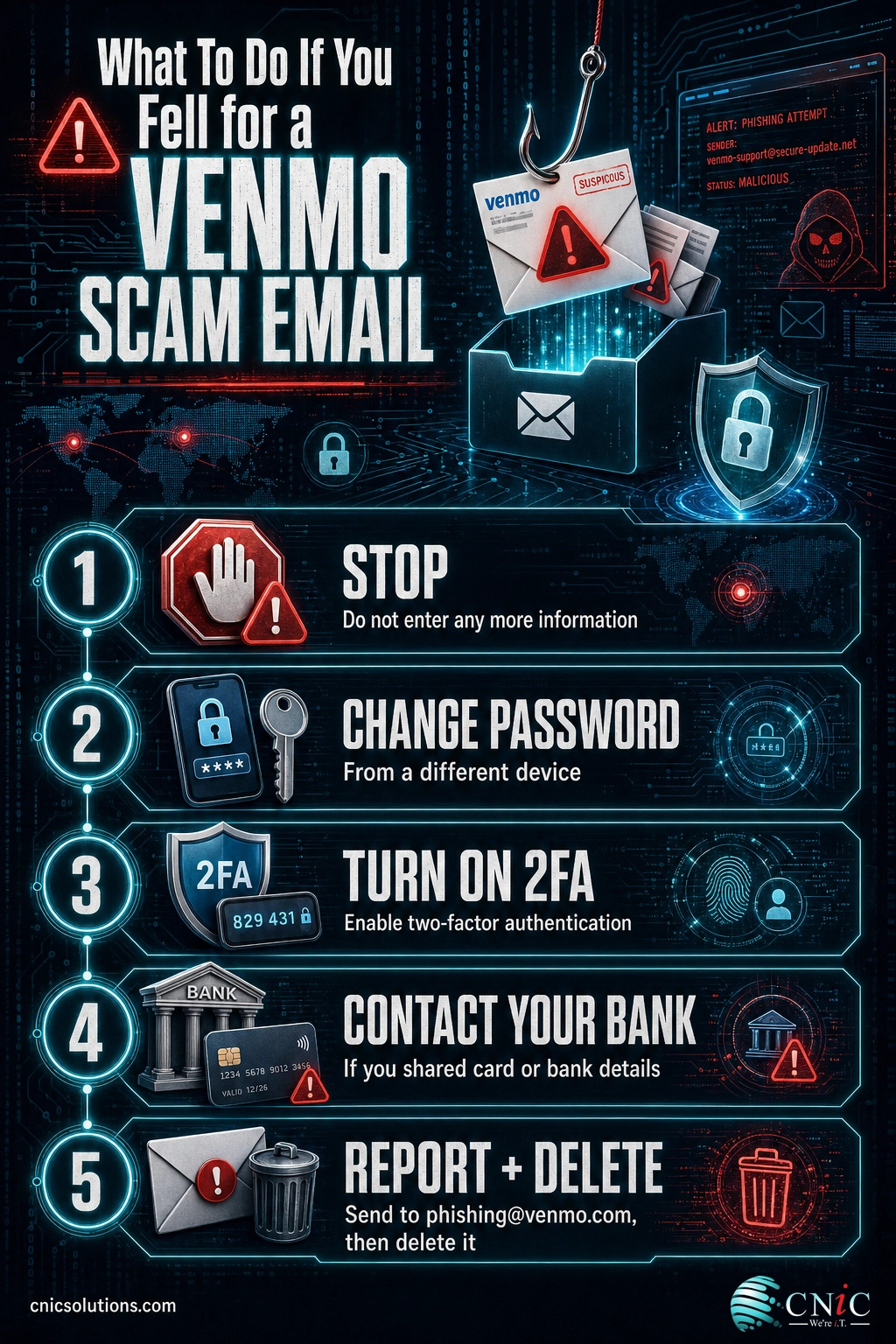
If you clicked, replied, or entered information, do not panic and do not stay quiet. Speed of response is what limits the damage. Here is what to do for the most common situations.
| What happened | What to do right now |
|---|---|
| I clicked the link but did not enter anything | Close the page, do not enter any data, and run a scan with your security software. Forward the email to phishing@venmo.com and, on a work device, tell your IT team so they can block the sender. |
| I entered my Venmo password on the page | Change your password immediately from a different device, and change it anywhere you reused it. Turn on two-factor authentication and check your Venmo activity for anything you did not authorize. |
| I shared a verification code or was talked through a call | Assume account takeover is in progress. Change your password now, revoke access in the app if possible, and contact Venmo support through the app. Watch for pending transfers you did not start. |
| I sent money back or shared card or bank details | Contact your bank or card issuer directly using the number on your card, place a fraud alert, and report the loss to the FBI at ic3.gov and the FTC at reportfraud.ftc.gov. |
| I am not sure whether the email was real | Do not click anything further. Open the Venmo app to check your real activity, forward the message to phishing@venmo.com, and treat it as a scam until proven otherwise. |
The worst outcome is not clicking a scam link. It is hiding that you did. In a business, an employee who reports a mistake in the first few minutes lets you contain it before it spreads. One who stays silent out of embarrassment gives the attacker hours or days. A blame-free reporting culture is one of the cheapest and most effective security controls a company has.
How to Avoid Venmo Scam Emails for Good
Spotting one scam email is a skill. Staying safe over time is a set of habits. A few practices turn recognition into durable protection.
Make “check the app, not the email” your default
Whenever an email claims something about your account, resist the link and open the Venmo app instead. This one habit defeats nearly every Venmo email scam, because the app shows you the truth and the email cannot fake it. Type venmo.com yourself if you need the website, and never rely on a link you were sent.
Turn on two-factor authentication
Assume a password will eventually be phished, and make that not enough. Two-factor authentication on your Venmo account, your email, and your bank means a stolen password alone cannot open the door. It is the single most effective safety net behind your own awareness. Just remember: never read a code back to anyone who calls or emails you.
Report and delete, do not just ignore
Forwarding scams to phishing@venmo.com helps Venmo shut down the campaign that targeted you, which protects other people too. Reporting to the FTC at reportfraud.ftc.gov and the FBI at ic3.gov feeds the national data that measures the threat. Then delete the email so you do not click it later by accident.
For businesses, protect the inbox at the source
Individual vigilance is essential but imperfect. On a business network, email filtering, enforced multi-factor authentication, and account monitoring stop most scam emails before an employee ever sees them, and catch the compromises that slip through. Scam emails targeting personal apps like Venmo often arrive on work accounts, which is why the full range of email scams your team will encounter belongs in your security awareness plan, not just your personal inbox. A named security leader keeps that plan current as the scams evolve, which is what our Virtual CIO service provides for businesses without a full-time IT executive.
Get Executive-Level Security Strategy With a Virtual CIO
Frequently Asked Questions
What email address do real Venmo emails come from?
Does Venmo ever email you about your account?
I got a Venmo email saying I received a payment I was not expecting. Is it a scam?
What should I do if I clicked a link in a Venmo scam email?
Where do I report a fake Venmo email?
All statistics in this article come from Tier 1 primary sources only, with no blog-to-blog citations. Fraud loss totals and contact-method findings are from the Federal Trade Commission Consumer Sentinel Network 2024 data ($12.5 billion in reported consumer fraud losses, up 25% year over year; email reported as the most common scam contact method for the second consecutive year). Cybercrime complaint volumes are from the FBI Internet Crime Complaint Center 2024 Annual Report (859,532 total complaints; over $16 billion in reported losses, up 33% year over year; 193,407 phishing and spoofing complaints, the most-reported type; 64,882 personal data breach complaints; approximately 86,000 extortion complaints). Reporting steps and legitimate-sender guidance reflect Venmo’s Help Center and the Cybersecurity and Infrastructure Security Agency (CISA). Figures reflect the most recently published data available as of August 2026; readers are encouraged to consult the primary sources directly for full methodology.



related posts
What Does Cyber Insurance Cover? A Guide for Small Businesses
October 2, 2026Cyber insurance is a business insurance policy that pays for the financial fallout of a cyberattack…
What Are TTPs in Cybersecurity? Tactics, Techniques, and Procedures Explained
October 2, 2026TTPs, short for tactics, techniques, and procedures, describe how a cyber attacker behaves: the goal they…
What Are Standard Operating Procedures (SOPs) for IT and Why They Matter
October 1, 2026An IT standard operating procedure (SOP) is a documented, step-by-step set of instructions for performing a…
What Are Passkeys? How Passwordless Login Works and Why It Matters
October 1, 2026Passkey, defined: A passkey is a phishing-resistant login credential that replaces your password with a cryptographic…