

A brute force attack is a trial-and-error method for cracking a password, PIN, or encryption key by systematically trying enormous numbers of combinations until one works. Attackers rarely do this by hand. They use automated software that can test thousands or millions of guesses per second, so weak, short, or reused passwords fall quickly. The attack is old and unsophisticated, but it still works, because the thing it targets, a login, is only as strong as the password behind it.
Brute force is the digital equivalent of trying every key on a giant keyring until the door opens. It is one of the oldest attack methods in cybersecurity, and it remains one of the most common, because it does not rely on a clever trick or a brand-new vulnerability. It relies on speed and on the fact that many accounts are still protected by short, obvious, or reused passwords. Microsoft has reported that its cloud services alone see well over 300 million fraudulent sign-in attempts every single day, a scale that is only possible because the guessing is fully automated. This guide explains what a brute force attack is, how it works, the main types you will encounter, why it still succeeds, and, most importantly, the layered defenses that stop it.
Key Takeaways
- A brute force attack guesses credentials by trying many combinations until one works, almost always with automated tools that test thousands of guesses per second.
- It targets the login, so its success depends entirely on password strength and on whether the system limits repeated failed attempts.
- There are several variants: simple, dictionary, hybrid, reverse, password spraying, and the closely related credential stuffing.
- It still works because weak and reused passwords are common, and many login systems allow unlimited guesses. Credential-based attacks now dominate breach data.
- Defense is layered: long unique passwords, multi-factor authentication, account lockout and rate limiting, monitoring, and locking down remote access. MFA alone stops the vast majority of these attacks.
What’s in This Guide
What a Brute Force Attack Is
A brute force attack is a method of gaining unauthorized access to an account or system by systematically guessing the credentials that protect it. Instead of exploiting a software flaw or tricking a person, the attacker simply tries password after password until one is correct. The name captures the approach: there is no finesse, just relentless, exhaustive force applied at machine speed.
The target is usually a password, but the same technique applies to anything guessable: a PIN, the answer to a security question, an API key, or an encryption key. What makes brute force viable is automation. A person could never try enough combinations to matter, but a program running on capable hardware can churn through vast numbers of attempts, and attackers often spread the work across many machines to go faster still. The math is on the defender’s side only when the secret is long and random enough that even machine speed cannot cover the possibilities in a useful amount of time.
How a Brute Force Attack Works
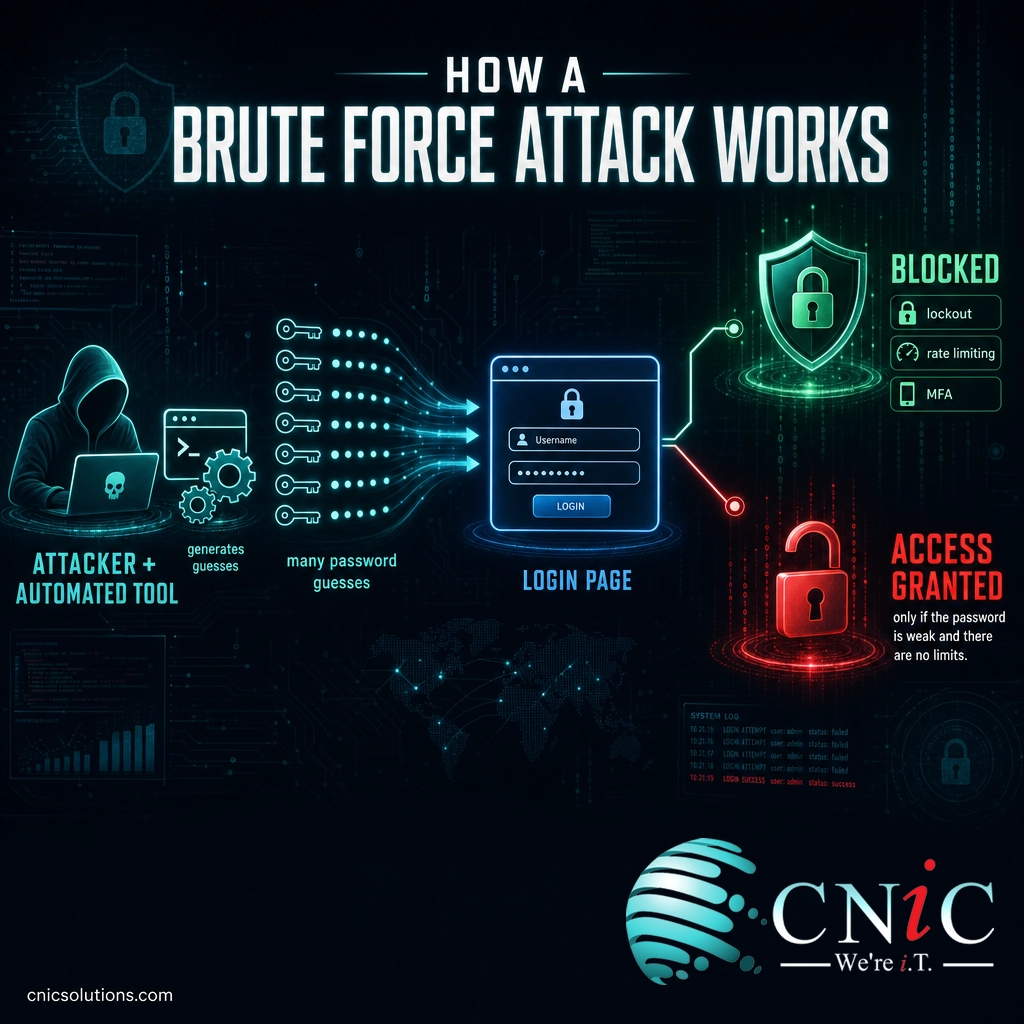
Every brute force attack follows the same basic loop: pick a target account, generate a guess, submit it, check whether it worked, and repeat. The differences between attacks come down to how the guesses are generated and how the attacker avoids being blocked. There are two very different settings in which this plays out, and the distinction matters enormously for how fast an attack can go.
Online attacks run against a live login page, such as a website portal, an email service, a VPN, or a remote desktop connection. Here the attacker is limited by the target system. If the login page slows down responses, locks the account after several failures, or requires a second authentication factor, the attack is throttled or stopped. Online brute forcing is noisy and comparatively slow, but it works when a system allows unlimited attempts.
Offline attacks happen after an attacker has already stolen a file of scrambled (hashed) passwords, often taken in an earlier data breach. Because the guessing now happens on the attacker’s own hardware, there is no login page to slow them down and no lockout to trigger. They can test billions of candidates against the stolen hashes at full speed. This is why a breach elsewhere can endanger your accounts, and why password length is the single most important factor in resisting a determined attacker.
Source: Microsoft account-security research
The Main Types of Brute Force Attacks
“Brute force” is an umbrella term. In practice, attackers rarely try every combination blindly, because that is slow. They use smarter variants that reach the answer faster. Knowing the types helps you understand why certain defenses work.
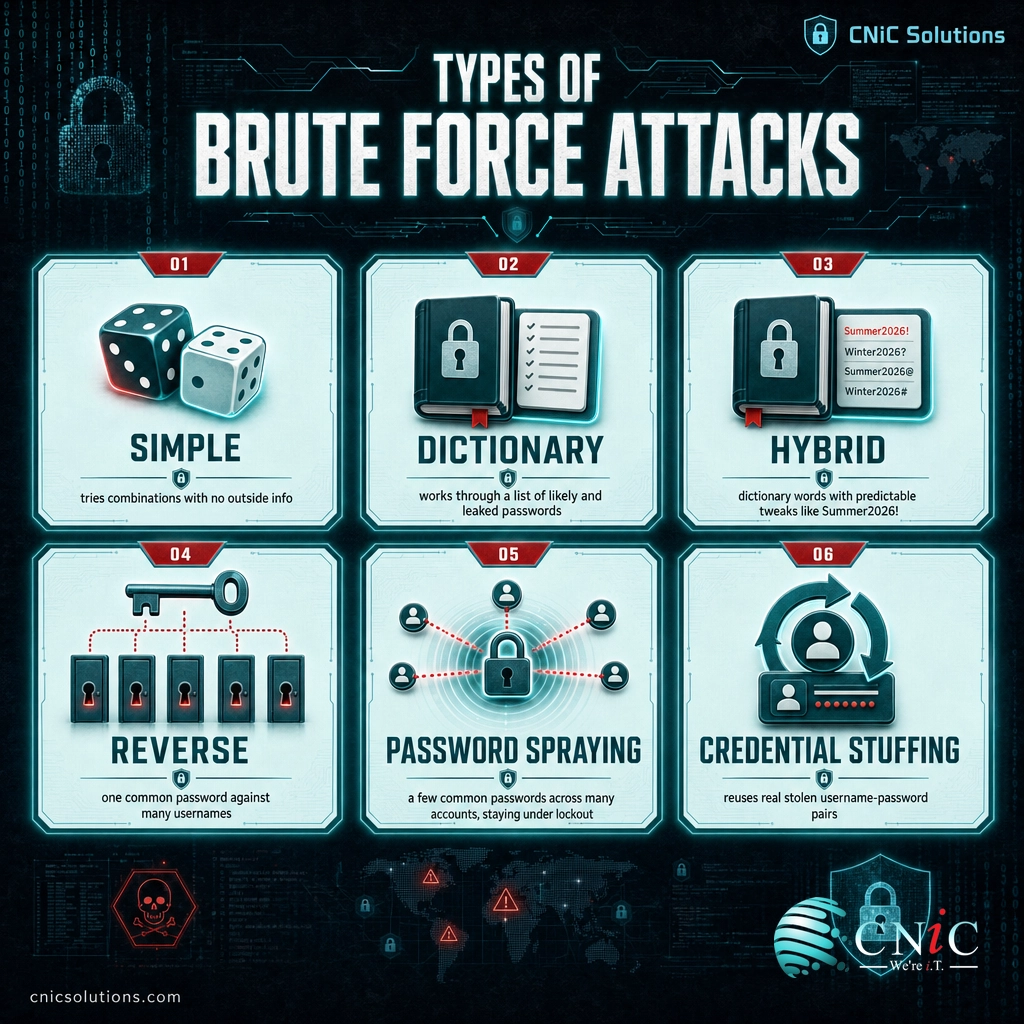
- Simple brute force: The attacker tries combinations systematically, with no outside information, often starting with short or obvious passwords. Effective only against weak credentials.
- Dictionary attack: Instead of random combinations, the attacker works through a prepared list of likely passwords, common words, names, and passwords leaked in past breaches. Because so many people choose predictable passwords, this is far more efficient than guessing at random.
- Hybrid attack: A combination of the two. The attacker takes dictionary words and adds the predictable tweaks people use to “strengthen” them, such as appending numbers or a year (for example, turning “summer” into “Summer2026!”). It defeats the illusion that a common word plus a few characters is safe.
- Reverse brute force: The attacker starts with one common password, such as “123456,” and tries it against many different usernames. Rather than attacking one account with many passwords, it attacks many accounts with one password.
- Password spraying: A stealthier cousin of reverse brute force. The attacker tries a few very common passwords across a large number of accounts, deliberately staying under the failed-attempt threshold on each account so lockout rules never trigger. It is a favorite technique against business email and single sign-on systems.
- Credential stuffing: Technically related but distinct. Instead of guessing, the attacker uses real username and password pairs stolen in earlier breaches and tries them elsewhere, betting on password reuse. It is not guessing at all, but it hits login pages the same way and is stopped by the same defenses.
Credential stuffing and password spraying are usually carried out by networks of automated bots, which is why brute force defense overlaps heavily with defending against credential stuffing and other automated bot attacks.
Why Brute Force Attacks Still Work
Brute force is decades old, so it is reasonable to ask why it has not been engineered out of existence. The answer is that the weakness it exploits is human, not technical. Three things keep it alive.
Weak and reused passwords are still the norm. Short passwords, common words, and passwords reused across many sites give both dictionary attacks and credential stuffing an enormous head start. When one breached password unlocks several accounts, the attacker’s job is nearly done before it begins. Credential-based attacks now dominate the breach landscape: according to Verizon’s 2024 Data Breach Investigations Report, the use of stolen credentials has been involved in roughly a third of all breaches over the past decade, and stolen credentials account for the large majority of attacks aimed directly at web applications.
Many systems allow unlimited guessing. If a login page does not lock accounts, slow down responses, or otherwise limit repeated failures, an attacker can keep trying indefinitely. Exposed remote-access services, such as remote desktop (RDP) and SSH left open to the internet, and devices still using their factory-default passwords, are especially common targets because they combine a reachable login with weak or predictable credentials.
Computing power keeps getting cheaper. The same graphics hardware that powers modern computing also accelerates password cracking, so the number of guesses an attacker can make per second keeps rising. A password that felt safe years ago may now fall in an offline attack. This is why security guidance has shifted toward longer passphrases rather than short passwords with complex character rules.
The myth that a “complex” password is enough
A short password packed with symbols, like “P@ss1!”, feels strong but is weak, because length, not punctuation, is what defeats brute force. Attackers already expect the common substitutions (@ for a, 1 for i, ! at the end), so hybrid attacks fold them in automatically. A longer passphrase of several unrelated words is both easier to remember and dramatically harder to crack. And no password, however long, protects an account on its own once it has leaked. That is the job of multi-factor authentication.
Source: Verizon’s 2024 Data Breach Investigations Report

How to Stop a Brute Force Attack
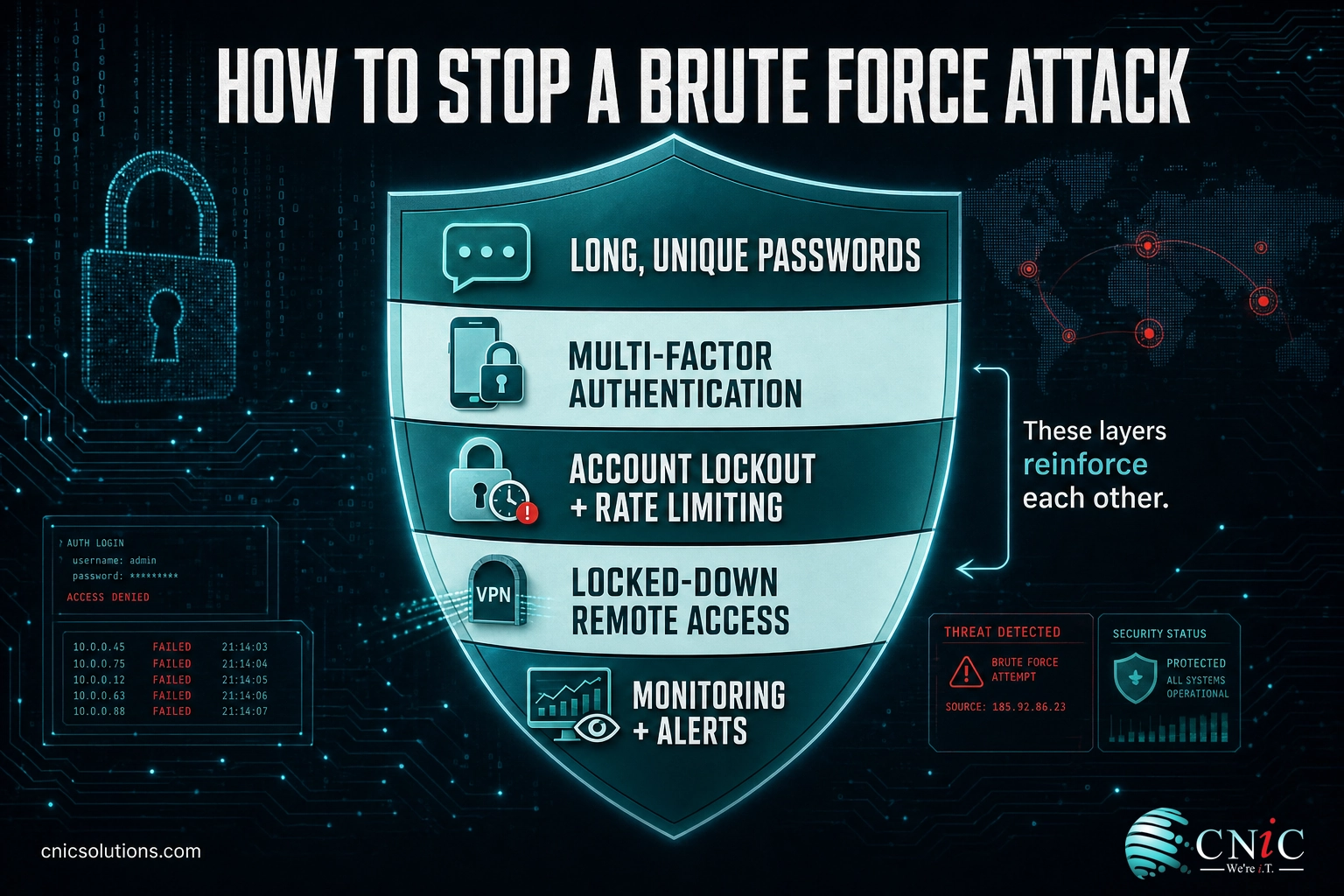
No single control stops brute force on its own. The reliable approach is layered: make the password hard to guess, make repeated guessing impossible, and make a correct guess useless without a second factor. Put these together and brute force stops being a realistic threat to your accounts.
- Require long, unique passwords or passphrases. Length beats complexity. Encourage passphrases of several unrelated words and ban reuse across accounts. A password manager makes long, unique passwords practical for everyone on your team.
- Turn on multi-factor authentication (MFA) everywhere. This is the highest-value single defense. Even if an attacker guesses or steals the password, the login still fails without the second factor. Microsoft has reported that MFA blocks over 99.9% of account-compromise attacks. App-based or hardware-key MFA is stronger than codes sent by text message.
- Enforce account lockout and rate limiting. Lock or temporarily slow an account after a small number of failed attempts, and throttle how many login requests a single source can make. This alone defeats most online brute forcing. Pair it with monitoring so password spraying, which stays under per-account limits, is still caught.
- Screen out known-bad passwords. Block common and previously breached passwords at the point a user sets one, so weak choices never make it into your systems in the first place.
- Add a challenge at sensitive points. A CAPTCHA or similar human-verification step on login pages slows automated tools without burdening real users much.
- Lock down remote access. Do not expose remote desktop (RDP) or SSH directly to the internet. Put them behind a VPN or a zero-trust access layer, restrict them by IP where possible, and change every default credential on servers, network gear, and connected devices.
- Monitor and alert on failed logins. Watch authentication logs for surges in failed attempts, lockouts, and logins from unusual locations. Early detection turns an attack in progress into a non-event rather than a breach.
The pattern across all of these is that they reinforce each other. Long passwords raise the cost of guessing, lockout and rate limiting cap the number of guesses, blocklists remove the easy wins, and MFA neutralizes the payoff even when everything else fails. These measures reflect the guidance in NIST’s digital identity guidelines (SP 800-63B), which emphasize length over forced complexity, screening against breached passwords, throttling failed attempts, and using multi-factor authentication. For a broader starting point, our overview of the cybersecurity fundamentals every business should have in place puts these account defenses in context alongside the rest of a security program.
Source: CISA guidance on multi-factor authentication | NIST SP 800-63B digital identity guidelines
When to Bring In a Professional
For a single personal account, turning on MFA and using a long, unique password is enough. For a business, brute force defense is harder, because it has to be applied consistently across every login your organization exposes: email, the VPN, remote desktop, cloud applications, network equipment, and every connected device. A single overlooked service with a default password or no lockout can undo careful work everywhere else. The attacks also do not stop, so someone has to be watching the logs and responding when the failed-login counter starts climbing.
That ongoing, everywhere-at-once nature is where managed security earns its keep. CNiC Solutions helps Texas businesses close the gaps that brute force exploits through cybersecurity services, deploying MFA, enforcing strong password and lockout policies, hardening remote access, and monitoring authentication activity so an attack is caught while it is still just noise. Because account security is one part of a healthy overall posture rather than a standalone product, it fits naturally within broader managed IT services that keep your systems patched, monitored, and resilient. It also reinforces the bigger picture we cover in why network security matters for growing businesses.
Talk to CNiC about locking down logins and stopping brute force attacks
Frequently Asked Questions
What is a brute force attack?
How long does a brute force attack take?
What is the difference between a brute force attack and credential stuffing?
Can multi-factor authentication stop a brute force attack?
How do I know if my business is under a brute force attack?
About This Guide and Sources
The definitions and framework in this guide, what a brute force attack is, the online-versus-offline distinction, the attack-type taxonomy (simple, dictionary, hybrid, reverse, password spraying, and credential stuffing), and the layered defenses, reflect standard, widely consistent characterizations across the cybersecurity industry and the guidance published in NIST Special Publication 800-63B. The figure that stolen credentials have been involved in roughly a third of breaches over the past decade, and account for the majority of web application attacks, comes from Verizon’s 2024 Data Breach Investigations Report. The statement that multi-factor authentication blocks over 99.9% of account-compromise attacks, and that Microsoft’s cloud services see more than 300 million fraudulent sign-in attempts per day, comes from Microsoft’s published account-security research. Figures are attributed to their primary sources and given as reported; exact percentages shift year to year. Businesses should assess their own exposure against their specific systems and risk profile.



related posts
What Is a Checksum? How It Verifies Data Integrity
October 3, 2026A checksum is a small value calculated from a block of digital data, used to detect…
What Are TTPs in Cybersecurity? Tactics, Techniques, and Procedures Explained
October 2, 2026TTPs, short for tactics, techniques, and procedures, describe how a cyber attacker behaves: the goal they…
What Does Cyber Insurance Cover? A Guide for Small Businesses
October 2, 2026Cyber insurance is a business insurance policy that pays for the financial fallout of a cyberattack…
What Are Passkeys? How Passwordless Login Works and Why It Matters
October 1, 2026Passkey, defined: A passkey is a phishing-resistant login credential that replaces your password with a cryptographic…