

A firmware update is a manufacturer-issued revision to the low-level software built into a device, such as a router, printer, security camera, or laptop. It fixes bugs, improves performance, and, most importantly, patches security flaws that attackers can exploit. Applying firmware updates promptly is a basic but frequently overlooked security control.
Almost every device in your office runs on firmware, the hidden code that tells the hardware how to behave. Most people never think about it until a manufacturer pushes an update, and even then it is easy to click “remind me later” and forget. That habit is a genuine security gap. Firmware sits beneath your operating system and your antivirus, so when a flaw is found in it, the update is often the only thing standing between your business and an attacker. This guide explains what a firmware update actually is, how it differs from ordinary software, and why keeping firmware current is one of the quieter but more important parts of business security.
Key Takeaways
- Firmware is the built-in software that makes a piece of hardware work; a firmware update is the manufacturer’s revision to that code.
- Firmware updates are security patches. Many exist specifically to close a vulnerability that has been discovered in the device.
- Firmware runs below your other defenses. A compromise there can be invisible to antivirus and can survive a reboot or even a factory reset.
- Unpatched devices are actively hunted. Attackers scan the internet for routers, cameras, and IoT gear running known-vulnerable firmware.
- The hard part is process, not the update itself. Most businesses have no inventory of what runs firmware and no routine for keeping it current, which is exactly where the risk lives.
What’s in This Guide
How a Firmware Update Works
Firmware is the set of instructions permanently stored inside a device that tells its hardware how to operate. NIST defines it as computer programs and data stored in hardware, typically in read-only or programmable read-only memory, so that they are not changed during normal use. It is the layer that turns a circuit board into a working router, a printer, or a laptop. Without firmware, the hardware is inert. A firmware update replaces or revises that stored code with a newer version released by the manufacturer.
A useful way to picture it: if your applications are the staff working in a building and the operating system is the building manager, then firmware is the wiring, plumbing, and elevators built into the structure itself. You rarely see it, you do not interact with it directly, but everything above it depends on it working correctly. When the manufacturer finds a fault in that wiring, they issue a firmware update to fix it, and someone has to actually apply it.
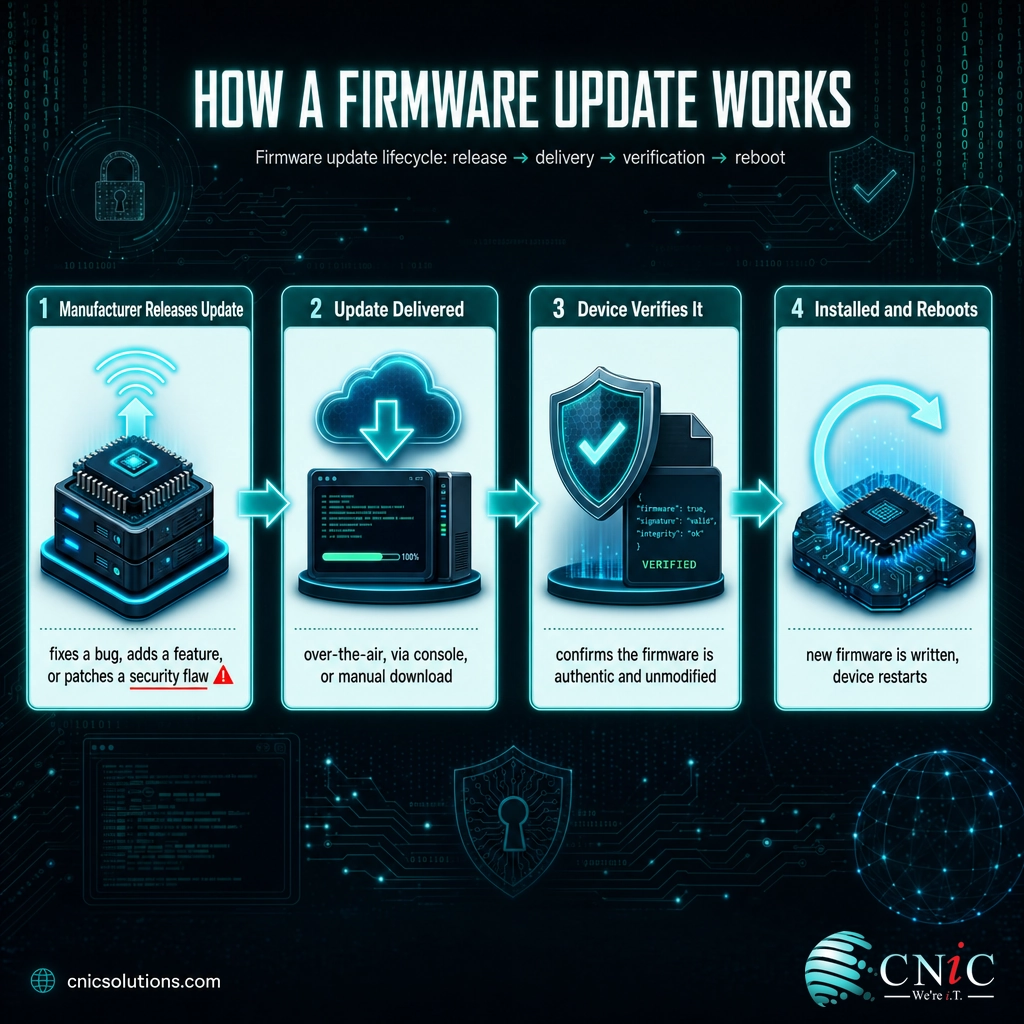
The process itself is consistent across most devices:
- The manufacturer releases an update. This is usually triggered by a bug, a performance improvement, a new feature, or, critically, a newly discovered security vulnerability.
- The update is delivered. Depending on the device, it arrives over the internet automatically (over-the-air), through a management console, or as a file you download and apply manually.
- The device verifies the update. Well-designed devices check that the firmware image is authentic and unmodified before installing it, so that malicious code cannot be slipped in.
- The new firmware is written and the device restarts. The device installs the new code and reboots to run it. Interrupting power during this step is the one moment where damage can occur.
That verification step matters more than it looks. Modern security guidance from NIST treats firmware as something that must be protected against unauthorized changes, able to detect tampering, and able to recover if it is corrupted. A legitimate firmware update, applied through the manufacturer’s official channel, is how that protection is delivered in practice.
Source: NIST Glossary: Firmware | NIST SP 800-193: Platform Firmware Resiliency Guidelines
Firmware vs. Software vs. Drivers
The most common confusion is between firmware and ordinary software, with drivers adding a third layer of muddle. They are related, but they sit at different depths in a device, and knowing the difference explains why firmware updates deserve special attention.
Software is what most people mean by “apps,” the programs that run on top of an operating system: your email client, your accounting package, your browser. Firmware is far lower down, the code baked into the hardware that lets the device function at all, before any operating system is even involved. A driver sits in between, a piece of software that lets your operating system talk to a specific piece of hardware. The closer to the hardware a piece of code runs, the more powerful, and the more dangerous, a flaw in it becomes.
| Firmware | Driver | Software / Applications | |
|---|---|---|---|
| Where it lives | Inside the hardware itself | On the operating system | On top of the operating system |
| What it does | Makes the physical device work | Lets the OS control the device | Performs tasks for the user |
| Example | Router, printer, or BIOS/UEFI firmware | Printer or graphics driver | Outlook, QuickBooks, Chrome |
| If it has a flaw | Deep, often hidden, hard to remove | Can crash or expose the device | Usually contained to the app |
The practical takeaway is that all three need updating, but firmware is the one businesses forget. Operating systems and applications nag you to update; firmware on a router or camera often sits untouched for years, quietly running whatever version it shipped with, holes and all.
Source: NIST Glossary: Firmware
Why Firmware Updates Matter for Security
Firmware updates are not just about smoother performance or a new feature. A large share of them exist to fix security vulnerabilities, and the reasons those fixes matter so much come down to where firmware sits and how attackers behave.
Firmware runs below your other defenses. Your antivirus, your endpoint protection, and even your operating system all rely on the hardware underneath them behaving honestly. A vulnerability in firmware can give an attacker control at a level those tools cannot see. Malicious code planted in firmware can survive a reboot, an operating-system reinstall, and in some cases a full factory reset, because it lives in the hardware rather than on the disk you wiped.
Unpatched devices are actively hunted. Attackers run automated tools that constantly scan the internet for devices running firmware with known, published vulnerabilities. Routers, security cameras, network storage, and other connected gear are favorite targets because they are rarely updated and often forgotten. The U.S. government maintains a public catalog of vulnerabilities that are being actively exploited in the real world, and network and device flaws feature heavily on it. If a vulnerability is on that list, a firmware update to close it is urgent, not optional.
The clearest illustration of the stakes is the VPNFilter campaign. In 2018, the FBI and the Department of Homeland Security warned that foreign cyber actors had compromised huge numbers of home and small-office routers and network storage devices worldwide using malware that embedded itself in the devices.
VPNFilter could collect data, attack other systems on the local network, and even destroy an infected device on command. Because it lodged in the device, a simple restart was only a temporary fix. The permanent remedy the FBI recommended was to update the firmware. That is the whole argument for firmware updates in one real-world example: the flaw lived in the device, and the update was the cure.
Myth: “If the device is working fine, leave the firmware alone.”
This is the single most common and most dangerous firmware misconception. A device with a serious security vulnerability works perfectly, right up until an attacker uses it. “It is not broken” tells you nothing about whether it is safe. The old warning that updates might break something has some truth for critical equipment, which is why you test and schedule them, but it is not a reason to run known-vulnerable firmware indefinitely. The real risk is not the update; it is the months or years an unpatched device spends exposed.
Protect every device with managed cybersecurity
Attackers are also getting faster at weaponizing new flaws, which shrinks the safe window between a vulnerability being published and being exploited. The gap between “an update is available” and “we applied it” is exactly the window an attacker needs, a pattern the broader data on exploited vulnerabilities and time-to-exploit makes clear.
Source: FBI IC3 Public Service Announcement (VPNFilter) | CISA Alert: Cyber Actors Target Home and Office Routers | CISA Known Exploited Vulnerabilities Catalog
Where Firmware Lives in Your Business
Part of what makes firmware easy to ignore is that it is everywhere and mostly invisible. When people think of updates, they picture their computers. But the firmware attack surface in a typical business is much wider, and it is dominated by the devices no one is watching.
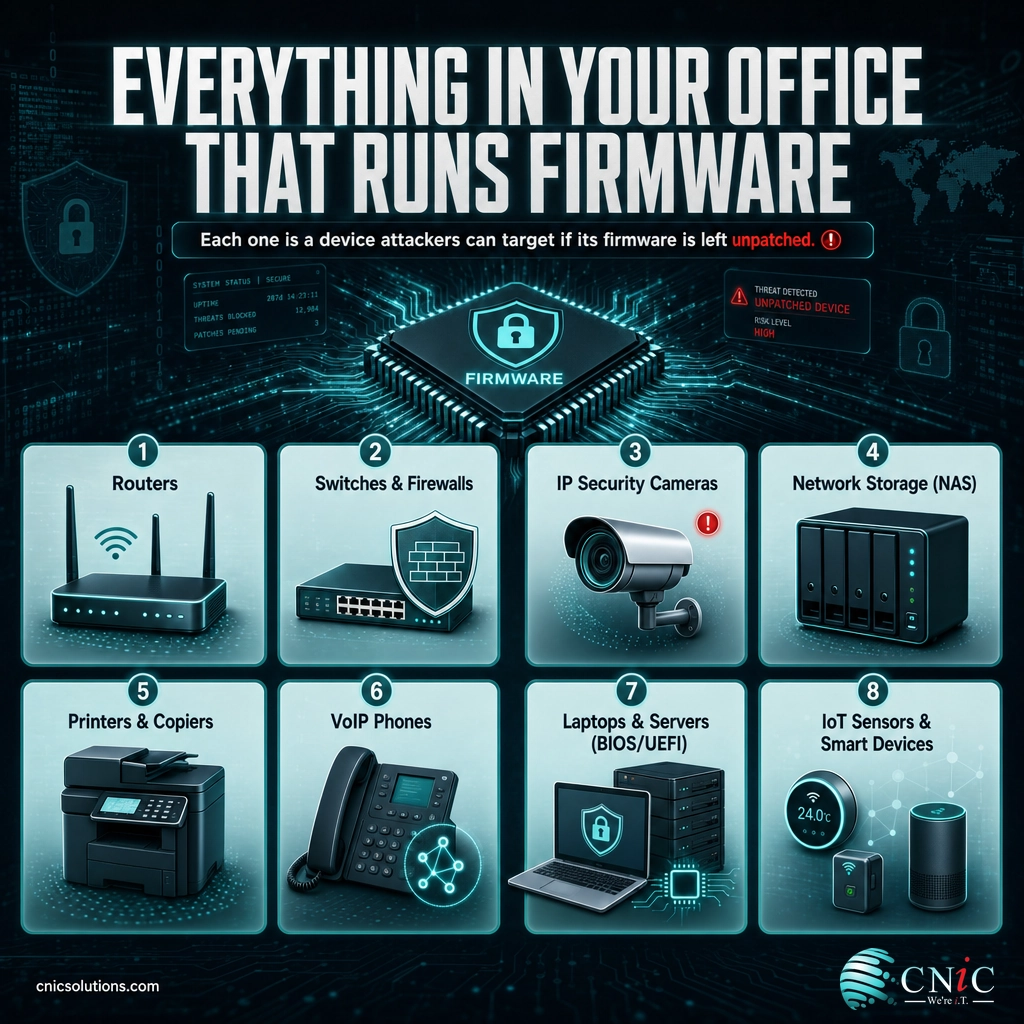
- Network gear: routers, switches, and firewalls all run firmware, and because they sit at the edge of your network, a flaw in them is especially valuable to an attacker. Keeping this equipment patched is a core reason managed firewall services exist.
- IoT and connected devices: security cameras, smart sensors, access-control systems, and other Internet of Things gear are notorious for weak, rarely-updated firmware, which is why they need dedicated attention. Ongoing monitoring of connected devices is often the only way to catch a problem.
- Computers and servers: the BIOS or UEFI firmware that starts every PC and server is itself a security target. NIST publishes specific guidance on protecting this system firmware because compromising it gives an attacker control before the operating system even loads.
- Office and peripheral devices: printers, multifunction copiers, VoIP phones, and network storage (NAS) all run firmware and connect to your network, making each one a potential entry point.
The point is not to panic about every gadget. It is to recognize that “keeping our software updated” quietly excludes a whole category of devices that also need attention. A device you cannot see is a device you are not patching.
Source: NIST SP 800-147: BIOS Protection Guidelines | NIST SP 800-193: Platform Firmware Resiliency Guidelines

How to Manage Firmware Updates in Your Business
Firmware updates fail businesses not because they are hard to install, but because no one owns the job. Turning firmware from a blind spot into a managed control comes down to a repeatable routine, the same discipline NIST recommends for patching in general.
- Build an inventory first. You cannot update what you do not know you have. List every device on your network that runs firmware, from servers and routers down to cameras and printers. An infrastructure audit of your connected equipment is the natural starting point.
- Enable automatic updates where it is safe. For many devices, especially IoT and endpoints, turning on automatic firmware updates closes holes fast with no ongoing effort. Reserve manual control for equipment too critical to update unattended.
- Prioritize by risk. Not every update is equally urgent. A firmware fix for an internet-facing router or a flaw on the government’s actively-exploited list jumps the queue; a minor update for an isolated device can wait for a maintenance window.
- Test before you deploy critical updates. For core equipment, apply the update to one device or in a test setting first, confirm it behaves, then roll it out. This is how you get the security benefit without the “an update broke it” risk.
- Only use official sources, and verify. Download firmware only from the manufacturer’s official channel. Fake firmware is itself an attack vector, so the authenticity check is part of the security, not a formality.
- Keep a record and revisit it. Log what was updated and when, and review the inventory on a schedule. Firmware management is a routine, not a one-time cleanup.
For most small and midsize businesses, the honest problem is time and visibility. No one has a full list of what runs firmware, and no one has a recurring slot to check for updates and apply them safely. That is precisely the gap a managed IT provider fills: maintaining the inventory, monitoring for critical updates, testing them, and applying them across your whole fleet so nothing quietly rots on an old, vulnerable version. It is the same principle behind sound patch management practices, extended to the hardware layer.
Keep your business devices patched and current
Get your device infrastructure professionally managed
Source: NIST SP 800-40 Rev. 4: Guide to Enterprise Patch Management Planning | CISA Known Exploited Vulnerabilities Catalog
Related Terms
- Firmware: The low-level software stored inside a device that makes its hardware work.
- BIOS / UEFI: The system firmware that starts a computer and hands off to the operating system; a high-value security target.
- Patch: A software or firmware update that fixes a specific bug or vulnerability.
- Vulnerability: A weakness in software or firmware that an attacker can exploit; often the reason an update is issued.
- Over-the-air (OTA) update: A firmware update delivered wirelessly over the internet rather than by cable or manual file.
- IoT (Internet of Things): Connected devices such as cameras and sensors, frequently shipped with weak, rarely-updated firmware.
- Endpoint protection: Security software on individual devices; complements, but cannot replace, current firmware.
- Attack surface: The full set of points where an attacker could try to get in; every device running firmware adds to it.
Frequently Asked Questions
What is a firmware update in simple terms?
Why are firmware updates important for security?
What is the difference between firmware and software?
What happens if you don’t update firmware?
Are firmware updates safe to install?
Sources
This explainer anchors its technical claims to primary standards and government sources. The definition of firmware follows the NIST glossary (drawn from NIST SP 800-53 Rev. 5 and CNSSI 4009). The principles that firmware must be protected against unauthorized change, monitored for tampering, and able to recover follow NIST Special Publication 800-193, Platform Firmware Resiliency Guidelines, and system-firmware protection reflects NIST SP 800-147, BIOS Protection Guidelines. Update and patch-management practice follows NIST SP 800-40 Revision 4, Guide to Enterprise Patch Management Planning. The active-exploitation point references the CISA Known Exploited Vulnerabilities Catalog. The VPNFilter figures (more than 500,000 devices across 54 countries, with firmware updates as the permanent remedy) are reported by the FBI Internet Crime Complaint Center and CISA.
Primary and authoritative sources: NIST Glossary: Firmware, NIST SP 800-193, NIST SP 800-147, NIST SP 800-40 Rev. 4, CISA Known Exploited Vulnerabilities Catalog, FBI IC3 (VPNFilter), CISA VPNFilter Alert.



related posts
What Is a Human Firewall? Turning Employees Into Your Best Defense
October 6, 2026A human firewall is the group of employees who, through security awareness and good habits, act…
What Is a Distributed System? How It Works and Why It Matters
October 5, 2026A distributed system is a collection of independent computers, called nodes, that are connected over a…
What Is a Firewall? How It Protects Your Business Network
October 5, 2026A firewall is a network security device or software that monitors incoming and outgoing traffic and…
What Is a Data Center? Types, Components, and How They Work
October 4, 2026A data center is a physical facility that houses the servers, storage, and networking equipment a…