

A firewall is a network security device or software that monitors incoming and outgoing traffic and decides whether to allow or block it based on a set of security rules. It acts as a barrier between your trusted business network and untrusted networks like the internet, blocking unauthorized access while permitting legitimate traffic.
Every time a device in your office connects to the internet, it opens a door. A firewall is what stands in that doorway, checking who is trying to come in, who is trying to get out, and whether they are allowed. It is one of the oldest and most fundamental controls in business security, and also one of the most misunderstood. This guide explains what a firewall actually does, the main types in plain language, and what your business network genuinely needs to have in place.
Key Takeaways
- A firewall filters network traffic against a set of rules, allowing legitimate connections and blocking everything else by default.
- It sits at the boundary between your trusted internal network and untrusted outside networks, and can also run on individual devices (host-based).
- There are four main technology types: packet-filtering, stateful inspection, application-proxy, and next-generation firewalls (NGFW), each inspecting traffic more deeply than the last.
- A firewall is not the same as antivirus. One guards the network perimeter; the other cleans up threats on the device. You need both.
- A firewall is one layer, not the whole strategy. Its real value comes from correct configuration and ongoing management, which is where most small businesses fall short.
What’s in This Guide
How a Firewall Works
At its core, a firewall does one job: it inspects every packet of data trying to cross a network boundary and decides, based on rules, whether to let it pass or drop it. Those rules are built around details the firewall can read on each packet, such as the source and destination IP address, the port, and the protocol being used. If a packet matches a rule that permits it, it goes through. If it matches a rule that denies it, or matches nothing at all, it is blocked.
A useful analogy is a security guard at the single entrance to an office building. Everyone coming in or going out has to pass the desk. The guard has a list: these delivery companies are expected, these visitors are on today’s list, this contractor has a badge. Anyone who is not on the list does not get in, no matter how convincing they look. The guard does not need to know the intent of every person, only whether they match an approved rule. A firewall works the same way, thousands of times per second, for network traffic.
The most important principle in that rulebook is default deny. A properly configured firewall does not try to guess which traffic is bad and block it. It blocks everything by default and only allows what has been explicitly permitted. This is why firewall configuration matters so much: the protection comes not from the box itself, but from a rule set that is tight, current, and matched to how your business actually operates.
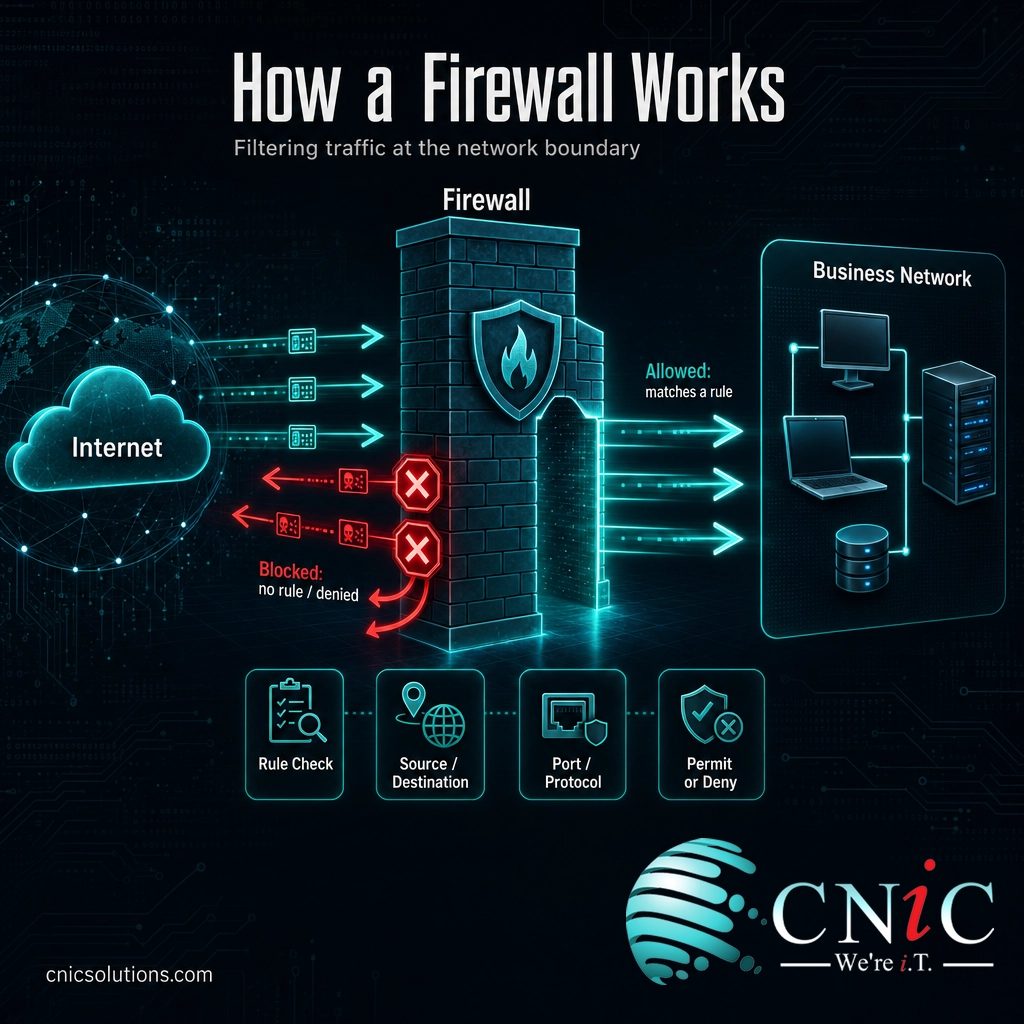
Source: NIST SP 800-41 Rev. 1: Guidelines on Firewalls and Firewall Policy
Firewall vs. Antivirus
The single most common point of confusion is the difference between a firewall and antivirus software. Business owners often assume that having one means they are covered. In reality, they defend different layers and do genuinely different jobs.
A firewall controls network traffic: it decides what is allowed to travel between your network and the outside world. Antivirus (more accurately, endpoint or anti-malware protection) works on the device itself: it scans files, programs, and processes for malicious code and removes or quarantines what it finds. A firewall tries to stop a threat from ever reaching the device. Antivirus deals with a threat that has already landed on it.
| Firewall | Antivirus / Endpoint Protection | |
|---|---|---|
| What it protects | The network perimeter and traffic flow | The individual device (laptop, server, phone) |
| What it does | Allows or blocks connections by rule | Scans for and removes malicious files/code |
| When it acts | Before a threat reaches the device | After code is on, or trying to run on, the device |
| Analogy | The guard at the building entrance | Security inside catching an intruder who got in |
The takeaway is simple: they are complementary, not interchangeable. A firewall without endpoint protection leaves you exposed to threats that arrive by other routes, such as a malicious email attachment or an infected USB drive. Endpoint protection without a firewall leaves your network open to direct attack. Serious business security uses both, alongside other controls, an approach known as defense in depth.
Source: CISA: Cybersecurity Best Practices
The Main Types of Firewalls
Firewalls have evolved over decades, and the categories build on one another: each generation inspects traffic more deeply than the last. Understanding the four main types helps you know what you are actually buying or running.
1. Packet-Filtering Firewalls
The original firewall type. A packet-filtering firewall examines each packet in isolation and checks its header, the source and destination IP address, port, and protocol, against an access control list. It is fast and lightweight, but it is also stateless: it has no memory of previous packets, so it cannot tell whether a packet belongs to a legitimate, established conversation or is an unsolicited probe pretending to. On its own, it is basic protection.
2. Stateful Inspection Firewalls
Stateful inspection was the major leap forward and is still the baseline for most business firewalls. Instead of judging each packet alone, it keeps a state table that tracks the status of every active connection. That context lets it make far smarter decisions: it can allow return traffic for a request your network actually made, while blocking unsolicited traffic that deviates from an expected connection. This is what “stateful” means, and why it is a meaningful upgrade over simple packet filtering.
3. Application-Proxy (Application-Layer) Firewalls
An application-proxy gateway goes deeper still, inspecting traffic at the application layer, the level of specific services like web (HTTP) or file transfer (FTP). Rather than passing traffic straight through, it acts as an intermediary, or proxy, that fully evaluates the content of a request before deciding to forward it. This gives strong, granular control and can catch threats hidden inside otherwise-allowed traffic, at the cost of more processing overhead.
4. Next-Generation Firewalls (NGFW)
A next-generation firewall combines the strengths of the earlier types and adds modern capabilities into a single platform. On top of stateful inspection, an NGFW typically layers in deep packet inspection, an intrusion prevention system (IPS), application awareness (recognizing and controlling specific apps regardless of port), and often threat intelligence feeds. For most modern businesses, the NGFW is the practical standard, because a single appliance handles what used to require several separate tools.
| Type | Inspects | Best understood as |
|---|---|---|
| Packet-filtering | Packet headers only (stateless) | Basic, fast, foundational |
| Stateful inspection | Headers plus connection state | The modern baseline |
| Application-proxy | Full application-layer content | Deep, granular control |
| Next-generation (NGFW) | All of the above plus IPS and app awareness | The all-in-one standard today |
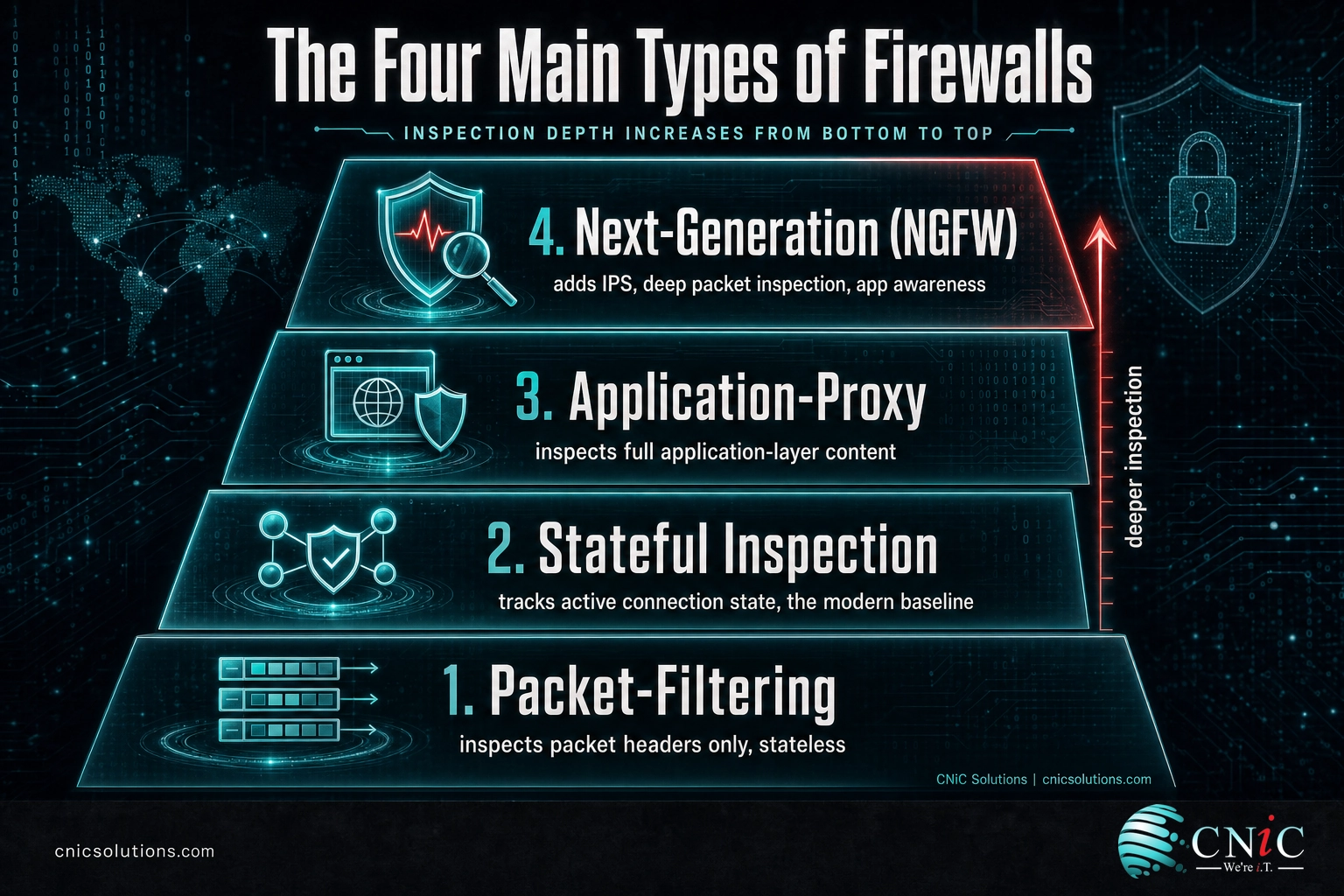
Source: NIST SP 800-41 Rev. 1: Guidelines on Firewalls and Firewall Policy
Where Firewalls Live: Hardware, Software, and Cloud
Type describes how a firewall inspects traffic. A separate question is where it runs, and businesses usually need a combination.
- Hardware (network) firewalls: a physical appliance that sits at the edge of your network, between your internet connection and your internal systems. It protects everything behind it at once and is the anchor of most business setups. This is the “guard at the front door” for the whole building.
- Software (host-based) firewalls: a firewall running on an individual device, such as the built-in firewalls in Windows and macOS. It protects that one machine, which matters for laptops that leave the office and connect to untrusted networks. Host-based firewalls complement the network firewall rather than replacing it.
- Cloud firewalls (Firewall as a Service): firewall capability delivered from the cloud, protecting cloud infrastructure and distributed, remote workforces that no longer sit behind a single office perimeter. As work moves off-premises, this layer has become increasingly important.
Most small and midsize businesses end up with a layered mix: a hardware firewall guarding the office network, host-based firewalls on mobile devices, and cloud protection for anything hosted or accessed remotely. The perimeter is no longer a single wall, and modern firewall strategy reflects that.
Source: NIST SP 800-41 Rev. 1: Guidelines on Firewalls and Firewall Policy

Why a Firewall Matters for Your Business
A firewall is not a nice-to-have. For any business connected to the internet, it is a baseline control, and in several ways a required one. Its value shows up in three concrete areas.
First line of defense. The internet is full of automated tools constantly scanning for exposed systems and open ports. A firewall makes your network far less visible and far harder to reach, turning away the vast majority of untargeted, opportunistic attacks before they ever touch a device. For most businesses, that automated background noise is the most common threat they face, and the firewall is what silences it.
Regulatory compliance. Firewalls are written directly into major compliance frameworks. The Payment Card Industry Data Security Standard (PCI DSS) devotes its entire first requirement to installing and maintaining network security controls, the category that firewalls define. Frameworks covering healthcare (HIPAA) and other regulated data expect equivalent network safeguards. For many businesses, a properly configured and documented firewall is not optional; it is a condition of doing business.
Control and visibility. Beyond blocking threats, a firewall gives you a control point for outbound traffic and a source of logs. You can restrict where your systems are allowed to connect, catch a compromised device trying to “phone home,” and maintain a record of network activity that is invaluable during an incident. Good network security depends on that visibility.
Myth: “We have a firewall, so our network is protected.”
A firewall you installed once and never touched is not the same as protection. The two most common failures are not missing firewalls; they are firewalls with sloppy, overly permissive rules, and firewalls that are never reviewed as the business changes. An open rule left over from a project three years ago, or default settings never hardened, can leave the door wide open behind an impressive-looking appliance. A firewall is only as good as its configuration and the discipline of keeping it current. And no firewall replaces the other layers: endpoint protection, patching, backups, and trained staff still matter.
Protect your network with managed cybersecurity
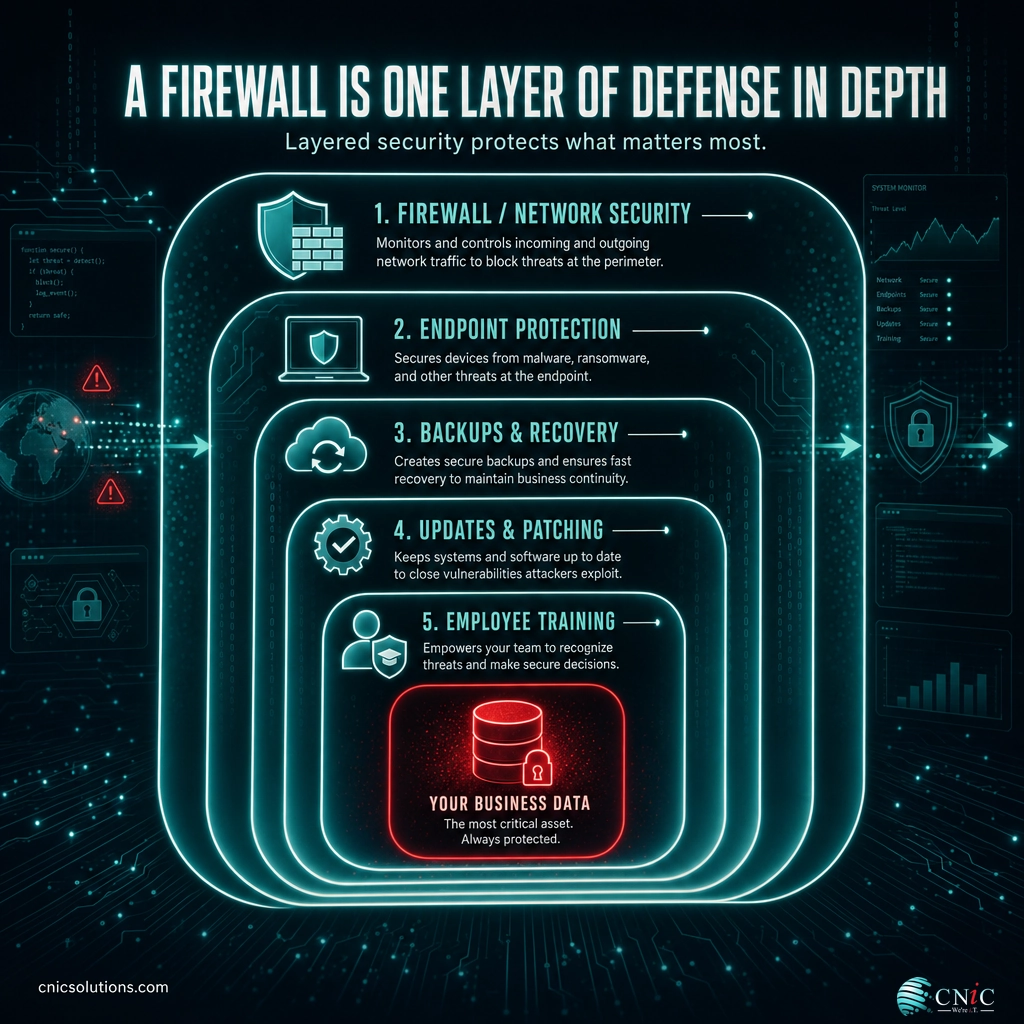
Source: PCI Security Standards Council | CISA: Cybersecurity Best Practices
Setting Up and Managing a Business Firewall
Buying a firewall is the easy part. Getting real protection from it comes down to a handful of practices that many small businesses never fully complete:
- Right-size the hardware. Choose an appliance matched to your bandwidth and number of users, so it inspects traffic without becoming a bottleneck. An NGFW is the sensible default for most businesses today.
- Configure default deny. Start from “block everything,” then open only the specific traffic your business genuinely needs. Every open rule should have a known reason.
- Segment the network. Use the firewall (and network segmentation) to separate sensitive systems, guest Wi-Fi, and general staff traffic, so a problem in one area cannot spread freely.
- Keep firmware and rules current. Apply security updates promptly and review the rule set on a schedule, removing anything obsolete. This is the step most often skipped.
- Monitor the logs. A firewall generates warning signs that only help if someone is actually watching them. Ongoing monitoring turns a passive box into active defense.
That last point is where reality bites. A firewall is not “set and forget” equipment; it is a system that needs configuration expertise, regular maintenance, and someone monitoring it. Most small and midsize businesses do not have the in-house time or specialized knowledge to do this well, which is exactly why managed firewall services exist: a provider deploys the right firewall, hardens the configuration, keeps it patched, and monitors it around the clock so it actually earns its place.
Get your business network professionally secured
Related Terms
- Packet: A small unit of data sent across a network; firewalls inspect packets to decide what to allow.
- Port: A numbered channel on a device for a specific type of traffic; firewalls open or close ports by rule.
- Stateful inspection: Firewall technology that tracks the state of active connections, the modern baseline.
- Next-generation firewall (NGFW): A firewall that adds intrusion prevention, deep packet inspection, and app awareness.
- Proxy server: An intermediary that forwards traffic on your behalf; the basis of application-proxy firewalls.
- VLAN: A virtual network segment used to separate traffic, often enforced alongside a firewall.
- Intrusion Prevention System (IPS): A control that detects and blocks known attack patterns, built into most NGFWs.
- DMZ: A buffer network between the internet and your internal systems where public-facing services sit.
Frequently Asked Questions
What is a firewall in simple terms?
What are the main types of firewalls?
What is the difference between a firewall and antivirus?
Does my small business need a firewall?
Is a firewall enough to protect my business?
Sources
This explainer anchors its technical claims to primary standards documentation. The definition of a firewall, the packet-filtering, stateful inspection, and application-proxy firewall categories, and the default-deny principle follow NIST Special Publication 800-41 Revision 1, Guidelines on Firewalls and Firewall Policy. The compliance point reflects PCI DSS Requirement 1 (Install and Maintain Network Security Controls) as published by the PCI Security Standards Council. Defense-in-depth and general best practices align with CISA cybersecurity guidance. Next-generation firewall capabilities reflect established, standards-based networking concepts.
Primary and authoritative sources: NIST SP 800-41 Rev. 1, PCI Security Standards Council, CISA Cybersecurity Best Practices.



related posts
What Is a Distributed System? How It Works and Why It Matters
October 5, 2026A distributed system is a collection of independent computers, called nodes, that are connected over a…
What Is a Data Center? Types, Components, and How They Work
October 4, 2026A data center is a physical facility that houses the servers, storage, and networking equipment a…
What Is a DDoS Attack? How DDoS Attacks Work and How to…
October 4, 2026A DDoS attack (distributed denial-of-service attack) is an attempt to take a website, application, or network…
What Is a Checksum? How It Verifies Data Integrity
October 3, 2026A checksum is a small value calculated from a block of digital data, used to detect…