

Zero Trust security is a cybersecurity model built on one rule: never trust, always verify. Instead of assuming that anyone inside the network is safe, it requires every user, device, and request to be authenticated and authorized before gaining access, and grants only the minimum access needed. This limits how far any single breach can spread.
For decades, business security worked like a walled castle. You built a strong perimeter, a firewall around the office network, and anything inside that wall was treated as trusted. That model made sense when your people, devices, and data all sat in one building. It falls apart the moment work moves to the cloud, staff log in from home, and a single stolen password lets an attacker walk straight through the front gate. Zero Trust is the response to that new reality. This guide explains what it actually means, the principles behind it, and how a small business can start applying it without a corporate budget.
Key Takeaways
- Zero Trust means “never trust, always verify.” No user or device is trusted by default, inside or outside the network, and access is checked on every request.
- It replaces the old perimeter model. The “castle-and-moat” approach trusts everything inside the wall. Zero Trust removes that automatic trust because the wall no longer holds.
- It rests on three principles: verify explicitly, enforce least-privilege access, and assume breach so the damage is contained when something gets through.
- It is a strategy, not a product. You build it from tools you likely already have, such as multi-factor authentication, identity management, and segmentation, applied under one consistent policy.
- Small businesses can start small. The highest-impact first steps, multi-factor authentication and least privilege on critical accounts, are affordable and available today.
What’s in This Guide
How Zero Trust Works
Zero Trust starts from an uncomfortable assumption: an attacker may already be on your network. Rather than trusting a user or device because of where it is connecting from, it treats every request for access as if it came from an open, hostile network. That request has to prove itself every single time. The formal definition comes from the U.S. National Institute of Standards and Technology, whose NIST Special Publication 800-207 on Zero Trust Architecture is the standards-body reference the whole industry builds on.
A helpful way to picture it is the difference between a building with one guard at the front door and a building where every internal door has its own lock and checkpoint. In the old model, once you badge in at the entrance, you can wander anywhere inside. In a Zero Trust building, getting through the front door means nothing. To open each room you have to prove who you are again, show that your device is in good shape, and demonstrate that you are actually allowed into that specific room, right now, for what you are trying to do. Nobody gets a master key.
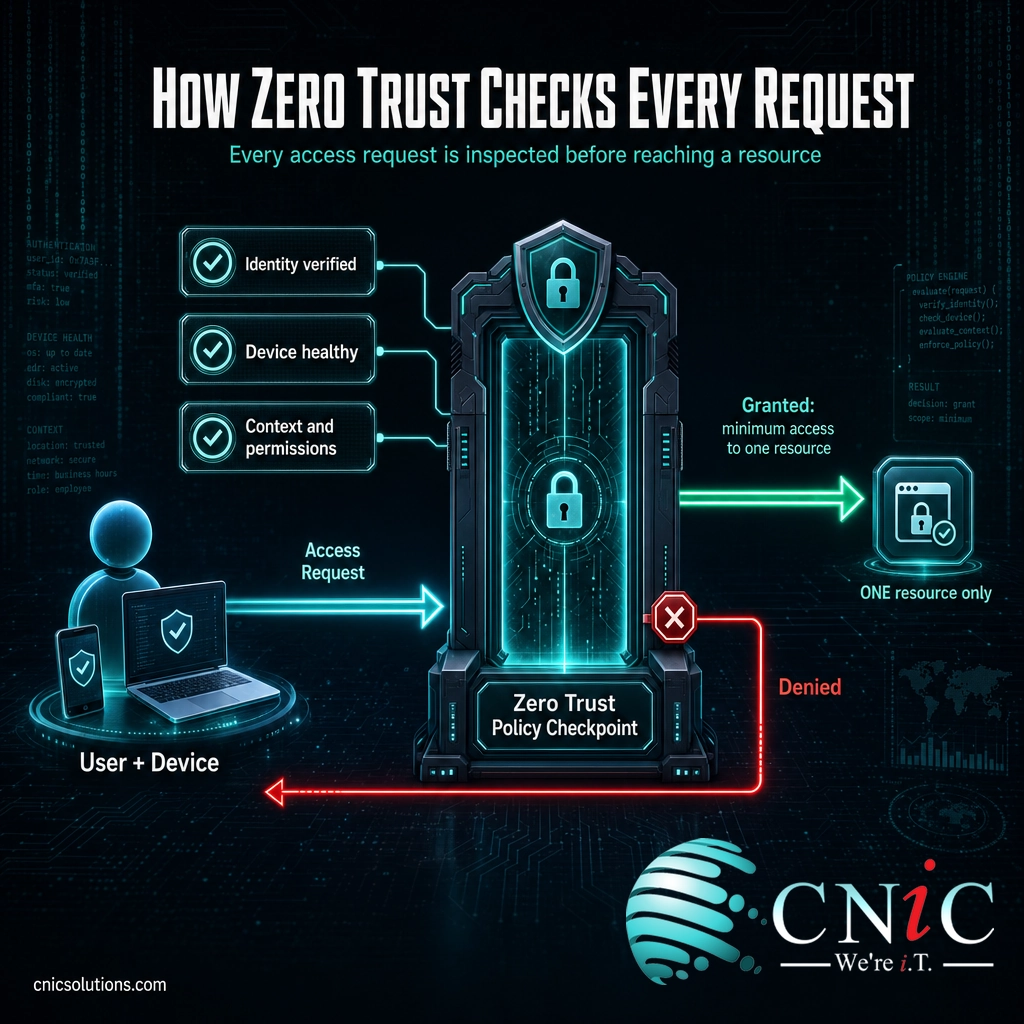
In practice, that decision runs through a policy checkpoint on every access attempt. Three principles guide what the checkpoint looks for:
- Verify explicitly. Authenticate and authorize based on everything you know: the user’s identity, the health and identity of their device, the location, the sensitivity of what they are asking for, and anything unusual about the request. A password alone is never enough, which is why multi-factor authentication is a foundation of any Zero Trust setup.
- Use least-privilege access. Give each user and system the minimum access required to do the job, and nothing more. When access is granted, it is narrow and often time-limited. This is where privileged access management earns its place, tightly controlling the powerful admin accounts attackers want most.
- Assume breach. Design the environment as though a compromise is inevitable. Segment the network into small zones, encrypt data, monitor everything, and limit the blast radius so that one compromised account or device cannot reach the entire business.
Put together, these turn security from a one-time gate into a continuous process. Trust is never permanent. It is earned per request, granted narrowly, and constantly re-checked.
Source: NIST SP 800-207: Zero Trust Architecture
Zero Trust vs. Perimeter Security
The concept Zero Trust is most often contrasted with is traditional perimeter security, sometimes called the “castle-and-moat” model. Understanding the difference is the fastest way to understand why Zero Trust exists at all.
Perimeter security draws a hard line around the corporate network. It invests heavily in a strong outer wall, then trusts almost everything inside it. The flaw is simple: once an attacker gets past the wall, whether through a phishing email, a stolen VPN login, or an infected laptop, they are treated as trusted and can often move freely from system to system. That sideways movement, called lateral movement, is how a small foothold becomes a full-blown breach.
Zero Trust removes the automatic trust inside the wall. There is no soft interior. A user who is authenticated is still not allowed to reach anything they have not been explicitly authorized for, so a single compromise stays boxed in.
| Perimeter Security (Castle-and-Moat) | Zero Trust | |
|---|---|---|
| Core assumption | Inside the network is trusted | Nothing is trusted by default |
| Trust decision | Made once, at the perimeter | Made on every request, continuously |
| Access granted | Broad access to the network | Narrow access to one resource |
| If a login is stolen | Attacker can roam the network | Attacker reaches only what that account was allowed |
| Built for | Everyone in one office | Cloud apps, remote work, mobile devices |
This is also why Zero Trust is steadily replacing the traditional VPN for remote access. A VPN authenticates a user once and then drops them onto the internal network with broad trust. A more modern approach, Zero Trust Network Access, applies these principles to connect a verified user to one specific application instead of the whole network. Zero Trust does not throw out your firewall or your existing tools. It changes the assumption underneath them, from “trusted because it is inside” to “trusted only after it is verified.”
Source: CISA: Zero Trust Maturity Model
The Five Pillars of Zero Trust
Zero Trust is not a single switch you flip. It is applied across several distinct areas of your technology, each of which needs its own controls. The U.S. Cybersecurity and Infrastructure Security Agency organizes this into five pillars in its Zero Trust Maturity Model. Thinking in pillars turns a vague philosophy into a practical checklist.
1. Identity
Confirming that users are who they claim to be. This is where strong authentication lives: multi-factor authentication, single sign-on, and increasingly passwordless login with passkeys. Because stolen credentials are one of the leading ways attackers get in, identity is where most small businesses see the biggest return first.
2. Devices
Every laptop, phone, and server that touches your data is a potential entry point. Zero Trust checks the health of a device before granting access: is it a known, managed device, is it patched, does it have endpoint security running. An unrecognized or out-of-date device gets less access, or none.
3. Networks
Instead of one large trusted network, Zero Trust divides it into smaller, isolated segments, an approach called segmentation or microsegmentation. If an attacker breaks into one segment, walls stand between them and everything else, which is what stops a minor incident from becoming a company-wide one.
4. Applications and Workloads
Access to individual applications, whether on-premises or in the cloud, is controlled and monitored per request rather than assumed. Apps are not left openly reachable just because a user is on the network; they are exposed only to the specific people and systems authorized to use them.
5. Data
Ultimately, security is about protecting the data itself. This pillar covers knowing where your sensitive data lives, classifying it, encrypting it, and controlling who can access it. The other four pillars all exist to keep this one safe.
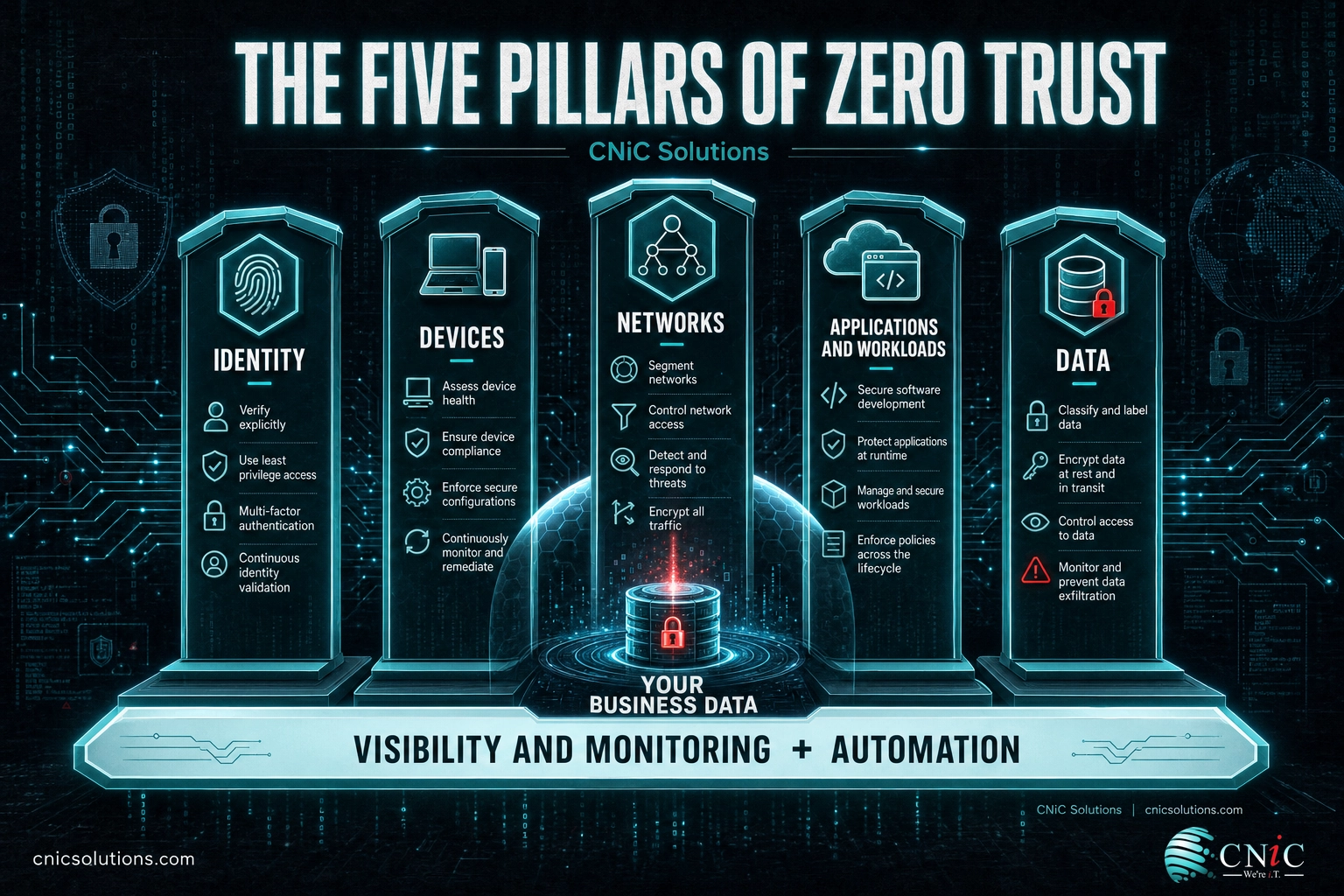
Underpinning all five are two things that run across every pillar: continuous visibility and monitoring, so you can see what is happening, and automation, so policies are enforced consistently without relying on someone to remember. A business rarely masters all five pillars at once. The maturity model exists precisely so you can improve one pillar at a time.
Source: CISA: Zero Trust Maturity Model v2.0

Why Zero Trust Matters for Small Businesses
It is tempting to file Zero Trust under “enterprise problem,” something for banks and government agencies with dedicated security teams. That instinct is exactly backward. The forces that make the old perimeter model fail, cloud apps, remote work, and stolen passwords, hit small businesses just as hard, and small businesses have far less margin to absorb a breach. The numbers behind the model tell the story.
Read together, these point at one conclusion. The most common way into a business is not a Hollywood-style hack of the firewall; it is a legitimate login used by the wrong person, or an ordinary employee mistake. A perimeter model trusts that login the moment it is inside. Zero Trust does not. By verifying every request and limiting what any one account can reach, it directly attacks the way most real breaches actually unfold.
There is a strategic dimension too. Zero Trust has become the direction the entire security industry, and the federal government, is moving. A 2021 U.S. executive order and the follow-on federal strategy directed government agencies to adopt Zero Trust architectures, and that expectation increasingly flows downstream to the private companies and vendors they work with. For many small businesses, especially those in regulated fields or in someone else’s supply chain, moving toward Zero Trust is becoming a matter of staying eligible to do business, not just staying safe.
Myth: “Zero Trust is only for big enterprises.”
This is the most damaging misconception about the model, and it keeps small businesses on an approach attackers stopped respecting years ago. Zero Trust is a set of principles, not a price tag. You do not need a security operations center or a seven-figure budget to apply “never trust, always verify.” Turning on multi-factor authentication, removing standing admin rights, and checking device health are Zero Trust in action, and they are within reach of a two-person office. The mistake is not being too small for Zero Trust. It is assuming your existing perimeter still protects you when your data and your people have already left the building.
Protect your business with managed cybersecurity
Source: Verizon Data Breach Investigations Report | IBM Cost of a Data Breach Report
How to Get Started with Zero Trust
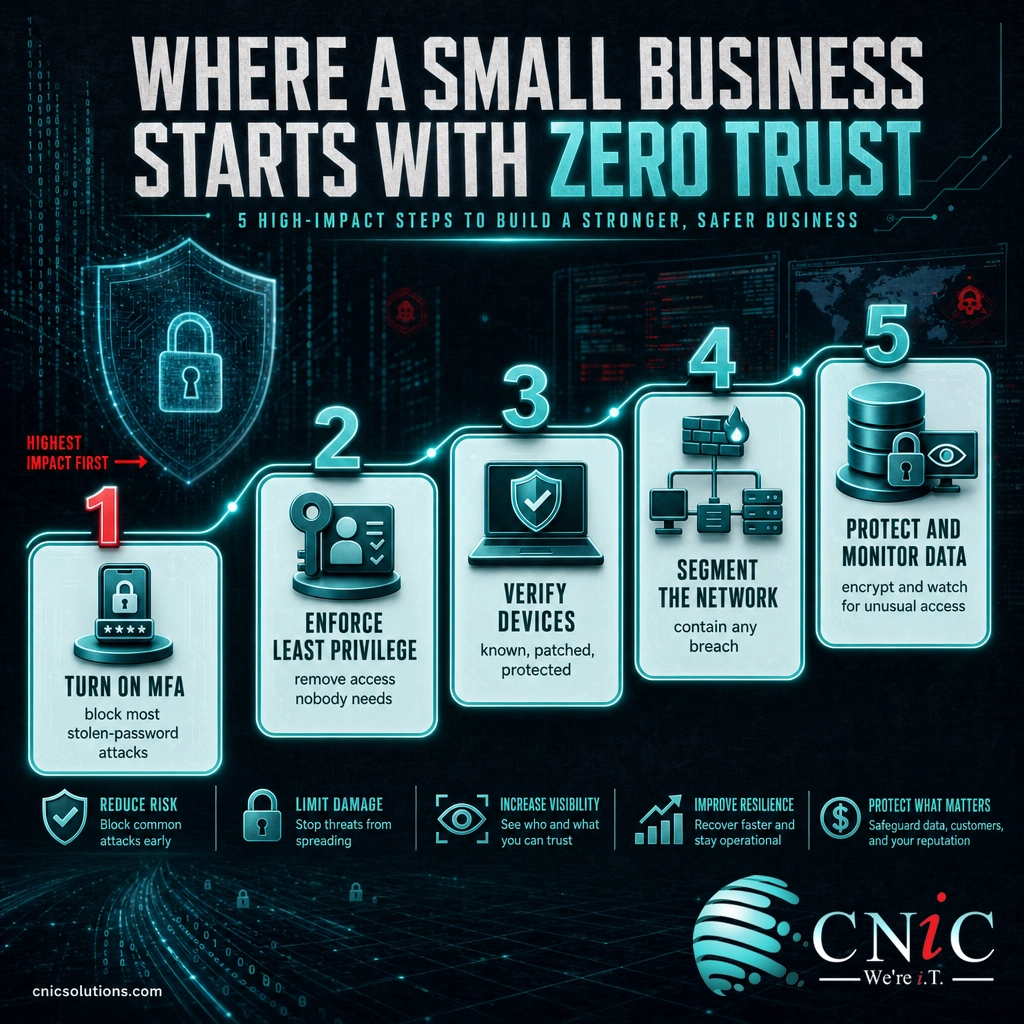
The single biggest barrier to Zero Trust is the belief that it is an all-or-nothing project. It is not. It is a journey you take one pillar at a time, and the early steps deliver most of the protection for the least effort. A sensible order for a small business looks like this:
- Turn on multi-factor authentication everywhere. Start with email, remote access, and any account with admin rights. This one step blocks the large majority of attacks that rely on a stolen password, and it is often free or already included in tools you own.
- Enforce least privilege. Review who has access to what and remove anything nobody needs. Get rid of standing administrator rights that sit unused on everyday accounts. Attackers cannot abuse access that was never granted.
- Verify your devices. Make sure every device that reaches company data is known, kept up to date, and running endpoint protection. Unmanaged personal devices should not have the same access as a hardened company laptop.
- Segment your network. Separate critical systems, guest Wi-Fi, and general staff traffic so a problem in one area cannot spread freely into the rest.
- Protect and monitor your data. Know where your sensitive data lives, encrypt it, and put monitoring in place so unusual access gets noticed rather than discovered months later.
You do not have to do all of this at once, and you do not have to do it alone. Because Zero Trust is a strategy that stitches together identity, devices, networks, and data under one policy, the hardest part is usually not any single tool but deciding the sequence and making the pieces work as a system. This is where a managed IT and security partner, or a Virtual CIO, adds the most value: assessing where you stand today, prioritizing the steps that cut the most risk for your budget, and rolling the model out in a way your team will actually use.
Map out a Zero Trust roadmap with a Virtual CIO
Related Terms
- Multi-Factor Authentication (MFA): Requiring more than a password to log in; a foundational Zero Trust control.
- Least Privilege: Giving each user and system only the minimum access needed to do the job, and no more.
- Privileged Access Management (PAM): Tightly controlling and monitoring the powerful admin accounts attackers target most.
- Microsegmentation: Dividing a network into small isolated zones so a breach in one cannot spread to others.
- Zero Trust Network Access (ZTNA): The technology that applies Zero Trust to remote access, connecting a user to one app instead of the whole network.
- Assume Breach: A mindset that designs security as if an attacker is already inside, focusing on containing damage.
- Identity and Access Management (IAM): The systems that manage who your users are and what each is allowed to reach.
- Lateral Movement: How an attacker spreads from one compromised system to others; the behavior Zero Trust is built to stop.
Frequently Asked Questions
What is Zero Trust security in simple terms?
What are the core principles of Zero Trust?
Is Zero Trust a product I can buy?
Can a small business actually implement Zero Trust?
What is the difference between Zero Trust and a VPN?
Sources
This explainer anchors its definitions and framework to primary standards documentation. The definition of Zero Trust, the “never trust, always verify” principle, and the assume-breach and least-privilege tenets follow the National Institute of Standards and Technology, NIST Special Publication 800-207, Zero Trust Architecture. The five pillars (Identity, Devices, Networks, Applications and Workloads, Data) and the cross-cutting visibility and automation capabilities follow the Cybersecurity and Infrastructure Security Agency (CISA) Zero Trust Maturity Model, version 2.0. Breach statistics are drawn from the Verizon 2024 Data Breach Investigations Report (human element in 68% of breaches; stolen credentials in 31% of breaches over the past decade) and the IBM Cost of a Data Breach Report 2024 (global average breach cost of $4.88 million). The federal adoption point reflects Executive Order 14028 (2021) and the subsequent U.S. federal Zero Trust strategy.
Primary and authoritative sources: NIST SP 800-207, CISA Zero Trust Maturity Model, Verizon DBIR, IBM Cost of a Data Breach Report.



related posts
Zero Trust Statistics for 2026: Adoption, Maturity, and Breach Impact
November 3, 2026Zero trust has become the default security strategy on paper, but not yet in practice. Okta's…
What Is ZTNA (Zero Trust Network Access)?
November 3, 2026Zero Trust Network Access (ZTNA) is a security service that grants a verified user access to…
What Is XDR (Extended Detection and Response) and How Does It Protect…
November 2, 2026Extended detection and response (XDR) is a security platform that collects and correlates threat data from…
What Is the Cyber Kill Chain? The 7 Stages Explained
November 1, 2026The cyber kill chain is a model that breaks a cyberattack into seven sequential stages, from…