

Endpoint security is the practice of protecting the devices that connect to your network, such as laptops, desktops, phones, servers, and IoT hardware, from cyberattacks. It combines prevention that blocks known threats with detection and response that catches what slips through, so a single compromised device does not become a company-wide breach.
Almost every attack on a business starts at a device. An employee opens a laptop, taps a link, plugs in a phone, and that ordinary machine becomes the doorway an attacker uses to reach everything else. Endpoint security is how you guard those doorways. It has moved well past the antivirus your business ran a decade ago, because attackers have moved too, and understanding what it actually covers is the difference between spotting an intrusion in minutes and finding out weeks later.
- Endpoints are the front line. Laptops, desktops, servers, phones, and IoT devices are where most attacks begin, which makes protecting them the foundation of business security, not an afterthought.
- It is prevention plus detection, not just antivirus. Modern endpoint security blocks known threats and continuously watches device behavior to catch the ones that get past the first line.
- The attacks have changed. CrowdStrike found 79% of detections in 2024 were malware-free, up from 40% in 2019, so signature-based antivirus alone no longer sees most of what matters.
- The stakes are high. Ransomware appeared in 44% of breaches in the Verizon 2025 DBIR, and the average U.S. data breach reached a record $10.22 million in IBM’s 2025 report.
- It is layered. A complete program stacks prevention (EPP), detection and response (EDR), and often around-the-clock monitoring (MDR) across every device you own.
What’s in This Guide
How Endpoint Security Works
Start with the word itself. NIST defines an endpoint as any device that serves as an entry or exit point for communications on a network. In a real business that means laptops and desktops, but also servers, phones, tablets, printers, point-of-sale terminals, and the growing pile of smart cameras and sensors most offices now run. Endpoint security is the set of tools and policies that protect every one of those devices, because each is a place an attacker can get in.
Think of it like securing a building. You put locks on the doors so intruders cannot walk in (prevention). You run cameras that record everything, so if someone does get inside you can see exactly what they touched (detection). And you have guards who can respond the moment something looks wrong, locking a wing or escorting the intruder out (response). Antivirus is the lock. Modern endpoint security is the lock, the cameras, and the guards, working together and reporting to one desk.
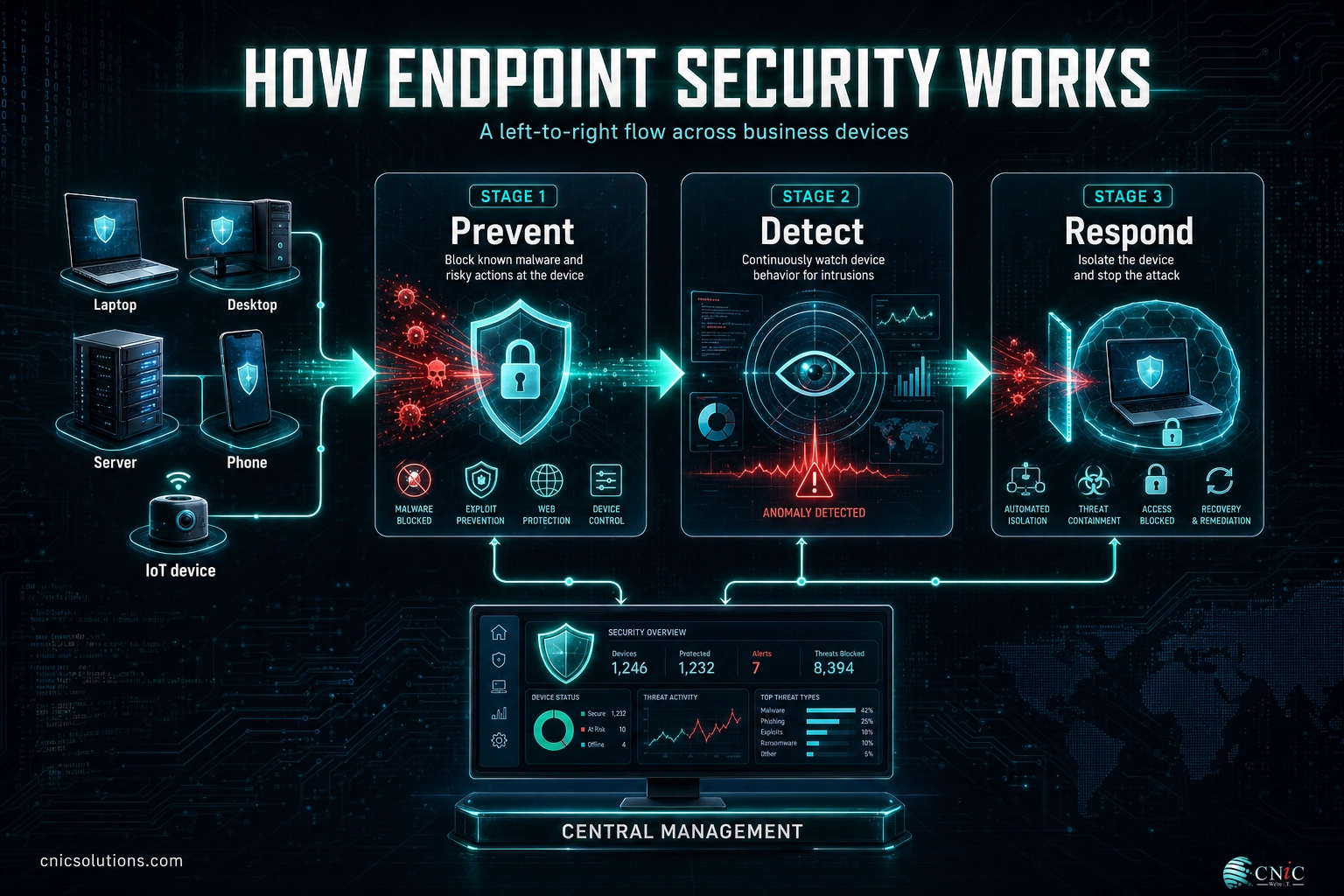
Under the hood, a modern endpoint security program runs in three continuous stages:
- Prevent at the device. An endpoint protection platform blocks known malware, malicious websites, and risky actions before they run. It can also control which apps are allowed and lock down USB ports, shrinking the ways an attack can start.
- Watch behavior continuously. Endpoint detection and response records what each device is actually doing (the processes it launches, the connections it makes, the files it changes) and flags patterns that look like an attack, even when no known malware is involved.
- Detect and respond fast. When something crosses the line, the system can isolate the device from the network, kill the malicious process, and alert your team, either automatically or through analysts who investigate and remediate.
Tying it together is central management: one console that shows the health of every endpoint, pushes policies, and gives your team a single place to see and stop an attack that touches many machines at once. That last part matters, because a threat that lands on one laptop rarely wants to stay there. It wants the network behind it.
Source: NIST Computer Security Resource Center glossary
Endpoint Security vs. Antivirus
This is the point most people get stuck on, so it is worth settling clearly. “Antivirus” and “endpoint security” are not two names for the same thing. Antivirus is a single feature. Endpoint security is the whole program that antivirus lives inside. Traditional antivirus works by matching files against a list of known-bad signatures, which is fine for yesterday’s malware but blind to anything new or to attacks that use no malware file at all.
That blind spot is now the main event. When most intrusions arrive as a logged-in session using stolen credentials rather than a virus on a drive, a tool that only inspects files is looking in the wrong place. Endpoint security widens the lens: it watches behavior, ties activity together across devices, and can act, not just alert. Here is how the two compare.
| Attribute | Traditional Antivirus | Modern Endpoint Security |
|---|---|---|
| What it is | One feature that scans for known malware | A full program of prevention, detection, and response |
| How it detects | Signatures of previously seen threats | Signatures plus behavior and real-time analytics |
| Malware-free attacks | Largely invisible to it | Caught by watching device behavior |
| Response | Quarantines or deletes a bad file | Isolates the device, kills the process, investigates |
| Visibility | One device at a time | Every endpoint from a single console |
None of this means antivirus is useless. It is still the efficient first filter that stops the flood of commodity malware cheaply, and it remains one layer inside a good endpoint platform. The mistake is treating it as the whole defense. If antivirus is all your business runs, you are protected against the threats of a decade ago and exposed to the ones that dominate now.
Source: NIST Computer Security Resource Center glossary

Why Endpoint Security Matters for Your Business
The case for endpoint security is not abstract. It rests on how attacks actually happen today, and the data has shifted hard in the last few years. The single biggest change: attackers have largely stopped relying on malware files that antivirus can catch. In its 2025 Global Threat Report, CrowdStrike found that 79% of the detections it observed in 2024 were malware-free, up from 40% in 2019. Instead of dropping a virus, adversaries log in with stolen credentials and use the tools already on the device.
Once they are on an endpoint, they move quickly. CrowdStrike measured the average time for an intruder to jump from the first compromised device to the rest of the network, its “breakout time,” at 48 minutes in 2024, with the fastest recorded at just 51 seconds. That is the window your defenses have to notice and react. Signature scanning that runs on a schedule cannot meet that clock. Continuous detection and automated response can.
Those endpoints are also where the most damaging attacks begin. In the Verizon 2025 Data Breach Investigations Report, which analyzed more than 22,000 security incidents and 12,195 confirmed breaches, ransomware was present in 44% of breaches. And the initial way in was almost always a device or an account: credential abuse (22%) and exploitation of vulnerabilities (20%) were the leading paths, followed by phishing (16%).
How Attackers First Get In (Verizon 2025 DBIR)
Leading initial-access paths in confirmed breaches. Source: Verizon 2025 Data Breach Investigations Report.
The cost of getting this wrong keeps climbing. IBM’s 2025 Cost of a Data Breach Report put the average U.S. breach at a record $10.22 million, even as the global average eased to $4.44 million. For a small or midsize business, a single unprotected laptop that leads to a network-wide ransomware event is not a line item. It is an existential event.
Myth: “We have antivirus, so our devices are covered.” Antivirus catches known malware files, but most attacks now use no malware file at all. They arrive as a valid login and blend in with normal activity, which signature-based tools are not built to see. Antivirus is a useful layer, not a finish line. Without behavioral detection and response on the endpoint, the fastest-growing category of attacks walks straight past your defenses.
There is a strategic angle too. Endpoint protection is often the control that regulators, insurers, and frameworks look for first, and it is a natural starting point when you run a structured review of where your real risks live. Knowing which devices you have, and how well each is defended, is step one of almost every serious security program.
Source: CrowdStrike 2025 Global Threat Report | Verizon 2025 Data Breach Investigations Report | IBM Cost of a Data Breach 2025
Types of Endpoint Security
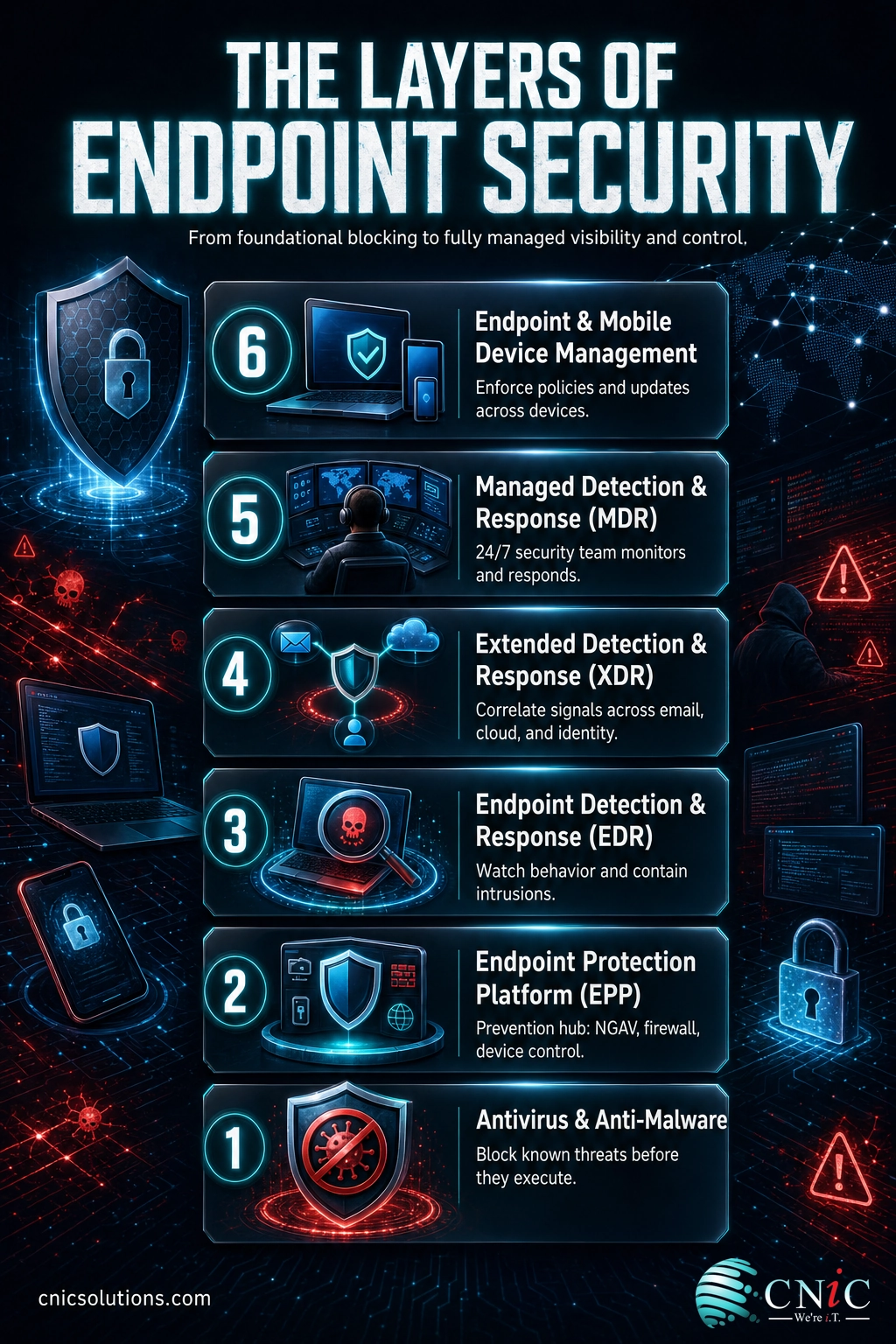
Endpoint security is not one product. It is a stack of capabilities that has grown over time, each layer added to cover what the previous one could not see. You do not always need every layer, but you should know what each does so you can tell a full defense from a partial one.
Antivirus and anti-malware
The original layer. It matches files against known-bad signatures and blocks or quarantines them. Still valuable as a cheap first filter for commodity threats, but blind to new or malware-free attacks on its own.
Endpoint protection platform (EPP)
The prevention hub. An EPP bundles next-generation antivirus with tools like a device firewall, web and app control, USB restrictions, and disk encryption. Its job is to stop as much as possible before it ever runs on the device.
Endpoint detection and response (EDR)
The layer that assumes some threats will get through. EDR continuously records endpoint activity and uses behavior and analytics to spot intrusions, then gives responders the tools to isolate a device and shut an attack down. For a closer look, see our guide to choosing EDR for a small business.
Extended detection and response (XDR)
EDR that widens its view beyond the device. XDR correlates endpoint signals with data from email, cloud, identity, and network, so an attack that touches several systems shows up as one connected story instead of scattered, unrelated alerts.
Managed detection and response (MDR)
The people layer. Tools generate alerts, but someone has to watch them around the clock and act. MDR pairs the technology with a security team that monitors, investigates, and responds on your behalf. If your business has no 24/7 security staff, managed detection and response is how you get expert eyes on your endpoints without hiring a night shift.
Endpoint and mobile device management
The control layer. Unified endpoint management and mobile device management enforce policies across laptops and phones: requiring encryption and screen locks, pushing updates, and letting you wipe a lost device. This is the backbone of securing remote work and any bring-your-own-device setup.
Source: NIST Computer Security Resource Center glossary
How to Get Started with Endpoint Security
You do not roll out endpoint security by buying one tool and calling it done. You build it in an order that closes the biggest gaps first without overwhelming your team. A practical rollout for a small or midsize business looks like this:
- Inventory every endpoint. You cannot protect a device you do not know exists. List every laptop, desktop, server, phone, and connected device, including the personal ones people use for work. Unmanaged devices are where attacks hide.
- Deploy prevention and detection together. Put an EPP with next-generation antivirus on every device, and add EDR so you can see and stop what prevention misses. Prevention without detection leaves you blind after the first bypass.
- Keep everything patched. Vulnerability exploitation was a top way attackers got in, and patching the operating systems and apps on your endpoints closes those doors. Our patch management data shows how quickly backlogs pile up.
- Tighten identity and access. Because most intrusions now arrive as a valid login, endpoint protection works best alongside strong identity controls. Pair it with multifactor authentication and conditional access policies so a stolen password alone is not enough.
- Contain the blast radius. If a device is compromised, you want the damage stopped at that device. Segmenting your network into isolated zones and keeping tested backups you can actually restore from are what turn a breach into an inconvenience instead of a shutdown.
- Decide who watches the alerts. Tools raise alarms 24/7, but attackers do not keep business hours, and breakout time is under an hour. If you have no team to watch overnight, managed detection and response fills that gap.
For many businesses, the honest answer is that maintaining all of this in-house is more than the staff can carry alongside their day jobs. That is where a managed IT and security partner earns its keep: designing the endpoint stack, keeping it current, and watching it so your people do not have to. A virtual CIO can also own the roadmap, making sure endpoint protection lines up with how your business actually runs and what your industry requires.
Get a Free Security Audit From CNiC Solutions
Source: CISA Known Exploited Vulnerabilities Catalog
Common Questions About Endpoint Security
What is endpoint security?
Is endpoint security the same as antivirus?
What counts as an endpoint?
What is the difference between EPP and EDR?
Do small businesses need endpoint security?
Related Terms
- Endpoint protection platform (EPP): the prevention layer that blocks known threats at the device with next-generation antivirus, firewall, and device controls before they can run.
- Endpoint detection and response (EDR): the layer that records device activity and detects intrusions by behavior, then contains them. See how to choose EDR for a small business.
- Managed detection and response (MDR): endpoint detection paired with a security team that monitors and responds around the clock, covered in our MDR guide.
- Attack surface management: the practice of finding and reducing every exposed way into your systems, including the endpoints attackers probe first.
- Zero Trust: the security model that grants no implicit trust and verifies every request, using device health and identity signals that endpoint security helps provide.
- Phishing: fraudulent messages that trick users into handing over credentials or running malware on their device. Learn the warning signs of a phishing email.
- Social engineering: manipulating people rather than machines to gain access, the human trigger behind many endpoint compromises. See the tactics attackers use.
- Managed security services: outsourcing the design, monitoring, and response of your security program, including endpoints, to a dedicated provider, explained in our guide to MSSPs.
About This Guide
The definition of an endpoint and endpoint protection platform is drawn from the NIST Computer Security Resource Center glossary. The malware-free detection figures (79% in 2024, up from 40% in 2019) and the 48-minute average breakout time come from the CrowdStrike 2025 Global Threat Report. Breach statistics, including ransomware present in 44% of breaches and the leading initial-access paths, are from the Verizon 2025 Data Breach Investigations Report, which analyzed more than 22,000 incidents and 12,195 confirmed breaches. The $10.22 million average U.S. breach cost is from IBM’s 2025 Cost of a Data Breach Report. Figures are cited to their original sources and used to explain how endpoint security protects business devices, not as a guarantee of any specific outcome.
Sources: NIST CSRC glossary | CrowdStrike 2025 Global Threat Report | Verizon 2025 DBIR | IBM Cost of a Data Breach 2025
Explore Managed IT Services
Talk to a Virtual CIO



related posts
What Is FinOps? A Guide to Managing and Optimizing Cloud Costs
October 19, 2026FinOps is an operational framework and cultural practice for managing and optimizing cloud costs by bringing…
What Is DNS? How the Internet’s Address Book Works
October 18, 2026DNS (Domain Name System) is the internet's address book. It translates the human-friendly domain names you…
What Is Encryption in Cybersecurity?
October 18, 2026Encryption in cybersecurity is the process of scrambling readable data into an unreadable code that only…
What Is Data Loss Prevention (DLP) and Why Does Your Business Need…
October 17, 2026Data loss prevention (DLP) is a set of tools and policies that detect and stop sensitive…