

Cloud cost optimization is the ongoing practice of reducing your cloud spend while maintaining, or improving, performance. It works on two fronts at once: cutting waste that delivers no value, and getting more value from the spend that remains. Done well, it turns an unpredictable, ever-climbing cloud bill into a controlled line item that scales with your business instead of against it.
Your cloud bill is almost certainly higher than it needs to be, and you are not alone. Gartner forecasts worldwide public cloud spending to reach $723.4 billion in 2025, and as those bills climb, a striking amount of the money is wasted: Flexera’s 2025 State of the Cloud Report found that organizations estimate 27% of their cloud spend delivers no value. The good news is that this waste is recoverable, and you do not need to rip anything out to recover it. This guide walks through eight proven cloud cost optimization strategies, in the order most businesses should tackle them, so you can reduce cloud costs without sacrificing the performance and reliability your team depends on.
Key Takeaways
- Waste is the starting point, not the exception. With roughly a quarter of cloud spend commonly wasted, most businesses have real savings waiting before they optimize anything.
- Visibility comes first. You cannot cut what you cannot see. Tagging and cost allocation are the foundation every other strategy depends on.
- Two levers, not one. Eliminate waste (idle and oversized resources) and improve efficiency (commitments, autoscaling, architecture). The first is faster; the second compounds.
- Commitments pay off for steady workloads. Reserved Instances and Savings Plans cut up to 72% off On-Demand pricing when your baseline usage is predictable.
- It is a discipline, not a project. Teams that treat cost optimization as an ongoing FinOps practice keep the savings; one-time cleanups quietly erode.
What’s in This Guide
- Before You Begin: What You Need in Place
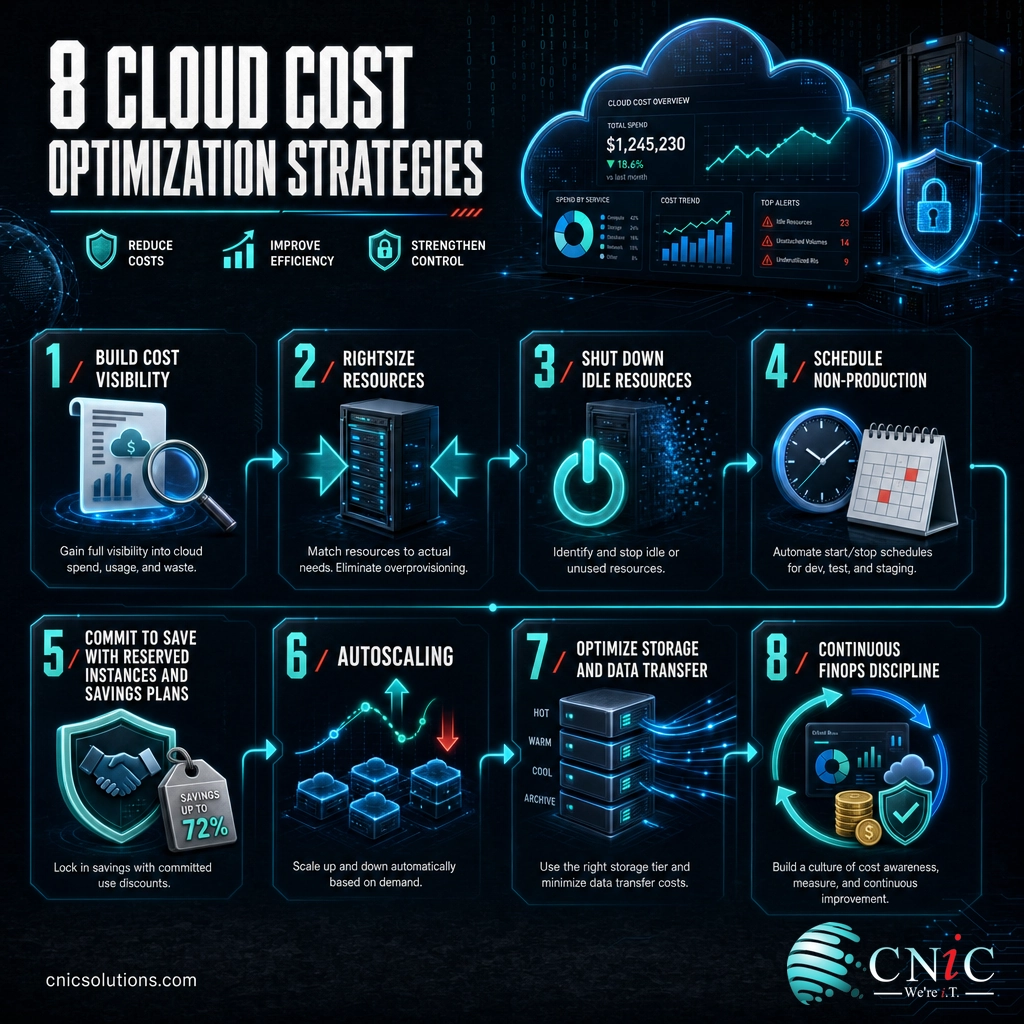
- Strategy 1: Build Full Cost Visibility First
- Strategy 2: Rightsize Overprovisioned Resources
- Strategy 3: Shut Down Idle and Orphaned Resources
- Strategy 4: Schedule Non-Production Environments
- Strategy 5: Commit to Save With Reserved Instances and Savings Plans
- Strategy 6: Match Capacity to Demand With Autoscaling
- Strategy 7: Optimize Storage Tiers and Data Transfer
- Strategy 8: Make Cost Optimization a Continuous Discipline
- When to Bring in a Virtual CIO
- Troubleshooting Common Cloud Cost Problems
- Maintain and Monitor
- Frequently Asked Questions
Before You Begin: What You Need in Place
Cloud cost optimization is not a single button. It is a sequence of moves that build on one another, and skipping the setup work is the most common reason optimization efforts stall. Before you start cutting, make sure you have the following in place.
Prerequisites for this guide
- Access to your billing and usage data. Admin or billing-level access to your cloud provider’s cost tools (AWS Cost Explorer, Azure Cost Management, or Google Cloud Billing), or a third-party cost platform.
- A tagging plan. A basic scheme for labeling resources by team, application, and environment. Without it, later strategies have nothing to act on.
- Stakeholder buy-in. Someone on the finance side and someone on the engineering side who agree this matters. Cost optimization is a shared responsibility, not an IT chore.
- Estimated time: An initial visibility-and-cleanup pass takes a few weeks. Ongoing optimization is continuous.
- Skill level: Intermediate. You do not need to be an architect, but you should be comfortable reading a cloud bill and navigating your provider’s console.
Strategy 1: Build Full Cost Visibility First
You cannot optimize what you cannot see, and this is where nearly every successful effort begins. The single biggest reason cloud spend runs out of control is that no one can tie a given dollar to a given team, application, or purpose. Fix that first.
What to do: Implement a consistent tagging (or labeling) strategy across every resource: by business unit, application, environment (production, staging, development), and owner. Then use your provider’s native cost tools, or a dedicated cost platform, to break the bill down along those tags. The goal is a clear answer to a simple question: who is spending what, and on what?
Why this step matters: Tagging turns an anonymous lump-sum invoice into an accountable, department-level view. It is the foundation every other strategy on this list depends on.
What success looks like: You can pull up a cost breakdown by team and application on demand, spot the biggest line items in seconds, and set per-team budgets and alerts. Untagged spend drops toward zero. That visibility is also what makes managing cloud spend feel possible at all, which matters, because 84% of organizations told Flexera that managing cloud spend is the single biggest cloud challenge they face.
Source: Flexera 2025 State of the Cloud Report
Strategy 2: Rightsize Overprovisioned Resources
Once you can see spending clearly, the fastest efficiency win is rightsizing: matching the size of a resource to what it actually uses. Teams routinely provision instances “just to be safe,” pick a size once, and never revisit it. Months later, a server humming along at 10% CPU is still billed as if it were fully loaded.
What to do: Pull utilization data (CPU, memory, network, disk) for your compute instances and databases. Identify anything consistently running well below capacity, then step it down to a smaller instance type or a more appropriate service tier. Most providers offer rightsizing recommendations built into their cost tools.
Why this step matters: Overprovisioning is pure inefficiency. You pay full price for capacity that sits idle, month after month, with no benefit.
Myth: “The cloud is automatically cheaper than on-premises”
This is the assumption that quietly inflates more cloud bills than any other. The cloud can be cheaper, but only when it is managed. Left on autopilot, cloud resources are easy to over-provision, easy to forget, and billed by the hour whether you use them or not. The elasticity that makes the cloud powerful is the same elasticity that makes waste effortless. Savings come from active management, not from the platform itself.
What success looks like: Instance utilization sits in a healthy range rather than near-idle, and you have a recurring review (monthly or quarterly) so resources are rightsized as workloads change, not just once.
Strategy 3: Shut Down Idle and Orphaned Resources
If rightsizing trims what you overpay for active resources, this strategy removes what you pay for and do not use at all. In a busy cloud environment, resources accumulate and get abandoned: a test server no one turned off, storage volumes detached from deleted instances, unattached IP addresses, old snapshots, and load balancers pointing at nothing. Each one keeps billing quietly.
What to do: Run a sweep for idle and orphaned resources: compute instances with near-zero activity, unattached storage volumes, obsolete snapshots and machine images, idle load balancers, and reserved IP addresses that are not in use. Confirm they are truly unneeded, then delete or deallocate them.
Why this step matters: This is often the single fastest source of savings because the resources deliver zero value. Removing them has no performance downside at all.
What success looks like: A documented cleanup pass that reclaims spend immediately, plus a standing policy (ideally automated) that flags idle and orphaned resources before they pile up again.
Strategy 4: Schedule Non-Production Environments
Here is a cost most businesses never think to question: development, testing, and staging environments that run 24 hours a day, 7 days a week, even though the people using them work roughly 40 hours a week. You are paying for around 168 hours of uptime to get about 50 hours of use.
What to do: Put non-production environments on a schedule so they shut down automatically outside of working hours (nights, weekends, holidays) and start back up when the team needs them. Every major cloud provider supports automated start/stop scheduling.
Why this step matters: Non-production workloads rarely need to be available around the clock. Turning them off when no one is working can cut their compute cost by more than half, with zero impact on production.
What success looks like: Dev, test, and staging environments follow a working-hours schedule by default, and running one overnight becomes a deliberate exception rather than the silent norm.

Strategy 5: Commit to Save With Reserved Instances and Savings Plans
Everything so far has been about removing and resizing. This strategy is about paying less for the baseline you keep. Cloud providers charge a premium for the flexibility of On-Demand pricing, where you pay by the hour with no commitment. If a portion of your usage is steady and predictable (and for most businesses, a large share is), you can trade some of that flexibility for a substantial discount.
What to do: Identify your always-on baseline usage, the workloads that run continuously month after month. Cover that baseline with commitment-based pricing: Reserved Instances or Savings Plans on AWS, Reservations and Savings Plans on Azure, or Committed Use Discounts on Google Cloud. These exchange a one- or three-year commitment for a lower rate.
Why this step matters: For predictable workloads, commitment discounts are among the largest single reductions available, and they apply to spend you were going to incur anyway.
For workloads that are flexible and interruption-tolerant (batch processing, testing, rendering, fault-tolerant jobs), Spot capacity goes even further, at up to 90% off On-Demand, in exchange for the possibility of interruption. The chart below shows the ceiling on each model.
Maximum discount vs. On-Demand pricing, by AWS pricing model
Maximum published discounts vary by commitment term, region, and instance type. Source: Amazon Web Services.
What success looks like: Your steady baseline is covered by commitments at a discounted rate, flexible workloads use Spot where appropriate, and you avoid over-committing to capacity your usage may not sustain.
Source: AWS Savings Plans | Amazon EC2 Spot Instances
Strategy 6: Match Capacity to Demand With Autoscaling
Commitments handle your steady baseline. Autoscaling handles everything above it. Instead of provisioning for peak demand and paying for that peak all the time, autoscaling adds capacity when traffic rises and removes it when traffic falls, so you pay for what you actually need at any given moment.
What to do: Configure autoscaling for workloads with variable demand, setting sensible minimums, maximums, and scaling triggers based on real usage patterns. Where your architecture allows it, consider serverless options that scale to zero when idle, so you pay nothing when there is no activity.
Why this step matters: Static provisioning forces a bad trade: either over-provision (and waste money at off-peak) or under-provision (and risk performance problems at peak). Autoscaling removes the trade-off.
What success looks like: Capacity tracks demand automatically, you are no longer paying peak rates around the clock, and performance holds steady during spikes without manual intervention.
Strategy 7: Optimize Storage Tiers and Data Transfer
Compute gets most of the attention, but storage and data transfer quietly add up, and they are frequently left unoptimized. Data that is rarely accessed sits on premium high-performance storage, and data moving between regions or out to the internet racks up transfer fees that surprise people at month’s end.
What to do: Move infrequently accessed data to lower-cost storage tiers (cool, cold, or archive tiers), and use lifecycle policies to shift data down automatically as it ages. Delete redundant backups and old snapshots on a schedule. Review your data-transfer patterns and architect to minimize cross-region and egress traffic where you can.
Why this step matters: Storage tiering can dramatically reduce the cost of data you must keep but rarely touch, and transfer charges are often invisible until someone goes looking for them.
What success looks like: Data lives on the cheapest tier appropriate for how often it is accessed, lifecycle rules handle the transitions automatically, and data-transfer costs are understood rather than mysterious.
Strategy 8: Make Cost Optimization a Continuous Discipline
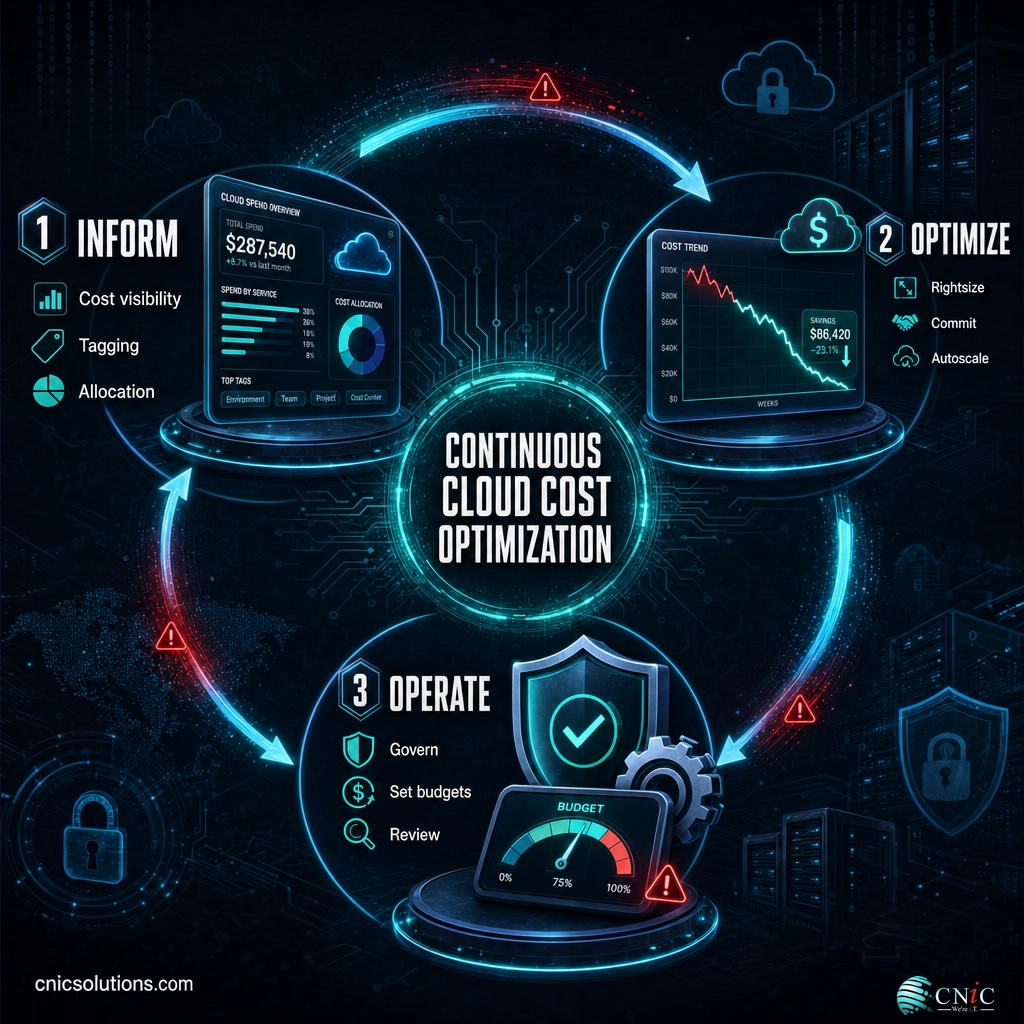
The first seven strategies will recover real money. This one keeps it recovered. Cloud environments change constantly: new services spin up, workloads shift, teams grow. A one-time cleanup delivers a one-time result, and the waste creeps back within months. The organizations that stay optimized treat cost as an ongoing, shared discipline, an approach known as FinOps.
What to do: Establish a FinOps practice that brings finance, engineering, and operations together around cloud spending. Set budgets and automated alerts, give engineers visibility into the cost of what they build, review spend on a regular cadence, and make cost a normal factor in architecture decisions rather than an afterthought. This shift is well underway across the industry: Flexera reports that 59% of organizations are expanding their FinOps teams.
Why this step matters: Optimization that depends on one person remembering to check is fragile. A culture and a process make the savings durable.
What success looks like: Cost is reviewed on a schedule, budgets and alerts catch overruns early, engineers factor cost into decisions by default, and your optimization gains hold steady instead of eroding.
Source: Flexera 2025 State of the Cloud Report
When to Bring in a Virtual CIO
Many of these strategies you can start on your own. But if you reach the point where cloud spending has become a real budget line, where multiple teams provision resources, where commitments and architecture decisions carry six-figure consequences, that is where outside expertise earns its keep. Analyzing usage across accounts, modeling commitment purchases, building a FinOps practice, and weighing repatriation are exactly the kind of strategic work most businesses do not have in-house.
This is a core function of a Virtual CIO: providing senior IT and financial strategy without the cost of a full-time executive. CNiC Solutions’ Virtual CIO services include cloud cost analysis, commitment planning, and FinOps governance, and our cloud solutions team can right-size and re-architect your environment so it costs less to run. It is the same cost-discipline mindset that guides sound IT budgeting across your whole technology stack.
Get a free cloud cost assessment
Troubleshooting Common Cloud Cost Problems
When cloud costs misbehave, the cause usually falls into a handful of familiar patterns. Here is how to diagnose and address the most common ones.
| Problem | Likely Cause | What to Do |
|---|---|---|
| Bill jumped with no obvious reason | A new resource, a scaled-up workload, or a data-transfer spike no one flagged | Use cost tools filtered by tag and date to isolate the change, then trace it to the owning team |
| Can’t tell which team is spending what | Missing or inconsistent tagging | Enforce a tagging policy and backfill tags on existing resources before optimizing further |
| Committed too much, now underusing it | Commitment purchase based on a temporary usage peak | Right-size future commitments to true baseline; use flexible Savings Plans over rigid reservations |
| Costs creep back after a cleanup | No ongoing process; optimization treated as one-time | Stand up a recurring review and automated alerts (the FinOps discipline in Strategy 8) |
| Storage costs keep climbing | Old data on premium tiers, orphaned snapshots, no lifecycle rules | Apply lifecycle policies, archive cold data, and schedule snapshot cleanup |

Maintain and Monitor
Cloud cost optimization is not a destination you arrive at once. The environments that stay lean are the ones that are watched. After your initial pass through these strategies, build a light but consistent routine to hold the gains.
- Review spend on a set cadence. A monthly cost review, even a short one, catches drift before it becomes a budget problem.
- Keep budgets and alerts live. Automated thresholds that notify the right people mean an anomaly gets caught in days, not at month-end.
- Revisit commitments and rightsizing quarterly. Workloads change; last quarter’s right size may be this quarter’s waste.
- Track a cost-efficiency metric. Cost per customer, per transaction, or per unit of work tells you whether spend is scaling healthily with the business. Flexera notes that cost efficiency has ranked as the top cloud metric for six consecutive years.
Ongoing management is precisely where a managed IT partner turns unpredictable, climbing cloud bills into a controlled, plannable expense, so the optimization work you do once keeps paying off month after month.
Frequently Asked Questions
What is cloud cost optimization?
How much can cloud cost optimization actually save?
What is the difference between waste elimination and efficiency improvement?
What is FinOps?
Should we move workloads off the cloud to save money?
About This Guide and Sources
The strategies described here (cost visibility and tagging, rightsizing, idle-resource cleanup, non-production scheduling, commitment-based pricing, autoscaling, storage-tier optimization, and FinOps governance) reflect standard, widely consistent guidance across the cloud and managed IT industry. Specific savings will vary by environment, provider, and how much waste and unoptimized spend a business begins with; figures here are presented as reference ranges and published maximums, not guarantees.
Cited data: worldwide public cloud spending forecast and growth from Gartner; wasted cloud spend (27%), the share of organizations calling cloud spend management their top challenge (84%), and FinOps team expansion (59%) from the Flexera 2025 State of the Cloud Report; and maximum discount figures for Reserved Instances, Savings Plans (up to 72%), and Spot Instances (up to 90%) from Amazon Web Services.



related posts
What Is a Hypervisor? Types and How They Work
October 7, 2026A hypervisor is software that lets a single physical computer run many separate virtual machines at…
What Is a Load Balancer? How It Keeps Applications Fast and Reliable
October 7, 2026A load balancer is a device or piece of software that sits in front of your…
What Is a Firmware Update and Why It Matters for Security
October 6, 2026A firmware update is a manufacturer-issued revision to the low-level software built into a device, such…
What Is a Human Firewall? Turning Employees Into Your Best Defense
October 6, 2026A human firewall is the group of employees who, through security awareness and good habits, act…