

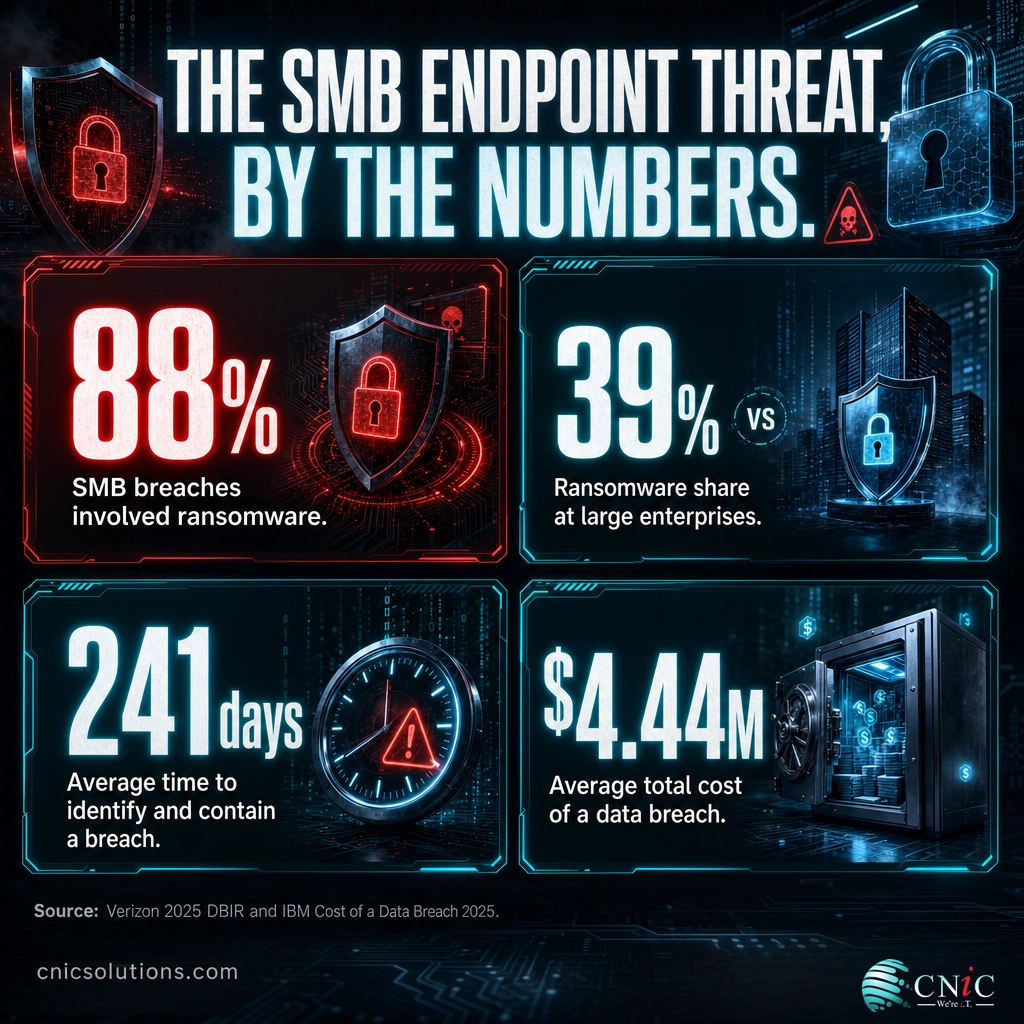
Choosing endpoint protection is one of the highest-stakes IT decisions a small business makes, because the laptop, desktop, and server are where most attacks actually land. Verizon’s 2025 Data Breach Investigations Report found that 88% of breaches at small and midsize businesses involved ransomware, versus 39% at large enterprises. Pick a platform your team cannot realistically run, and you own an expensive dashboard nobody watches. This guide ranks seven of the best endpoint protection and EDR options for SMBs in 2026 and shows you how to match one to your business.
- Small businesses are the target, not collateral. 88% of SMB breaches involved ransomware in the 2025 Verizon DBIR, more than double the 39% rate at large organizations.
- The best fit depends on who runs it. Businesses with an IT team can self-manage a platform like SentinelOne or CrowdStrike; businesses without one are usually better served by managed EDR, where deployment and 24/7 response are handled for them.
- Cheapest entry point: Microsoft Defender for Business at 3 dollars per user per month, and it is already bundled in Microsoft 365 Business Premium.
- Detection is only half the job. The average breach took 241 days to identify and contain in IBM’s 2025 report. An EDR alert at 2 a.m. only helps if someone acts on it.
- Overall pick for the typical SMB: fully managed EDR through an MSP, because the tool is rarely the problem, the staffing to respond to it is.
What’s in This Guide
- Why endpoints are the SMB battleground
- EPP vs. EDR vs. MDR, explained
- How we evaluated these solutions
The 7 best EDR solutions for SMBs:
- 1. CNiC Managed EDR
- 2. SentinelOne Singularity
- 3. CrowdStrike Falcon Go
- 4. Microsoft Defender for Business
- 5. Huntress Managed EDR
- 6. Bitdefender GravityZone
- 7. Sophos Intercept X
Make the decision:
Why Endpoints Are the SMB Battleground
An endpoint is any device that connects to your network and runs your business: employee laptops, office desktops, the receptionist’s workstation, the server in the closet, and increasingly the phones in people’s pockets. Every one of them is a door. Attackers do not need to breach a firewall if they can trick an employee into opening a malicious attachment on a laptop, and that laptop has full network access.
The data makes the priority clear. Ransomware appeared in 44% of all confirmed breaches in the 2025 Verizon DBIR, up sharply from 32% the year before. For small and midsize businesses the concentration is worse: 88% of SMB breaches involved ransomware or extortion malware, against 39% at large organizations. Attackers deliberately favor victims with slower patch cycles, thinner IT teams, and no one watching alerts overnight, a profile that describes most SMBs.
Share of Breaches Involving Ransomware: SMBs vs. Large Enterprises (2025 Verizon DBIR)
Source: Verizon 2025 Data Breach Investigations Report.
Detection speed is the other half of the story. IBM’s 2025 Cost of a Data Breach report found the average breach took 241 days to identify and contain, and the global average breach cost reached 4.44 million dollars. The last year IBM broke out organizations under 500 employees, the average cost still ran to 3.31 million dollars. For a business with thin margins, a single unmanaged ransomware event can be existential. That is the gap endpoint detection and response is designed to close: catching the intrusion early and containing it before it spreads.
If you want the full picture of how these attacks play out and what recovery costs, our 2026 ransomware statistics roundup and ransomware recovery data break down the numbers behind the headlines.
Source: Verizon 2025 Data Breach Investigations Report | IBM Cost of a Data Breach 2025
EPP vs. EDR vs. MDR, Explained
These three acronyms get used interchangeably in sales decks, but they describe different layers of protection. Getting them straight is the fastest way to avoid overpaying for capability you cannot use, or underbuying and leaving a gap.
EPP (Endpoint Protection Platform) is the prevention layer. It is the modern successor to antivirus: signature matching plus next-generation techniques like machine-learning file analysis and attack-surface reduction. Its job is to block known and obvious threats before they run. Every product in this guide includes EPP.
EDR (Endpoint Detection and Response) is the detection and investigation layer. Instead of only asking “is this file known to be bad,” EDR watches behavior across the device, spots the patterns of an attack in progress, records a timeline of what happened, and gives a responder the tools to isolate the machine and reverse the damage. EDR assumes something will eventually get past prevention and prepares you to catch it.
MDR (Managed Detection and Response) is not a different tool. It is EDR plus people. A provider deploys and tunes the EDR platform, then a security operations team monitors the alerts 24/7 and responds on your behalf. MDR exists because the hardest part of endpoint security for a small business is not buying the software; it is having a trained human awake and watching when an alert fires at 2 a.m. on a Saturday.
The plain-English version: EPP tries to stop the attack. EDR catches and contains the attack that slips through, but someone has to watch it. MDR is EDR with that someone included. A business with a capable IT team can run EDR itself; a business without one usually needs the managed layer to get any value from the alerts. For a deeper walkthrough, see our guide to managed detection and response (MDR).
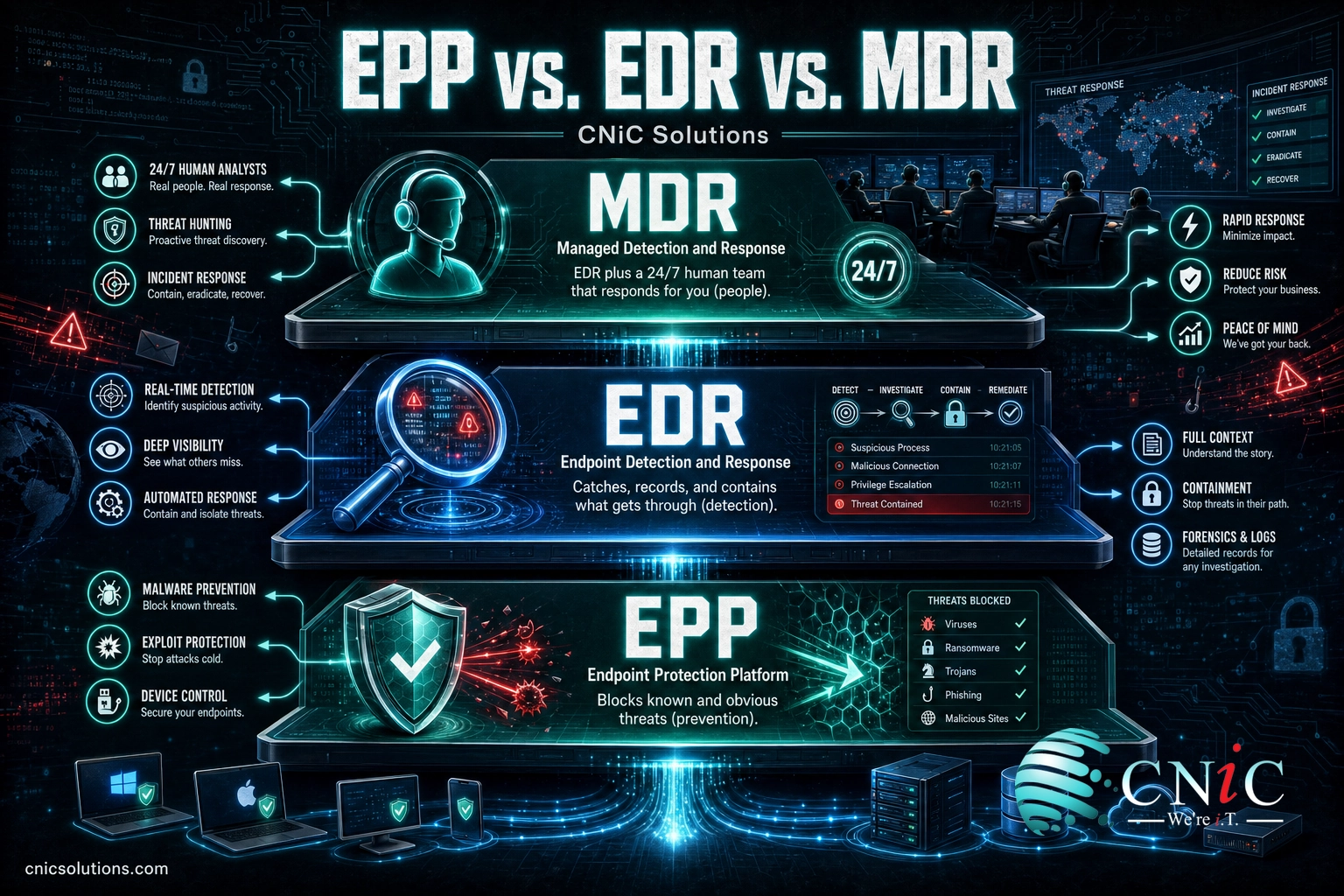
Source: CISA guidance on endpoint detection and response | NIST computer security glossary
How We Evaluated These Solutions
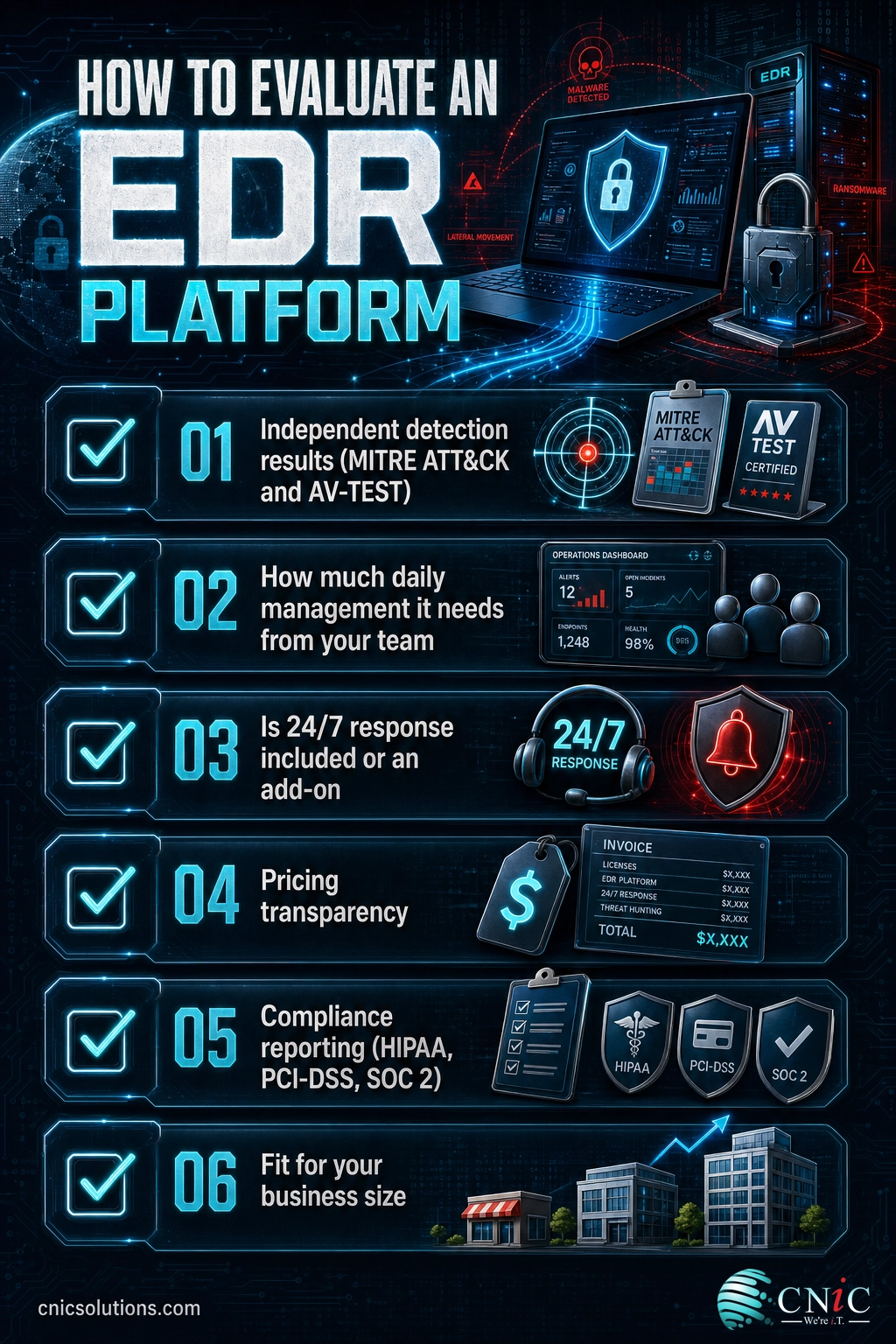
A “best of” list is only useful if every option is judged the same way. We scored each platform against six criteria that reflect what actually determines success for a small business, not just what looks good on a spec sheet.
- Threat detection and response depth. Independent results from MITRE ATT&CK evaluations and AV-TEST, plus the quality of investigation and rollback tooling. Prevention is table stakes; catching what gets through is the differentiator.
- SMB deployment and ease of management. How much time and expertise the platform demands day to day. A tool that needs a full-time analyst is a poor fit for a 25-person company.
- Managed 24/7 response. Whether around-the-clock human monitoring and response is built in, available as an add-on, or absent entirely. An alert nobody sees does nothing.
- Pricing transparency. Whether pricing is published and predictable, or quote-only. SMBs need to budget with confidence.
- Compliance reporting. The audit logs, reports, and controls that support HIPAA, PCI-DSS, and SOC 2 obligations for regulated businesses.
- Fit for business size. How well the product scales down to a small team without enterprise overhead.
Scores in each entry are on a 10-point scale and reflect editorial assessment against these criteria for the SMB buyer specifically. A platform can be excellent for a Fortune 500 security team and still score lower here if it overwhelms a small business. The full data sources are listed in the methodology section.

1 CNiC Managed EDR
Best for: Small and midsize businesses with no dedicated security team that want detection and 24/7 response fully handled.
CNiC Solutions is not another EDR product to add to your to-do list; it is the managed layer that makes any of the tools below actually work for a business without security staff. CNiC deploys a proven, independently tested EDR engine on your endpoints, tunes it to your environment, and backs it with round-the-clock monitoring and response. The distinction matters: the products further down this list are software you are responsible for running, while managed EDR is the outcome, threats caught and contained, delivered as a service.
For most SMBs this is the honest answer to “which EDR should I buy,” because the platform is rarely the failure point. The failure point is a well-configured tool firing an alert on a Saturday night with no one on staff to see it. That is exactly the gap a managed provider fills, alongside the compliance reporting that regulated businesses in healthcare, legal, and finance need.
Pros
- Deployment, tuning, and updates are handled for you, so protection is live without an internal project.
- 24/7 human monitoring and response included, not sold as a separate tier.
- Built on independently tested EDR engines rather than a single proprietary black box.
- Compliance-ready reporting for HIPAA, PCI-DSS, and SOC 2 obligations, plus Virtual CIO guidance to plan ahead.
Cons (fit considerations)
- Pricing is scoped to your environment rather than a flat published per-seat number, so you request a quote.
- Businesses that already employ a full security team may prefer to license and run an EDR tool directly for maximum in-house control.
- Best suited to organizations that want a partner relationship, not a self-checkout software purchase.
| Criterion | Score | Notes |
|---|---|---|
| Detection & response depth | 9 / 10 | Tier-1 EDR engine plus human-led investigation and containment. |
| SMB deployment & ease | 10 / 10 | Fully done-for-you; no internal expertise required. |
| Managed 24/7 response | 10 / 10 | Around-the-clock monitoring and response included. |
| Pricing transparency | 7 / 10 | Custom-scoped quote rather than a public per-seat price. |
| Compliance reporting | 9 / 10 | Reporting aligned to HIPAA, PCI-DSS, and SOC 2, with vCIO support. |
If you would rather have endpoint protection run for you than run it yourself, that is what CNiC’s managed cybersecurity program is built to do.
Explore CNiC managed cybersecurity
2 SentinelOne Singularity
Best for: Businesses with in-house IT that want autonomous, AI-driven detection with one-click rollback.
SentinelOne’s Singularity platform is one of the strongest self-managed EDR engines on the market and has been named a Leader in the Gartner Magic Quadrant for Endpoint Protection Platforms for five consecutive years, including the 2025 evaluation. Its calling card is autonomous response: the agent can detect, block, and automatically remediate a threat on the device without waiting for a human, and its rollback feature can reverse ransomware changes on Windows machines. For a business that has someone to own the console, it is a genuinely capable platform.
Pros
- Autonomous, on-device detection and remediation that works even when a machine is offline.
- Ransomware rollback on supported Windows endpoints.
- Consistent top-tier results in independent testing and Gartner recognition.
Cons (fit considerations)
- Getting full value assumes someone on staff can tune policies and triage alerts.
- 24/7 human response requires the separate Vigilance MDR add-on, which raises the price.
- Pricing is quote-based, which makes quick budgeting harder for a small team.
| Criterion | Score | Notes |
|---|---|---|
| Detection & response depth | 10 / 10 | Autonomous detection, remediation, and rollback; top independent results. |
| SMB deployment & ease | 7 / 10 | Powerful, but assumes an owner for the console. |
| Managed 24/7 response | 7 / 10 | Available via the Vigilance MDR add-on, not included by default. |
| Pricing transparency | 6 / 10 | Quote-based; no simple public per-seat price for SMBs. |
| Compliance reporting | 8 / 10 | Strong logging and reporting for regulated environments. |
Source: SentinelOne Singularity Endpoint official page | 2025 Gartner Magic Quadrant for Endpoint Protection Platforms
3 CrowdStrike Falcon Go
Best for: Growing SMBs that want cloud-native protection backed by leading threat intelligence.
CrowdStrike has been named a Leader in the Gartner Magic Quadrant for Endpoint Protection Platforms six times running, and its Falcon Go tier packages that technology specifically for small businesses with published, self-service pricing. The agent is lightweight, the platform is cloud-native so there is no on-premises server to maintain, and CrowdStrike’s threat intelligence is among the most respected in the industry. For a business that expects to grow, starting on the same platform enterprises trust is a reasonable bet.
Pros
- Lightweight single agent with strong prevention and EDR in one console.
- Falcon Go offers transparent, self-service pricing aimed at small businesses.
- Industry-leading threat intelligence and a clear upgrade path as you scale.
Cons (fit considerations)
- The lower tiers give you the tool, not a team; fully managed response is the higher-cost Falcon Complete tier.
- The breadth of the platform can feel like more than a very small shop needs on day one.
- Advanced modules add up quickly if you expand beyond the entry bundle.
| Criterion | Score | Notes |
|---|---|---|
| Detection & response depth | 9 / 10 | Excellent prevention and EDR; elite threat intelligence. |
| SMB deployment & ease | 8 / 10 | Cloud-native, lightweight agent; quick to roll out. |
| Managed 24/7 response | 7 / 10 | Full managed response is the higher Falcon Complete tier. |
| Pricing transparency | 8 / 10 | Falcon Go publishes SMB pricing; upper tiers are quote-based. |
| Compliance reporting | 8 / 10 | Solid reporting and audit support. |
Source: CrowdStrike Falcon Go official page | CrowdStrike 2025 Gartner MQ announcement
4 Microsoft Defender for Business
Best for: Microsoft 365 businesses that want capable EDR at the lowest entry price.
Microsoft was also named a Leader in the 2025 Gartner Magic Quadrant for Endpoint Protection Platforms, and Defender for Business brings enterprise-grade EDR down to a small-business price point. It is listed at 3 dollars per user per month as a standalone plan for organizations up to 300 users, and it is already included in Microsoft 365 Business Premium at 22 dollars per user per month. If your business runs on Microsoft 365, you may be paying for it already. The catch is that Microsoft gives you a strong tool and a console, not a team to watch it.
Pros
- The lowest published entry price of any option here, and bundled with Business Premium.
- Native integration with Microsoft 365 identity, email, and device management.
- Real EDR capabilities, including attack-surface reduction and automated investigation.
Cons (fit considerations)
- No built-in security operations team; alerts still need someone to monitor and act on them.
- Full value depends on correct configuration, which many SMBs never complete.
- Best experienced inside the Microsoft ecosystem; mixed environments see less benefit.
| Criterion | Score | Notes |
|---|---|---|
| Detection & response depth | 8 / 10 | Strong EDR, especially against Microsoft-targeted attacks. |
| SMB deployment & ease | 8 / 10 | Simple if you already run Microsoft 365; setup still matters. |
| Managed 24/7 response | 5 / 10 | No included SOC; response is on you or a partner. |
| Pricing transparency | 10 / 10 | Published at 3 dollars per user per month; bundled in Business Premium. |
| Compliance reporting | 8 / 10 | Ties into Microsoft Purview and compliance tooling. |
Source: Microsoft Defender for Business official page | Microsoft Defender for Business pricing FAQ
5 Huntress Managed EDR
Best for: SMBs that want a managed response layer, often on top of Microsoft Defender.
Huntress built its business around a simple truth: most small companies have security tools they cannot staff. Huntress Managed EDR combines lightweight behavioral detection with a 24/7 security operations center that investigates and responds for you, and it is designed to complement Microsoft Defender rather than replace it. For a business that already has Defender but no one watching it, Huntress is a purpose-built way to add the human layer without a full enterprise platform.
Pros
- Included 24/7 human threat investigation and response, not an add-on tier.
- Designed to layer on top of Microsoft Defender, extending value you already pay for.
- SMB-focused, with straightforward onboarding and clear reporting.
Cons (fit considerations)
- Positioned as a managed layer, so it is less of a standalone enterprise EPP than SentinelOne or CrowdStrike.
- Deepest value comes when paired with Microsoft Defender rather than used entirely alone.
- Feature breadth is narrower by design; it does one job well rather than everything.
| Criterion | Score | Notes |
|---|---|---|
| Detection & response depth | 8 / 10 | Behavioral detection plus expert human investigation. |
| SMB deployment & ease | 9 / 10 | Built for small businesses; fast to onboard. |
| Managed 24/7 response | 9 / 10 | SOC-backed response included as standard. |
| Pricing transparency | 8 / 10 | Predictable per-endpoint managed pricing. |
| Compliance reporting | 7 / 10 | Good reporting; less deep than full enterprise suites. |
Source: Huntress Managed EDR official page
6 Bitdefender GravityZone
Best for: Value-focused businesses with some in-house IT that want strong prevention.
Bitdefender GravityZone consistently earns high marks in independent detection testing and packages prevention, EDR, and optional managed services in a platform that scales from very small businesses upward. If you have internal IT resources who can own endpoint protection and you do not need everything bundled with a managed service, GravityZone delivers a lot of capability for the money. Its prevention engine is a genuine strength.
Pros
- Excellent prevention and detection scores in independent lab tests.
- Competitive, transparent pricing with small-business bundles.
- Scales from a handful of endpoints to larger deployments on one platform.
Cons (fit considerations)
- 24/7 managed response is a separate MDR add-on, not included in the core product.
- The console rewards some hands-on management to get the most from it.
- Best suited to teams that want to run the tool themselves rather than hand it off.
| Criterion | Score | Notes |
|---|---|---|
| Detection & response depth | 9 / 10 | Top-rated prevention; capable EDR tooling. |
| SMB deployment & ease | 8 / 10 | Approachable, with small-business bundles. |
| Managed 24/7 response | 6 / 10 | Available as an MDR add-on rather than standard. |
| Pricing transparency | 8 / 10 | Published, competitive SMB pricing. |
| Compliance reporting | 7 / 10 | Solid reporting for common compliance needs. |
Source: Bitdefender GravityZone official page | Bitdefender small business pricing
7 Sophos Intercept X
Best for: Businesses that prioritize anti-ransomware protection with an option to add managed response.
Sophos has been named a Leader in the Gartner Magic Quadrant for Endpoint Protection Platforms for sixteen consecutive reports, and Intercept X is built with a heavy emphasis on stopping ransomware specifically through its CryptoGuard technology. Sophos also offers one of the more mature MDR services in the market, so a business can start with the tool and add managed response later. The unified Sophos Central console is a plus for organizations that also use Sophos firewalls.
Pros
- Dedicated anti-ransomware technology that detects and rolls back malicious encryption.
- Mature, well-regarded Sophos MDR service available as an upgrade.
- Single console across endpoint and Sophos network products.
Cons (fit considerations)
- The strongest value comes when you also adopt other Sophos products.
- Managed response is an added service on top of the endpoint license.
- Pricing generally runs through partners rather than fully self-service.
| Criterion | Score | Notes |
|---|---|---|
| Detection & response depth | 9 / 10 | Strong anti-ransomware focus; capable EDR. |
| SMB deployment & ease | 7 / 10 | Best within a broader Sophos environment. |
| Managed 24/7 response | 8 / 10 | Mature Sophos MDR available as an upgrade. |
| Pricing transparency | 7 / 10 | Typically partner-quoted rather than self-service. |
| Compliance reporting | 7 / 10 | Good reporting through Sophos Central. |
Source: Sophos Intercept X official page | Sophos MDR official page
Side-by-Side Comparison
Here is how the seven options compare on the criteria that matter most to a small business. Remember that the right choice depends less on the highest total and more on which row matters most for your situation: if you have no security staff, the managed-response column outweighs everything else.
| Solution | Best for | 24/7 managed response | Pricing model | Overall |
|---|---|---|---|---|
| CNiC Managed EDR | SMBs with no security team | Included | Custom quote | 9.0 |
| SentinelOne Singularity | Teams wanting autonomous EDR | Add-on (Vigilance) | Quote-based | 8.4 |
| CrowdStrike Falcon Go | Growing, cloud-native SMBs | Higher tier (Complete) | Published (Go tier) | 8.2 |
| Microsoft Defender for Business | Microsoft 365 shops on a budget | Not included | 3 dollars/user/mo | 7.8 |
| Huntress Managed EDR | Adding a managed layer to Defender | Included | Per-endpoint managed | 8.2 |
| Bitdefender GravityZone | Value-focused teams with IT | Add-on (MDR) | Published SMB tiers | 7.6 |
| Sophos Intercept X | Anti-ransomware priority | Add-on (Sophos MDR) | Partner-quoted | 7.6 |
The pattern is clear. Every product on this list is genuinely good at detection. Where they diverge is who does the responding, and for a small business without a night-and-weekend security shift, that is the whole ballgame.
How to Choose the Right EDR for Your Business
Skip the feature-checklist trap. Before you compare platforms, answer three questions about your own business, because they determine which option fits.
1. Who will watch the alerts? If the honest answer is “no one after 5 p.m.,” a self-managed tool is a liability no matter how good its detection is. Choose managed EDR, or budget for a partner to run whatever tool you pick.
2. Are you already in an ecosystem? If your business runs on Microsoft 365, Defender for Business may already be paid for and is the natural starting point, ideally with a managed layer on top. Existing Sophos or Bitdefender customers get similar consolidation benefits.
3. What are your compliance obligations? Healthcare, legal, and financial firms need audit logs, retention, and reporting that hold up under HIPAA, PCI-DSS, or SOC 2 review. Confirm the platform, or your managed provider, produces the evidence your auditor will ask for. A tested backup and recovery plan belongs in this conversation too, because EDR reduces the odds of an incident but never eliminates them.
Red flags when evaluating EDR vendors:
- “Set it and forget it” claims. No endpoint tool is truly hands-off. If a vendor implies you never have to think about it again, ask specifically who monitors alerts and when.
- Signature-only antivirus dressed up as EDR. If it cannot show behavioral detection, an investigation timeline, and isolation or rollback, it is antivirus with a new label.
- No independent test results. Reputable platforms cite MITRE ATT&CK evaluations or AV-TEST scores. Vague “99.9%” marketing figures with no source are a warning sign.
- Response sold separately but never explained. “Managed” should mean a named team with a stated response time, not a ticket queue. Get the service-level commitment in writing.
- Per-endpoint prices that hide the real cost. Ask what onboarding, data retention, and higher response tiers actually add before you sign.
If weighing all of this is more than your team has time for, that is exactly the kind of decision our managed IT and security team handles for Texas businesses every day, from selecting the right platform to running it around the clock.
Frequently Asked Questions
What is the difference between antivirus and EDR?
Do small businesses really need EDR, or is antivirus enough?
How much does EDR cost for a small business?
What is managed EDR (MDR) and when should an SMB choose it?
How do I evaluate an endpoint protection platform?
Methodology and Sources
How this guide was built
Each platform was assessed against six criteria weighted for the small and midsize business buyer: threat detection and response depth, SMB deployment and ease of management, availability of 24/7 managed response, pricing transparency, compliance reporting, and fit for business size. Scores are editorial judgments intended to guide fit, not laboratory measurements. Detection assessments reference independent evaluations from MITRE ATT&CK and AV-TEST and recognition in the 2025 Gartner Magic Quadrant for Endpoint Protection Platforms. Product capabilities and pricing were drawn from each vendor’s official documentation as of 2026; verify current pricing on the vendor pages linked above before purchasing.
Threat and cost statistics are sourced from primary industry research:
- Verizon 2025 Data Breach Investigations Report: SMB ransomware share and overall breach data.
- IBM Cost of a Data Breach 2025: average breach cost and time to identify and contain.
- 2025 Gartner Magic Quadrant for Endpoint Protection Platforms: vendor Leader positioning.
- CISA endpoint detection and response guidance: definitions and best practice.
CNiC Solutions is a Houston-based managed IT and cybersecurity provider. Where this guide recommends managed EDR, it reflects CNiC’s own service model, disclosed for transparency.



related posts
What Is ZTNA (Zero Trust Network Access)?
November 3, 2026Zero Trust Network Access (ZTNA) is a security service that grants a verified user access to…
Zero Trust Statistics for 2026: Adoption, Maturity, and Breach Impact
November 3, 2026Zero trust has become the default security strategy on paper, but not yet in practice. Okta's…
What Is Zero Trust Security? A Guide for Small Businesses
November 2, 2026Zero Trust security is a cybersecurity model built on one rule: never trust, always verify. Instead…
What Is XDR (Extended Detection and Response) and How Does It Protect…
November 2, 2026Extended detection and response (XDR) is a security platform that collects and correlates threat data from…