

A disaster recovery plan is the documented, tested playbook that gets your systems, applications, and data back online after a ransomware attack, a hardware failure, a flood, or plain human error. The businesses that recover quickly are not luckier than the ones that do not. They wrote the plan, assigned the roles, and tested it before they needed it. This guide walks through the exact seven-step process to build one, gives you a template outline you can adapt today, and shows you how to set the two numbers, RTO and RPO, that every recovery decision depends on.
Downtime is not a hypothetical. When systems go dark, revenue stops, staff sit idle, customers leave, and the clock on any compliance or contractual obligation keeps running. A disaster recovery plan is how you shorten that outage from days to hours, or from hours to minutes, and how you make sure the recovery is a rehearsed procedure rather than a panic.
The most common myth: “We have backups, so we have disaster recovery.” Backups copy your data so it can be restored later. A disaster recovery plan restores your running operations: the systems, the order they come back in, the people who do the work, and the target times they have to hit. Backups are one ingredient. The plan is the recipe. Having the first without the second is the gap most outages expose.
Before You Begin
You do not need specialized software to start. You need a few hours of focused time, input from the people who run each part of the business, and honesty about what you actually depend on. Here is what helps to have ready:
- Who to involve: an owner or executive sponsor, whoever manages IT (internal or your provider), and a representative from each core business function.
- What to gather: a rough inventory of your systems and applications, where your data lives, and your current backup arrangement.
- Estimated time: a workable first draft takes about a week of part-time effort for a small business; the business impact analysis is the longest part.
- Skill level: the analysis and decisions are business-led and non-technical; only the recovery strategy and testing steps need IT expertise.
Key Takeaways
- A plan recovers operations, not just data. Backups are necessary but not sufficient on their own.
- Two numbers drive every decision: RTO (how fast a system must be back) and RPO (how much data you can afford to lose).
- Start with a business impact analysis. You cannot prioritize recovery until you know what an outage of each system actually costs.
- Use the 3-2-1 backup rule as the floor: three copies, two media types, one off-site.
- An untested plan is an assumption. Testing is the step that turns a document into a real capability.
What’s in This Guide
- The 7-Step Overview
- Step 1: Set the Scope and Build Your Recovery Team
- Step 2: Run a Business Impact Analysis
- Step 3: Set RTO and RPO for Each Critical System
- Step 4: Identify Risks and Add Preventive Controls
- Step 5: Choose Your Recovery Strategies
- Step 6: Write the Plan (the Template)
- Step 7: Test, Train, and Maintain It
- When to Call a Professional
- Troubleshooting Common Problems
- Frequently Asked Questions
The 7-Step Overview
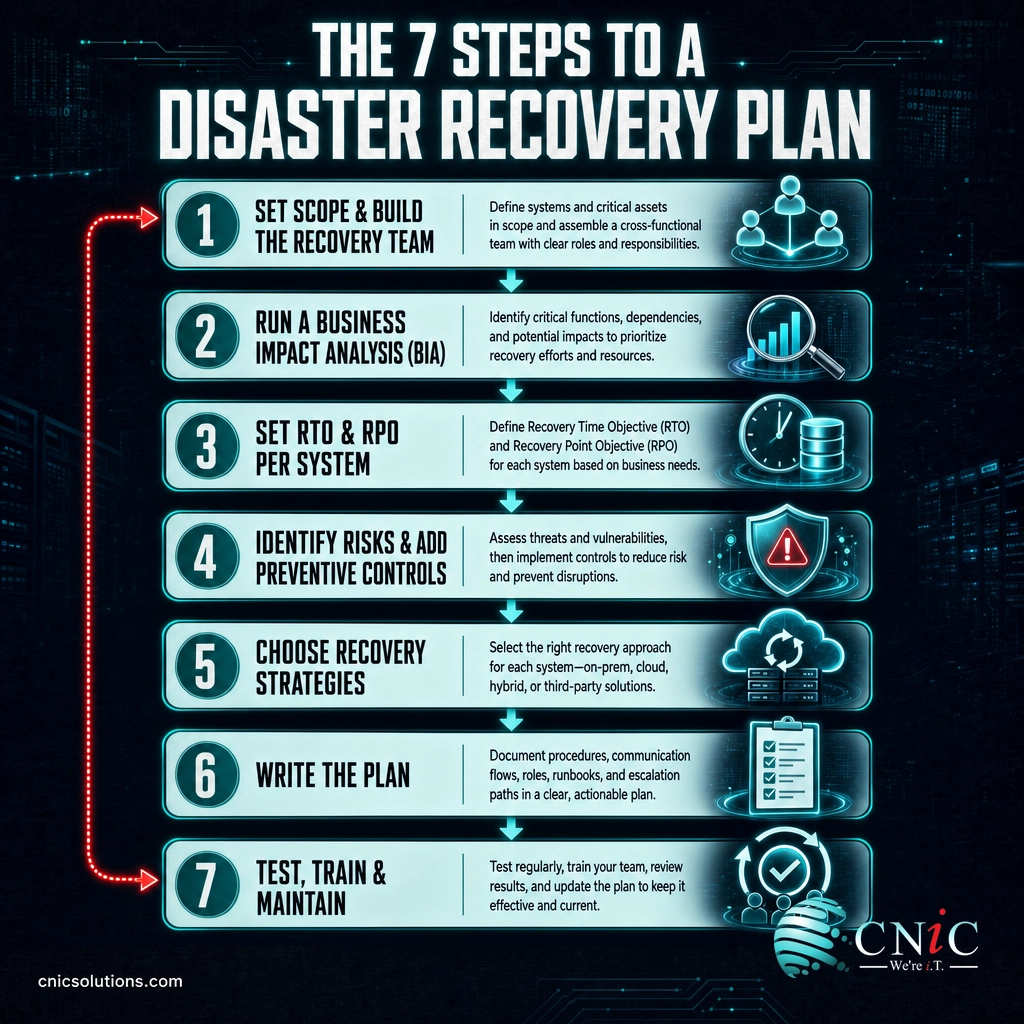
The process below follows the same backbone that federal guidance uses. NIST Special Publication 800-34, the government’s contingency planning guide, lays out a seven-step process, and the national preparedness program at Ready.gov builds an IT recovery plan the same way: understand the business first, set recovery objectives, then design the technology to meet them. You do not need to be a federal agency to use the model. It scales down cleanly to a small or midsize business.
Each step below tells you what to do, why it matters, and what success looks like, with the common mistakes flagged so you can skip them.
Source: NIST SP 800-34 Rev. 1, Contingency Planning Guide | Ready.gov IT Disaster Recovery Plan guidance
1Set the Scope and Build Your Recovery Team
What to do: Before anything technical, write one or two paragraphs that define what the plan covers and who is responsible. Name the locations, systems, and data types in scope. Then assign the roles: who has the authority to declare a disaster and activate the plan, who leads the technical recovery, who handles communication with staff and customers, and who owns each critical system. Give every role a named backup person.
Why it matters: Disasters do not wait for the right people to be available. If only one person knows how to fail over the phone system and they are unreachable, the plan stalls exactly when speed matters most. Clear ownership and named alternates remove that single point of failure from the people side, the same way backups remove it from the data side.
What success looks like: A one-page section that anyone in the company could read and know, within seconds, what the plan covers, who to call, and who decides.
Common mistake: Listing job titles instead of names, or naming people without a backup. “The IT Manager” is not a plan when the IT Manager is on a plane. Use real names and a real alternate for every role, and include after-hours contact details.
2Run a Business Impact Analysis
What to do: A business impact analysis (BIA) is where you find out what actually matters. Work through each business process (invoicing, order fulfillment, patient scheduling, payroll, whatever your business runs on), and for each one document the systems and data it depends on, and what a disruption costs per hour in lost revenue, idle staff, penalties, and reputation. Then rank the processes from most to least time-critical.
Why it matters: You cannot recover everything at once, and you should not try. The BIA tells you the order. Ready.gov is explicit that recovery priorities and objectives for IT should be set during the business impact analysis, and that IT recovery priorities must line up with the business functions they support. Skip this step and you end up guessing, usually by restoring whatever is easiest instead of whatever is most important.
What success looks like: A ranked list of business processes with their supporting systems and an hourly cost of downtime for each. This single table becomes the foundation for every decision that follows.
Not every disaster is a breach, but the exercise is the same: put a number on the impact. If you want to see how those breach costs break down by cause and industry, our companion report on the average cost of a data breach shows why fast, tested recovery has become a financial priority, not just an IT one.
Source: Ready.gov Business Impact Analysis guidance | IBM Cost of a Data Breach Report
3Set RTO and RPO for Each Critical System
What to do: For every system on your ranked list, set two targets:
- RTO (Recovery Time Objective): the maximum acceptable time the system can be down before the impact becomes unacceptable. It answers, how fast must this be back?
- RPO (Recovery Point Objective): the maximum acceptable amount of data loss, measured in time. An RPO of one hour means you can tolerate losing up to the last hour of data. It answers, how much data can we afford to lose?
Why it matters: RTO and RPO translate the business priorities from your BIA into technical requirements. A system with a four-hour RTO and a fifteen-minute RPO needs a very different recovery strategy, and budget, than one that can be down for two days. Setting these numbers per system is what lets you spend money where it counts instead of over-protecting everything equally.
What success looks like: Every critical system has an RTO and an RPO written next to it, agreed by the business, not just IT. These are business decisions about acceptable loss, so the owner or executive sponsor should sign off on them.
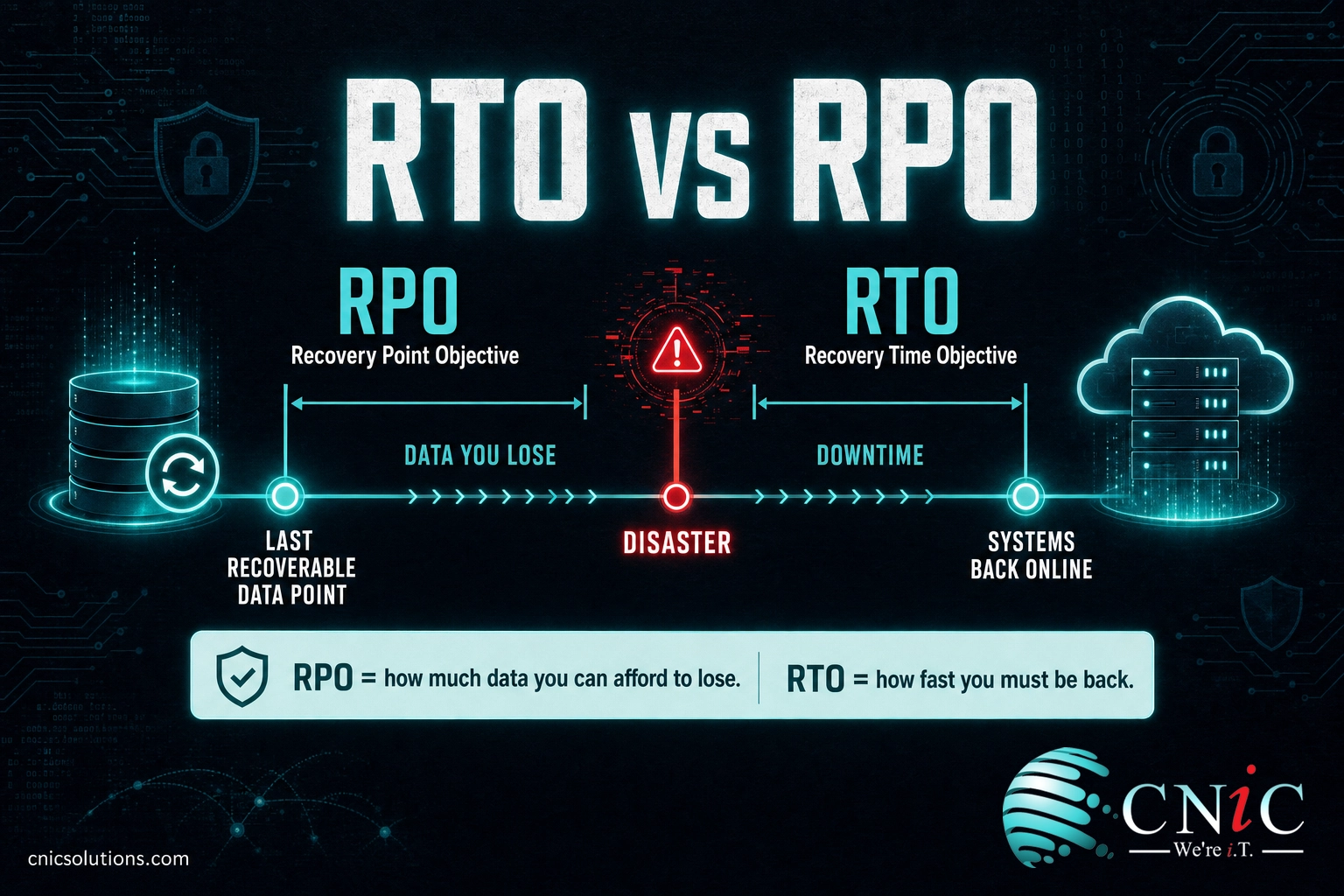
How to picture it: Put the disaster in the middle of a timeline. RPO sits in the past, at the most recent recoverable point, so the gap between it and the disaster is the data you lose. RTO sits in the future, at the moment you are back up. The tighter you need each one, in minutes rather than hours, the more capable and typically more expensive the recovery solution has to be.
4Identify Risks and Add Preventive Controls
What to do: List the disruptions most likely to hit you: ransomware and other cyberattacks, hardware and power failures, cloud or vendor outages, accidental deletion, fire, flooding, and severe weather. For each, note how likely it is and how much of your environment it would affect. Then add preventive controls that lower the odds or the blast radius: multi-factor authentication and email filtering against ransomware, uninterruptible power supplies and redundant hardware against equipment failure, and monitoring that catches problems early.
Why it matters: The cheapest disaster is the one that never happens. NIST places preventive controls as a formal step in the process for a reason: every threat you reduce or contain up front is one your recovery procedures never have to handle under pressure. Prevention and recovery are partners, not alternatives.
What success looks like: A short risk register that pairs each realistic threat with the control that reduces it, and flags the gaps you have decided to accept or address.
Ransomware deserves special attention because it targets the very backups a recovery plan relies on. Modern attacks try to encrypt or delete backups before triggering, which is why an isolated or immutable copy matters so much. If cyber threats are your primary concern, layered protection against ransomware and data loss is the preventive half of the equation your recovery plan assumes is in place.
See how CNiC hardens businesses against ransomware
5Choose Your Recovery Strategies
What to do: Now match a recovery method to each system based on its RTO and RPO. Start with the backup foundation, then layer on faster recovery for the systems that need it.
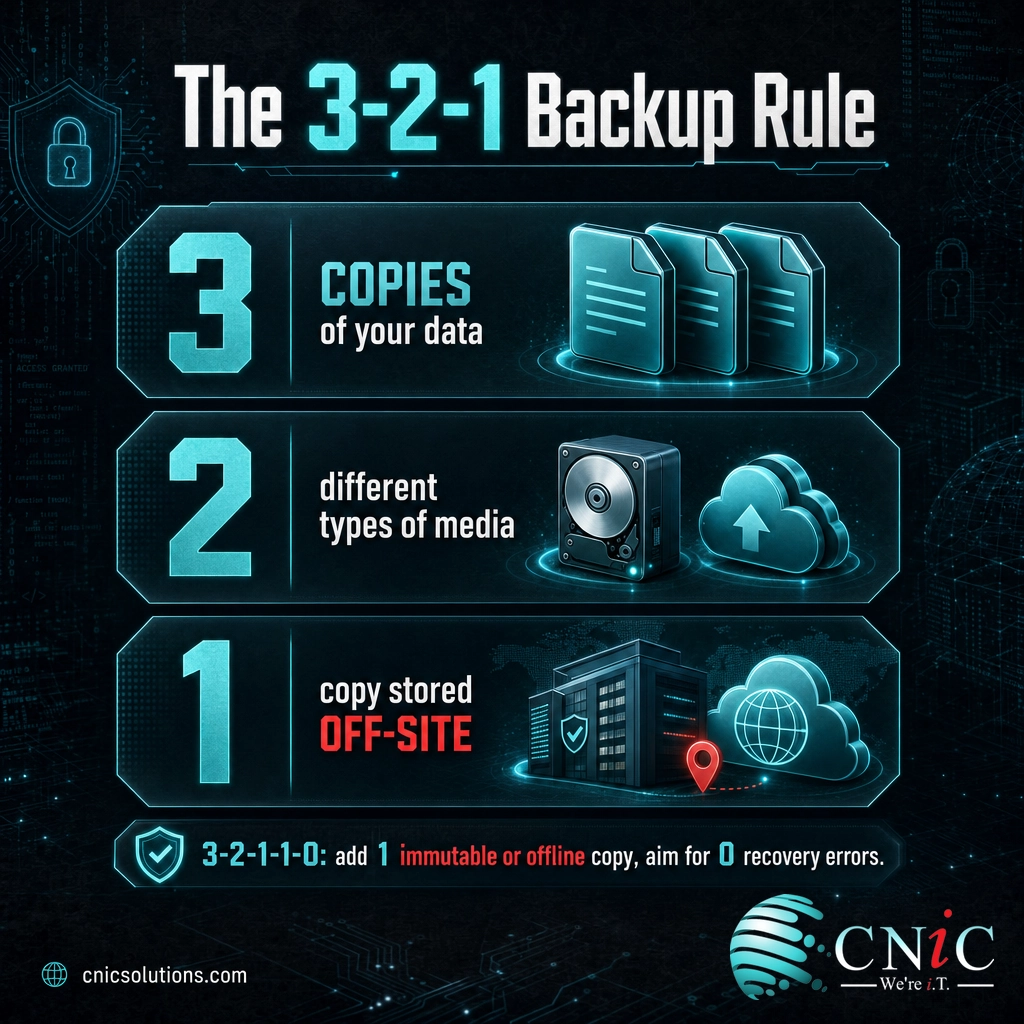
The baseline for backup is the 3-2-1 rule: keep three copies of your data, on two different types of media, with one copy stored off-site. A modern extension, sometimes written 3-2-1-1-0, adds one immutable or offline copy and a goal of zero errors on recovery testing. This protects against a single point of failure, so no one event, whether hardware failure, ransomware, or a site disaster, can take out every copy at once.
For systems that cannot wait for a restore from backup, you need a standby environment to fail over to. Options range from a warm standby site to cloud-based recovery. Disaster Recovery as a Service (DRaaS) has made that standby capability affordable for smaller businesses by delivering it from the cloud. Our guide on how cloud-based failover works explains where it fits and when a business needs it.
Why it matters: This is where RTO and RPO earn their keep. A tight RTO forces you toward a standby environment; a loose one lets you rely on backups alone. Matching strategy to objective is how you avoid both extremes: paying for enterprise failover on systems that do not need it, and discovering too late that a backup-only approach cannot meet a four-hour RTO.
What success looks like: Every critical system has a named recovery method that can realistically hit its RTO and RPO, plus a defined communication method for reaching staff and customers when your normal channels are down.
Common mistake: Treating replication as recovery. Continuously copying data to another location is not the same as being able to bring the systems up there, in the right order, with the applications talking to each other. If your recovery strategy has never been failed over end to end, you have a copy, not a capability. That gap is what Step 7 exists to close.

6Write the Plan (the Template)
What to do: Turn everything above into a single document that someone could actually follow during a stressful outage. A good disaster recovery plan reads like a runbook, not a policy binder. Use the template outline below as your section structure, and fill each section from the work you did in Steps 1 through 5.
| Plan Section | What Goes In It |
|---|---|
| 1. Purpose and Scope | What the plan covers, which sites and systems, and what it does not cover (from Step 1). |
| 2. Roles and Contacts | Named recovery team, their responsibilities, backups for each role, and after-hours contact details. |
| 3. Activation Criteria | What counts as a disaster, who has authority to declare one, and how the plan is triggered. |
| 4. Critical Systems and Objectives | The ranked system list from your BIA, each with its RTO and RPO (Steps 2 and 3). |
| 5. Recovery Procedures | Step-by-step instructions to recover each critical system, in priority order, including dependencies. |
| 6. Backup and Data Details | Where backups live, how often they run, retention, and how to restore them (Step 5). |
| 7. Communication Plan | How to reach staff, customers, and vendors when normal systems are down. |
| 8. Testing and Maintenance | The test schedule, who runs each test, and how the plan gets updated (Step 7). |
| 9. Appendices | Network diagrams, vendor SLAs and support numbers, licenses, and account recovery details. |
Why it matters: A plan that lives only in one person’s head, or in a document too dense to use, fails the moment it is needed. The recovery procedures in Section 5 are the heart of it: they should be specific enough that a competent person who is not the usual system owner could follow them.
What success looks like: A finished document following the outline above, stored where you can reach it even if your primary systems are down, meaning a printed copy and an off-network digital copy, not only a file on the server the disaster just took offline.
Tip: Keep the recovery procedures modular, one short procedure per system, so a single change (a new server, a migrated application) means updating one section, not rewriting the whole plan. Modular procedures are far more likely to stay current, which is the difference between a plan that works and a plan that is quietly out of date.
7Test, Train, and Maintain It
What to do: Schedule regular tests, ranging from a tabletop walkthrough (the team talks through the response to a scenario) to a full failover of a critical system to its recovery environment. Train the team on their roles so the first time someone runs the procedure is not during a real disaster. After every test, record what failed and fix it. Then set a cadence to review and update the plan whenever systems, staff, or priorities change.
Why it matters: This is the step that separates a real recovery capability from a document that describes one. NIST includes testing, training, and maintenance as formal steps because plans decay: people leave, systems change, and assumptions quietly stop being true. The failures you find in a controlled test are the ones you do not discover during an actual outage, when they cost the most.
What success looks like: A tested plan with a documented test date, a list of issues found and resolved, and a scheduled next review. Aim to test at least annually and after any major change, and to test your most critical systems more often than that.
Common mistake: Writing the plan, filing it, and never touching it again. An untested, unmaintained plan gives a false sense of security that is often worse than knowing you are exposed, because it stops you from asking whether you are actually protected. Put the next test date on a calendar before you close the document.
Source: NIST SP 800-34 Rev. 1, Contingency Planning Guide
When to Call a Professional
You can build the framework of a disaster recovery plan yourself, and the business-led steps (scope, BIA, RTO and RPO) are best done in-house because you know your operations. Bring in a professional when you reach the technical steps and any of these apply:
- You need a standby or cloud recovery environment engineered to hit a tight RTO, and you are not confident your current backups can meet it.
- You have compliance obligations (HIPAA, PCI-DSS, and similar) that require a documented, tested recovery capability with evidence.
- Your internal team does not have the time or bandwidth to test the plan properly and keep it current.
- You have never actually failed a critical system over to its recovery environment and verified it comes back correctly.
This is the point where most small and midsize businesses partner with a managed IT provider. CNiC Solutions helps businesses design and test the technical half of the plan through data backup and recovery services, setting realistic RTO and RPO targets, building the right mix of backup and failover, and proving the plan works with real tests rather than assumptions. For businesses weighing where recovery fits in a broader technology strategy and budget, our Virtual CIO services align continuity planning with overall business risk.
Talk to a Virtual CIO about your recovery strategy
Troubleshooting Common Problems
Most disaster recovery plans fail in a handful of predictable ways. Here is how to spot and fix the usual ones.
| Problem | Why It Happens | The Fix |
|---|---|---|
| “We restored the data but the system still won’t run.” | You backed up data but not the configuration, dependencies, or application state. | Recover full systems in tests, not just files; document dependencies and boot order in Section 5. |
| Recovery takes far longer than the RTO. | The RTO was set without a strategy that can actually meet it, usually backup-only for a system that needs failover. | Re-check each RTO against its strategy (Step 5); add standby or cloud recovery where the gap is real. |
| Backups exist but are corrupted or incomplete. | Backups were never restore-tested, or ransomware reached them. | Test restores regularly; keep one immutable or off-line copy per the 3-2-1 rule. |
| No one knew what to do during the outage. | The plan was written but never trained or tested. | Run a tabletop exercise; store the plan off-network so it is reachable when systems are down. |
| The plan is out of date. | Systems changed but the plan was never updated. | Use modular procedures and a scheduled review after every major change. |
A disaster recovery plan is only as strong as the backup and recovery capability behind it. If you want the technical half built, tested, and proven rather than assumed, CNiC can help you get there.
Get help building and testing your recovery plan
Frequently Asked Questions
What is a disaster recovery plan?
What are the main steps in building a disaster recovery plan?
What is the difference between a disaster recovery plan and a business continuity plan?
How often should you test a disaster recovery plan?
What is the 3-2-1 backup rule?
About This Guide and Sources
The seven-step process in this guide (scope and policy, business impact analysis, recovery objectives, preventive controls, recovery strategies, plan documentation, and testing and maintenance) follows the model in NIST Special Publication 800-34 Rev. 1 and the IT disaster recovery guidance published by Ready.gov, adapted for small and midsize businesses. The outage-cost figure (54% of significant outages costing more than $100,000, and roughly one in five exceeding $1 million) is from the Uptime Institute Annual Outage Analysis 2024. The $4.44 million average data breach cost is the global figure from the IBM Cost of a Data Breach Report 2025. RTO and RPO are standard, industry-consistent definitions; any example values (such as a four-hour RTO or a one-hour RPO) are illustrations of the concept, not benchmarks. Every business should set its own RTO and RPO through its own business impact analysis.



related posts
Zero Trust Statistics for 2026: Adoption, Maturity, and Breach Impact
November 3, 2026Zero trust has become the default security strategy on paper, but not yet in practice. Okta's…
What Is ZTNA (Zero Trust Network Access)?
November 3, 2026Zero Trust Network Access (ZTNA) is a security service that grants a verified user access to…
What Is XDR (Extended Detection and Response) and How Does It Protect…
November 2, 2026Extended detection and response (XDR) is a security platform that collects and correlates threat data from…
What Is Zero Trust Security? A Guide for Small Businesses
November 2, 2026Zero Trust security is a cybersecurity model built on one rule: never trust, always verify. Instead…