

Cloud computing lets a business rent computing power, storage, and software over the internet instead of buying, housing, and maintaining its own servers. That single shift changes how companies budget for technology, protect their data, support remote teams, and grow without a hardware project every time demand rises. This guide explains the service models, deployment options, real costs, security responsibilities, and a practical migration path, so you can decide what belongs in the cloud and what does not, without the jargon.
- The market is enormous and growing fast. Gartner forecasts worldwide public cloud spending will reach $723.4 billion in 2025, up from $595.7 billion in 2024, a 21.5 percent jump in a single year.
- There are three service models (IaaS, PaaS, SaaS) and four deployment models (public, private, hybrid, multicloud). Most businesses end up with a blend, not a single choice.
- Cloud is not automatically cheaper. Flexera found that about 27 percent of cloud spend is wasted and that 84 percent of organizations name managing cloud cost as their top challenge.
- Security is shared, and the risk is on your side. Gartner has projected that through 2025, 99 percent of cloud security failures will be the customer’s fault, almost always from misconfiguration.
- Downtime is expensive. ITIC found a single hour of downtime now costs more than $300,000 for over 90 percent of mid-size and large enterprises, which is why cloud resilience matters.
- Migration works best in phases. Move low-risk workloads first, prove the process, then tackle the systems your business runs on.
- The cloud does not remove the need for IT strategy. It shifts the work from maintaining hardware toward securing, optimizing, and governing what you use.
What’s in This Guide
- What Cloud Computing Actually Means for a Business
- The Three Service Models: IaaS, PaaS, and SaaS
- The Four Deployment Models: Public, Private, Hybrid, and Multicloud
- The Business Case: What the Cloud Actually Delivers
- What the Cloud Costs, and Where the Money Leaks
- Cloud Security and the Shared Responsibility Model
- Backup, Disaster Recovery, and Business Continuity
- How to Choose the Right Cloud Setup for Your Business
- Migrating to the Cloud: A Practical Roadmap
- Common Cloud Mistakes to Avoid
- What to Do Next: Your Implementation Roadmap
- Related Resources
- Everything at a Glance: Summary Table
- Frequently Asked Questions
- Methodology and Sources
1What Cloud Computing Actually Means for a Business
Strip away the marketing and cloud computing is a simple trade. Instead of buying servers, installing them in a closet or a rented rack, and paying staff to keep them running, you rent that same computing capacity from a provider who operates it at massive scale and delivers it to you over the internet. You reach your files, applications, and systems through a browser or an app, and you pay for what you use, the way you pay for electricity rather than building your own power plant.
The National Institute of Standards and Technology, whose definition remains the reference point for the whole industry, describes cloud computing as on-demand access to a shared pool of configurable computing resources that can be provisioned quickly and released with minimal management effort. In plain terms: you get the capacity you need, when you need it, and you stop paying when you no longer need it. That elasticity is the feature that on-premises hardware can never match, because a physical server you bought in January is a fixed cost whether you use 10 percent of it or 100 percent.
For a small or midsize business, the practical effect is a change in how technology feels. New employees get accounts instead of waiting for a machine to be provisioned. A seasonal spike in orders is handled by adding capacity for a few weeks rather than buying a server you will underuse for the other 11 months. A failed hard drive in the office stops being a crisis, because the data lives in a data center built with redundancy your business could never justify on its own. This is not a niche approach anymore. It is the default, and the spending numbers show how completely the market has moved.
None of this means the cloud is right for every workload. A machine that controls a piece of factory equipment, a system bound by strict data-residency rules, or an application that needs microsecond response times may belong on-premises or in a private setup. The goal of this guide is not to move everything to the cloud. It is to help you decide, workload by workload, where each system runs best, and to run the cloud portion well.
Source: NIST Definition of Cloud Computing (SP 800-145) | Gartner public cloud spending forecast
If you want a hand mapping which systems should move and which should stay, a managed IT partner can run that assessment with you.
2The Three Service Models: IaaS, PaaS, and SaaS
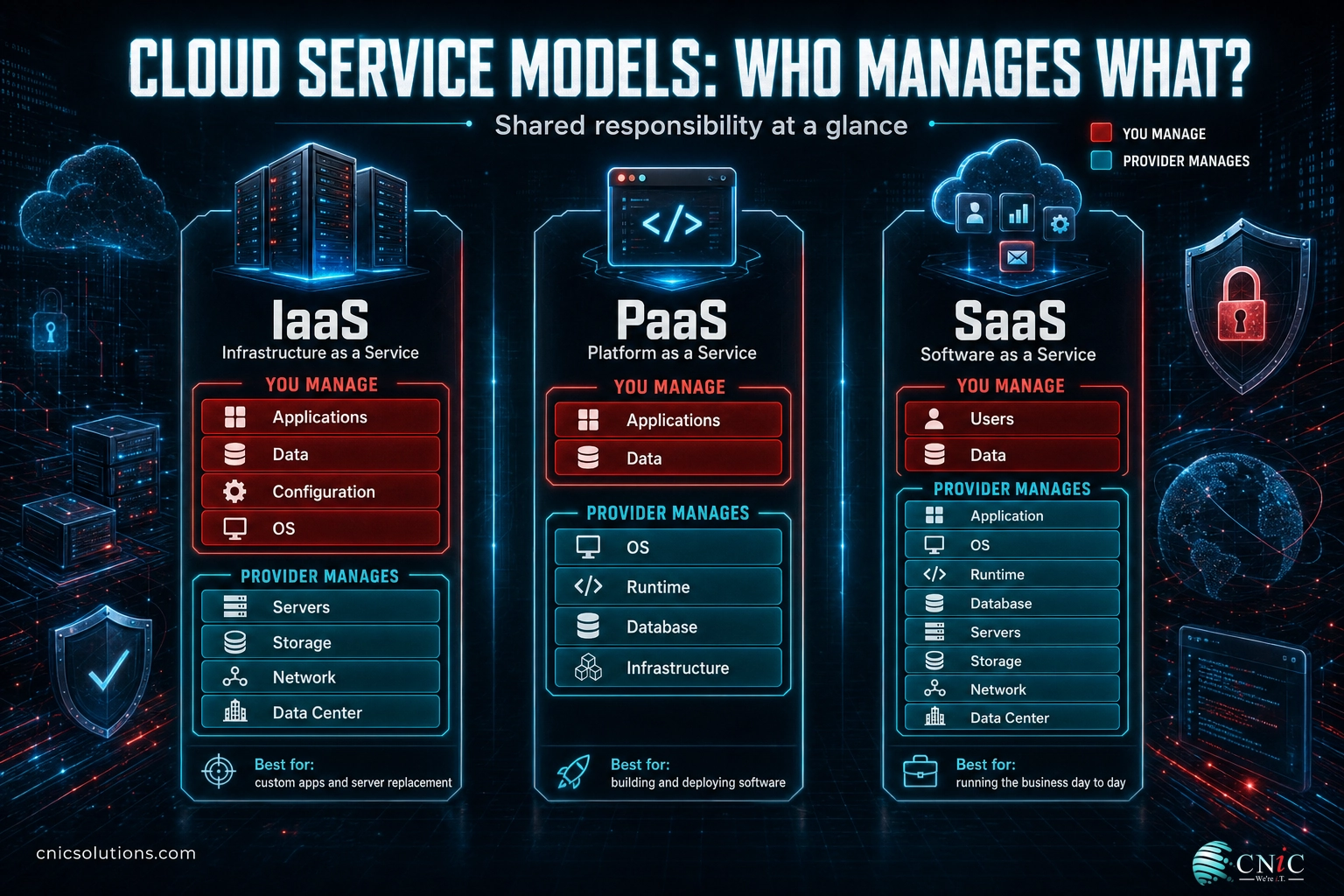
Cloud services come in three layers, and understanding them removes most of the confusion buyers run into. The difference between the three comes down to how much the provider manages and how much you manage. Think of it as the spectrum between renting an empty piece of land, renting a finished workshop, and renting a fully staffed office where you just walk in and work.
Infrastructure as a Service (IaaS) is the raw layer. You rent virtual servers, storage, and networking, then install and manage your own operating systems, applications, and data on top. It gives you the most control and flexibility, and it is what businesses use to run custom applications, host virtual desktops, or replace an aging server room without rewriting their software. The provider keeps the hardware alive; everything above it is yours.
Platform as a Service (PaaS) sits in the middle. The provider hands you a ready-made environment for building, testing, and running applications, including the operating system, database, and development tools, so your team never touches the underlying servers. It is aimed at companies that build software, because it removes the plumbing and lets developers focus on the product. Most small businesses use PaaS indirectly, through the vendors who build the software they buy.
Software as a Service (SaaS) is the layer nearly every business already lives in. It is finished software delivered over the internet with nothing to install and no servers to maintain, from email and file storage to accounting, CRM, and payroll. If your company uses Microsoft 365, Google Workspace, QuickBooks Online, or a hosted phone system, you are already a cloud business. SaaS is usually billed per user per month, which makes it easy to predict and easy to scale up or down as headcount changes.
| Model | You manage | Provider manages | Best for | Everyday example |
|---|---|---|---|---|
| IaaS | OS, apps, data, configuration | Servers, storage, network, data center | Custom apps, virtual desktops, server replacement | Hosted virtual servers |
| PaaS | Apps and data only | OS, runtime, database, infrastructure | Building and deploying software | Managed app and database platforms |
| SaaS | Your users and your data | Everything else | Running the business day to day | Email, CRM, accounting, file sharing |
A useful rule of thumb: the higher up the stack you go (IaaS to PaaS to SaaS), the less you manage and the faster you move, but the less you can customize. Most businesses run a mix: SaaS for everyday tools, IaaS for the handful of systems that need to be theirs. There is no prize for using only one layer.
The layer you choose changes who is responsible for security, updates, and uptime, which is why picking the right model per workload matters more than picking a single provider. A managed IT partner can help you match each system to the right layer instead of forcing everything into one.
Source: NIST cloud service model definitions (SP 800-145)
To keep your everyday systems running and supported, businesses lean on outside expertise.
3The Four Deployment Models: Public, Private, Hybrid, and Multicloud
Service models describe what you rent. Deployment models describe where it runs and who else shares the space. This is the second decision, and it usually matters more for security, compliance, and cost than the branding of any single provider.
Public cloud means your resources run on infrastructure shared with other customers, isolated by software, and operated by a large provider. It offers the deepest scale and the lowest entry cost, and it is where most SaaS and a great deal of business infrastructure now lives. Private cloud means dedicated infrastructure used by a single organization, either in your own data center or hosted for you. It costs more but gives tighter control, which appeals to businesses with strict regulatory or data-residency requirements. Hybrid cloud combines the two, keeping sensitive workloads private while using public cloud for scale and flexibility. Multicloud means using more than one public provider at once, often to avoid lock-in, meet regional needs, or because different teams adopted different tools over time.
The data shows that the blended approach has become the norm rather than the exception. Very few organizations run everything on a single public cloud, and even fewer keep everything private. Flexera’s research puts hybrid adoption near 70 percent, with the average organization already spread across more than two public cloud providers. That reality has a cost: complexity. Every additional environment adds another place to secure, another bill to watch, and another set of controls to configure correctly.
Myth: “Multicloud automatically means resilience.” Spreading workloads across providers only improves resilience if each environment is configured, monitored, and secured properly. Flexera notes that a lot of multicloud adoption is unintentional, inherited from mergers or siloed teams rather than a deliberate plan. Unmanaged multicloud multiplies risk instead of reducing it. Resilience comes from architecture and governance, not from the number of logos on the invoice.
For most small and midsize businesses, the honest answer is a modest hybrid setup: SaaS tools in the public cloud, a private or on-premises home for the one or two systems that truly need it, and a clear plan for how they connect. The right networking foundation underneath makes that connection reliable, which is where a solid business networking design earns its keep.
Source: Flexera 2025 State of the Cloud Report
To keep every environment connected and reliable, start with the underlying network: See Networking Services
4The Business Case: What the Cloud Actually Delivers
The strongest reasons to move to the cloud are not technical. They are operational and financial, and they show up in how quickly a business can respond to change. Four benefits do most of the work: predictable costs, elastic scale, resilience, and access from anywhere.
Predictable, flexible cost. On-premises technology forces large purchases every few years, followed by long stretches of underused capacity. The cloud converts that into an operating expense you can adjust monthly. You add capacity for a busy season and release it afterward, and you stop writing five-figure checks for hardware you hope will last. This does not guarantee savings, a point the cost section covers in detail, but it does change cash flow from lumpy to smooth.
Elastic scale. Growth stops being a hardware project. When you hire ten people, open a location, or launch a product, capacity is a setting rather than a purchase order and a two-week wait. That speed is the difference between capturing demand and apologizing for downtime during your busiest week.
Resilience and uptime. Serious providers run redundant power, cooling, hardware, and networks across multiple facilities, which is why cloud-hosted systems often achieve availability a single office server cannot. This matters because downtime is not an inconvenience, it is a bill. ITIC’s survey of more than 1,000 firms found that for over 90 percent of mid-size and large enterprises, a single hour of downtime now costs more than $300,000, with 41 percent putting the figure between $1 million and more than $5 million per hour.
Worldwide public cloud spending, 2024 vs 2025 forecast (USD billions)
Source: Gartner, November 2024. Public cloud end-user spending grew 21.5 percent year over year.
Access from anywhere. Cloud systems reach any authorized user on any connection, which is what made hybrid and remote work practical at scale. A team can collaborate on the same files from three locations, and a laptop lost in an airport is a replaceable device rather than a data loss event, because the data was never only on that machine. Paired with the right security controls, this flexibility is a genuine advantage, not just a convenience.
The uptime math, made concrete. If an hour of downtime costs a mid-size business even the low end of ITIC’s range, a single afternoon outage can erase a month of IT budget. Cloud resilience, backed by a tested recovery plan, is one of the few technology investments that pays for itself the first time it prevents an outage.
Source: ITIC 2024 Hourly Cost of Downtime Report | Gartner spending forecast
For the infrastructure layer that keeps cloud systems available and performing, businesses turn to See Infrastructure Management
5What the Cloud Costs, and Where the Money Leaks
Here is the uncomfortable truth vendors gloss over: the cloud is not automatically cheaper, and for undisciplined organizations it can cost more than the hardware it replaced. The technology that makes scaling effortless also makes overspending effortless. When adding capacity is a single click, unused capacity accumulates quietly, and the bill climbs. Understanding where the money goes is what separates a smart cloud strategy from an expensive one.
Costs fall into a few buckets. SaaS is usually billed per user per month, which is easy to forecast but easy to over-buy when former employees keep licenses or teams pay for overlapping tools. Infrastructure is billed by compute time, storage volume, and data transfer, which is powerful but unforgiving: an oversized server left running around the clock, or a test environment nobody shut down, bills every hour. Data transfer fees, often called egress, surprise many first-time buyers when they move large volumes of data out of a provider.
The industry-wide numbers are sobering. Flexera’s research found that managing cloud spend is the single biggest challenge organizations report, that roughly a quarter of all cloud spend is wasted outright, and that organizations exceed their cloud budgets by a meaningful margin year after year. Waste on this scale is not a rounding error, it is a strategy problem, and it is fixable.
Cloud cost reality (share of organizations)
Source: Flexera 2025 State of the Cloud Report.
| Cost driver | How you pay | Where waste hides | How to control it |
|---|---|---|---|
| SaaS licenses | Per user, per month | Unused seats, duplicate tools | Quarterly license review; deprovision on offboarding |
| Compute (servers) | Per hour or per second | Oversized and always-on instances | Right-size; schedule non-production shutdowns |
| Storage | Per GB, per month | Old snapshots, orphaned volumes | Lifecycle rules; tiered storage classes |
| Data transfer (egress) | Per GB moved out | Chatty apps, cross-region traffic | Architect for locality; model egress before you commit |
| Backup and DR | Storage plus retention | Over-retention of everything | Match retention to real recovery needs |
The fix is not to fear the cloud, it is to govern it. Right-sizing resources to real demand, shutting down what runs only during business hours, cleaning up forgotten storage, and reviewing the bill every month typically recovers a large share of that wasted spend. A Virtual CIO or managed provider treats cost optimization as an ongoing discipline rather than a once-a-year panic, and that discipline is usually what turns cloud from a cost worry into a genuine saving.
Source: Flexera: 84% struggle to manage cloud spend
To put ongoing cost discipline and technology strategy behind your cloud, businesses use Get Virtual CIO Guidance
6Cloud Security and the Shared Responsibility Model
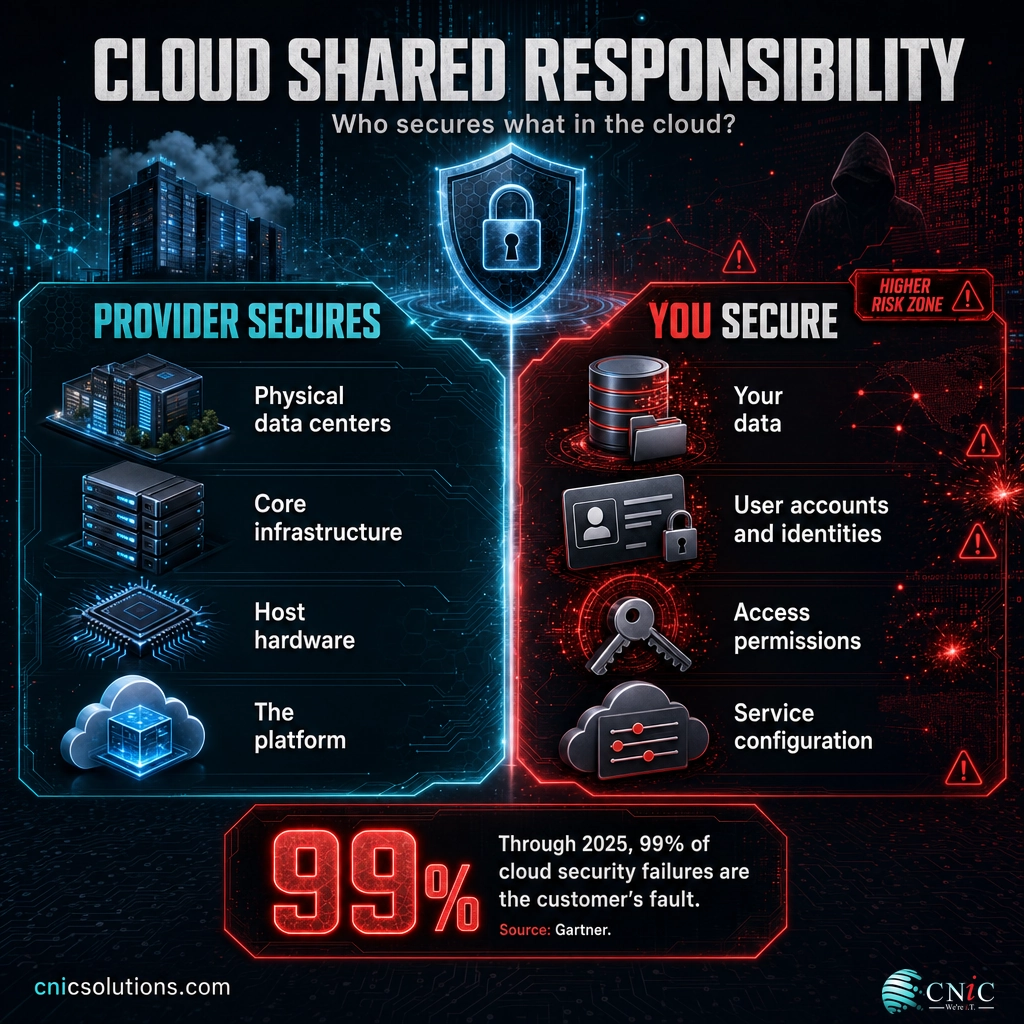
The biggest misunderstanding in cloud security is the belief that moving to the cloud hands your security to the provider. It does not. It splits the job. Under the shared responsibility model, the provider secures the physical data centers and the core infrastructure, and you secure your data, your user accounts, your access permissions, and how each service is configured. The line between the two is exactly where most breaches happen.
The provider’s side is genuinely strong. Major clouds invest more in physical and platform security than almost any individual business could, with 24/7 monitoring, hardened facilities, and compliance certifications that would take a small company years to earn. The customer’s side is where things go wrong, usually not through sophisticated attacks but through simple mistakes: a storage bucket left public, a password reused across systems, an admin account without multifactor authentication, or a permission set far broader than the job requires.
The number every decision-maker should know: Gartner has projected that through 2025, 99 percent of cloud security failures will be the customer’s fault. The threat is rarely the provider being breached. It is your own configuration. That is empowering, because it means the biggest risk is the one you can directly control.
The financial stakes are documented. IBM’s Cost of a Data Breach research put the global average cost of a breach at $4.44 million in 2025, with the United States average far higher at $10.22 million. Breaches involving data spread across multiple environments, exactly the situation multicloud creates, were both the most expensive at $5.05 million and the slowest to contain, at 276 days on average. Complexity is not free, and it is not neutral. It raises both the odds and the cost of a bad day.
The practical response is a short list done consistently: multifactor authentication on every account, least-privilege access so people can reach only what they need, encryption for data at rest and in transit, continuous monitoring for misconfiguration, and regular reviews of who has access to what. None of this is exotic. It is discipline, and it is exactly the work a dedicated security practice handles so it does not fall through the cracks. The organizations that treat cloud security as an ongoing program, rather than a setup task, are the ones that stay off the breach reports.
Source: IBM Cost of a Data Breach Report 2025 | CISA Cloud Security Technical Reference Architecture
To close the configuration gap that causes almost every cloud breach, businesses rely on Strengthen Cloud Security
7Backup, Disaster Recovery, and Business Continuity
A common and dangerous assumption is that data in the cloud is automatically backed up. It is not. Cloud providers protect their infrastructure from failure, but they do not protect you from your own mistakes, from ransomware that encrypts your files, or from an employee who deletes the wrong folder. Under the shared responsibility model, your data is your responsibility, and that includes making sure a clean copy exists.
The distinction that matters is between backup and disaster recovery. Backup is a copy of your data you can restore if something is lost. Disaster recovery is the plan and capability to get your whole business running again after a serious disruption, measured by two questions: how much data can you afford to lose, and how long can you afford to be down. The cloud makes strong answers to both far more affordable than they used to be, because you no longer need a second physical site to hold your recovery environment.
The most reliable approach for most businesses is hybrid: keep a local copy for the fastest possible restore of everyday files, and keep a cloud copy offsite so a fire, flood, theft, or ransomware event at your office cannot take your only backup with it. This mirrors the long-standing 3-2-1 principle, three copies of your data, on two types of media, with one kept offsite, updated for a cloud world. It is simple, it is proven, and it is the difference between a bad afternoon and a closed business.
Test your recovery, do not just trust it. A backup you have never restored from is a hope, not a plan. Recovery testing on a regular schedule is what turns a backup policy into genuine business continuity. When downtime can cost a mid-size company more than $300,000 an hour, the value of a recovery you have actually rehearsed is hard to overstate.
Myth: “My SaaS provider backs up my data, so I am covered.” Most SaaS platforms operate on a shared responsibility basis too. They keep the service running, but recovering data you deleted, or restoring after an account compromise, is often on you, sometimes within a short retention window. Assume you need your own backup of business-critical SaaS data until the provider’s terms prove otherwise, in writing.
Building this properly means matching retention and recovery targets to how your business actually works, then automating it so it does not depend on someone remembering. That is the core of a dependable data protection and disaster recovery program, and it is one of the highest-return investments a cloud-reliant business can make.
Source: CISA guidance on backing up your data
To make sure a clean, tested copy of your data always exists, businesses set up Plan Backup and Recovery
8How to Choose the Right Cloud Setup for Your Business
There is no universal right answer, only the right answer for your business, your industry, and your risk tolerance. The way to reach it is to evaluate each workload against a consistent set of questions rather than moving everything by default or resisting everything out of habit. The best cloud strategy is deliberate, not accidental.
Start with the workload, not the provider. For each significant system, ask what it does, how sensitive its data is, what rules govern it, how much it needs to talk to other systems, and what happens to the business if it goes down. A customer database bound by industry regulation deserves a different home than an internal file share. A high-traffic public application has different needs than a back-office tool used by five people. Sorting your systems this way turns a vague migration into a clear, prioritized plan.
Industry context shapes the answer heavily. A medical practice weighs HIPAA obligations, a law firm weighs client confidentiality and privilege, an accounting firm weighs financial-data rules, and a manufacturer weighs uptime on systems tied to physical production. The cloud can serve all of them well, but the configuration, the controls, and sometimes the deployment model differ. This is where sector experience matters, and why guidance tuned to your field beats a generic checklist.
| If your priority is… | Lean toward | Because |
|---|---|---|
| Lowest entry cost and fastest scale | Public cloud / SaaS | Shared infrastructure and per-user billing minimize up-front spend |
| Strict data control or residency | Private or hybrid | Dedicated infrastructure keeps regulated data where you need it |
| A mix of regulated and general workloads | Hybrid | Sensitive systems stay private; everything else gains public-cloud flexibility |
| Avoiding dependence on one vendor | Multicloud (managed) | Spreads risk, but only pays off with disciplined governance |
| Maximum uptime on critical systems | Cloud with tested DR | Redundant infrastructure plus a rehearsed recovery plan |
A practical sequence: inventory your systems, classify each by sensitivity and criticality, match each to a service and deployment model, then design how they connect and how they are secured. Doing this on paper first is far cheaper than discovering the answer mid-migration. Industries with specific compliance needs, from healthcare to financial services, benefit most from planning before moving.
If mapping this out feels like a lot, that is exactly the kind of decision a Virtual CIO exists to make with you, translating business priorities into a technology plan you can actually execute.
Source: NIST Cybersecurity Framework
9Migrating to the Cloud: A Practical Roadmap
A cloud migration goes wrong the same way most technology projects go wrong: by trying to do too much at once, without a plan, and without a way back if something breaks. The businesses that migrate smoothly follow a phased approach, prove the process on low-risk systems, and keep the lights on throughout. Here is the sequence that works.
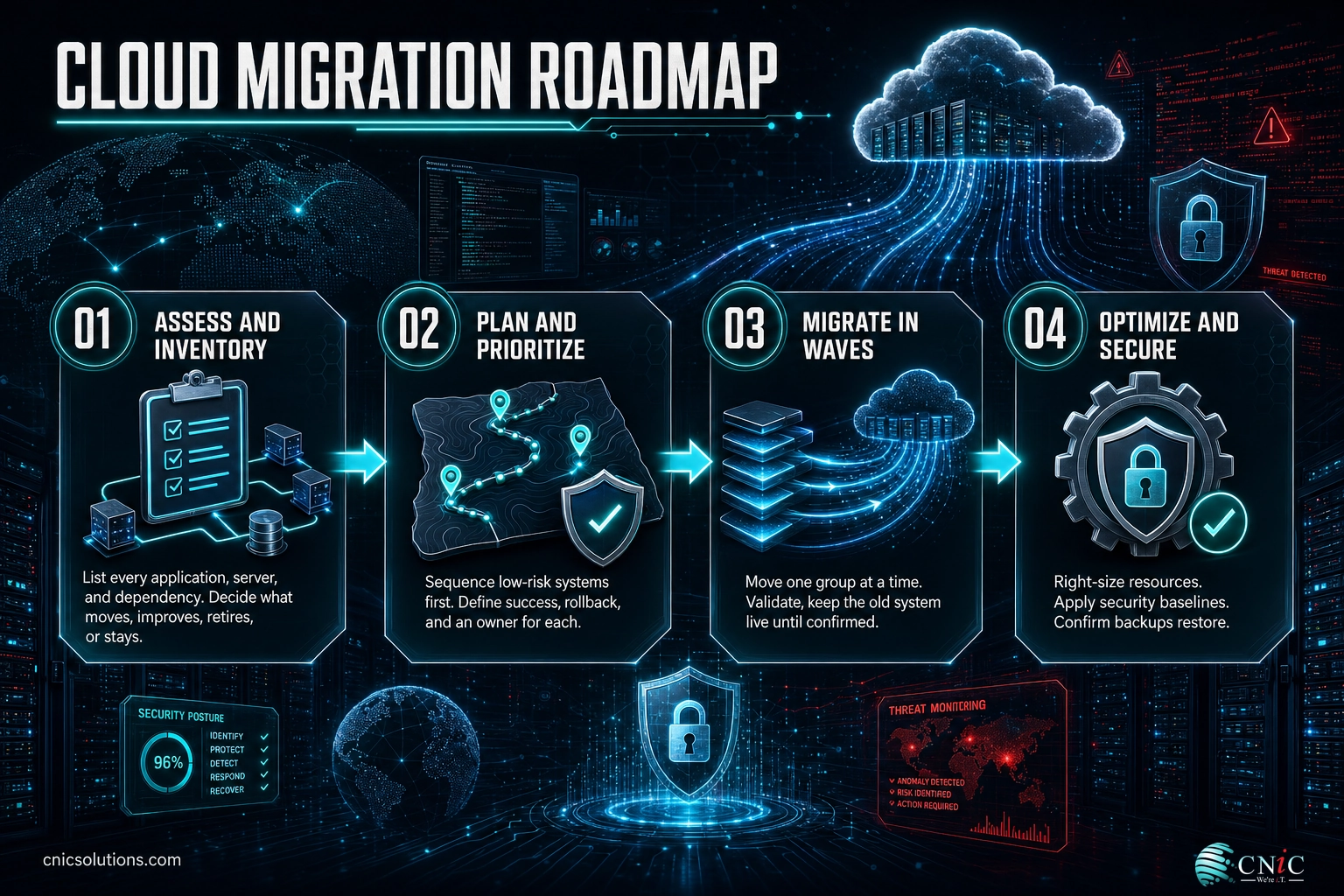
Phase 1, assess and inventory. You cannot move what you have not counted. List every application, server, data store, and dependency, and note how systems connect. This is also where you decide the fate of each workload: some will move as-is, some will move to a better cloud-native equivalent, some will be retired, and some will stay put. Skipping this phase is the single most common cause of migrations that stall or blow the budget.
Phase 2, plan and prioritize. Sequence the move so risk rises gradually. Start with low-stakes, low-dependency systems, email, file storage, a single SaaS tool, and save the systems your business runs on for after the process is proven. For each workload, define success, define rollback, and define who is responsible. A plan that names an owner and an exit for every step is a plan you can trust.
Phase 3, migrate in waves. Move one prioritized group at a time. Validate that each wave works, that data is intact, and that users can do their jobs before starting the next. Keep the old system available until the new one is confirmed, so a problem is an inconvenience rather than an outage. Communicate each wave to the people it affects before it happens, not after.
Phase 4, optimize and secure. Migration is the start, not the finish. Once systems are live, right-size resources to real usage, apply security baselines, confirm backups run and restore, and remove the temporary access and scaffolding the move required. This is where the wasted-spend and misconfiguration risks from earlier sections are either closed or left open. The best migrations budget time for this phase instead of declaring victory at cutover.
Keep a rollback option at every step. The safest migrations never burn a bridge until the new system has proven itself in real use. If a wave fails validation, you fall back, fix the issue, and try again, without downtime and without data loss. Momentum is good; recklessness is not.
Most small and midsize migrations run from a few weeks to a few months depending on complexity. Done in phases with a partner who has run the play before, it is a manageable project rather than a leap of faith. If your team is stretched thin, this is a natural place to bring in outside help so day-to-day operations do not suffer while the move happens.
Source: NIST cloud computing reference definitions
To run a phased migration without disrupting daily operations, businesses partner with See Infrastructure Management Resources
10Common Cloud Mistakes to Avoid
The gap between a cloud strategy that pays off and one that disappoints usually comes down to a handful of avoidable mistakes. None of them are exotic, and every one is preventable with attention and discipline. If you internalize this section, you have avoided most of the pain other businesses run into.
Treating the cloud as set-and-forget. The two biggest problems in this guide, wasted spend and misconfiguration, both come from the same root: nobody is actively minding the environment. The cloud rewards ongoing attention and punishes neglect. Idle resources keep billing and open settings stay open until someone looks.
Assuming the provider handles security and backup. As the security and backup sections showed, both are shared responsibilities, and the customer side is where failures cluster. Assume it is your job until the contract proves otherwise, and act accordingly.
Lifting and shifting without rethinking. Moving an oversized on-premises server to an equally oversized cloud instance carries the waste along for the ride. Migration is the moment to right-size, not to replicate old inefficiency at a new address.
Ignoring cost until the bill shocks you. With 84 percent of organizations naming cloud cost as their top challenge, the pattern is well established. Cost governance from day one is far easier than clawing back overspend after a year of drift.
The most expensive mistake of all: no exit and no recovery plan. Businesses that never test recovery, never document their setup, and never plan for a provider outage discover the gap at the worst possible moment. When a single hour of downtime can cost a mid-size company more than $300,000, the cost of preparation is trivial by comparison. Plan for the bad day before you have it.
The common thread is simple: the cloud is a powerful tool that needs a steady hand. The businesses that thrive treat it as an ongoing discipline covering cost, security, and resilience, not a project they finish and forget. That is precisely the work a managed IT partnership is built to carry.
Source: Flexera 2025 State of the Cloud Report | IBM Cost of a Data Breach 2025
11What to Do Next: Your Implementation Roadmap
Knowing the landscape is worth little without a first step. The table below turns this guide into an ordered plan, from the quick wins you can start this month to the strategic work that pays off over a year. You do not need to do all of it at once. You need to start, in order.
| Action | Priority | Timeline | Relevant service |
|---|---|---|---|
| Inventory every system and classify by sensitivity and criticality | High | Weeks 1–2 | Virtual CIO / Cloud Solutions |
| Enable multifactor authentication on every account | Critical | Week 1 | Cybersecurity Services |
| Review cloud and SaaS spend; cut idle and duplicate resources | High | Weeks 2–4 | Virtual CIO / Managed IT |
| Confirm backups exist for critical cloud and SaaS data, then test a restore | Critical | Weeks 2–4 | Data Backup and Recovery |
| Match each workload to the right service and deployment model | High | Month 1 | Cloud Solutions |
| Migrate low-risk workloads first, in waves, with rollback | Medium | Months 1–3 | Infrastructure Management |
| Right-size resources and apply security baselines post-migration | High | Months 2–4 | Infrastructure Management |
| Establish a monthly cost and security review cadence | Medium | Ongoing | Managed IT / Virtual CIO |
The first two rows cost little and remove the most common risks immediately. The rest build on that foundation. If you have the internal capacity, run this yourself. If your team is already busy keeping the business running, this is the natural moment to bring in a partner who does it every day.
To turn this roadmap into a running plan for your business, start with a conversation: Get a Free Consultation
12Related Resources
This guide is the hub for a wider set of cloud topics. Use these CNiC resources and pages to go deeper on the specific decision in front of you, and the authoritative external sources to verify the data for yourself.
Explore related CNiC topic areas:
- Cybersecurity and Threat Protection: the threats and defenses behind cloud security.
- Unified Communications and UCaaS Resources: moving voice and collaboration to the cloud.
Authoritative external sources:
13Everything at a Glance: Summary Table
| Topic | What to know | Why it matters |
|---|---|---|
| Definition | Renting computing over the internet, pay for what you use | Turns capital hardware cost into flexible operating cost |
| Market size | $723.4B forecast public cloud spend in 2025 | Shows the cloud is now the default, not the exception |
| IaaS | Rent raw servers and storage; you manage the rest | Most control, best for custom apps and server replacement |
| PaaS | Rent a ready environment to build and run apps | Speeds software development, no infrastructure to manage |
| SaaS | Use finished software over the internet | Where nearly every business already operates |
| Public cloud | Shared infrastructure, lowest entry cost, deepest scale | Best default for most workloads |
| Private cloud | Dedicated infrastructure for one organization | Control and residency for regulated data |
| Hybrid cloud | Public plus private together; ~70% of orgs use it | Sensitive systems private, everything else flexible |
| Multicloud | More than one public provider; avg 2.4 per org | Reduces lock-in but adds complexity and risk |
| Cost reality | ~27% of cloud spend wasted; 84% struggle to manage it | Cloud is not automatically cheaper without governance |
| Cost control | Right-size, schedule shutdowns, clean storage, review monthly | Recovers most wasted spend |
| Shared responsibility | Provider secures platform; you secure data and config | The line where most breaches happen |
| Security risk | Through 2025, 99% of cloud failures are the customer’s fault | Configuration is the controllable risk |
| Breach cost | $4.44M global average; $10.22M in the U.S. (2025) | The financial stakes of getting it wrong |
| Multi-environment breaches | $5.05M average, 276 days to contain | Complexity raises both odds and cost |
| Backup vs DR | Backup is a copy; DR is getting the business running again | You need both; cloud makes DR affordable |
| 3-2-1 rule | Three copies, two media types, one offsite | Survives fire, theft, and ransomware |
| Downtime cost | Over $300,000 per hour for 90%+ of mid/large firms | Justifies resilience and tested recovery |
| Migration | Phased: assess, plan, migrate in waves, optimize | Low risk, no burned bridges, no surprise outages |
| Biggest mistake | Treating the cloud as set-and-forget | Waste and misconfiguration both come from neglect |
| The takeaway | Cloud is a discipline, not a one-time project | Ongoing cost, security, and resilience management wins |
14Frequently Asked Questions
What is cloud computing for business in simple terms?
What are the three main types of cloud services?
Is the cloud cheaper than on-premises servers?
Is cloud computing secure for small and midsize businesses?
What is the shared responsibility model?
What is hybrid cloud and why do businesses use it?
How long does it take to migrate to the cloud?
What happens to my data if the internet goes down?
Do I still need IT support if everything is in the cloud?
How much does cloud computing cost for a business?
15Methodology and Sources
How this guide was built
Every statistic in this guide is drawn from a primary source: a government standards body, a major analyst or research firm, or a published annual report. No figures are estimated, and no claims are attributed to unnamed experts. Where a number is a forecast, it is labeled as such. Where two sources describe the same trend, the more conservative figure is used.
Primary sources cited:
- NIST Special Publication 800-145, The NIST Definition of Cloud Computing: service and deployment model definitions.
- Gartner: worldwide public cloud end-user spending forecast ($723.4B in 2025, up from $595.7B in 2024) and the shared-responsibility security projection.
- Flexera 2025 State of the Cloud Report: wasted spend, budget overage, hybrid and multicloud adoption, and cost-management challenge figures.
- IBM Cost of a Data Breach Report 2025: average breach cost, U.S. average, and multi-environment breach cost and lifecycle.
- ITIC 2024 Hourly Cost of Downtime Report: cost of downtime for mid-size and large enterprises.
- CISA: cloud security reference architecture and data-backup guidance.
Last Updated: August 2026. This guide is reviewed and refreshed as new annual data is published.



related posts
What Is ZTNA (Zero Trust Network Access)?
November 3, 2026Zero Trust Network Access (ZTNA) is a security service that grants a verified user access to…
Zero Trust Statistics for 2026: Adoption, Maturity, and Breach Impact
November 3, 2026Zero trust has become the default security strategy on paper, but not yet in practice. Okta's…
What Is Zero Trust Security? A Guide for Small Businesses
November 2, 2026Zero Trust security is a cybersecurity model built on one rule: never trust, always verify. Instead…
What Is XDR (Extended Detection and Response) and How Does It Protect…
November 2, 2026Extended detection and response (XDR) is a security platform that collects and correlates threat data from…