

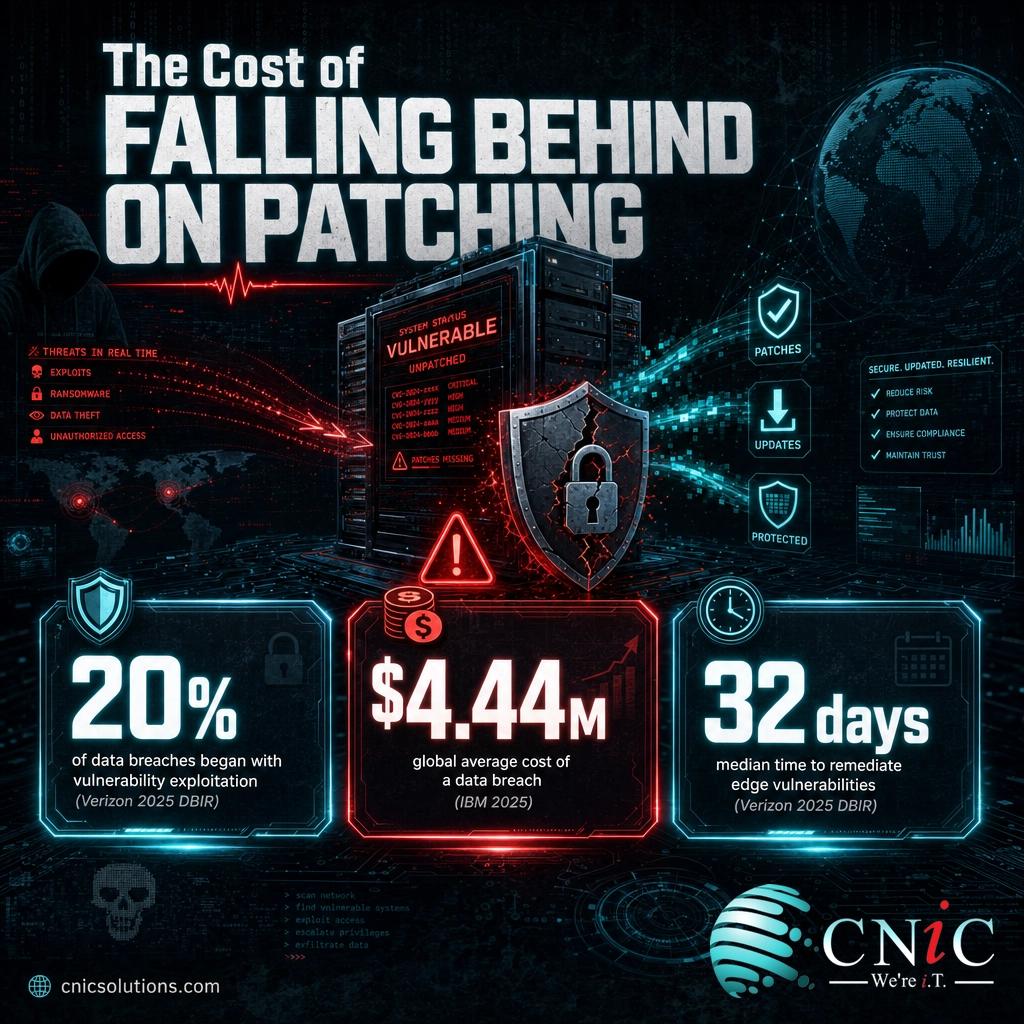
Patch management is the disciplined process of finding, testing, and deploying software updates so known vulnerabilities get closed before attackers reach them. It matters because vulnerability exploitation was the entry point for 20% of data breaches in Verizon’s 2025 Data Breach Investigations Report, a 34% jump in a single year, and in most cases a fix was already available. The best practices below turn patching from a reactive scramble into a repeatable program: inventory everything, prioritize by real-world risk, automate the routine work, test before you deploy, and patch your internet-facing systems first.
Key Takeaways
- Unpatched software is the most preventable breach cause. Attackers overwhelmingly exploit flaws that already have a patch, not unknown zero-days.
- Speed now beats coverage. A rising share of exploited vulnerabilities are attacked on or before the day they are disclosed, so slow patch cycles leave a widening window.
- Prioritize by risk, not by release order. An internet-facing system with an actively exploited flaw outranks a low-severity bug on an isolated internal server.
- Automation and testing are partners, not opposites. Automating deployment plus ring-based testing lets you patch fast without breaking production.
- What you cannot measure, you cannot govern. Patch compliance percentage and mean time to patch tell you whether the program is actually working.
What’s in This Guide
- 1. Build a Complete, Living Asset Inventory
- 2. Put a Written Patch Management Policy in Place
- 3. Prioritize by Risk, Not Release Order
- 4. Automate the Routine Patching
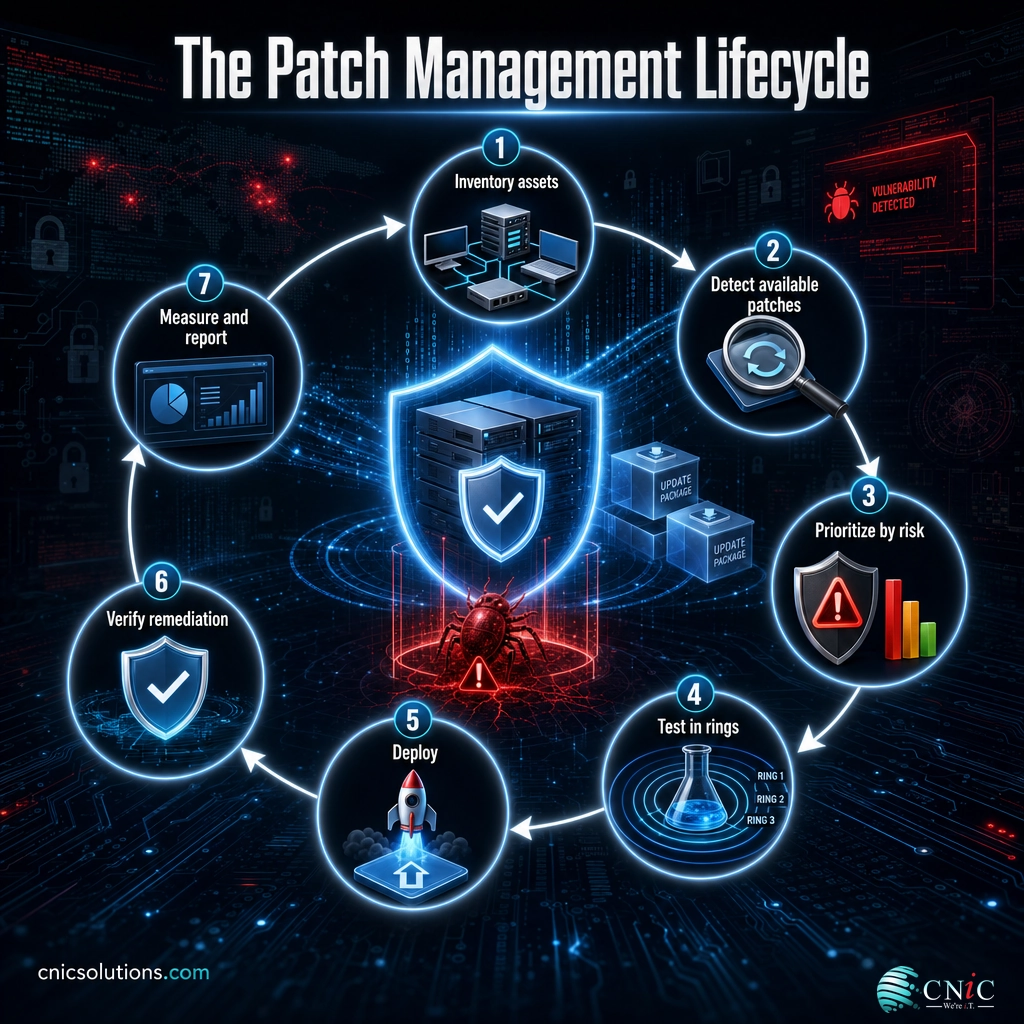
- 5. Test in Rings Before a Full Rollout
- 6. Set and Enforce Patch Timelines (SLAs)
- 7. Cover Third-Party Apps and Firmware, Not Just the OS
- 8. Patch Edge and Internet-Facing Systems First
- 9. Back Up and Plan a Rollback Before You Patch
- 10. Measure, Report, and Improve
Put it to work:
Why Patch Management Matters More Than Ever
Patching has quietly become one of the highest-impact security tasks a business can perform. Verizon’s 2025 Data Breach Investigations Report found that exploiting a software vulnerability was the initial access method in 20% of breaches, and that this route grew by 34% compared with the prior year. The uncomfortable detail behind those numbers is that the exploited flaws were, in most cases, already known and already had a vendor patch. Attackers were not out-innovating defenders. They were walking through doors that had been left unlocked.
The financial stakes are real even as defenses improve. IBM’s 2025 Cost of a Data Breach Report put the global average breach at USD 4.44 million, and organizations still took a mean of 241 days to identify and contain an incident. A single unpatched, internet-facing server can be the difference between a quiet quarter and a months-long recovery.
Myth: “We turn on automatic updates, so we are already patched.”
Consumer-style automatic updates cover a slice of the problem, usually the operating system on a handful of managed laptops. They rarely reach third-party applications, browser plugins, firmware on routers and firewalls, line-of-business software, or servers that require a scheduled change window. Those uncovered categories are exactly where attackers concentrate. Treating “auto-update is on” as a finished patch program leaves most of your attack surface untouched.
Source: Verizon 2025 DBIR | IBM Cost of a Data Breach 2025
For businesses that would rather hand this discipline to a dedicated team, a managed program folds patching into day-to-day operations.
See how managed IT keeps your systems patched and monitored
10 Patch Management Best Practices
The practices below are ordered roughly the way you would build a program, from foundation to feedback loop. Each one includes why it matters and how to put it into practice, so you can start where your organization is weakest.
1 Build a Complete, Living Asset Inventory
You cannot patch what you do not know you own. A patch program begins with an accurate, continuously updated inventory of every server, workstation, laptop, mobile device, network appliance, and application in the environment, including the version each one runs. Unmanaged and forgotten assets, the old server nobody decommissioned or the contractor’s laptop, are the ones that quietly fall behind.
Why it matters: Every device missing from your inventory is a device that never gets a patch. Coverage gaps, not deployment failures, are where most real-world exposure lives.
How to implement: Use automated discovery to find assets on the network rather than relying on a spreadsheet. Reconcile discovery data against your directory and procurement records, and flag anything that appears on the network but not in your records. Treating this as an ongoing feed, closely tied to disciplined IT asset management, keeps the list honest.
2 Put a Written Patch Management Policy in Place
A patch policy is the document that turns good intentions into an accountable process. It defines who owns patching, which systems are in scope, how patches are tested and approved, the timelines for each severity level, and how exceptions are handled. Without it, patching depends on whoever remembers to do it that week.
Why it matters: When ownership is undefined, patches slip through the cracks between teams. A written policy assigns a clear owner and a clear deadline, which is what auditors and cyber-insurance carriers increasingly expect to see.
How to implement: Keep the first version short and enforceable. Name an accountable owner, list system categories, set patch windows, and define an exception process for systems that cannot be patched immediately. The NIST SP 800-40 Rev. 4 guide to enterprise patch management planning is a strong, vendor-neutral template to adapt.
3 Prioritize by Risk, Not Release Order
Most teams that struggle with patching are not lazy, they are drowning. New vulnerabilities arrive faster than any team can apply them, so the question is never “patch everything today,” it is “what do we patch first.” Prioritizing in the order patches happen to be released means low-severity bugs on stable systems get fixed while a critical, actively exploited flaw on an exposed server waits its turn.
Why it matters: Risk is a product of severity and exposure. A high-severity flaw that attackers are already using in the wild, on an internet-facing system, is a five-alarm fire. The same score on an isolated, offline machine is not.
How to implement: Rank by real-world exploitation, not just CVSS severity in isolation. CISA’s Known Exploited Vulnerabilities catalog is a free, authoritative list of flaws confirmed to be under active attack, and anything on it that touches your environment should jump the queue. Combine that with exposure, so an unpatched newly disclosed vulnerability on a public-facing service outranks an internal one.
The patch window is closing faster than most cycles
VulnCheck’s State of Exploitation report for the first half of 2025 found that 32.1% of newly added known-exploited vulnerabilities had evidence of exploitation on or before the day the CVE was publicly disclosed, up from 23.6% in 2024. When a third of exploited flaws are attacked on disclosure day, a monthly-only patch cadence for internet-facing systems is no longer fast enough.
Source: CISA Known Exploited Vulnerabilities catalog | VulnCheck State of Exploitation 1H 2025
4 Automate the Routine Patching
Manual patching does not scale. Once an environment passes a few dozen endpoints, hand-applying updates across operating systems and applications becomes slow, inconsistent, and error-prone. Automation handles the high-volume, low-risk majority of patches, freeing your team to focus judgment on the exceptions.
Why it matters: Automation shrinks the gap between a patch being released and it being deployed everywhere. That gap is precisely the window attackers race to exploit, so closing it is a direct security win.
How to implement: Use a patch management or endpoint management platform to schedule and push routine operating system and application updates automatically, with reporting on success and failure per device. Reserve manual review for critical servers and anything flagged by testing. Automating the routine is also what makes a fast security response realistic instead of aspirational.
5 Test in Rings Before a Full Rollout
The fear that a patch will break production is legitimate, and it is the reason many organizations delay updates far too long. The answer is not to skip patching, it is to test in controlled waves, often called deployment rings. A small pilot group receives the patch first, and only after it proves stable does the update move to broader groups and then the full fleet.
Why it matters: Ring deployment catches compatibility and stability problems while they affect a handful of non-critical machines instead of the whole company. It gives you the confidence to patch quickly rather than the excuse to patch never.
How to implement: Define at least three rings: a pilot ring of IT and volunteer users, a broad ring of general staff, and a final ring of critical systems and executives. Keep each ring on the previous one’s heels, so a stable pilot moves forward in days, not weeks. Document a clear “go or no-go” check between rings.
Here is how quickly the exposure window has shifted, and why waiting weeks to patch internet-facing systems is riskier every year.
Share of newly exploited vulnerabilities attacked on or before disclosure day (VulnCheck)
Source: VulnCheck State of Exploitation 1H 2025
6 Set and Enforce Patch Timelines (SLAs)
A patch program needs deadlines, and those deadlines should scale with risk. A single “patch everything within 30 days” rule treats a critical exploited flaw the same as a cosmetic bug. Tiered service level agreements (SLAs), for example critical patches within a few days and routine patches on a monthly cycle, give every severity level a clock.
Why it matters: Timelines convert priority into action. Without an SLA, “high priority” has no teeth, and even correctly ranked patches drift. Documented SLAs also make your program measurable and auditable.
How to implement: Tie your SLAs to severity and exposure. A common structure is: actively exploited or critical internet-facing flaws within 48 to 72 hours, high-severity within one to two weeks, and standard updates on a monthly cadence. Track every patch against its SLA and review misses.
Governance is a leadership job, not just an IT task
Patch SLAs, exception approvals, and risk acceptance decisions belong to someone with authority over the business, not only the help desk. This is where a Virtual CIO earns their keep, owning the policy, reporting compliance to leadership, and making the call on systems that genuinely cannot be patched on schedule.

7 Cover Third-Party Apps and Firmware, Not Just the OS
Operating system updates get the attention, but the operating system is only part of the attack surface. Browsers, PDF readers, productivity suites, remote-access tools, and the firmware inside routers, firewalls, and printers all ship vulnerabilities, and all need patching. Third-party applications in particular are a frequent and often-overlooked target.
Why it matters: Attackers do not care whether a flaw lives in Windows or in a browser plugin. A single unpatched third-party app or an out-of-date firewall firmware image can be the whole breach. Firmware is especially dangerous because it sits below the operating system, where standard security tools have little visibility. See why a firmware update is a security event, not just a feature bump.
How to implement: Extend your inventory and automation to cover third-party software, not just the OS. Subscribe to vendor security advisories for your network appliances so firmware updates are not missed, and treat endpoint protection agents as assets that themselves need to stay current.
8 Patch Edge and Internet-Facing Systems First
Not all unpatched systems carry equal risk, and the ones reachable from the public internet carry the most. Verizon’s 2025 DBIR reported that 22% of vulnerability-exploitation breaches targeted edge devices such as firewalls, VPN gateways, and remote-access appliances, roughly an eightfold increase over the prior year. These devices are attractive because they are exposed by design and often patched infrequently.
Why it matters: An exposed VPN concentrator or firewall with a known flaw is a direct path into the network, bypassing many internal defenses. When the same report shows only about 54% of these edge vulnerabilities were fully remediated within a year, with a median of 32 days to fix, the exposure window is long and well known to attackers.
How to implement: Maintain a specific, short SLA for internet-facing systems and treat their patches as emergencies. Inventory every public-facing service, subscribe to the relevant vendor advisories, and verify remediation rather than assuming a pushed patch succeeded.
Source: Verizon 2025 DBIR
Get a free security review of your exposed systems
9 Back Up and Plan a Rollback Before You Patch
Even a well-tested patch occasionally causes problems in production. The professional habit is to make sure you can undo a change before you make it. That means a verified, recent backup of critical systems and a documented rollback procedure for the patches you are about to deploy.
Why it matters: A rare bad patch should be a two-hour inconvenience, not a two-day outage. Without a tested backup and rollback plan, a problematic update can cause more downtime than the vulnerability it was fixing.
How to implement: Confirm backups are current and restorable before large patch cycles, especially on servers. Document how to uninstall or roll back each significant update, and know your recovery steps in advance. Reliable backup and disaster recovery is what makes aggressive patching safe.
10 Measure, Report, and Improve
A patch program you cannot measure is a program you cannot defend, to leadership or to auditors. Two metrics carry most of the weight: patch compliance percentage, the share of assets current against your policy, and mean time to patch, how long it takes from a patch’s release to its deployment. Watching these over time tells you whether the program is improving or quietly decaying.
Why it matters: Metrics turn patching from a vague activity into a managed outcome. They surface the systems that consistently fall behind, justify investment, and provide the evidence that compliance frameworks and cyber-insurance applications increasingly demand.
How to implement: Report patch compliance and mean time to patch on a regular cadence, broken out by system category and by SLA tier. Feed the misses back into the process, whether the fix is better automation, tighter inventory, or an escalation path for stubborn systems. Continuous IT monitoring makes this reporting close to automatic.
Source: NIST SP 800-40 Rev. 4
How to Prioritize This List
Ten practices can feel like a lot to stand up at once. If you are starting from a blank slate, the sequence below shows where each practice sits on effort versus payoff, so you can bank the biggest risk reductions first.
| Best practice | Priority | Difficulty | Impact |
|---|---|---|---|
| 1. Asset inventory | Do first | Medium | High |
| 3. Prioritize by risk | Do first | Low | High |
| 8. Patch edge systems first | Do first | Low | High |
| 4. Automate routine patching | Do next | Medium | High |
| 6. Set patch SLAs | Do next | Low | Medium |
| 9. Back up and plan rollback | Do next | Medium | High |
| 2. Written patch policy | Build up | Low | Medium |
| 5. Ring testing | Build up | Medium | Medium |
| 7. Third-party and firmware coverage | Build up | Medium | High |
| 10. Measure and report | Ongoing | Medium | Medium |
If you only do three things from this list
Start here. First, build the asset inventory, because you cannot patch what you cannot see. Second, prioritize by active exploitation using the CISA KEV catalog, so scarce time goes to the flaws attackers are actually using. Third, patch your internet-facing edge systems on a fast, separate clock. Those three moves close the largest and most-attacked part of your exposure before you have built anything else.
Patch Management Best Practices at a Glance
| # | Best practice | Why it matters | Difficulty |
|---|---|---|---|
| 1 | Complete asset inventory | You cannot patch assets you do not know exist | Medium |
| 2 | Written patch policy | Assigns ownership and deadlines; satisfies auditors | Low |
| 3 | Risk-based prioritization | Focuses limited time on actively exploited flaws | Low |
| 4 | Automation | Shrinks the release-to-deploy window at scale | Medium |
| 5 | Ring testing | Catches breakage without stalling security fixes | Medium |
| 6 | Patch SLAs | Gives every severity level an enforceable clock | Low |
| 7 | Third-party and firmware coverage | Closes the attack surface the OS update misses | Medium |
| 8 | Edge systems first | Removes the most-attacked direct path into the network | Low |
| 9 | Backup and rollback plan | Turns a rare bad patch into a minor inconvenience | Medium |
| 10 | Measure and report | Proves the program works and finds where it decays | Medium |
Patching is essential, but it is one layer of a broader defense. It sits alongside monitoring, backups, access controls, and staff training as part of a complete infrastructure management program. For the full picture on what breaches actually cost when those layers fail, see our breakdown of the average cost of a data breach in 2026.
Methodology & Sources
This guide draws on primary, publicly available research and standards. Breach and exploitation figures come from Verizon’s 2025 Data Breach Investigations Report and IBM’s 2025 Cost of a Data Breach Report. Exploitation-timing data comes from VulnCheck’s State of Exploitation report for the first half of 2025. Prioritization guidance references the U.S. Cybersecurity and Infrastructure Security Agency (CISA) Known Exploited Vulnerabilities catalog, and process guidance follows NIST Special Publication 800-40 Revision 4. Historical context on unpatched-vulnerability breach causation reflects the Ponemon Institute’s vulnerability response research. No statistics in this article are estimated or invented; each figure is attributed to its published source above.
Sources:
Verizon 2025 DBIR |
IBM Cost of a Data Breach 2025 |
VulnCheck State of Exploitation 1H 2025 |
CISA KEV catalog |
NIST SP 800-40 Rev. 4 |
Ponemon State of Vulnerability Response
Frequently Asked Questions
What is patch management?
Why is patch management important for businesses?
How often should a business apply patches?
Should you test patches before deploying them?
What is the difference between patch management and vulnerability management?
Patch management rewards consistency over heroics. Start with visibility, prioritize by what attackers are actually exploiting, automate the routine, and protect your exposed edge first. If keeping every system current is more than your team can carry, a Virtual CIO can own the policy, the priorities, and the reporting so nothing slips through.
Get a Virtual CIO to own your patch strategy



related posts
What Is ZTNA (Zero Trust Network Access)?
November 3, 2026Zero Trust Network Access (ZTNA) is a security service that grants a verified user access to…
Zero Trust Statistics for 2026: Adoption, Maturity, and Breach Impact
November 3, 2026Zero trust has become the default security strategy on paper, but not yet in practice. Okta's…
What Is XDR (Extended Detection and Response) and How Does It Protect…
November 2, 2026Extended detection and response (XDR) is a security platform that collects and correlates threat data from…
What Is Zero Trust Security? A Guide for Small Businesses
November 2, 2026Zero Trust security is a cybersecurity model built on one rule: never trust, always verify. Instead…