

IT asset management (ITAM) is the practice of tracking and managing an organization’s hardware, software, and cloud assets across their entire lifecycle, from purchase to retirement. It combines financial, contractual, and inventory data so a business always knows what it owns, controls what it spends, and reduces the security risk of unknown or unmanaged technology.
Most businesses cannot answer a deceptively simple question: exactly what IT assets do we own, where are they, and what are they costing us right now? Laptops walk out the door, software licenses renew on autopilot, and cloud subscriptions multiply in the background. IT asset management is the discipline that replaces those guesses with an accurate, continuously maintained record of every device, application, and service, and it is the foundation that cost control, security, and smart IT decisions all sit on.
- ITAM is a business discipline, not a tool. It combines financial, contractual, and inventory data to manage IT assets across a five-stage lifecycle: plan, procure, deploy, maintain, and retire.
- It pays for itself in cost control. Gartner found organizations can cut software spending by as much as 30% in the first year using software asset management and license optimization.
- Waste is the default without it. Even after years of improvement, 27% of cloud spend was still wasted in 2024, according to Flexera, and managing that spend is now the top cloud challenge.
- Security starts with an inventory. Knowing your hardware and software assets is literally CIS Critical Security Controls 1 and 2, the foundation of basic cyber hygiene.
- ITAM is not ITSM. Asset management tracks what you own and its lifecycle; service management tracks how those assets are used and supported. Businesses need both.
What’s in This Guide
What Is IT Asset Management?
IT asset management is the set of business practices that combine financial, contractual, and inventory information to track and manage IT assets throughout their lifecycle. In plain terms, it is how an organization keeps an accurate, living record of everything it owns and uses in technology, and makes deliberate decisions about each item instead of letting it drift.
The discipline is formalized in an international standard, the ISO/IEC 19770-1 standard for IT asset management systems, which defines ITAM as the infrastructure and processes needed for the effective management, control, and protection of IT assets across every stage of their life. That standard exists because ITAM is a repeatable management system, not a one-time cleanup project.
An IT asset is any hardware, software, or service the business relies on to operate. The list is broader than most people expect:
- Hardware: laptops, desktops, servers, networking equipment, printers, phones, and IoT devices.
- Software: operating systems, business applications, and the licenses that govern how each may be used.
- Cloud and subscriptions: SaaS applications, cloud infrastructure, and the recurring contracts behind them.
- Supporting records: warranties, contracts, purchase costs, assigned users, and location data tied to each asset.
The reason ITAM ties financial and contractual data to each item, rather than just counting boxes, is that an asset’s value and risk change over its life. A three-year-old laptop still on the books, a renewed license nobody uses, and a former employee’s cloud account that was never deactivated are all invisible costs and risks that only a proper asset record surfaces.
Source: ISO/IEC 19770-1:2017, IT asset management systems
How ITAM Works: The IT Asset Lifecycle
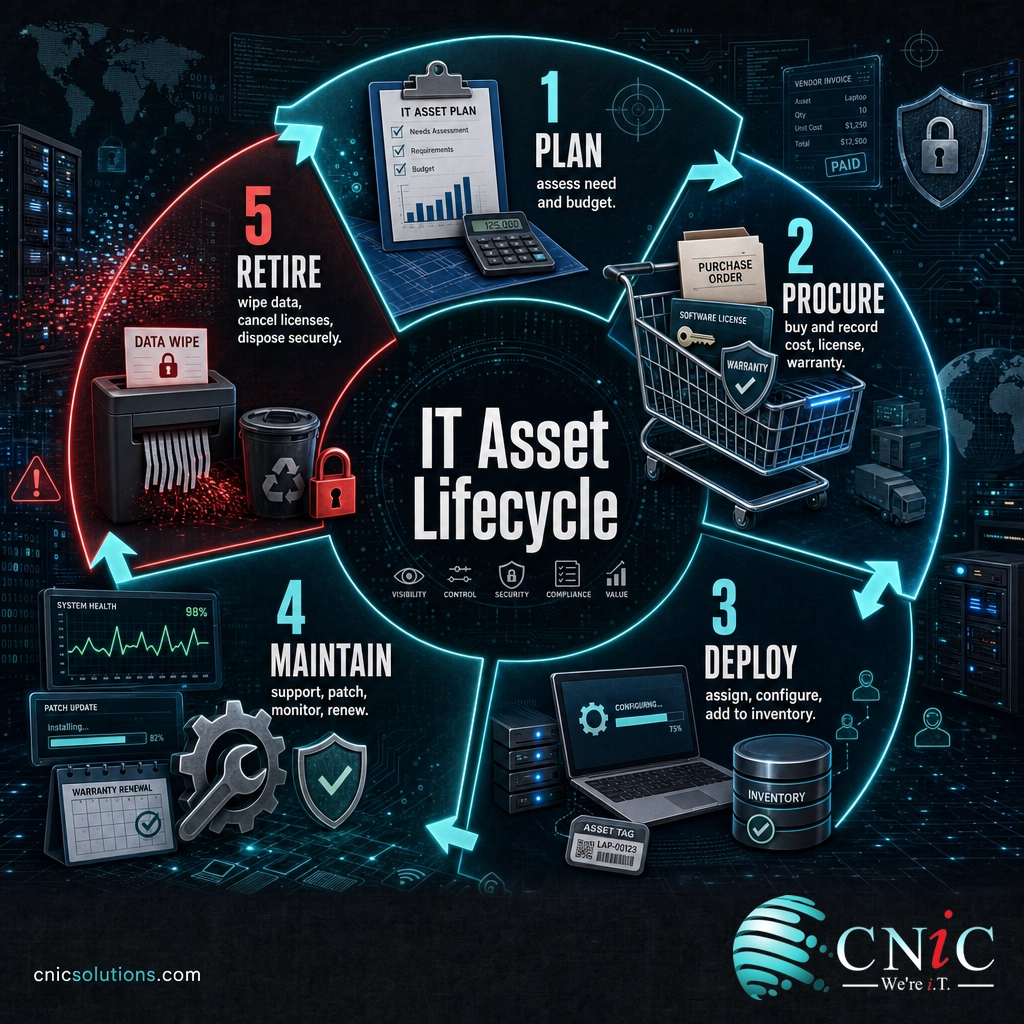
The engine of IT asset management is the asset lifecycle. Every asset moves through the same stages, and ITAM tracks each item at every step so it is never lost, forgotten, or left running long past its usefulness. Most programs use five stages:
- Plan. Decide what is actually needed based on demand, budget, and existing inventory, before anything is purchased.
- Procure. Acquire the asset, and record its cost, contract terms, warranty, and license details from day one.
- Deploy. Assign the asset to a user or system, configure it, and add it to the inventory so it is accounted for the moment it goes live.
- Maintain. Support, update, patch, and monitor the asset through its working life, tracking changes and renewals along the way.
- Retire. Decommission the asset securely, wipe its data, cancel the associated licenses or subscriptions, and dispose of it responsibly.
Think of it like managing a fleet of company vehicles. You would not buy a truck, hand over the keys, and then lose track of it until it broke down. You would log the purchase, assign a driver, schedule maintenance, and plan its replacement before it failed. ITAM applies that same disciplined ownership to every laptop, license, and cloud subscription in the business.
The retire stage is the one businesses most often neglect, and it is where hidden cost and risk concentrate. Unwiped drives leak data, licenses keep billing after the software is gone, and old subscriptions renew indefinitely. A lifecycle that ends deliberately, not by neglect, is what separates real asset management from a spreadsheet nobody updates.
ITAM vs. ITSM: Clearing Up the Confusion
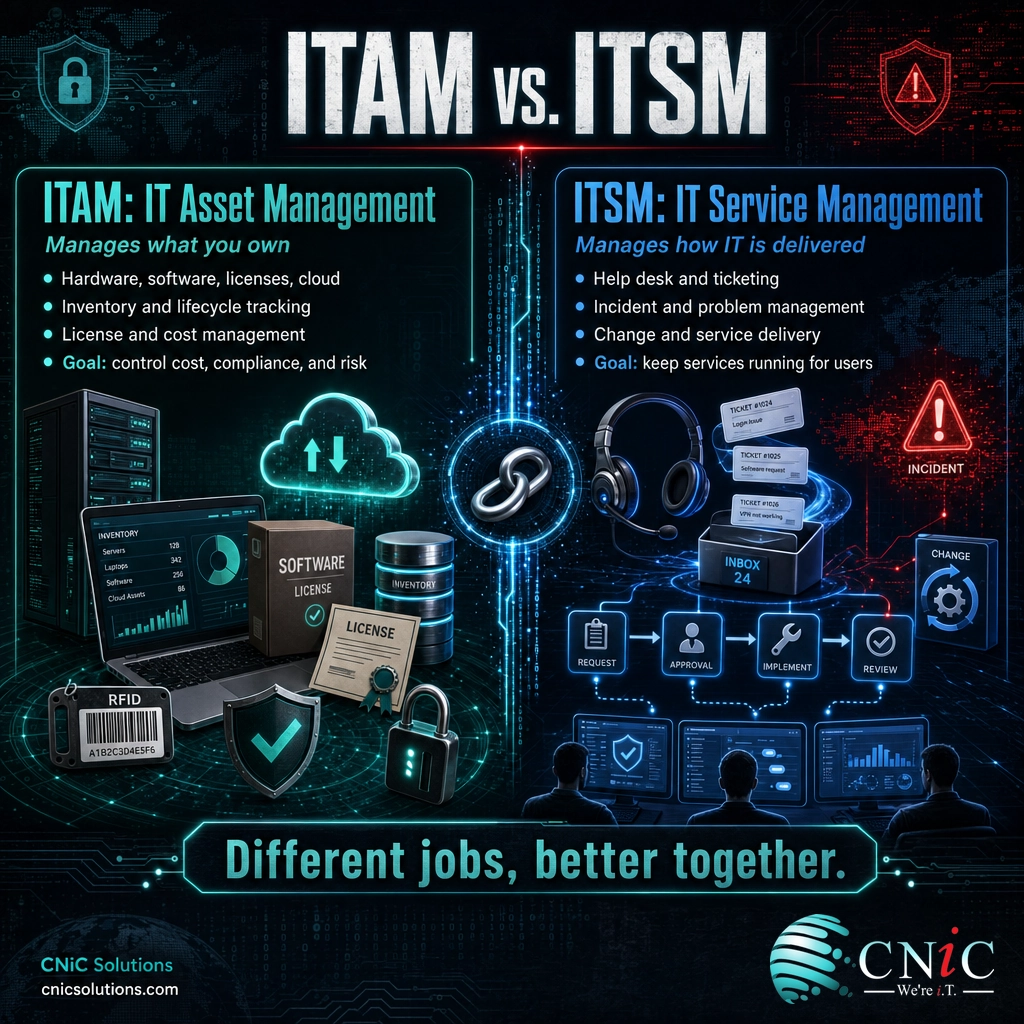
The most common point of confusion is the difference between IT asset management (ITAM) and IT service management (ITSM). They are closely related, they often share tools and data, and they are frequently run by the same team, but they answer different questions. ITAM manages the assets, what you own and its lifecycle and cost. ITSM manages the services, how IT is delivered and supported for the people who use it.
| Attribute | ITAM (IT Asset Management) | ITSM (IT Service Management) |
|---|---|---|
| Core question | What do we own, and what is it costing us? | How well are we delivering IT services to users? |
| Focus | Assets: hardware, software, licenses, cloud | Services: incidents, requests, changes, support |
| Key activities | Inventory, lifecycle tracking, license and cost management, disposal | Help desk, ticketing, incident and problem management, service delivery |
| Primary goal | Control cost, compliance, and asset risk | Keep services running and users productive |
| Typical output | An accurate asset register and lifecycle plan | Resolved tickets and reliable service levels |
The two work best together. ITSM needs ITAM’s accurate inventory to resolve tickets faster, because a technician handling an incident needs to know exactly what device, software version, and warranty status they are dealing with. ITAM, in turn, uses the activity flowing through ITSM to keep asset records current. One tracks the thing; the other tracks what happens to it. A healthy IT operation runs both, which is a core part of well-structured ongoing IT infrastructure management.
Myth: IT asset management is just an inventory spreadsheet. A one-time spreadsheet is a snapshot that is out of date the moment someone buys a laptop, installs an app, or cancels a subscription. Real ITAM is a continuous process with defined ownership and lifecycle stages. The value is not in the list itself, it is in keeping the list accurate and acting on what it reveals. A static spreadsheet gives false confidence while the real inventory quietly drifts away from it.
Why IT Asset Management Matters for Your Business
ITAM is easy to postpone because nothing appears to break when you skip it. The costs and risks accumulate quietly instead. Three business impacts make the case clearly.
1. It cuts real money out of your IT budget. Unused licenses, over-provisioned cloud, and duplicate tools are pure waste, and they are the norm without active management. Gartner found that organizations can reduce software spending by as much as 30% in the first year by using software asset management tools and license optimization, a finding drawn from more than 800 client inquiries about SAM tools.
The cloud tells the same story. Flexera’s annual State of the Cloud research found that even after years of improvement, 27% of cloud spend was still wasted in 2024, and that managing cloud spend has become the single biggest cloud challenge, cited by 82% of organizations. Waste at that scale is not an accident. It is what happens when nobody owns the asset record.
Wasted Cloud Spend, Self-Reported Average (Flexera State of the Cloud)
Wasted cloud spend has fallen but remains high: more than a quarter of cloud budgets were still wasted in 2024. Source: Flexera 2024 State of the Cloud Report.
2. It is the foundation of cybersecurity. You cannot protect a device you do not know exists or patch software you do not know is installed. This is not a soft claim. Building an inventory of your hardware and software is the first two of the CIS Critical Security Controls: Control 1 is Inventory and Control of Enterprise Assets, and Control 2 is Inventory and Control of Software Assets. Both sit in the essential cyber hygiene tier that CIS recommends for every organization, because unknown devices and unauthorized software are among the most common ways attackers get in. ITAM produces the accurate inventory that every downstream security control depends on, which is why it works hand in hand with layered cybersecurity protection.
3. It enables smarter IT decisions. When you know what you own, how old it is, what it costs, and how it is used, budgeting and planning stop being guesswork. You can time hardware refreshes before failures, negotiate renewals from a position of knowledge, and prove compliance during a software audit without a fire drill. This strategic view is exactly what a Virtual CIO who aligns IT spending with business strategy brings to the table, and it starts with a trustworthy asset record.
Source: Gartner, software cost reduction research | Flexera 2024 State of the Cloud | CIS Critical Security Controls v8
Types of IT Asset Management
ITAM is usually broken into specialized disciplines, each focused on a category of asset with its own tracking needs. Most businesses do all of these to some degree, whether they call them by name or not.
Hardware Asset Management (HAM)
HAM covers the physical devices: laptops, desktops, servers, networking gear, phones, and increasingly the IoT devices connected to your network. It tracks each item from procurement through assignment, maintenance, and secure disposal. Because hardware physically moves and eventually fails, HAM is where lifecycle tracking and end-of-life data destruction matter most.
Software Asset Management (SAM)
SAM manages applications and, critically, the licenses that govern them. It reconciles what you have installed against what you are entitled to use, which is where the cost savings and audit protection live. Over-licensing wastes money; under-licensing invites compliance penalties. SAM is the discipline behind the 30% software savings figure above.
Cloud and SaaS Asset Management
As IT shifted from owned equipment to subscriptions, a whole category of assets moved off the balance sheet and into monthly billing. Cloud and SaaS asset management tracks these recurring services, who is using them, and whether the spend is justified. It is the fastest-growing area of ITAM, and the one where waste hides most easily because a forgotten subscription just keeps charging.
Larger or more mature programs add further specializations, such as mobile asset management for a fleet of phones and tablets, and configuration management, which tracks how assets relate to and depend on one another. The right mix depends on your environment, but for most small and midsize businesses, HAM, SAM, and cloud asset management cover the vast majority of the value.
How to Get Started With IT Asset Management
You do not need an enterprise platform to begin. ITAM starts with discipline, and the first meaningful step is building an accurate inventory. A practical starting sequence looks like this:
- Discover and inventory. Find every asset you have, using automated discovery tools where possible, and record hardware, software, and cloud subscriptions in one place.
- Assign ownership. Give each asset an owner and a status, so responsibility is clear and nothing is orphaned.
- Capture the financial and contract data. Attach purchase cost, license terms, warranty, and renewal dates to each asset so decisions have real numbers behind them.
- Define the lifecycle. Set simple rules for how assets are procured, maintained, and retired, and stick to them.
- Keep it current. Build asset updates into everyday IT work so the record stays accurate instead of decaying into another stale spreadsheet.
The hard part is not the first inventory, it is keeping it accurate as the business changes. That is why many small and midsize companies fold ITAM into a broader managed relationship rather than staffing it alone. A provider already has the discovery tools, the process, and the routine to keep the record trustworthy, and can tie asset data directly to security, budgeting, and support. It is the same logic that moves businesses away from the reactive break-fix approach to IT and toward managed, proactive operations.
See How Managed Infrastructure Handles Your Assets
Build Security on an Accurate Inventory
Common Questions About IT Asset Management
What is IT asset management in simple terms?
What is the difference between ITAM and ITSM?
What are the stages of the IT asset lifecycle?
What are the main types of IT asset management?
Why is IT asset management important for cybersecurity?
Related Terms
- Software asset management (SAM): the ITAM discipline focused on applications and licenses, where most software cost savings and audit protection come from.
- Hardware asset management (HAM): tracking physical devices from procurement through secure disposal, including servers, laptops, and network gear.
- IT service management (ITSM): the management of IT service delivery and support, such as the help desk and incident resolution, which relies on accurate asset data.
- Configuration management database (CMDB): a record of IT assets and how they relate to and depend on one another, often built on ITAM inventory data.
- IT asset lifecycle: the plan, procure, deploy, maintain, and retire stages every asset moves through under an ITAM program.
- Shadow IT: hardware, software, or cloud services used without IT’s knowledge, the exact gap a complete asset inventory is meant to close.
- Managed IT services: outsourcing IT operations, including asset management, to a provider that supplies the tools, process, and expertise as one team. See how managed IT keeps your assets accounted for.
- Break-fix IT: the reactive, pay-per-incident model that predates proactive asset management and managed services.
About This Guide
The definition and lifecycle framework follow ISO/IEC 19770-1, the international standard for IT asset management systems. The software savings figure is from Gartner research based on more than 800 client inquiries about software asset management tools. Cloud waste and cloud-spend challenge figures are from Flexera’s 2024 State of the Cloud Report. The security controls referenced are CIS Critical Security Controls v8, Controls 1 and 2. Figures are cited to their original sources and used to illustrate the value and structure of IT asset management, not as guaranteed outcomes for any specific business.
Sources: ISO/IEC 19770-1:2017 | Gartner, software cost reduction research | Flexera 2024 State of the Cloud | CIS Critical Security Controls v8
Get a Free Consultation on Managing Your IT Assets



related posts
What Is ISO 27001? A Guide to the Information Security Standard
October 22, 2026ISO 27001 is the world's best-known standard for managing information security, and increasingly the certification customers…
What Is Infrastructure as Code (IaC)? A Guide for Businesses
October 21, 2026Infrastructure as Code (IaC) is the practice of managing and provisioning IT infrastructure, such as servers,…
What Is Infrastructure Security? A Guide for Businesses
October 21, 2026Infrastructure security is the practice of protecting the core technology systems a business runs on: its…
What Is GDPR? A Data Protection Compliance Guide for Businesses
October 20, 2026GDPR (the General Data Protection Regulation) is a European Union law that governs how organizations collect,…