
A LAN (local area network) connects the devices inside one location, like a single office, and you own and control it. A WAN (wide area network) connects those locations to each other and to the internet across long distances, usually over links you lease from a carrier. In short: the LAN is your building’s private network, and the WAN is how that building talks to the rest of the world.
- LAN = local, WAN = wide. A LAN covers one site; a WAN connects multiple sites and reaches the internet across cities, states, or countries.
- The internet is the world’s largest WAN. Your office LAN reaches it through a WAN link from your provider.
- LANs are faster and lower-latency. Devices are close together on hardware you own; wired LAN speeds are standardized up to hundreds of gigabits per second by IEEE.
- WANs cost differently. A LAN is mostly a one-time buildout you own; WAN capacity is an ongoing service you rent from carriers.
- You almost certainly run both. Any business with a website, cloud apps, or more than one location uses a LAN and a WAN together every day.
- They are partners, not rivals. The real question is not “which is better” but “which one is holding my business back right now.”
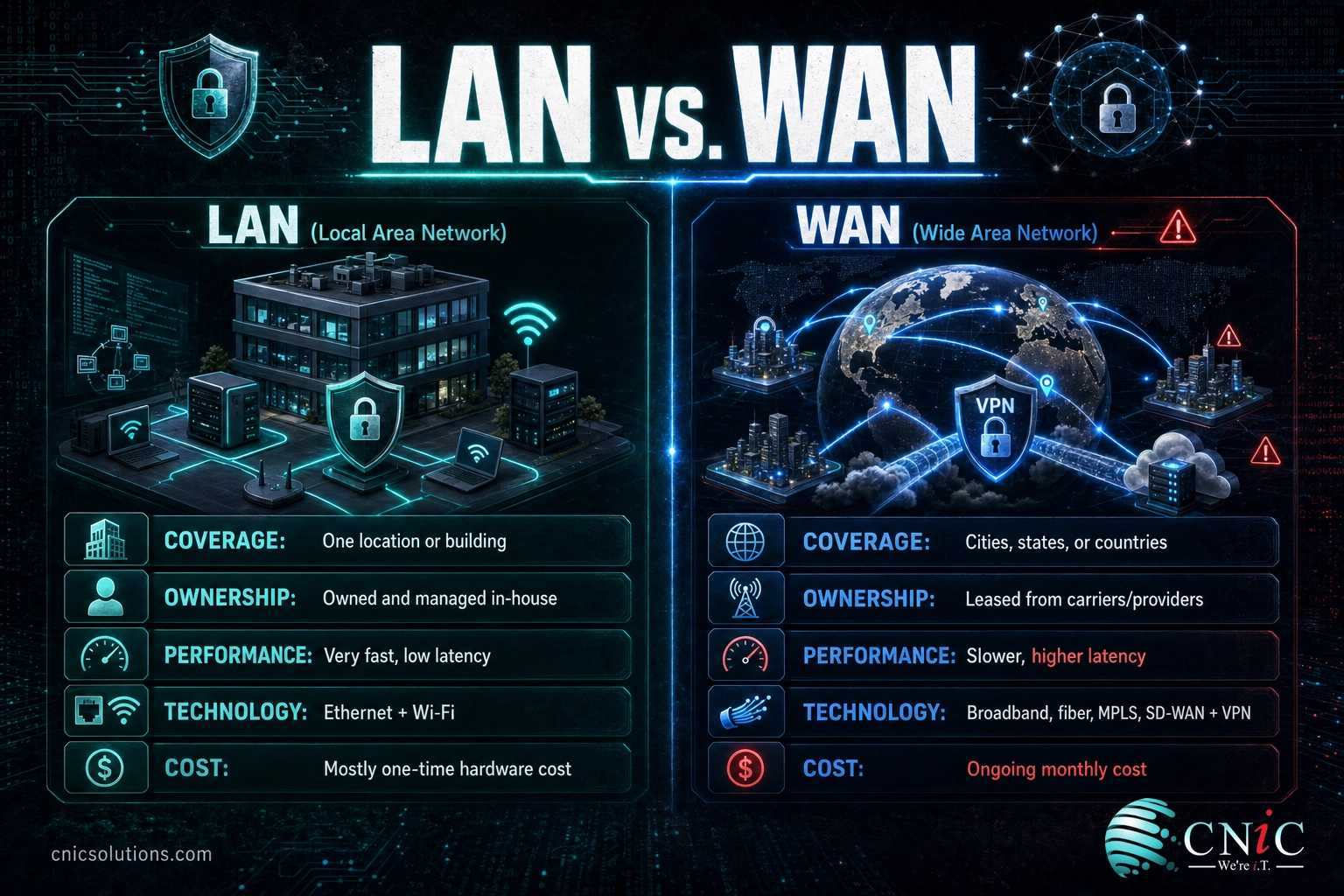
LAN (Local Area Network)
- Covers a single location: office, building, or campus
- Owned and managed in-house
- Very fast, very low latency
- Runs on Ethernet cabling and Wi-Fi you control
- Mostly a one-time hardware investment
WAN (Wide Area Network)
- Covers a wide area: multiple cities, states, or countries
- Usually leased from telecom carriers and internet providers
- Slower and higher latency than a LAN, by design
- Runs on broadband, fiber, MPLS, SD-WAN, and VPNs
- An ongoing monthly service cost
What’s in This Guide
- What Is a LAN?
- What Is a WAN?
- Range: One Building vs. The Whole World
- Speed and Latency: Why a LAN Feels Instant
- Ownership, Control, and Cost
- Security: Trusted Interior vs. Open Distance
- LAN vs. WAN: Side by Side
- How LAN and WAN Work Together
- Which One Does Your Business Need?
- The Bottom Line
- Frequently Asked Questions
What Is a LAN?
A local area network, or LAN, is the network that lives inside one physical location. Every device in your office that talks to another device without leaving the building is on the LAN: desktops, laptops, printers, phones, security cameras, the Wi-Fi access points, and the server in the closet. They connect to each other through switches and a router, using Ethernet cables and Wi-Fi.
The defining trait of a LAN is proximity and ownership. Because the equipment sits in one place and belongs to you, you decide how it is built, how fast it runs, and who gets on it. That control is why LANs are the fast, dependable core of daily work. Wired connections follow the IEEE 802.3 Ethernet family, which is standardized for speeds from 1 megabit per second all the way up to 400 gigabits per second, so there is enormous headroom for a business that needs it. Wireless connections follow IEEE 802.11, and the current Wi-Fi 6 (802.11ax) generation supports throughput above 9 gigabits per second.
What a LAN is good at: speed, low latency, full control, and predictable performance. Moving a large file between two computers in the same office is nearly instant because the data never leaves your equipment.
Where a LAN stops: at the front door. A LAN cannot, on its own, reach a second office across town, a data center in another state, or a cloud application on the far side of the country. For that, you need a WAN. If you want the deeper picture of the switches, cabling, and hardware that make a LAN run, our explainer on the network infrastructure behind it all breaks down the pieces.
Source: IEEE 802.3-2022 Standard for Ethernet | IEEE on Wi-Fi 6 (802.11ax)
What Is a WAN?
A wide area network, or WAN, connects networks that are far apart. If a LAN is one building’s private network, a WAN is the set of connections that ties buildings, cities, and continents together. As Cisco puts it, a WAN is essentially a network of networks, and the largest WAN in existence is the internet itself.
Here is the part that trips people up: you rarely build a WAN the way you build a LAN. A WAN almost always relies on infrastructure owned by someone else. Telecom carriers and internet service providers run the fiber, the cell towers, and the long-haul links, and you pay for access to them. When your Houston office pulls a file from a server in Dallas, or a hybrid employee logs in from home, that traffic crosses a WAN built on leased connections.
WANs come in several flavors. A basic business internet connection is the simplest WAN link, joining your LAN to the public internet. Larger organizations layer on private options such as MPLS circuits, site-to-site VPNs that tunnel securely over the public internet, and increasingly SD-WAN, which uses software to steer traffic across multiple links for better reliability and cost control. The demand for that modernization is real money: Gartner projects the SD-WAN market will grow to more than 8 billion dollars by 2026.
What a WAN is good at: reach and scale. It is what lets a company operate across many locations, support remote staff, and use cloud services as if they were down the hall.
Where a WAN struggles: raw speed and latency. Distance and shared infrastructure make a WAN slower than the LAN it connects to. Choosing the right uplink matters, which is why we put together a guide to choosing a business internet provider for local companies.
Source: Cisco: What Is a WAN? | Gartner on the WAN networking market
Range: One Building vs. The Whole World
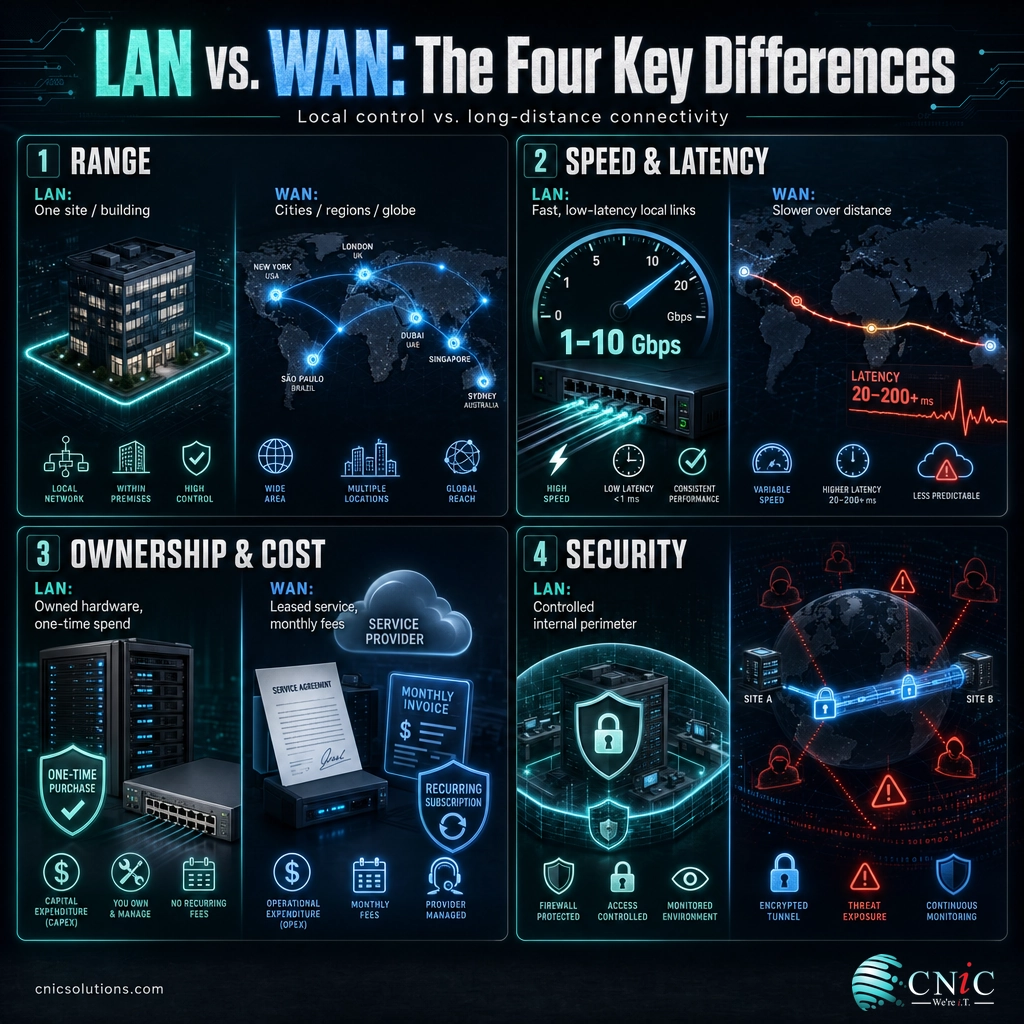
Range is the cleanest way to tell the two apart, because it is the entire reason each exists. A LAN is bounded by a location. It might be a single suite, a whole office floor, or a multi-building campus, but it stays inside property you occupy. Everything on it is close enough to reach with your own cabling and access points.
A WAN has no such limit. It is defined by connecting places that are too far apart for a LAN to bridge: a branch office in another city, a warehouse two states away, a cloud platform anywhere on earth. Where a LAN measures its reach in feet and floors, a WAN measures it in miles and time zones.
The simple test: if the two devices are in the same building and you own the cable between them, that is a LAN. If the connection leaves your property and travels a distance you do not own, that is a WAN. On this one, the edge clearly goes to the WAN, because reaching far is its whole job.
Speed and Latency: Why a LAN Feels Instant
Inside a LAN, data has a short trip on hardware you control, so it moves fast and arrives with almost no delay. Modern business LANs commonly run wired connections at 1, 2.5, 5, or 10 gigabits per second, all standardized under IEEE 802.3, and Wi-Fi 6 adds multi-gigabit wireless on top. That is why saving to a local server or printing across the office feels immediate.
Common Wired LAN Speeds (IEEE 802.3 Standards)
Standardized wired LAN speed tiers per IEEE 802.3. Typical business WAN links deliver a fraction of these speeds.
A WAN cannot match that, and not only because of budget. Data crossing a WAN travels long distances over links shared with other traffic, and the laws of physics put a floor under how quickly a signal can cover ground. The farther the two endpoints, the more latency you feel. This is why a video call to a colleague across the country has a slight lag that a call across the office never would. A WAN can be made fast and reliable, but a well-built LAN will almost always be the quicker of the two.
Source: IEEE 802.3-2022 Standard for Ethernet
Ownership, Control, and Cost
This is where the two networks differ in a way that hits the budget directly. A LAN is yours. You buy the switches, run the cabling, set up the access points, and once it is built, the ongoing cost is mostly maintenance and the occasional upgrade. You control every setting because you own every piece.
A WAN is rented. Because it depends on infrastructure owned by carriers and internet providers, you pay for it as a service, month after month, based on the speed and reliability you need. You also give up some control: if a provider’s fiber gets cut miles from your office, your WAN goes down even though every device on your LAN is working perfectly. That dependency is exactly why redundancy and modern approaches like SD-WAN have become a fast-growing category, projected by Gartner to top 8 billion dollars by 2026 as businesses invest in more resilient ways to connect their sites.
Source: Gartner on the WAN networking market
Security: Trusted Interior vs. Open Distance
Security follows the same logic as everything else: the LAN is your controlled interior, and the WAN is the exposed distance between you and everyone else. On a LAN, you decide who plugs in and who gets on the Wi-Fi, and traffic stays within walls you manage. That does not make a LAN automatically safe, but it does give you a defensible perimeter.
A WAN is riskier by nature because its traffic travels across public or shared infrastructure to reach other places. Data leaving your building can be intercepted or exposed if it is not protected, which is why WAN connections between sites are typically wrapped in encryption through VPN tunnels or private circuits. Anything sensitive that crosses the distance between locations needs to be secured in transit, and keeping that protection consistent across every site and remote worker is one of the harder parts of running a modern network. It is a core reason businesses lean on layered protection for data moving between sites rather than trusting the connection alone.
The stakes are not abstract. When the WAN link between your locations and your cloud services fails or is compromised, work stops. The ITIC 2024 Hourly Cost of Downtime survey found that a single hour of downtime now costs more than 300,000 dollars for over 90 percent of midsize and large enterprises, and much of that risk rides on the connection between sites.
Source: ITIC 2024 Hourly Cost of Downtime survey
LAN vs. WAN: Side by Side
Here is the full comparison in one place. Notice that neither column is a loser; each network wins on the traits it was designed for.
| Factor | LAN | WAN | Edge |
|---|---|---|---|
| Area covered | One location, building, or campus | Cities, states, countries, the globe | WAN (reach) |
| Speed | Very high (1 to 10 Gbps and beyond) | Lower, varies by link and distance | LAN |
| Latency | Near-instant | Higher, grows with distance | LAN |
| Ownership | You own and manage it | Leased from carriers and providers | LAN (control) |
| Cost model | Mostly one-time hardware buildout | Ongoing monthly service | Depends on need |
| Core technology | Ethernet (802.3), Wi-Fi (802.11) | Broadband, fiber, MPLS, SD-WAN, VPN | Different jobs |
| Security posture | Controlled interior perimeter | Exposed distance, needs encryption | LAN (contained) |
| Best at | Fast local work and shared resources | Connecting sites, cloud, and remote staff | Both, together |
How LAN and WAN Work Together
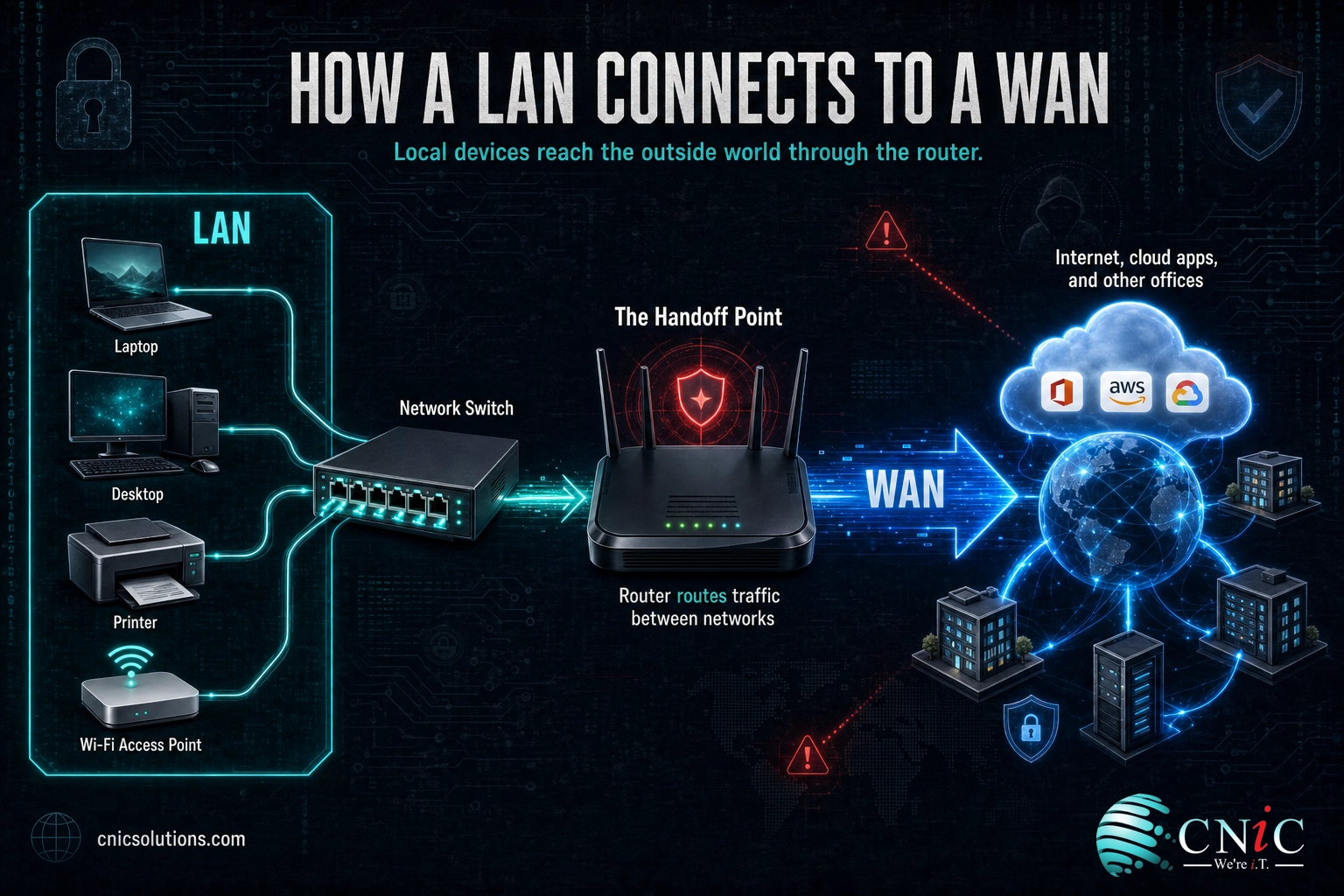
The most useful thing to understand is that a LAN and a WAN are not competitors. They are two halves of one system, and almost every business runs both without thinking about it. Picture a normal workday: an employee opens a laptop, joins the office Wi-Fi (LAN), and clicks into a cloud application. The click travels across the LAN to the router, out through the WAN link to the provider, across the internet to the cloud, and all the way back. Two networks, one seamless action.
The handoff point between them is your router. Inside, the LAN moves traffic between local devices at full speed. At the edge, the router passes traffic bound for the outside world onto the WAN. This is why network problems can be confusing: slow performance might be a saturated LAN switch, or it might be a struggling WAN uplink, and the two require completely different fixes.
Common myth: “My internet is slow, so I need to upgrade my whole network.” Not necessarily. If files fly between local computers but cloud apps and downloads crawl, your LAN is fine and your WAN link (your internet service) is the bottleneck. Upgrading expensive LAN hardware will not fix a slow WAN, and buying more internet bandwidth will not speed up a LAN that is choking on an old switch. Diagnosing which network is the problem is the first step, and it saves money on the wrong upgrade.
Which One Does Your Business Need?
Since you almost certainly use both, the practical question is which one deserves your attention and budget right now. That depends on how your business is shaped.
Focus on your LAN when:
- Most of your work happens inside one location, with shared files, printers, and local servers.
- You are adding staff, cameras, VoIP phones, or Wi-Fi coverage and the building network feels strained.
- Devices in the same office are slow to reach each other, which points to switches, cabling, or access points.
- You are moving into or building out a new space and want the wiring done right the first time.
Focus on your WAN when:
- You have more than one location and they need to share systems reliably.
- You have remote or hybrid employees who depend on a steady, secure connection back to company resources.
- Your business runs on cloud applications, so the link to the outside world is now business-critical.
- Internet outages or slowdowns are costing you real productivity, and you need redundancy or SD-WAN.
In reality, most growing businesses need both a well-built LAN and a resilient WAN, and the two decisions influence each other. Getting the balance right is a design question, not a guess, which is where working with a team that manages the network infrastructure end to end pays off.
The Bottom Line
LAN versus WAN is not a contest with a winner. A LAN is the fast, controlled network inside your walls, and a WAN is the connection that carries your business beyond them. A LAN wins on speed, latency, and control. A WAN wins on reach and scale. You need both working in concert, and the trick is knowing which one is limiting you at any given moment.
For most businesses, the honest answer is that the network is only as strong as its weakest link, whether that link is a tired switch on the LAN or an unreliable uplink on the WAN. If your team is spending time fighting either one, the fix is rarely more hardware bought at random. It is a clear look at how both networks are built and managed together.
Get a free assessment of your LAN and WAN
Frequently Asked Questions
Is the internet a LAN or a WAN?
Is Wi-Fi a LAN or a WAN?
Can a network be both a LAN and a WAN at the same time?
Which is faster, a LAN or a WAN?
Does a business with only one office need a WAN?
What is the difference between LAN, WAN, and MAN?
About This Guide
This comparison uses primary technical standards and industry research rather than secondary write-ups. Network speed figures reference the IEEE 802.3 (Ethernet) and IEEE 802.11ax (Wi-Fi 6) standards. WAN definitions follow Cisco’s networking documentation. Market and cost figures come from Gartner and the ITIC 2024 Hourly Cost of Downtime survey. CNiC Solutions is a Houston-based managed IT and networking provider; this article is educational and not a substitute for a network assessment of your specific environment.
Sources:
IEEE 802.3-2022 Ethernet Standard |
IEEE 802.11ax (Wi-Fi 6) |
Cisco: What Is a WAN? |
Gartner: WAN Networking Market |
ITIC 2024 Hourly Cost of Downtime



related posts
RTO vs. RPO: Understanding the Two Key Disaster Recovery Metrics
September 24, 2026Short answer: RTO (Recovery Time Objective) is how long you can be down, measured forward from…
Security Awareness Training for Employees: A Complete Guide
September 24, 2026Security awareness training for employees is a continuous program that teaches your staff to recognize and…
Patch Management Best Practices for Businesses: 10 Steps That Actually Reduce Risk
September 23, 2026Patch management is the disciplined process of finding, testing, and deploying software updates so known vulnerabilities…
Remote Work IT Setup: A Complete Guide for Small Businesses
September 23, 2026Setting up IT for a remote or hybrid team is no longer a temporary arrangement, it…