

An auto attendant is an automated phone menu that answers incoming calls and routes each caller to the right person, department, or extension without a live receptionist. Callers hear a recorded greeting (for example, “Press 1 for Sales, Press 2 for Support”) and choose an option using their keypad or voice, so every call is answered instantly, around the clock.
Every call to your business is a first impression, and a missed one is often a lost customer. An auto attendant makes sure no call goes unanswered: it greets callers professionally, presents a simple menu, and sends each person exactly where they need to go, whether that is a salesperson, a support tech, or a voicemail box after hours. This guide explains what an auto attendant is, how it actually works, how it differs from IVR (a distinction that trips up a lot of buyers), the features worth having, and a step-by-step walkthrough of how to set one up for your own phone system.
Key Takeaways
- An auto attendant answers and routes every call automatically, so callers reach the right place without a live operator.
- It differs from IVR: an auto attendant directs calls, while IVR also collects information and handles self-service tasks. Every auto attendant is a basic IVR, but not the reverse.
- It works through a menu and a set of rules: a greeting, keypad or voice options, and routing to extensions, ring groups, voicemail, or after-hours destinations.
- Setup starts with the call flow, not the technology: map who answers what before you build a single menu.
- On cloud phone and UCaaS systems it is usually built in, so most small businesses already have it available.
What’s in This Guide
What an Auto Attendant Is
An auto attendant (sometimes called an automated attendant or a virtual receptionist) is the automated voice that answers your main business number and offers callers a menu of choices. Instead of a person picking up and asking who you would like to reach, the system plays a recorded greeting, lists the options, and connects the caller based on what they select.
You have almost certainly used one. “Thank you for calling. For sales, press 1. For support, press 2. To reach a specific person, press 3 for our company directory.” That is an auto attendant at work. Its single job is to answer instantly and route each caller to the correct destination: a person, a department, a ring group, a voicemail box, or another menu.
The feature has been part of business phone systems for decades, originally running on on-premise PBX hardware. Today it is a standard capability of cloud-based phone systems and unified communications platforms, which means most businesses can turn one on without buying anything extra.
How an Auto Attendant Works
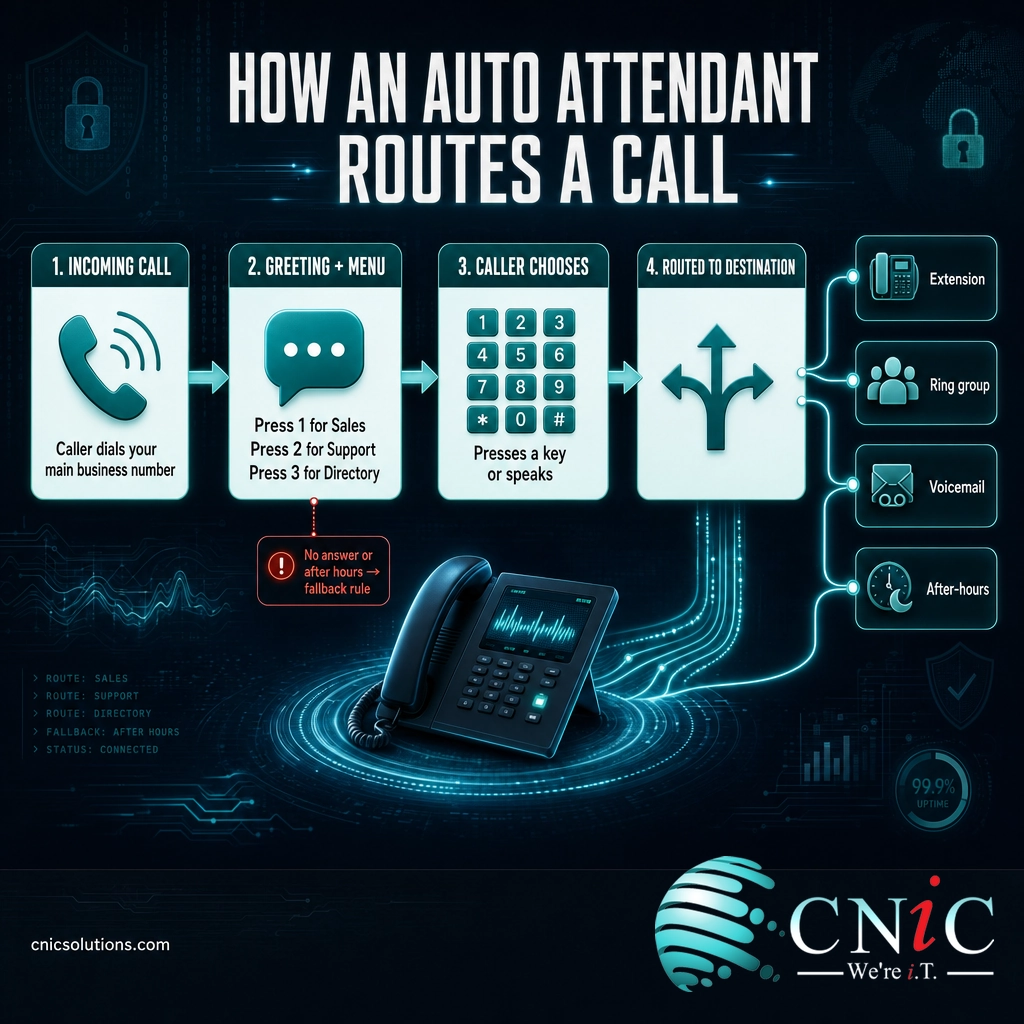
Behind the simple menu, an auto attendant follows a predictable sequence every time the phone rings:
- 1. The call arrives. Someone dials your main business number (in telephony terms, a direct inward dialing or DID number).
- 2. The system answers instantly. The auto attendant picks up on the first ring and plays your recorded greeting, so the caller never hears an unanswered phone.
- 3. It presents the menu. The greeting lists the options: “Press 1 for Sales, Press 2 for Support,” and so on.
- 4. The caller chooses. They press a key, which sends a DTMF tone (the beep your keypad makes), or on voice-enabled systems they just say what they want.
- 5. The system routes the call. Based on the choice, it connects the caller to the matching destination: an individual extension, a group of phones that ring together, a voicemail box, an outside number, or a second menu for more specific options.
- 6. Fallback rules catch the rest. If the caller presses nothing, presses an invalid key, or calls outside business hours, a fallback rule decides what happens next: repeat the menu, send them to an operator, or drop them into voicemail.
All of this happens in seconds, and it happens the same way on the thousandth call as it did on the first. That consistency is the point. A busy front desk misses calls; an auto attendant does not.
Auto Attendant vs IVR: The Difference That Confuses Buyers
The title of this guide pairs the two terms on purpose, because vendors and buyers use “auto attendant” and “IVR” interchangeably all the time, and that causes real confusion when you are comparing phone systems. They are related, but they are not the same thing.
The simplest way to think about it: an auto attendant directs callers, while an IVR (interactive voice response) can also interact with them. An auto attendant sends you to the right place. A full IVR can gather information, look something up, and let you complete a task without ever reaching a human, such as checking an order status, paying a bill, or confirming an appointment, usually by connecting to a database or CRM in the background.
| Auto Attendant | IVR (Interactive Voice Response) | |
|---|---|---|
| Main job | Route callers to the right destination | Route callers and let them complete self-service tasks |
| Interaction | Menu selection only | Collects and acts on caller input |
| Data connection | Usually none | Often linked to a database or CRM |
| Typical setting | Small and midsize business phone systems | Contact centers and high-volume call operations |
| Complexity | Straightforward to set up | More advanced, often needs configuration or scripting |
Here is the relationship that clears it up: every auto attendant is a basic form of IVR, but not every IVR is just an auto attendant. The auto attendant is the simple, menu-and-route end of the spectrum. As soon as the system starts collecting information and doing something with it, you are into true IVR territory. For most small and midsize businesses, an auto attendant is exactly what is needed. Businesses running a busy contact center, taking payments, or fielding thousands of calls a day are the ones that grow into a full IVR.
Why an Auto Attendant Matters for Small Businesses
An auto attendant is not just a convenience. For a smaller business, it quietly solves several problems at once.
It makes a small team sound established. A caller who reaches a clean, professional menu assumes there are departments and staff behind it. A polished greeting levels the playing field with much larger competitors, without you hiring a single person.
It stops calls from slipping through the cracks. When your one receptionist is on lunch, on another line, or out sick, calls get missed, and a missed call from a prospect often goes straight to a competitor. An auto attendant answers every call on the first ring and always has a destination for it, even if that destination is voicemail with a promise to call back.
It covers you after hours and on holidays. The business does not stop getting calls at 5 p.m. With time-based routing, evening and weekend callers hear the right message and reach the right place, whether that is voicemail, an on-call line, or a note about your hours, instead of a phone that just rings out.
It frees your people from playing switchboard. Without one, someone has to answer, ask, and transfer every call by hand. That is a constant interruption. Letting the system handle routing gives your staff their focus back and gets callers to the right person faster.

Because an auto attendant is a standard part of a modern cloud phone system, most businesses already have access to one, they just have not configured it. It is one of the highest-impact features to turn on inside a broader unified communications platform.
Common Auto Attendant Features
Auto attendants range from a single simple menu to a layered system that handles hundreds of callers a day. These are the features worth knowing about when you set one up or compare providers:
- Multi-level menus: A first menu can hand off to sub-menus (“For billing questions, press 1; for a copy of an invoice, press 2”), so complex organizations still route cleanly.
- Dial-by-name directory: Callers who know who they want can spell a name on the keypad and be connected, no extension number required.
- Dial-by-extension: Regular callers can enter a known extension at any time and skip the menu entirely.
- Business-hours and after-hours greetings: Time-based routing plays different messages and sends calls to different places depending on the day and time.
- Holiday schedules: Preset closures automatically switch to a holiday greeting so you are not editing settings the night before a long weekend.
- Ring groups and hunt groups: A menu option can ring several phones at once, or in sequence, so the first available person answers.
- Voicemail-to-email: Messages left in a menu’s voicemail box are transcribed or attached and sent to the right inbox, so nothing sits unheard.
- Zero-out to a live person: A well-built menu always lets a caller press 0 (or wait) to reach an operator, so no one is ever trapped in the system.
How to Set Up an Auto Attendant, Step by Step
Setting up an auto attendant is less about technology than about thinking through how you want calls to flow. On a cloud phone system, the configuration itself takes minutes; the planning is what makes it good. Here is the process:
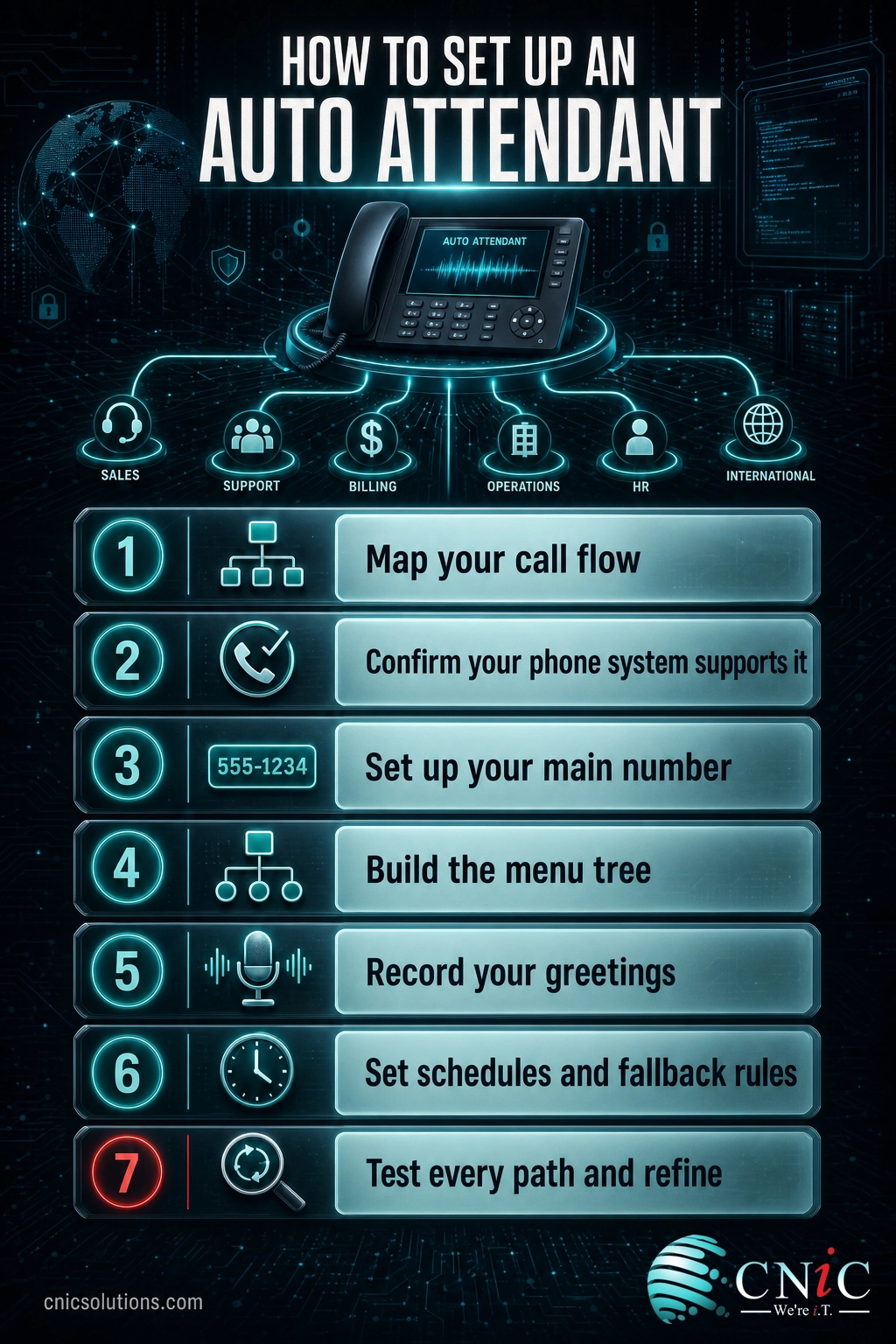
- Step 1: Map your call flow first. Before touching any settings, write down the departments and destinations callers need, who answers each one, and what should happen after hours. This map is your blueprint. Skipping it is the most common reason menus end up confusing.
- Step 2: Confirm your phone system supports it. Nearly all cloud VoIP and UCaaS platforms include an auto attendant. If you are on an older on-premise system, check whether the feature is licensed or whether this is the moment to move to a cloud platform.
- Step 3: Set up your main number. Point your primary business number (your DID) at the auto attendant so every inbound call is greeted by it. If you are switching providers, this is where you port your existing number over.
- Step 4: Build the menu tree. In the admin portal, create each option and assign its destination: an extension, a ring group, a voicemail box, an outside number, or a sub-menu. Keep the top menu short and put the most-requested options first.
- Step 5: Record your greetings. Write clear, short scripts and record a main greeting, an after-hours greeting, and a holiday greeting. Professional voice recordings are worth it, but a clean recording on a good headset works too. State the options in the order they appear.
- Step 6: Set schedules and fallback rules. Define your business hours, holidays, and what happens when a caller does nothing or presses an invalid key. Always define a fallback that reaches a human or a monitored voicemail.
- Step 7: Test every path, then refine. Call in and walk through every option, including after-hours and the zero-out. Listen as a customer would. Once it is live, review it periodically and adjust menus that callers rarely use or frequently mis-select.
If mapping call flows, porting numbers, and configuring routing rules is not how you want your team spending its time, this is exactly the kind of setup a managed IT and communications provider handles as part of a phone system deployment.
Auto Attendant Best Practices
A good auto attendant is invisible: callers get where they are going and barely notice the menu. A bad one makes people mash 0 or hang up. A few principles separate the two.
Myth: more menu options mean better service. The opposite is usually true. Long menus overwhelm callers, force them to hold the whole list in their head, and bury the option they actually want. Keep the top menu to roughly three to five choices, list the most common ones first, keep greetings short, and always offer a clear path to a live person. If a menu needs more than five options, that is a sign to split it into sub-menus, not to make callers listen longer.
Beyond keeping menus short: use plain language rather than internal department jargon, record greetings clearly and at a natural pace, revisit your menu whenever your team or hours change, and check that after-hours and holiday routing actually works before you need it. An auto attendant is not set-and-forget; the businesses that get the most from it treat it as something to tune.
For a growing business, the phone menu is one piece of a larger communications setup. Getting your call routing, voicemail, mobile apps, and messaging working together is what a contact center and call management solution is designed to do.
Set up a business phone system with a professional auto attendant
Frequently Asked Questions
What is an auto attendant?
What is the difference between an auto attendant and IVR?
Do I still need a receptionist if I have an auto attendant?
How much does an auto attendant cost?
Can an auto attendant route calls differently after hours?
About This Guide and Sources
The definitions and framework in this guide, what an auto attendant is, how it routes calls through a greeting and menu, the distinction between an auto attendant and interactive voice response (IVR), the common features (multi-level menus, dial-by-name, time-based routing, ring groups), and the setup process, reflect standard, widely consistent characterizations of business telephony used across the unified communications industry, including reference material from sources such as TechTarget on automated attendants and IVR. Auto attendant capabilities, pricing, and configuration steps vary by provider and platform; no specific costs, call volumes, or performance figures are cited here because they depend entirely on the individual business and vendor. Any business should confirm exact features and setup steps with its own phone system or UCaaS provider.

related posts
What Is BYOD? Bring Your Own Device Explained for Businesses
October 13, 2026BYOD (Bring Your Own Device) is a policy that lets employees use their own personal devices,…
What Is Calendar Phishing and How to Prevent It
October 13, 2026Calendar phishing is a scam that hides a malicious link inside a calendar invitation instead of…
What Is an Evil Twin Attack? How Fake Wi-Fi Hotspots Steal Your…
October 12, 2026An evil twin attack is a fake Wi-Fi hotspot that copies the name of a network…
What Is an IP Address? A Plain-English Guide for Business
October 12, 2026An IP address (Internet Protocol address) is a unique number assigned to every device on a…