

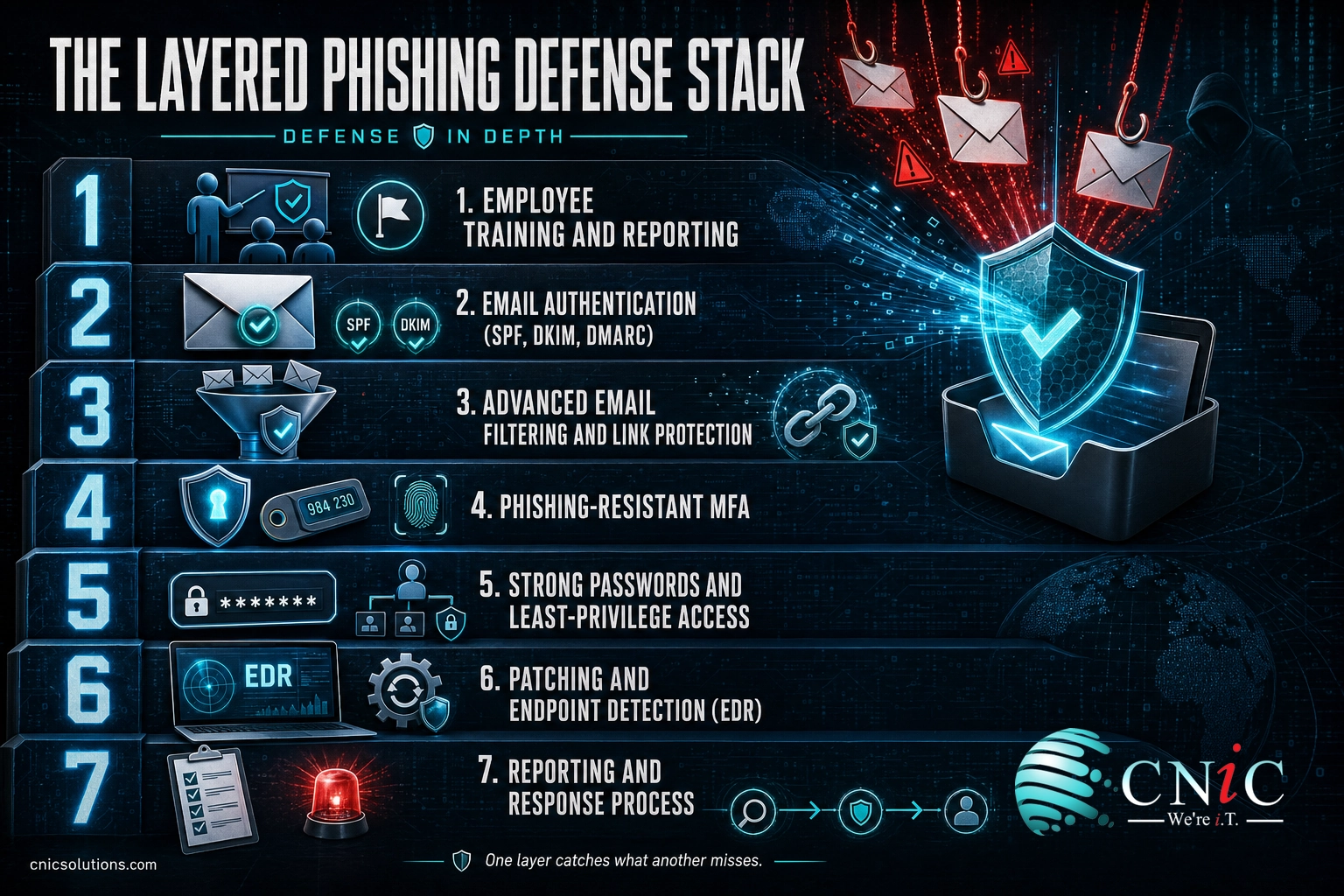
Phishing is now the single most common way attackers break into a business, and it works because it targets your people, not your firewall. The good news: phishing is also one of the most preventable threats you face, if you stop treating it as a training problem and start building layered defenses around it. This guide gives you a practical, seven-step plan to prevent phishing attacks at your company, combining the human side (awareness and reporting) with the technical controls (email authentication, filtering, and multi-factor authentication) that stop the messages a person would otherwise have to catch.
Before You Begin
What you need in place first: administrative access to your email platform (Microsoft 365 or Google Workspace) and your domain’s DNS settings, plus a rough list of which staff and accounts are highest value. Who should be involved: whoever manages your IT (internal staff or a managed provider), an owner or manager who can set policy, and someone who can communicate changes to employees. Estimated time: the core technical controls can be turned on in a day or two; awareness training and reporting habits are an ongoing program, and a mature posture takes a few months to settle in. Skill level: business decision-maker. You do not need to be a security engineer to lead this, but you will rely on technical help for the email and identity settings.
Key Takeaways
- Phishing is the top way in. IBM’s 2025 report found phishing overtook stolen credentials as the most common initial attack vector, at an average breach cost of $4.8 million.
- Training alone is not enough. People click a phishing link in under 60 seconds on average, so awareness has to be paired with technical controls that stop bad messages before a person sees them.
- Authenticate your email. SPF, DKIM, and DMARC stop attackers from spoofing your own domain, one of the cheapest and highest-impact steps available.
- Use phishing-resistant MFA on what matters. Basic MFA helps, but security keys and passkeys defeat the real-time phishing kits that bypass app and SMS codes.
- Make reporting effortless. A one-click report button turns your employees from the weakest link into a real-time detection network.
What’s in This Guide
- Why Phishing Prevention Beats Cleanup
- Step 1: Train Employees to Recognize and Report Phishing
- Step 2: Lock Down Your Email With Authentication (SPF, DKIM, DMARC)
- Step 3: Turn On Advanced Email Filtering and Link Protection
- Step 4: Require Phishing-Resistant Multi-Factor Authentication
- Step 5: Enforce Strong Passwords and Least-Privilege Access
- Step 6: Keep Software Patched and Endpoints Protected
- Step 7: Build a Simple Reporting and Response Process
- When to Call a Professional
- Troubleshooting Common Gaps
- How to Maintain and Monitor Your Defenses
- Frequently Asked Questions
Why Phishing Prevention Beats Cleanup
Phishing is a message, usually an email, designed to trick someone into handing over a password, wiring money, or opening a malicious file. It is the front door for most modern attacks: ransomware, business email compromise, and data breaches almost all start with one convincing message. That is why prevention is worth the effort. Stopping the message is cheap. Cleaning up after it succeeds is not.
The reason phishing keeps working is not that people are careless. It is that the attack is fast, and it is aimed at human instinct rather than technical weakness. The Verizon 2025 Data Breach Investigations Report found the median time for someone to click a phishing link is under 60 seconds, and that roughly 60% of breaches involved a human element. Attackers do not need everyone to fall for it. They need one person, once.
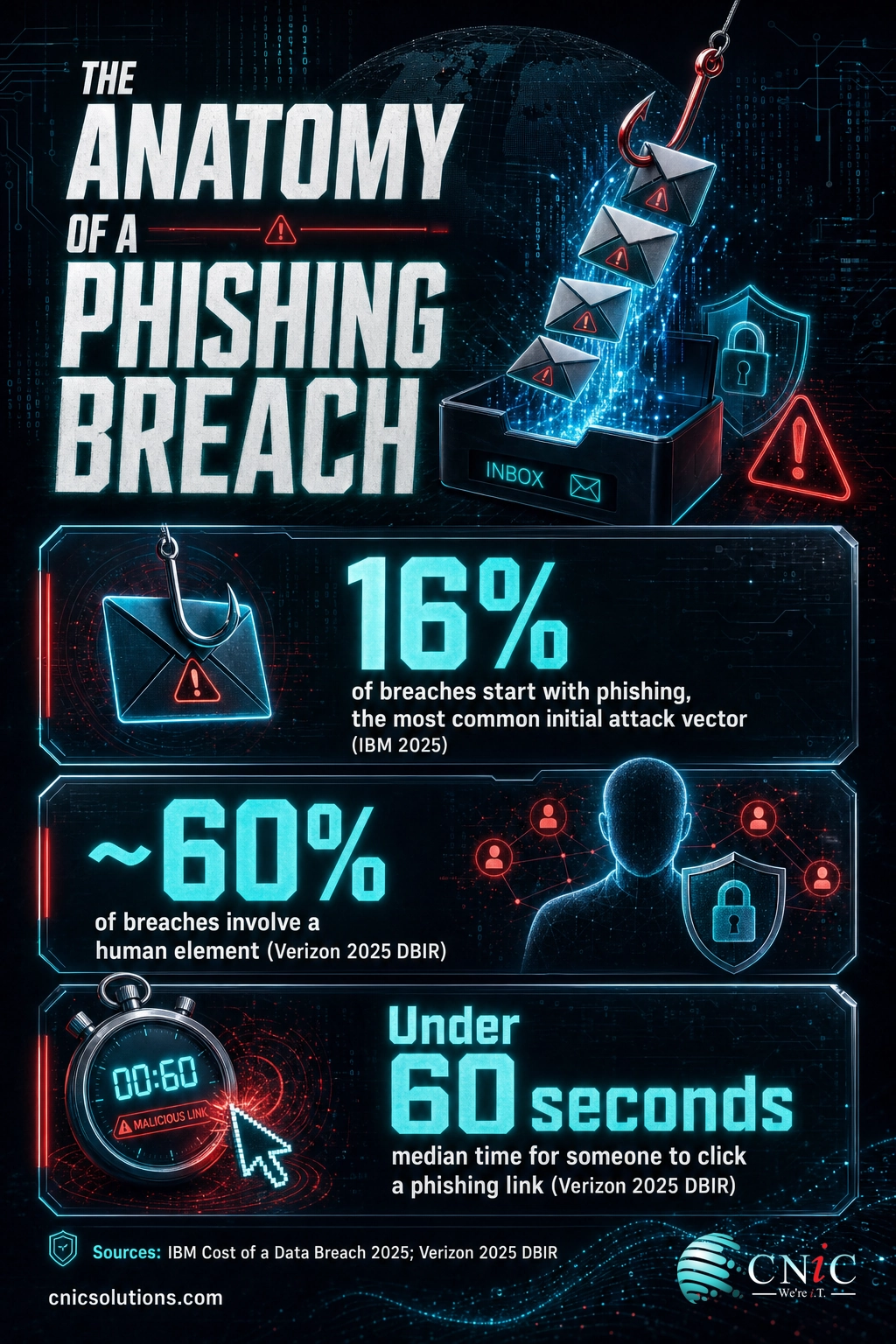
It is also getting easier for attackers. IBM reported that generative AI has cut the time to write a convincing phishing email from about 16 hours to five minutes, and that attackers are now using AI most commonly for phishing. The days of spotting a scam by its bad grammar are ending, which is exactly why “just be careful” is no longer a strategy. You need layers.
Top Starting Points for a Breach (Verizon 2025 DBIR)
Source: Verizon 2025 Data Breach Investigations Report. Stolen passwords and phishing are the two leading ways attackers get their first foothold, and phishing feeds credential theft.
Myth: “We’re too small to be a phishing target.”
The opposite is true. Automated phishing campaigns are sprayed at millions of addresses at once, and small and midsize businesses are attractive precisely because they tend to have fewer defenses than large enterprises. Attackers are not hand-picking Fortune 500 logos. They are casting a wide net, and an unprotected 12-person company is an easier catch than a hardened 12,000-person one. Size is not camouflage.
For a fuller picture of the specific tricks attackers use, our guide to the different types of phishing attacks businesses face and our explainer on the social engineering tactics behind them are worth a read alongside this plan.
Get a free assessment of your phishing defenses
Source: IBM Cost of a Data Breach Report | Verizon Data Breach Investigations Report | FBI IC3 2024 Internet Crime Report
Step 1: Train Employees to Recognize and Report Phishing
Your people are the layer attackers aim at, so start by strengthening it. The goal of training is not to turn every employee into a security analyst. It is to build two reflexes: pause on anything that creates urgency or asks for credentials or money, and report it in one easy step.
What to do: run short, frequent security awareness training rather than one long annual session, and send realistic phishing simulations so the lessons are practiced, not just watched. Teach the reliable red flags: a sense of urgency or threat, a request to change payment details, a mismatch between the display name and the real email address, links that do not match the text, and unexpected attachments. Crucially, teach the report step so a suspicious message becomes a signal to IT, not a private guess.
Why this matters: awareness lowers the click rate and, more importantly, raises the report rate, which shrinks the window an attacker has to operate.
What success looks like: employees who slow down on high-pressure requests, verify payment or credential changes through a second channel, and report suspicious messages within minutes. A deeper program, including who to train and how often, is covered in our complete guide to employee security awareness training.
Common mistake: treating training as a one-and-done checkbox
A single annual video does almost nothing. Verizon’s 2025 report found that click rates on phishing simulations were largely unaffected by traditional training, which does not mean training is useless, it means it has to be continuous and paired with an easy report path and the technical controls in the next steps. Awareness is a layer, not the whole wall.
Step 2: Lock Down Your Email With Authentication (SPF, DKIM, DMARC)
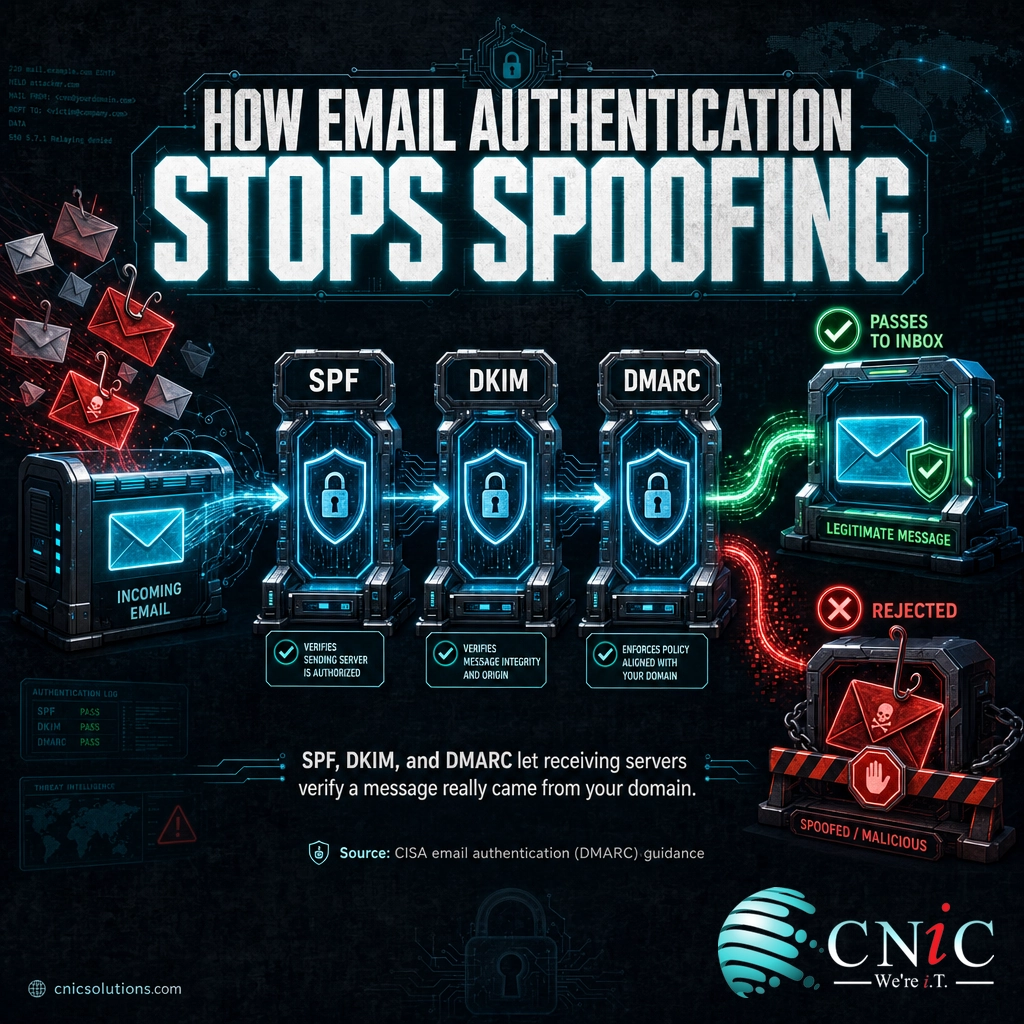
One of the most common and damaging phishing tactics is spoofing, where an attacker sends a message that appears to come from your own domain, your CEO, or a trusted vendor. Email authentication is how you shut that down, and it is one of the highest-impact steps you can take because it protects your staff, your customers, and your partners at once.
What to do: publish three DNS records for your domain and confirm they are configured correctly:
- SPF (Sender Policy Framework): lists the mail servers allowed to send as your domain, so unauthorized senders are flagged.
- DKIM (DomainKeys Identified Mail): adds a cryptographic signature to your outgoing mail so receivers can verify it was not altered and really came from you.
- DMARC (Domain-based Message Authentication): ties SPF and DKIM together and tells receiving servers what to do with mail that fails, and sends you reports. Start in monitoring mode, review the reports, then move the policy to quarantine and finally reject.
Why this matters: without DMARC at enforcement, anyone can send email that appears to come from your domain, which is the backbone of business email compromise and invoice fraud. This is a control your attackers are counting on you to have skipped.
What success looks like: a DMARC policy set to “reject” (p=reject), clean SPF and DKIM alignment, and DMARC reports being monitored so you catch both spoofing attempts and any legitimate services you forgot to authorize. The FBI’s guidance on business email compromise specifically recommends this kind of email authentication.
Source: CISA guidance on email authentication (DMARC) | FBI IC3 2024 Internet Crime Report
Step 3: Turn On Advanced Email Filtering and Link Protection
The best phishing message is the one no employee ever sees. Modern email platforms include strong anti-phishing tools, but many businesses never turn the advanced features on. This step is about making the filter do as much work as possible so your people only have to catch what slips through.
What to do: enable the advanced protection features in your platform and, for higher-risk businesses, consider a dedicated email security layer:
- Anti-phishing and anti-spoofing policies in Microsoft 365 (Defender for Office 365) or Google Workspace, including impersonation and display-name protection.
- Link scanning and rewriting, so URLs are checked at the moment of click, not just at delivery.
- Attachment sandboxing, which opens attachments in an isolated environment to detect malware before they reach a user.
- External-sender warning banners, a simple visual cue that a message came from outside the company.
Why this matters: filtering removes the large majority of malicious mail automatically, which both reduces risk and reduces the fatigue that makes people click. A filter never gets tired or rushed.
What success looks like: advanced anti-phishing policies enabled and tuned, external banners visible, and a steady, low volume of phishing actually reaching inboxes, which is where your trained, report-ready employees take over.
Have your email security configured and monitored for you

Step 4: Require Phishing-Resistant Multi-Factor Authentication
Phishing often has one real goal: steal a password. Multi-factor authentication (MFA) is what makes a stolen password far less useful, because logging in also requires something the attacker does not have. It is the highest-value identity control you can turn on, and it belongs on every account that supports it.
What to do: require MFA across email, remote access, financial systems, and any cloud application that supports it. Then upgrade the method for your most sensitive accounts:
- Baseline: an authenticator app is far better than SMS text codes, which can be intercepted or SIM-swapped.
- Phishing-resistant: for administrators, finance staff, and executives, use FIDO2 hardware security keys or passkeys, which are bound to the real website and cannot be handed to a fake one.
Why this matters: CISA states that enabling MFA makes you significantly less likely to be hacked, and it is one of the single most effective steps against account takeover. The catch is that determined attackers have learned to bypass basic app and SMS codes with real-time phishing kits that relay your login as you type it. Phishing-resistant methods close that gap.
What success looks like: MFA enforced everywhere it is available, SMS retired as a primary factor where possible, and phishing-resistant keys or passkeys protecting your highest-value accounts. For how these controls actually work, see our explainers on multi-factor authentication and passwordless passkeys.
Source: CISA guidance on multi-factor authentication
Step 5: Enforce Strong Passwords and Least-Privilege Access
MFA is your safety net, but strong password and access practices reduce how often that net is tested and how much damage a single compromised login can do. Phishing that captures one password should never open the whole business.
What to do: tackle both the passwords themselves and what each account can reach:
- Give everyone a password manager, so long, unique passwords for every service become effortless and reuse stops. Password reuse is what turns one phished login into many.
- Ban reuse between work and personal accounts, which is a common bridge attackers exploit.
- Apply least privilege, granting each role only the access it needs, so a compromised standard user cannot reach admin functions or sensitive data.
- Separate admin accounts from everyday accounts, and never browse email or the web from an administrator login.
Why this matters: credential abuse is the leading starting point for breaches, and phishing is the main way those credentials get stolen. Limiting reuse and access shrinks the blast radius of any single success.
What success looks like: a password manager in use company-wide, no shared or reused passwords on critical systems, and access rights that match job roles rather than accumulating over time.
Step 6: Keep Software Patched and Endpoints Protected
Not every phishing attack tries to steal a password. Some deliver malware through a malicious attachment or a drive-by link. This layer assumes a payload occasionally runs and makes sure it fails to take hold.
What to do: close the technical gaps that malware relies on:
- Patch promptly. Keep operating systems, browsers, and applications up to date, because phishing payloads frequently exploit known, already-fixed vulnerabilities.
- Deploy endpoint detection and response (EDR) rather than basic antivirus alone, so suspicious behavior on a device is detected and contained, not just matched against a signature list.
- Restrict macros and risky file types, a common malware delivery route through Office documents.
- Maintain tested backups, so that if a phishing-delivered ransomware attack does land, you can recover.
Why this matters: patching and EDR are the difference between a blocked attempt and a business-wide incident when a user does click something they should not have.
What success looks like: automatic patching on a short cycle, EDR running and monitored on every endpoint, and backups you have actually restored from in a test, not just scheduled.
Add managed backups and endpoint protection
Step 7: Build a Simple Reporting and Response Process
Even with every layer above, some phishing will land, and someone will eventually click. What separates a near-miss from a breach is what happens in the next few minutes. A clear, blame-free reporting and response process is the final, decisive layer.
What to do: make reporting effortless and the response predictable:
- Add a one-click report button to your email client (both Microsoft 365 and Google Workspace offer one), so reporting is easier than deleting.
- Publish a short “if you clicked” guide: disconnect the device, stop entering credentials, change the affected password from a different device, and tell IT immediately.
- Make it blame-free. If people fear punishment, they hide clicks, and a hidden click is how a small mistake becomes a large breach.
- Define who responds: who investigates a report, who can lock an account or isolate a device, and how a confirmed phishing incident is escalated.
Why this matters: fast reporting turns your workforce into a live detection sensor and gives your team the minutes it needs to contain an incident before it spreads.
What success looks like: reports arriving within minutes, a documented response for confirmed incidents, and a culture where reporting a mistake is rewarded, not feared. When a click does turn into a real intrusion, the next move is your incident response plan, which our step-by-step incident response plan guide walks through.
When to Call a Professional
Many of these steps are ones a capable business can start on its own. But several layers are hard to build and, more importantly, hard to keep running well without dedicated expertise. It is worth bringing in a managed IT and cybersecurity partner when:
- You are configuring email authentication or advanced filtering and want SPF, DKIM, and DMARC set to enforcement without breaking legitimate mail. A misconfiguration here quietly blocks real invoices or leaves the door open.
- You cannot monitor around the clock. Phishing does not keep business hours, and detection speed is the biggest lever on breach cost. Continuous monitoring is the piece most small businesses cannot staff internally.
- You need to satisfy compliance or cyber-insurance requirements, which increasingly mandate MFA, training, and email security as conditions of coverage.
- You have suffered a phishing incident and need help containing it and understanding what was exposed.
A partner turns this list from a project you finish into a posture that is watched and maintained every day, which is where the real protection lives.
Put an experienced security leader in charge of your defenses
Troubleshooting Common Gaps
Most phishing defenses fail in a handful of predictable ways. Here are the gaps we see most often and how to close them.
| The gap | How to fix it |
|---|---|
| MFA is on for email but not for other apps | Extend MFA to remote access, financial systems, and every cloud app that supports it. Attackers pivot to whatever account is left unprotected. |
| DMARC is stuck in monitoring mode | Review your DMARC reports, authorize the legitimate senders you find, then move the policy to quarantine and finally reject. Monitoring alone does not stop spoofing. |
| Training happens once a year | Switch to short, frequent training plus regular phishing simulations, and measure the report rate, not just the click rate. |
| Employees do not know how to report | Deploy a one-click report button and publish a two-line “if you clicked” guide everyone can find in seconds. |
| Filtering is left at default settings | Turn on the advanced anti-phishing, impersonation, link-scanning, and sandboxing features. The defaults catch spam, not targeted phishing. |
How to Maintain and Monitor Your Defenses
Phishing prevention is not a project you complete. Attacker tactics change constantly, and AI is making convincing lures faster to produce, so your defenses have to be reviewed and kept current. Once the seven layers are in place, keep them healthy:
- Review DMARC reports and filter logs regularly to spot new spoofing attempts and senders that need authorizing.
- Keep training and simulations running on a schedule, and refresh the content as new tactics like AI-generated and QR-code phishing appear.
- Track your report rate and response time, which tell you whether your human layer is actually working.
- Re-check access and MFA coverage whenever staff or systems change, so no account quietly falls out of protection.
- Pair everything with continuous monitoring, because the fastest containment comes from tools and eyes that are watching even when your team is not.
Maintaining this rhythm is ongoing work, and it is exactly the kind of managed discipline that keeps phishing defenses effective year after year rather than drifting back into a single stale training video.
Frequently Asked Questions
What is the most effective way to prevent phishing attacks?
Can employee training alone stop phishing?
Does multi-factor authentication stop phishing?
What should an employee do if they clicked a phishing link?
How much does a phishing attack cost a business?
Sources
Phishing’s rank as the most common initial attack vector, its associated average breach cost of $4.8 million, and the note on generative AI accelerating phishing are from IBM’s 2025 Cost of a Data Breach Report. The median time to click a phishing link (under 60 seconds), the roughly 60% of breaches involving a human element, and the 22% credential-abuse and 16% phishing initial-vector figures are from the Verizon 2025 Data Breach Investigations Report. Phishing and spoofing complaint volume (193,407) and business email compromise losses ($2.77 billion across 21,442 incidents in 2024) are from the FBI Internet Crime Complaint Center (IC3) 2024 Internet Crime Report. Guidance on multi-factor authentication and email authentication (DMARC) references CISA. No statistics in this article are estimated or invented; each is drawn from the primary source named.
Primary and authoritative sources: IBM Cost of a Data Breach Report, Verizon DBIR, FBI IC3 2024 Internet Crime Report, CISA MFA guidance, CISA DMARC guidance.



related posts
Zero Trust Statistics for 2026: Adoption, Maturity, and Breach Impact
November 3, 2026Zero trust has become the default security strategy on paper, but not yet in practice. Okta's…
What Is ZTNA (Zero Trust Network Access)?
November 3, 2026Zero Trust Network Access (ZTNA) is a security service that grants a verified user access to…
What Is XDR (Extended Detection and Response) and How Does It Protect…
November 2, 2026Extended detection and response (XDR) is a security platform that collects and correlates threat data from…
What Is Zero Trust Security? A Guide for Small Businesses
November 2, 2026Zero Trust security is a cybersecurity model built on one rule: never trust, always verify. Instead…