

A cybersecurity incident response plan is the difference between a bad day and a business-ending one. When an attack hits, the organizations that recover fastest are not the ones that improvise. They follow a plan written in advance that says who does what, in what order, and who to call. This guide walks through how to build that plan step by step, using the same NIST and SANS frameworks that auditors, regulators, and cyber insurers expect, translated into practical actions your business can take now.
Before You Begin
What you need in place first: a current list of your systems and data, knowledge of which vendors or IT partners support you, and the backing of leadership to make this an official document. Who should be involved: an owner or executive sponsor, whoever manages your IT (internal or a provider), and someone who can speak to legal and compliance obligations. Estimated time: a usable first version takes one to two weeks of focused effort; a mature, tested program is an ongoing discipline. Skill level: business decision-maker. You do not need to be a security engineer to lead this, but you will lean on technical people for the response playbooks.
Key Takeaways
- An incident response plan is a decision-making system, not a document you file away. Its value is that roles, authority, and steps are settled before the pressure hits.
- Build on an established framework. NIST SP 800-61 and the SANS PICERL model both map the full lifecycle, from preparation through lessons learned, so you are not inventing structure from scratch.
- Preparation is most of the work. Assembling the team, inventorying assets, and defining incidents and severity happen before anything goes wrong.
- Reporting is a plan, not an afterthought. Legal, regulatory, insurer, and customer notifications have deadlines you cannot meet if you are figuring them out mid-crisis.
- Testing is what makes it real. A plan that has never been rehearsed will fail under stress. IBM ties a tested plan to $2.66 million in average breach-cost savings.
What’s in This Guide
- What an Incident Response Plan Is and Why Every Business Needs One
- The Frameworks Behind a Modern Plan: NIST and SANS
- Step 1: Assemble Your Team and Define Roles
- Step 2: Identify and Prioritize Your Critical Assets
- Step 3: Define What Counts as an Incident and Rank Severity
- Step 4: Build Detection and Analysis Procedures
- Step 5: Write Your Containment, Eradication, and Recovery Playbooks
- Step 6: Create Your Communication and Notification Plan
- Step 7: Test the Plan, Train the Team, and Improve
- When to Call a Professional
- Troubleshooting Common Gaps
- How to Maintain and Monitor Your Plan
- Frequently Asked Questions
What an Incident Response Plan Is and Why Every Business Needs One
An incident response plan (IRP) is a documented, rehearsed set of roles and procedures your business follows when a security event happens: a ransomware infection, a compromised email account, a lost laptop full of client data, or a confirmed data breach. It answers the questions no one can think clearly about at 2 a.m. during an attack. Who is in charge? What do we shut down first? Who do we legally have to notify, and by when? How do we get back to normal without destroying the evidence?
The reason to build one is simple: incidents are common, expensive, and fast. The cost of getting caught unprepared has never been higher, and attacks that used to hit only large enterprises now land squarely on small and midsize businesses.
Ransomware’s share of breaches is not just high, it is climbing, which is exactly why a written response plan is now a baseline business control rather than an IT nicety.
Share of Breaches Involving Ransomware (Verizon DBIR)
Source: Verizon 2024 and 2025 Data Breach Investigations Reports.
The picture is worse for smaller organizations. The Verizon 2025 DBIR found ransomware present in 88% of breaches at small businesses, a reminder that “we are too small to be a target” is one of the most expensive assumptions a company can make. For the full picture of how often breaches happen and what drives them, our breakdown of data breach frequency and causes and our analysis of what a breach actually costs put hard numbers behind the risk.
Myth: “We have cyber insurance, so we don’t need a plan.”
It is now the reverse. Insurers increasingly require a documented and tested incident response plan as a condition of coverage, and gaps in your response can reduce or void a claim. A plan is not a substitute for insurance, and insurance is not a substitute for a plan. See how underwriting is tightening in our look at cyber insurance requirements and claims trends. And “our backups are our plan” is a related trap: backups only help with recovery. They do nothing for detection, containment, legal notification, or communications.
Get help building and running your security program
Source: IBM Cost of a Data Breach Report | Verizon Data Breach Investigations Report
The Frameworks Behind a Modern Plan: NIST and SANS
You do not need to invent the structure of an incident response plan. Two widely accepted frameworks already define it, and building on one gives your plan credibility with auditors, regulators, and insurers.
The SANS model breaks a response into six discrete steps, often remembered by the acronym PICERL: Preparation, Identification, Containment, Eradication, Recovery, and Lessons Learned. It is granular and operational, which is why responders reach for it during an actual incident.
The NIST model, from Special Publication 800-61, groups the same work into fewer phases. The long-standing version defined four: Preparation; Detection and Analysis; Containment, Eradication, and Recovery; and Post-Incident Activity. There is an important update to know about. In April 2025, NIST finalized Revision 3 of SP 800-61, and it reframes incident response around the six functions of the NIST Cybersecurity Framework 2.0: Govern, Identify, Protect, Detect, Respond, and Recover. The goal is to treat incident response as part of continuous risk management rather than a standalone playbook.
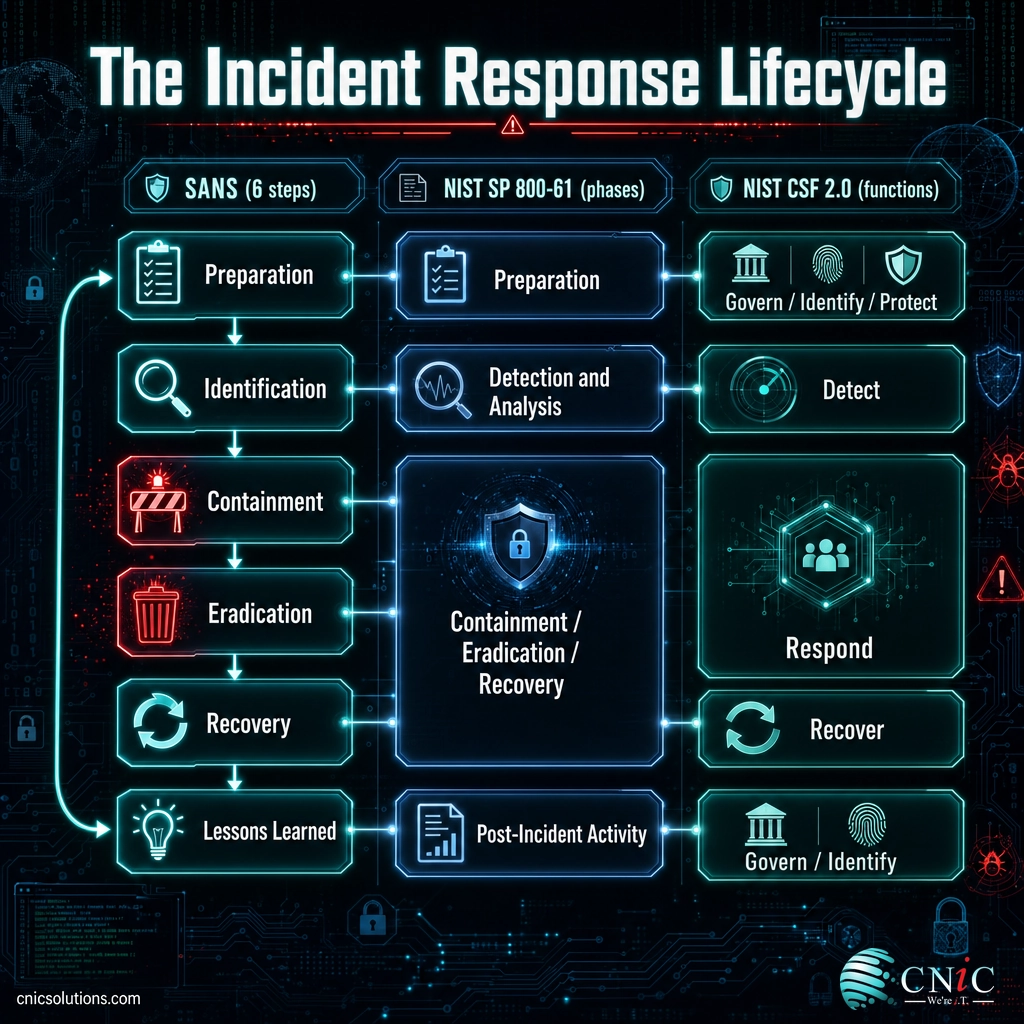
| SANS six steps | NIST SP 800-61 phase | NIST CSF 2.0 function (Rev. 3) |
|---|---|---|
| Preparation | Preparation | Govern, Identify, Protect |
| Identification | Detection and Analysis | Detect |
| Containment | Containment, Eradication, and Recovery | Respond |
| Eradication | ||
| Recovery | Recover | |
| Lessons Learned | Post-Incident Activity | Govern, Identify |
For most businesses, the practical answer is to use SANS PICERL as the operational spine of your plan (it maps cleanly to the steps below) while aligning your overall program with the NIST framework your compliance obligations reference. The seven build steps that follow give you both.
Source: NIST Special Publication 800-61 Revision 3 | SANS Incident Handler’s Handbook
Step 1: Assemble Your Team and Define Roles
Before any procedure matters, you need to know who runs a response. An incident is not the moment to figure out who is allowed to take a server offline or authorize paying an outside forensics firm. Name your team and settle their authority in advance.
What to do: identify the people (internal staff, your IT provider, outside counsel) who will handle incidents, and assign each a clear role. At minimum, define:
- Incident lead: the single person who coordinates the response and makes the call to escalate.
- Technical lead: whoever directs the hands-on work of investigation, containment, and recovery.
- Communications: who talks to staff, customers, and (if needed) the press.
- Legal and compliance: who determines notification obligations and manages liability.
- Executive sponsor: the leader who authorizes major decisions and resources.
Why this matters: speed depends on clarity. When roles and decision authority are pre-assigned, the team acts instead of debating.
What success looks like: a one-page roster with names, roles, backups for each role, and 24/7 contact details, including at least one out-of-band channel (a personal phone or a separate messaging app) in case your primary email and network are the very things that are compromised.
Small businesses rarely have a dedicated security team, and that is fine. The roles can be filled by owners, an office manager, and a managed IT or virtual CISO partner. What matters is that every role has a name next to it.
Step 2: Identify and Prioritize Your Critical Assets
You cannot protect or prioritize what you have not catalogued. This step is the “Identify” function in plain terms: know what you have and what it is worth.
What to do: inventory your important systems, data stores, applications, and network infrastructure. For each, note where it lives, who depends on it, and (critically) whether it holds sensitive or regulated data such as protected health information, cardholder data, or financial records. Then rank each asset by business impact: how badly would losing it, or having it exposed, hurt the company?
Why this matters: during an incident you will make triage decisions under time pressure. A ranked asset list tells you what to defend and restore first.
What success looks like: a prioritized inventory that flags your “crown jewels,” the handful of systems and data sets whose compromise would be most damaging, so the response plan can protect them first. This inventory also feeds your compliance work, because it tells you exactly which regulated data is in scope if it is ever exposed.
Step 3: Define What Counts as an Incident and Rank Severity
A plan is useless if the team cannot tell a real incident from routine noise, or a minor issue from a five-alarm fire. This step sets those definitions so response is proportional and consistent.
What to do: write a clear definition of a “security incident” for your business (for example, any event that compromises the confidentiality, integrity, or availability of your systems or data). Then create a severity scale that ties each level to a required response time and a notification path.
| Severity | Example | Response |
|---|---|---|
| SEV-1 Critical | Active ransomware, confirmed breach of regulated data, business operations down | Immediate, all-hands; executive and legal engaged; likely external help and notifications |
| SEV-2 High | Compromised admin account, malware on a key server, targeted phishing that succeeded | Same-day response by the core team; escalation ready if it spreads |
| SEV-3 Medium | Single infected workstation, isolated policy violation, contained phishing click | Handled by IT within defined hours; logged and reviewed |
| SEV-4 Low | Blocked attack, spam, minor anomaly needing verification | Routine handling; tracked for patterns |
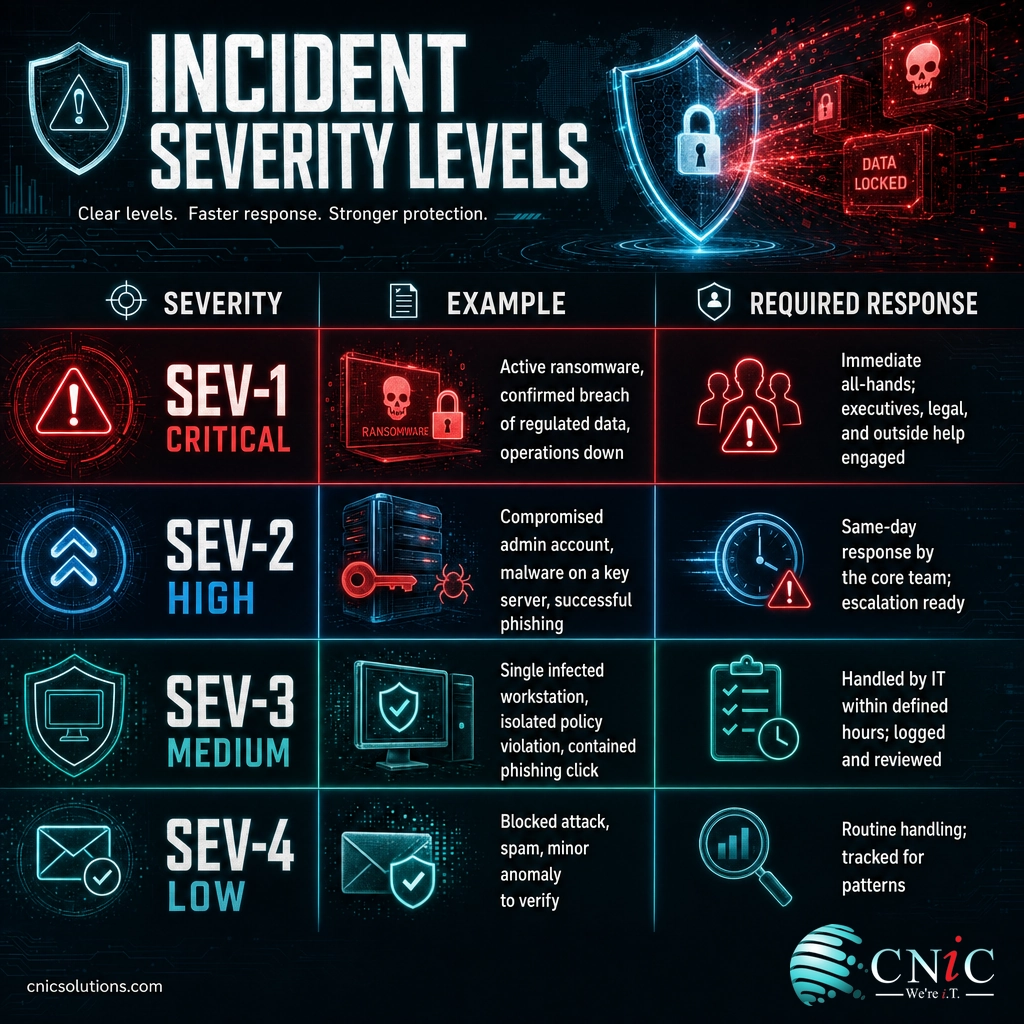
Why this matters: severity levels turn “something looks wrong” into a defined action with the right people and the right urgency, and they prevent both overreaction and dangerous under-reaction.
What success looks like: anyone in the business, technical or not, can look at an event and know what level it is, who to tell, and how fast.
Step 4: Build Detection and Analysis Procedures
This is the “Detect” and “Identification” step: how you find out something is wrong, and how you confirm it. Many breaches go undetected for weeks, and detection speed drives everything downstream. IBM’s 2025 report put the average breach lifecycle at 181 days to identify and another 60 days to contain.
What to do: document how incidents are detected and reported. Cover both technology and people:
- Monitoring and logging: what tools watch your endpoints, network, email, and cloud, and where their alerts go. Endpoint detection and response (EDR), centralized logging, and email security are common sources.
- Human reporting: a simple, well-known way for any employee to report something suspicious, because staff are often the first to notice a phishing attempt or an odd request.
- Triage and analysis: the steps to confirm an alert is a real incident, scope which systems are affected, and assign a severity from Step 3.
Why this matters: you cannot respond to what you cannot see. Reliable detection and a low-friction reporting path shorten the window attackers have to operate.
What success looks like: alerts are actually monitored (ideally 24/7), employees know how to report a concern in one step, and every suspected incident is quickly confirmed, scoped, and classified before response begins. Continuous monitoring is the piece most small businesses cannot staff around the clock on their own, and it is where a managed partner adds the most immediate value.
Add round-the-clock monitoring to your business
Source: IBM Cost of a Data Breach Report
Step 5: Write Your Containment, Eradication, and Recovery Playbooks
This is the heart of the response: stop the bleeding, remove the threat, and get back to work. Write these as concrete playbooks for your most likely scenarios (ransomware, business email compromise, a lost or stolen device) so the team follows steps instead of improvising.
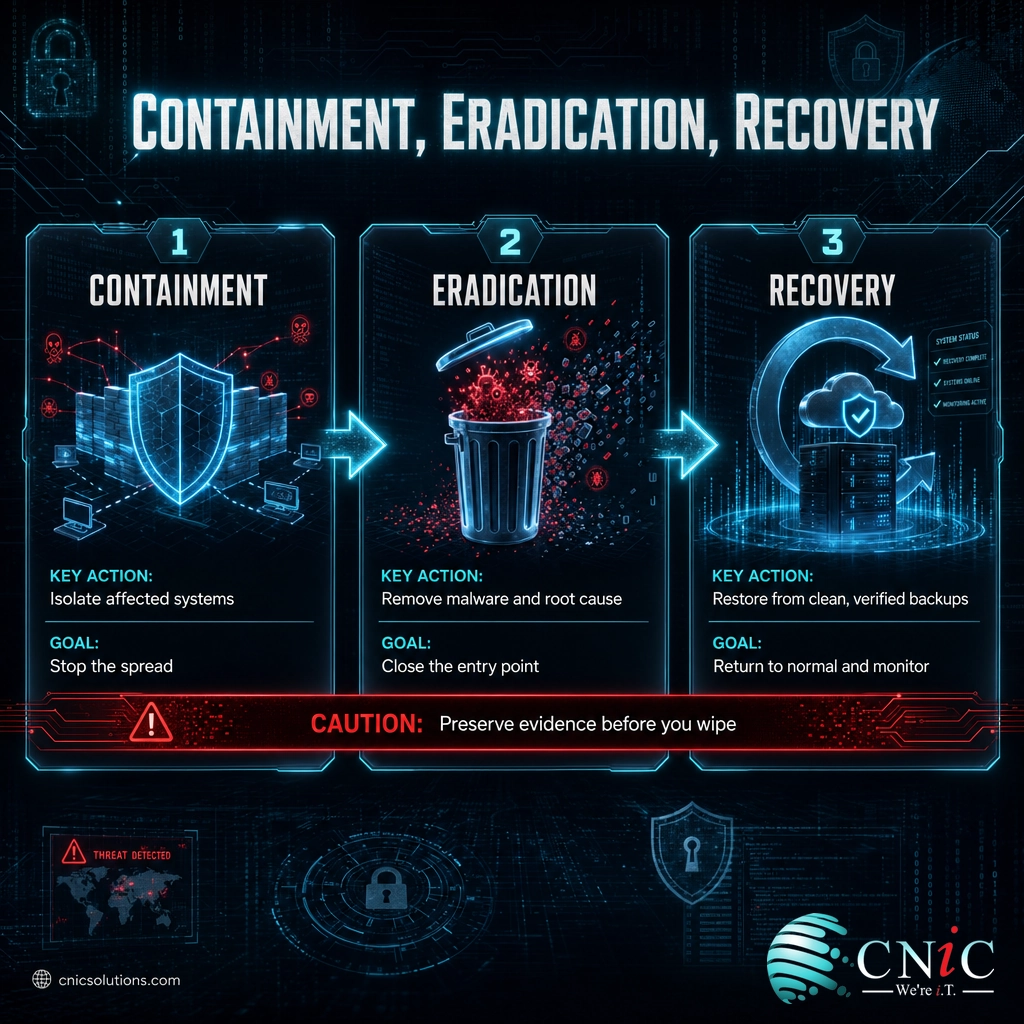
Containment: isolate affected systems to stop the incident from spreading. That can mean disconnecting a device from the network, disabling a compromised account, or segmenting part of the network. The goal is to limit damage while preserving the ability to investigate.
Eradication: remove the root cause, not just the symptom. That means eliminating malware, closing the vulnerability or misconfiguration that allowed entry, resetting compromised credentials, and verifying the attacker no longer has a foothold.
Recovery: restore systems and data from clean, verified backups, confirm they are functioning normally, and monitor closely for signs the threat returns. This is where tested backups earn their keep. Ransomware recovery in particular is often slower and more expensive than businesses expect, as our data on real ransomware recovery timelines shows.
Common mistake: destroying evidence while cleaning up
The instinct during an active incident is to wipe and rebuild as fast as possible. Do that too soon and you erase the forensic evidence you need to understand what happened, meet legal and insurance requirements, and prove what data was (and was not) affected. Before you wipe, preserve: capture logs, take system images or snapshots, and document every action with timestamps. Your insurer and, potentially, regulators will expect this chain of evidence.
Why this matters: a disorganized recovery can reinfect systems, miss the real entry point, or destroy the proof you need later.
What success looks like: for each major scenario, a written playbook that a competent responder can follow under stress, ending with clean systems, verified backups restored, and a documented record of what was done.
Step 6: Create Your Communication and Notification Plan
Handling the technical side well but botching communication can still turn an incident into a reputational and legal disaster. Decide in advance who you tell, what you say, and by when.
Internal communication: how the team coordinates during a response (using that out-of-band channel from Step 1 if primary systems are down), and how and when staff and leadership are updated.
External and regulatory notification: this is the part most plans underdevelop. Build a checklist of every obligation that could apply, with its deadline:
- Regulatory bodies: depending on your industry and the data involved, breaches may trigger notification duties under HIPAA, state data-breach laws, PCI-DSS, or sector rules, each with its own timeline.
- Law enforcement: know how and when to report to the FBI’s Internet Crime Complaint Center (IC3) and CISA. In 2024, IC3 received 859,532 complaints reporting $16.6 billion in losses, a 33% jump, and reporting can aid investigation and recovery.
- Cyber insurer: most policies require prompt notification; late reporting can jeopardize a claim.
- Customers and partners: what you will disclose, through what channel, and who approves the message.
Why this matters: notification deadlines are unforgiving, and a missed one carries its own penalties on top of the breach. Deciding this calmly in advance protects both compliance and trust.
What success looks like: a ready notification checklist with responsible owners, contact points, and deadlines, plus pre-drafted holding statements you can adapt quickly rather than write from scratch during a crisis.
Source: FBI IC3 2024 Internet Crime Report | CISA incident reporting
Step 7: Test the Plan, Train the Team, and Improve
A plan that lives in a drawer and has never been rehearsed will fail the first time you need it. This final step, the “Lessons Learned” and continuous-improvement piece, is what separates a document from a real capability.
What to do:
- Train the team on their roles and on how to recognize and report incidents. Everyone, not just IT, should know the first move.
- Run tabletop exercises: walk through a realistic scenario (say, ransomware on a file server) and have the team talk through each decision. These surface gaps cheaply, before a real attacker does.
- Hold a lessons-learned review after every exercise and every real incident. What worked, what was slow, what was missing? Feed the answers back into the plan.
- Review on a schedule: revisit the whole plan at least annually and after any major change to your systems, staff, or business.
Why this matters: testing is where a plan proves it works, and it pays off directly. IBM found that organizations with a tested incident response plan saved an average of $2.66 million per breach.
What success looks like: a plan with a version history, dated tests, and a track record of improvements. Building that rhythm, and owning it over time, is exactly the ongoing role a virtual CISO or virtual CIO fills for businesses without a full-time security leader.
Put an experienced security leader in charge of your plan
Source: IBM Cost of a Data Breach Report
When to Call a Professional
You can and should build the framework of this plan yourself, because it forces the business decisions only you can make. But there are clear points where bringing in a professional is the right call rather than a luxury:
- You are in an active incident and unsure how to contain it without making things worse. This is the moment for experienced incident responders, and hesitating is costly.
- You cannot monitor around the clock. Detection is the biggest lever on breach cost, and most small businesses cannot staff 24/7 coverage internally.
- You face compliance or cyber-insurance requirements and need the plan to satisfy HIPAA, PCI-DSS, SOC 2, or an underwriter’s checklist.
- You need forensic investigation to determine what data was affected, which shapes your legal notification duties.
A managed IT and cybersecurity partner brings the monitoring, the tested playbooks, and the response experience that are impractical to build alone, and turns your written plan into a capability that is watched and maintained every day.
Troubleshooting Common Gaps
Most incident response plans fail in predictable ways. Here are the gaps we see most often and how to close them.
| The gap | How to fix it |
|---|---|
| The plan exists but has never been tested | Schedule a two-hour tabletop exercise this quarter. Testing, not writing, is what makes a plan work under pressure. |
| Only IT knows the plan exists | Train all staff on how to report an incident, and make the reporting step a single, well-known action. |
| Contact info and roles are out of date | Review the roster every time someone joins or leaves, and confirm out-of-band contact details at each test. |
| No notification checklist | Build the regulatory, insurer, and customer notification list now, with deadlines and owners, before an incident forces the question. |
| Backups exist but recovery was never verified | Run a real restore test. An untested backup is a hope, not a recovery plan, and ransomware is the moment you find out which. |
How to Maintain and Monitor Your Plan
An incident response plan is a living program, not a one-time project. Once the first version exists, keep it alive:
- Review it on a schedule, at minimum annually and after any significant change to your systems, staff, tools, or compliance obligations.
- Keep the roster current, so names, roles, and contact details never go stale.
- Update after every incident and test, folding each lessons-learned finding back into the document.
- Watch the threat landscape, and add or revise playbooks as new attack types (like the current wave of ransomware and business email compromise) become relevant to your business.
- Pair the plan with continuous monitoring, because the fastest detection comes from tooling and eyes that are watching even when you are not.
Maintaining this rhythm is ongoing work, and it is precisely the kind of managed discipline that keeps a plan trustworthy year after year rather than letting it drift into a stale document no one remembers.
Frequently Asked Questions
What is a cybersecurity incident response plan?
What are the main steps of an incident response plan?
How often should you test an incident response plan?
Does a small business really need an incident response plan?
What is the difference between the NIST and SANS incident response frameworks?
Sources
Framework structure follows NIST Special Publication 800-61 (including the April 2025 Revision 3 alignment with the NIST Cybersecurity Framework 2.0 functions) and the SANS incident response model (PICERL). Breach-cost figures, the average time to identify and contain a breach, and the savings tied to a tested incident response plan are from IBM’s Cost of a Data Breach Report. Ransomware’s share of breaches is from the Verizon Data Breach Investigations Report (2024 and 2025 editions). Cybercrime complaint and loss figures are from the FBI Internet Crime Complaint Center (IC3) 2024 Internet Crime Report. Incident reporting guidance references CISA. No statistics in this article are estimated or invented; each is drawn from the primary source named.
Primary and authoritative sources: NIST SP 800-61 Rev. 3, NIST Cybersecurity Framework 2.0, SANS Incident Handler’s Handbook, IBM Cost of a Data Breach Report, Verizon DBIR, FBI IC3 2024 Report, CISA.



related posts
What Is Network Penetration Testing? Types and Process
October 25, 2026Network penetration testing is a controlled, authorized simulation of a real cyberattack on your network, run…
What Is NIST Compliance? Frameworks, Requirements, and Who Needs It
October 25, 2026NIST compliance means aligning your organization's security program with the cybersecurity standards published by the National…
What Is MFA? How Multi-Factor Authentication Protects Your Accounts
October 24, 2026Multi-factor authentication (MFA) is a security method that requires two or more separate proofs of identity…
What Is Mobile Device Management (MDM)? A Guide for Businesses
October 24, 2026Mobile Device Management (MDM) is software that lets an organization remotely enroll, configure, secure, and monitor…