
IT monitoring is the continuous practice of collecting and analyzing data from a business’s technology, its servers, networks, applications, cloud services, and devices, to confirm everything is running correctly. It detects performance problems, outages, and security threats in real time so IT teams can fix them before the business feels the impact.
Every business now runs on technology it cannot afford to lose. When a server stalls, a network slows, or a cloud app goes dark, work stops and customers notice within minutes. IT monitoring is how you see trouble coming instead of finding out from an angry phone call. This guide explains what IT monitoring is, the main types, how it differs from observability, the handful of metrics that actually matter, and why watching your systems closely is one of the cheapest forms of protection a business can buy.
Key Takeaways
- Monitoring is early warning. It watches your technology in real time and raises an alert the moment something drifts from normal, before an outage reaches users.
- It covers every layer. Infrastructure, network, applications, cloud, devices, logs, and security each have their own type of monitoring, and most businesses run several together.
- Monitoring and observability are not the same. Monitoring tells you something is wrong; observability helps explain why.
- Downtime is expensive. A single hour of downtime costs more than $300,000 for over 90% of mid-size and large enterprises, which is what makes early detection so valuable.
- Someone has to watch. Tools generate alerts around the clock, so many businesses hand monitoring to a managed provider that can respond at any hour.
What’s in This Guide
What Is IT Monitoring?
IT monitoring is the practice of continuously observing how well a business’s technology is running. It watches the health, performance, and availability of everything the organization depends on, physical and virtual servers, the network, cloud platforms, storage, applications, and the laptops and devices employees use every day. Monitoring tools collect data from each of these layers, compare it against what normal looks like, and raise an alert the moment something falls out of range.
The goal is simple: catch problems while they are still small. A failing hard drive, a memory leak, a spike in failed logins, or a service that has quietly stopped responding are all easier and cheaper to fix in the first few minutes than after they cascade into a full outage. Monitoring is the difference between a business that knows a problem is forming and one that learns about it from customers.
In security and compliance settings, the same idea is formalized as continuous monitoring, which the National Institute of Standards and Technology defines as maintaining ongoing awareness of information security, vulnerabilities, and threats to support risk decisions. Whether the focus is uptime or security, the principle holds: you cannot manage what you cannot see.
Source: NIST SP 800-137, Information Security Continuous Monitoring
How IT Monitoring Works
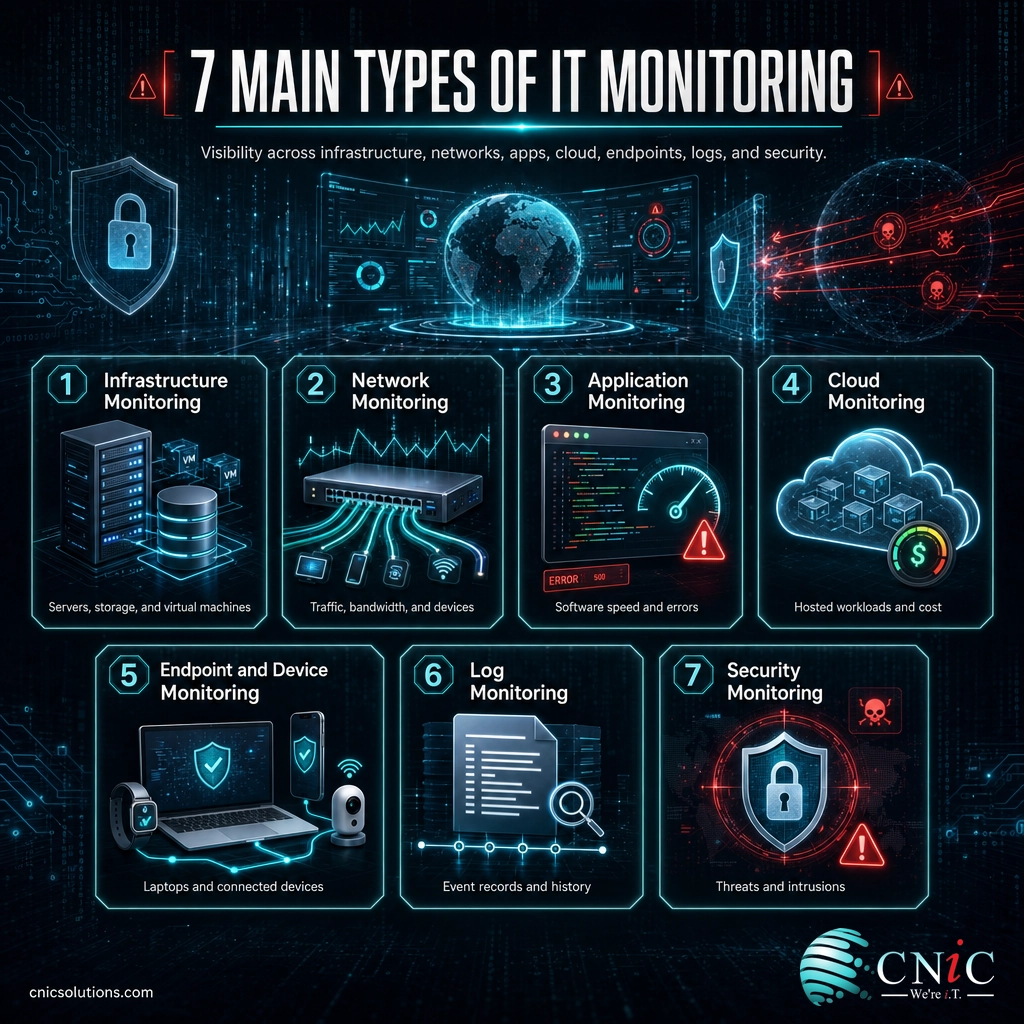
Under the surface, IT monitoring follows the same loop no matter which systems it watches. Think of it like the gauges and warning lights in a car: sensors read what is happening, the dashboard shows it, and a light comes on before a small issue leaves you stranded.
- Collect data. Lightweight agents, built-in APIs, and log collectors gather telemetry from each component, CPU load, memory use, latency, error counts, traffic, and events, then stream it to a central platform in real time or close to it.
- Set a baseline. The platform learns what normal looks like for each metric across a typical day and week, so it can tell an ordinary busy hour from a genuine problem.
- Compare and alert. Incoming data is measured against thresholds and baselines. When a metric crosses the line, the system raises an alert by email, text, or a ticket, and points to exactly which component is affected.
- Diagnose. Dashboards and historical trends let the team see whether a spike is momentary or building, and trace a symptom in one system back to its root cause in another.
- Respond. A person, or an automated rule, acts: freeing resources, restarting a service, blocking a suspicious connection, or scheduling a fix before users are affected.
That last step is what separates monitoring that protects a business from monitoring that just fills an inbox with alerts nobody reads. The raw data monitoring collects along the way is often called telemetry, the machine data behind modern IT, and it is the fuel every dashboard and alert runs on.
The Main Types of IT Monitoring
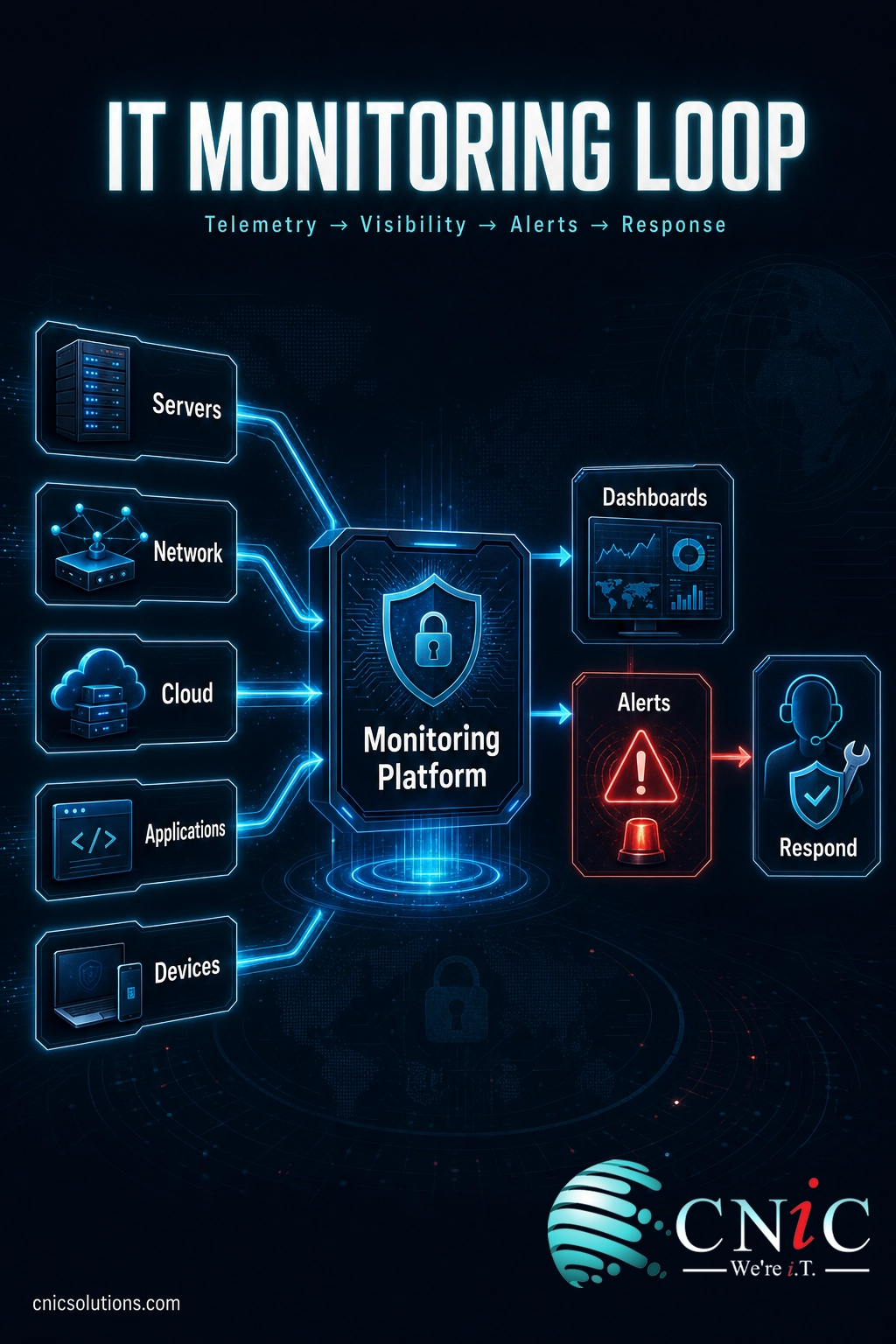
“IT monitoring” is really an umbrella term. Underneath it sit several focused disciplines, each watching a different layer of your technology. Most businesses run several at once, because a problem in one layer often shows up as a symptom in another. Here are the types that matter most.
- Infrastructure monitoring: tracks the core compute layer, servers, virtual machines, and storage, watching CPU, memory, disk, and uptime. CNiC covers this depth in its guide to infrastructure performance monitoring and management.
- Network monitoring: watches the traffic, bandwidth, latency, and devices that move data across the business. It is often the first place a slowdown is spotted. See how the underlying network infrastructure is built and connected.
- Application monitoring: measures whether the software employees and customers actually use is responding quickly and without errors, from an internal line-of-business tool to a customer-facing website.
- Cloud monitoring: checks the availability, performance, and cost of workloads running in cloud platforms, where you do not control the hardware and depend on visibility into the service instead.
- Endpoint and device monitoring: covers the laptops, desktops, mobile devices, and increasingly the connected sensors and equipment on the network. Watching internet-connected hardware has become its own discipline, covered in CNiC’s guide to keeping connected devices secure and online.
- Log monitoring: collects and analyzes the event records systems generate, turning millions of log lines into searchable evidence of what happened and when.
- Security monitoring: watches for threats, intrusions, and suspicious behavior rather than performance faults. Its network-focused form is explained in CNiC’s guide to how network security monitoring catches threats early, and the fully managed version is managed detection and response.
Performance monitoring and security monitoring overlap more than most people expect. Many attacks show up first as unusual performance behavior, an unexpected spike in traffic, a server working far harder than its workload should require, or a burst of failed requests. Because monitoring already knows what normal looks like, it is well placed to flag the abnormal, whatever the cause.
IT Monitoring vs. Observability
These two terms get used interchangeably, and the difference matters when you are deciding what your business needs. Monitoring watches known parts of a system against predefined checks and answers a yes-or-no question: is this healthy? Observability is broader. It uses rich, detailed data to help you understand why something is behaving unexpectedly, including problems you never thought to set up an alert for. Monitoring tells you the server is slow; observability helps you work out that a specific database query, triggered by a new release, is the reason.
| Aspect | IT Monitoring | Observability |
|---|---|---|
| Core question | Is this system healthy right now? | Why is this system behaving this way? |
| Watches | Known metrics and predefined checks | The whole system, including unexpected states |
| Best for | Catching known failure modes fast | Investigating new or complex problems |
| Output | Alerts and dashboards | Deep context and root-cause insight |
| Relationship | The foundation | Built on top of monitoring data |
The two are not rivals. Observability is built on the same telemetry monitoring collects, and for most businesses solid monitoring is the necessary first step. You add deeper observability as your systems grow more complex and the questions you need to answer get harder.
What IT Monitoring Measures
You do not need to track a thousand numbers to know whether your technology is healthy. A focused set of core metrics covers most of what matters, and each one maps to a real business risk when it goes wrong.
- CPU and memory utilization: how hard your servers are working. Sustained high usage signals a system straining to keep up, and memory pressure can crash services outright.
- Disk usage and input/output: how full storage is and how quickly it reads and writes. A disk that is full or slow drags down everything depending on it.
- Network throughput and latency: how much data moves and how fast. Rising latency or packet loss shows up as sluggish apps and dropped connections.
- Application response time: how long a request takes to complete. This is closest to what users actually feel.
- Uptime and availability: the percentage of time a system is up and reachable, the headline number behind any service commitment.
- Error rates and security events: the count of failed requests, warnings, and suspicious activity, which often rise before a bigger failure or breach.
The skill is in reading them together. High CPU on its own may be fine; high CPU plus rising response time plus climbing error rates is a system about to fall over. A sudden, unexplained change in traffic or resource use can be an early sign of a security problem worth investigating, which is one reason monitoring feeds directly into a clear-eyed cybersecurity risk assessment.
Why IT Monitoring Matters for Businesses
The case for monitoring comes down to a simple fact: technology rarely fails all at once. It degrades. A disk fills gradually, memory leaks slowly, latency creeps upward, a threat probes quietly before it strikes. By the time users are complaining, the cheap window to fix the problem has already closed. Monitoring exists to catch those early signals while a fix still takes minutes instead of becoming a crisis.
The reason that early window is worth so much is what downtime costs when you miss it.
Most significant outages are not the six-figure kind, but a meaningful share are, and the tail is what hurts. The distribution makes the risk clear:
What a significant outage costs (Uptime Institute, 2024)
Roughly one in five significant outages now costs more than $1 million, which is why early detection pays for itself.
Myth: Buying monitoring software means you are covered
Monitoring tools do not fix anything on their own. They generate alerts, and alerts only help if someone is watching and ready to act, at 2 a.m. and on a holiday weekend as much as on a Tuesday afternoon. A business that installs a monitoring platform and then ignores the notifications it sends has bought a smoke detector and taken out the battery. The value is in the response, not the dashboard.
Source: ITIC 2024 Hourly Cost of Downtime | Uptime Institute Annual Outage Analysis 2024
Reactive vs. Proactive Monitoring
Not all monitoring is equal. The difference between reactive and proactive monitoring is the difference between finding out about a problem after it has caused damage and catching it before anyone notices.
Reactive monitoring tells you something has already broken. A server is down, a site is offline, users are locked out. It is better than no monitoring, but by the time the alert fires, the cost is being paid. Proactive monitoring watches trends and thresholds so it can flag a disk that will fill next week, a memory pattern drifting toward its limit, or traffic that looks unusual, while there is still time to act quietly.
Proactive monitoring is also where automation earns its place. When a defined condition is met, the system can restart a stalled service, shift a workload, or block a suspicious connection on its own, resolving routine issues in seconds without waiting for a human. The same data that drives those responses also feeds capacity planning, turning a running record of demand into evidence for when to upgrade, so a business schedules changes before a limit is reached rather than after it causes an outage.
How to Get Started with IT Monitoring
Standing up effective monitoring is less about buying a specific tool and more about covering the right things and, crucially, being ready to respond. A sensible path looks like this:
- Inventory what you depend on. List the servers, network gear, cloud services, applications, and devices the business cannot function without. You can only monitor what you have accounted for.
- Decide what “normal” and “urgent” mean. Set thresholds and priorities so a genuine emergency stands out and routine noise does not drown it.
- Cover every layer. Make sure infrastructure, network, applications, cloud, endpoints, and security are all watched, not just the servers.
- Plan the response. Define who gets which alert, how fast they must act, and which issues can be automated. Monitoring without a response plan is just noise.
- Provide round-the-clock coverage. Problems do not keep business hours, so decide honestly whether your team can watch and respond at 3 a.m., or whether that job belongs with a partner.
That last point is where most businesses reach a decision. Monitoring only delivers value if someone is actually watching and ready to respond, and infrastructure does not keep business hours. Building a 24/7 monitoring desk in-house, with the tools, staffing, and expertise to tell a false alarm from a real emergency, is more than the workload justifies for most organizations. This is why so many businesses fold monitoring into a managed IT partnership instead of staffing it themselves.
As a full-service managed IT and cybersecurity partner, CNiC Solutions watches client systems around the clock, acts on issues before they reach users, and uses performance data to plan ahead, so reliability becomes something you can count on rather than hope for.
Get 24/7 IT monitoring with a managed IT partner
Where the priority is the core compute layer, that coverage extends to dedicated infrastructure management, and on the security side to continuous threat monitoring and response.
Explore infrastructure management and monitoring
See continuous threat monitoring and response
Related Terms
- Telemetry: the raw performance, event, and health data that monitoring tools collect from systems. See what telemetry is and why it matters.
- Uptime: the percentage of time a system is operational and available, usually expressed in “nines.”
- Latency: the delay before data begins transferring, a key driver of how fast systems feel.
- Baseline: the normal range of a metric under typical conditions, used to judge whether current readings are a problem.
- Observability: the ability to understand a system’s internal state from the data it produces, built on top of monitoring.
- Network security monitoring: the security-focused discipline of watching network traffic for threats. See how network security monitoring works.
- Managed detection and response: a fully managed security monitoring and response service. See what MDR covers.
Frequently Asked Questions
What is IT monitoring?
What are the main types of IT monitoring?
What is the difference between IT monitoring and observability?
Why is IT monitoring important for businesses?
Do small businesses need IT monitoring?
Sources
The definition of continuous monitoring follows NIST Special Publication 800-137, Information Security Continuous Monitoring for Federal Information Systems and Organizations. Downtime cost figures come from the ITIC 2024 Hourly Cost of Downtime survey, which reports that a single hour of downtime exceeds $300,000 for more than 90% of mid-size and large enterprises. Outage cost distribution (54% of significant outages exceeding $100,000, and one in five exceeding $1 million) and the share of outages attributed to IT and networking issues are drawn from the Uptime Institute Annual Outage Analysis 2024. The monitoring types, workflow, and metrics described reflect widely documented, standard practice across the IT monitoring field.
Primary sources: NIST SP 800-137 | ITIC 2024 Hourly Cost of Downtime | Uptime Institute Annual Outage Analysis 2024.



related posts
What Is Log Analysis? How It Works and Why It Matters
October 23, 2026Log analysis is the practice of reviewing and interpreting the log files that computers, applications, and…
What Is ISO 27001? A Guide to the Information Security Standard
October 22, 2026ISO 27001 is the world's best-known standard for managing information security, and increasingly the certification customers…
What Is IT Asset Management (ITAM)? A Guide for Businesses
October 22, 2026IT asset management (ITAM) is the practice of tracking and managing an organization's hardware, software, and…
What Is Infrastructure as Code (IaC)? A Guide for Businesses
October 21, 2026Infrastructure as Code (IaC) is the practice of managing and provisioning IT infrastructure, such as servers,…