

Log analysis is the practice of reviewing and interpreting the log files that computers, applications, and network devices record automatically, in order to find security threats, diagnose problems, and prove compliance. It turns raw machine data into clear answers about what happened, when it happened, and who was involved.
Every server, laptop, firewall, and cloud service on your network keeps a running diary of what it does. Those diaries are logs, and they hold the evidence of nearly everything that matters: the failed login attempts, the file that got copied at 2 a.m., the account that suddenly gained admin rights. The problem is that a mid-sized business can generate millions of log entries a day, and none of it means anything until someone reads it. That reading is log analysis. It is also why breaches so often go unnoticed for months: according to IBM, organizations took an average of 181 days just to identify a breach in 2025. This guide explains what log analysis is, how it works step by step, how it differs from the terms it gets confused with, the kinds of logs involved, why it matters to your bottom line, and how to get real coverage without building a security team from scratch.
Key Takeaways
- Logs are the evidence; analysis is the detective work. Machines record everything automatically, but the data is useless until it is read and interpreted.
- Log analysis is mostly how breaches get caught. Attacks show up in logs first, often long before any visible damage.
- Log management is not log analysis. Management collects and stores the data; analysis makes sense of it.
- Speed is the payoff. The longer an intrusion goes unread in the logs, the more it costs, and identification is the slowest part of the breach lifecycle.
- Most SMBs outsource it. A managed SIEM plus analysts delivers around-the-clock analysis without hiring an internal team.
What’s in This Guide
What Log Analysis Is
A log is a timestamped record of an event on a computing system. When a user signs in, a firewall blocks a connection, an application throws an error, or a file is deleted, the system that handled it writes a line to a log. The U.S. National Institute of Standards and Technology describes a log as a record of the events occurring within an organization’s systems and networks, and log management as the process of generating, transmitting, storing, and analyzing that data. Log analysis is the last and most valuable part of that chain: actually examining the records to understand what they mean.
The reason this matters is scale. A single busy server can produce tens of thousands of log lines an hour, and the vast majority describe routine, healthy activity. Buried in that flood are the handful of entries that signal a real problem: a brute-force login attempt, a service failing repeatedly, a user account touching files it has never touched before. Log analysis is the discipline of separating that signal from the noise, either by a person reading and querying the data or, far more commonly at scale, by software that correlates events and flags the ones worth a human’s attention.
Businesses lean on log analysis for three broad jobs: security (detecting and investigating attacks), operations and troubleshooting (finding the root cause when something breaks or slows down), and compliance (proving to auditors and regulators that activity is being recorded and reviewed). The same underlying logs serve all three.
Source: NIST SP 800-92, Guide to Computer Security Log Management
How Log Analysis Works
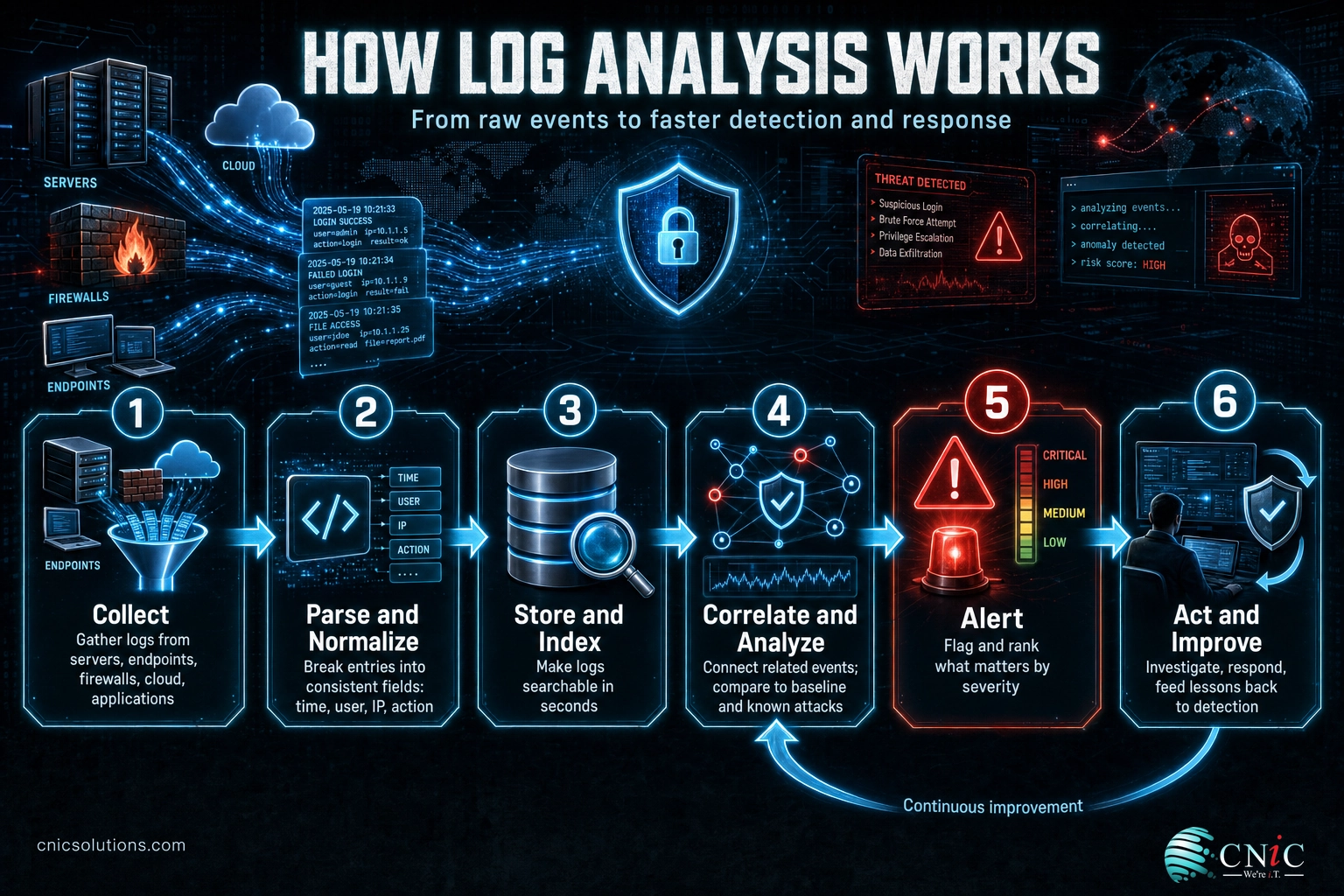
Modern log analysis is a pipeline. Raw, messy records go in one end, and clear, prioritized findings come out the other. In practice, it moves through these stages:
- Collect: Logs are gathered from every source that matters, such as servers, endpoints, firewalls, cloud platforms, identity systems, and applications, and shipped to a central place. Analysis is only as good as the sources feeding it, so gaps here become blind spots later.
- Parse and normalize: Every device writes logs in its own format. This step breaks each entry into consistent fields (time, user, source IP, action, result) so records from different systems can be compared side by side. Without normalization, a firewall log and a Windows log may as well be in different languages.
- Store and index: The cleaned data is indexed so it can be searched in seconds rather than scrolled through by hand. Indexing is what makes it possible to ask a question like “show every failed login for this account in the last hour” and get an instant answer.
- Correlate and analyze: This is the heart of it. The system connects related events across sources, compares them against known attack patterns, and measures them against a baseline of normal behavior. A single failed login is nothing; five hundred failed logins followed by one success, from a new country, is an alarm.
- Alert: When correlation finds something that matters, it raises an alert and ranks it by severity so the most dangerous items rise to the top. Good tuning here is what stops analysts from drowning in false alarms.
- Act and improve: A human (or an automated playbook) investigates the alert, decides whether it is real, and responds. What the team learns then feeds back into the detection rules, so the next version of the same attack is caught faster.
At small scale, steps four and five can be done manually by an administrator running searches. At business scale, they are handled by a SIEM (security information and event management) platform, increasingly assisted by machine learning that surfaces anomalies no human would find in the volume.
Log Analysis vs. Log Management vs. SIEM
These three terms get used interchangeably, and that confusion leads businesses to buy one thing while thinking they have another. They are related but distinct: log management is the pipes, log analysis is the thinking, and a SIEM is the platform that does both at scale with a security focus.
| Log Management | Log Analysis | SIEM | |
|---|---|---|---|
| What it is | Collecting, moving, storing, and retaining logs | Examining and interpreting logs to find answers | A platform that combines both, tuned for security |
| Main question | Are we keeping the data? | What is the data telling us? | Is anything attacking us right now? |
| Primary goal | Availability and retention | Insight and detection | Real-time threat detection and response |
| You need it for | Compliance retention, storage | Troubleshooting, security, audits | 24/7 security monitoring at scale |
The simplest way to hold them apart: you cannot analyze logs you never collected, so log management comes first. But collecting logs and never reading them, which is more common than it should be, gives you storage costs and no protection. A security operations center uses a SIEM to do continuous log analysis, and that is where the three come together into an actual defense.
Myth: “We collect all our logs, so we’re covered.” Collecting logs is not the same as analyzing them. Plenty of breached companies had complete logs the whole time; the evidence of the attack was sitting in storage, unread, while the intruder worked. Logs no one looks at are a liability (storage cost and false confidence), not a defense. The protection comes from analysis and response, not from the pile of data itself.
Types of Logs You Analyze
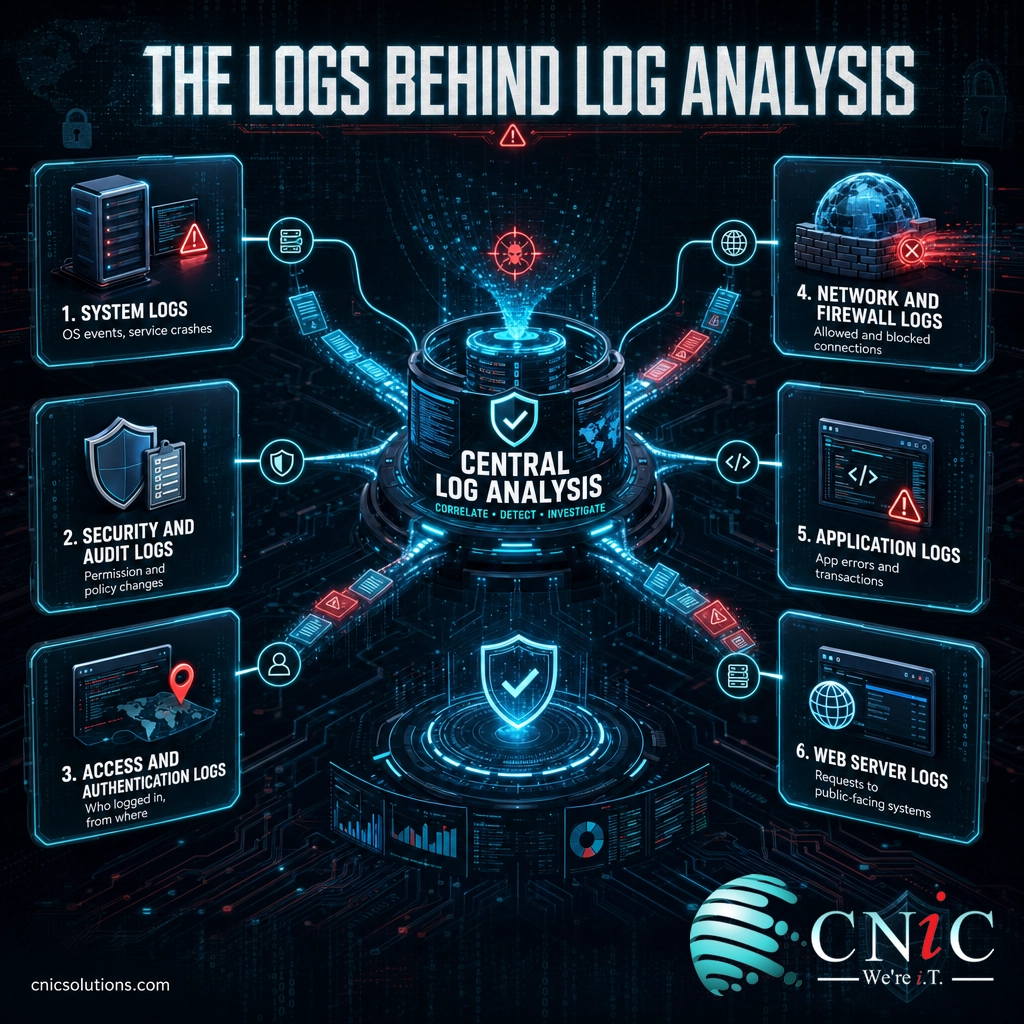
Effective analysis rarely relies on one kind of log. The real picture appears when several sources are correlated together, because an attacker who looks innocent in one log often stands out when two are compared. The common categories are:
- System logs: Operating-system events such as startups, shutdowns, driver failures, and service crashes. The backbone for both troubleshooting and spotting tampering.
- Security and audit logs: Records of security-relevant actions, including permission changes, policy edits, and audit-trail events. Central to detecting privilege abuse.
- Access and authentication logs: Who logged in, from where, when, and whether it succeeded. The single richest source for catching credential attacks.
- Network and firewall logs: Connections allowed and blocked, traffic patterns, and port activity. These reveal scanning, data exfiltration, and command-and-control traffic.
- Application logs: Errors, transactions, and user actions inside your business software. Essential for diagnosing outages and abuse of the app itself.
- Web server logs: Every request to your website or web app, including the source, the page, and the response. Used to spot attacks against public-facing systems.
Credential-based attacks are a good example of why correlation matters. Verizon’s 2025 Data Breach Investigations Report found stolen credentials were the entry point in 22% of breaches, and ransomware was present in 44% of them. Both leave a trail: authentication logs show the suspicious login, and network logs show what it did next. Neither log alone tells the story; together they do.
Source: Verizon 2025 Data Breach Investigations Report

Why Log Analysis Matters for Your Business
The business case rests on one stubborn fact: attackers usually sit inside systems far longer than anyone realizes, and the meter is running the whole time. Log analysis is the main thing that shortens that window, because the evidence of an intrusion is almost always in the logs before it is anywhere else.
Identification is the slow, expensive part of a breach, and it is precisely the part log analysis owns. IBM’s 2025 data puts the full breach lifecycle at 241 days on average, but that total is lopsided: 181 days to identify the breach and only 60 to contain it once found. In other words, most of the damage window is time spent not knowing, and knowing is what reading the logs provides.
Where the 241-Day Breach Lifecycle Goes (2025 average, days)
Source: IBM Cost of a Data Breach Report 2025. Identification, the job log analysis does, is roughly three-quarters of the breach lifecycle, and the biggest lever for cutting cost.
Beyond security, the same analysis pays off in uptime. When an application slows down or a service fails, the logs hold the root cause, and being able to search them turns hours of guesswork into minutes of answers. For the full financial picture behind the security side, our breakdown of the latest data breach cost data shows how directly slow detection drives up the bill.
Source: IBM Cost of a Data Breach Report 2025 | Mandiant M-Trends 2025
Log Analysis and Compliance
For many businesses, log analysis is not optional. Major regulations and security frameworks require organizations not just to keep logs but to review them. HIPAA expects audit controls and regular review of activity records; PCI DSS requires daily log review for systems handling card data; and frameworks like SOC 2 and NIST build log monitoring into their control sets. An auditor’s question is rarely “do you have logs?” It is “can you show me you look at them, and what you did when something turned up?”
That distinction trips up a lot of companies. Retaining logs satisfies the storage requirement, but the review and response requirement is a log-analysis job. Regulated industries such as healthcare, finance, and legal are where this bites hardest, and it is a common reason those businesses bring in a partner who can demonstrate continuous monitoring rather than a dusty archive.
How to Get Started with Log Analysis
Getting to real log analysis is less about buying a product and more about closing a specific gap: turning collected data into watched data, with someone qualified to act on what it shows. A sensible path looks like this:
- Inventory your sources. List the systems that generate logs worth watching, such as servers, endpoints, firewalls, cloud services, and identity systems. Anything left off becomes a blind spot.
- Centralize the logs. Ship them to one place so they can be correlated. Scattered logs on individual machines cannot be analyzed together, and are easily wiped by an attacker.
- Set a baseline, then alert on the exceptions. Define what normal looks like so the unusual stands out, and tune alerts so real threats are not buried in noise.
- Insist on response, not just alerts. Analysis that only produces notifications nobody acts on is not protection. The value is in a team that investigates and responds.
- Match the model to your team. A capable in-house IT group might co-manage a SIEM; a business with no security staff is better served by a fully managed service.
Most small and midsize businesses cannot staff round-the-clock log review, which is why log analysis is usually delivered as part of broader managed cybersecurity services rather than bought as a standalone tool. CNiC Solutions runs the SIEM, the monitoring, and the analysts who read the logs and respond, backed by fully managed IT support so security and daily operations work from the same data. For organizations that want to align that investment with overall risk and budget, our Virtual CIO services set the strategy behind the monitoring.
Get a free security assessment from CNiC Solutions
Frequently Asked Questions
What is log analysis?
What is the difference between log analysis and log management?
Why is log analysis important for security?
What are the main types of logs?
Can a small business outsource log analysis?
Related Terms
- SIEM (Security Information and Event Management): The platform that collects, correlates, and analyzes log data at scale and raises security alerts. Log analysis is what a SIEM does continuously.
- Log Management: The collection, storage, and retention of logs, the necessary groundwork that analysis is built on top of.
- Telemetry: The broader stream of machine data (logs, metrics, and traces) that monitoring and analysis draw from. Learn how telemetry drives modern IT monitoring.
- Security Operations Center (SOC): The team and technology that perform log analysis around the clock. See what a SOC is and how it works.
- Endpoint Security: Protection for laptops, servers, and devices, a major source of the logs analysis relies on. See how endpoint security protects your devices.
- Incident Response: The structured process of containing and recovering from an attack, the “act” step that log analysis triggers. See how to build an incident response plan step by step.
- Anomaly Detection: Flagging activity that deviates from a normal baseline, one of the core techniques inside log analysis.
About This Guide and Sources
The definitions and framework in this guide, what log analysis is, the collect, parse, store, correlate, alert, and act pipeline, the distinction between log management, log analysis, and SIEM, the categories of logs, and the compliance framing, reflect standard, widely consistent characterizations across the IT and cybersecurity industry, anchored to the definitions in NIST SP 800-92, Guide to Computer Security Log Management. The statistics are drawn from primary research: the 181-day average time to identify a breach, the 241-day full breach lifecycle, and the roughly $1.9 million in savings and 80-day lifecycle reduction from extensive use of security AI and automation come from the IBM Cost of a Data Breach Report 2025. The 11-day global median dwell time comes from Mandiant’s M-Trends 2025. The credential (22%) and ransomware (44%) breach figures come from the Verizon 2025 Data Breach Investigations Report. Tool and implementation specifics vary by provider and environment.



related posts
What Is IT Monitoring? A Guide for Businesses
October 23, 2026IT monitoring is the continuous practice of collecting and analyzing data from a business's technology, its…
What Is ISO 27001? A Guide to the Information Security Standard
October 22, 2026ISO 27001 is the world's best-known standard for managing information security, and increasingly the certification customers…
What Is IT Asset Management (ITAM)? A Guide for Businesses
October 22, 2026IT asset management (ITAM) is the practice of tracking and managing an organization's hardware, software, and…
What Is Infrastructure as Code (IaC)? A Guide for Businesses
October 21, 2026Infrastructure as Code (IaC) is the practice of managing and provisioning IT infrastructure, such as servers,…