

AIOps (Artificial Intelligence for IT Operations) is the use of big data and machine learning to automate and improve how IT is run. It ingests the flood of data your systems produce, then detects anomalies, correlates related alerts, and pinpoints root causes, so problems get found and fixed faster, often before your people even notice.
Every business now runs on more technology than any team can watch by hand: servers, cloud services, networks, applications, and the monitoring tools bolted onto all of them. Each of those tools raises its own alarms, and on a busy day that means thousands of alerts, most of them noise, a few of them the start of a real outage. AIOps is the layer that sits above the noise. It applies machine learning to all of that data at once, separates the signal from the static, and tells you what is actually breaking and why. This guide explains what AIOps is in plain terms, how it works, how it differs from the monitoring you already have, and how a business decides whether it is worth adopting.
- AIOps means AI applied to running IT. Gartner coined the term in 2016 to describe using big data and machine learning to automate IT operations, including event correlation, anomaly detection, and root-cause analysis.
- Its job is to cut through alert noise. Instead of dozens of tools each beeping on their own, AIOps unifies the data, groups related alerts into a single incident, and points to the likely cause.
- The driver is data volume. IDC projects the world’s data will reach 175 zettabytes by 2025, up from 33 in 2018, far more than human operators can review alert by alert.
- Downtime is expensive. A single hour of downtime now costs more than $300,000 for over 90% of mid-size and large enterprises, per ITIC’s 2024 survey, which is why faster detection pays for itself.
- It augments people, it does not replace them. AIOps removes the repetitive triage that burns out IT teams and frees them for the judgment calls software cannot make.
What’s in This Guide
How AIOps Works
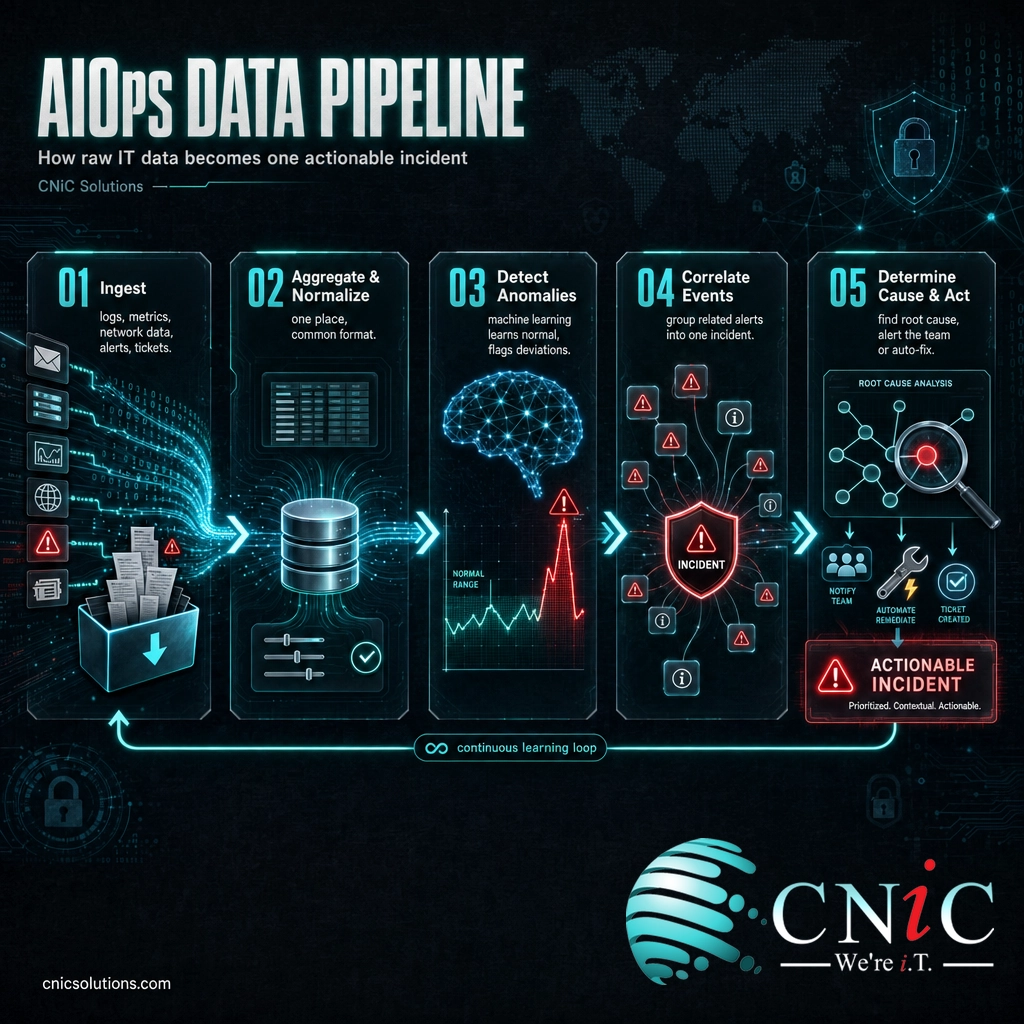
AIOps is software that sits on top of your existing IT tools and applies machine learning to everything they report. Rather than watching one system at a time, it pulls in data from across the environment, learns what normal looks like, and works out what deserves attention. The plain-English version is a pipeline that runs continuously:
- Ingest. It collects data from every source: server and application logs, performance metrics, network telemetry, monitoring alerts, and even help-desk tickets.
- Aggregate and normalize. All of that data, in different formats from different tools, is pulled into one place and put into a common structure so it can be compared.
- Detect anomalies. Machine learning models learn each system’s baseline behavior over time, then flag deviations from it, without a human setting a fixed threshold for every metric.
- Correlate events. Related alerts from different tools are grouped together, so twenty symptoms of one problem become a single incident instead of twenty separate pages.
- Determine cause and act. The system traces the correlated signals to a likely root cause and either routes it to the right team with context, or triggers an automated fix for issues it has seen before.
A useful way to picture it: every monitoring tool you own is a smoke detector. When something goes wrong, they all start beeping at once, in different rooms, with no idea about each other. AIOps is the fire chief who hears every alarm in the building at the same time, figures out which one is the real fire and which are just steam from the kitchen, and sends the truck to the right address. The individual detectors are still useful. What was missing was someone standing above all of them, making sense of the whole picture in real time.
The two things that make AIOps powerful are scale and learning. It can read far more data than a person ever could, and it improves its sense of normal as it goes, so it catches the subtle drift that precedes an outage rather than only the alarm that fires once the outage has already hit.
Source: Gartner IT Glossary, AIOps definition
AIOps vs Traditional IT Monitoring
The most common point of confusion is treating AIOps as a fancier version of the monitoring you already have. It is not the same thing. Traditional monitoring tells you when a specific number crosses a line you set in advance: this server’s CPU is over 90%, this website did not respond. That is useful, but it produces a wall of disconnected alerts and leaves a human to figure out how they relate. AIOps changes the job from watching individual gauges to understanding the whole system. The table below shows the difference.
| Attribute | Traditional monitoring | AIOps |
|---|---|---|
| Data | Siloed, one tool at a time | Unified across every tool and layer |
| Alerts | Fixed thresholds, high noise | Learned baselines, correlated and deduplicated |
| Root cause | An engineer hunts for it manually | Traced automatically across systems |
| Timing | Reactive, after something breaks | Predictive, flags trouble as it builds |
| Response | A person fixes every issue | Known issues can be auto-remediated |
The right-hand column is why AIOps exists as its own category. Monitoring answers “is this one thing up or down?” AIOps answers the harder questions a stretched IT team actually cares about: “out of these hundreds of alerts, what is the one real problem, what caused it, and can we handle it before customers feel it?” It does not throw away your monitoring tools. It makes them work together.
Myth: AIOps replaces your IT team. This is the fear that keeps businesses from adopting it, and it gets the tool backwards. AIOps removes the work people are worst at and hate most: staring at dashboards, triaging duplicate alerts at 2 a.m., and manually chasing a root cause across a dozen systems. It does not make the strategic calls, own the customer relationship, or handle the messy, first-of-its-kind incidents. Used well, it lets a small team cover a large environment by spending its human hours where human judgment matters.
The Core Capabilities of AIOps
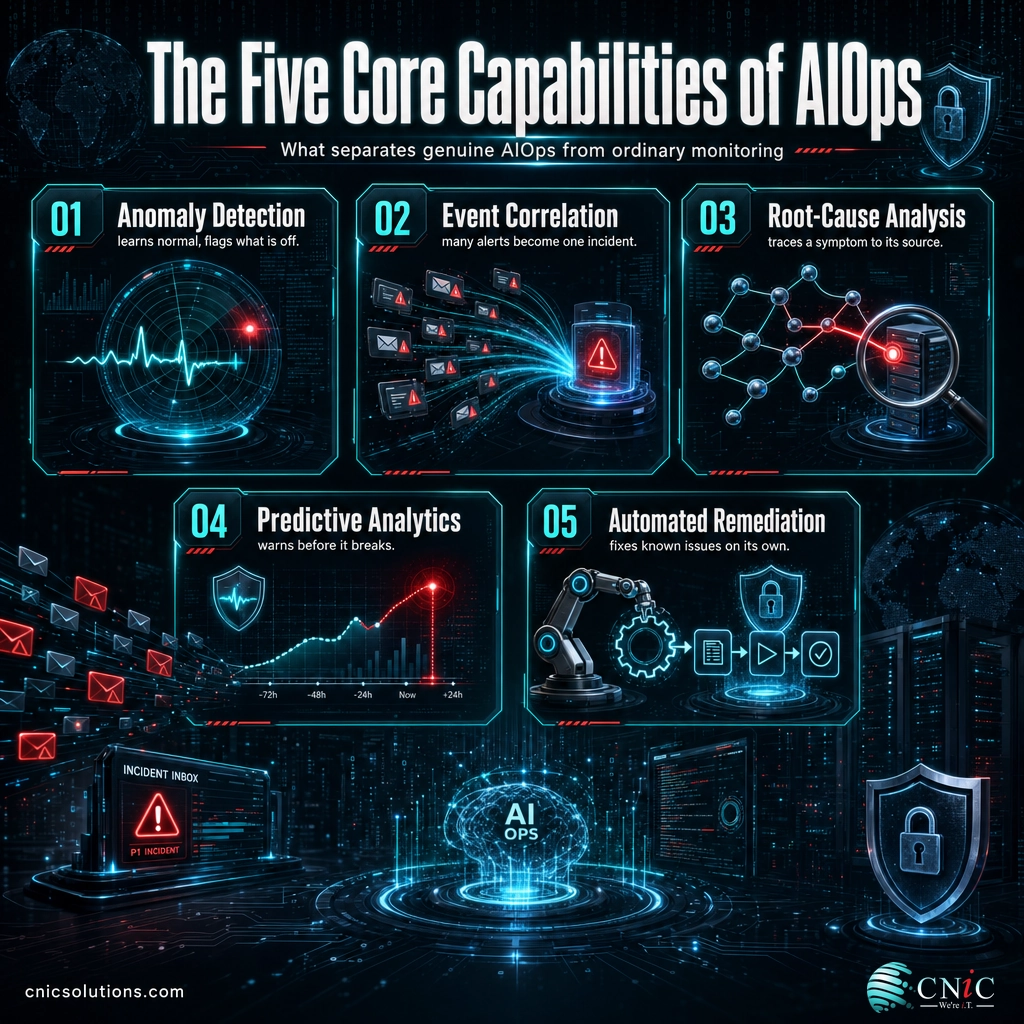
Gartner’s definition frames AIOps as combining big data and machine learning to support IT operations, specifically through event correlation, anomaly detection, and causality determination. In practice, most platforms deliver five capabilities. Understanding them helps you judge whether a tool marketed as “AI-powered” is genuine AIOps or just monitoring with a new label.
1Anomaly Detection
Instead of relying on a human to set a threshold for every metric, machine learning models learn what normal looks like for each system and time of day, then flag meaningful deviations. This catches problems that a static rule would miss, such as a gradual slowdown that never quite trips a fixed alarm but is clearly abnormal for a Tuesday morning.
2Event Correlation and Noise Reduction
When one problem sets off alarms in many tools, correlation groups those related events into a single incident. This is the capability IT teams feel first, because it turns an unreadable flood of alerts into a short list of real issues. Cutting alert noise is what keeps a team from tuning out warnings entirely, a dangerous habit that lets the important alert hide among the false ones.
3Root-Cause Analysis
Because AIOps sees data from every layer at once, it can trace a symptom back through the chain to a probable cause: the slow application traces to a database, which traces to a failing disk. Doing that by hand can take hours of an engineer’s time during an outage. Automated causality shortens the most expensive minutes of any incident.
4Predictive Analytics
By learning patterns over time, AIOps can warn that a disk will fill, a service will overload, or capacity will run short before it actually happens. That shifts IT from reacting to outages toward preventing them, which is both cheaper and far less visible to customers.
5Automated Remediation
For issues the system understands well, AIOps can trigger a fix on its own: restart a stuck service, clear a full log, or add capacity when demand spikes. High-impact actions still route to a person, but handling the routine automatically means many problems are resolved before anyone opens a ticket.
Source: Gartner IT Glossary, AIOps definition

Why AIOps Matters for Your Business
Two forces make AIOps relevant to businesses that have never thought of themselves as tech companies. The amount of data that IT systems produce is exploding, and the cost of those systems going down keeps climbing. AIOps sits exactly where those two trends collide.
That volume is the core problem AIOps was built for. When a single application can generate millions of log lines a day across servers, containers, and cloud services, no team can watch it manually. The choice is not “review it all carefully” versus “use AI.” It is “use AI to make sense of it” versus “miss the signal in the noise.” Machine learning is the only practical way to read data at that scale in real time.
That is why detection speed is a financial number, not just a technical one. If AIOps correlates alerts and surfaces a root cause in minutes instead of hours, it directly shortens the most expensive part of any outage. For a small or midsize business, the exposure is rarely a dramatic breach. It is the quiet reality that more of the company runs on IT every year, that the systems are more interconnected, and that when something fails the whole operation can stall. The same logic that justifies a solid approach to new AI risks applies here: you cannot manage at machine speed with human-speed tools.
There is a competitive edge too. A modern managed IT provider that runs AIOps behind the scenes can watch more of your environment, catch more problems early, and resolve routine issues automatically, all without adding headcount to your bill. The intelligence does the watching so the humans can do the fixing that actually needs a person.
See How AI-Enhanced IT Support Works
How to Get Started With AIOps
You do not adopt AIOps by buying one product and switching it on. It is a capability you build on top of good operational discipline. For most businesses, the sensible path is gradual and starts with what you already have.
- Get your monitoring data in order first. AIOps is only as good as the data it reads. If key systems are not monitored, or logs are scattered and inconsistent, fix that foundation before adding intelligence on top.
- Start with correlation and noise reduction. The fastest, safest win is letting AIOps deduplicate and group alerts. It cuts fatigue immediately and does not touch your systems, so there is little risk.
- Add anomaly detection, then prediction. Once the team trusts the correlated view, let the models watch for abnormal behavior and forecast capacity problems, moving you from reactive to proactive.
- Automate remediation last, and carefully. Begin with low-risk, well-understood fixes and keep a human approving anything consequential. Automation should earn trust one action at a time.
- Decide who owns it. Someone has to tune the models, review what gets automated, and act on the insights. For most small and midsize businesses, that owner is a managed IT partner rather than a new in-house hire.
That last point is where the build-versus-buy decision usually lands. Standing up an AIOps practice in-house means tooling, integration, and the expertise to keep the models honest, which is a heavy lift for a business whose product is not IT. Folding it into managed IT services lets you get the benefit, quieter alerts, faster fixes, fewer outages, without owning the machinery. A good provider can also connect it to broader infrastructure oversight so the intelligence covers your whole environment, not one corner of it.
Get a Free IT Operations Consultation
Common Questions About AIOps
What is AIOps?
What does AIOps stand for?
How is AIOps different from traditional IT monitoring?
Does AIOps replace IT staff?
What problems does AIOps solve?
Related Terms
- MLOps: the practice of deploying and maintaining machine learning models in production. It is often confused with AIOps, but MLOps is about running AI, while AIOps is about using AI to run IT.
- Observability: the ability to understand a system’s internal state from the data it produces (logs, metrics, and traces). Observability is the rich data source AIOps analyzes.
- ITOM (IT Operations Management): the broader discipline of managing an organization’s IT infrastructure and services. AIOps is the AI-driven modernization of ITOM.
- Event correlation: grouping related alerts from different tools into a single incident, one of the core capabilities that makes AIOps useful.
- Anomaly detection: using machine learning to flag behavior that deviates from a learned baseline, instead of relying on fixed thresholds.
- MTTR (mean time to resolution): the average time to fix an incident. Faster root-cause analysis is how AIOps aims to lower it.
- Agentic AI: AI that can take actions on its own, not just answer questions. It brings its own risks. See our guide to agentic AI security for business owners.
- Virtual CISO (vCISO): an outsourced security leader who can help set policy for new technologies. Learn whether your business needs a vCISO.
About This Guide
The definition and history of AIOps in this article follow Gartner, which coined the term in 2016 and defines it as combining big data and machine learning to automate IT operations functions including event correlation, anomaly detection, and causality determination. The data-growth figure is from IDC’s Data Age 2025 study, which projects the global datasphere reaching 175 zettabytes by 2025, up from 33 zettabytes in 2018. The downtime-cost figure is from ITIC’s 2024 Hourly Cost of Downtime Survey, an independent poll of more than 1,000 firms conducted from November 2023 through mid-March 2024. Figures are cited to their original sources and used to illustrate why AIOps matters, not as guaranteed outcomes for any specific business.
Sources: Gartner IT Glossary, AIOps | IDC, Data Age 2025 | ITIC 2024 Hourly Cost of Downtime Survey
Talk to a Virtual CIO About Modernizing Your IT



related posts
What Is Network Penetration Testing? Types and Process
October 25, 2026Network penetration testing is a controlled, authorized simulation of a real cyberattack on your network, run…
What Is NIST Compliance? Frameworks, Requirements, and Who Needs It
October 25, 2026NIST compliance means aligning your organization's security program with the cybersecurity standards published by the National…
What Is MFA? How Multi-Factor Authentication Protects Your Accounts
October 24, 2026Multi-factor authentication (MFA) is a security method that requires two or more separate proofs of identity…
What Is Mobile Device Management (MDM)? A Guide for Businesses
October 24, 2026Mobile Device Management (MDM) is software that lets an organization remotely enroll, configure, secure, and monitor…