

Cloud computing is the on-demand delivery of computing resources (servers, storage, databases, software, and networking) over the internet, so a business rents what it needs from a provider instead of buying and maintaining its own hardware. You pay only for what you use and can scale up or down in minutes.
If your team uses email in a browser, stores files in a shared drive they can reach from home, or logs into accounting software online, you already rely on the cloud. Cloud computing is not a single product you buy once. It is a way of getting technology as a service, on demand, without owning the machines behind it. This guide explains what the cloud actually is, how it works, the different types, what it costs, and how a small or midsize business gets started without getting lost in jargon.
- The cloud is rented computing over the internet. Instead of buying servers and running them in a closet, you use a provider’s hardware and pay for what you consume.
- It comes in three service models. IaaS, PaaS, and SaaS represent how much of the technology stack you manage versus how much the provider handles for you.
- It is now the mainstream way businesses run IT. Gartner forecasts worldwide public cloud spending will reach $723.4 billion in 2025, up from $595.7 billion in 2024.
- Security is shared, not outsourced. The provider secures the infrastructure, but you remain responsible for your data, access, and configuration. Most cloud incidents start with a customer mistake.
- Cost control is the real discipline. Flexera found roughly 27% of cloud spend is wasted, so the goal is right-sizing what you use, not just moving everything and hoping.
What’s in This Guide
- How Cloud Computing Works
- Cloud Computing vs On-Premises IT
- Why Cloud Computing Matters for Businesses
- Types of Cloud Computing: Service and Deployment Models
- Is the Cloud Secure? The Shared Responsibility Model
- How to Get Started With Cloud Computing
- Common Questions About Cloud Computing
- Related Terms
How Cloud Computing Works
Every app and file has to live on a computer somewhere. With cloud computing, that computer is not in your office. It sits in a large, professionally run data center owned by a cloud provider, and you reach it over the internet. The provider handles the buildings, power, cooling, hardware, and physical security. You handle your data and how you use the service.
The formal definition comes from the U.S. National Institute of Standards and Technology, whose official definition of cloud computing (NIST SP 800-145) describes it as on-demand network access to a shared pool of configurable resources that can be provisioned and released quickly with minimal management effort. NIST identifies five essential traits that separate true cloud computing from a server you merely rent:
- On-demand self-service: you provision what you need yourself, in minutes, without calling anyone.
- Broad network access: you reach it from any device over the internet, in the office or remote.
- Resource pooling: the provider serves many customers from shared hardware, keeping each tenant separate.
- Rapid elasticity: capacity scales up during a busy period and back down when demand falls.
- Measured service: usage is metered, so you pay for what you consume, like electricity.
Here is a plain analogy. Owning your own servers is like owning a car. You pay for it upfront, insure it, maintain it, and it sits idle most of the day. Cloud computing is like ride-sharing. You summon exactly the capacity you need, use it for as long as you need it, and stop paying when you are done. You never buy the vehicle, and you never worry about the maintenance.
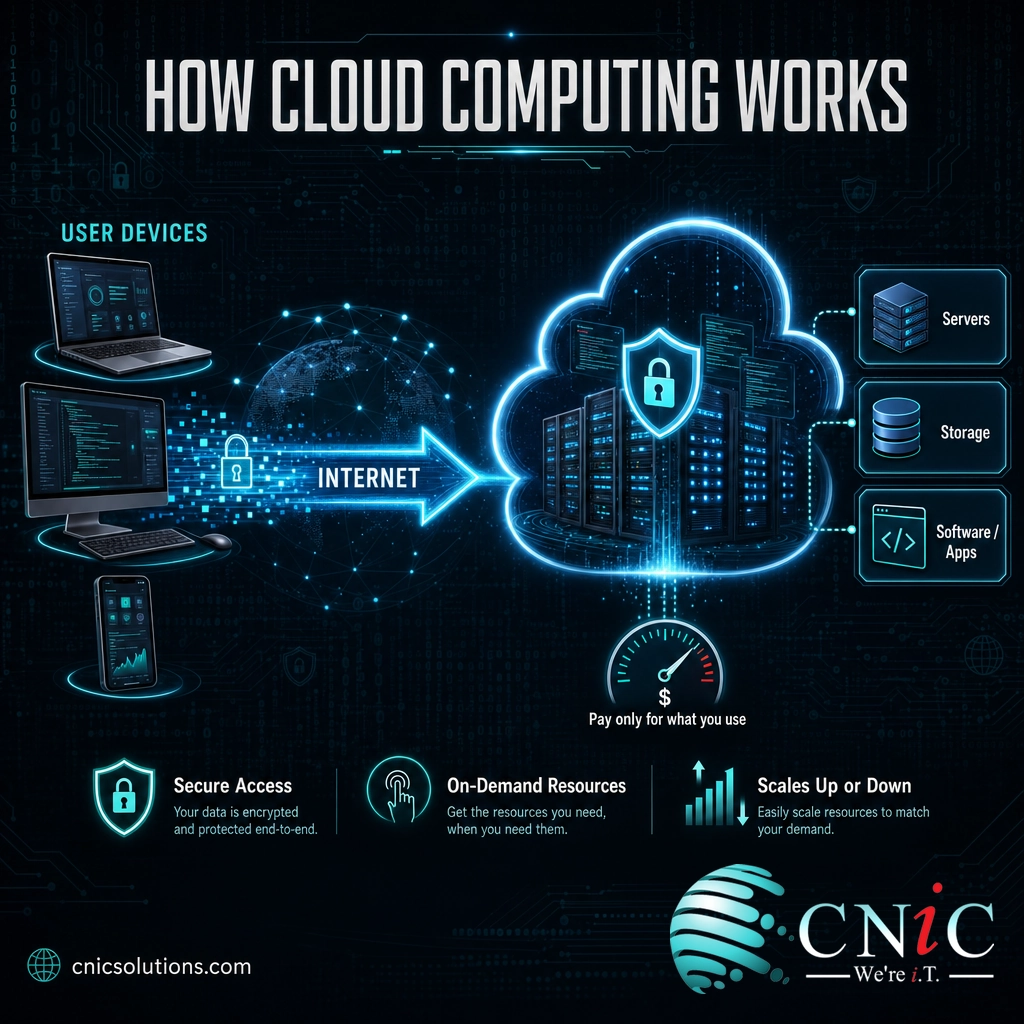
In practice, that means a business can launch a new application, add storage for a growing database, or spin up extra capacity for a busy season in minutes, and pay a metered bill instead of a five-figure hardware invoice. The machines, the maintenance, and the upgrades are the provider’s problem.
Source: NIST, The NIST Definition of Cloud Computing (SP 800-145)
Cloud Computing vs On-Premises IT
The concept most beginners confuse with the cloud is traditional on-premises IT, often shortened to “on-prem.” On-premises means the servers physically live in your building, you own them, and your team (or a provider) maintains them. Cloud computing moves that hardware into the provider’s data center and turns it into a service you access remotely. The difference is not just where the box sits. It changes how you pay, how you scale, and who fixes things when they break.
| Factor | On-Premises IT | Cloud Computing |
|---|---|---|
| Upfront cost | Large capital purchase of servers and licenses | Little to none; you start with a subscription |
| Ongoing cost | Maintenance, power, cooling, refresh every few years | Predictable monthly bill based on usage |
| Scaling | Buy and install more hardware, which takes weeks | Add or remove capacity in minutes |
| Maintenance | Your responsibility, including hardware failures | Provider handles the underlying infrastructure |
| Access | Usually tied to the office network | Anywhere with an internet connection |
| Best when | Strict data control needs, stable and predictable workloads | Growth, remote work, variable demand, limited IT staff |
Neither model is automatically better. On-premises can make sense for workloads with strict regulatory or latency requirements, and some organizations even move certain systems back in a process called cloud repatriation. But for most small and midsize businesses, the cloud’s low upfront cost, fast scaling, and remote access are decisive. If you want the deeper strategic comparison and a full rollout plan, our complete guide to cloud computing for business goes further than this introduction.
Why Cloud Computing Matters for Businesses
Cloud computing is no longer an emerging trend that early adopters experiment with. It is how most business technology is now delivered. Gartner forecasts that worldwide end-user spending on public cloud services will reach $723.4 billion in 2025, up from $595.7 billion in 2024, a 21.5% jump in a single year. When that much money moves in one direction, it reflects a settled decision across the market, not a gamble.
For a smaller business, the appeal is practical rather than abstract. The cloud converts a big, risky hardware purchase into a predictable operating cost, removes the burden of maintaining physical servers, and lets a lean team access enterprise-grade tools that were once out of reach. It also underpins remote and hybrid work, because staff reach the same systems from anywhere. And it is rarely all-or-nothing: most organizations mix providers and environments. Flexera’s 2025 State of the Cloud Report found that 89% of enterprises already run a multi-cloud strategy, and 73% operate hybrid environments that blend public cloud with private or on-premises systems.
There is a catch that matters for the bottom line. Spending on the cloud is easy, and spending too much is even easier. Flexera found that organizations waste roughly 27% of their cloud spend on resources that are idle, oversized, or forgotten. The lesson is not to avoid the cloud but to manage it deliberately. Getting real value depends on right-sizing and controlling cloud costs from the start, which is one of the strongest reasons businesses lean on a managed provider rather than going it alone.
Myth: moving to the cloud automatically saves money. It can, but only with active management. Because cloud resources are so easy to turn on and so easy to forget, unmanaged environments routinely overspend. Flexera’s data shows about a quarter of cloud spend is wasted. Treat the cloud as something to monitor and optimize continuously, not a switch you flip once and stop thinking about.
Source: Gartner public cloud spending forecast | Flexera 2025 State of the Cloud Report
Types of Cloud Computing: Service and Deployment Models
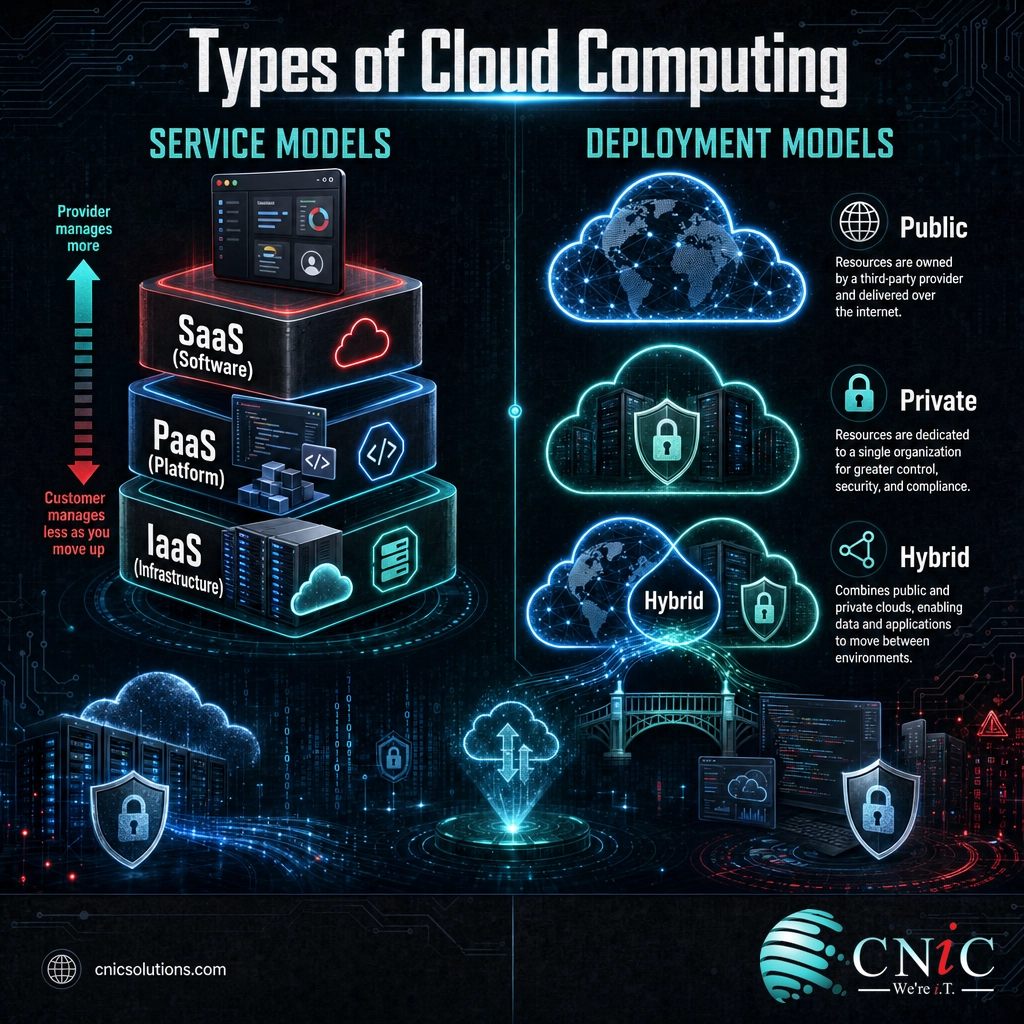
“Cloud computing” is an umbrella term, and beginners get tripped up because it is sorted two different ways at once: by service model (how much the provider manages for you) and by deployment model (who the cloud is shared with). Understanding both makes every cloud conversation clearer.
The Three Service Models: IaaS, PaaS, SaaS
The service models describe how much of the technology stack you manage versus how much the provider takes off your plate. Think of it as the difference between renting a plot of land, renting a fully serviced kitchen, and ordering a finished meal.
- Infrastructure as a Service (IaaS): you rent raw building blocks, such as virtual servers, storage, and networking, and install and manage everything on top. The most hands-on and flexible option. Examples: Amazon EC2, Microsoft Azure Virtual Machines.
- Platform as a Service (PaaS): you rent a ready-made platform to build, test, and run your own applications, and the provider manages the servers and operating system underneath. Developers focus on the app, not the plumbing.
- Software as a Service (SaaS): you just use finished software over the internet, and the provider manages everything behind it. This is the model most people already know: Microsoft 365, Google Workspace, QuickBooks Online, Salesforce.
These three models are also where the money goes, and the mix tells you how businesses actually consume the cloud. Gartner’s 2025 forecast breaks public cloud spending down by segment:
Forecast 2025 Public Cloud Spending by Service Model (Worldwide)
Ready-made software (SaaS) is the largest single category of cloud spending. Source: Gartner 2025 forecast.
Related delivery models extend the same idea to specific needs, such as Desktop as a Service (DaaS), which streams full virtual desktops to any device.
The Deployment Models: Public, Private, and Hybrid
Deployment models describe who else shares the cloud you are using:
- Public cloud: the provider (such as AWS, Microsoft Azure, or Google Cloud) serves many customers from shared infrastructure. The most common, scalable, and cost-effective model for most businesses.
- Private cloud: a cloud environment dedicated to one organization, either hosted by a provider or run in a private data center or colocation facility. Used when control or compliance demands it.
- Hybrid cloud: a deliberate blend of public and private (and often on-premises), letting a business keep sensitive workloads private while using the public cloud for scale and flexibility.
Hybrid is quickly becoming the default. Gartner projects that 90% of organizations will adopt a hybrid cloud approach through 2027, which is why the “one cloud or none” framing rarely matches how real businesses operate.
Source: Gartner public cloud spending forecast
Is the Cloud Secure? The Shared Responsibility Model
Security is the most common hesitation, and the honest answer is that the cloud can be more secure than a typical small-business server room, but only if you hold up your end. Major providers invest more in physical and infrastructure security than almost any individual business could. What trips companies up is misunderstanding where the provider’s job ends and yours begins.
That boundary is called the shared responsibility model. In short, the provider secures the cloud (the hardware, the data centers, the core infrastructure), and you secure what you put in the cloud (your data, user accounts, access permissions, and configuration). The joint guidance from the National Security Agency and CISA on the NSA and CISA Top Ten Cloud Security Mitigation Strategies centers on exactly these customer-side tasks: identity and access management, secure configuration, and logging.
Myth: the cloud provider handles all of my security. It does not. Under the shared responsibility model you stay accountable for your data, your users, and your settings, and the large majority of cloud incidents trace back to customer misconfiguration rather than a provider failure. Turning on multi-factor authentication, restricting access, and reviewing configurations are your responsibility, not the provider’s.
This is precisely where a managed IT partner earns its keep. Configuring access controls, hardening settings, and monitoring for threats are ongoing disciplines, and pairing cloud adoption with real business cybersecurity services closes the gap the shared responsibility model creates. It also connects directly to resilience: a sound cloud setup should include a tested disaster recovery plan so an outage or attack does not become a business-ending event.
Explore Backup & Disaster Recovery
Source: NSA and CISA, Top Ten Cloud Security Mitigation Strategies
How to Get Started With Cloud Computing
You do not migrate an entire business to the cloud overnight, and you should not try. The most successful adoptions start small, prove value, then expand. A sensible path looks like this:
- Take inventory. List the applications, files, and systems your business runs today and note which are already cloud-based (email and file sharing usually are).
- Start with SaaS. The lowest-risk entry point is adopting ready-made software like Microsoft 365 or a cloud accounting tool. You get the benefits with none of the infrastructure work.
- Pick one workload to move. Choose a single system, such as file storage or a specific application, and plan its move rather than lifting everything at once.
- Plan the migration. Data transfer, downtime, and user access all need a plan. This is the stage where a structured cloud migration process prevents costly surprises.
- Set up governance and cost controls. Decide who can create resources, turn on monitoring, and review usage monthly so waste never builds up unnoticed.
- Secure it and support it. Apply the shared responsibility tasks (access controls, configuration, backups) and decide whether you have the internal capacity to manage it or need a partner.
Most small and midsize businesses do not have a dedicated cloud engineer on staff, which is why they partner with a managed IT provider to plan the move, secure the environment, and keep costs in line. CNiC Solutions designs, migrates, and manages cloud environments so your team gets the flexibility of the cloud without owning the complexity.
Explore CNiC’s Managed Cloud Solutions
Common Questions About Cloud Computing
What is cloud computing in simple terms?
What are the three types of cloud computing?
What is the difference between cloud computing and on-premises IT?
Is cloud computing secure for small businesses?
How much does cloud computing cost for a business?
Related Terms
- IaaS, PaaS, SaaS: the three cloud service models, defined by how much of the technology stack the provider manages for you versus how much you manage yourself.
- Public, private, and hybrid cloud: the deployment models that describe whether your cloud is shared, dedicated, or a deliberate mix of both.
- Cloud migration: the planned process of moving applications, data, and workloads into the cloud. See our business guide to cloud migration.
- Cloud repatriation: moving certain workloads back out of the public cloud when cost or control makes on-premises the better fit. Learn when repatriation makes sense.
- Desktop as a Service (DaaS): a cloud model that streams full virtual desktops to any device. See how DaaS and VDI work.
- Data center colocation: renting space, power, and cooling for your own hardware in a professional facility, often used for private cloud. Read our colocation explainer.
- Shared responsibility model: the security framework that divides duties between the cloud provider (the infrastructure) and the customer (data, access, and configuration).
- Cloud cost optimization: the ongoing practice of right-sizing and monitoring cloud usage to eliminate waste. See proven cost-reduction techniques.
About This Guide
The definition and essential characteristics of cloud computing are drawn from the U.S. National Institute of Standards and Technology (NIST SP 800-145). Market-size and spending figures are from Gartner’s forecast of worldwide public cloud end-user spending. Multi-cloud adoption and wasted-spend figures are from Flexera’s 2025 State of the Cloud Report. Security responsibilities follow the joint NSA and CISA Top Ten Cloud Security Mitigation Strategies. Figures are cited to their original sources and used to illustrate the scale and structure of cloud computing, not as guaranteed outcomes for any specific business.
Sources: NIST SP 800-145 | Gartner public cloud spending forecast | Flexera 2025 State of the Cloud Report | NSA and CISA, Top Ten Cloud Security Mitigation Strategies
Get a Free Consultation on Your IT



related posts
What Is Cloud-Native Security? Protecting Applications Built for the Cloud
October 14, 2026Cloud-native security is the practice of building protection directly into applications that are designed to run…
What Is BYOD? Bring Your Own Device Explained for Businesses
October 13, 2026BYOD (Bring Your Own Device) is a policy that lets employees use their own personal devices,…
What Is Calendar Phishing and How to Prevent It
October 13, 2026Calendar phishing is a scam that hides a malicious link inside a calendar invitation instead of…
What Is an Evil Twin Attack? How Fake Wi-Fi Hotspots Steal Your…
October 12, 2026An evil twin attack is a fake Wi-Fi hotspot that copies the name of a network…