

A data retention policy is a documented set of rules that defines what data your organization keeps, where it is stored, how long it is retained, and how it is securely disposed of once it is no longer needed. It exists to meet legal obligations, reduce security risk, and control the cost of storing data you no longer use.
Most businesses are very good at keeping data and very bad at getting rid of it. Files, emails, customer records, and backups pile up for years because deleting anything feels risky, and because no one has ever written down what “keep” and “delete” actually mean. That default, keep everything forever, quietly becomes a liability: it raises your breach exposure, inflates storage bills, complicates audits, and in some cases breaks the law. A data retention policy fixes that. This guide explains what a data retention policy is, why it matters, how it differs from a backup, the legal retention periods that apply to common records, and a practical step-by-step way to create one for your business.
Key Takeaways
- A retention policy governs the whole data lifecycle: what you keep, where, for how long, and how you dispose of it.
- Compliance is the leading driver. Different laws set very different minimum retention periods, from three years for payroll to seven years for audit records.
- Less data means less risk. Information you have securely deleted cannot be stolen in a breach or produced in litigation.
- A backup is not a retention policy. Backups copy data; the policy decides how long anything, including those backups, should live.
- It is a team effort, owned across IT, legal, and compliance, and it needs regular review to stay accurate.
What’s in This Guide
- What a Data Retention Policy Is
- Why Your Business Needs One
- Retention Policy vs Backup: The Common Confusion
- What the Law Requires: Common Retention Periods
- How to Create a Data Retention Policy in 7 Steps
- Secure Disposal: What Happens When Retention Ends
- Common Mistakes to Avoid
- How to Get Started
- Related Terms
- Frequently Asked Questions
What a Data Retention Policy Is
A data retention policy is the written rulebook for the entire life of your data. For every category of information your business holds, it answers four questions: what is it, where does it live, how long do we keep it, and how do we destroy it when its time is up. It turns thousands of ad hoc decisions (“do I delete this old client folder?”) into one consistent, defensible standard that everyone follows.
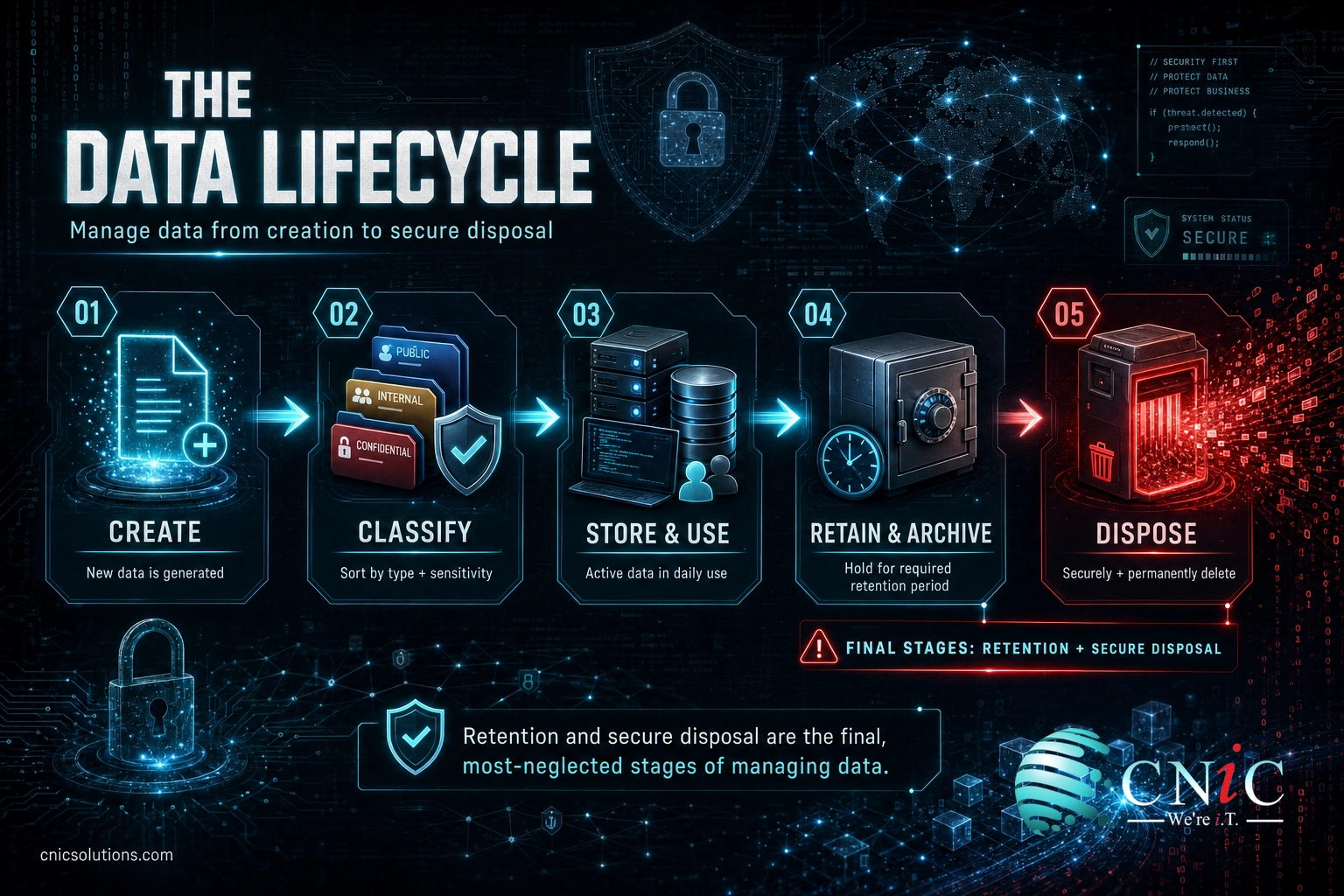
The policy is part of a broader practice called data lifecycle management, which tracks information from the moment it is created, through active use and long-term archival, to secure disposal. Retention is the stage that most organizations neglect, because keeping data requires no decision while deleting it does. A good policy forces that decision to be made once, in advance, and applied automatically.
Crucially, a retention policy is not a technology. It is a governance document. Tools such as backup systems, archives, and email platforms enforce it, but the policy itself is a business decision about risk, law, and value, agreed by the people who own the data and the people who are accountable for compliance.
Why Your Business Needs One
Three forces make a data retention policy worth the effort: compliance, security, and cost. They reinforce each other.
Compliance is the most pressing driver. Privacy and records laws increasingly dictate not just how you protect data but how long you may keep it. The California Consumer Privacy Act, as amended, now requires businesses to tell consumers how long they intend to keep each category of personal information they collect, which is impossible to answer without a retention policy behind it. Industry rules go further, setting hard minimums for specific records.
Security is the second driver, and it works in your favor. Every record you keep is a record that can be exposed if you are breached. The average cost of a data breach in the United States reached a record high in 2025, and reducing the volume of sensitive data you hold is one of the few levers that directly shrinks that exposure. Data minimization, keeping only what you need for only as long as you need it, is a core principle of modern privacy law precisely because it lowers risk.
Cost is the third driver. Storing, backing up, indexing, and securing data all cost money, and most of what businesses hoard is redundant, obsolete, or trivial. Deleting data you are not legally or operationally required to keep lowers storage spend and cuts the time and expense of e-discovery when litigation or an audit arrives. Less data is cheaper to protect and cheaper to search.
There is a governance benefit too. A documented policy demonstrates to auditors, regulators, and cyber insurers that your business manages information deliberately, which is exactly the kind of control they look for. It pairs naturally with the other documentation in a small business’s compliance program, from access controls to your IT compliance checklist.
Source: IBM Cost of a Data Breach Report 2025 | California Attorney General, CCPA guidance
Retention Policy vs Backup: The Common Confusion
This is where businesses most often go wrong. “We back up everything” is not a retention policy, and treating the two as the same thing leaves dangerous gaps. They answer different questions.
| Backup | Data Retention Policy | |
|---|---|---|
| What it is | A copy of data for recovery | A governing rule for the data lifecycle |
| Question it answers | How do we get data back after loss? | How long should data live, and when must it go? |
| Main goal | Availability and recovery | Compliance, risk reduction, cost control |
| Handles deletion? | No, backups tend to keep everything | Yes, it schedules disposal |
The two actually collide in an important way. Backups are one of the most common places where data outlives its retention period, because backup systems are built to preserve, not to expunge. If your policy says customer records are deleted after five years but your backups quietly hold copies from ten years ago, you are not compliant, and that old data is still exposed in a breach. A mature retention policy therefore governs backups and archives too, not just live systems. For a deeper look at how recovery-focused systems differ from everyday retention, see our explainer on disaster recovery as a service.
What the Law Requires: Common Retention Periods
There is no single legal retention period, and that is the hard part. Different regulations govern different record types, and they rarely agree. A retention policy exists to translate this patchwork into clear, category-by-category rules your team can actually follow. Some of the most common U.S. requirements for a typical business:
| Record type | Typical minimum retention | Authority |
|---|---|---|
| Payroll records | 3 years | Fair Labor Standards Act (DOL) |
| Employment tax records | 4 years | Internal Revenue Service |
| HIPAA compliance documentation | 6 years | 45 CFR 164.316 (HHS) |
| Public-company audit records | 7 years | Sarbanes-Oxley / 17 CFR 210.2-06 (SEC) |
| EU residents’ personal data | No longer than necessary | GDPR Article 5(1)(e) |
Notice the two different philosophies at work. U.S. records laws tend to set a firm floor: keep payroll data for at least three years, employment tax records for four, HIPAA documentation for six, and audit workpapers for seven. Privacy laws such as the GDPR flip the logic, setting a ceiling instead: personal data must be kept “no longer than is necessary for the purposes for which it is processed.” A workable policy has to satisfy both directions at once, holding regulated records long enough while purging personal data as soon as its purpose ends.
Minimum retention for common U.S. business records
Sources: DOL Fact Sheet #21, IRS employment tax recordkeeping, 45 CFR 164.316, 17 CFR 210.2-06. Minimums only; state law, contracts, and litigation holds often require longer.
These are minimums, not ceilings, and they are only the starting point. State laws, professional standards, payer and vendor contracts, and litigation holds can all require you to keep records longer, and they frequently do. That is exactly why a policy has to be built deliberately rather than guessed, and why legal and compliance belong at the table when you set the numbers.
Source: DOL Fact Sheet #21 | IRS employment tax recordkeeping | 45 CFR 164.316 | 17 CFR 210.2-06 | GDPR Article 5

How to Create a Data Retention Policy in 7 Steps
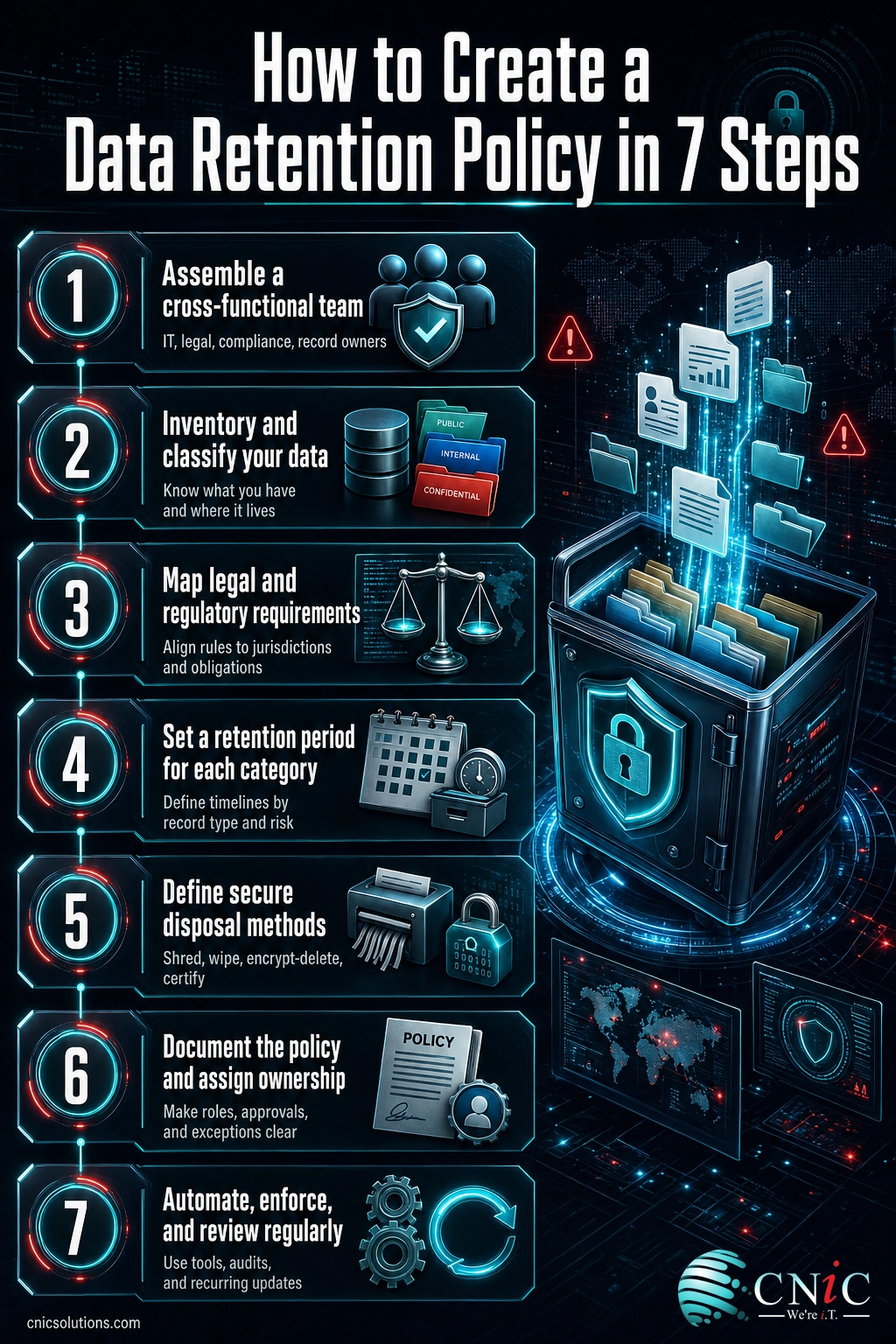
Building a retention policy is a structured project, not a document you dash off in an afternoon. These seven steps take you from a blank page to a policy your team can operate and an auditor can trust.
1Assemble a cross-functional team
Retention decisions span the whole business, so the policy cannot be written by IT alone. Bring together IT (who know where data lives), legal and compliance (who know what the law requires), and the department leaders who own specific records such as HR, finance, and sales. Name an executive sponsor who is accountable for signing off. This mix is what makes the finished policy both accurate and enforceable.
2Inventory and classify your data
You cannot set retention rules for data you have not mapped. Catalog what information the business holds, where it is stored (servers, cloud apps, email, backups, endpoints), and how sensitive it is. Then group it into a manageable set of categories, for example financial records, employee records, customer personal data, health information, and general operational files. Classification is the backbone of the entire policy: every rule that follows is applied by category, not file by file.
3Map the legal and regulatory requirements
For each category, identify every retention obligation that applies to your industry and the jurisdictions you operate in. A healthcare provider weighs HIPAA, a public company weighs Sarbanes-Oxley, and almost every employer weighs FLSA and IRS payroll rules. If you handle data on EU or California residents, privacy laws add “delete when no longer needed” obligations on top. This is where legal counsel earns its place at the table.
4Set a retention period for each category
Now assign a specific, defensible duration to every category. Where a law sets a minimum, meet or exceed it. Where no law applies, base the period on genuine business need rather than habit, and resist the urge to default everything to “forever.” Write down the reasoning behind each period so the policy can be explained and defended later. The output of this step is a clear retention schedule: category, period, and justification.
5Define secure disposal methods
A retention policy is only half a policy if it never deletes anything. For each category, specify how data is destroyed when its period ends, and make sure the method fits the sensitivity of the data. Deletion must be permanent and verifiable, not just moving files to a recycle bin. Disposal is covered in depth below.
6Document the policy and assign ownership
Write the policy in plain language, publish it where staff can find it, and make sure every retention schedule has a named owner responsible for keeping it current. Include how legal holds work, the process that freezes normal deletion when litigation or an investigation is anticipated, because destroying data under a hold can carry serious penalties. A policy no one can find or understand will not be followed.
7Automate, enforce, and review
Manual enforcement fails at scale. Wherever possible, configure your systems to apply retention and disposal automatically, so records age out on schedule without anyone remembering to act. Then review the policy at least annually, and whenever laws, systems, or your business change. Retention is not a one-time project; it is an ongoing control that has to keep pace with the data it governs.
Secure Disposal: What Happens When Retention Ends
Reaching the end of a retention period is not the end of your obligation. Data has to be disposed of in a way that actually makes it unrecoverable, and “delete” in everyday software rarely does that. Pressing delete or emptying the trash typically removes the pointer to the data, not the data itself, which can often be recovered with basic tools until it is overwritten.
The federal standard for doing this properly is NIST Special Publication 800-88, which defines three levels of media sanitization: clear (overwriting so data cannot be recovered with standard tools), purge (stronger techniques that defeat laboratory recovery), and destroy (physically shredding or degaussing the media so it can never be reused). The right level depends on how sensitive the data is and whether the storage device will be reused, resold, or discarded.
For encrypted data there is an efficient option known as cryptographic erasure, or crypto-shredding: if data was encrypted at rest, destroying the encryption keys renders every copy permanently unreadable, including copies sitting in backups. It is one of the practical reasons strong encryption is worth implementing in the first place, a topic we cover in our guide to business data encryption methods. Whatever method you choose, document that disposal happened, because being able to prove data was destroyed on schedule is part of the compliance value of the policy.
Source: NIST SP 800-88 Rev. 1, Guidelines for Media Sanitization
Common Mistakes to Avoid
A few predictable errors undermine most retention policies. Knowing them in advance is the easiest way to build a policy that holds up.
Myth: keeping everything forever is the safe choice. It feels cautious, but over-retention is a liability, not a safeguard. Every extra record is more to secure, more that can be exposed in a breach, more to search and produce in litigation, and, for personal data under laws like the GDPR, an outright compliance violation. Data you have properly disposed of on schedule cannot be stolen, subpoenaed, or leaked. Deliberate deletion is a security control, not a risk.
Beyond the “keep it all” instinct, watch for these traps:
- Writing a policy and never enforcing it. A retention schedule that lives in a document while systems keep everything anyway is worse than no policy, because it creates the appearance of control without the substance.
- Forgetting backups and archives. If disposal only touches live systems, old data survives in backups and quietly breaks your own rules.
- Ignoring legal holds. Automated deletion must pause the moment litigation or an investigation is anticipated. Destroying relevant data under a hold can carry severe penalties.
- Setting it and forgetting it. Laws, systems, and data types change. A policy that is never reviewed slowly drifts out of compliance.
How to Get Started
You do not need a perfect policy on day one; you need a defensible one that you actually operate. Start with a data inventory and your highest-risk categories, the regulated records and the sensitive personal data, then expand coverage from there. The goal is a living control that keeps the right data for the right length of time and disposes of the rest on schedule.
For many small and midsize businesses, the hard part is not the concept but the execution: mapping where data actually lives, interpreting overlapping regulations, and wiring retention and disposal into the systems that hold the data. That is where an experienced IT partner helps. CNiC Solutions works with businesses to inventory and classify their data, translate compliance requirements into a workable retention schedule, and build secure, verifiable disposal into their overall security program, so the policy is enforced rather than just written.
Talk to CNiC about data retention, backup, and secure disposal
Related Terms
- Data lifecycle management: The end-to-end management of data from creation through use, archival, and disposal. A retention policy governs its later stages.
- Data minimization: The privacy principle of collecting and keeping only the data you actually need. It is a core reason retention limits exist.
- Retention schedule: The category-by-category list of how long each type of record is kept and when it is destroyed. It is the operational core of the policy.
- Legal hold (litigation hold): A process that suspends normal deletion for data relevant to anticipated litigation or an investigation.
- Cryptographic erasure (crypto-shredding): Making encrypted data unrecoverable by destroying its encryption keys rather than the data itself.
- Backup vs archive: A backup exists to recover recent data after loss; an archive exists to retain data long term, often to satisfy retention rules. See disaster recovery as a service.
- IT compliance: The broader practice of meeting the legal and regulatory rules that govern your systems and data. Start with an IT compliance checklist.
Frequently Asked Questions
What is a data retention policy?
Why is a data retention policy important?
How long should a business keep its data?
What is the difference between a data retention policy and a backup?
Who is responsible for creating a data retention policy?
About This Guide and Sources
The retention periods cited here are drawn from primary sources: payroll recordkeeping from the U.S. Department of Labor Fact Sheet #21, employment tax records from the IRS, HIPAA documentation retention from 45 CFR 164.316, and audit-record retention from SEC Rule 17 CFR 210.2-06 (enacted under the Sarbanes-Oxley Act). The storage-limitation principle for personal data comes from GDPR Article 5(1)(e), and the California disclosure requirement from the CCPA as amended. The average U.S. data breach cost is from IBM’s Cost of a Data Breach Report 2025. Media sanitization levels follow NIST Special Publication 800-88 Revision 1. All figures are legal minimums or reported averages; actual obligations vary by industry, jurisdiction, contract, and litigation status. This guide is general information, not legal advice; confirm the requirements that apply to your business with qualified counsel.



related posts
What Is ZTNA (Zero Trust Network Access)?
November 3, 2026Zero Trust Network Access (ZTNA) is a security service that grants a verified user access to…
Zero Trust Statistics for 2026: Adoption, Maturity, and Breach Impact
November 3, 2026Zero trust has become the default security strategy on paper, but not yet in practice. Okta's…
What Is Zero Trust Security? A Guide for Small Businesses
November 2, 2026Zero Trust security is a cybersecurity model built on one rule: never trust, always verify. Instead…
What Is XDR (Extended Detection and Response) and How Does It Protect…
November 2, 2026Extended detection and response (XDR) is a security platform that collects and correlates threat data from…