

Single sign-on (SSO) is a login method that lets one person use a single set of credentials to reach many different applications, so they sign in once and every connected tool opens without another password. For a business, that means fewer passwords to reuse or forget, one place to enforce strong security, and the power to switch off a departing employee’s access to every app at the same moment.
Quick definition: Single sign-on (SSO) is an authentication service that uses one trusted login to grant access to multiple applications. The user authenticates with an identity provider a single time, and that provider vouches for them to each connected app. The goal is fewer logins, stronger central control, and less password risk.
- One login, many apps. SSO replaces a pile of separate passwords with a single trusted sign-in that opens every connected application.
- SSO is not MFA. SSO reduces the number of logins; MFA adds a second identity check. Used together, they are stronger than either alone.
- It closes a top attack path. Stolen credentials were the single most common way into a breach in 2025, and SSO plus MFA directly attacks that path.
- Real business payoff. Fewer password reset tickets, faster onboarding and offboarding, and one dashboard to control who can reach what.
- Standards run the show. SAML, OAuth 2.0, and OpenID Connect are the protocols that make trusted SSO work across cloud and on-premises tools.
What’s in This Guide
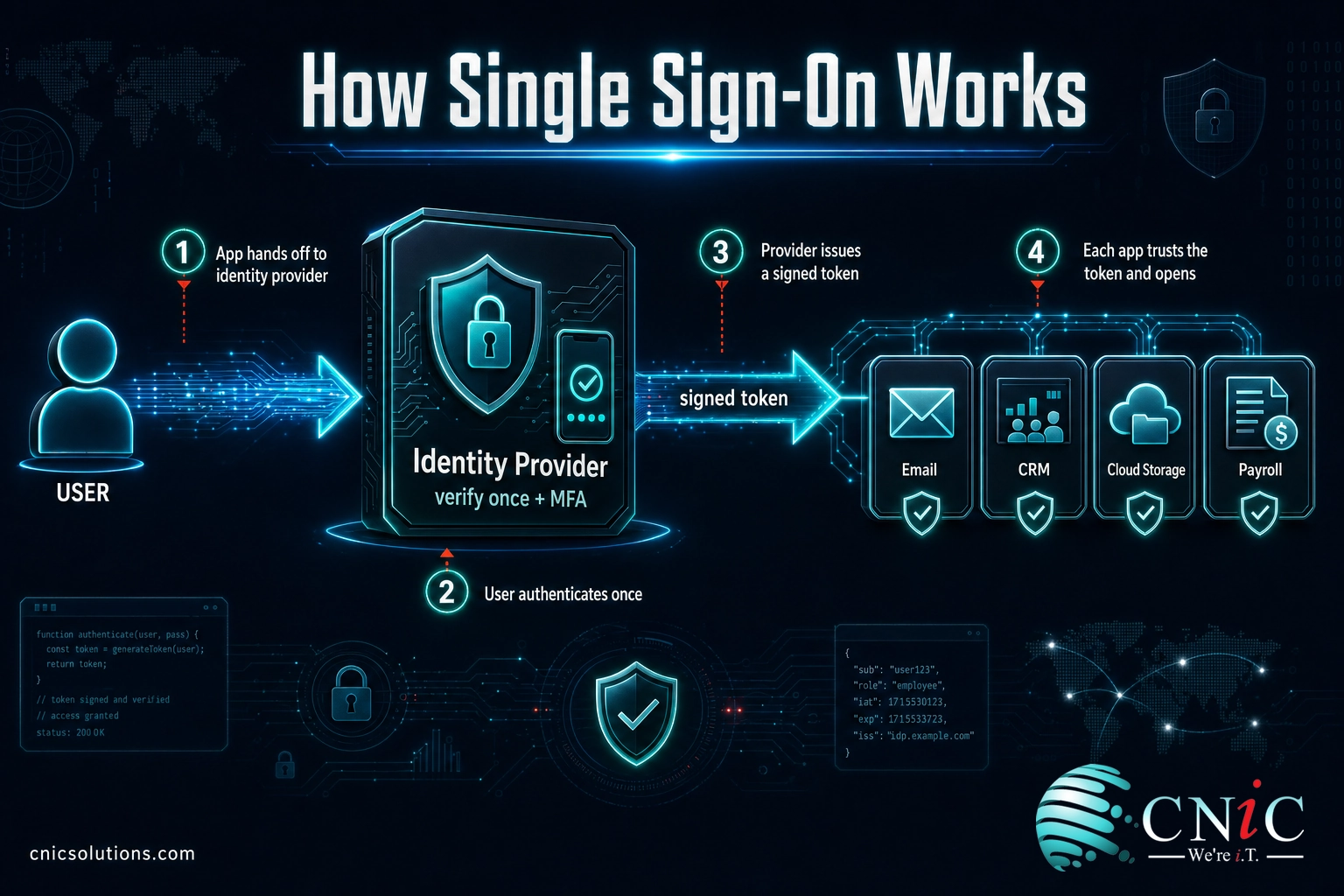
How Single Sign-On Works
The easiest way to picture SSO is a hotel key card. You verify who you are once at the front desk, and the card then opens your room, the pool, the gym, and the parking garage. You do not prove your identity again at every door. SSO does the same thing for software: you prove who you are one time to a trusted gatekeeper, and it quietly opens each app you are allowed to use.
That gatekeeper is called an identity provider (IdP), such as Microsoft Entra ID, Okta, or Google. Each application that trusts the IdP is called a service provider. Here is the flow in plain steps:
- You open an app (say, your CRM) and it sees you are not signed in.
- The app hands you off to the identity provider instead of asking for its own password.
- You authenticate once with the IdP, ideally with a password plus MFA.
- The IdP issues a signed token, a tamper-proof digital note that says “this person is verified.”
- The app reads the token and lets you in. Open the next app and the token is reused, so you skip the login entirely.
Critically, the individual apps never see or store your password. They only trust the token from the identity provider. This is why SSO is stronger than it first sounds: there are fewer passwords floating around, and there is one authoritative place that decides who gets in. The U.S. National Institute of Standards and Technology defines single sign-on as using one account and its authenticators to reach multiple applications, generally through a federation protocol, and treats it as a core part of modern identity design.
Source: NIST Computer Security Resource Center glossary | NIST SP 800-63-4 Digital Identity Guidelines
SSO vs. MFA: The Most Common Mix-Up
The single biggest point of confusion is treating SSO and multi-factor authentication as the same thing, or as competitors. They solve different problems and are strongest together.
SSO answers “how many times do I log in?” Its job is to cut the number of separate logins down to one. MFA answers “how sure are we it is really you?” Its job is to add a second proof, like a code or an approval on your phone, on top of the password. SSO makes logging in simpler; MFA makes each login harder to fake.
| Single Sign-On (SSO) | Multi-Factor Authentication (MFA) | |
|---|---|---|
| What it does | One login opens many apps | Adds a second identity check to a login |
| Problem it solves | Password sprawl and login friction | Stolen or guessed passwords |
| User experience | Fewer prompts, faster access | One extra step at sign-in |
| Best used | Together, not instead of each other | Together, not instead of each other |
Here is why they belong together. Because SSO funnels every app through one identity provider, you can require MFA once at that provider and have it protect every connected tool automatically. Without SSO, you would have to switch on MFA app by app, and the ones you miss stay exposed. With SSO, strong authentication becomes the default across the whole environment.
Myth: “SSO means one password is the key to everything, so it must be less secure.” The opposite is usually true. Employees already reuse passwords across dozens of apps, which is the real single point of failure. SSO replaces that scattered risk with one hardened login you can protect with MFA, monitor for suspicious activity, and shut off instantly. The concentration is the point, and it is defensible in a way that reused passwords never are.

Why SSO Matters for Your Business
SSO is easy to file under “convenience,” but the business case is mostly about security and time. Start with the threat it addresses. Credentials are the front door attackers use most.
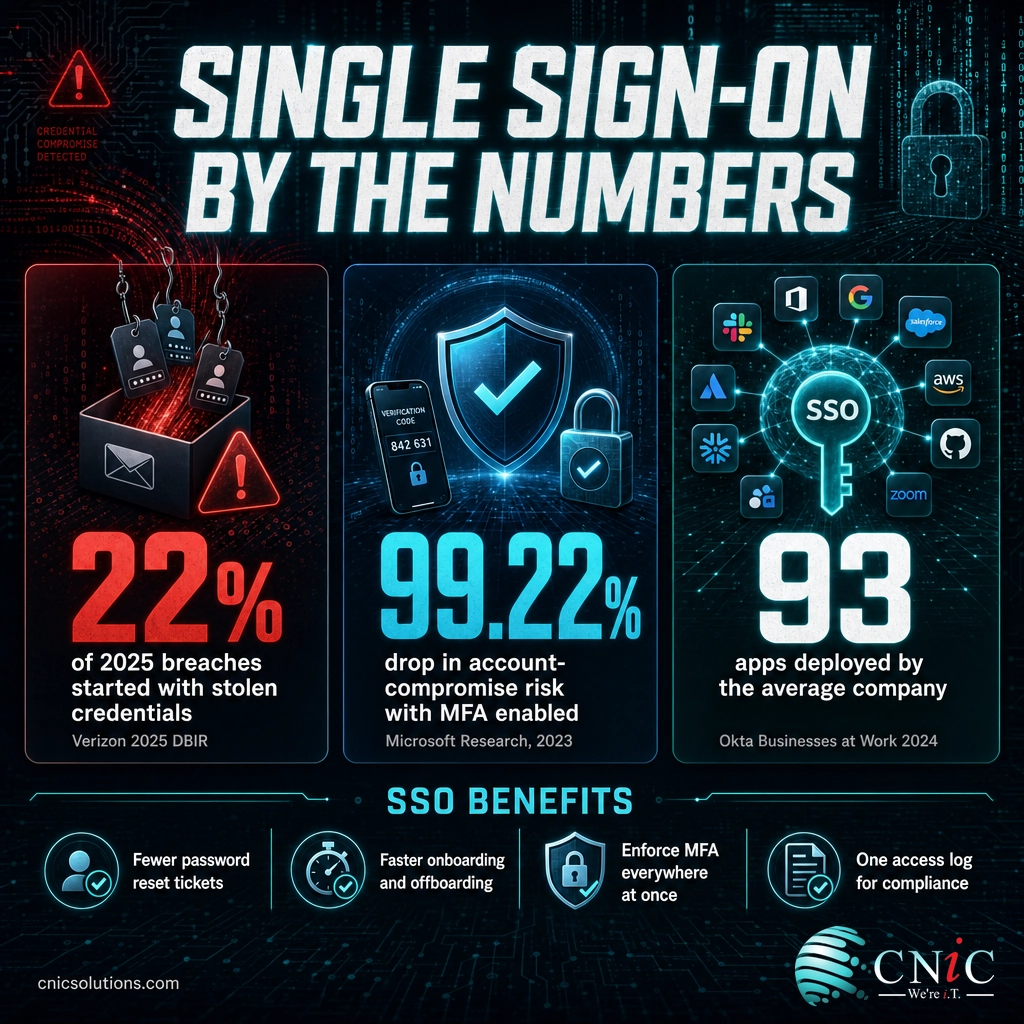
When attackers already have a working password, defenses that rely on the password alone fail. That is exactly the gap SSO plus MFA closes. Microsoft’s large-scale research on real account attacks found that MFA is remarkably effective at stopping account takeover.
SSO is what makes that protection practical at scale. Instead of chasing MFA across every tool, you enforce it at the identity provider and it covers the lot. And the “lot” keeps growing: the number of apps a company deploys keeps climbing, so the number of logins to secure climbs with it.
Look at how the most common ways into a breach line up. Two of the top three are directly connected to logins and access, which is the territory SSO and MFA govern.
Top Initial Access Vectors in Breaches (Verizon 2025 DBIR)
Share of breaches by initial access vector. Source: Verizon 2025 Data Breach Investigations Report.
Beyond the security math, SSO returns real hours to your team:
- Fewer password reset tickets. Password problems are one of the largest categories of help desk work. Fewer passwords to remember means fewer lockouts and fewer calls.
- Faster onboarding and offboarding. Grant a new hire access to their full app stack from one console on day one, and revoke every app the moment someone leaves. No orphaned accounts left behind.
- Cleaner compliance evidence. One authoritative log of who accessed what, and when, is far easier to hand an auditor than access records scattered across 90-plus tools.
- Less shadow IT. When approved apps are one click away, employees are less tempted to spin up unmanaged tools with their own weak passwords.
This is where identity strategy meets everyday operations. Businesses that want the security upside without babysitting the plumbing often fold SSO into a broader managed IT and support program so the identity provider, MFA policies, and access reviews are all handled for them. If you are still sizing up the threat landscape, our small business cyber attack data puts the credential-theft problem in sharper context.
Source: Verizon 2025 Data Breach Investigations Report | Microsoft Research: How effective is MFA? | Okta Businesses at Work 2024
Types of SSO and the Protocols Behind It
“SSO” is a category, not a single product. The differences come down to the standard, or protocol, the identity provider and app use to trust each other. Three dominate business environments.
SAML 2.0
Security Assertion Markup Language is the long-standing standard for enterprise web applications. When you log in to a payroll portal or an HR system through your company identity and never see that app’s own login screen, SAML is usually doing the work behind the scenes. It is battle-tested and widely supported by established business software.
OAuth 2.0
OAuth is an authorization standard, not strictly a login one. It is what lets one service act on your behalf in another (for example, granting a scheduling tool access to your calendar) without handing over your actual password. It underpins much of the “Sign in with…” experience across modern cloud apps.
OpenID Connect (OIDC)
OIDC is a thin identity layer built on top of OAuth 2.0. It adds the piece OAuth lacks on its own: a standard way to confirm who the user is. OIDC powers most current cloud and mobile SSO, including consumer logins like “Sign in with Google.”
Which do you need? In practice you rarely choose by hand. A modern identity provider speaks all three and negotiates whichever a given app supports. The takeaway is not to memorize the acronyms but to make sure your SSO platform supports the standards your critical apps use, so every tool can sit behind one login.
Source: NIST SP 800-63-4 Digital Identity Guidelines
The Security Trade-Off: Benefits and Risks
Honest advice acknowledges the trade-off. Concentrating logins into one identity provider brings large benefits and one real responsibility.
The benefits are the ones covered above: fewer passwords to steal, MFA enforced everywhere at once, instant off-boarding, and a single source of truth for access logs. For most small and midsize businesses, those gains clearly outweigh the risks of the status quo, where employees quietly reuse the same weak password across dozens of accounts.
The responsibility is that the identity provider becomes a high-value target. If someone breaks into the SSO account itself, they inherit its reach. That is precisely why SSO is never deployed alone. It is hardened with MFA, conditional access rules (blocking logins from unexpected locations or devices), and monitoring for unusual sign-in behavior. The U.S. Cybersecurity and Infrastructure Security Agency treats strong MFA as a baseline control for exactly this reason, and pairing it with SSO is how that baseline reaches every app.
The correct comparison is not “SSO versus perfect security.” It is “one hardened, monitored, MFA-protected login versus 90 scattered passwords no one is watching.” Framed that way, the risk math favors SSO for the large majority of businesses. Getting the hardening right is where an experienced partner earns its keep, and it is a natural role for a Virtual CIO to guide your security roadmap.
Source: CISA guidance on multi-factor authentication
Get a Virtual CIO Security Roadmap
How to Get Started With SSO
Rolling out SSO does not have to be a massive project. A sensible sequence for a small or midsize business looks like this:
- Inventory your apps. List every tool employees log in to. Most teams are surprised how long the list is once shadow IT is included.
- Pick an identity provider. If you already run Microsoft 365 or Google Workspace, you likely own an SSO-capable identity platform (Microsoft Entra ID or Google) and can start there.
- Connect your highest-value apps first. Email, finance, CRM, and anything holding customer data go first. These are the tools where a stolen login hurts most.
- Turn on MFA at the provider. This is the step that converts SSO from convenience into a genuine security upgrade.
- Add conditional access and reviews. Layer in location and device rules, then schedule regular checks of who has access to what.
The order matters more than the speed. Getting the identity provider and MFA right on your critical apps delivers most of the benefit early, and you can extend coverage to the long tail of tools over time.
If you would rather not stand this up alone, this is standard work for a managed security team. We help Houston and Texas businesses design identity and access management around SSO and MFA, then run it day to day so access stays tight without slowing anyone down. Device-heavy environments often pair this with strong mobile device management tools for full coverage.
Talk to CNiC About Managed IT Security
Frequently Asked Questions
What is single sign-on (SSO)?
Is SSO the same as MFA?
Is single sign-on safe?
What is an example of single sign-on?
What protocols does SSO use?
Related Identity and Access Terms
- Multi-factor authentication (MFA): A second proof of identity, such as a phone approval or one-time code, added on top of a password. The natural partner to SSO.
- Identity and access management (IAM): The broader discipline of managing who can access what across an organization. SSO is one component of a full IAM program.
- Identity provider (IdP): The trusted service, such as Microsoft Entra ID or Okta, that verifies users and issues the tokens SSO relies on.
- Federated identity: An arrangement where one organization’s identity can be trusted by another’s systems, the trust model that lets SSO span different vendors.
- SAML, OAuth 2.0, OpenID Connect: The three protocols that let identity providers and apps trust each other securely.
- Zero trust: A security model that verifies every request rather than trusting anything by default. Strong identity and SSO are foundational to it.
- Password manager: A vault that stores unique passwords per app. Useful, but it still leaves many logins; SSO removes the logins instead of just storing them.
Strong identity is the foundation of everything else in security. If access management is on your roadmap, our team can help you build it on a solid footing of managed cybersecurity services rather than bolting it on later.
Sources and Methodology
Statistics in this article come from primary, first-party research and standards bodies, cited inline and listed here:
- Credential and breach data: Verizon 2025 Data Breach Investigations Report
- MFA effectiveness: Microsoft Research, “How effective is multifactor authentication at deterring cyberattacks?” (2023)
- App-per-company data: Okta Businesses at Work 2024
- SSO definition and identity standards: NIST Computer Security Resource Center and NIST SP 800-63-4
- MFA baseline guidance: Cybersecurity and Infrastructure Security Agency (CISA)



related posts
What Is SIP Trunking? How It Modernizes Business Phone Systems
October 30, 2026SIP trunking is a technology that connects a business phone system to the public telephone network…
What Is Shadow IT? Risks, Examples, and How to Manage It
October 29, 2026Shadow IT is any hardware, software, cloud service, or AI tool that employees use for work…
What Is SIEM? Security Information and Event Management Explained
October 29, 2026A SIEM (security information and event management) is a security platform that collects log and event…
What Is SASE (Secure Access Service Edge)? How It Works
October 28, 2026Secure access service edge (SASE) is a cloud-delivered model that combines wide-area networking (SD-WAN) with a…