

A SIEM (security information and event management) is a security platform that collects log and event data from across an organization’s systems, then correlates and analyzes it in real time to detect, investigate, and respond to cyber threats. It turns scattered signals from firewalls, servers, and apps into one view, so an attack is caught early.
Every system in your business keeps a diary. The firewall logs connections, the server logs logins, the email platform logs messages, and the cloud apps log every file that moves. Read alone, each diary looks unremarkable. Read together, they can spell out an attack in progress. A SIEM is the tool that reads all of them at once. It pulls the log data from every corner of your environment into one place, connects events that would seem harmless in isolation, and raises the alarm when the pattern points to a threat. This guide explains what a SIEM is, how it works, how it differs from the tools it is most often confused with, and how to tell whether your business needs one.
- A SIEM is the hub of security monitoring. It pulls logs and alerts from every system into one place and correlates them so a real attack stands out from ordinary noise.
- Its whole purpose is speed. IBM found breaches took an average of 258 days to identify and contain in 2024, and a well-run SIEM is built to shrink that window.
- Correlation is the point. A failed login in one place and a large download in another look innocent alone; a SIEM connects them into a single alert.
- It is not a set-and-forget product. Without tuned rules and people watching it, a SIEM becomes an expensive pile of ignored alerts.
- Most small businesses buy the outcome, not the box. Managed and co-managed models deliver a SIEM plus the analysts to run it for far less than building a security operations center in-house.
What’s in This Guide
How a SIEM Works
The idea behind a SIEM is old and simple: the evidence of almost every attack already exists somewhere in your logs, but no human could ever read all of them in time. Standards bodies have described the discipline for years. The NIST definition of a SIEM frames it as software that provides centralized logging across many log types, and NIST’s guide to security log management lays out why centralizing and analyzing that data is a core control. In practice, a SIEM runs a continuous pipeline that turns raw logs into action.
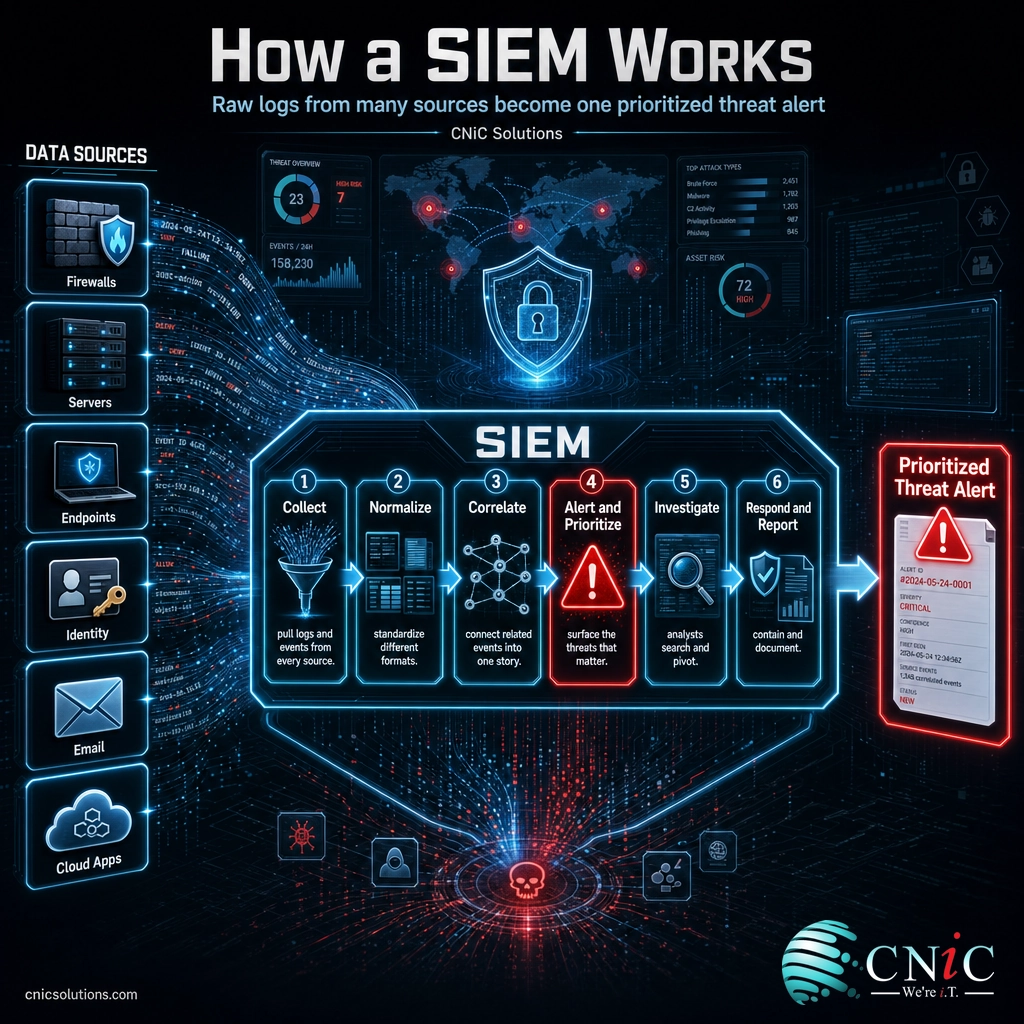
- Collect. Connectors and agents pull log and event data from across the environment: firewalls, servers, endpoints, identity systems, email, and cloud apps all stream in.
- Normalize. Every source writes logs in its own format, so the SIEM standardizes them into a common structure. A login from Windows and a login from a cloud app can then be compared side by side.
- Correlate. This is the heart of the tool. Rules and analytics connect related events across sources, so a failed login, a new admin account, and a large data transfer stop looking like three unrelated blips and start looking like one attack.
- Alert and prioritize. When the pattern crosses a threshold, the SIEM raises a prioritized alert, filtering the flood of routine events down to the handful that deserve a human’s attention.
- Investigate. Analysts search and pivot through the collected data to understand what happened, which systems are involved, and how far the intrusion has spread.
- Respond and report. The team contains the threat, and the SIEM produces the timeline and reports used both for the response and for compliance, then feeds lessons back into sharper rules.
A useful way to picture it: a SIEM is the control room in a large building. Every camera, door badge reader, and motion sensor feeds into one wall of screens. Any single feed is boring, but the guard watching them all notices when the same badge opens three restricted doors at 2 a.m. On a network, the “feeds” are your logs, and the SIEM is the control room that makes one suspicious story visible out of thousands of ordinary events.
That correlation is also what separates a SIEM from plain log storage. Keeping logs in a bucket means you can look up what happened after the fact. A SIEM watches the logs as they arrive and tells you something is wrong while there is still time to act. It is a close cousin of broader network security monitoring, which uses the SIEM as its central brain while adding live traffic analysis on top.
Source: NIST Computer Security Resource Center glossary | NIST SP 800-92, Guide to Computer Security Log Management

SIEM vs SOAR: Clearing Up the Confusion
The term you will hear paired with SIEM most often is SOAR, and the two are constantly mixed up because they sit right next to each other in a security operation. They are not competitors, and they are not the same thing. The simplest way to keep them straight: a SIEM decides that something is wrong, and SOAR (security orchestration, automation, and response) helps do something about it quickly.
A SIEM is a detection tool. Its output is a prioritized alert built from correlated log data. SOAR is a response tool. It takes alerts, often from the SIEM, and runs automated playbooks: disabling a compromised account, isolating a device, or opening a ticket without waiting for a human to click through every step. A SIEM is the eyes and ears; SOAR is the hands. Many modern platforms bundle both, but the jobs stay distinct.
| Attribute | SIEM | SOAR |
|---|---|---|
| Core job | Detect: collect and correlate data into alerts | Respond: automate and orchestrate the reaction |
| Main input | Logs and events from across your systems | Alerts and cases, often from the SIEM |
| Main output | Prioritized threat alerts and investigations | Automated playbooks and faster containment |
| Question it answers | Is something wrong here? | What do we do about it, right now? |
| Role in the SOC | The eyes and ears | The hands |
There is one more term worth untangling here: the SOC itself. A SOC (security operations center) is not a piece of software at all. It is the team and command center that watches for threats, and the SIEM is the primary tool that team lives in all day. If a SIEM is the control room’s wall of screens, the SOC is the people sitting in front of it. A related managed model, managed detection and response (MDR), packages the SIEM, the SOC, and the response process together as a service.
Why a SIEM Matters for Growing Businesses
The argument for a SIEM comes down to one number that has barely improved in a decade: the time between an attacker getting in and anyone noticing. That gap is where a break-in becomes a breach, and correlation across all your logs is the fastest way to close it.
Start with detection time. IBM’s Cost of a Data Breach Report found that in 2024 it took an average of 258 days to identify and contain a breach. That is more than eight months, and every one of those days is time an attacker can use to steal data, spread deeper, or stage ransomware. A SIEM exists to compress that timeline by catching the correlated signals early.
Attackers also get a long head start on their own. Mandiant’s M-Trends report put the global median dwell time, the number of days an intruder operates in an environment before being detected, at 10 days in 2024. That is a real improvement over prior years, but it still means the typical attacker has more than a week inside a network before anyone reacts. Correlated alerting is exactly what turns those days into hours.
The cost of missing all of this keeps climbing. IBM put the global average cost of a data breach at $4.88 million in 2024, the highest on record and roughly a 10% jump in a single year. Smaller businesses see smaller absolute figures, but the downtime, lost data, and recovery can be existential rather than merely expensive.
Global Average Cost of a Data Breach by Year (IBM)
The global average breach cost has risen every year and hit a record in 2024. Source: IBM Cost of a Data Breach Report.
Myth: buying a SIEM means we are protected. A SIEM does not stop attacks; it surfaces them. On its own, an untuned SIEM produces a torrent of alerts that no one has time to read, and the one that matters gets buried. The tool only pays off when someone tunes its rules and investigates what it flags, which is why detection matters so much: Verizon’s Data Breach Investigations Report found the human element, such as phishing, error, or stolen logins, was involved in 68% of breaches in 2024. Those attacks walk in with valid credentials, and only correlated monitoring plus a real analyst catches them.
Source: IBM Cost of a Data Breach Report | Mandiant M-Trends 2024 | Verizon Data Breach Investigations Report
Types of SIEM: Deployment Models
SIEM is a capability, not a single product, and how you run it matters as much as which platform you pick. The main difference between options is who hosts the system and who watches the alerts it produces. These are the models you will be choosing between.
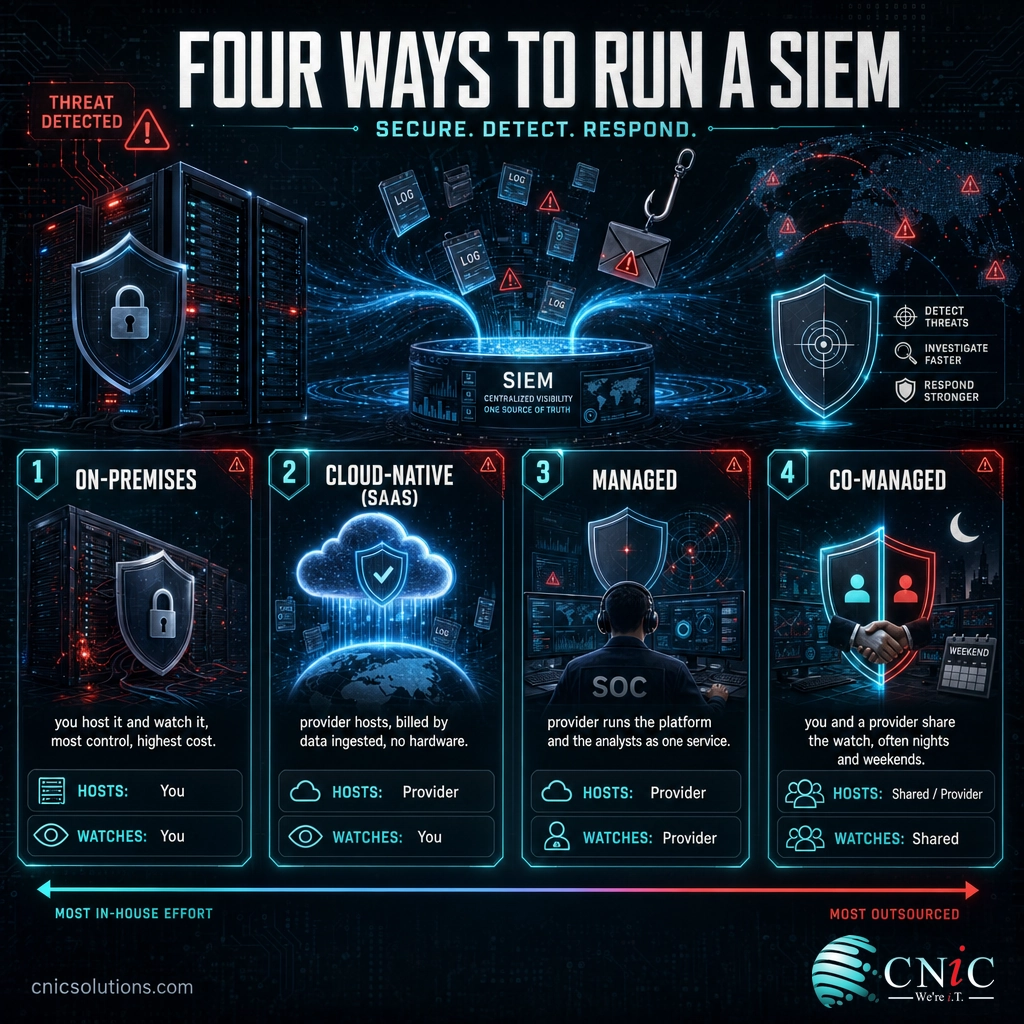
- On-premises SIEM. The platform runs on your own servers, and your team handles hosting, tuning, and monitoring. It offers the most control and is common in large enterprises with a full security team, but the licensing, hardware, and staffing costs are the highest.
- Cloud-native (SaaS) SIEM. The provider hosts the platform and you send your logs to it, usually billed by the volume of data ingested. There is no hardware to maintain, and it scales easily, but you still need people to tune it and act on the alerts.
- Managed SIEM. A provider runs the platform and watches it for you, delivering the tool plus the analysts as one service. This is the most common route for small and midsize businesses, because it turns a complex build into a monthly service.
- Co-managed SIEM. Your team and an outside provider share the work, often with your staff handling business hours and the provider covering nights and weekends. It suits companies that have some IT capacity but cannot staff a 24/7 watch alone.
You will also hear the term “next-generation SIEM.” It refers to modern platforms that fold in extra analytics, most commonly user and entity behavior analytics (UEBA) to catch abnormal behavior, and built-in SOAR automation to speed the response. The deployment choice above still applies; next-gen just describes how much intelligence is baked into the platform itself.
How to Get Started With a SIEM
You do not need to buy every capability on day one, and very few businesses run a SIEM entirely on their own. Standing up a 24/7 operation in-house means licensing an expensive platform, hiring scarce analysts, and keeping the watch staffed every night and weekend. For most small and midsize companies, the practical route is a provider that already runs a SIEM at scale across many clients. A sensible path looks like this.
- Know what you are protecting. Start with a clear picture of your systems and your most sensitive data. A cybersecurity risk assessment tells you where the real risk sits and which log sources matter most.
- Get the right data flowing in. A SIEM is only as good as what it can see, so connect the sources that matter: firewalls, servers, identity and email systems, endpoints, and cloud apps. Gaps in coverage are exactly where attackers hide.
- Tune before you trust. Out of the box, a SIEM is noisy. The rules need tuning to your environment so that real threats rise to the top and routine activity does not drown them. This is ongoing work, not a one-time setup.
- Put people behind it. Pair the platform with analysts who investigate what it flags, whether that is your team, a provider, or a shared model. A SIEM without a human is just storage.
Because the platform and the people are inseparable, most businesses get SIEM through a broader security service rather than as a standalone purchase. Our explainer on managed security service providers covers how that model is delivered and priced, and it pairs naturally with day-to-day managed IT support so the team running your systems and the team watching them are connected. Government resources help you set a baseline too: CISA’s cyber guidance for small and midsize businesses outlines the core protections every organization should have in place.
Explore Managed IT and Security
Source: Cybersecurity and Infrastructure Security Agency, small and midsize business resources
Common Questions About SIEM
What is a SIEM in simple terms?
What is the difference between SIEM and SOAR?
Is a SIEM the same as a SOC?
Does a small business need a SIEM?
How much does a SIEM cost?
Related Terms
- SOAR (security orchestration, automation, and response): the automation layer that takes SIEM alerts and runs response playbooks, speeding containment.
- SOC (security operations center): the staffed, always-on team and command center that watches for and responds to threats, using the SIEM as its main tool.
- MDR (managed detection and response): a service that bundles the SIEM, the SOC, and the response process together, explained in our managed detection and response guide.
- EDR (endpoint detection and response): detection focused on laptops and servers, a common SIEM data source, covered in our endpoint protection guide.
- Log management: the collection and storage of log data, which a SIEM builds on by adding real-time correlation and alerting.
- UEBA (user and entity behavior analytics): analytics that flag abnormal user or device behavior, often built into next-generation SIEM platforms.
- Network security monitoring: the broader practice of watching network traffic and logs for threats, detailed in our network security monitoring explainer.
- MSSP (managed security service provider): an outside team that delivers security tools like a SIEM as a managed service, covered in our MSSP explainer.
About This Guide
The definition of a SIEM and the log-management standard it rests on follow the NIST Computer Security Resource Center glossary and NIST Special Publication 800-92. The average time to identify and contain a breach, the year-over-year breach-cost trend, and the record 2024 figure are drawn from IBM’s Cost of a Data Breach Report. The global median attacker dwell time is from Mandiant’s M-Trends report, and the human-element breach figure is from the Verizon Data Breach Investigations Report. Figures are cited to their original sources and used to illustrate why a SIEM matters, not as guaranteed outcomes for any specific business.
Sources: NIST CSRC glossary | NIST SP 800-92 | IBM Cost of a Data Breach Report | Mandiant M-Trends | Verizon DBIR | CISA small and midsize business resources
Get a Free Security Audit From CNiC



related posts
What Is Shadow IT? Risks, Examples, and How to Manage It
October 29, 2026Shadow IT is any hardware, software, cloud service, or AI tool that employees use for work…
What Is SASE (Secure Access Service Edge)? How It Works
October 28, 2026Secure access service edge (SASE) is a cloud-delivered model that combines wide-area networking (SD-WAN) with a…
What Is SD-WAN? How Software-Defined WAN Works
October 28, 2026SD-WAN (software-defined wide area network) is a way of building a business network that uses software…
What Is Root Cause Analysis (RCA)? A Guide to Solving IT Problems…
October 27, 2026Root cause analysis (RCA) is a structured way to find the true underlying cause of a…