

Shadow IT is any hardware, software, cloud service, or AI tool that employees use for work without the knowledge or approval of the IT department. Because it operates outside official oversight, it sits beyond the organization’s security, compliance, and support controls, creating risk that leadership often cannot see.
Most shadow IT does not start with bad intentions. It starts with an employee who needs to get something done, finds the approved tools too slow or too limited, and signs up for a free app that solves the problem in minutes. Multiply that by a whole workforce and you get a sprawling, invisible layer of technology that IT never chose, never secured, and cannot support. Gartner projects that by 2027, 75 percent of employees will acquire, modify, or create technology outside the visibility of the IT department, up from 41 percent in 2022. Understanding what shadow IT is, why it happens, and how to bring it under control is now a core part of running a secure, compliant business.
Key Takeaways
- Shadow IT is unsanctioned technology. Any app, device, cloud service, or AI tool used for work without IT’s approval counts, from a personal Google Drive to a team’s own SaaS subscription.
- It is common and growing. Gartner expects 75 percent of employees to source technology outside IT’s visibility by 2027, and estimates shadow IT already consumes 30 to 40 percent of IT spending in large enterprises.
- The real problem is invisibility. Tools IT cannot see cannot be patched, monitored, or secured, which turns convenience into unmanaged risk.
- Shadow AI is the fastest-growing form. IBM found breaches involving unsanctioned AI added about $670,000 to the average cost and made customer data far more likely to be exposed.
- It is manageable, not bannable. Blanket bans push shadow IT deeper underground. Discovery, clear policy, sanctioned alternatives, and continuous monitoring bring it into the light.
What’s in This Guide
What Is Shadow IT?
Shadow IT refers to any technology used inside an organization that the IT and security teams did not approve, do not manage, and often do not even know exists. The word “shadow” captures the core problem: it operates in the dark, outside the systems IT uses to keep the business secure and running.
That technology can take almost any form. It might be a cloud application a marketing team signed up for, a file-sharing account an employee uses to move work between home and office, a personal phone with company email on it, or an AI chatbot someone pastes a report into for a quick summary. What ties all of it together is not what the tool does, but who is watching it. Sanctioned IT is chosen, configured, and monitored by the IT department. Shadow IT is chosen by everyone else and monitored by no one.
The distinction matters because IT’s controls only reach what IT can see. A sanctioned app gets security reviews, access controls, patching, backups, and a support path when something breaks. A shadow app gets none of that, even though it may hold the exact same sensitive customer or financial data.
| Sanctioned IT | Shadow IT |
|---|---|
| Chosen and vetted by the IT department | Chosen by individuals or teams on their own |
| Security reviewed and access controlled | No security review, uncontrolled access |
| Patched, monitored, and backed up | Unpatched, unmonitored, rarely backed up |
| Covered by a support and recovery path | No official support when it fails |
| Visible in the IT inventory and budget | Invisible to IT and finance |
Why Shadow IT Happens
Shadow IT is rarely an act of rebellion. It is almost always a rational response to friction. When the approved way of doing something is slower or clumsier than a tool an employee can find in a browser, people route around the obstacle. Understanding those motivations is the first step to managing the behavior instead of fighting it.
The most common drivers are consistent across industries:
- Speed. Waiting days or weeks for IT to review and approve a tool feels impossible when a deadline is tomorrow. A free app is available right now.
- Better functionality. Employees often believe the tool they found does the job better than the officially provided option, and frequently they are right.
- Remote and hybrid work. Distributed teams reach for their own collaboration, file-sharing, and messaging tools to stay productive across locations and devices.
- Familiarity. People bring the consumer apps they already know and trust from personal life straight into their work.
- Cost and convenience. Free tiers and low-cost SaaS subscriptions can be started with a personal credit card and an email address, no procurement process required.
Read as a whole, shadow IT is a signal. Every unsanctioned tool points to a gap between what employees need and what the organization officially provides. That reframing is important, because it turns shadow IT from a discipline problem into a useful piece of business intelligence.
How Big Is the Shadow IT Problem?
Shadow IT is not a fringe issue affecting a handful of rule-breakers. It is now the default way a large share of the workforce adopts technology, and the trend line is steep. Gartner’s projection that 75 percent of employees will source technology outside IT’s visibility by 2027, nearly double the 41 percent figure from 2022, shows how quickly self-service technology has moved from exception to norm.
Employees acquiring technology outside IT’s visibility
Source: Gartner. Share of employees who acquire, modify, or create technology beyond the IT department’s visibility.
The financial footprint is just as striking. Gartner estimates that shadow IT already accounts for 30 to 40 percent of IT spending in large enterprises, money flowing to tools that never appear on IT’s books. That spending is not just a governance headache. It represents data, accounts, and access that live entirely outside the organization’s security perimeter.
Source: Gartner cybersecurity research and predictions
Common Examples of Shadow IT
Shadow IT is easier to grasp with concrete examples. It shows up in nearly every department, usually disguised as ordinary productivity. The categories below cover where it most often appears.
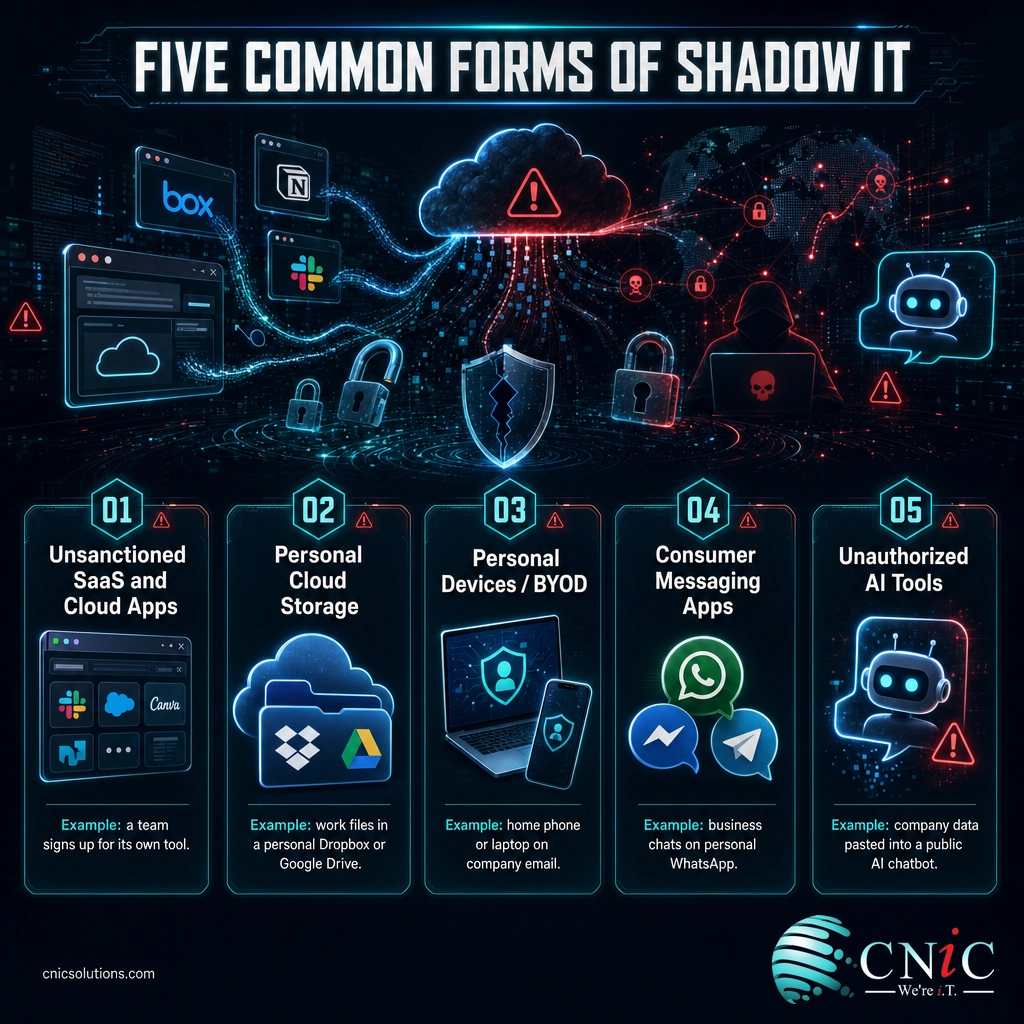
Unsanctioned SaaS and cloud apps
This is the largest and fastest-growing category. A team signs up for a project management, design, or automation tool on its own, often on a free tier or a personal card. The app may be excellent, but IT has no record of it, no control over who can access it, and no way to remove company data if an employee leaves.
Personal cloud storage and file sharing
Employees move work files into personal Dropbox, Google Drive, or iCloud accounts to work from home or share with a client. Sensitive documents now sit in a consumer account with no company access controls, retention rules, or backup, and IT cannot revoke access to them.
Personal devices (BYOD)
Phones, tablets, and home laptops used to check email, join calls, or access company systems are a form of shadow IT whenever they fall outside the organization’s device management. An unpatched or lost personal device becomes a direct door into corporate data.
Consumer messaging and collaboration tools
Teams coordinate over personal WhatsApp, Telegram, or a private Slack workspace because it is quick. Business conversations, decisions, and sometimes sensitive data end up in channels IT cannot archive, secure, or produce for compliance and legal requests.
Unauthorized AI tools
The newest and most consequential category. Employees paste reports, code, customer records, or strategy documents into public AI chatbots and assistants to save time. This has become common enough, and risky enough, to earn its own name: shadow AI.
The Rise of Shadow AI
Shadow AI is shadow IT for the generative AI era: employees using unsanctioned AI tools for work without IT’s oversight. It has spread faster than almost any technology before it, because the tools are free, instantly useful, and only a browser tab away. The catch is that every prompt can carry sensitive company data into a system the organization does not control.
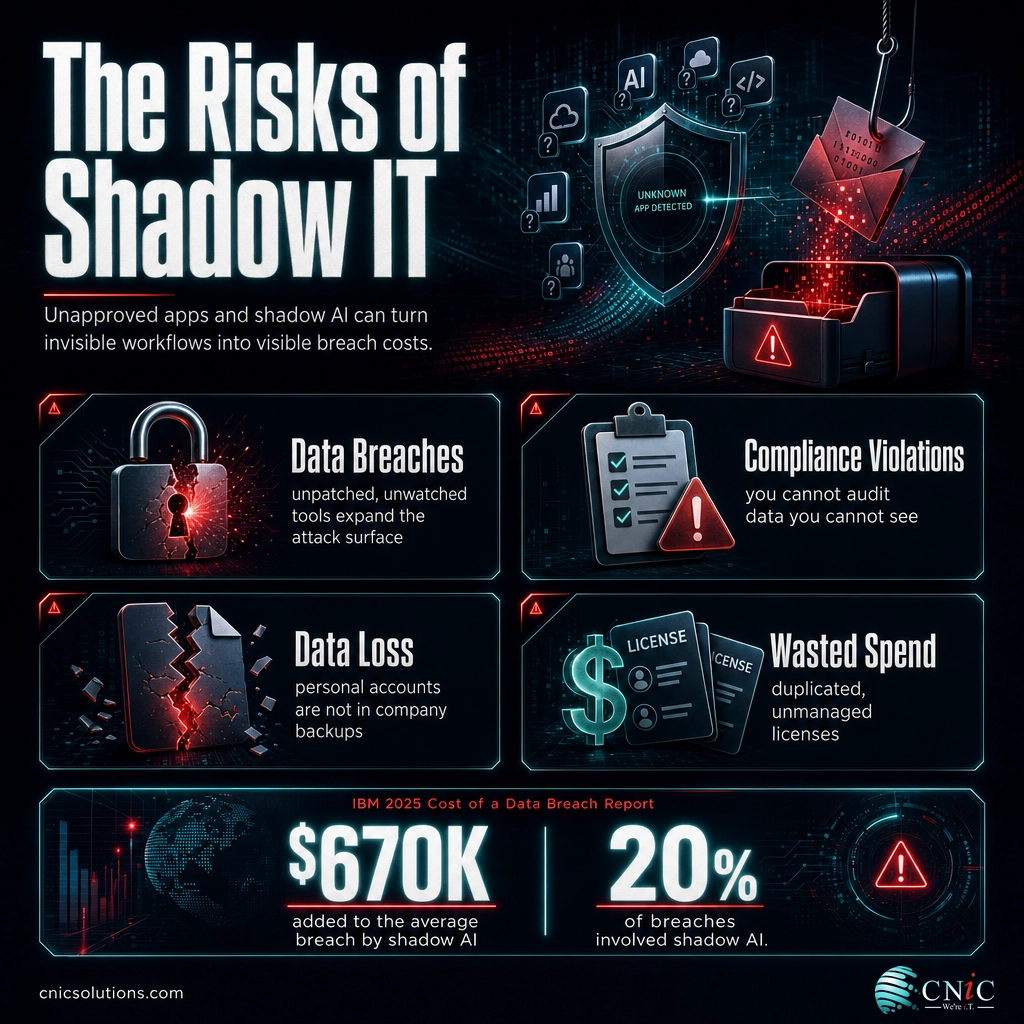
The data on the fallout is now concrete. In its 2025 Cost of a Data Breach Report, IBM found that 20 percent of breached organizations were compromised through shadow AI, and that those incidents added roughly $670,000 to an already high average breach cost. Just as telling, breaches involving shadow AI were far more likely to expose customer data.
The lesson is not that AI is dangerous, but that ungoverned AI is. The same report found that organizations using AI security tools within a proper governance framework detected and contained breaches faster and at lower cost. The dividing line is oversight, which is exactly what shadow AI removes.
Source: IBM Cost of a Data Breach Report 2025
The Risks of Shadow IT
The appeal of shadow IT is obvious: it helps people work faster. The risks are less visible, which is exactly what makes them dangerous. Because the tools operate outside IT’s line of sight, the damage often accumulates quietly until an incident brings it to the surface.
Data breaches and an expanded attack surface
Every unsanctioned app, device, and account is another way into the organization, and one that no one is watching. Shadow IT tools are rarely patched or configured securely, so they hand attackers soft targets. Worse, when data lives in systems IT does not know about, a breach can go undetected far longer and be much harder to contain.
Compliance and regulatory violations
For any business handling regulated data, shadow IT is a direct compliance threat. Frameworks like HIPAA, PCI-DSS, and SOC 2 require you to know where sensitive data lives and to prove it is protected. You cannot secure, audit, or produce records for data sitting in an account IT has never seen, and regulators do not accept “we did not know it was there” as a defense.
Data loss and no recovery path
When work lives in an employee’s personal account or unmanaged device, it is not part of the company’s backups. If that person leaves, loses the device, or the free service shuts down, the data can simply vanish, with no way for IT to recover it.
The hidden multiplier: shadow IT does not just add one risk, it compounds them. A single unsanctioned file-sharing app can create a breach exposure, a compliance gap, and a data-loss risk all at once, and because IT never logged it, none of those risks appear on any report until something goes wrong.
Wasted spend and duplicated tools
Beyond security, shadow IT quietly drains budgets. Different teams buy overlapping tools, licenses go unused, and no one negotiates volume pricing because no one sees the full picture. The 30 to 40 percent of IT spend Gartner attributes to shadow IT is not just a risk figure, it is real money spent without oversight or negotiating power.
Managing this sprawl is a core part of modern cybersecurity protection for your business, which starts with knowing exactly what is connected to your data in the first place.
Find the shadow IT hiding in your business with a free security audit
Source: IBM Cost of a Data Breach Report 2025 | Gartner
Is Shadow IT Always Bad?
It is tempting to treat shadow IT as pure liability, but that view misses half the story and leads to the wrong fix. The tools themselves are usually not the problem. Employees adopt them because they genuinely help, and that impulse contains valuable information for the business.
Myth: Shadow IT is just employees breaking the rules, so the answer is to ban it. Blanket bans rarely work. They push the behavior deeper underground, where it becomes even harder to see and secure. The goal is not to eliminate the instinct that drives shadow IT, but to redirect it into channels IT can support.
Handled well, shadow IT can drive innovation. It surfaces the tools employees actually want, reveals where official systems fall short, and can act as a low-cost testing ground for technology the whole organization might eventually adopt. Some of the best sanctioned tools in a company started as something a single team found on its own.
The healthy response is not zero tolerance, but visibility and partnership. When IT knows what people are using and why, it can vet the good options, replace the risky ones with secure equivalents, and turn a security blind spot into a genuine roadmap for better technology decisions.

How to Manage Shadow IT: A 6-Step Approach
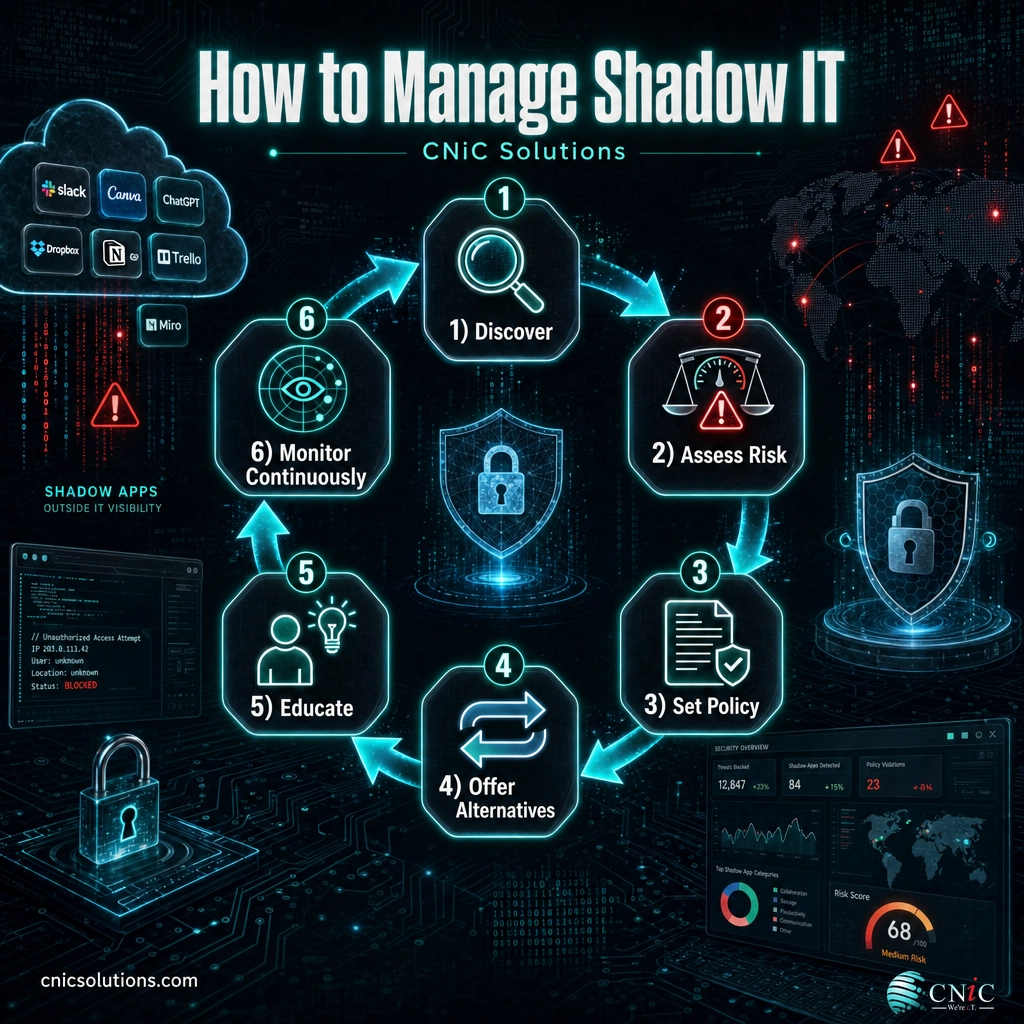
You cannot secure what you cannot see, so managing shadow IT is fundamentally about replacing invisibility with visibility and control. The goal is not a one-time purge, but an ongoing process that keeps pace with how quickly employees adopt new tools. These six steps form a practical, repeatable framework.
1 Discover what is already in use
Start by building an inventory. Use network monitoring, cloud access security tools, and expense and single sign-on reviews to surface the apps, devices, and services already touching company data. Pair the technical scan with honest, blame-free conversations, because employees will only tell you the full picture if they are not afraid of punishment.
2 Assess the risk of each tool
Not all shadow IT is equally dangerous. Sort what you find by the sensitivity of the data it touches and the strength of the vendor’s security. A personal notes app holding no company data is low risk; a personal cloud drive full of client contracts is urgent. This triage tells you where to act first.
3 Set a clear, realistic policy
Write an acceptable-use policy that people can actually follow. It should explain what is allowed, what is prohibited, and, crucially, how to request a new tool quickly. A policy that only says “no” invites more shadow IT. A policy that offers a fast, friendly path to approval reduces it.
4 Offer sanctioned alternatives
Most shadow IT exists because an approved tool is missing or inadequate. Close that gap. If people are using personal file storage, give them a secure, well-configured business cloud environment that is just as easy to use. Removing the reason for the workaround is far more effective than policing it.
5 Educate employees on the “why”
People follow rules they understand. Train staff on the real risks of shadow IT and shadow AI, using plain business terms rather than technical jargon. When employees see how a convenient app can expose customer data or trigger a compliance failure, they become partners in security instead of the source of the problem.
6 Monitor continuously
Shadow IT is not a problem you solve once. New tools appear constantly, so discovery and review have to be ongoing. Continuous monitoring catches new unsanctioned apps early, before they accumulate data and risk, and keeps your inventory accurate as the business and its technology evolve.
When to Bring In a Managed IT Partner
The six-step framework is straightforward in theory, but running it well takes tools and time that most small and midsize businesses do not have in-house. Discovery, risk assessment, and continuous monitoring are specialized, ongoing work, not a project you finish on a Friday afternoon. If your team is already stretched keeping the lights on, shadow IT is exactly the kind of always-on governance that tends to slip.
This is where a managed IT partner earns its keep. A good provider brings the discovery tools to map your entire technology estate, the security expertise to triage what they find, and the round-the-clock monitoring to keep new shadow IT from taking root. Bringing that under professionally managed IT support turns shadow IT from a recurring fire drill into a controlled, visible part of your operations.
For businesses that want to get ahead of the strategy as well as the security, a Virtual CIO can build the governance policies, technology roadmap, and approval processes that stop shadow IT from forming in the first place, aligning the tools people use with where the business is actually headed.
Bring your shadow IT under managed control
Related Terms
- Shadow AI: A subset of shadow IT covering unsanctioned AI tools and assistants used for work without IT’s oversight, now one of its fastest-growing and costliest forms.
- BYOD (Bring Your Own Device): The practice of using personal phones, tablets, and laptops for work, which becomes shadow IT when those devices fall outside company management.
- SaaS (Software as a Service): Cloud-hosted applications accessed through a browser, the most common vehicle for shadow IT when adopted without IT approval.
- Managed IT Services: An outsourced model where a provider proactively manages and monitors your IT, including the discovery and control of shadow IT.
- IT Compliance: The requirement to know where regulated data lives and prove it is protected, an obligation shadow IT directly undermines.
Frequently Asked Questions
What is shadow IT?
What is an example of shadow IT?
Why is shadow IT a security risk?
Is shadow IT illegal or always bad?
How do you manage shadow IT?
Sources
This guide uses Tier 1 primary sources for every statistic. Adoption and spending figures come from Gartner’s cybersecurity research and predictions, including the projection that 75 percent of employees will source technology outside IT’s visibility by 2027 (up from 41 percent in 2022) and the estimate that shadow IT represents 30 to 40 percent of IT spending in large enterprises. Breach and shadow AI figures come from the IBM Cost of a Data Breach Report 2025. The definitions, risk categories, and management framework reflect established, widely documented security practice.
Primary sources: IBM Cost of a Data Breach Report 2025, Gartner cybersecurity research and predictions.



related posts
What Is SIEM? Security Information and Event Management Explained
October 29, 2026A SIEM (security information and event management) is a security platform that collects log and event…
What Is SASE (Secure Access Service Edge)? How It Works
October 28, 2026Secure access service edge (SASE) is a cloud-delivered model that combines wide-area networking (SD-WAN) with a…
What Is SD-WAN? How Software-Defined WAN Works
October 28, 2026SD-WAN (software-defined wide area network) is a way of building a business network that uses software…
What Is Root Cause Analysis (RCA)? A Guide to Solving IT Problems…
October 27, 2026Root cause analysis (RCA) is a structured way to find the true underlying cause of a…