
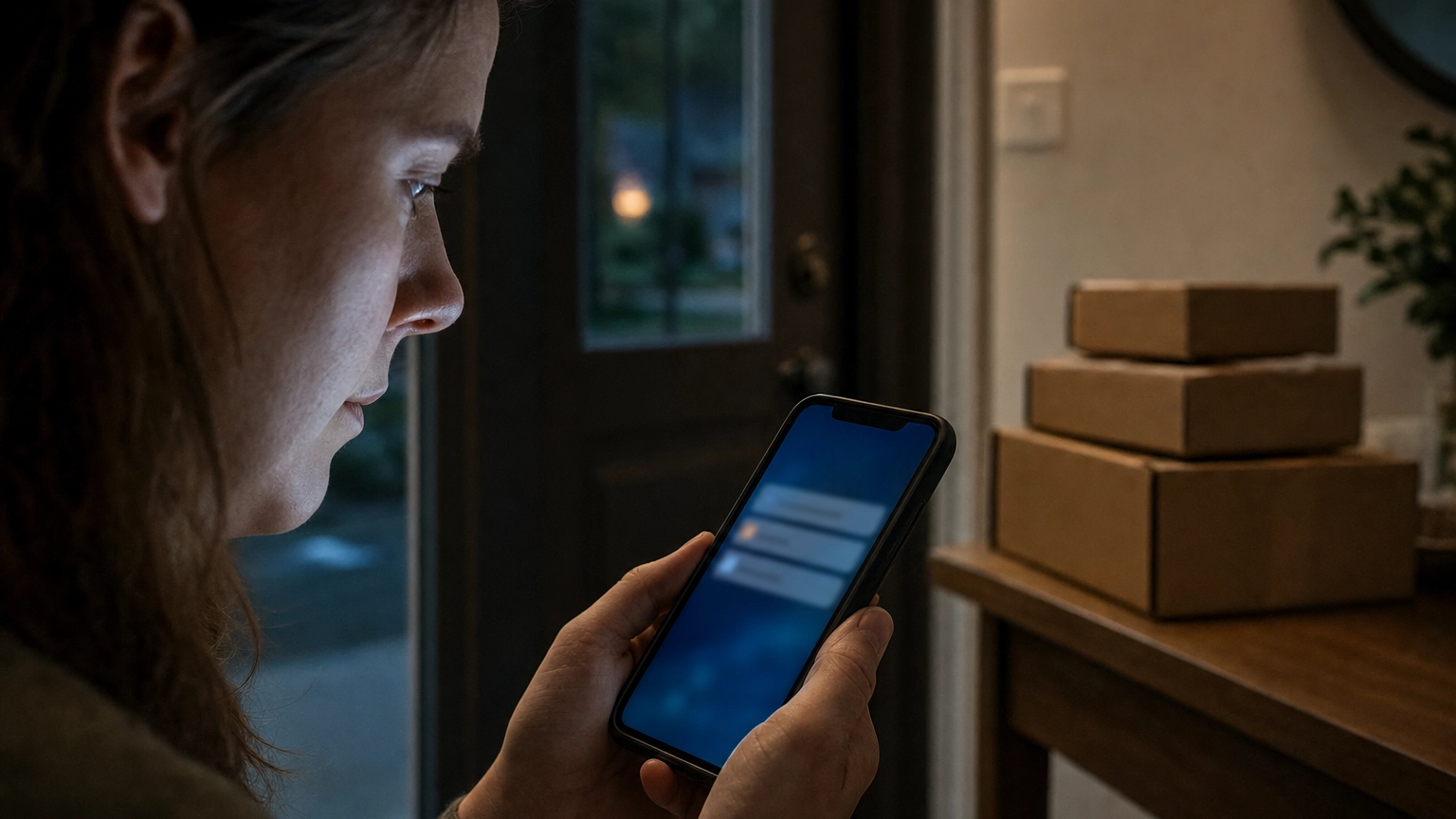
A text lands on your phone: “FedEx: your package is held pending a small unpaid delivery fee. Reschedule here.” It looks routine, and that is exactly the problem. Fake FedEx delivery texts, a form of SMS phishing known as smishing, were part of the most commonly reported text scam of 2024, and consumers lost 470 million dollars to text scams that year, according to the Federal Trade Commission. This guide shows you how to spot a fake FedEx text in seconds, how to verify a real one safely, and what to do if you already tapped the link.
- What you need: the suspicious text in front of you, and a second, trusted way to check tracking (the official FedEx app or fedex.com typed yourself).
- Time required: about 5 minutes to evaluate and report a single message.
- Skill level: beginner. No technical tools required, just a careful eye.
- Golden rule: never tap a link or call a number inside an unexpected delivery text. Verify through a source you opened yourself.
- Fake package delivery was the most commonly reported text scam of 2024, and text scams cost Americans 470 million dollars that year (FTC).
- FedEx does not request payment or personal information through unsolicited email or text. Any fee, customs charge, or login request is a red flag.
- The sender line lies. Spoofed numbers and look-alike short codes mean you cannot trust a message just because it looks official.
- Never tap the link. Verify tracking by opening fedex.com or the FedEx app yourself, or by checking the retailer’s order confirmation.
- Report scam texts by forwarding to 7726 (SPAM), to FedEx at abuse@fedex.com, and to the FTC at ReportFraud.ftc.gov.
- On a work phone, one tapped smishing link can expose company logins, so report it to your IT or security team right away.
What’s in This Guide
- Why FedEx Text Scams Work So Well
- Step 1: Examine the Sender Number and Short Code
- Step 2: Read the Real Link Destination Without Tapping
- Step 3: Spot the Fee, Fine, or Reschedule Pressure
- Step 4: Check the Message Against Your Actual Orders
- Step 5: Verify Directly on FedEx.com, Not the Text
- Step 6: Report It, Then Delete It
- When to Call a Professional
- Troubleshooting: I Already Interacted With It
- Protect Your Team Going Forward
- Frequently Asked Questions
Why FedEx Text Scams Work So Well
Delivery scams succeed because they hit a nerve almost everyone shares: at any given moment, a lot of us are waiting on a package. A scammer does not need to know your order history. They send the same “delivery problem” message to thousands of numbers and let the odds work. Enough recipients are genuinely expecting a delivery that a small percentage will click, and that is all a mass-scale phishing operation needs.
The numbers show how effective this has become. The Federal Trade Commission reported that fake package delivery was the single most commonly reported text scam of 2024, ahead of bogus job offers, fake bank fraud alerts, and phony unpaid-toll notices.
This is not only a consumer nuisance. Phishing and spoofing were the top-reported cybercrime category overall in 2024, and the volume keeps climbing.
Reported U.S. Text-Scam Losses: 2020 vs 2024
2024 figure reported by the FTC. The 2020 baseline reflects the FTC’s statement that 2024 losses were “five times higher” than 2020. Source: Federal Trade Commission.
Because the same delivery-text playbook targets personal phones and work phones alike, the risk crosses over into business security. If an employee taps a smishing link on a device that also holds email or SaaS logins, a personal scam becomes a company incident. That overlap is why we treat delivery smishing as part of a broader approach to recognizing phishing across email and text.
Source: Federal Trade Commission | FBI Internet Crime Complaint Center
Step 1: Examine the Sender Number and Short Code
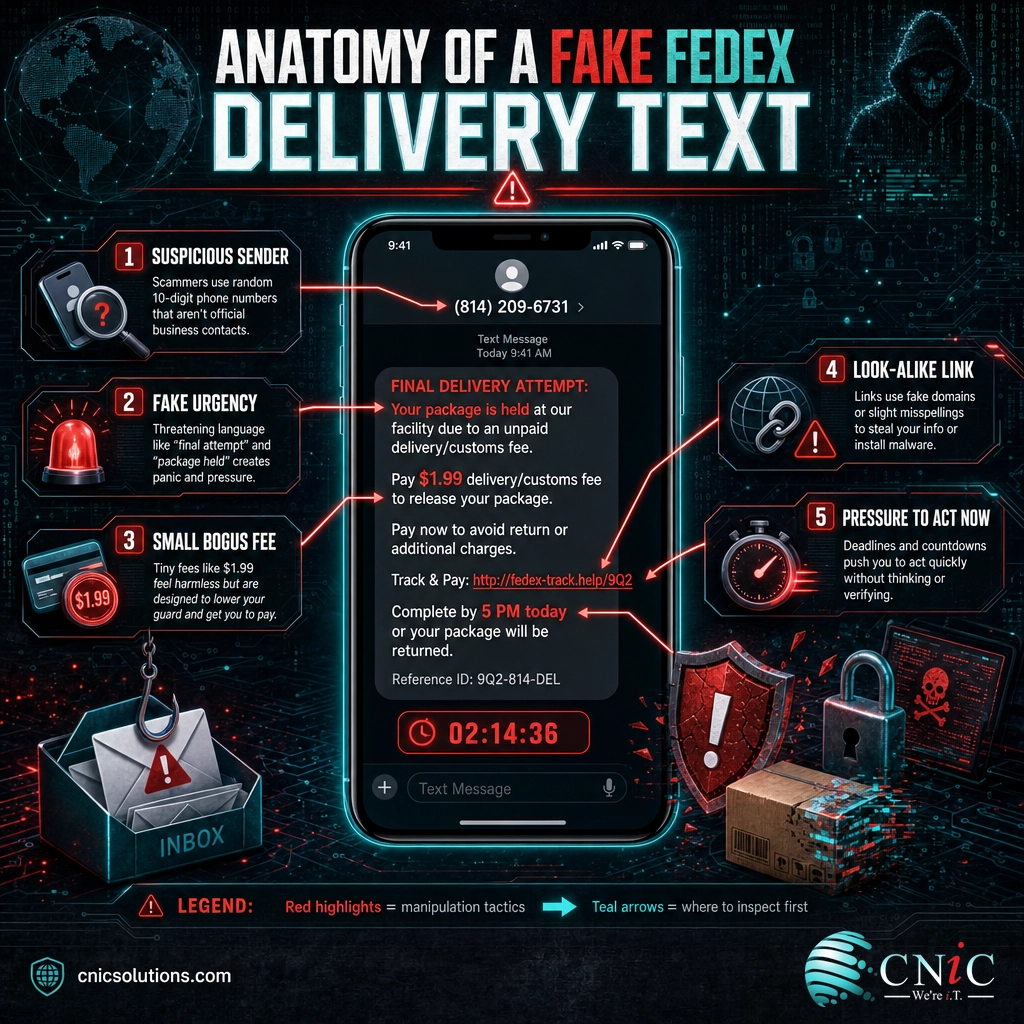
Start with who the message claims to be from. Fraudulent delivery texts frequently arrive from ordinary 10-digit mobile numbers, international numbers, or email-to-text gateways (an address ending in something like @something.com that shows up as a text). A real carrier notification does not come from a stranger’s cell phone.
Why this step matters: the sender line is the first and fastest filter. A random personal number carrying a “FedEx” alert is a near-certain tell.
What success looks like: you can state, out loud, exactly what number or address sent the text, and whether that matches how you normally hear from FedEx.
Source: FedEx Trust Center
Step 2: Read the Real Link Destination Without Tapping
The payload of almost every fake FedEx text is a link. The entire scam depends on you tapping it, so this is the step where you win or lose. Do not tap. Instead, preview the true destination: on most phones you can press and hold the link to see the full URL, and if it is a shortened link you can expand it with a reputable link-preview or link-expander service before going anywhere.
Real FedEx tracking lives on fedex.com. Scam links lean on tricks that look right at a glance:
- Look-alike domains that insert extra words, such as fedex-delivery-support or fedex.tracking-help on a domain that is not fedex.com.
- Misspellings and character swaps, like fedex, fedexx, or a lowercase L standing in for an I.
- Unusual top-level domains (the ending), such as .top, .xyz, .info, or a random country code, instead of a normal .com.
- The real brand buried as a subdomain, where fedex.something-else.com actually belongs to “something-else,” not FedEx.
Why this step matters: the domain is the ground truth. Logos and formatting can be copied perfectly, but the address bar is much harder to fake.
What success looks like: you have read the actual domain and confirmed whether it is fedex.com or an impostor, without ever loading the page.

Step 3: Spot the Fee, Fine, or Reschedule Pressure
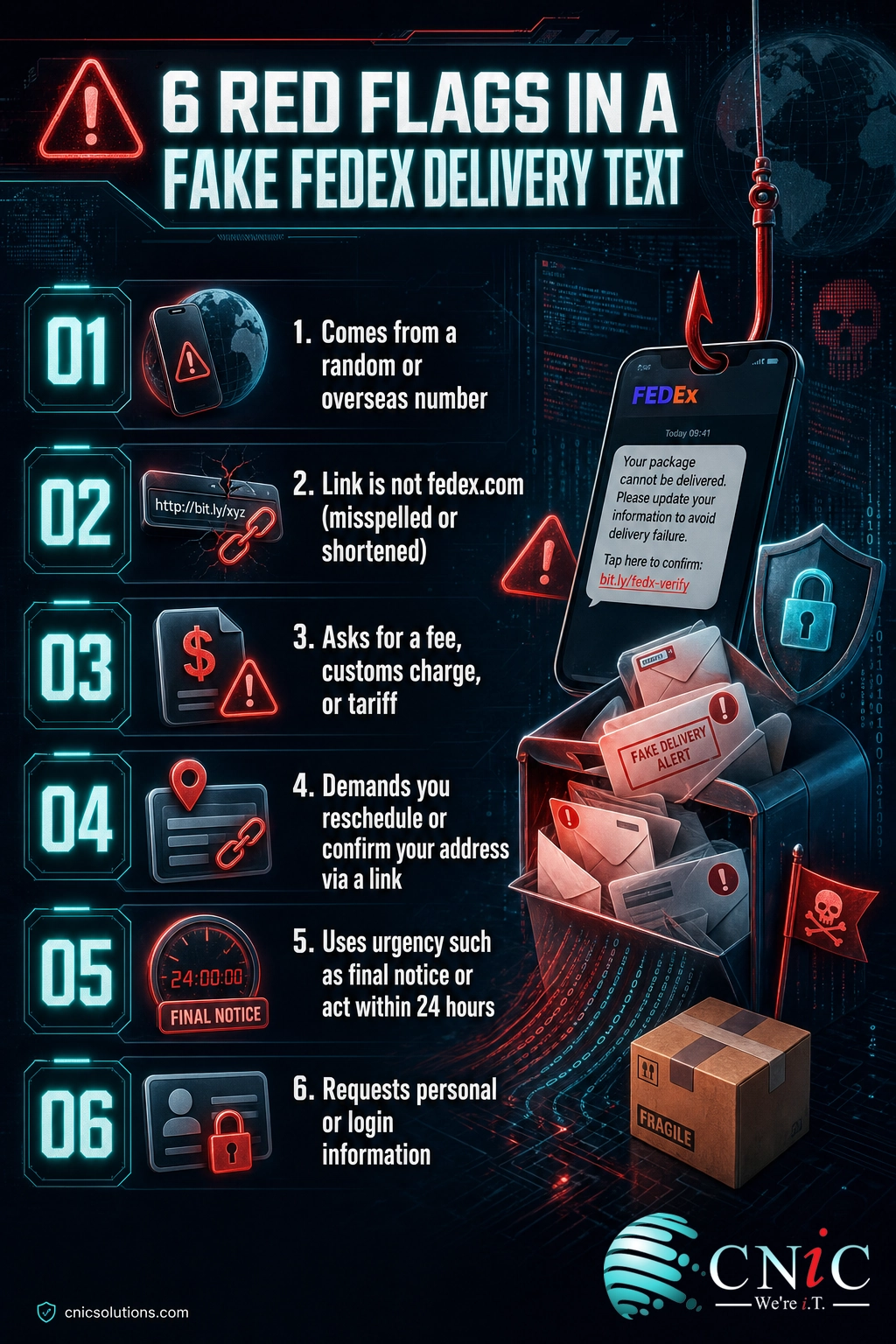
Look at what the message wants you to do. Fraudulent delivery texts almost always push one of a few urgent asks, and each one is a bright red flag:
- A small payment to release a package: a customs charge, an import duty, a “redelivery fee,” or a tariff. The amount is deliberately tiny (often a few dollars) so it feels harmless, but the goal is to capture your card details on the payment page.
- A reschedule or address confirmation link, which leads to a fake form that harvests your name, address, and login or card information.
- Time pressure: “final notice,” “package will be returned today,” or “act within 24 hours.” Urgency is engineered to stop you from checking.
Here is the anchor fact that cuts through all of it: FedEx states plainly that it does not request payment or personal information in return for goods in transit through unsolicited mail, email, or SMS. So a text demanding money to release your package is not a FedEx message. Full stop.
Why this step matters: the request reveals intent. A real delivery update informs you; a scam pressures you to pay or log in.
What success looks like: you can name what the text is asking for, and confirm it falls into “pay a fee” or “enter information,” which FedEx never does by unsolicited text.
Source: FedEx Trust Center | Federal Trade Commission
Step 4: Check the Message Against Your Actual Orders
Ask two simple questions. Are you actually expecting a FedEx package right now? And does any tracking number in the text match a real order you placed? Because scammers blast messages to huge lists at random, a large share of recipients are not waiting on anything from FedEx at all. A delivery alert for a package you never ordered is one of the clearest signs of a scam.
If you are expecting something, do not trust the tracking number in the text. Match it against the confirmation email or order page from the retailer you actually bought from.
Why this step matters: context beats presentation. A message that does not line up with a real order you placed has already failed the test.
What success looks like: you have tied the text to a specific real order, or confirmed there is no such order, in which case you are done and the message is a scam.
Step 5: Verify Directly on FedEx.com, Not the Text
When you genuinely need to check on a delivery, go to the source yourself. This single habit defeats nearly every delivery scam, because it removes the scammer’s link from the equation entirely.
- Type fedex.com into your browser by hand, or open the official FedEx mobile app, and enter your tracking number there.
- Or start from the retailer: open your order confirmation and use the tracking link the store itself provided.
- Never call a phone number printed in the suspicious text. If you want to reach FedEx, use the contact number listed on fedex.com.
Why this step matters: a link or number you sourced yourself cannot be the scammer’s. Verifying independently is the one move that works even when a text is a flawless copy of the real thing.
What success looks like: your package status is confirmed (or disproven) on fedex.com or the retailer’s site, with zero interaction with the text message.
The Federal Communications Commission and FTC give the same core advice for every delivery-scam text: do not click, verify through a channel you trust, and report it. For a deeper look at how these messages are engineered, see our breakdown of real-world phishing examples and the patterns they share.
Source: Federal Communications Commission
Step 6: Report It, Then Delete It
Reporting a scam text takes under a minute and helps carriers and investigators shut the operation down faster. Do all three, then delete the message:
- Forward it to 7726 (SPAM). This free shortcode routes the message to your wireless provider so it can identify and block similar texts. The FTC recommends this as the first step.
- Report it to FedEx. Forward the fraudulent text or email to abuse@fedex.com, the address FedEx publishes for reporting brand impersonation.
- File it with the FTC at ReportFraud.ftc.gov, which feeds the Consumer Sentinel database that law enforcement uses.
Then delete the text. Do not reply, and do not send “STOP,” because any response tells the scammer your number is live and active, which can invite more messages.
Why this step matters: reporting improves the filters that protect everyone else, and it removes a message that could still tempt you later.
What success looks like: the text is forwarded to 7726, reported to FedEx and the FTC, and deleted from your phone.
Source: Federal Trade Commission | FedEx Trust Center
When to Call a Professional
If you reach this step and the smishing link was tapped on a work phone, a company laptop, or any device that stores business email, VPN, or SaaS logins, treat it as a potential security incident rather than a personal mistake. A single harvested credential can give an attacker a foothold into your company’s systems, and delivery-themed lures are a favorite way in.
Report it to your internal IT or security contact immediately, or if your business does not have one, this is exactly where a managed security partner earns its keep: rapid triage, credential resets, device malware scans, and a check for any downstream account access. CNiC Solutions helps Texas and national businesses contain phishing and smishing incidents before they spread, and build the monitoring that catches the next one.
Talk to CNiC About Threat Protection
Troubleshooting: I Already Interacted With It
If you (or an employee) got further than you meant to, do not panic, but do move quickly. Match your situation to the row below.
| What happened | What to do now |
|---|---|
| I tapped the link but entered nothing | Close the page and clear that browser tab. Do not return to it. Watch your accounts for unusual activity over the next few days. Run a mobile security or antivirus scan if your device offers one. |
| I entered a username and password | Change that password immediately, and change it anywhere else you reused it. Turn on multi-factor authentication on the account. If it was a work login, tell IT or security now. |
| I entered credit or debit card details | Contact your bank or card issuer right away to flag the card and dispute charges. Ask about a replacement card. Monitor statements closely. |
| I paid a “delivery fee” | Treat it as card fraud: call your bank to dispute and reissue the card, and report the loss to the FTC at ReportFraud.ftc.gov. |
| It happened on a company device | Report to your IT or security team before doing anything else. They may need to isolate the device, reset credentials, and check whether the link delivered malware or reached business accounts. |
When any of this touches company systems, a professional response is faster and safer than guessing. A managed IT and support team can lock down affected accounts and confirm nothing spread.
Protect Your Team Going Forward
Spotting one bad text is a skill. Making sure the next one does not slip through, across an entire team, is a system. After the immediate threat is handled, a few ongoing practices keep delivery smishing from turning into a breach:
- Security awareness training so staff recognize smishing patterns (fees, urgency, look-alike links) the same way they learn to spot phishing email.
- Multi-factor authentication on email and every business app, so a stolen password alone is not enough to get in.
- Mobile device management for company and BYOD phones, which can enforce protections and help contain a device if it is compromised.
- A clear, blame-free reporting path so an employee who tapped a link tells IT in minutes, not days. Speed of reporting is often the difference between a near miss and an incident.
These controls are the day-to-day work of a security-minded IT partner. If your business does not have that coverage today, a Virtual CIO can build the training, policies, and monitoring that turn one lucky catch into consistent protection.
Get a Free Security Consultation
Frequently Asked Questions
Does FedEx send delivery texts?
What happens if I clicked a link in a fake FedEx text?
How do I report a fake FedEx text message?
Why do these scam texts use my real name?
Are fake package delivery texts common?
About This Guide
This guide draws on primary-source reporting from U.S. government agencies and FedEx’s own fraud guidance. Statistics on text-scam losses and the prevalence of fake package delivery come from the Federal Trade Commission’s April 2025 data spotlight on 2024 text scams. Phishing and spoofing complaint volume comes from the FBI Internet Crime Complaint Center’s 2024 Internet Crime Report. Guidance on what FedEx will and will not send, and how to report impersonation, comes from the FedEx Trust Center. Verification and reporting advice reflects Federal Communications Commission and FTC consumer guidance.



related posts
What Is ZTNA (Zero Trust Network Access)?
November 3, 2026Zero Trust Network Access (ZTNA) is a security service that grants a verified user access to…
Zero Trust Statistics for 2026: Adoption, Maturity, and Breach Impact
November 3, 2026Zero trust has become the default security strategy on paper, but not yet in practice. Okta's…
What Is XDR (Extended Detection and Response) and How Does It Protect…
November 2, 2026Extended detection and response (XDR) is a security platform that collects and correlates threat data from…
What Is Zero Trust Security? A Guide for Small Businesses
November 2, 2026Zero Trust security is a cybersecurity model built on one rule: never trust, always verify. Instead…