

Malware (short for malicious software) is any program or code created to damage, disrupt, or gain unauthorized access to a computer, network, or data. It is an umbrella term for many distinct threats, including viruses, worms, trojans, ransomware, and spyware, each with its own way of spreading and causing harm.
Not all malware behaves the same way, and the differences matter. A worm tears through a network on its own, ransomware locks up your files for a ransom, and spyware sits quietly and steals credentials for months. Knowing which type you are dealing with is the difference between a fast, contained response and a costly one. This guide breaks down the most common types of malware in plain language, explains how each one works, and shows what your business can do to spot and stop them.
Key Takeaways
- Malware is an umbrella term, not a single thing. The type determines how it spreads and what damage it does.
- The threat is relentless. The AV-TEST Institute registers over 450,000 new malicious programs every single day.
- Ransomware is now the dominant business threat, present in 44% of data breaches according to the 2025 Verizon DBIR, up from 32% the year before.
- Most malware gets in the same few ways: phishing, unpatched software, weak remote-access credentials, and infected downloads.
- No single tool stops everything. Real protection is layered: awareness, patching, MFA, endpoint detection, and tested backups, maintained over time.
What’s in This Guide
The most common types of malware:
- Viruses
- Worms
- Trojans
- Ransomware
- Spyware, Keyloggers, and Infostealers
- Adware
- Rootkits
- Botnets and Bots
- Fileless Malware
- Cryptojacking
Defend your business:
What Malware Is (and Why the Type Matters)
Malware is the catch-all name for any software written with malicious intent. If a program is designed to harm a system, steal information, hold data hostage, or hand control to an attacker, it is malware, regardless of how it is delivered or what it targets.
The reason the specific type matters is that each behaves differently once inside, and the right response depends entirely on which one you are facing. A rootkit hides itself and demands a deep, careful cleanup. A worm spreads on its own, so speed of containment is everything. Ransomware makes your backups the single most important thing you own. Treating every infection the same way is how a minor incident becomes a major one.
The scale of the problem is hard to overstate. The AV-TEST Institute, an independent security research body, registers over 450,000 new malicious programs and potentially unwanted applications every day. Attackers constantly tweak and repackage existing threats to slip past defenses, which is why yesterday’s signature-based antivirus is no longer enough on its own.
Source: AV-TEST Institute: Malware Statistics | NIST Computer Security Resource Center: Malware definition
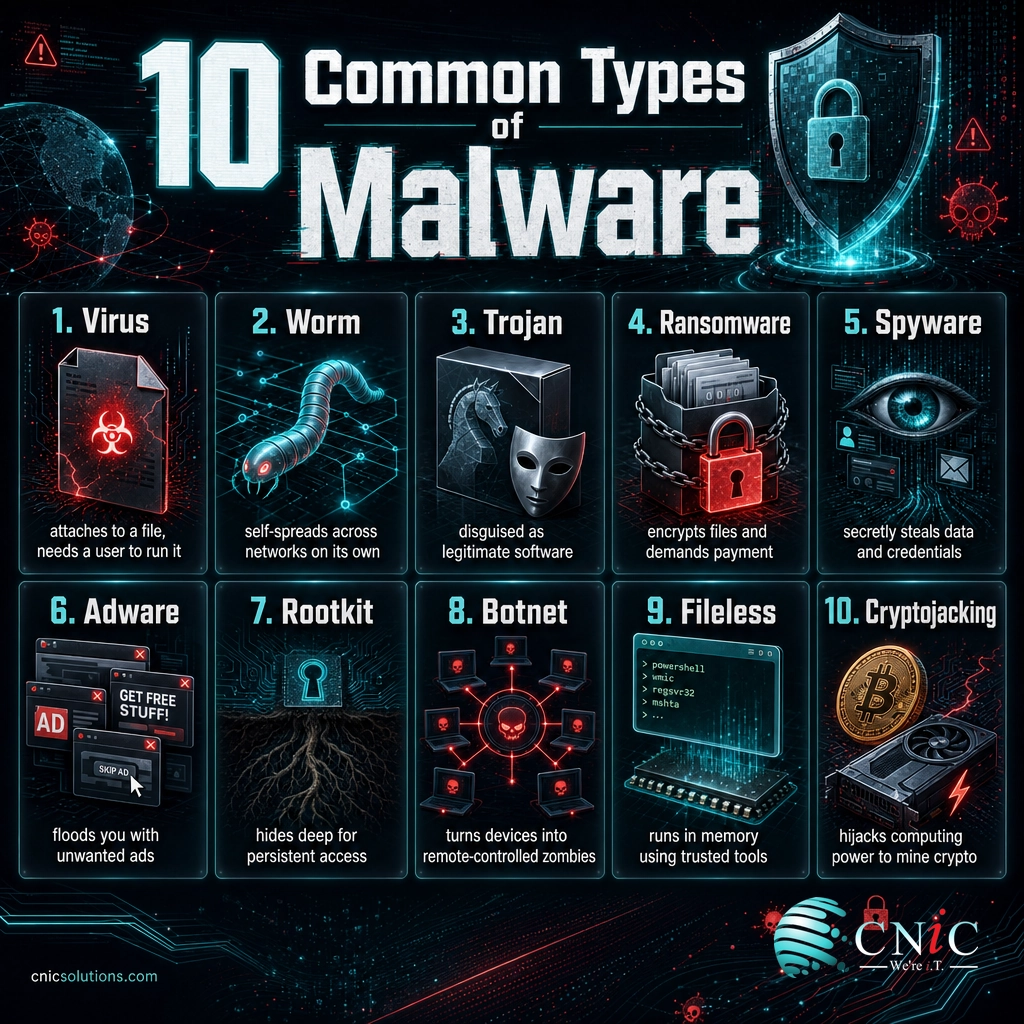
Malware Types at a Glance
Before diving into each one, here is a quick reference. The clearest way to tell malware types apart is to ask two questions: how does it spread, and what does it do once it is in?
| Type | How it spreads | What it does |
|---|---|---|
| Virus | Attaches to a file; needs a user to run it | Corrupts or deletes data, infects other files |
| Worm | Self-replicates across networks, no user needed | Spreads fast, consumes resources, drops payloads |
| Trojan | Disguised as legitimate software | Opens a backdoor for attackers, delivers other malware |
| Ransomware | Phishing, exposed remote access, other malware | Encrypts files and demands payment |
| Spyware | Bundled downloads, phishing, trojans | Secretly steals data, keystrokes, and credentials |
| Adware | Bundled with free software | Floods you with ads, tracks activity, degrades performance |
| Rootkit | Trojans, exploits, stolen credentials | Hides deep in the system for persistent privileged access |
| Botnet | Any infection that adds a device to the network | Turns devices into remote-controlled “zombies” |
| Fileless | Abuses trusted built-in system tools | Runs in memory, leaving little trace on disk |
| Cryptojacking | Malicious scripts, downloads, compromised sites | Hijacks computing power to mine cryptocurrency |
Source: CISA: Malware, Phishing, and Ransomware
Viruses
A computer virus is malicious code that attaches itself to a legitimate file or program and needs a person to open or run that host file before it can act. Once triggered, it self-replicates by inserting copies of itself into other files and programs, and it spreads when those infected files are shared over email, a network, or removable media.
Viruses are among the oldest forms of malware, and the term is often used loosely to mean any infection. Technically, the defining trait is that a virus is dormant until a user activates it. What it does next ranges from harmless nuisance to serious damage: corrupting or deleting data, disabling programs, or degrading system performance.
How to spot and stop it: reputable endpoint protection catches known viruses, but the frontline defense is behavioral. Do not open unexpected attachments or run software from untrusted sources, and keep applications updated so a virus cannot exploit a known flaw.
Worms
A worm is like a virus that does not wait for anyone. Its defining feature is self-propagation: it copies itself and spreads across networks automatically, with no user action and no host file required. Worms exploit security vulnerabilities to move from machine to machine, which lets them spread across an entire organization in minutes.
That speed is what makes worms so dangerous. The 2017 WannaCry outbreak, which used a worm to carry ransomware, infected hundreds of thousands of computers across 150 countries in a matter of days by exploiting a single unpatched Windows flaw. Beyond the direct damage, worms consume bandwidth and system resources, and they frequently carry a secondary payload such as ransomware or a backdoor.
How to spot and stop it: because worms feed on unpatched vulnerabilities, prompt patching is the single most effective defense. Network segmentation limits how far a worm can travel, and unusual spikes in network traffic are an early warning sign.
Trojans
Named after the wooden horse of Greek legend, a trojan disguises itself as something legitimate and desirable, a free utility, a software update, a cracked application, to trick you into installing it yourself. Unlike viruses and worms, a trojan does not self-replicate. Its whole strategy is deception at the point of entry.
Once installed, a trojan does what it was really built to do while appearing to function normally. Many open a backdoor that gives an attacker remote access to the system (a “remote access trojan,” or RAT). Others are purpose-built to steal banking details, load additional malware, or add the machine to a botnet. Banking trojans like Emotet became notorious precisely because they served as a delivery platform for even worse payloads.
How to spot and stop it: only install software from official, trusted sources, and be skeptical of anything offered for free that normally costs money. Application allowlisting and endpoint detection help catch trojans that slip through.
Ransomware
Ransomware encrypts your files and systems, then demands a payment (usually in cryptocurrency) in exchange for the decryption key. It has become the defining cyber threat for businesses of every size. According to the 2025 Verizon Data Breach Investigations Report, ransomware was present in 44% of all data breaches, a sharp jump from 32% the year before.
Ransomware Present in Data Breaches (Verizon DBIR)
Modern ransomware crews often use “double extortion,” stealing a copy of your data before encrypting it, so that even a business with good backups faces the threat of having sensitive files leaked publicly. The financial impact is severe. Sophos found that the average recovery cost from a ransomware attack, excluding any ransom paid, reached $2.73 million, while organizations that paid reported an average ransom of $2 million.
How to spot and stop it: tested, offline backups are your ultimate safety net, because they let you restore rather than pay. Multi-factor authentication, prompt patching, and locking down remote access close the doors ransomware crews use most. For the full picture on outcomes, see our breakdown of ransomware recovery timelines and costs.
Protect your data with backup and disaster recovery
Source: Verizon: Data Breach Investigations Report | Sophos: State of Ransomware
Spyware, Keyloggers, and Infostealers
Spyware is malware built to hide, watch, and report back. It secretly gathers information about a person or organization, browsing habits, account details, files, and sends it to a third party, all without consent. Because its goal is to stay unnoticed, an infection can quietly harvest data for months.
Two important subtypes fall under this umbrella. Keyloggers record every keystroke, capturing passwords, credit card numbers, and messages as you type them. Infostealers are purpose-built to scrape saved passwords, browser cookies, and session tokens, and stolen credentials from infostealers have become a major fuel source for account takeover and follow-on breaches.
How to spot and stop it: unexplained slowdowns, strange browser behavior, or unfamiliar logins can signal spyware. Endpoint detection and response, multi-factor authentication (so stolen passwords alone are not enough), and cautious download habits are the core defenses.
Adware
Adware bombards a device with unwanted advertisements, pop-ups, banners, and browser redirects, usually to generate revenue for its creators. It most often arrives bundled with free software that users install without reading the fine print.
Adware is frequently dismissed as merely annoying, and much of it is, but it is not harmless. It commonly tracks your browsing activity to build a profile without consent, degrades device performance, and can serve as a gateway to more dangerous malware by redirecting you to malicious sites. The line between aggressive adware and outright spyware is often thin.
How to spot and stop it: a sudden surge in ads, a changed browser homepage, or unfamiliar toolbars point to adware. Install software only from trusted sources, decline bundled “extras” during setup, and use reputable anti-malware tools to remove it.
Rootkits
A rootkit is designed to do one thing exceptionally well: hide. It burrows deep into a system, sometimes into the operating system kernel or even device firmware, to give an attacker persistent, privileged (“root”) access while concealing its own presence and any other malware it protects.
Rootkits are among the hardest threats to detect and remove precisely because they operate beneath the level where normal security tools look. An attacker with a rootkit in place can disable defenses, cover their tracks, and maintain long-term control. In serious cases, fully removing one requires reimaging the machine from scratch.
How to spot and stop it: prevention beats cleanup here. Keep firmware and operating systems patched, enforce least-privilege access so malware cannot easily gain root, and use security tools capable of behavioral and boot-level scanning rather than surface file checks.
Botnets and Bots
A botnet is a network of infected devices, sometimes tens of thousands of them, all secretly controlled by a single attacker through a command-and-control server. Each compromised machine, called a bot or “zombie,” carries out the attacker’s orders while its owner often has no idea anything is wrong.
The danger of a botnet is scale. Combined, the devices become a weapon used to launch distributed denial-of-service (DDoS) attacks that overwhelm websites, send massive spam campaigns, or run credential-stuffing attacks at volume. The Mirai botnet showed how poorly secured internet-connected devices, from cameras to routers, could be conscripted into an army powerful enough to take down major online services.
How to spot and stop it: a device running hot, slowing down, or generating unusual outbound traffic may be part of a botnet. Change default passwords on every device, keep firmware updated, and monitor network traffic for the tell-tale patterns of bot activity.
Fileless Malware
Fileless malware breaks the assumption that malware is a file you can scan and delete. Instead of installing a program on disk, it operates in a computer’s memory and hijacks legitimate, trusted built-in tools, such as PowerShell or Windows Management Instrumentation, to carry out an attack. Because it “lives off the land” using tools already present, it leaves very little for traditional antivirus to find.
This stealth makes fileless attacks especially effective at evading signature-based defenses, and they have become a favored technique in targeted intrusions. Since the malicious activity is disguised as normal system behavior, detecting it requires watching what programs actually do, not just what files exist.
How to spot and stop it: behavioral endpoint detection and response (EDR) that flags suspicious use of legitimate tools is the key defense. Restricting and monitoring scripting tools like PowerShell, and applying least-privilege access, further limits what fileless malware can accomplish.
Cryptojacking
Cryptojacking secretly hijacks a device’s computing power to mine cryptocurrency for an attacker. Unlike ransomware, it does not want your attention; it wants to stay hidden and quietly run for as long as possible, turning your electricity and hardware into someone else’s profit.
The symptoms are easy to mistake for ordinary problems: sluggish performance, machines running hot, fans constantly spinning, and rising power bills. At scale across an organization’s servers and endpoints, the drain on performance and hardware lifespan adds up quickly, and the presence of cryptojacking also signals that attackers found a way in that other malware could use too.
How to spot and stop it: watch for unexplained spikes in CPU usage and system slowdowns. Keep browsers and software patched, use ad and script blockers on the web, and rely on endpoint monitoring to catch unauthorized mining processes.
Other threats worth knowing
Beyond the core ten, a few specialized types show up in business incidents: wiper malware destroys data outright with no intention of ransom or recovery, scareware uses fake alerts (“Your PC is infected!”) to pressure victims into installing more malware or paying for bogus fixes, and logic bombs are malicious code set to trigger under specific conditions, such as a certain date. Most real-world attacks also blend techniques, so a single incident may involve a trojan that drops a rootkit that adds the machine to a botnet.
How Malware Gets Into Your Systems
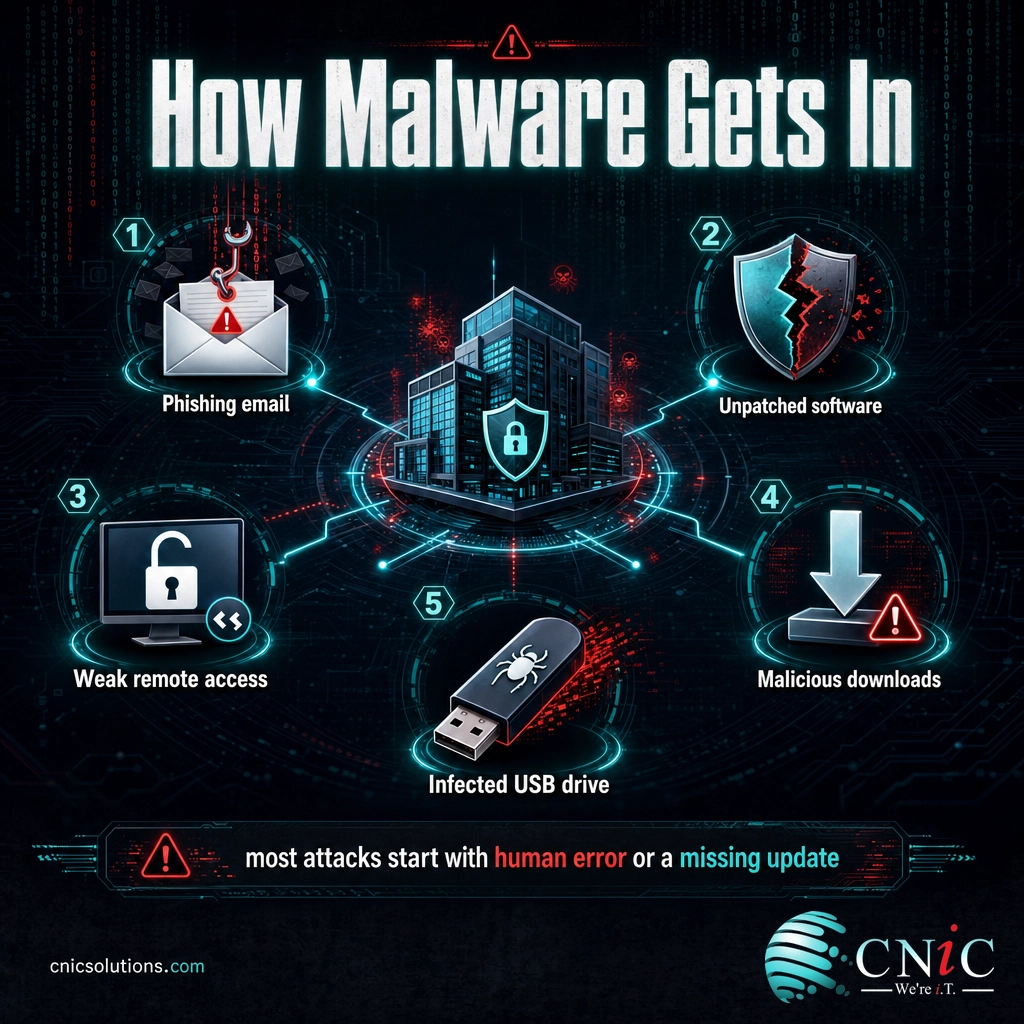
For all their variety, most malware types rely on the same short list of entry points. Understanding these vectors is what turns a list of threats into an actual defense plan, because you can close the doors attackers use most.
- Phishing and malicious email: the most common starting point by far. A convincing email tricks someone into opening a booby-trapped attachment or clicking a link to a malicious site. Reported phishing and spoofing were the top cybercrime complaint category in the FBI’s 2024 Internet Crime Report.
- Unpatched vulnerabilities: known flaws in software and operating systems that were never updated. Worms and many automated attacks exist specifically to exploit these.
- Weak or stolen remote access: exposed remote desktop connections and accounts without multi-factor authentication are a favorite entry point for ransomware crews.
- Malicious or bundled downloads: fake software, cracked applications, and “free” tools that carry trojans, spyware, or adware along for the ride.
- Removable media: infected USB drives that carry malware straight past network defenses.
Notice the common thread: the majority of these openings come down to human error or missing maintenance. The FBI’s Internet Crime Complaint Center logged more than $16.6 billion in reported losses from cyber-enabled crime in 2024, a 33% increase over the prior year, and the overwhelming majority traced back to these everyday entry points rather than exotic, movie-style hacking.
Source: FBI Internet Crime Complaint Center: 2024 Internet Crime Report

How to Protect Your Business From Malware
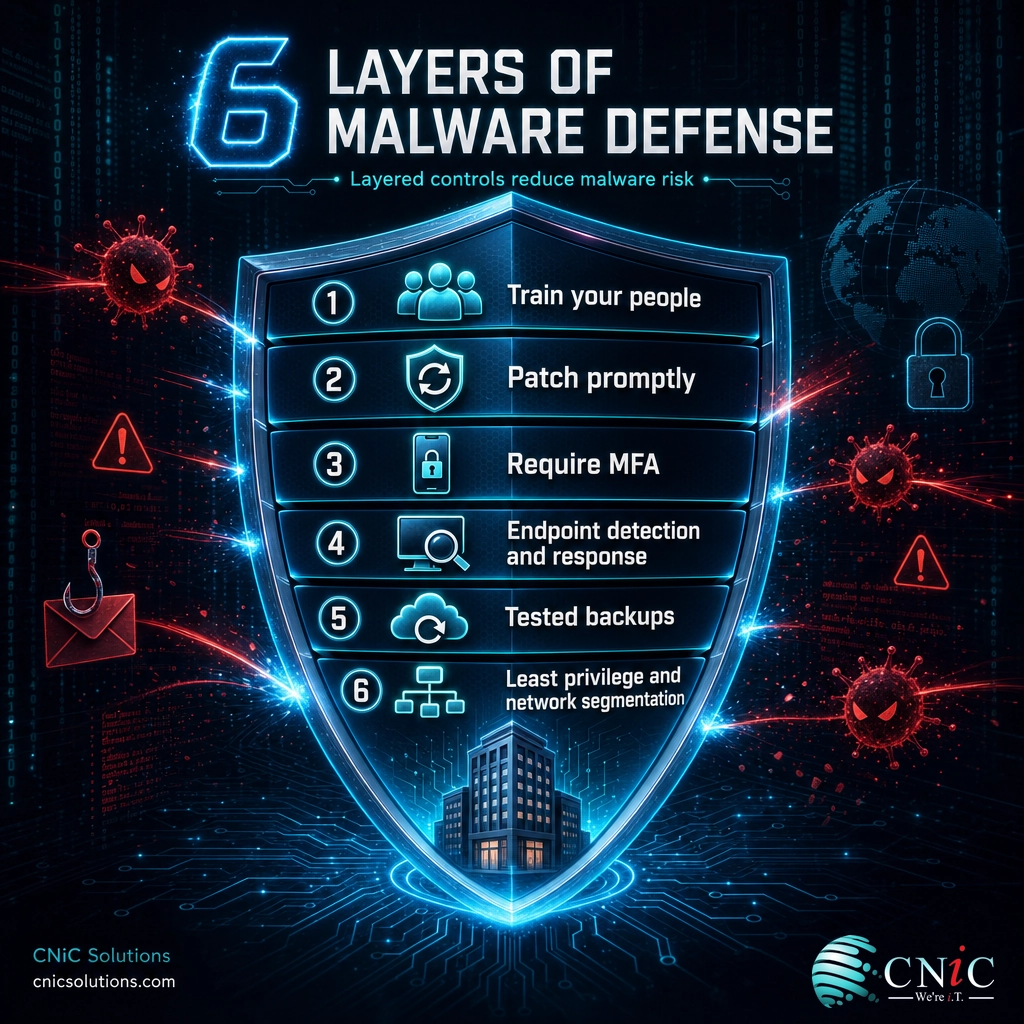
There is no single product that blocks every type of malware, and any vendor who promises one is overselling. Effective protection is layered, so that if one control fails, another catches the threat. For a small or midsize business, the following layers cover the vast majority of real-world attacks.
- Train your people. Since phishing is the number-one entry point, teaching staff to recognize suspicious emails and report them delivers the highest return of any single measure.
- Patch promptly. Keep operating systems, applications, and firmware current. Most exploited vulnerabilities already had a fix available that was never applied.
- Require multi-factor authentication. MFA means a stolen password alone does not grant access, neutralizing a huge share of credential-based attacks.
- Deploy modern endpoint protection. Endpoint detection and response (EDR) watches behavior, not just known signatures, which is what catches fileless and never-before-seen threats.
- Back up, and test the backups. Keep tested, offline or immutable backups so a ransomware attack becomes a restore rather than a payment. An untested backup is a hope, not a plan.
- Limit access and segment the network. Least-privilege access and network segmentation contain an infection so one compromised machine does not become a company-wide outage.
Myth: “We’re too small to be a target.”
This is the most dangerous assumption a small business can make. Attackers automate their attacks and cast the widest net possible, which means smaller organizations, often with lighter defenses, are hit constantly. The 2025 Verizon Data Breach Investigations Report found that ransomware was present in 88% of breaches at small and midsize businesses, compared with 39% at large enterprises. Being small does not make you invisible; it often makes you an easier mark.
The hard part is rarely turning on any one of these controls. It is keeping all of them enabled everywhere, configured correctly, updated as threats evolve, and actually monitored, day after day. A single unpatched server or one employee without MFA can undo an otherwise solid posture. This is exactly the kind of consistent, always-on oversight that strategic IT leadership and managed security exist to provide.
Protect your business with managed cybersecurity
Source: CISA: Cybersecurity Best Practices | CISA: StopRansomware
When to Call a Professional
Some situations call for expert help immediately rather than a do-it-yourself cleanup. Bring in a professional if you hit any of these:
- You suspect an active ransomware or worm outbreak. These spread fast, and the first hour of containment matters more than anything. Disconnect affected systems and get expert response underway.
- Malware keeps coming back after you remove it, a classic sign of a rootkit or a deeper compromise that surface tools cannot reach.
- You handle regulated data under HIPAA, PCI-DSS, or similar frameworks, where an infection may trigger legal reporting obligations and a documented response.
- You do not have the in-house time or expertise to monitor threats around the clock, which describes most small and midsize businesses.
Malware defense is not a one-time cleanup; it is ongoing management. A managed IT and security partner deploys these protections across every device, keeps them current, monitors for threats continuously, and responds fast when something slips through, so your team can focus on running the business instead of chasing infections.
Get malware protection managed across your business
Frequently Asked Questions
What is malware?
What are the most common types of malware?
What is the difference between a virus and a worm?
How does malware get onto a computer?
How can a business protect itself against malware?
Sources
Threat prevalence and cost figures in this guide come from primary and authoritative sources. The daily new-malware figure is from the AV-TEST Institute. Ransomware’s share of breaches and the small-business comparison are from the 2025 Verizon Data Breach Investigations Report. Ransomware recovery and ransom-payment averages are from Sophos, State of Ransomware 2024. Reported internet-crime losses are from the FBI Internet Crime Complaint Center 2024 Internet Crime Report. Malware type definitions and defensive best practices follow guidance from CISA and the NIST Computer Security Resource Center.
Primary and authoritative sources: AV-TEST Malware Statistics, Verizon DBIR, Sophos State of Ransomware, FBI IC3 2024 Internet Crime Report, CISA Malware, Phishing, and Ransomware, NIST CSRC Glossary.



related posts
Types of Servers and How They Work: A Business Guide
September 29, 2026A server is a computer that provides a service, data, or resource to other computers, called…
Types of Phishing Attacks Every Business Should Know
September 29, 2026Phishing is a cyberattack in which criminals pose as a trusted person or organization to trick…
Threat vs. Vulnerability vs. Risk: What’s the Difference in Cybersecurity?
September 28, 2026Quick definition: In cybersecurity, a vulnerability is a weakness that could be exploited, a threat is…
The Best Cybersecurity Certifications, Explained
September 27, 2026The best cybersecurity certifications in 2026 are the ones that match a real career stage and…