

A server is a computer that provides a service, data, or resource to other computers, called clients, over a network. A client asks for something, and the server sends it back. Servers are defined by the job they do, from hosting websites to storing files, and one machine can run many of these roles at once.
Every website you open, every email you send, and every file your team shares from a shared drive is handled by a server somewhere. Servers are the quiet machines that keep a business running, yet most owners never think about them until one stops responding. This guide explains what a server actually is, how servers work in plain terms, the main types of servers and the jobs they do, and how those servers run on physical, virtual, and cloud hardware, so you can make sense of your own infrastructure without a computer science degree.
Key Takeaways
- A server is a role, not just a box. It is any computer, or software, that answers requests from other computers on a network.
- Servers are named by their job. A web server serves web pages, a database server serves data, a mail server serves email, and so on.
- One machine can wear many hats. A single physical or virtual server can run several roles at once, which is why the type and the hardware are two separate questions.
- Physical, virtual, and cloud are deployment choices. The same server role can live on a box in your office, a virtual machine, or a provider’s data center.
- Reliability is the whole point, and most serious outages are preventable with proper management, which is where a managed IT partner earns its place.
What’s in This Guide
How a Server Works
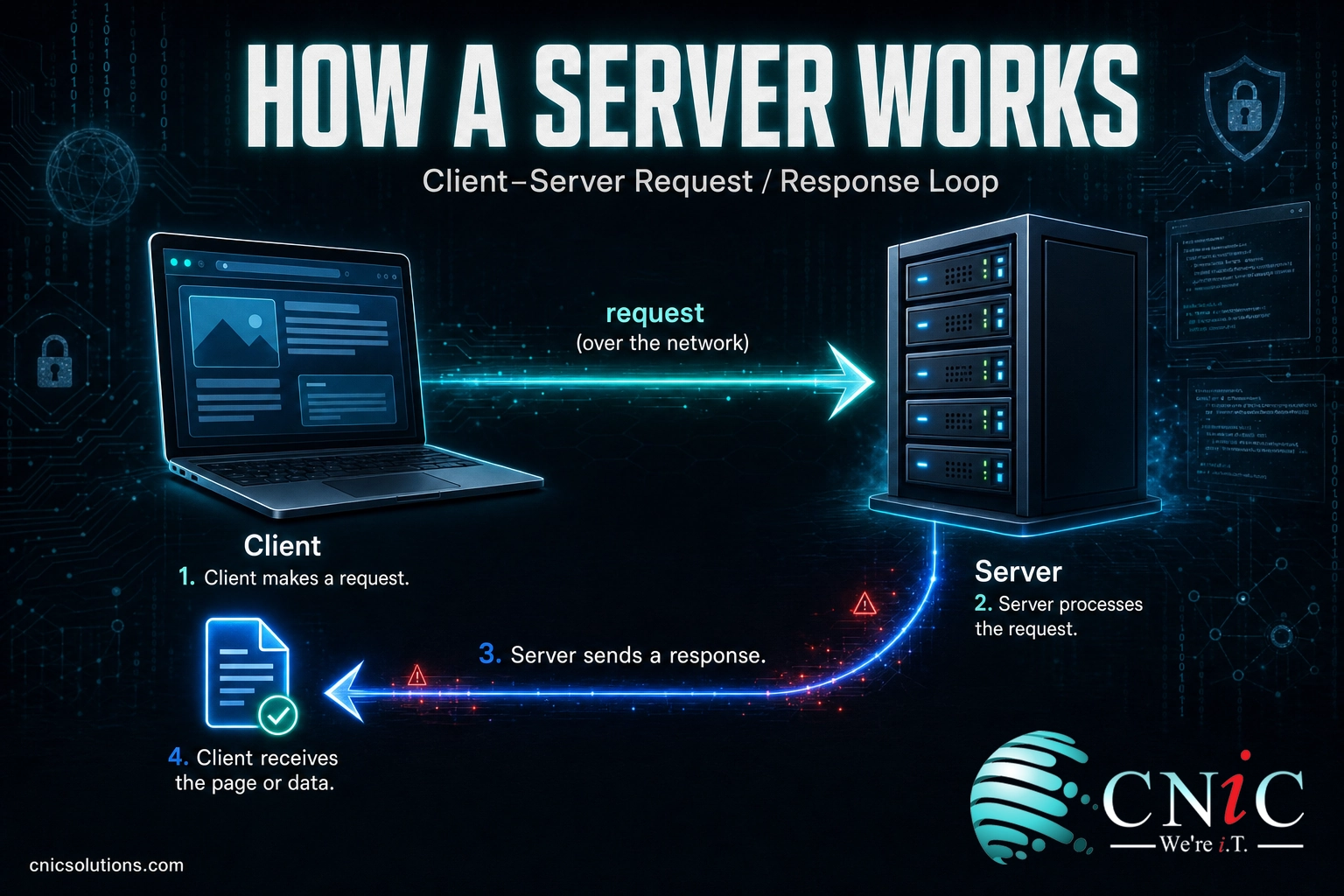
The simplest way to picture a server is a restaurant kitchen. You (the client) sit at a table and order a dish. The kitchen (the server) receives the order, prepares exactly what you asked for, and sends it back out. You never see the kitchen work, and dozens of other tables are being served at the same time. That back-and-forth is the entire idea behind the client-server model that runs the internet and every business network.
In technical terms, the process is a request and a response:
- A client makes a request. Your browser, email app, or accounting software asks for something specific, such as a web page, a record, or a file.
- The request travels over a network. It reaches the server using an agreed set of rules, called a protocol (HTTP for web pages, SMTP for email, and so on).
- The server processes the request. It finds or generates what was asked for, checks that the client is allowed to have it, and prepares the answer.
- The server sends a response. The requested page, data, or file travels back to the client, which displays or uses it.
What makes a server a server is that it is always listening and built to do this for many clients at once, reliably, around the clock. A machine sitting in a closet only becomes a “web server” or a “file server” because of the software running on it and the job you have given it. That is the key insight most explanations skip: the type of a server is about its role, and a single machine can play several roles at the same time.
Server vs. Desktop Computer
People often assume a server is just a bigger, more expensive desktop. They share the same basic parts, a processor, memory, and storage, but they are engineered for opposite jobs. A desktop is built for one person doing one thing at a time. A server is built to serve many clients continuously without failing.
| Factor | Desktop Computer | Server |
|---|---|---|
| Primary user | One person | Many clients at once |
| Uptime expectation | On when needed | Runs 24/7 |
| Hardware focus | Balanced, affordable | Reliability, redundancy, capacity |
| Redundancy | Rare | Common (dual power, RAID storage) |
| Interface | Monitor, keyboard, mouse | Often headless, managed remotely |
| Operating system | Windows, macOS desktop | Windows Server, Linux server builds |
The practical takeaway: you can technically turn an old desktop into a small server, and many businesses have, but it will not have the redundancy or endurance to be trusted with work that must not go down. When something is important enough that its failure stops the business, it belongs on real server hardware or a properly managed virtual or cloud server, not a repurposed office PC.
The Main Types of Servers
Because servers are named by the job they perform, the list of “types” is really a list of jobs. Below are the roles you are most likely to encounter in a business network. In practice, a small business might run several of these on one or two machines, while a larger one spreads them across many.
Web Server
A web server stores website files and delivers them to browsers that request them, using HTTP and its secure version, HTTPS. When someone types your domain and your site appears, a web server answered that request. Common web server software includes Apache and Nginx. For most small businesses, the web server lives with a hosting provider rather than in the office.
Database Server
A database server stores, organizes, and serves structured data, and answers queries from other software. Your customer records, inventory, and transaction history usually live on one. When your accounting app looks up an invoice, it is querying a database server behind the scenes. This is often the most sensitive server you run, which makes its backup and security a priority.
Application Server
An application server runs the business logic that sits between the user and the data. It handles the calculations, rules, and processing that turn a raw request into a useful result, then talks to the database server for the data it needs. Line-of-business platforms, from ERP systems to internal tools, typically run on application servers.
File Server
A file server is the shared drive your team maps to. It stores documents in one central place and controls who can open, edit, or delete them. Instead of files scattered across individual laptops, everyone works from a single, permission-controlled source, which makes backup and version control far easier to manage.
Mail Server
A mail server sends, receives, and stores email, using protocols such as SMTP to send and IMAP or POP to retrieve messages. It manages the accounts for your domain and routes messages to the right mailboxes. Many businesses now use a hosted mail service such as Microsoft 365 or Google Workspace, which means the mail server is run for you in the provider’s data center.
DNS Server
A DNS (Domain Name System) server is the internet’s address book. It translates the human-friendly domain names people type, like your company website, into the numeric IP addresses computers actually use to find each other. Without DNS, you would have to remember a string of numbers for every site and service you use.
DHCP Server
A DHCP (Dynamic Host Configuration Protocol) server automatically assigns IP addresses to the devices that join your network, so laptops, phones, and printers can connect without anyone configuring each one by hand. On most business networks this role runs quietly on a router or a server and is only noticed when it stops working.
Proxy Server
A proxy server sits between your users and the wider internet, forwarding requests on their behalf. It can filter content, improve performance by caching frequently used pages, and add a layer of privacy and security by hiding internal addresses. We cover this role in depth in our guide to proxy servers and their business uses.
Print Server
A print server manages print jobs across a network, queuing documents from many users and sending them to shared printers. It spares you from connecting every computer directly to every printer and gives IT one place to manage drivers, permissions, and queues.
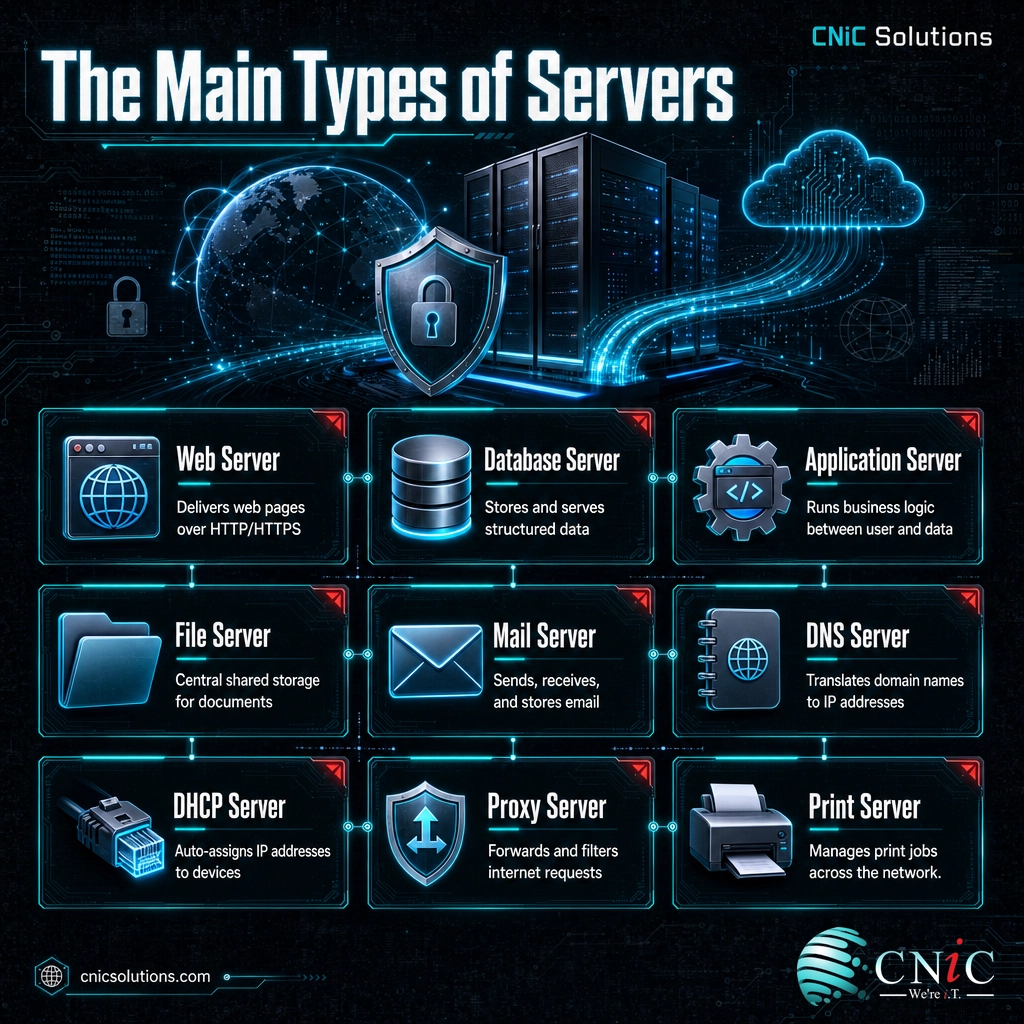
These are the workhorses, but the list keeps going: FTP servers move files between systems, monitoring servers watch the health of the whole network, and virtualization hosts run many virtual servers at once. The pattern never changes, though. Name the job, and you have named the server.
Physical, Virtual, and Cloud Servers
Once you know what a server does, the next question is where it lives. The same web server or file server role can run in very different ways, and this is where the type of a server and the hardware it runs on become two separate decisions.
Physical Servers and Their Form Factors
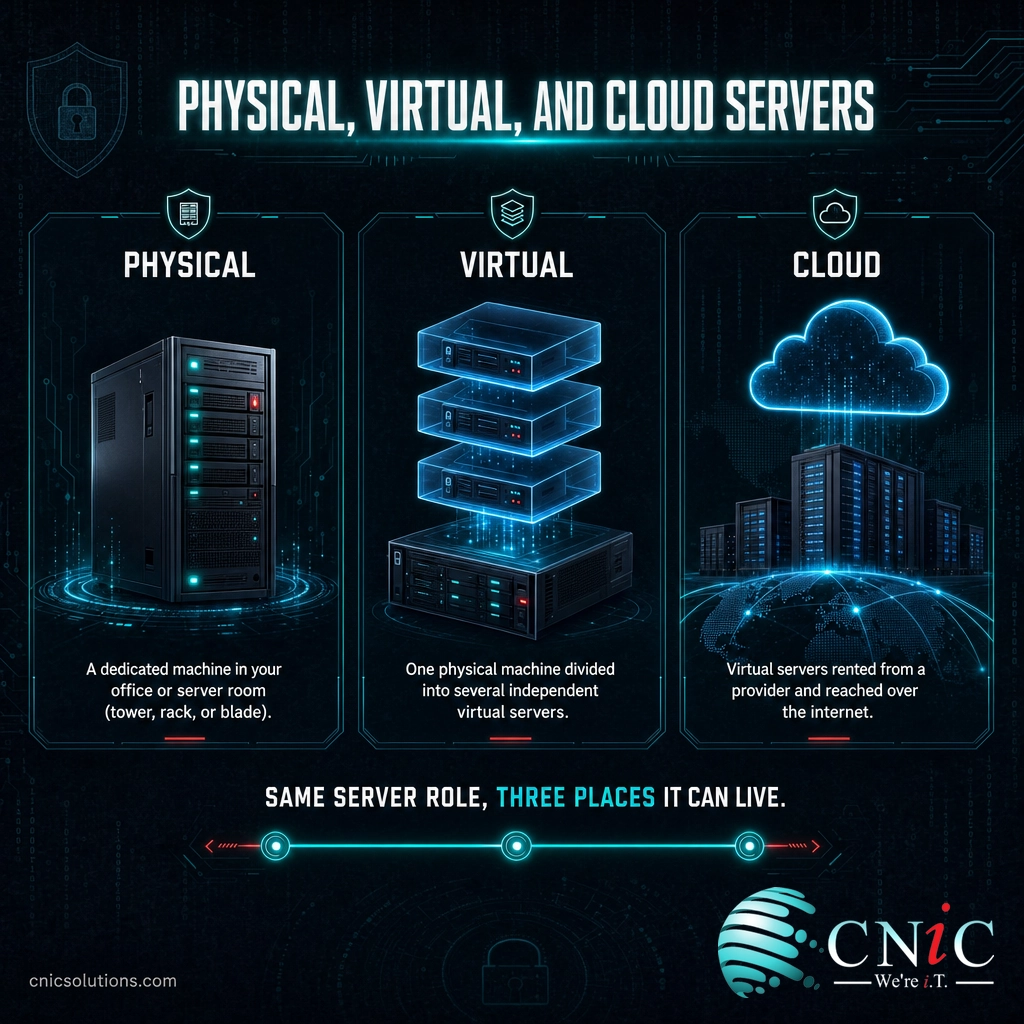
A physical server is a dedicated machine you can point to. Physical servers come in three common shapes:
- Tower servers look like a large desktop PC and suit a small office with one or two servers.
- Rack servers are flat units that bolt into a standardized rack, stacking many servers efficiently in a server room or data center.
- Blade servers are stripped-down cards that slide into a shared chassis, packing the most computing power into the least space for larger operations.
Virtual Servers
A virtual server is a full server that exists in software rather than as its own box. Using virtualization, one powerful physical machine is divided into several independent virtual servers, each with its own operating system and role. This is how a single piece of hardware can host a web server, a file server, and an application server at the same time, using resources far more efficiently than three separate machines would. Related to this is virtual desktop infrastructure, which applies the same idea to user desktops.
Cloud Servers
A cloud server is a virtual server you rent from a provider and reach over the internet, running in their data center on hardware you never see or maintain. You pay for the capacity you use and can scale up or down quickly. The cloud did not make servers disappear, a point worth stating plainly, because it is widely misunderstood.
Myth: “We moved to the cloud, so we don’t have servers anymore”
Moving to the cloud does not remove servers from the picture. It moves them into someone else’s data center and changes who maintains the hardware. Your data, applications, and email still run on servers, they are just rented rather than owned. That distinction matters, because security, backup, and configuration of those cloud servers are still your responsibility, not the provider’s alone.
Choosing among physical, virtual, and cloud is rarely all or nothing. Most businesses land on a mix, keeping some systems on owned hardware for control or compliance and others in the cloud for flexibility. If you own hardware but do not want to run a server room, a third option, data center colocation, lets you house your own servers in a professional facility. We break the trade-offs down further in our comparison of cloud versus on-premise infrastructure. The right mix is a strategic decision, and it is worth getting help with.
Source: Uptime Institute
Why Servers Matter for Your Business
Servers rarely get attention until one goes down, and by then the cost is already being counted in lost sales, idle staff, and frustrated customers. Understanding what your servers do, and how reliable they are, is a business concern, not just an IT one.
Reliability is measured in uptime, and the gap between “usually fine” and “engineered for reliability” is larger than it looks. The data center industry has long benchmarked reliability against the tier classification model created by the Uptime Institute, and the availability figures widely associated with those tiers make the point: a Tier III facility is generally referenced at about 99.982% availability, under roughly 1.6 hours of downtime per year, and a Tier IV facility at about 99.995%, roughly 26 minutes per year. A server humming under someone’s desk cannot come close to that.
When servers do fail, the financial hit is real and well documented. The Uptime Institute’s Annual Outage Analysis 2024 reported that most organizations now pay dearly for downtime.
The most important finding for a business owner is not the price of downtime, though, it is how avoidable it is. The same Uptime Institute analysis found that roughly four in five operators said their most recent serious outage could have been prevented with better management, processes, and configuration. In other words, most server failures are not bad luck; they are the result of servers that were never properly managed, monitored, or maintained.
That is the case for treating your servers as managed assets rather than boxes that “just work” until they don’t.
Source: Uptime Institute: Annual Outage Analysis 2024 | Uptime Institute: Tier Standards
How to Choose and Manage the Right Servers
The mistake businesses make is starting from the hardware: “should we buy a server or go cloud?” The better starting point is the work. Map what your business actually does, such as hosting a website, sharing files, running applications, handling email, and managing data, then match each need to the right server role and the right place for it to run. Only then does the buy-versus-rent question have a sensible answer.
Getting that mapping right, and then keeping every one of those servers patched, monitored, backed up, and secure, is exactly where a managed IT partner changes the equation. Rather than hoping the box in the closet keeps running, you get your servers watched around the clock, updated before problems bite, and backed up so a failure is an inconvenience rather than a crisis. As a Houston managed IT and infrastructure management partner, CNiC Solutions helps businesses design the right server setup, whether physical, virtual, cloud, or a blend, and then manages it day to day so it stays reliable.
Get expert help planning and managing your servers
If you are weighing a bigger infrastructure decision and want strategy before hardware, a Virtual CIO can map your server and deployment options to your business goals. For teams moving workloads off owned hardware, our cloud solutions team handles the migration, and because reliable servers are only as safe as their last backup, data backup and recovery should be part of any server plan.

Related Terms
- Client: Any device or program that requests a service or resource from a server, such as a browser or an app.
- Protocol: An agreed set of rules for how computers exchange data, such as HTTP for web pages or SMTP for email.
- Virtualization: Technology that splits one physical machine into several independent virtual servers, each with its own operating system.
- Data center: A facility built to house servers and networking equipment with reliable power, cooling, and security.
- Uptime: The percentage of time a server or service is available and running, the core measure of reliability.
- Redundancy: Duplicate hardware or systems (such as dual power supplies) that keep a server running if one part fails.
- On-premise: Servers and systems physically located and operated within your own business facilities.
Frequently Asked Questions
What is a server in simple terms?
What are the main types of servers?
What is the difference between a server and a regular computer?
Do businesses still use physical servers or is everything in the cloud?
How do I know which servers my business needs?
Sources
The data center availability figures (Tier III at about 99.982% and Tier IV at about 99.995%) are the availability levels long referenced against the tier classification model created by the Uptime Institute, the recognized authority on data center reliability standards. The outage cost and prevention figures (54% of significant outages costing over $100,000, 16% over $1 million, and roughly four in five outages being preventable) are from the Uptime Institute Annual Outage Analysis 2024.
The server definitions, roles, protocols, and deployment models described (web, database, application, file, mail, DNS, DHCP, proxy, and print servers; physical, virtual, and cloud deployment; tower, rack, and blade form factors) are standard, widely documented characteristics of computer networking, presented as such rather than attributed to any single vendor.



related posts
Types of Phishing Attacks Every Business Should Know
September 29, 2026Phishing is a cyberattack in which criminals pose as a trusted person or organization to trick…
Threat vs. Vulnerability vs. Risk: What’s the Difference in Cybersecurity?
September 28, 2026Quick definition: In cybersecurity, a vulnerability is a weakness that could be exploited, a threat is…
Types of Malware: A Guide to the Most Common Threats
September 28, 2026Malware (short for malicious software) is any program or code created to damage, disrupt, or gain…
The Best Cybersecurity Certifications, Explained
September 27, 2026The best cybersecurity certifications in 2026 are the ones that match a real career stage and…