

DNS (Domain Name System) is the internet’s address book. It translates the human-friendly domain names you type, like cnicsolutions.com, into the numeric IP addresses computers use to find each other. Every time you open a website or send email, DNS performs this lookup in milliseconds, so you never have to memorize a string of numbers.
You use DNS hundreds of times a day without ever seeing it. Type a web address, click a link, send an email, open an app: each one quietly asks the same question behind the scenes, “what is the actual number for this name?” DNS answers it. It is one of the oldest and most essential systems on the internet, and when it breaks, the internet appears to break with it, even though every server is still running. This guide explains what DNS is in plain English, how a DNS lookup actually works step by step, the record types that make it run, how DNS differs from the domain name and hosting it is often confused with, and why it deserves attention from any business that depends on being online.
Key Takeaways
- DNS is a translation service. It converts domain names people can remember into the IP addresses machines actually use.
- A lookup passes through four servers: the recursive resolver, a root server, a TLD server, and the authoritative nameserver that holds the answer.
- DNS records are the instructions. A records point to IPs, MX records route email, and others handle aliases, verification, and security.
- DNS is not your domain or your hosting. They are three separate things that often live with three different providers.
- DNS is a single point of failure and a security layer. If it goes down or is hijacked, you go offline; protective DNS filtering blocks malicious sites before they load.
What’s in This Guide
What DNS Is (The Address Book Analogy)
Computers do not find each other by name. They find each other by number. Every device and server connected to the internet has an IP (Internet Protocol) address, something like 192.0.2.1, that identifies where it lives on the network. People, however, are terrible at remembering numbers and very good at remembering names. DNS bridges that gap.
Think of the contacts app on your phone. You do not memorize your accountant’s phone number; you tap their name and the phone looks up the number for you. DNS is the internet’s version of that contacts list, operating at a global scale. You type cnicsolutions.com, and DNS looks up the IP address that name points to and connects you, all in a fraction of a second. The name is for humans; the number is for machines; DNS is the directory in between.
This system is not new. DNS was created in 1983 by Paul Mockapetris to replace a single, manually updated text file that had listed every host on the early internet, an approach that clearly could not scale. The design was later formalized in the standards that still govern it today, and it is coordinated at the top level by ICANN, the nonprofit that oversees the domain name system. Four decades on, the same basic idea, names mapped to numbers through a distributed directory, still underpins essentially everything you do online.
How DNS Works: The Lookup, Step by Step
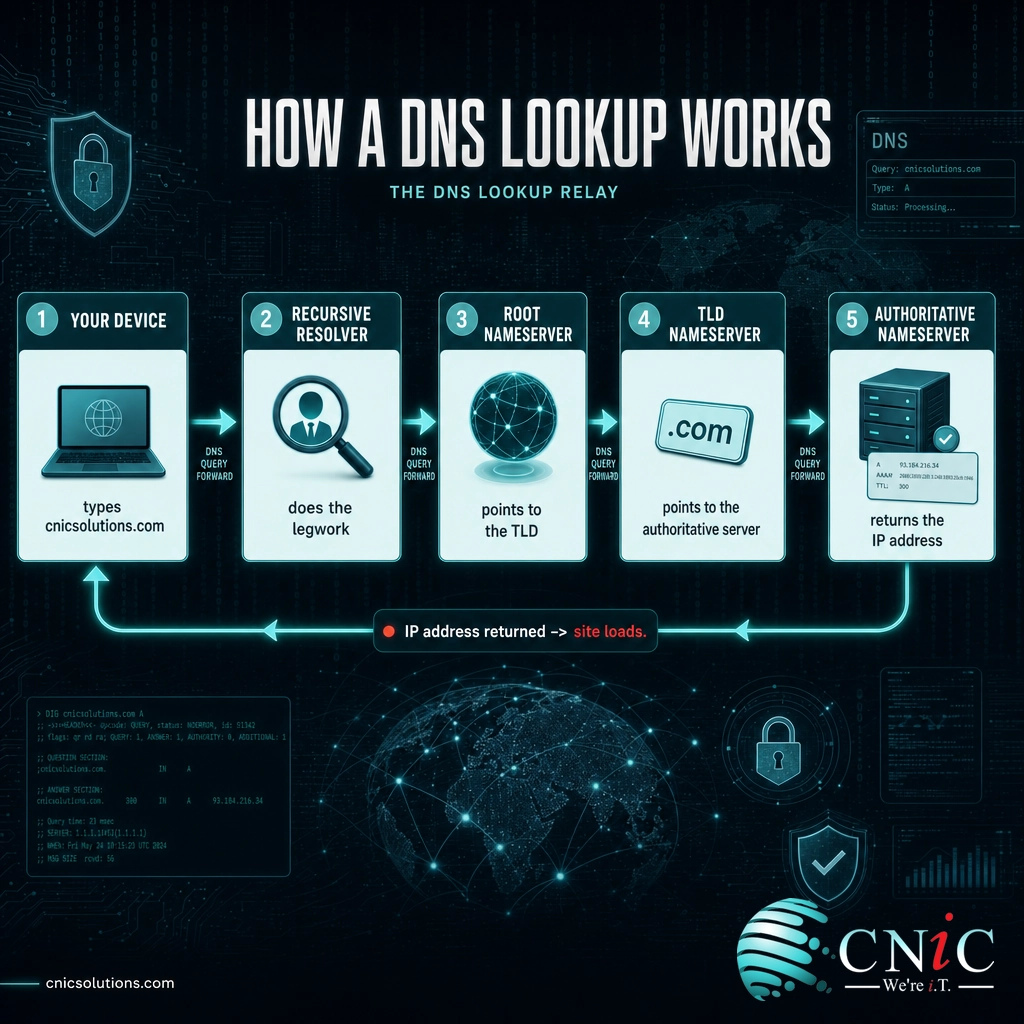
When you enter a web address, a process called a DNS lookup (or DNS resolution) kicks off. It usually finishes in milliseconds, and it involves a relay of up to four different servers, each one pointing the way to the next. Here is what happens the first time your device looks up a new domain:
- The recursive resolver takes the request. Your device asks a recursive DNS resolver to find the answer. This is usually run by your internet provider or a public service such as Cloudflare or Google. The resolver is the researcher: it does the legwork on your behalf and reports back the final answer.
- The resolver asks a root nameserver. If the answer is not already cached, the resolver starts at the top. A root nameserver does not know the specific IP address, but it knows who handles the ending of the domain, so it points the resolver toward the right top-level domain server.
- The TLD nameserver narrows it down. The top-level domain (TLD) server handles a specific ending, such as .com, .org, or .net. It does not have the final answer either, but it knows which nameserver is authoritative for that exact domain, and it hands that over.
- The authoritative nameserver gives the answer. This is the server that actually holds the domain’s records. It looks up the requested record and returns the IP address to the resolver.
- The resolver caches and delivers. The resolver hands the IP address back to your device, which connects to that server and loads the site. It also stores (caches) the answer for a set time, so the next visit skips most of these steps entirely.
That caching step is why a site you visit often loads faster than one you are opening for the first time: the answer is already saved closer to you. It is also why DNS scales to billions of requests without collapsing, most lookups never have to travel all the way to the authoritative server.
DNS Records: The Instructions Behind Every Domain
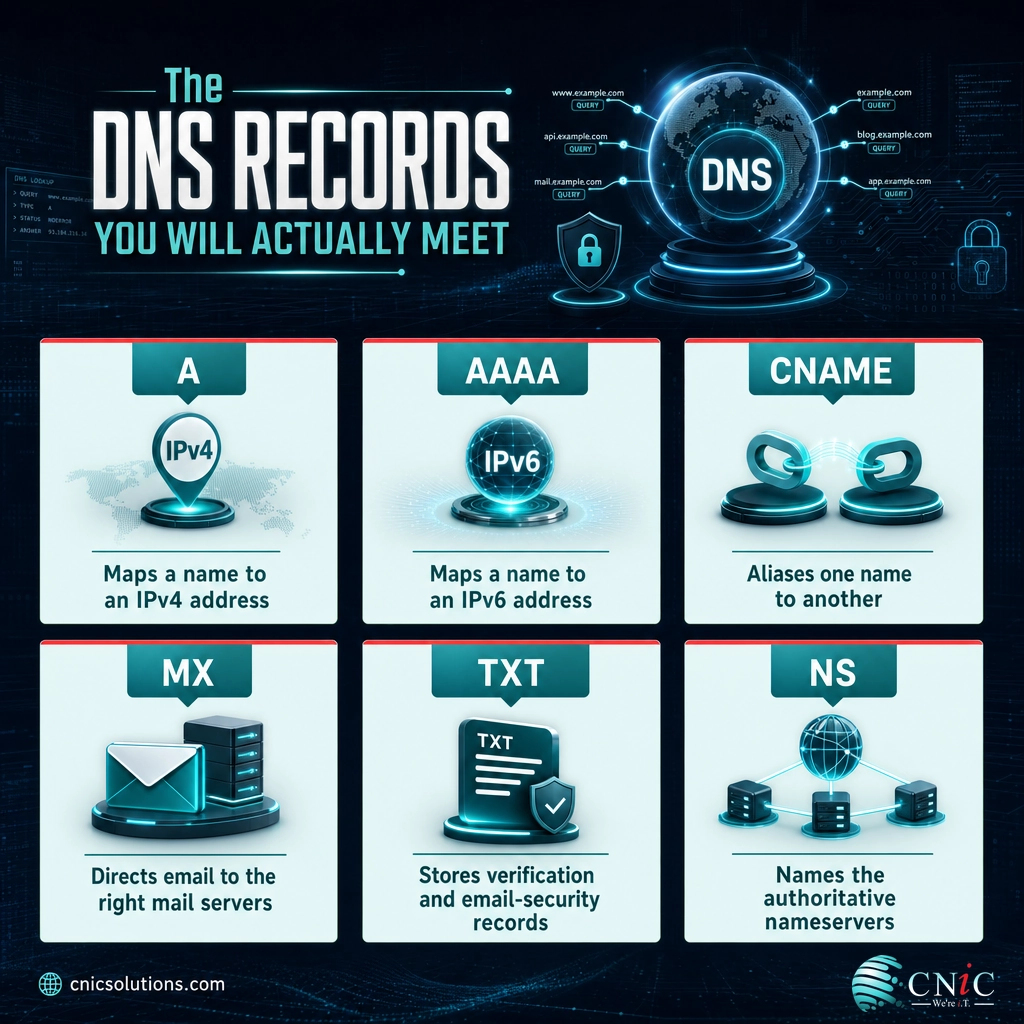
The authoritative nameserver does not just store one IP address per domain. It stores a set of DNS records, each one a small instruction telling the internet how to handle a particular kind of request for that name. These records are what you (or whoever manages your DNS) actually edit when you point a domain at a new website, set up business email, or verify ownership with a third-party service.
You do not need to memorize all of them, but knowing the handful you will actually run into removes most of the mystery:
| Record | What it does | Everyday example |
|---|---|---|
| A | Maps a domain name to an IPv4 address | Points cnicsolutions.com to the server that hosts the website |
| AAAA | Maps a domain name to a newer IPv6 address | The same job as an A record, for the newer IP format |
| CNAME | Aliases one name to another name | Points www to the root domain so both resolve the same way |
| MX | Directs email to the correct mail servers | Routes your business email to Microsoft 365 or Google Workspace |
| TXT | Stores text, often for verification and email security | Holds SPF, DKIM, and DMARC records that fight email spoofing |
| NS | Names the authoritative nameservers for the domain | Tells the internet which provider is in charge of your DNS |
A single misconfigured record can have outsized consequences. Fat-finger an A record and your website disappears. Get the MX records wrong and email silently stops arriving. This is exactly why DNS changes deserve care, and why businesses so often want a professional handling them rather than experimenting in a live console.
Myth: DNS changes take effect instantly. They do not. Because resolvers cache answers, an updated record has to wait for the old cached copy to expire before every user sees the change. That waiting period, controlled by a setting called TTL (Time To Live) and often described as DNS propagation, can take anywhere from a few minutes to 48 hours. Plan DNS changes accordingly, and never assume a change is live the second you save it.
DNS vs. Domain Name vs. Hosting
These three are constantly confused, and the confusion causes real support headaches, because they are three separate services that frequently live with three different companies. Sorting them out once makes DNS far less intimidating.
| What it is | The analogy | |
|---|---|---|
| Domain name | The address you registered, like cnicsolutions.com | The name of the business |
| DNS | The directory that translates that name into an IP address | The address book that finds the location |
| Web hosting | The server where your website’s files actually live | The building the business operates in |
Here is how they work together. You register a domain name with a registrar. That name has DNS records that point to wherever your site and email live. Your website files sit on a hosting server with its own IP address, and an A record connects the two. Change hosts, and you update DNS to point at the new server; the domain name itself never changes. Because these can be managed in different places, the single most common DNS support question, “why isn’t my site loading after I switched providers?”, almost always comes down to a DNS record still pointing at the old address.

Why DNS Matters for Your Business
For something so invisible, DNS carries a lot of weight. When it works, nobody thinks about it. When it fails, everything that depends on your domain, your website, your email, your cloud apps, your customer logins, can stop at once, even though every underlying server is perfectly healthy. That is the double edge of a system this central: it is both critical infrastructure and a concentrated point of risk.
DNS is a single point of failure. A widely cited real-world example is the October 2016 attack on the DNS provider Dyn, which overwhelmed its infrastructure and made major services including Twitter, Reddit, and Spotify unreachable for much of a day. None of those companies had been hacked. Their DNS provider had, and that was enough to take them offline. The lesson for any business: your uptime is only as reliable as the DNS that points people to you.
DNS is also a security frontline. Because nearly every connection starts with a DNS lookup, DNS is a favorite tool for attackers, used to redirect victims to fake sites, hide command-and-control traffic, and power phishing. The flip side is that it is an excellent place to defend. Protective DNS filtering checks each lookup against known-malicious domains and refuses to resolve the dangerous ones, stopping many threats before a single byte of the harmful page ever loads. The U.S. Cybersecurity and Infrastructure Security Agency (CISA) recommends protective DNS as a baseline control for exactly this reason. Getting DNS security right, from filtering to ICANN’s overview of DNSSEC (which cryptographically verifies that DNS answers have not been tampered with), turns a common attack surface into a genuine layer of protection.
All of this sits inside the broader networking and connectivity layer that keeps a business online, the same layer that includes your internet circuits and the physical cabling that carries the traffic once DNS has pointed it in the right direction.

Managing DNS Without the Headaches
You do not have to become a DNS expert to keep it healthy, but somebody should be treating it as the critical infrastructure it is. In practice, well-managed DNS comes down to a few disciplines: knowing exactly where your DNS is hosted and who has access, documenting your records so a change is deliberate rather than guessed, setting sensible TTLs, protecting the accounts that control DNS with multi-factor authentication, and layering in protective DNS filtering so the system defends you instead of just serving you.
For most small and midsize businesses, the cleanest answer is to fold DNS into professionally managed IT services, so records, security, and changes are handled by people who do it every day, with proper documentation and change control instead of a shared login and crossed fingers. When DNS is treated as part of a deliberate networking strategy, it stops being the thing that mysteriously breaks and becomes one more piece of infrastructure you can simply rely on.
CNiC Solutions helps businesses take that headache off the table, managing DNS, connectivity, and the security controls around them so being online is something you never have to think about.
Secure your DNS and network with CNiC’s managed cybersecurity services
Related Terms
- IP Address: The numeric identifier (such as 192.0.2.1) that pinpoints a device or server on a network. DNS exists to translate names into these.
- Recursive Resolver: The DNS server that does the legwork of a lookup on your behalf and caches the result for next time.
- Authoritative Nameserver: The server that holds a domain’s official DNS records and provides the final, definitive answer.
- TTL (Time To Live): The setting that controls how long a DNS answer is cached before it must be looked up again, the driver of DNS propagation delays.
- DNSSEC: A set of security extensions that cryptographically sign DNS data so resolvers can verify answers have not been forged.
- TLD (Top-Level Domain): The ending of a domain name, such as .com, .org, or .io, each handled by its own set of nameservers.
- Protective DNS: A filtering approach that blocks lookups to known-malicious domains, stopping many phishing and malware connections at the DNS layer.
Frequently Asked Questions
What is DNS in simple terms?
What are the four types of DNS servers?
What is the difference between DNS and an IP address?
What is a DNS record?
Why does DNS matter for security?
About This Guide and Sources
The definitions and mechanics in this guide, the name-to-IP role of DNS, the four-server lookup relay (recursive resolver, root, TLD, and authoritative nameservers), the common record types (A, AAAA, CNAME, MX, TXT, NS), caching and TTL, and the domain versus DNS versus hosting distinction, reflect standard, widely consistent descriptions of how DNS works, consistent with authoritative references including ICANN, IANA, the underlying IETF standards (RFC 1034 and RFC 1035), and public DNS documentation from providers such as Cloudflare. The 1983 origin and its creator are documented by the Internet Hall of Fame. The October 2016 Dyn incident is a widely reported real-world event, described here in general terms without specific traffic or loss figures. Guidance on protective DNS reflects recommendations from the U.S. Cybersecurity and Infrastructure Security Agency (CISA). No usage statistics, percentages, or cost figures are asserted in this article.



related posts
What Is FinOps? A Guide to Managing and Optimizing Cloud Costs
October 19, 2026FinOps is an operational framework and cultural practice for managing and optimizing cloud costs by bringing…
What Is Endpoint Security? How It Protects Your Business Devices
October 19, 2026Endpoint security is the practice of protecting the devices that connect to your network, such as…
What Is Encryption in Cybersecurity?
October 18, 2026Encryption in cybersecurity is the process of scrambling readable data into an unreadable code that only…
What Is Data Loss Prevention (DLP) and Why Does Your Business Need…
October 17, 2026Data loss prevention (DLP) is a set of tools and policies that detect and stop sensitive…