
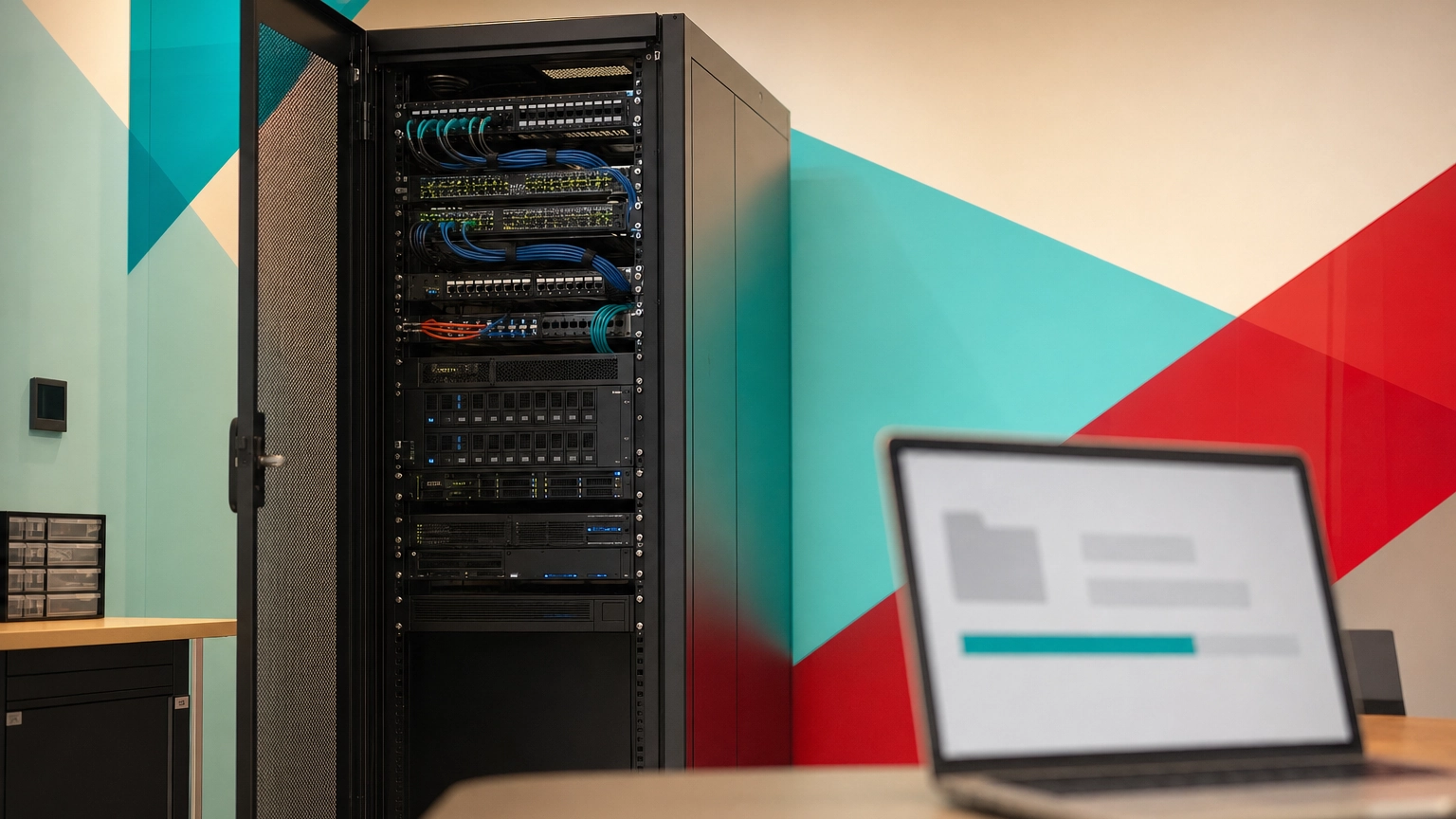
The 3-2-1 backup rule is a data protection standard that says to keep three copies of your data, stored on two different types of media, with at least one copy kept offsite. It removes single points of failure, so a hardware crash, a disaster, or a ransomware attack cannot wipe out every copy of your data at once.
One deleted folder, one failed drive, or one ransomware note can put a business out of commission. The 3-2-1 backup rule is the simplest, most widely endorsed answer to that risk, and it is the baseline U.S. agencies like CISA and NIST expect every organization to meet. This guide explains exactly what the rule means, why each number matters, and how to put it to work protecting your company’s data.
- 3-2-1 means three copies, two media types, one offsite. The production data plus two backups, never all in the same place or on the same kind of storage.
- It exists to kill single points of failure. No single fire, theft, drive failure, or ransomware event should be able to destroy every copy you have.
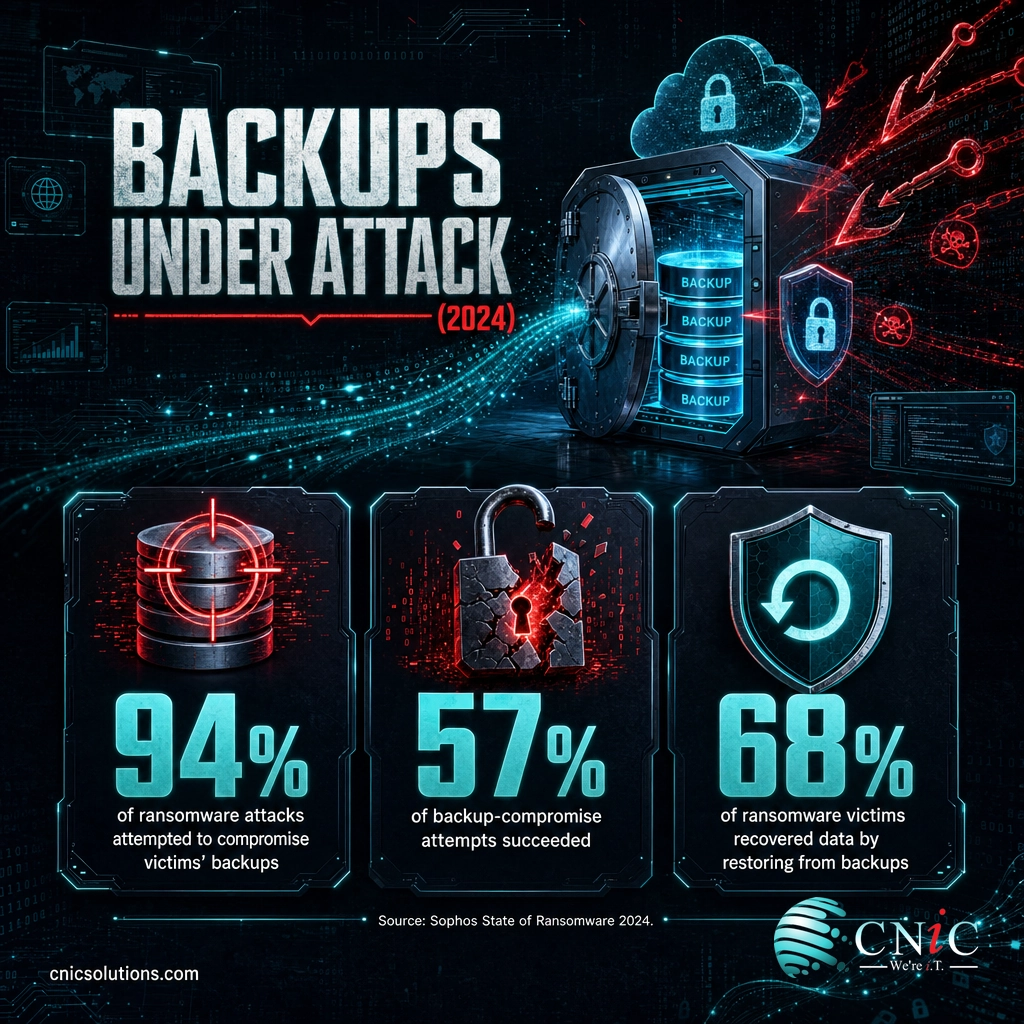
- Backups are now a primary target. Attackers tried to compromise backups in 94% of ransomware attacks in 2024, and succeeded 57% of the time (Sophos).
- Cloud sync and RAID are not backups. They mirror errors and drive failures rather than giving you independent, recoverable copies.
- Modern threats push 3-2-1 further. Adding one immutable or offline copy and testing every restore (the 3-2-1-1-0 update) hardens the rule against ransomware.
What’s in This Guide
- How the 3-2-1 Backup Rule Works
- 3-2-1 Backup vs. RAID and Cloud Sync
- Why the 3-2-1 Rule Matters for Your Business
- Types of Backups That Fit the 3-2-1 Model
- Beyond 3-2-1: The 3-2-1-1-0 Update
- How to Get Started With the 3-2-1 Rule
- Common Questions About the 3-2-1 Backup Rule
- Related Terms
- Sources & Methodology
How the 3-2-1 Backup Rule Works
The rule is three numbers, and each one closes a different gap. The concept was popularized by photographer Peter Krogh, who needed a memorable way to keep irreplaceable image files safe, and it has since become the default backup architecture across IT and cybersecurity.
Think of it like protecting a spare house key. You keep the original, you hide a spare somewhere different from the first, and you leave one with a friend across town. Lose one, and you are never locked out. Applied to your data, it looks like this:
- 3 copies of your data. The live version your team uses every day, plus two separate backups. Two copies is a coin flip; a third copy is what makes the odds of losing everything vanishingly small.
- 2 different media types. Store those copies on two kinds of storage, such as a local server or NAS device and cloud object storage. If one storage type fails or has a flaw, the other is unaffected.
- 1 copy offsite. At least one backup lives in a physically separate location, isolated from your main network. That is the copy that survives a fire, a flood, a stolen server, or ransomware moving through your building.
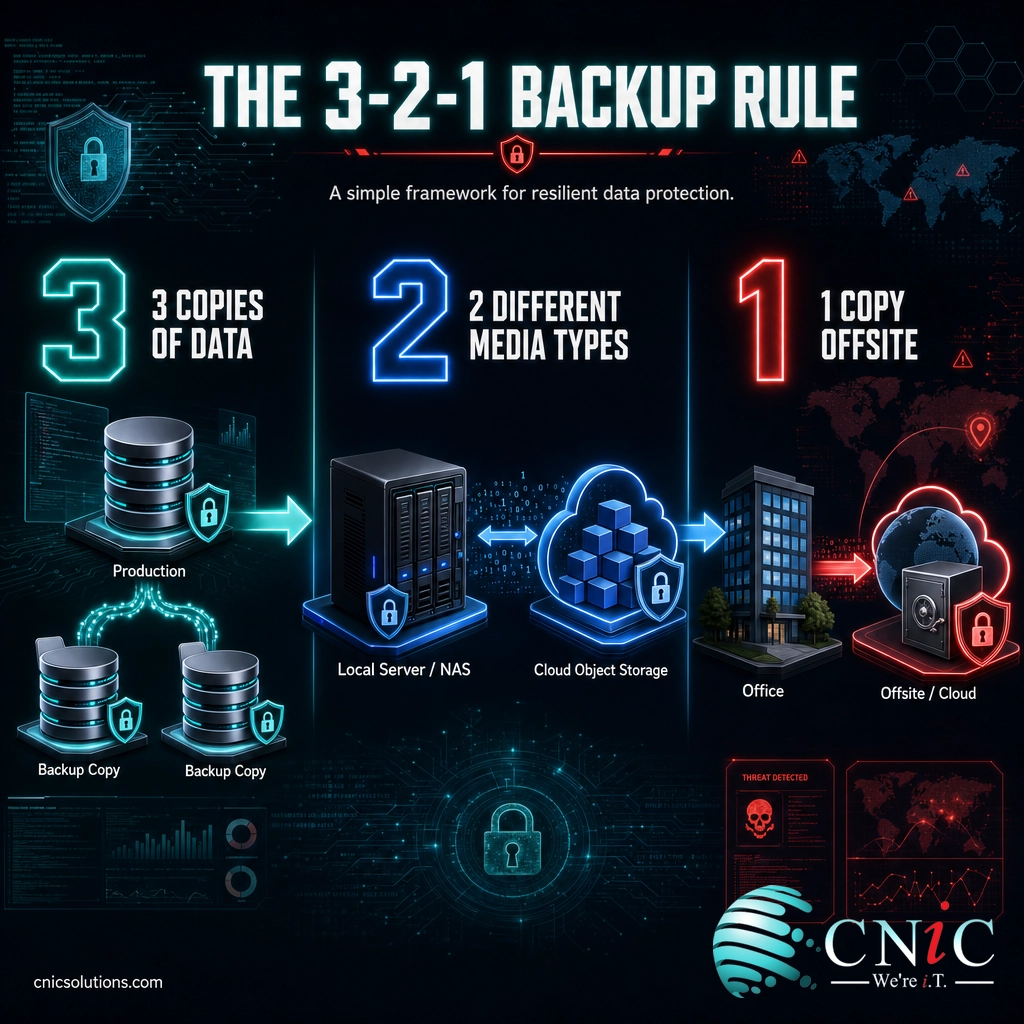
For an offsite copy to actually count, it has to be independently recoverable, meaning you can restore from it even if your main office, servers, and network are completely unavailable. A backup drive that sits next to the server it protects fails all three tests at once.
Source: CISA #StopRansomware | NIST Cybersecurity Framework
3-2-1 Backup vs. RAID and Cloud Sync
The most common and most expensive misunderstanding in data protection is believing you already have backups when you do not. Two tools get confused with backup constantly: RAID and file sync services like OneDrive, Google Drive, or Dropbox. Both are useful. Neither is a backup, and the difference is what saves you during an incident.
| Capability | RAID / Redundant Drives | Cloud File Sync | True 3-2-1 Backup |
|---|---|---|---|
| Protects against a drive failing | Yes | No | Yes |
| Keeps a separate historical copy | No | Limited version history | Yes, multiple restore points |
| Survives accidental deletion | No, the deletion mirrors instantly | Often no, the change syncs | Yes |
| Survives ransomware | No | No, encrypted files sync up | Yes, if an offline or immutable copy exists |
| Survives a site disaster | No | Yes | Yes, via the offsite copy |
RAID keeps a server running when one disk dies. File sync makes the same live file available everywhere, which means a mistake, a corruption, or an encryption event is copied everywhere too. A backup is different by design: it is a separate, point-in-time copy you can return to. The 3-2-1 rule exists precisely so that redundancy, sync, and true backups are not mistaken for one another.
Why the 3-2-1 Rule Matters for Your Business
Data loss is not a rare edge case; it is a routine business event with a growing price tag. The rule matters because the threats it defends against have become both more likely and more costly, and because backups themselves are now squarely in attackers’ sights.
When those attempts land, recovery gets slower and far more expensive. Compromised backups leave a business choosing between a long rebuild and a ransom demand, which is exactly the pressure attackers are counting on.
The organizations that come through fastest are the ones whose backups hold. Restoring from backups was the most common way victims got their data back, ahead of paying the ransom, which is the whole argument for keeping copies an attacker cannot reach.
How Ransomware Victims Recovered Their Data (2024)
Respondents could report more than one recovery method. Source: Sophos, State of Ransomware 2024.
The stakes are not limited to ransomware. The average data breach reached $4.88 million globally in 2024, according to IBM, and much of that cost comes from downtime and lost business while data is unavailable. A tested 3-2-1 backup shortens that downtime, which is where the real money is saved.
Myth: “Our backup runs every night, so we’re covered.” A backup you have never restored from is a hope, not a plan. Backups fail silently, fill up, skip open files, or get encrypted alongside production data. Until you have completed a real test restore, you do not actually know your data is recoverable. Scheduling the job is step one, not the finish line.
This is also why the rule shows up in the frameworks businesses are measured against. If your company handles regulated data, backup and recovery expectations appear in HIPAA, PCI-DSS, and SOC 2, and a documented 3-2-1 approach is a clean way to demonstrate you meet them. For the numbers behind these risks, our ransomware recovery data breaks down real-world timelines and costs.
Source: Sophos State of Ransomware 2024 | IBM Cost of a Data Breach 2024
Types of Backups That Fit the 3-2-1 Model
The rule tells you how many copies and where; it does not force a specific product. Most businesses satisfy 3-2-1 by combining a fast local copy with a protected remote copy. Here is how the common options map onto the two media types and the offsite requirement.
Local backups (on-site copy)
A backup appliance, a NAS device, or a dedicated backup server on your network. This is the copy you restore from for everyday problems: a deleted file, a corrupted database, or a failed workstation. It is fast, but on its own it lives in the same building as your production data, so it can never be your only backup.
Cloud and offsite backups (offsite copy)
A copy replicated to a cloud backup service or a second physical site. This satisfies both the second media type and the offsite requirement in one step, which is why cloud backup has become the default offsite copy for small and midsize businesses. Managed cloud solutions make this copy automatic instead of something a person has to remember to do.
Immutable and air-gapped backups (the ransomware-resistant copy)
An immutable backup cannot be altered or deleted for a set period, even by an administrator account. An air-gapped copy is physically or logically disconnected from the network. Either one is the copy that defends against the 57% of backup-compromise attempts that succeed, because an attacker who reaches your network still cannot touch it.
Beyond 3-2-1: The 3-2-1-1-0 Update
3-2-1 was designed for an era of hardware failure and physical disaster. It is still the right foundation, but it predates ransomware crews who hunt for backups on purpose. The modern extension, written as 3-2-1-1-0, keeps the original rule and adds two requirements built for today’s threats.
- +1 immutable or offline copy. One of your copies must be one an attacker cannot encrypt or delete, whether through immutability, an air gap, or offline media.
- +0 errors on recovery. Every backup is verified with a test restore, so the number of recovery errors you discover during a real incident is zero.
You do not have to overhaul everything to get there. For most businesses, adding an immutable cloud copy and a recurring restore test upgrades a standard 3-2-1 setup to 3-2-1-1-0. The point of the update is simple: assume the attacker will find your backups, and make sure at least one copy still works when they do.
Source: CISA #StopRansomware | Sophos State of Ransomware 2024
How to Get Started With the 3-2-1 Rule
Putting 3-2-1 in place is less about buying tools and more about answering a few questions honestly. Work through these in order:
- Inventory what matters. List the systems and data your business could not operate without, from file servers and email to line-of-business applications and databases.
- Count your real copies. For each system, ask: do I have three copies, on two media types, with one truly offsite? Most businesses find a gap here, usually a missing offsite or immutable copy.
- Set recovery targets. Decide how much data you can afford to lose (your recovery point) and how long you can be down (your recovery time). These targets drive how often backups run.
- Automate and monitor. A backup that depends on someone remembering will eventually be forgotten. Automate the jobs and alert on failures.
- Test a restore. Actually recover a file, then a whole system, on a schedule. This is the step almost everyone skips and the only one that proves the plan works.
If that list surfaces gaps, or you would rather not carry the responsibility in-house, a managed backup and recovery partner can design, run, and test the whole thing for you. CNiC Solutions builds tested 3-2-1 and 3-2-1-1-0 backup systems for businesses across Texas and nationally.
Explore Backup & Recovery Services
Backups are one layer of a larger defense. Pairing them with modern ransomware protection keeps attackers away from your systems in the first place, and a documented disaster recovery plan turns a good backup into a fast, orderly recovery.
Common Questions About the 3-2-1 Backup Rule
What is the 3-2-1 backup rule in simple terms?
Why does one backup copy need to be offsite?
Does the 3-2-1 backup rule protect against ransomware?
Is cloud storage or RAID enough on its own?
What is the 3-2-1-1-0 backup rule?
Related Terms
- Disaster Recovery (DR): The plan and process for restoring systems and data after a major outage. See our disaster recovery plan guide.
- Business Continuity: Keeping the business running during and after a disruption, of which backup is one piece. Learn to build a business continuity plan.
- Business Impact Analysis (BIA): The exercise that ranks which systems matter most and sets recovery priorities. Start with business impact analysis.
- Immutable Backup: A backup copy that cannot be changed or deleted for a defined retention period, making it ransomware-resistant.
- Air Gap: A backup copy kept physically or logically disconnected from the network so malware cannot reach it.
- RPO / RTO: Recovery Point Objective (how much data you can lose) and Recovery Time Objective (how long you can be down), the targets that shape a backup schedule.
- Data Backup Solutions: The tools and services that put 3-2-1 into practice. See backup solutions for small business.
Sources & Methodology
How this guide was sourced
Definitions and best-practice guidance follow the U.S. Cybersecurity and Infrastructure Security Agency (CISA) and the NIST Cybersecurity Framework, both of which recommend the 3-2-1 approach as a baseline for data backup resilience. All statistics are drawn from primary, first-party research and are cited inline at the point of use.
- Sophos, The State of Ransomware 2024 — survey of 5,000 IT and cybersecurity leaders across 14 countries (backup compromise, recovery cost, and recovery method figures).
- IBM, Cost of a Data Breach Report 2024 — global average breach cost.
- CISA #StopRansomware — federal guidance on maintaining offline, offsite, and immutable backups.
- NIST Cybersecurity Framework — controls for creating, protecting, maintaining, and testing backups.



related posts
What Is the Cyber Kill Chain? The 7 Stages Explained
November 1, 2026The cyber kill chain is a model that breaks a cyberattack into seven sequential stages, from…
What Is Virtualization? A Business Guide to Virtual Machines and Hypervisors
November 1, 2026Virtualization is technology that uses software to turn one physical computer into several separate virtual ones,…
What Is SOC 2 Type 2? A Guide to the Compliance Report
October 31, 2026SOC 2 Type 2 is an independent audit report in which a licensed CPA firm examines…
What Is Single Sign-On (SSO)? How It Works and Its Business Benefits
October 30, 2026Single sign-on (SSO) is a login method that lets one person use a single set of…