

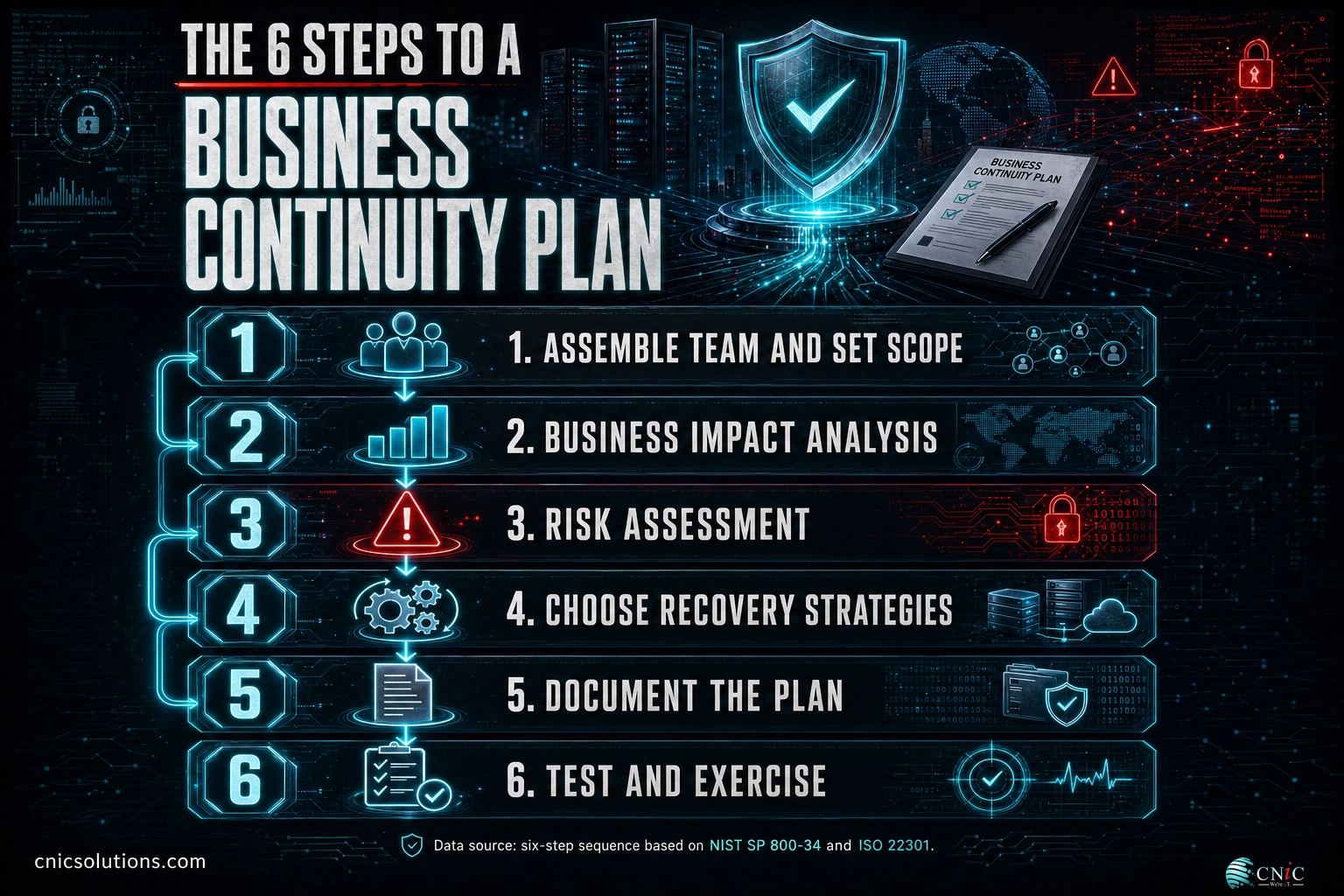
A business continuity plan is the written playbook that keeps your company running when something goes wrong, whether that is a ransomware attack, a server failure, a burst pipe, or a supplier that vanishes overnight. Building one comes down to six steps: assemble a team and set the scope, run a business impact analysis, assess your risks, choose recovery strategies that hit real recovery targets, document the plan so anyone can follow it, and test it. This guide walks through each step in order, with the specifics a small or midsize business needs to produce a plan that works under pressure, not just one that satisfies an auditor.
Before You Begin
Spend a few minutes lining up the essentials so the work moves quickly:
- Who you need: an owner with real authority, plus people who know how each part of the business actually runs, operations, IT, finance, HR, and whoever talks to customers. Continuity planning fails when it is treated as an IT-only project.
- What to gather: a list of your core business processes, your key systems and where their data lives, your vendor and staff contact lists, and any existing backup or insurance documentation.
- Estimated time: two to six weeks for a first working plan covering your most critical processes. The business impact analysis takes the most effort.
- Skill level: business-owner or manager level. You do not need to be technical, but you do need honest input from the people who run each function.
- Frameworks to lean on: the U.S. government’s NIST SP 800-34 contingency planning guide and the international ISO 22301 standard both define the same core sequence used below. You do not have to certify against them to borrow their structure.
Key Takeaways
- Continuity is broader than backup. A backup restores data. A continuity plan keeps people, communications, suppliers, and processes moving while the technical recovery happens.
- The business impact analysis is the heart of the plan. It tells you which processes to protect first and sets the recovery time and recovery point targets that drive every later decision.
- Downtime is expensive and getting more so. In the Uptime Institute’s 2024 outage analysis, 54% of organizations said their most recent significant outage cost more than $100,000, and 16% said it topped $1 million.
- Match recovery spending to criticality. A process with a one-hour recovery target needs redundancy or disaster recovery as a service; a process that can wait a day may only need a good backup.
- An untested plan is a guess. Testing is the step most often skipped and the one that separates a document from a capability.
What’s in This Guide
- What a Business Continuity Plan Actually Is
- Step 1: Assemble the Team and Set the Scope
- Step 2: Run a Business Impact Analysis
- Step 3: Assess the Risks and Threats
- Step 4: Choose Recovery Strategies for Each Function
- Step 5: Document the Plan
- Step 6: Test and Exercise the Plan
- When to Call a Professional
- Troubleshooting Common Problems
- Maintain and Monitor
- Frequently Asked Questions
What a Business Continuity Plan Actually Is
A business continuity plan (BCP) is a documented set of procedures for keeping your critical operations running, or getting them back fast, when a disruption hits. It answers a simple question that is surprisingly hard under stress: if this part of the business stops, what do we do in the next hour, the next day, and the next week to keep serving customers and paying staff?
It helps to separate three terms that get used interchangeably. Business continuity is the widest: it covers people, facilities, communications, suppliers, and processes. A disaster recovery plan is the technical subset that restores IT systems and data. Incident response is the immediate reaction to a specific event, such as a cyberattack. The continuity plan is the umbrella that the other two live under.
Why formalize it? Because the cost of getting caught flat-footed keeps climbing. The IBM Cost of a Data Breach Report 2024 put the global average breach at $4.88 million, up 10% in a year, and found that 70% of breached organizations reported significant or very significant disruption to operations. A breach is only one of many triggers, but the pattern holds across all of them: the organizations that recover fastest are the ones that decided what to do before the disruption, not during it.
Myth: “We have backups, so we have a continuity plan.”
A backup is a copy of your data. A continuity plan is the set of decisions and procedures that turn that copy back into a working business: who declares an emergency, in what order systems come back, where staff work if the office is unusable, how you tell customers, and who has authority when the owner is unreachable. Backups are necessary and they are not sufficient. Plenty of companies with clean backups still lost days of revenue because nobody had decided who does what when the alarm goes off.
Source: NIST SP 800-34 Rev. 1, Contingency Planning Guide | ISO 22301:2019 business continuity standard | IBM Cost of a Data Breach Report 2024
1Step 1: Assemble the Team and Set the Scope
Before you analyze anything, decide who is doing this work and how far the plan reaches. A continuity plan written by one person in a vacuum will miss the operational detail that makes it usable.
What to do:
- Name an owner with authority. This person drives the project and, later, has the standing to declare an incident and activate the plan. Without a clear owner, continuity work stalls the moment day-to-day fires flare up.
- Build a small cross-functional team. Pull in people who genuinely know how operations, IT, finance, HR, and customer service run. They hold the details that determine whether a procedure is realistic.
- Get leadership sponsorship in writing. A short mandate from ownership secures the time and budget the work needs and signals that this is not optional.
- Define the scope. Agree on which locations, which business units, and which disruption scenarios the plan covers. A focused plan that fully protects your revenue-critical processes beats a sprawling one that covers everything shallowly.
Why this step matters: scope and ownership set the boundaries for every later decision. Skip them and the analysis balloons or stalls.
What success looks like: a named owner, a short team roster, a one-paragraph scope statement, and a signed-off mandate from leadership.
Source: NIST SP 800-34 Rev. 1, Contingency Planning Guide
2Step 2: Run a Business Impact Analysis
The business impact analysis (BIA) is the single most important part of the plan. It converts a vague sense of “everything matters” into a ranked, evidence-based list of what to protect first and how fast each thing must come back. If you read one companion piece before continuing, make it our full explainer on the business impact analysis.
What to do:
- List every business process, not systems, processes: taking orders, invoicing, payroll, fulfilling service tickets, and so on.
- Quantify the impact of losing each one over time. Estimate the cost per hour or per day in lost revenue, contractual penalties, regulatory exposure, and reputational damage. The cost usually rises the longer the outage runs.
- Rank the processes from most to least critical based on that impact.
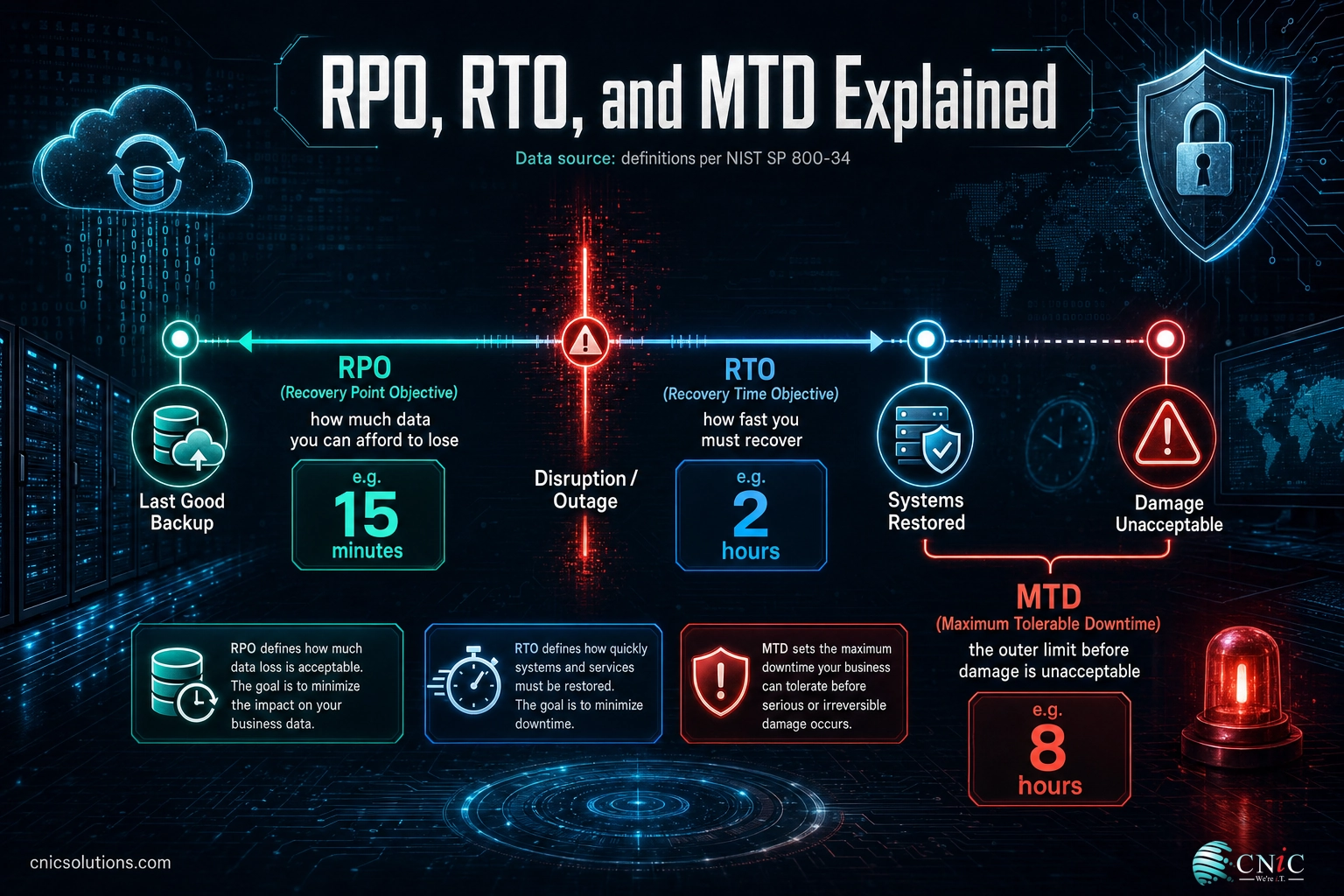
- Set recovery targets for the critical ones. The BIA produces three numbers that drive the rest of the plan, defined in NIST SP 800-34.
| Metric | What it answers | Example |
|---|---|---|
| MTD (Maximum Tolerable Downtime) | The longest a process can be down before the damage is unacceptable. | Order intake: 8 hours. |
| RTO (Recovery Time Objective) | How fast the process must be restored, inside the MTD. | Order intake: 2 hours. |
| RPO (Recovery Point Objective) | How much recent data you can afford to lose, which sets backup frequency. | Order intake: 15 minutes. |
Why this step matters: the RTO and RPO you set here decide how much you need to spend on recovery in Step 4. Guess them and you either overspend protecting things that can wait or underspend on the process that can sink you.
What success looks like: a ranked list of processes, each critical one carrying an MTD, an RTO, and an RPO your team agrees are realistic.
Source: NIST SP 800-34 Rev. 1, Contingency Planning Guide
3Step 3: Assess the Risks and Threats
The BIA tells you what matters. The risk assessment tells you what could go wrong. Together they focus the plan on the disruptions that are both likely and damaging.
What to do:
- Identify the threats to your critical processes: cyberattacks and ransomware, hardware and network failure, power and internet loss, fire and water damage, severe weather, supplier or cloud-provider failure, and the loss of key staff.
- Rate each threat by likelihood and by impact. A simple high, medium, low grid on both axes is enough for most businesses. The threats that score high on both are where your plan does its real work.
- Note existing controls already reducing each risk, such as offsite backups, a firewall, or a generator, so you are planning against the residual risk, not the raw one.
Because cyber incidents now sit near the top of most risk grids, it is worth grounding this step in a proper cybersecurity risk assessment rather than a gut feel about what attackers might do.
Why this step matters: planning for every conceivable hazard equally wastes effort. Ranking by likelihood and impact concentrates it where it pays off.
What success looks like: a short, ranked risk register that maps your top threats to the critical processes they endanger.
Common mistake: planning only for the dramatic disasters
Fires and hurricanes get the attention, but the outages that actually hit most businesses are mundane: a failed drive, a bad update, a ransomware click, a fiber cut, or a key employee out sick during a crunch. Weight your plan toward the frequent, boring disruptions, not just the rare catastrophic ones.
Source: Ready Business, FEMA continuity planning guidance
4Step 4: Choose Recovery Strategies for Each Function
Now you match a recovery approach to each critical process so it can hit the RTO and RPO you set in the BIA. This is where the plan turns from analysis into concrete investment, and where the cost of downtime justifies the spend.
The right strategy depends entirely on how fast the process has to come back. Faster recovery costs more, so you spend where the RTO is tight and economize where it is loose.
Typical monthly cost of protection rises sharply as the recovery target tightens (illustrative)
Directional relationship between recovery speed and cost. Set actual figures against your own RTO and RPO targets.
What to do: map each critical process to a strategy that meets its recovery targets.
- Tightest targets (minutes): redundant systems, real-time replication, or disaster recovery as a service (DRaaS), which keeps a standby copy of your environment ready to fail over.
- Moderate targets (hours): a warm standby, frequent backups to an alternate site, and cloud-hosted versions of key applications.
- Loose targets (a day or more): reliable offsite backups plus a documented restore procedure are often enough.
- People and workspace: plan remote-work access, an alternate location, and cross-training so one person’s absence does not stop a process.
- Manual workarounds: for some processes, a paper or phone fallback bridges the gap until systems return. Write these down too.
Why this step matters: a plan that names a recovery strategy for every critical process, tied to a real RTO and RPO, is what actually caps your downtime. A plan that stops at analysis does not.
What success looks like: every critical process has a named recovery strategy, an owner, and the resources (backup, standby, or workaround) already in place or budgeted.
Source: NIST SP 800-34 Rev. 1, Contingency Planning Guide | Uptime Institute Annual Outage Analysis 2024
See how CNiC backs up and recovers your critical systems
5Step 5: Document the Plan
A continuity plan is only as good as it is usable at 2 a.m. by a stressed employee who is not you. Write for that reader: plain language, clear ownership, and steps someone can follow without improvising.
What a complete plan document contains:
| Section | What it covers |
|---|---|
| Activation trigger and authority | What counts as an incident, who can declare one, and who leads if that person is unreachable. |
| Chain of command and roles | Named roles and backups for each, so responsibility never depends on one individual. |
| Contact trees | Staff, key vendors, insurer, bank, and IT provider contacts, kept current and stored offline. |
| Recovery procedures | Step-by-step actions per critical process, in priority order, with RTO and RPO noted. |
| Communications plan | What you tell staff, customers, and suppliers, through which channels, and who approves it. |
| Resource and location details | Where backups live, how to reach the alternate workspace, and how staff work remotely. |
Why this step matters: in an incident, people default to whatever is written and reachable. Ambiguity in the document becomes delay in the recovery.
What success looks like: a concise plan, an executive summary up front, and quick-reference checklists people can act on. Critically, keep at least one copy offline and offsite, because a plan stored only on the network you are trying to recover is no help during that outage.
Common mistake: a 90-page plan nobody can use
Length is not thoroughness. A plan so long that no one reads it fails exactly when it is needed. Lead with one-page activation checklists per scenario and push reference material to appendices. The test is simple: could a capable employee who has never seen it follow the first page and take the right first actions?
Source: Ready Business, FEMA continuity planning guidance
6Step 6: Test and Exercise the Plan
Testing is the step most often skipped, and it is the one that turns a document into a real capability. Every plan contains assumptions, and testing is how you find the wrong ones before an incident does.
What to do, from lightest to most rigorous:
- Tabletop exercise: gather the team, walk through a realistic scenario out loud, and check that roles, contacts, and procedures hold up. Cheap, fast, and it surfaces most gaps.
- Walkthrough or drill: physically confirm that specific pieces work, such as reaching the alternate site or logging in remotely.
- Functional recovery test: actually restore a system from backup and measure the true recovery time against its RTO. This is the test that most often exposes a backup that never worked or an RTO that was fiction.
Why this step matters: untested backups fail, contact lists go stale, and recovery times run longer than anyone estimated. You want to learn that in a drill, not during a live outage.
What success looks like: a completed exercise with a written list of what failed, owners assigned to fix each gap, and the next test on the calendar.
Source: Ready Business, FEMA training and testing guidance
When to Call a Professional
You can and should drive the business side of this plan yourself, nobody knows your processes better. The point where outside help usually pays off is the technical recovery layer: designing backups that actually meet your RPO, standing up failover or DRaaS that meets a tight RTO, and proving it all works under a real restore test.
That gap is expensive to get wrong. In the Uptime Institute’s 2024 survey, 54% of significant outages cost more than $100,000, and independent research from ITIC puts a single hour of downtime above $300,000 for most mid-size and larger organizations. Against numbers like those, a recovery setup that fails its first real test is not a small problem. A managed IT partner can design the recovery architecture to your RTO and RPO targets, run the restore tests on a schedule, and keep the plan current as your systems change, so the continuity plan you built does not quietly rot on a shared drive.
Get proactive managed IT support behind your continuity plan
Troubleshooting Common Problems
| Problem | What it points to | What to do |
|---|---|---|
| The project stalls after kickoff | No clear owner or leadership mandate | Assign one accountable owner and get a written sponsorship note from ownership (Step 1). |
| Everything is labeled “critical” | The BIA was skipped or rushed | Force ranking by quantified hourly or daily impact, then set RTO and RPO only for the true top tier (Step 2). |
| Recovery costs look unaffordable | Every process is treated as needing instant recovery | Loosen RTOs where the business can tolerate it and reserve hot-site or DRaaS spend for the few processes that need it (Step 4). |
| Nobody can find or follow the plan in a drill | The document is too long or stored only online | Add one-page activation checklists and keep an offline, offsite copy (Step 5). |
| The restore test fails or runs long | Backups were never validated end to end | Fix the backup configuration, retest until it meets the RPO and RTO, then schedule recurring tests (Step 6). |
Source: NIST SP 800-34 Rev. 1, Contingency Planning Guide
Maintain and Monitor
A continuity plan is a living document, not a one-time project. The business it describes keeps changing: new systems, new staff, new locations, new suppliers. A plan that is accurate today drifts out of date within months if nobody tends it.
- Review on a schedule and after change. Revisit the plan at least annually, and whenever you change systems, staff, sites, or suppliers, or after any real incident.
- Keep contact trees and vendor details current. Stale contacts are the most common and most avoidable failure during an activation.
- Fold in lessons from every test and incident. This is the Plan-Do-Check-Act cycle at the core of the ISO 22301 standard: each round makes the next recovery faster.
- Assign ownership of the upkeep, not just the writing. Continuity that has no standing owner reliably decays.
For most small and midsize businesses, this ongoing upkeep, testing, patching, monitoring, and revising, is exactly the work that slips when everyone is busy, right up until an incident makes it urgent. Building it into a managed service turns a recurring scramble into a routine that runs whether or not anyone remembers to think about it. Because so many incidents now start as security events, keeping the plan current goes hand in hand with keeping your defenses current.
Reduce the incidents that force a continuity plan into action
Source: ISO 22301:2019 business continuity standard
Frequently Asked Questions
What is the difference between a business continuity plan and a disaster recovery plan?
How long does it take to create a business continuity plan?
What should a business continuity plan include?
How often should a business continuity plan be tested and updated?
Does a small business really need a business continuity plan?
Methodology and Sources
This guide synthesizes the documented continuity-planning process from primary and authoritative sources. The six-step sequence, and the definitions of the business impact analysis, MTD, RTO, and RPO, follow the U.S. government’s NIST SP 800-34 Rev. 1 Contingency Planning Guide and the international ISO 22301:2019 business continuity standard. Downtime cost figures are attributed to their original sources: the “54% of outages cost more than $100,000” and “16% exceed $1 million” findings to the Uptime Institute Annual Outage Analysis 2024, and the “above $300,000 per hour” figure to ITIC’s Hourly Cost of Downtime research. The $4.88 million average breach cost and the 70% disruption figure come from the IBM Cost of a Data Breach Report 2024 (research conducted by Ponemon Institute). Small-business survival and testing guidance draws on FEMA’s Ready Business program.
Primary and authoritative sources: NIST SP 800-34 Rev. 1, ISO 22301:2019, Uptime Institute Annual Outage Analysis 2024, IBM Cost of a Data Breach Report 2024, Ready Business (FEMA).



related posts
Zero Trust Statistics for 2026: Adoption, Maturity, and Breach Impact
November 3, 2026Zero trust has become the default security strategy on paper, but not yet in practice. Okta's…
What Is ZTNA (Zero Trust Network Access)?
November 3, 2026Zero Trust Network Access (ZTNA) is a security service that grants a verified user access to…
What Is XDR (Extended Detection and Response) and How Does It Protect…
November 2, 2026Extended detection and response (XDR) is a security platform that collects and correlates threat data from…
What Is Zero Trust Security? A Guide for Small Businesses
November 2, 2026Zero Trust security is a cybersecurity model built on one rule: never trust, always verify. Instead…