

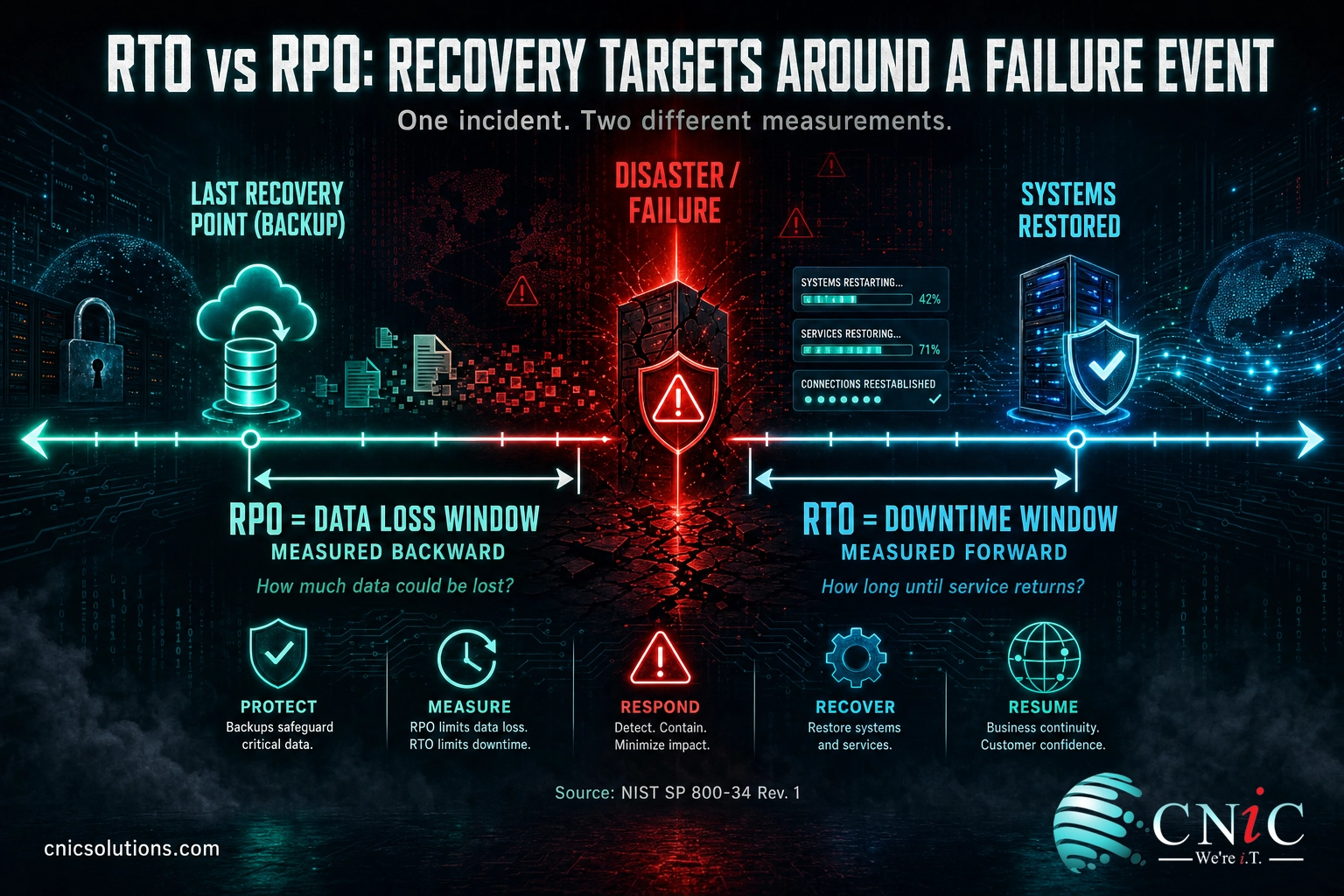
Short answer: RTO (Recovery Time Objective) is how long you can be down, measured forward from the moment of failure. RPO (Recovery Point Objective) is how much data you can lose, measured backward from that same moment to your last good recovery point. RTO is about downtime; RPO is about data loss. RTO shapes your recovery architecture and failover plan; RPO sets how often you back up or replicate. You need both, and they are set independently for each system.
When a server dies, ransomware detonates, or a data center loses power, two questions decide how much the incident costs you: how long until we are running again, and how much data did we just lose? Those are not the same question, and answering one does not answer the other. Recovery Time Objective and Recovery Point Objective are the two numbers that turn “we have backups” into a plan you can actually stake the business on. Get them wrong and you either overspend on protection you do not need, or discover mid-crisis that “recovered” still means a day of lost orders and a phone that will not stop ringing. This guide explains what each metric measures, why they point in opposite directions, and how to set both without guessing.
Key Takeaways
- RTO measures time, RPO measures data. RTO is the maximum acceptable downtime; RPO is the maximum acceptable amount of data loss, expressed as a span of time.
- They run in opposite directions from the failure. RTO counts forward (how fast you restore); RPO counts backward (how far back your last clean recovery point sits).
- They drive different investments. A tighter RTO buys standby infrastructure and failover; a tighter RPO buys more frequent backups or continuous replication.
- Your backup schedule is your real RPO. A once-a-day backup means up to 24 hours of potential data loss, whatever the target on paper says.
- Both live inside Maximum Tolerable Downtime. NIST defines RTO so that recovery plus data reprocessing fits within the total outage a process can survive.
What’s in This Guide
- RTO vs RPO at a Glance
- Understanding RTO (Recovery Time Objective)
- Understanding RPO (Recovery Point Objective)
- The Core Difference: Two Directions From One Moment
- What Each Metric Drives in Your Recovery Design
- The Real Cost of Getting Them Wrong
- How RTO and RPO Fit Inside Maximum Tolerable Downtime
- When to Tighten RTO vs When to Tighten RPO
- RTO vs RPO: The Full Comparison
- Putting RTO and RPO to Work Together
- Frequently Asked Questions
RTO vs RPO at a Glance
Both metrics come out of the same planning exercise, both are measured in units of time, and both answer a question about the same disaster. That surface similarity is exactly why they get confused. The difference is what they measure and which way they point. Here is the quick version before the detail.
RTO, the downtime metric
- Answers: how long can we be offline?
- Measured forward, from failure to systems restored
- Driven by recovery speed and failover design
- Reduced by standby infrastructure and automation
- Missed when recovery drags past the deadline
RPO, the data-loss metric
- Answers: how much data can we lose?
- Measured backward, from failure to last recovery point
- Driven by how often you back up or replicate
- Reduced by more frequent snapshots or continuous replication
- Missed when your last good copy is older than the target
Understanding RTO (Recovery Time Objective)
Recovery Time Objective is the clock on the outage. It is the maximum amount of time a system or process can be unavailable before the disruption starts doing unacceptable harm to the business. If your RTO for the order-processing system is four hours, then four hours after it goes down, you are officially into damage you decided in advance you could not accept.
The National Institute of Standards and Technology, in its contingency planning guide SP 800-34, defines RTO as “the overall length of time an information system’s components can be in the recovery phase before negatively impacting the organization’s mission or mission/business processes.” In plain terms: the deadline to be back up.
RTO is a forward-looking number. You start the stopwatch when the failure hits and stop it when users are working again. Everything that happens in between counts: detecting the problem, deciding to invoke the recovery plan, provisioning or failing over to replacement systems, restoring data, validating that everything works, and letting people back in. That is why an RTO is never just “how long does a restore take.” It is the whole sequence, and the slowest link sets the pace.
What a tight RTO demands: speed costs money and design. Cutting RTO from a day to an hour usually means pre-built standby systems, automated failover, and rehearsed runbooks rather than a manual rebuild from backup media. This is the layer a well-run backup and disaster recovery program is built to deliver, matching recovery speed to what each system is actually worth.
Source: NIST Computer Security Resource Center, Recovery Time Objective (SP 800-34 Rev. 1)
Understanding RPO (Recovery Point Objective)
Recovery Point Objective is the clock on your data. It is the maximum amount of data, measured as a span of time, that you can afford to lose in an incident. An RPO of one hour means that after a failure you must be able to recover to a point no more than one hour before it happened, so at most you lose one hour of work. An RPO of 24 hours means you could lose a full day.
NIST defines RPO succinctly as “the point in time to which data must be recovered after an outage.” The key word is point. RPO marks a spot in the past, the most recent moment you can reliably restore to, and the gap between that spot and the failure is the data you accept losing.
RPO is a backward-looking number, and here is the part that trips people up: your RPO is really set by how often you protect your data, not by the target you write down. If you back up nightly, your last clean copy at the moment of a crash could be almost 24 hours old, which means your true RPO is 24 hours regardless of any lower figure on the plan. To shrink RPO you have to protect data more often: hourly snapshots, continuous data protection, or live replication to a second location. The target and the mechanism have to match.
Source: NIST Computer Security Resource Center, Recovery Point Objective (SP 800-34 Rev. 1)
The Core Difference: Two Directions From One Moment
Picture the failure as a single point on a timeline. RPO and RTO are the two brackets on either side of it, and they never overlap.
To the left, in the past, sits your RPO. It stretches back from the failure to the last moment you can restore to. The wider that bracket, the more data you lose. To the right, in the future, sits your RTO. It stretches forward from the failure to the moment you are running again. The wider that bracket, the longer you are down. One measures what you already lost the instant the lights went out; the other measures what it costs you every minute after.
This is the cleanest way to keep them straight: RPO is about the past (data already written), RTO is about the future (time still ticking). A single incident has both a data-loss cost and a downtime cost, and these two metrics put a target on each. That is also why you cannot substitute one for the other. Knowing you will be back in an hour tells you nothing about how much data you lost, and knowing you lost only five minutes of data tells you nothing about how long the recovery will take.
Myth: a low RPO means you will also recover quickly. They are unrelated. RPO only tells you how fresh your recovered data will be, not how long it takes to get systems running. You can hold a near-zero RPO through continuous replication and still face a multi-hour RTO if there is no standby environment ready to run that data. A recovered database sitting on hardware you have not stood up yet is data you did not lose and a business still offline. Set and test both numbers separately, because one gives you no guarantees about the other.
What Each Metric Drives in Your Recovery Design
The most useful thing about separating RTO and RPO is that they push on completely different parts of your recovery plan, which means they carry different price tags and let you spend where it actually matters.
RPO drives your data-protection frequency. Because RPO is set by how recent your last recovery point is, lowering it means capturing data more often. Nightly backups support an RPO measured in a day. Backups every few hours support an RPO of a few hours. Getting to minutes or seconds means continuous data protection or synchronous replication that writes every change to a second copy as it happens. Each step down in RPO is a step up in how much data movement, storage, and bandwidth you pay for.
RTO drives your recovery architecture. Because RTO is set by how fast you can stand systems back up, lowering it means having replacement capacity closer to ready. A long RTO can be met by restoring from backup onto rebuilt hardware. A short RTO needs a warm or hot standby, automated failover, and often a second site or cloud environment already provisioned. Approaches like disaster recovery as a service exist precisely to compress RTO, spinning up replicated systems in a provider’s cloud on demand. If aggressive recovery targets are on the table, it is worth understanding how disaster recovery as a service compresses recovery time before you commit to a number.
Seeing them as separate levers is what keeps a recovery budget sane. You do not have to buy near-zero everything. You buy the RPO your data-loss risk justifies and the RTO your downtime risk justifies, per system, and let the less critical systems ride cheaper targets. Aligning those choices with the rest of your cloud and replication strategy is usually where the cost and the capability finally line up.

The Real Cost of Getting Them Wrong
RTO and RPO are not paperwork. They are the difference between an incident that costs a bad afternoon and one that costs six figures. The price of downtime has been climbing, even as outages themselves get rarer, because so much of what a business does now stops the moment its systems do.
In the Uptime Institute’s 2024 Annual Outage Analysis, 54% of operators said their most recent significant, serious, or severe outage cost more than $100,000, and 20%, one in five, said it topped $1 million. Uptime attributes the rising cost to the growing criticality of digital services, along with inflation, labor and hardware costs, SLA penalties, and longer recovery times. That last factor is RTO in the wild: the longer you stay down, the more each of those costs compounds.
Cost of the Most Recent Major Outage (2024)
Share of operators reporting each cost level for their most recent significant, serious, or severe outage. Source: Uptime Institute Annual Outage Analysis 2024.
An RTO that is too loose is what turns a technical hiccup into that kind of number. An RPO that is too loose is quieter but just as damaging: the systems come back, everyone relaxes, and then the missing orders, unrecorded payments, and lost case notes surface over the following days. Both failures share a root cause, which is a recovery plan whose targets were never matched to what the business could actually absorb.
Source: Uptime Institute Annual Outage Analysis 2024
How RTO and RPO Fit Inside Maximum Tolerable Downtime
RTO and RPO do not float free. They sit inside a larger figure that most quick explainers skip: Maximum Tolerable Downtime, or MTD. MTD is the total outage a business process can endure before the harm is unacceptable, full stop. It is the ceiling, and RTO has to fit under it.
NIST is explicit about the relationship. The recovery time is not the only thing that eats into MTD; after systems are technically back, there is often work to reprocess, validate, and reconcile data before the process is genuinely operational again. RTO plus that reconstitution time has to fit within MTD. Put numbers on it: if a process has an MTD of 24 hours and it takes 6 hours to validate and reprocess data once systems are restored, then the RTO cannot be 24 hours. It has to be 18 or less, so the whole sequence still lands inside the tolerable window.
How the numbers nest. Start from the business impact, not the technology. A business impact analysis produces the MTD for each critical process, the point past which the damage is unacceptable. RTO is then set below MTD, leaving room for data reprocessing. RPO is set separately, based on how much data loss that same process can absorb. MTD is the ceiling; RTO and RPO are the two targets you manage underneath it.
This ordering matters because it stops recovery targets from being pulled out of the air. The numbers come from the impact on the business, established in a business impact analysis, and flow down into the technical objectives. Deciding those thresholds well is a leadership and strategy question as much as a technical one, which is why it often sits with a virtual CIO who can weigh business risk against IT investment rather than being left to whoever runs the backups.
Source: NIST SP 800-34 Rev. 1, Contingency Planning Guide for Federal Information Systems
When to Tighten RTO vs When to Tighten RPO
Because you set the two independently, the practical skill is knowing which one to spend on for a given system. The answer comes from the nature of the work, not a blanket policy.
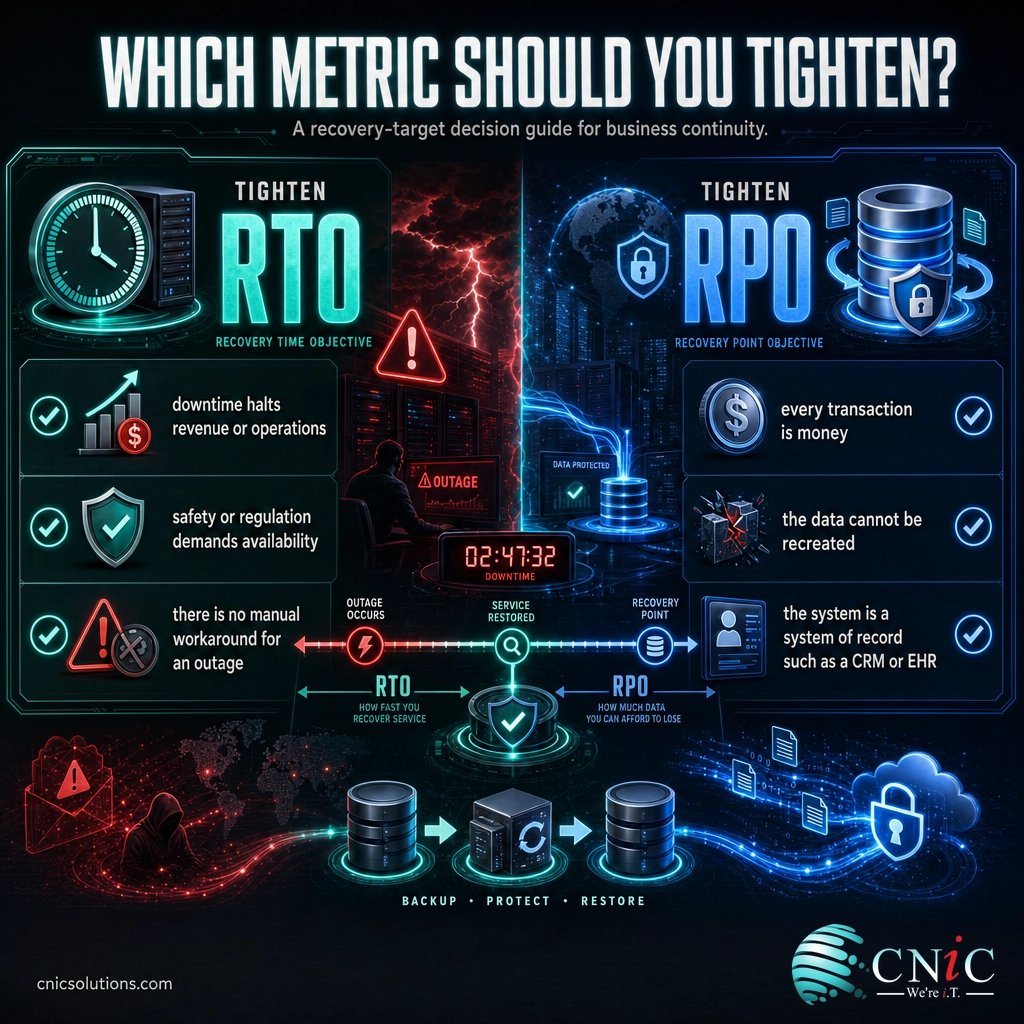
Tighten RTO when being offline is the main risk. Reach for a shorter recovery time when downtime itself halts revenue or operations, when customers or staff cannot work around an outage, or when regulation or safety demands availability:
- A hospital or clinic whose clinical systems must be available for patient care and compliance, where hours offline is not an option.
- A logistics or manufacturing operation where a stopped system stops trucks or a production line, and every hour down has a direct dollar cost.
- An e-commerce or booking business that loses sales for every minute the storefront is dark, no matter how current the data is.
Tighten RPO when losing data is the main risk. Reach for a shorter recovery point when each transaction or record is hard or impossible to recreate, and re-entering a few hours of work is unacceptable:
- A bank or payment processor where a lost transaction is lost money and a compliance problem, so the acceptable data loss is close to zero.
- A financial or accounting firm mid-close, where hours of un-backed-up entries would be painful or impossible to reconstruct.
- Any system of record, such as a CRM, EHR, or case-management platform, where the data is the asset and re-keying it is not realistic.
Most organizations land on a blend: aggressive on both for the handful of systems that run the business, relaxed on both for the archives and internal tools that can wait. The mistake is applying one target everywhere, which either overspends protecting things that do not need it or under-protects the systems that do.
RTO vs RPO: The Full Comparison
The head-to-head, summarized. Remember these are complementary, not competing: a complete plan sets a deliberate value for each, per system.
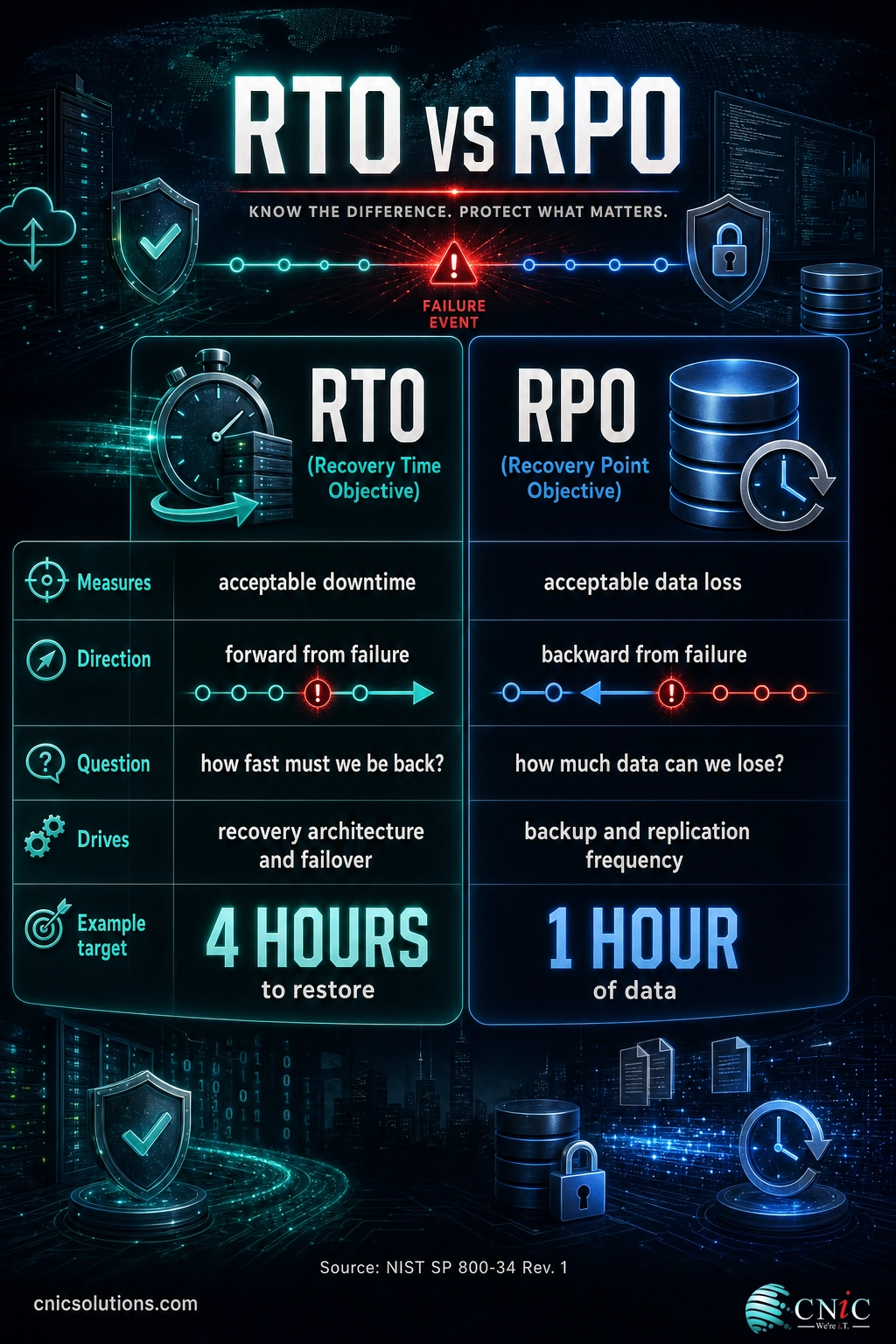
| Dimension | RTO (Recovery Time Objective) | RPO (Recovery Point Objective) |
|---|---|---|
| What it measures | Acceptable downtime | Acceptable data loss |
| Unit | Time (minutes to days) | Time (minutes to days) of data |
| Direction from failure | Forward, to systems restored | Backward, to last recovery point |
| Question it answers | How fast must we be back? | How much data can we lose? |
| Primarily driven by | Recovery architecture and failover | Backup and replication frequency |
| Lowered by | Standby systems, automation, DRaaS | More frequent snapshots, continuous replication |
| Missed when | Recovery runs past the deadline | Last clean copy is older than the target |
| Governed by | Sits inside Maximum Tolerable Downtime | Set from data-loss tolerance in the BIA |
Putting RTO and RPO to Work Together
RTO and RPO are two answers to one event, and a recovery plan is not finished until both are set, matched to real business impact, and tested. The final picture is not “which metric matters more” but “what does each of our systems need on both axes, and can we actually hit those numbers when it counts?”
The sequence that gets it right runs top-down. Start with a business impact analysis to find the Maximum Tolerable Downtime and the data-loss tolerance for each critical process. Set RTO under the MTD, leaving room for reprocessing. Set RPO from the data-loss tolerance. Then build the mechanisms to hit them, backup frequency for the RPO, recovery architecture for the RTO, and, crucially, test the whole thing so the numbers on paper are numbers you can actually deliver. An untested RTO is a guess, and an unverified backup is an RPO you only find out about during the disaster. The natural next step once your targets are set is to fold them into a written, testable plan, which is what a full step-by-step disaster recovery plan is for.
If your current backups were set up without anyone ever writing down an RTO or an RPO, that is the gap to close first, because it means no one has decided what “recovered” is supposed to mean. Putting real targets on downtime and data loss, and proving you can meet them, is the difference between hoping the backups work and knowing they do.
Set RTO and RPO targets you can actually meet, get a backup and recovery assessment
Frequently Asked Questions
What is the difference between RTO and RPO?
Is RTO or RPO more important?
What does a 4-hour RPO actually mean?
How do RTO and RPO relate to Maximum Tolerable Downtime (MTD)?
Can you have a low RTO but a high RPO, or the other way around?
About This Guide and Sources
The definitions of Recovery Time Objective and Recovery Point Objective, and the relationship between RTO, data reprocessing, and Maximum Tolerable Downtime, follow the National Institute of Standards and Technology’s Contingency Planning Guide, NIST SP 800-34 Revision 1, and the corresponding entries in the NIST Computer Security Resource Center glossary. Outage cost figures (54% of most recent major outages costing more than $100,000, and 20% costing more than $1 million) are from the Uptime Institute’s Annual Outage Analysis 2024. The example RTO, RPO, and MTD values used throughout are illustrative and for explanation only; real targets should be set for each system through a business impact analysis specific to your organization. No figure in this article is presented as a guarantee of recovery performance for any particular environment.
Sources: NIST SP 800-34 Rev. 1, Contingency Planning Guide; NIST CSRC glossary: Recovery Time Objective; NIST CSRC glossary: Recovery Point Objective; Uptime Institute Annual Outage Analysis 2024.



related posts
Security Awareness Training for Employees: A Complete Guide
September 24, 2026Security awareness training for employees is a continuous program that teaches your staff to recognize and…
Patch Management Best Practices for Businesses: 10 Steps That Actually Reduce Risk
September 23, 2026Patch management is the disciplined process of finding, testing, and deploying software updates so known vulnerabilities…
Remote Work IT Setup: A Complete Guide for Small Businesses
September 23, 2026Setting up IT for a remote or hybrid team is no longer a temporary arrangement, it…
OKRs vs. KPIs: What’s the Difference?
September 22, 2026An OKR (Objective and Key Results) is a goal-setting framework that pairs an ambitious objective with…