

Data loss prevention (DLP) is a set of tools and policies that detect and stop sensitive information from leaving your organization without authorization. It monitors data across endpoints, networks, and cloud apps, then blocks, alerts on, or encrypts risky transfers. DLP guards against both deliberate theft and everyday accidental leaks.
Most data does not leave a business through a dramatic hack. It leaves through a misaddressed email, a file dropped into a personal cloud drive, or a spreadsheet of customer records copied to a USB stick. Data loss prevention is the control that watches for those moments and steps in before the information is gone. This guide explains what DLP is in plain language, how it works, how it differs from backup, and why it has become a baseline safeguard for businesses that handle sensitive data.
Key Takeaways
- DLP stops sensitive data from leaving your organization without permission, whether the cause is malicious theft or an honest mistake.
- It works in three stages: discover and classify your sensitive data, monitor how it moves, and enforce policies that allow, block, encrypt, or alert.
- DLP is not backup. Backup restores data after it is lost or deleted; DLP prevents data from leaking out in the first place. A complete strategy needs both.
- There are three main types: network DLP, endpoint DLP, and cloud DLP. Most businesses need all three to cover how work actually happens today.
- The biggest driver is human error. Because most incidents are accidental, DLP earns its place by catching the routine mistakes that policies alone cannot prevent.
What’s in This Guide
How Data Loss Prevention Works
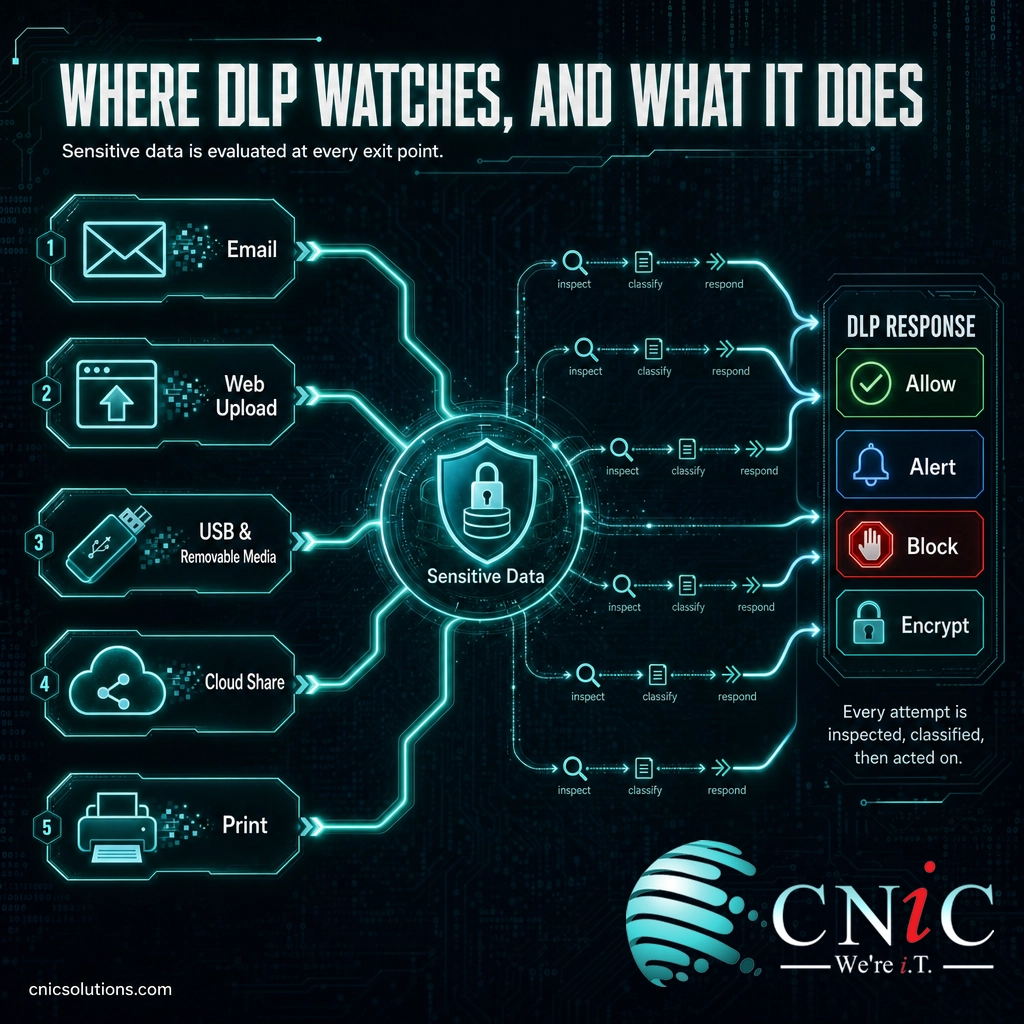
DLP is often pictured as a single wall around your data, but it works more like a diligent mailroom. Every package trying to leave the building gets inspected. If it contains something sensitive and the sender does not have clearance to ship it, the package is held, flagged, or sealed before it goes out the door. DLP applies that same inspection to digital information, automatically, across every exit your data could use.
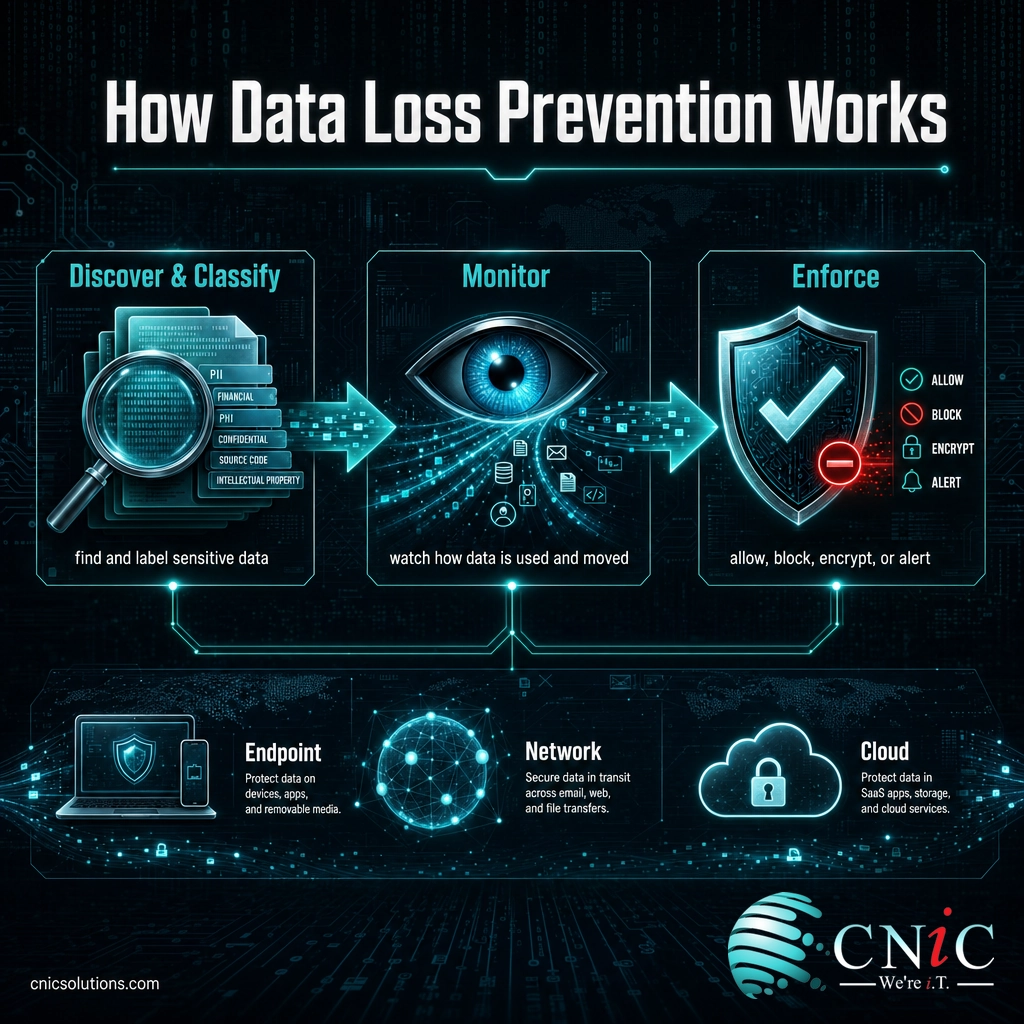
Under the hood, a DLP system runs a repeatable three-stage process:
- Discover and classify. First, DLP finds where sensitive data lives and labels it. It scans files, databases, email, and cloud storage, using patterns and rules to recognize things like Social Security numbers, credit card numbers, health records, or documents marked confidential. You cannot protect what you have not identified, so classification comes first.
- Monitor. Once data is classified, DLP watches how it is used and where it tries to go: attached to an email, uploaded to a website, copied to a USB drive, printed, or shared from a cloud app. It reads both the content (what the data is) and the context (who is moving it, to where, and how).
- Enforce. When an action matches a policy, DLP responds automatically. Depending on the rule, it can allow the action, block it outright, quietly log it, alert a security team, prompt the user to justify it, or force the file to be encrypted first. The response fits the risk.
This is the core of what makes DLP different from a policy written in a handbook. A policy asks people to do the right thing. DLP enforces the rule at the exact moment it matters, whether the person made an honest mistake or a deliberate choice.
Source: NIST: Data Loss Prevention (CSRC Glossary)
DLP vs. Backup and Disaster Recovery
This is the single most common point of confusion, and it is easy to see why: both DLP and backup contain the words “data loss.” But they solve opposite problems, and mixing them up leaves a real gap in your defenses.
Data loss prevention keeps sensitive data from getting out. It is about confidentiality and control: stopping leaks, theft, and accidental exposure. Backup and disaster recovery get your data back. They are about availability: restoring information after it is deleted, corrupted, encrypted by ransomware, or wiped out by a hardware failure or disaster.
| Data Loss Prevention (DLP) | Backup & Disaster Recovery | |
|---|---|---|
| Problem it solves | Data leaving without authorization | Data being lost, deleted, or destroyed |
| Core goal | Confidentiality and control | Availability and recovery |
| When it acts | Before data leaves (prevention) | After data is lost (restoration) |
| Typical trigger | An email, upload, or copy of sensitive data | Deletion, corruption, ransomware, outage |
| A win looks like | A leak that never happens | Files restored to a point in time |
A useful way to hold the two apart: backup answers “can we get our data back?” while DLP answers “can we stop our data from getting out?” You need both, because they cover different failure modes. Ransomware is the clearest example of why. Solid backup and disaster recovery lets you restore encrypted files without paying, while DLP helps stop attackers from stealing a copy of that data to extort you a second time.
Myth: “We have backups, so our data is covered.”
Backups are essential, but they only help after data is lost or locked. They do nothing to stop a departing employee from copying your client list, or a staffer from emailing a patient file to the wrong address. Those are leaks, not losses, and a backup will never catch them. Covering only one side leaves the other wide open.
Source: CISA: Cybersecurity Best Practices
The Three Types of DLP
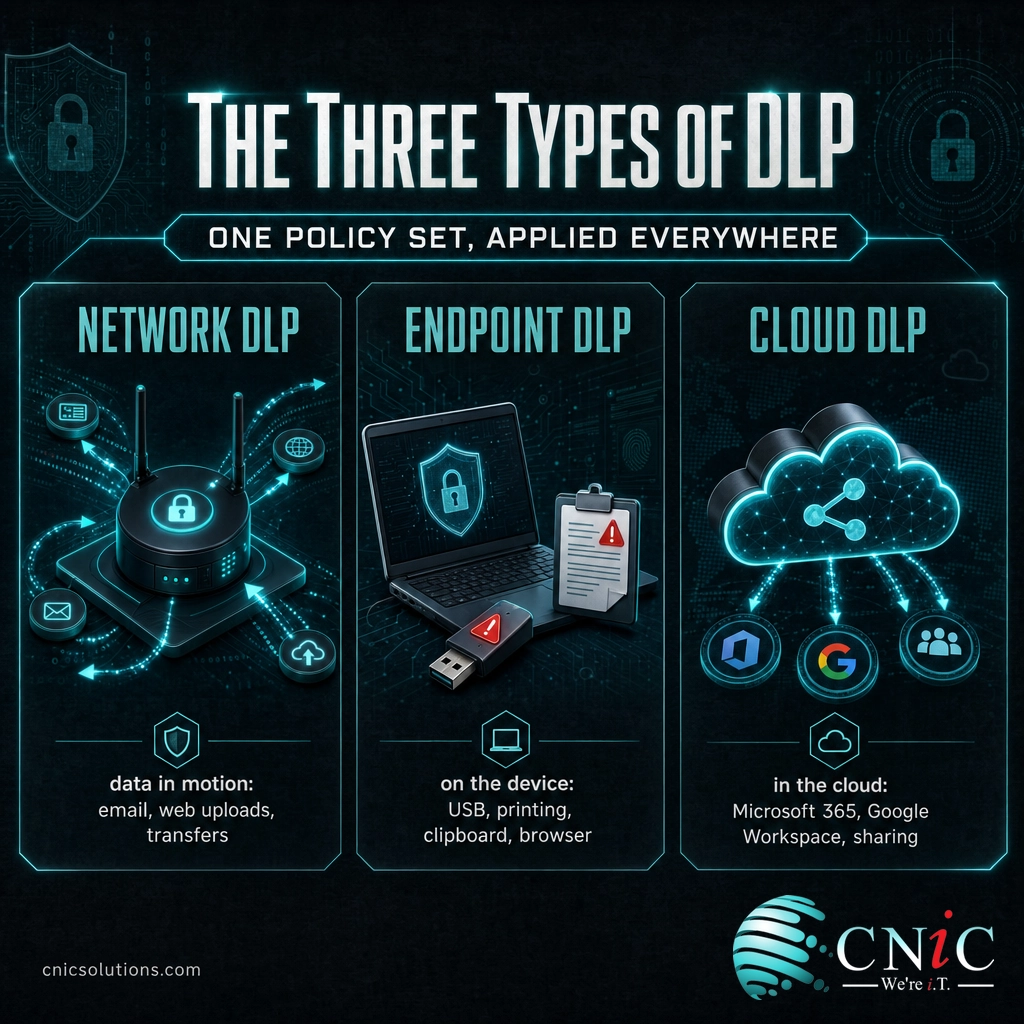
DLP is not one product but a capability that has to reach data wherever it lives and moves. In practice, that breaks down into three types, usually deployed together and managed from one console.
Network DLP
Network DLP monitors data in motion across your network: outbound email, web uploads, file transfers, and messaging traffic. It inspects what is leaving through the corporate network and enforces policy at that boundary, for example blocking an attempt to email a file full of credit card numbers to an outside address. It is the traditional starting point and covers data as it crosses the edge of your environment.
Endpoint DLP
Endpoint DLP runs as an agent directly on laptops, desktops, and other devices. This matters because so much data movement never touches the corporate network: copying files to a USB drive, printing a document, using the clipboard, or uploading through a personal browser session at home. With remote and hybrid work now standard, endpoint coverage has become essential, because the device is often the real perimeter.
Cloud DLP
Cloud DLP protects data inside cloud applications and storage, such as Microsoft 365, Google Workspace, and file-sharing platforms. It scans documents at rest in the cloud, watches how they are shared, and flags risky actions like a confidential file set to “anyone with the link.” As business data has shifted into SaaS apps, cloud DLP has moved from optional to central.
The point is coverage. Protecting the network but not the endpoint means a USB stick walks your data out the door. Protecting endpoints but not the cloud means a public share link exposes it anyway. Modern DLP works because it applies one consistent set of policies across all three channels at once.
Source: NIST: Data Loss Prevention (CSRC Glossary)
Why DLP Matters for Your Business
DLP used to be seen as an enterprise concern. That has changed, for three practical reasons: the cost of a leak, the fact that most leaks are accidental, and the growing list of regulations that expect data to be actively protected.
Those numbers point to the same conclusion. A breach is expensive, most incidents start with an ordinary human action rather than a sophisticated attack, and the damage grows the longer it goes unnoticed. DLP addresses all three: it targets the accidental leaks that make up the bulk of incidents, and it surfaces suspicious data movement early, before a slow leak becomes a costly, reportable event. For a fuller picture of the financial stakes, see our breakdown of the average cost of a data breach.
There is also a compliance dimension that is not optional for many businesses. Frameworks that govern regulated data, including HIPAA for health information, PCI-DSS for payment cards, and SOC 2 for service providers, expect organizations to control how sensitive data is accessed and shared. DLP provides both the enforcement and the audit trail that demonstrate that control is real, not just written down. When encryption is the remediation a policy calls for, DLP can trigger it automatically; our guide on how data encryption works explains that piece in depth.
Protect your sensitive data with managed cybersecurity
Source: IBM: Cost of a Data Breach Report 2025 | Verizon: 2025 Data Breach Investigations Report
How to Get Started with DLP
DLP delivers value quickly, but only if it is rolled out in the right order. Turning on aggressive blocking rules on day one is the fastest way to frustrate staff and get the tool switched off. A sound approach looks like this:
- Know your data. Start by finding and classifying the sensitive information you actually hold: customer records, financial data, intellectual property, regulated data. This inventory is the foundation for every policy that follows.
- Define clear policies. Decide what should and should not be allowed to leave, and through which channels. Tie the rules to real risks and to any compliance obligations you carry.
- Begin in monitor mode. Run DLP in an observe-only mode first. You learn how data really flows in your business, and you find the legitimate workflows a blanket block would break, before you enforce anything.
- Tune, then enforce. Use what monitoring reveals to refine the rules, cut false positives, and only then switch on active blocking for the highest-risk actions.
- Manage it over time. Data, staff, apps, and regulations all change. DLP is not a one-time install; it needs ongoing review, tuning, and response to the alerts it raises.
That last point is where most DLP projects succeed or stall. The technology is capable, but it needs someone to configure it correctly, watch what it reports, and adjust as the business evolves. For many small and midsize businesses, that ongoing attention is exactly what a managed IT and security partner provides, so DLP becomes protection you can rely on rather than a tool that sits unused. A Virtual CIO can also fold DLP into a broader data protection and compliance strategy rather than treating it as an isolated product.
Get DLP set up and managed by an IT partner
Build DLP into a Virtual CIO data strategy
Related Terms
- Data exfiltration: The unauthorized transfer of data out of an organization, whether by an attacker or an insider. Preventing it is DLP’s central job.
- Data classification: The practice of labeling data by sensitivity (for example public, internal, confidential) so protections can be applied accordingly. It is the first step in any DLP program.
- PII (personally identifiable information): Data that can identify a person, such as names, Social Security numbers, or account details. It is one of the primary data types DLP is configured to protect.
- Insider threat: A risk that comes from within the organization, whether malicious or accidental. Because most data loss is internal, DLP is a key control against it.
- Shadow IT: Apps and services employees use without IT approval, such as personal cloud drives. These are common leak channels that cloud and endpoint DLP are designed to catch.
- Data encryption: Scrambling data so only authorized parties can read it. DLP often triggers encryption as an automatic response to a risky transfer, turning a would-be leak into unreadable ciphertext.
- Endpoint: Any device that connects to your network, such as a laptop or phone. Endpoint DLP runs directly on these devices to control data at the source.
Frequently Asked Questions
What is data loss prevention in simple terms?
What is the difference between DLP and data backup?
What are the three main types of DLP?
Does a small business really need DLP?
How does DLP work?
Sources
This explainer grounds its definition and technical claims in primary sources. The definition of data loss prevention follows the NIST Computer Security Resource Center glossary. Breach cost and lifecycle figures ($4.44 million average cost; 241-day average time to identify and contain) come from IBM’s Cost of a Data Breach Report 2025. The share of breaches involving a human element (roughly 60%) comes from the Verizon 2025 Data Breach Investigations Report. Data protection best practices align with CISA guidance. The three-type model (network, endpoint, cloud) and the discover-monitor-enforce process reflect established, standards-based DLP concepts.
Primary and authoritative sources: NIST CSRC Glossary: Data Loss Prevention, IBM Cost of a Data Breach Report 2025, Verizon 2025 Data Breach Investigations Report, CISA Cybersecurity Best Practices.



related posts
What Is FinOps? A Guide to Managing and Optimizing Cloud Costs
October 19, 2026FinOps is an operational framework and cultural practice for managing and optimizing cloud costs by bringing…
What Is Endpoint Security? How It Protects Your Business Devices
October 19, 2026Endpoint security is the practice of protecting the devices that connect to your network, such as…
What Is Encryption in Cybersecurity?
October 18, 2026Encryption in cybersecurity is the process of scrambling readable data into an unreadable code that only…
What Is DNS? How the Internet’s Address Book Works
October 18, 2026DNS (Domain Name System) is the internet's address book. It translates the human-friendly domain names you…