

SD-WAN (software-defined wide area network) is a way of building a business network that uses software to route traffic intelligently across multiple internet and private connections at once. A central controller sends each application over the best available path in real time, improving performance and reliability while lowering the cost of connecting several locations.
For years, connecting offices, data centers, and now cloud applications meant buying expensive private circuits and managing each router by hand. As business moved to the cloud and remote work became permanent, that old model started to strain. SD-WAN is the response: a software layer that treats every connection you have as one flexible pool and automatically routes each application over the best path. This guide explains what SD-WAN is, how it works in plain language, how it compares to MPLS, and what it actually means for a growing business.
Key Takeaways
- SD-WAN separates your network’s “brains” from its hardware. Software decides how traffic flows, so the network can be managed centrally instead of router by router.
- It uses every connection at once. MPLS, fiber, broadband, and cellular are bundled into one virtual overlay, and traffic is steered to the best link for each application.
- It is application-aware. A video call or a cloud app can be prioritized and rerouted automatically the instant a link degrades, without dropping the session.
- SD-WAN and MPLS are not the same thing. MPLS is a transport you buy; SD-WAN is the software that runs over any transport, including MPLS.
- SD-WAN is not automatically full security. It encrypts traffic between sites, but complete protection pairs it with firewalls and cloud security, the model known as SASE.
What’s in This Guide
How SD-WAN Works
A traditional wide area network routes traffic based on fixed rules programmed into hardware at each site. If the primary circuit is congested, traffic still takes it, because the router has no easy way to know a better path exists or to switch on its own. SD-WAN changes that by separating the decision-making “brains” of the network from the physical boxes, and moving those decisions into centrally managed software.
Think of it like a smart navigation app for your company’s data. An old paper map always sends you down the same road, even when it is jammed. A live navigation app sees traffic on every route and reroutes you to whichever one is fastest right now. SD-WAN does the same thing for network traffic, continuously, and per application.
In practice, it works in a few clear steps:
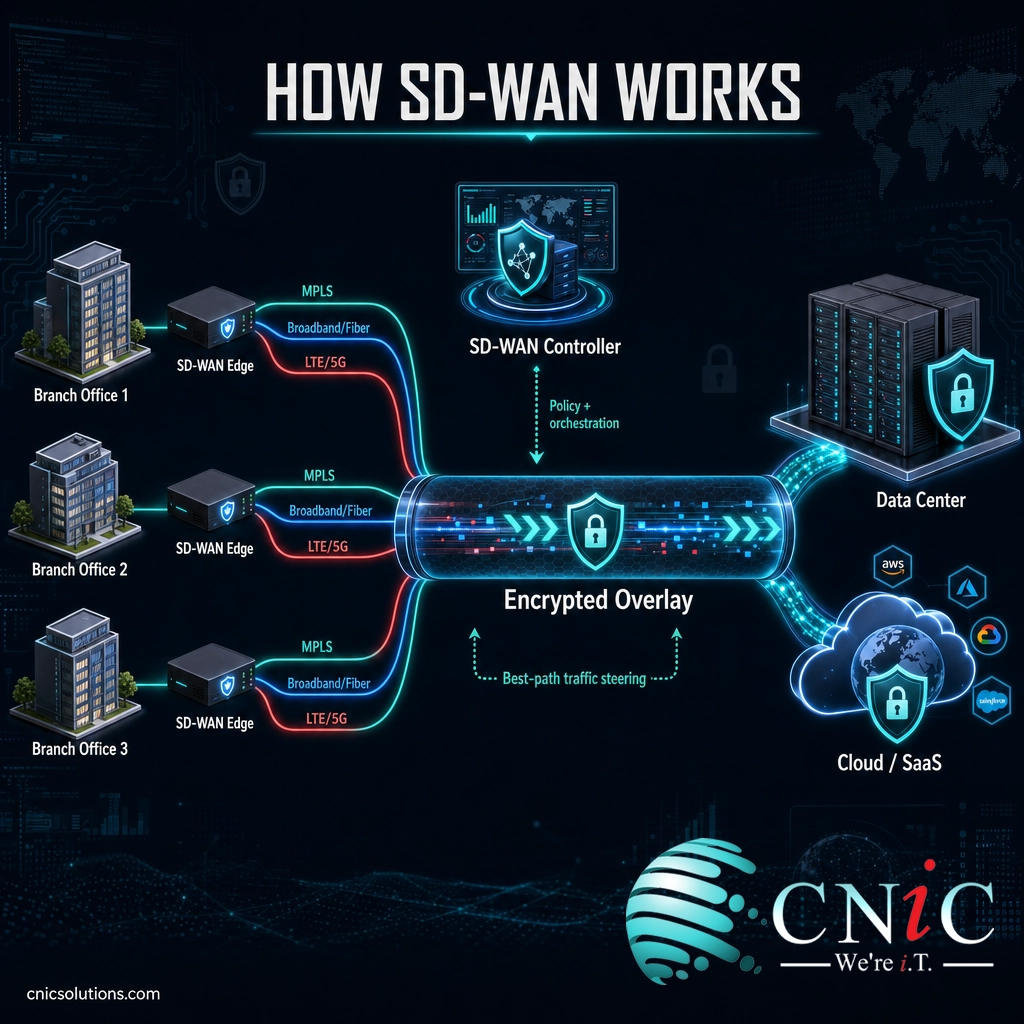
- An SD-WAN edge device sits at each location. This appliance (physical or virtual) is the on-ramp to the network at every office, branch, or data center.
- All available connections are bundled into one virtual overlay. MPLS, fiber, cable broadband, and cellular (LTE or 5G) are combined into a single logical network rather than managed as separate, siloed links.
- A central controller applies business policies. From one dashboard, an administrator sets rules such as “voice and video get top priority” or “guest Wi-Fi never touches the private circuit.” Those policies push out to every site at once.
- Traffic is matched to the best path, per application, in real time. The system constantly measures each link for latency, jitter, and packet loss, then sends each application over the connection best suited to it at that moment.
- Failover happens automatically. If a link degrades or drops, traffic shifts to a healthy connection instantly, often without the user noticing a call or session ever hiccuped.
- Everything is encrypted. Traffic moving between sites travels through encrypted tunnels, so data crossing the public internet stays private.
The formal definition backs this up. In 2019, the industry body MEF published the first global standard for SD-WAN, describing it as an application-aware service that uses policies to direct application flows over multiple underlying networks, regardless of the transport technology beneath.
Source: MEF: Industry’s First SD-WAN Standard (MEF 70) | NIST: Software-Defined Networking
SD-WAN vs. MPLS: The Comparison That Matters
The single most common point of confusion is how SD-WAN relates to MPLS, so it is worth settling directly. They are not competitors in the way people assume. MPLS is a type of connection you buy from a carrier. SD-WAN is software that manages connections, including MPLS. One is a road; the other is the traffic-routing intelligence that decides which roads to use.
MPLS (Multiprotocol Label Switching) is a private, carrier-managed transport known for reliable, predictable performance between fixed sites. Its weaknesses are cost, long provisioning times, and the fact that it was designed to connect offices to a data center, not offices to dozens of cloud applications. SD-WAN was built for exactly the world MPLS struggles with: cloud-first, multi-connection, and change-heavy.
| Factor | Traditional MPLS WAN | SD-WAN |
|---|---|---|
| What it is | A private transport service you buy | A software layer that runs over any transport |
| Connections used | Usually one private circuit per site | Many at once: MPLS, fiber, broadband, cellular |
| Traffic routing | Fixed, set at the hardware | Dynamic and application-aware, chosen in real time |
| Cloud and SaaS traffic | Often backhauled through a data center first | Sent directly to the cloud over the best path |
| Cost per megabit | High | Lower, by adding cheaper broadband and fiber |
| New-site setup | Weeks to months to provision a circuit | Days, using existing internet connections |
| Management | Site by site, often carrier-dependent | Centralized, from a single dashboard |
The practical takeaway: this is rarely an all-or-nothing choice. Many businesses run a hybrid, keeping MPLS for a handful of latency-sensitive sites while letting SD-WAN add affordable broadband everywhere and balance traffic across both.
Myth: “SD-WAN makes my network secure by default.”
SD-WAN encrypts the traffic that travels between your sites, which is genuinely valuable. But encryption in transit is not the same as complete security. SD-WAN on its own does not inspect traffic for threats, filter malicious websites, or protect a laptop working from a coffee shop. That is why the industry pairs SD-WAN with cloud-delivered security into a single framework called SASE (Secure Access Service Edge). Treat SD-WAN as the connectivity foundation, then build security on top of it, not as a replacement for a firewall or endpoint protection.
Source: MEF: SD-WAN Service Standards | CISA: Cybersecurity Best Practices

Why SD-WAN Matters for Your Business
SD-WAN moved from a niche networking upgrade to a mainstream business decision because it lines up with how companies actually work now: distributed teams, heavy cloud and SaaS use, and a need to add or change sites quickly. The adoption numbers reflect that shift.
Behind those figures are concrete, day-to-day benefits that decision-makers feel directly:
- Better application performance. Prioritizing voice, video, and business-critical apps means fewer dropped calls and less lag, even during congestion.
- Lower and more flexible connectivity costs. Adding inexpensive broadband or fiber under SD-WAN can reduce reliance on premium circuits without giving up reliability.
- Higher uptime. Automatic failover across multiple links means a single carrier outage no longer takes an office offline.
- Faster growth. A new location can come online in days on ordinary internet, instead of waiting weeks for a private circuit.
- Central visibility and control. One dashboard shows every site’s performance and pushes policy changes everywhere at once, which is a large operational time saver.
For a business weighing whether the payoff justifies the project, the honest answer depends on your footprint. Multiple locations, cloud-heavy workflows, unreliable connections, or remote teams all push the value up. This is exactly the kind of decision a managed provider or a virtual CIO helps you make objectively, before you commit to a design.
Design a network that fits how your business works
Source: Gartner: Market Guide for SD-WAN | IDC: Worldwide SD-WAN Infrastructure Market
Types of SD-WAN Deployments
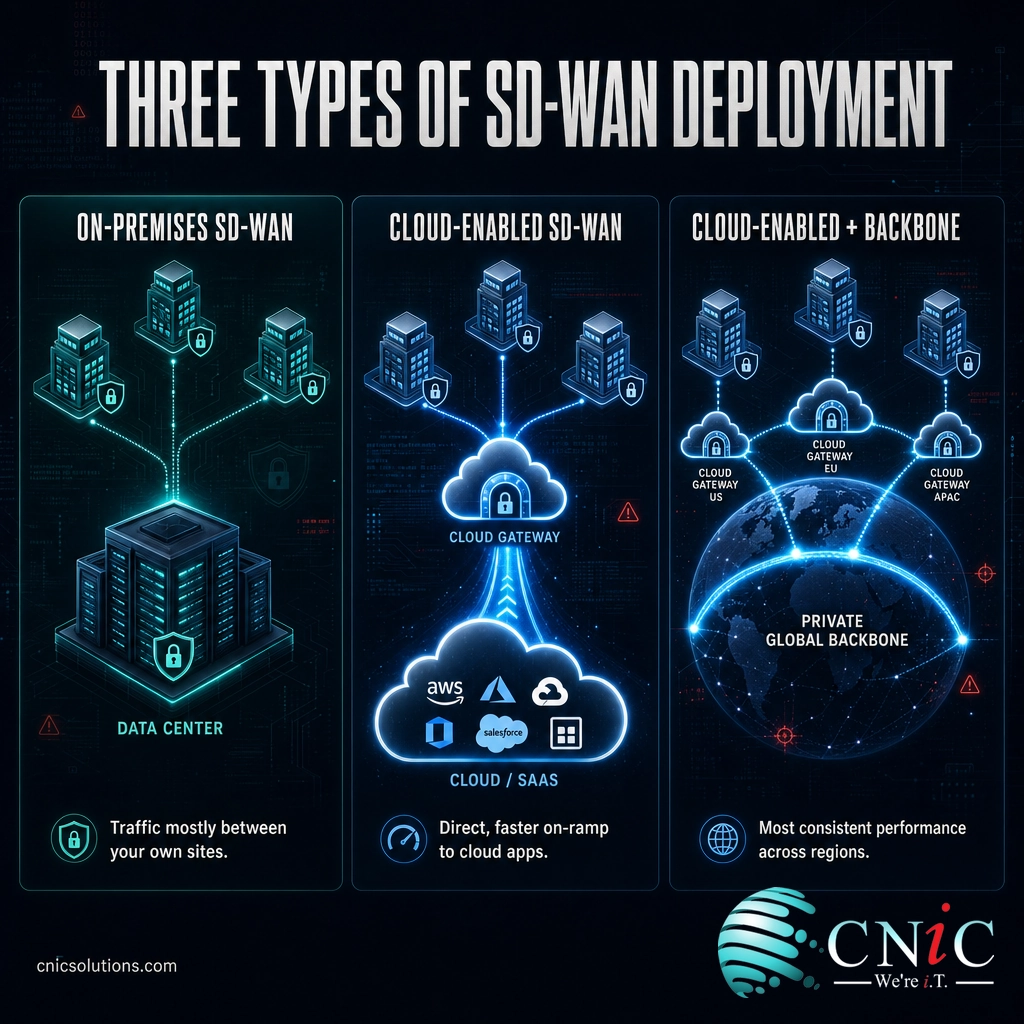
“SD-WAN” is one label for a few different delivery models. The right one depends on how cloud-dependent your business is and how much of the work you want to hand off. There are two useful ways to slice it: by architecture and by who runs it.
By architecture
- On-premises SD-WAN. Edge appliances at each of your sites handle routing between locations. This suits businesses whose traffic mostly moves between their own offices and data center, with lighter cloud use.
- Cloud-enabled SD-WAN. Your sites connect to a gateway near major cloud and SaaS providers, giving applications like Microsoft 365, Salesforce, and hosted phone systems a faster, more direct on-ramp. This is the common choice for cloud-first businesses.
- Cloud-enabled SD-WAN with a backbone. Adds the provider’s private global backbone between gateways, for the most consistent performance across long distances or many regions. It is the most capable and typically the most involved to run.
By who manages it
Separately, you decide whether to run SD-WAN yourself or have it managed for you. A do-it-yourself deployment gives your team full control but demands in-house networking expertise to design, secure, and maintain. A managed SD-WAN service hands the design, monitoring, and day-to-day operation to a provider, which is why most small and midsize businesses choose it: the benefits of SD-WAN without needing a full-time network engineer on staff.
Source: MEF: SD-WAN Service Standards
How to Get Started With SD-WAN
Moving to SD-WAN is a project, not a purchase, and the businesses that get the most from it treat it that way. A sound rollout follows a clear sequence:
- Map your current network and its pain points. Document every site, connection, and cost, and note where performance actually hurts, whether that is dropped calls, slow cloud apps, or fragile single-link offices.
- Rank your applications. Decide what must never lag (usually voice, video, and core business tools) so those priorities can be written into policy.
- Choose the right transport mix. Decide where to keep MPLS, where broadband or fiber is enough, and where cellular backup makes sense for resilience.
- Plan security alongside connectivity. Decide how firewalls and cloud security fit in from the start, rather than bolting them on later, so you land on a coherent SASE-style design.
- Pilot, then scale. Prove the design at one or two sites, confirm the failover and performance gains are real, then roll out in waves.
None of this requires you to become a network engineer. It does require experienced hands to design the policies, tune the failover, and keep the whole thing secure as your business changes. That is the value of running SD-WAN as a managed service: the connectivity, security, and ongoing oversight are handled together, so the network keeps doing its job without becoming another item on your plate.
Get SD-WAN designed and managed end to end
Source: CISA: Cybersecurity Best Practices
Related Terms
- WAN (wide area network): The network that connects a business’s separate locations across distance. SD-WAN is a modern, software-driven way to build one.
- MPLS: A private, carrier-managed transport valued for predictable performance, often used as one link within an SD-WAN.
- SDN (software-defined networking): The broader idea of controlling networks through centralized software, which SD-WAN applies to the wide area network.
- Overlay and underlay: The underlay is the physical connections (fiber, broadband, cellular); the overlay is the virtual SD-WAN network that runs on top of them.
- SASE: Secure Access Service Edge, the model that combines SD-WAN with cloud-delivered security services into one framework.
- QoS (quality of service): The prioritization that keeps voice and video traffic clear when a connection is busy.
- Failover: Automatically switching to a healthy connection when one link degrades or fails, a core SD-WAN strength.
Frequently Asked Questions
What is SD-WAN in simple terms?
What is the difference between SD-WAN and MPLS?
Does SD-WAN replace MPLS?
Is SD-WAN secure on its own?
Is SD-WAN worth it for a small business?
Sources
This explainer anchors its technical description and market claims to primary, authoritative sources. The SD-WAN service definition and its architecture (edge devices, policies, and multiple underlays) follow MEF’s MEF 70 standard, the industry’s first global SD-WAN standard, published in 2019. Enterprise adoption figures are from Gartner’s Market Guide for SD-WAN. Market size and growth-rate figures are from IDC’s Worldwide SD-WAN Infrastructure Forecast. Security guidance reflects CISA cybersecurity best practices.
Primary and authoritative sources: MEF 70 SD-WAN Standard, Gartner Market Guide for SD-WAN, IDC Worldwide SD-WAN Infrastructure, CISA Cybersecurity Best Practices.



related posts
What Is SIEM? Security Information and Event Management Explained
October 29, 2026A SIEM (security information and event management) is a security platform that collects log and event…
What Is Shadow IT? Risks, Examples, and How to Manage It
October 29, 2026Shadow IT is any hardware, software, cloud service, or AI tool that employees use for work…
What Is SASE (Secure Access Service Edge)? How It Works
October 28, 2026Secure access service edge (SASE) is a cloud-delivered model that combines wide-area networking (SD-WAN) with a…
What Is Root Cause Analysis (RCA)? A Guide to Solving IT Problems…
October 27, 2026Root cause analysis (RCA) is a structured way to find the true underlying cause of a…