
A VoIP migration rarely fails because the technology is hard. It fails because a number gets ported before the network is ready, or a call flow is missed, or 911 addresses were never set. This checklist turns the switch to a cloud phone system into a sequence of clear, ownable steps so your business changes phone systems without dropped calls, downtime, or a scramble on cutover day.
Explore CNiC’s cloud phone and UCaaS solutions
- Migration risk lives in planning and sequencing, not in the VoIP technology itself. Prepare the network first, port numbers last.
- Test network readiness before anything else: about 100 kbps per concurrent call, latency under 150 ms, jitter under 30 ms, and packet loss under 1 percent.
- Number porting is the most common cause of delays. Submit a clean Letter of Authorization early and never cancel the old service until the port completes.
- E911 is a legal requirement, not an option. Register a dispatchable address for every phone and update it when devices move.
- Run the new system in parallel, pilot with a small group, then cut over on a planned date with a rollback option.
What’s in This Checklist
- Phase 1: Plan and Discover
- Phase 2: Assess Network Readiness
- Phase 3: Choose Your Provider and Plan
- Phase 4: Port Numbers and Design Call Flows
- Phase 5: Configure Hardware and Security
- Phase 6: Test, Train, and Go Live
- Phase 7: Optimize After Migration
- The Priority Matrix
- Quick Wins You Can Do Today
- Frequently Asked Questions
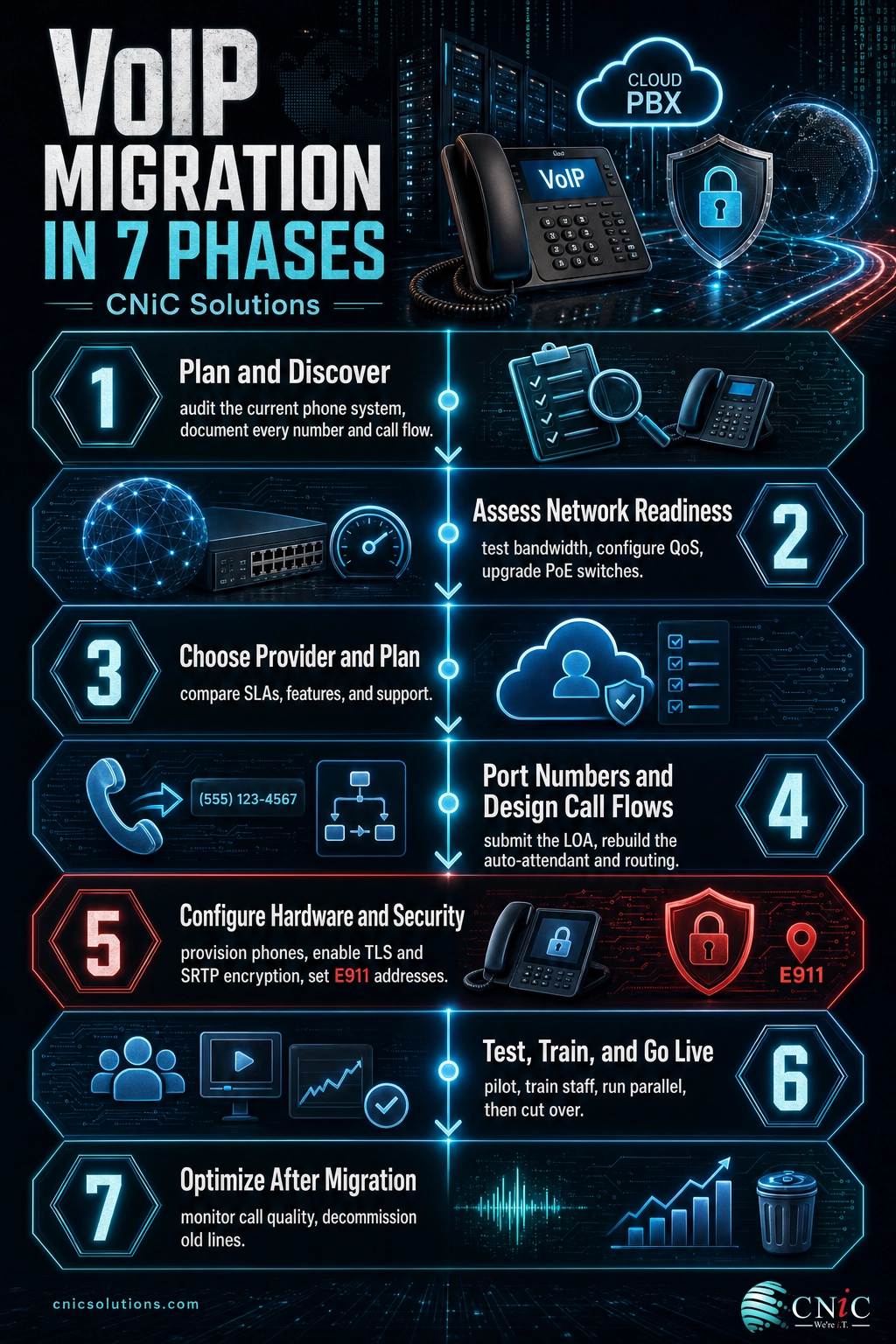
Phase 1: Plan and Discover
Every clean migration starts with an honest inventory of what you have today. You cannot port what you have not documented, and you cannot rebuild call flows you never mapped. Spend the time here and the rest of the project gets easier.
- Inventory every phone number. List all main lines, direct-dial numbers, fax lines, and toll-free numbers, including any you rarely use. A single forgotten number can strand a customer.
- Pull a recent phone bill from each carrier. Porting requires an account number, service address, and billing name that match the carrier’s records exactly.
- Map your current call flows. Document how calls route today: auto-attendant menus, ring groups, after-hours handling, voicemail boxes, and any hunt or overflow rules.
- Count concurrent calls, not employees. Review call reporting or ask staff how many calls typically happen at once. This drives your bandwidth and license planning.
- List must-have features. Separate needs from wants: call recording, mobile apps, texting, CRM integration, video meetings, and reporting each affect provider choice.
- Set goals and a budget. Define what success looks like (lower cost, remote flexibility, better reporting) and a realistic monthly budget before you shop.
Phase 2: Assess Network Readiness
VoIP turns your data network into your phone network. If the network is not ready, callers hear the symptoms first: choppy audio, dropped words, and echo. This phase is where migrations are won or lost, so treat it as a gate that must pass before you schedule anything else.
- Test your bandwidth against concurrent calls. Budget roughly 100 kbps up and down per simultaneous call, plus headroom for the rest of your business traffic.
- Measure latency, jitter, and packet loss. Aim for latency under 150 ms, jitter under 30 ms, and packet loss under 1 percent. A one-time speed test is not enough; watch these during busy hours.
- Configure Quality of Service (QoS). Prioritize voice traffic on your router and switches so a large file upload cannot starve a live call.
- Disable SIP ALG. This well-meaning router feature commonly breaks VoIP signaling and causes one-way audio or dropped calls. Turn it off on business routers.
- Check switches and cabling. Use PoE-capable switches for desk phones and confirm Cat5e or Cat6 cabling to each location. Upgrade aging switches before, not during, cutover.
- Plan for failover. Decide what happens if the internet drops: a secondary connection, automatic call forwarding to mobiles, or both.
Recommended Upload Bandwidth by Concurrent Calls (planning estimate)
CNiC Solutions estimate at roughly 100 kbps per call. Add headroom for data traffic and use it for planning, not as a hard limit.
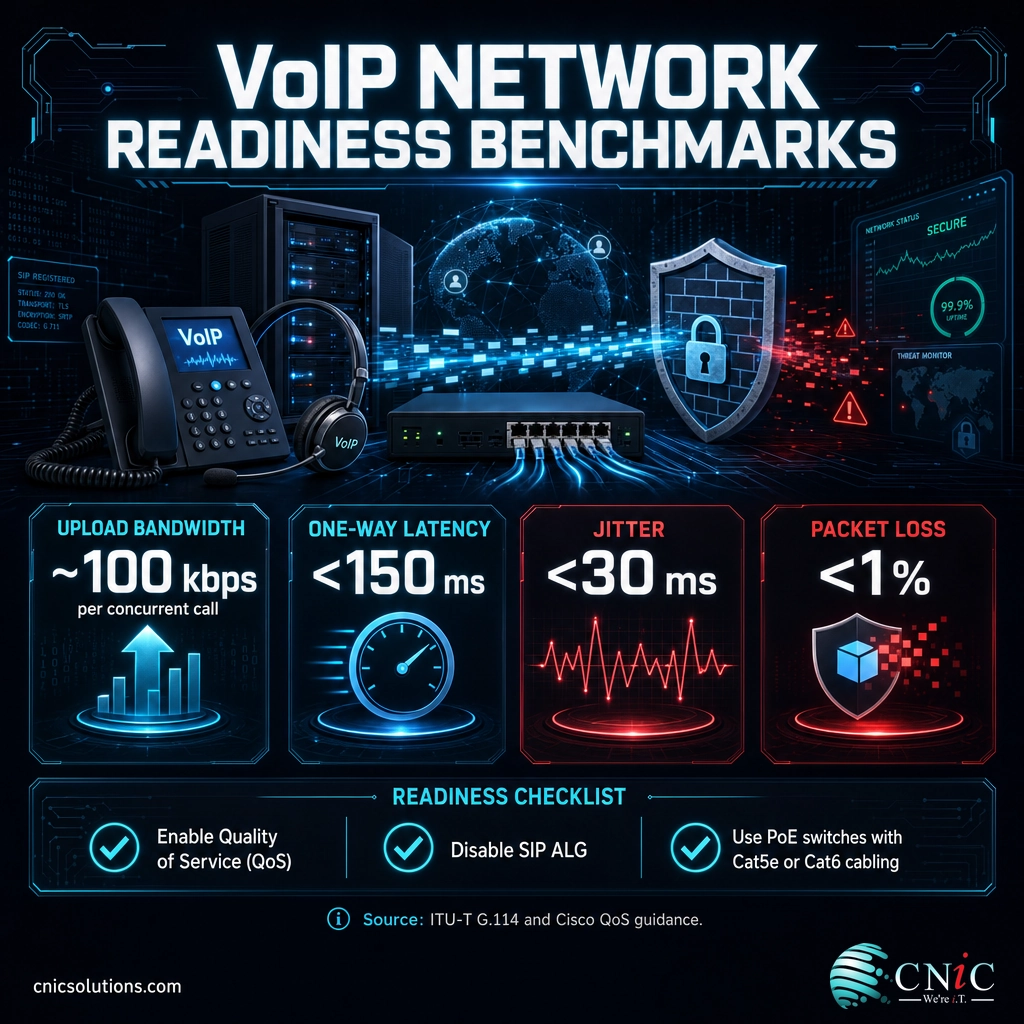
Source: ITU-T G.114 | Cisco QoS design guidance
Get help planning your network for VoIP
Phase 3: Choose Your Provider and Plan
The cheapest quote can become the most expensive choice if it leads to downtime, poor support, or a plan you outgrow in a year. Evaluate providers on reliability and fit, not just the monthly price per seat.
- Compare uptime SLAs in writing. Look for a published availability commitment and what remedies apply when it is missed.
- Confirm the features you listed in Phase 1. Match must-haves line by line rather than trusting a marketing page.
- Ask how support works. Who answers when a call flow breaks at 8 a.m.? Understand hours, channels, and whether onboarding is included.
- Check integrations. Verify the platform connects to your CRM, Microsoft 365, or helpdesk tools the way you need.
- Review contract and porting terms. Understand the contract length, per-seat costs as you grow, and whether the provider assists with porting.
- Decide on-premise, cloud, or hybrid. Most businesses moving off legacy PBX choose a cloud UCaaS platform for flexibility and remote support.
Compare cloud phone system options
Phase 4: Port Numbers and Design Call Flows
With a provider chosen and the network ready, you can safely schedule the port and rebuild how calls move through your business. Sequencing matters here more than anywhere else.
- Submit a clean Letter of Authorization (LOA). Match the account name, service address, and account number to the old carrier’s records exactly. Mismatches are the top cause of port rejections.
- Port in the right order. Keep secondary or fax numbers separate from your main line so a single issue does not take down your primary number.
- Never cancel the old service early. Let the port complete first. Canceling ahead of time can release the numbers permanently.
- Rebuild your call flows. Recreate the auto-attendant, business hours, ring groups, voicemail, and after-hours routing you mapped in Phase 1.
- Set up voicemail and greetings. Record or import professional greetings and confirm voicemail-to-email delivery works.
- Confirm the port date and a fallback. Get the scheduled firm order commitment date and keep forwarding ready in case timing shifts.
Source: FCC number portability guidance
Phase 5: Configure Hardware and Security
Now provision the devices your team will actually use and lock the system down. VoIP is software on your network, so it deserves the same security discipline as the rest of your infrastructure.
- Provision phones and softphones. Configure desk phones, computer softphones, and mobile apps, and label each device to its user and extension.
- Register E911 addresses for every phone. Assign a correct dispatchable address to each extension so emergency services reach the right location, and set a process to update it when people move.
- Enable encryption. Turn on TLS for signaling and SRTP for media so calls cannot be easily intercepted.
- Enforce strong access controls. Use unique credentials, multi-factor authentication on the admin portal, and remove default passwords on every device.
- Set fraud and toll controls. Restrict international dialing where it is not needed and enable spend alerts to catch toll fraud early.
- Document the configuration. Keep a record of extensions, DIDs, call flows, and admin logins in a secure place for the whole team to reference.
Source: FCC E911 requirements | CISA cybersecurity guidance
Phase 6: Test, Train, and Go Live
The final week is about proving the system works before you depend on it, then switching over with a way back. A calm go-live is the product of thorough testing, not luck.
- Run a pilot. Move a small group first, place real internal and external calls, and confirm audio quality, transfers, and call flows.
- Test emergency and edge cases. Verify a 911 test path with your provider, plus voicemail, forwarding, conference, and after-hours routing.
- Train your team. Give staff short, role-based training on the desk phone, app, voicemail, and transferring calls before cutover, not after.
- Run in parallel. Keep old and new systems live together until you are confident, so no call is missed during the transition.
- Cut over on a planned date. Choose a low-volume window, complete the port, and monitor closely for the first business day.
- Keep a rollback option. Have forwarding or the old lines available as a fallback until the new system is proven stable.
Phase 7: Optimize After Migration
Migration does not end at go-live. The first weeks on the new system are your best chance to tune quality and close out the old world cleanly.
- Monitor call quality. Watch provider dashboards for jitter, latency, and dropped-call metrics, and act on any location that trends poorly.
- Gather user feedback. Ask staff what is working and what is confusing, then adjust call flows and training.
- Decommission old lines and hardware. Once the port is confirmed stable, cancel legacy circuits and PBX maintenance to stop paying for both.
- Confirm billing is correct. Verify the first invoice matches your plan and that old charges have stopped.
- Schedule a 30-day review. Revisit goals from Phase 1, review usage, and right-size licenses and features.
- Keep E911 addresses current. Make address updates part of your onboarding and moves process, not a one-time task.
The Priority Matrix
Use this as your master tracker. Sort your effort by priority, assign an owner to every item, and set the cadence so nothing that matters gets skipped under deadline pressure.
| Checklist Item | Priority | Owner | Frequency |
|---|---|---|---|
| Network readiness test (bandwidth, QoS, jitter) | Critical | IT lead or MSP | Before migration |
| Submit clean porting LOA | Critical | Office admin | Once, early |
| Register E911 dispatchable addresses | Critical | IT lead | At setup and on every move |
| Disable SIP ALG and set QoS | Critical | IT lead or MSP | Before go-live |
| Review provider SLA and contract | High | Decision-maker | Before signing |
| Design and rebuild call flows | High | Ops and IT | Before porting |
| Staff training | High | Operations | Before go-live |
| Enable TLS and SRTP encryption | High | IT lead or MSP | At configuration |
| Decommission legacy lines and PBX | Medium | IT lead | After port is stable |
| Ongoing call-quality monitoring | Medium | IT lead or MSP | Ongoing |
Quick Wins You Can Do Today
- Run an internet speed and quality test during a busy hour and write down the upload, download, latency, and jitter numbers.
- Inventory every phone number and save a recent bill from each carrier for porting.
- Write down your must-have call features so provider demos stay focused.
- Check whether SIP ALG is enabled on your router and flag it to be disabled.
- Assign a migration owner and pencil in a realistic target go-live date.
A structured migration is the difference between a phone system that quietly works and one that generates support tickets for months. If you would rather hand the network testing, porting, and cutover to a team that runs these projects regularly, that is exactly what a managed telecommunications partner does.
See UCaaS plans and pricing for your team
Frequently Asked Questions
How long does a VoIP migration take?
Will we lose our phone numbers when we switch to VoIP?
How much internet bandwidth does VoIP need?
Can we keep our old phones running during the switch?
Does VoIP work for 911 emergency calls?

related posts
What Is Calendar Phishing and How to Prevent It
October 13, 2026Calendar phishing is a scam that hides a malicious link inside a calendar invitation instead of…
What Is BYOD? Bring Your Own Device Explained for Businesses
October 13, 2026BYOD (Bring Your Own Device) is a policy that lets employees use their own personal devices,…
What Is an IP Address? A Plain-English Guide for Business
October 12, 2026An IP address (Internet Protocol address) is a unique number assigned to every device on a…
What Is an Evil Twin Attack? How Fake Wi-Fi Hotspots Steal Your…
October 12, 2026An evil twin attack is a fake Wi-Fi hotspot that copies the name of a network…