

Security awareness training for employees is a continuous program that teaches your staff to recognize and safely respond to cyber threats such as phishing, social engineering, and unsafe data handling. It matters because people, not firewalls, are the target of most modern attacks: the Verizon 2025 Data Breach Investigations Report found a human element in roughly 60 percent of breaches. This guide explains what security awareness training is, the proof that it works, the topics every program must cover, the regulations that require it, and a step-by-step plan to build a program that actually changes behavior rather than checking a compliance box.
- The human element is involved in about 60 percent of breaches, and phishing is the starting point for 16 percent of them (Verizon 2025 DBIR).
- Untrained employees fail roughly 1 in 3 phishing tests; after 12 months of ongoing training that falls to under 5 percent (KnowBe4 2024 benchmark of 54M+ tests).
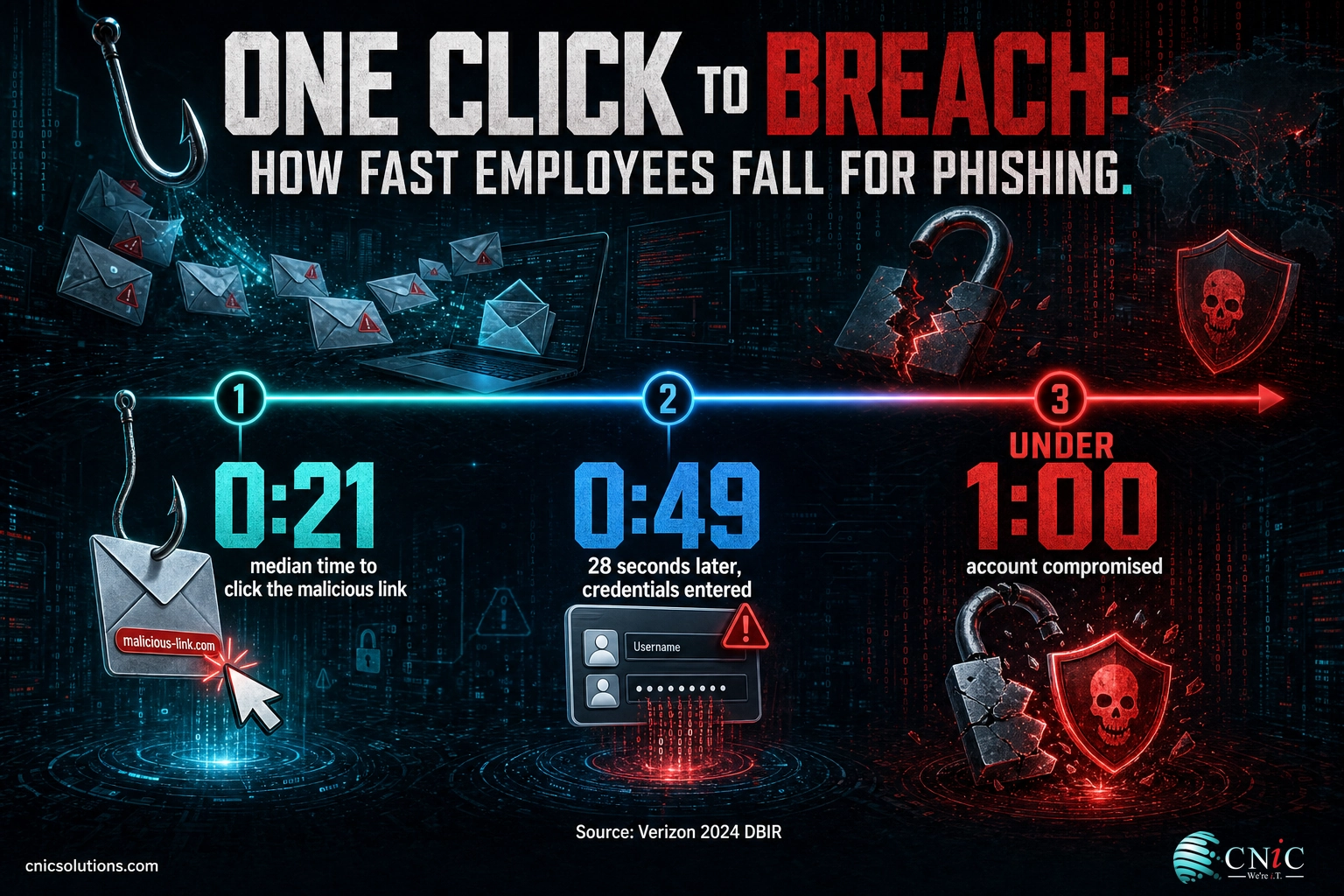
- Employees fall for phishing fast: the median time to click a malicious link is 21 seconds, then just 28 more seconds to enter credentials (Verizon 2024 DBIR).
- The U.S. average data breach reached an all-time high of $10.22 million in 2025 (IBM), which makes prevention through training a high-return investment.
- A real program is continuous: short monthly modules plus monthly phishing simulations beat a once-a-year video every time.
- Training is a compliance requirement under HIPAA, PCI DSS, SOC 2, and CMMC, and is increasingly expected by cyber insurers.
- Measure the program with a phish-prone percentage, a reporting rate, and time-to-report, then report those numbers to leadership every quarter.
What’s in This Guide
- What Security Awareness Training Actually Is
- Why It Matters: The Human Element in Breaches
- Does Training Work? What the Numbers Show
- Core Topics Every Program Must Cover
- Compliance: Which Regulations Require Training
- How to Build a Program, Step by Step
- Phishing Simulations: The Engine of Behavior Change
- Measuring ROI and Program Effectiveness
- Building a Security Culture That Lasts
- Common Mistakes That Kill a Program
- Your Implementation Roadmap
- The Whole Program at a Glance
- Related Resources
- Frequently Asked Questions
- Methodology and Sources
What Security Awareness Training Actually Is
Security awareness training is a structured, ongoing program that equips every employee to recognize cyber threats and respond to them safely. It turns the person sitting at the keyboard, historically the easiest way into an organization, into an active layer of defense. The goal is not to make everyone a security expert. The goal is to build reliable habits: pause before clicking, verify unusual requests, use strong and unique credentials, handle sensitive data correctly, and report anything suspicious quickly.
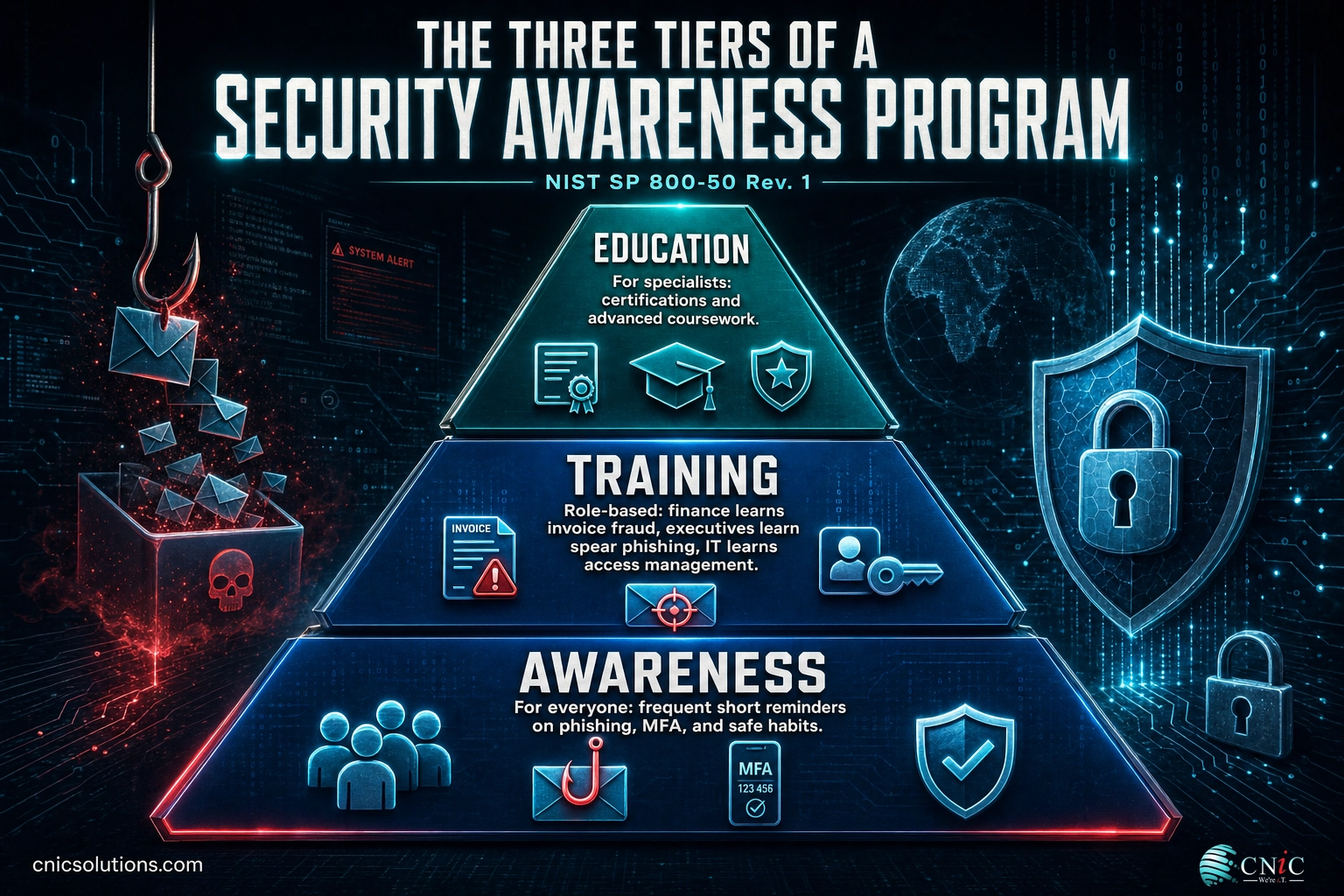
The most useful way to understand a program is the framework published by the National Institute of Standards and Technology. In September 2024, NIST released NIST SP 800-50 Revision 1, “Building a Cybersecurity and Privacy Learning Program,” which is now the reference blueprint that HIPAA, PCI DSS, SOC 2, CMMC, and FedRAMP assessors look for. It separates learning into three distinct tiers, and a mature program runs all three.
- Awareness: for everyone. Short, frequent reminders that keep security top of mind: how to spot a phishing email, why multi-factor authentication matters, what to do with a suspicious attachment. This is the broad base of the program.
- Training: role-based. Deeper, job-specific instruction. Finance staff learn to detect invoice fraud and business email compromise; executives learn about targeted spear phishing; IT staff learn secure configuration and access management.
- Education: for specialists. The formal, in-depth development that produces security professionals, typically through certifications and advanced coursework.
For most small and midsize businesses, the day-to-day program lives in the first two tiers: continuous awareness for the whole company, plus role-based training for the people who are targeted most. What separates real training from a checkbox is that it never stops. Threats evolve monthly, attackers test new lures constantly, and human memory fades. A program delivered once a year and forgotten is, in practice, no program at all.
It also helps to be clear about what security awareness training is not. It is not a one-time onboarding formality, it is not solely an IT department responsibility, and it is not a guarantee that no one will ever click. It is a continuous, company-wide effort to shift the odds in your favor over time, with accountability shared across every team. Framing it that way from the start prevents the two most common failure modes: treating it as a checkbox, and treating it as something only the technical staff own.
If you are just getting your fundamentals in place, it helps to pair awareness training with a broader baseline of protective controls. Our overview of the essential protections every small business should have shows where training fits alongside patching, backups, and endpoint defense.
Source: NIST SP 800-50 Rev. 1
Why It Matters: The Human Element in Breaches
The business case for training starts with a simple reality: attackers go after people because it works. Technical defenses have improved, so the path of least resistance is now a convincing email, a spoofed phone call, or a fake login page. The data is blunt about how often that path succeeds.
That last figure is the one that should reset expectations. The median time for a user to fall for a phishing email is under a minute. There is rarely time for the help desk to intervene, so the decision has to be made correctly by the employee, in the moment. That is exactly the reflex training builds.
The financial stakes are climbing at the same time. IBM’s 2025 Cost of a Data Breach Report found that while the global average breach cost fell to $4.44 million, the United States average jumped nine percent to an all-time high, and phishing remained the single most common initial attack vector.
Average cost of a data breach by industry, 2025 (USD millions)
Source: IBM Cost of a Data Breach Report 2025. U.S. average across all industries reached $10.22M.
Put those numbers together and the logic of training becomes hard to argue with. The most common way in is a person, the decision happens in seconds, and the cost of a single successful breach can run into the millions. Reducing the odds that an employee falls for the lure is one of the highest-impact moves a business can make. For the full picture on breach economics, see our breakdown of the latest data breach cost statistics, and for attack frequency against smaller firms, our small business cyber attack statistics.
Smaller businesses sometimes assume they are too small to be a target. The opposite is true. Modern phishing and credential attacks are automated and sprayed across millions of inboxes at once, so attackers do not weigh whether your company is worth the effort; their tooling simply reaches everyone. Small and midsize firms are also used as a stepping stone into the larger partners and clients they connect to, which makes them attractive rather than invisible. With leaner IT teams and less slack to absorb downtime, an untrained workforce is often the single biggest gap a small business has, and it is also the cheapest one to close.
None of this is a reason to blame employees. It is a reason to prepare them. When people understand what an attack looks like and know exactly what to do, they stop being the target and start being the sensor network that catches attacks early.
Source: Verizon Data Breach Investigations Report | IBM Cost of a Data Breach 2025
Explore CNiC’s cybersecurity services
Does Training Work? What the Numbers Show
Skepticism about training is fair. Plenty of companies have paid for a video library that nobody watched and saw no change. The difference between programs that work and programs that waste money is measurement, frequency, and realistic practice. When those are present, the effect is large and repeatable.
The clearest evidence comes from KnowBe4’s 2024 Phishing by Industry Benchmarking Report, which analyzed more than 54 million simulated phishing tests across 11.9 million users at over 55,000 organizations. It tracks a single metric, the phish-prone percentage, which is the share of employees who fail a simulated phishing test. The trajectory with sustained training is striking.
Phish-prone percentage before and after ongoing training
Source: KnowBe4 2024 Phishing by Industry Benchmarking Report (54M+ simulated tests).
Read that as a risk-reduction curve. A workforce that fails one in three phishing tests is a workforce where a determined attacker will almost certainly find a way in. Bringing that failure rate below five percent does not make you invulnerable, but it removes the easy win that automated phishing campaigns depend on, and it dramatically shrinks the number of incidents your team has to chase.
The mechanism is not mysterious. Frequent exposure to realistic examples builds recognition. Immediate feedback after a failed simulation is a teachable moment that sticks. And a culture where reporting is praised rather than punished means threats surface early, when they are cheap to contain.
Risk is not spread evenly, which is why role-based and industry-aware training matters. The same KnowBe4 benchmark found the highest failure rates in healthcare and pharmaceuticals, where large organizations posted an average phish-prone percentage of 51.4 percent before training, meaning more than half of untrained staff failed a test. Highly regulated, high-turnover, and data-rich industries tend to score worst at baseline, which is exactly where a disciplined program delivers the biggest drop. Knowing your own baseline by department is what tells you where to concentrate the early effort.
Myth: “One annual training video keeps us compliant and safe.” Compliance frameworks may accept an annual module as a minimum, but safety comes from frequency. In the benchmarking data above, the deep drop in failure rates required ongoing monthly training and simulations, not a single yearly session. Annual-only training satisfies an auditor and leaves the door open for an attacker.
Source: KnowBe4 Phishing by Industry Benchmarking Report
Core Topics Every Program Must Cover
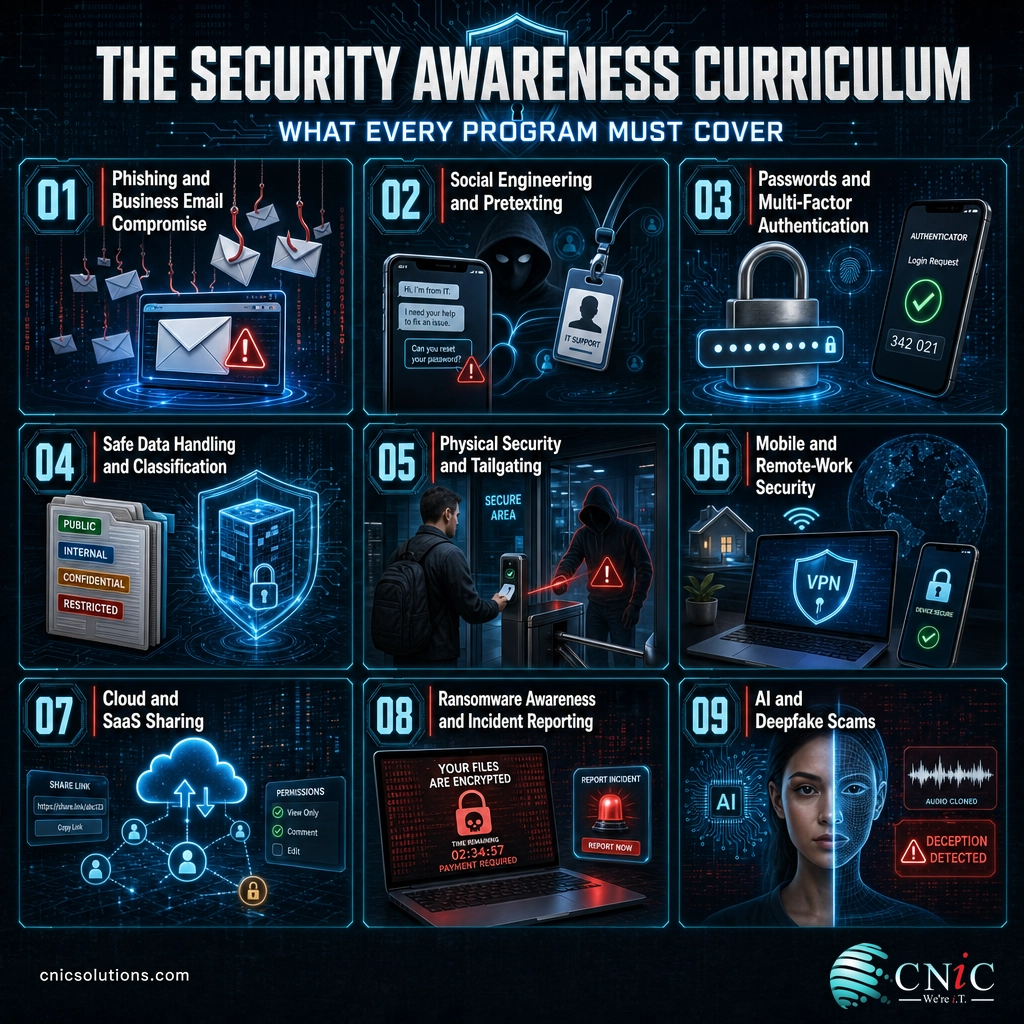
A program is only as good as its curriculum. The topics below map to how businesses are actually attacked today. Not every employee needs every topic in equal depth, which is where role-based training comes in, but every topic belongs somewhere in the program.
Phishing and business email compromise. This is the core skill. Employees should be able to spot mismatched sender addresses, urgent or threatening language, unexpected attachments, and links that do not match their labels. Business email compromise, where an attacker impersonates an executive or vendor to redirect a payment, deserves special attention for anyone who touches money. Our guides on the warning signs of a phishing email and real phishing email examples are useful teaching aids.
Social engineering and physical security. Not every attack arrives by email. Pretexting over the phone, fake IT support calls, and physical tactics such as tailgating through a secured door all exploit human trust. Employees should learn to verify identities through a known channel before acting on an unusual request.
Passwords and multi-factor authentication. Credential theft remains a top cause of breaches. Training should cover long unique passphrases, a password manager, and why multi-factor authentication matters even when a password is strong. Reused passwords turn one leaked credential into many open doors.
Safe data handling. Employees need to know how to classify information, where sensitive data may and may not go, and the risks of shadow IT, such as moving company files into a personal cloud account. This is also where regulated data, like patient records or cardholder data, gets specific rules.
Mobile, remote, and cloud security. With hybrid work, the perimeter is wherever the employee is. Training should cover securing home Wi-Fi, avoiding public networks for sensitive work, keeping devices updated, and sharing safely in cloud and SaaS tools.
Ransomware awareness and incident reporting. Everyone should understand how ransomware typically starts, usually with a phished credential or a malicious attachment, and, above all, how to report a suspected incident immediately. Fast reporting is the difference between a contained event and a company-wide outage.
AI-era threats. Attackers now use generative AI to write flawless phishing emails and to clone voices and faces. Employees should know that a familiar voice on the phone or a convincing video is no longer proof of identity, and that verification through a trusted channel matters more than ever.
| Topic | Who needs it most | What good looks like |
|---|---|---|
| Phishing recognition | All staff | Reports suspicious emails instead of clicking |
| Business email compromise | Finance, executives, AP | Verifies payment changes out of band |
| Social engineering | All staff, reception | Confirms identity before acting on requests |
| Passwords and MFA | All staff | Uses a manager, unique passphrases, MFA everywhere |
| Data handling | All staff, regulated roles | Keeps sensitive data in approved systems only |
| Physical security | All on-site staff | Does not hold doors for unverified strangers |
| Remote and mobile | Hybrid and field staff | Secures devices and home networks |
| Ransomware and reporting | All staff | Reports incidents within minutes |
| AI and deepfake scams | Executives, finance, HR | Verifies voice and video requests independently |
Notice how many rows say “all staff.” Broad coverage is what builds a genuine human firewall, while the role-based rows are where you concentrate the deepest training on the people attackers target with the most effort and the biggest payoff.
Source: CISA phishing guidance | NIST SP 800-50 Rev. 1

Compliance: Which Regulations Require Training
For many businesses, security awareness training is not optional. It is a written requirement in the regulations and frameworks that govern how they handle data. Even where a specific law does not apply, cyber insurers increasingly require a documented program before they will write or renew a policy. Understanding which mandates apply to you turns training from a cost into a compliance asset.
| Framework | Training requirement | Who it applies to |
|---|---|---|
| HIPAA Security Rule | Requires a security awareness and training program for the workforce, including periodic security reminders | Healthcare providers, health plans, and their business associates |
| PCI DSS | Requires security awareness training at hire and at least annually for personnel who handle cardholder data | Any business that stores, processes, or transmits payment cards |
| SOC 2 | Expects a documented awareness and training program as part of the common criteria controls | SaaS and service organizations proving security to customers |
| CMMC | Requires awareness and role-based training in the Awareness and Training control family | Defense contractors and their supply chain |
| GLBA Safeguards Rule | Requires security awareness training as part of the information security program | Financial institutions and many businesses that handle consumer financial data |
| State privacy and breach laws | Increasingly reference reasonable security, which regulators read to include training | Businesses handling residents’ personal data |
A practical point ties all of these together: auditors and insurers want evidence, not good intentions. That means you need records showing who was trained, on what, and when, plus simulation results over time. A program built on a platform that logs completion and tracks phish-prone percentage produces that evidence automatically. A program run on ad hoc lunch-and-learns does not.
Regulated verticals such as healthcare, legal, and financial services carry the highest stakes, which is also why they top the breach-cost tables. If your business sits in one of these industries, mapping your training program to your specific framework is worth doing deliberately, and it is a natural fit for a virtual CISO engagement that keeps your controls aligned with your obligations.
Source: HHS HIPAA Security Rule | PCI Security Standards Council
Talk to a Virtual CIO about compliance
How to Build a Program, Step by Step
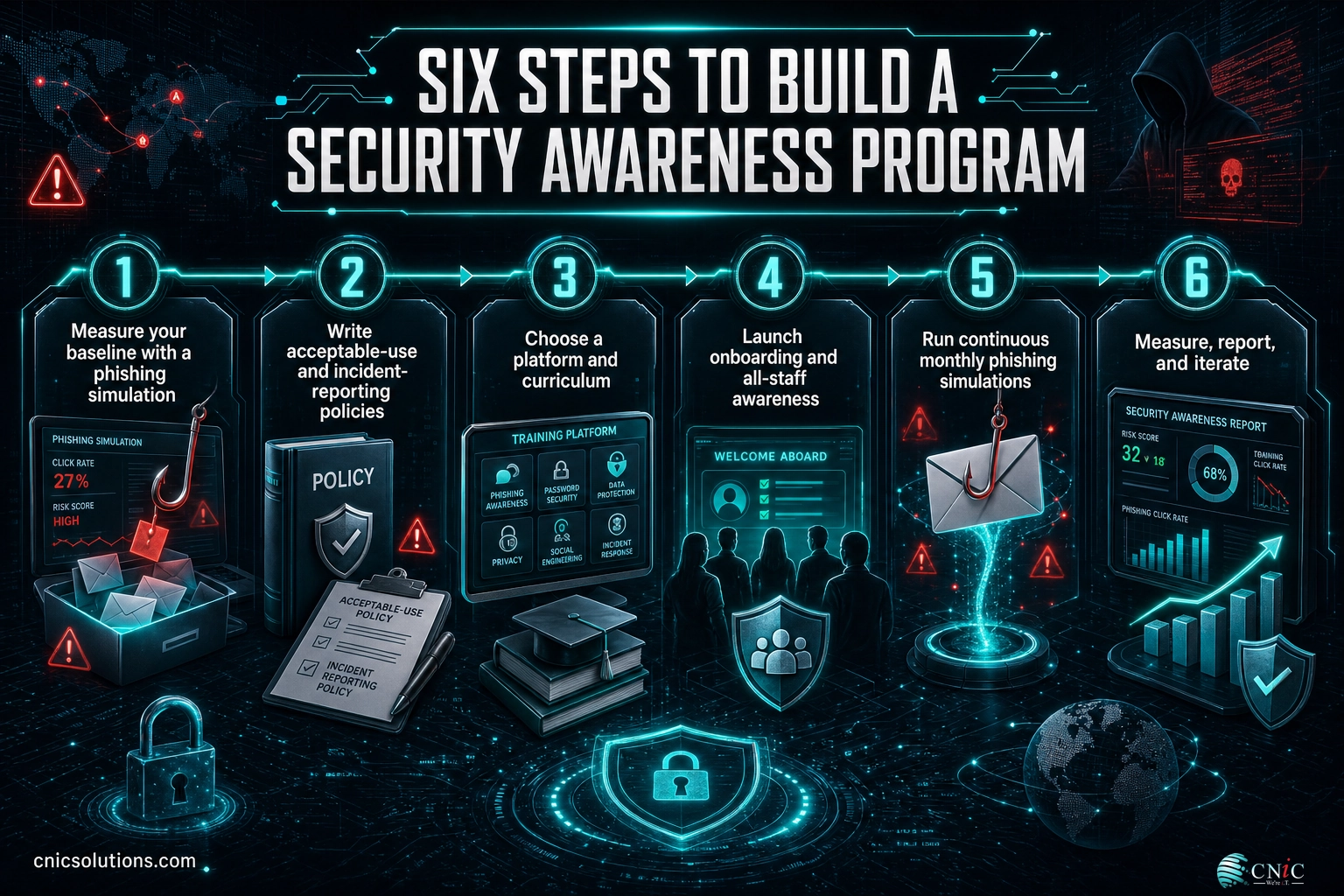
A program does not have to be complicated to be effective, but it does have to be deliberate. The sequence below takes a business from nothing to a running, measurable program. Each step builds on the one before it, and the whole thing can be stood up in the first month and then refined continuously.
1 Measure your baseline
Before you train anyone, find out where you stand. Send an unannounced phishing simulation to the whole company and record the phish-prone percentage. This baseline is your before picture, and it is what lets you prove progress later. A baseline test also has a way of winning over skeptical leadership, because the click rate is almost always higher than anyone expects.
2 Write the policies employees will follow
Training reinforces rules, so the rules have to exist. At minimum, publish an acceptable-use policy and a clear incident-reporting procedure that tells employees exactly how to report a suspected phish or breach, and reassures them they will not be blamed for reporting. Keep it short enough that people actually read it.
3 Choose a platform and curriculum
Use a training platform that combines short awareness modules, role-based content, and built-in phishing simulations with reporting. The reporting is not a nice-to-have; it is how you produce compliance evidence and measure behavior change. Look for content that is current, engaging, and brief, because a ten-minute module that gets watched beats an hour-long one that gets skipped.
4 Launch onboarding and all-staff awareness
Make awareness training part of onboarding for every new hire, and roll out a baseline module to all current staff. This is the broad awareness tier from the NIST model. Keep the cadence frequent and the modules short: a few minutes each month sustains attention far better than a single long annual course.
5 Run continuous phishing simulations
Schedule regular simulations, ideally monthly, with varied and realistic lures. Route anyone who clicks straight into a brief follow-up lesson. The point is practice and feedback, not punishment, so keep the tone constructive and celebrate employees who report the test.
6 Measure, report, and iterate
Review your metrics every quarter, share them with leadership, and adjust. Focus follow-up training on repeat clickers and on the departments with the highest failure rates. Over roughly twelve months of consistent effort, you should see your phish-prone percentage follow the same downward curve the benchmark data shows.
Running this well takes consistent attention, which is why many businesses fold security awareness training into a broader managed IT relationship rather than trying to own every task in-house. A managed provider can run the simulations, curate the curriculum, chase completion, and hand leadership a clean quarterly report.
Source: NIST SP 800-50 Rev. 1
See how managed IT support runs your program
Phishing Simulations: The Engine of Behavior Change
If awareness modules are the classroom, phishing simulations are the practice field. A simulation is a safe, controlled fake phishing email sent to your own employees so you can measure who clicks, who submits credentials, and, just as importantly, who reports it. Nothing is actually compromised, but the behavior is real, and that is what makes simulations the single most effective component of a program.
Simulations work for three reasons. First, they measure. You cannot manage what you do not measure, and a simulation produces a hard number you can track over time. Second, they teach at the moment of failure. When an employee clicks a simulated lure and is immediately shown what they missed, the lesson lands far harder than a scheduled module ever could. Third, they build the reporting reflex. Every simulation is a chance for employees to practice hitting the report button, which is the behavior that catches real attacks early.
The Verizon data underscores why the reporting habit matters so much. In partner simulation data, only about 20 percent of users reported the phishing email, and among those who clicked, just 11 percent went on to report it. That gap is the opportunity: a program that lifts the reporting rate turns your whole staff into an early-warning system for the security team.
A concrete example shows how this plays out. Suppose a 50-person firm runs its first simulation and 20 employees click a fake invoice email, a 40 percent failure rate. Each clicker gets a two-minute lesson on verifying invoices, and the finance team receives a short role-based module on payment-change fraud. The next month’s test uses a different lure and the failure rate falls to 25 percent, then into single digits over the following quarters. Meanwhile the reporting rate climbs as employees learn where the report button is and that using it is welcomed. That visible, month-over-month movement is what keeps leadership invested and what an auditor wants to see.
- Regular and varied: monthly is a strong default, with lures that change so employees cannot memorize a pattern.
- Realistic, not tricky: mirror the attacks your industry actually sees rather than impossible gotchas designed to fail people.
- Paired with instant feedback: a click routes to a short, blame-free lesson, not a scolding.
- Measured by reporting, not just clicks: a rising report rate is as important as a falling click rate.
- Role-aware: send finance a fake invoice, send executives a spoofed board request, and match the test to the real threat.
One caution worth stating plainly: simulations are a coaching tool, not a trap. Programs that name and shame high clickers, or that tie results to discipline, drive the exact opposite of the behavior you want, because employees stop reporting for fear of getting colleagues in trouble. Keep the culture supportive and the numbers will move in the right direction.
Source: Verizon 2024 Data Breach Investigations Report
Measuring ROI and Program Effectiveness
Leadership funds what it can measure, so a security awareness program needs a small set of numbers that show whether behavior is changing and what risk is being removed. The good news is that a decent platform tracks all of them automatically. The goal is to move from anecdotes to a trend line you can put in front of an executive team or an auditor.
Leading indicators (behavior). These tell you whether the program is working before an incident ever happens. The core metric is the phish-prone percentage, the share of employees failing simulations, which should trend down. Alongside it, track the reporting rate and time-to-report, which should trend up and down respectively, and the number of repeat clickers, the small group that needs focused attention.
Lagging indicators (outcomes). Over longer periods, watch the number of real security incidents that trace back to human error, the number of malware or credential-theft events, and any near-misses that were caught by an employee report. A healthy program shows fewer incidents and more early catches.
| Metric | What it tells you | Healthy direction |
|---|---|---|
| Phish-prone percentage | Share of staff failing simulations | Down toward single digits |
| Reporting rate | Share who report a simulated or real phish | Up over time |
| Time-to-report | How fast a suspected phish is flagged | Down toward minutes |
| Repeat clickers | Individuals who fail more than once | Down, with targeted coaching |
| Training completion | Compliance and coverage evidence | Near 100 percent |
| Human-error incidents | Real events traced to a person | Down over quarters |
The return on investment is best framed as risk avoided. With the U.S. average breach at $10.22 million and the human element behind roughly 60 percent of breaches, even a modest reduction in successful attacks dwarfs the cost of a training program, which for most small and midsize businesses runs a few dollars per employee per month. Training is one of the rare security controls where the math is not close.
CNiC Solutions Analysis: Combining the Verizon 2025 DBIR finding that a human element appears in about 60 percent of breaches with IBM’s 2025 U.S. average breach cost of $10.22 million illustrates the exposure that training addresses. The human-driven share of that average works out to roughly $6.1 million of expected loss per breach sitting on the employee side of the equation. Calculation and interpretation original to CNiC Solutions, using published figures from Verizon and IBM.
Source: IBM Cost of a Data Breach 2025 | Verizon 2025 DBIR
Building a Security Culture That Lasts
Tools and modules deliver knowledge, but culture is what decides whether that knowledge gets used under pressure. The strongest programs treat security as a shared value rather than an IT chore, and they build that value deliberately over time. The aim is an environment where reporting a mistake is normal, asking a security question is welcome, and doing the safe thing is the easy thing.
Leadership sets the tone. When executives complete the same training as everyone else, talk openly about a phishing test they nearly failed, and thank employees who flag suspicious messages, security stops feeling like surveillance and starts feeling like teamwork. The opposite is just as powerful: when leaders exempt themselves, staff quietly conclude the whole exercise is theater. Because executives are prime spear-phishing targets, their visible participation is both a cultural signal and a real risk reduction.
Positive reinforcement outperforms fear. Recognizing the employee who reported the tricky phish, celebrating a department that reached a low click rate, and keeping the tone constructive all encourage the behavior you want. Some organizations add light gamification, such as reporting leaderboards or small rewards, and appoint security champions inside each department who serve as an approachable first point of contact. None of this requires a large budget. It requires consistency and a message, repeated often, that security is everyone’s job.
Signs a healthy security culture is taking hold: employees report suspicious emails without being prompted, near-misses get raised openly instead of hidden, new hires pick up safe habits from their peers, and leadership treats training metrics as a business measure worth reviewing. These are the leading indicators that behavior, not just awareness, has changed.
Source: NIST SP 800-50 Rev. 1
Common Mistakes That Kill a Program
Most failed programs fail for the same handful of reasons. Knowing them in advance is the cheapest way to avoid wasting your budget and your employees’ goodwill.
The five program-killers:
- Once-a-year and done. An annual module satisfies a checkbox and fades within weeks. Behavior change needs frequent reinforcement.
- A punitive culture. Naming and shaming clickers destroys the reporting behavior you most need. Coach, do not punish.
- No metrics. Without a baseline and a trend line, you cannot prove value, target follow-up, or satisfy an auditor.
- No leadership buy-in. When executives skip training or exempt themselves, the whole program loses credibility, and executives are prime spear-phishing targets.
- Generic, stale content. Modules that ignore your industry’s real threats and never change teach employees to tune out.
There is also a strategic mistake worth calling out: treating training as your only defense. Awareness dramatically reduces risk, but no program drives the failure rate to zero, and a single determined attacker only needs one success. Training belongs inside a layered strategy that assumes some attacks will get through. That is why a tested backup and recovery capability matters so much, because it is what limits the damage on the day an employee does click. Pairing awareness training with reliable recovery is the difference between an incident and a catastrophe, and a regular cybersecurity risk assessment keeps both aligned to your real exposure.
Source: NIST SP 800-50 Rev. 1 | CISA phishing guidance
Protect your data with backup and recovery
Your Implementation Roadmap
Here is the whole plan on one page, sequenced by priority and timeline so you can start this week. The point is momentum: get a baseline and a policy in place first, then layer on the continuous elements that drive long-term behavior change.
| Action | Priority | Timeline | Relevant service |
|---|---|---|---|
| Run a baseline phishing simulation | High | Week 1 to 2 | Cybersecurity services |
| Publish acceptable-use and incident-reporting policies | High | Week 2 to 4 | Virtual CIO services |
| Deploy onboarding and all-staff awareness modules | High | Month 1 to 2 | Managed IT services |
| Start monthly phishing simulations | Medium | Ongoing | Cybersecurity services |
| Add role-based training for finance, execs, and IT | Medium | Month 2 to 3 | Virtual CIO services |
| Review metrics and report to leadership | Medium | Quarterly | Virtual CIO services |
| Test backup and recovery for when training fails | High | Month 2 | Data backup and recovery |
You do not have to do all of this alone. Handing the recurring work to a partner who lives in this every day keeps the program consistent, which is exactly the quality the benchmark data shows matters most.
The Whole Program at a Glance
Use this table as a reference for what a complete security awareness program contains, how often each element should run, and how it ties back to compliance. It doubles as a checklist when you are evaluating a platform or a provider, and as a gap analysis against whatever training you run today. Print it, mark the rows you already cover, and the blank rows become your priority list for the next quarter.
| Program element | What employees learn | Cadence | Compliance tie |
|---|---|---|---|
| Phishing recognition | Spot and report malicious emails | Monthly | HIPAA, PCI DSS, SOC 2 |
| Business email compromise | Verify payment and vendor changes | Quarterly, role-based | GLBA, SOC 2 |
| Spear phishing | Recognize targeted executive lures | Quarterly, role-based | SOC 2, CMMC |
| Vishing and smishing | Handle phone and text scams | Quarterly | HIPAA, GLBA |
| Password hygiene | Use unique passphrases and a manager | Onboarding, annual | All frameworks |
| Multi-factor authentication | Enable and use MFA everywhere | Onboarding, annual | PCI DSS, CMMC |
| Credential reuse risk | Avoid reusing work passwords | Annual | SOC 2 |
| Social engineering | Verify identity before acting | Quarterly | All frameworks |
| Pretexting and impersonation | Question unusual authority requests | Quarterly | SOC 2, CMMC |
| Tailgating and physical security | Control door and badge access | Annual, on-site staff | HIPAA, PCI DSS |
| Removable media | Handle USB and external drives safely | Annual | CMMC, PCI DSS |
| Data classification | Know where sensitive data may go | Onboarding, annual | HIPAA, GLBA |
| Safe web browsing | Avoid malicious sites and downloads | Annual | All frameworks |
| Cloud and SaaS sharing | Share safely, avoid shadow IT | Annual | SOC 2 |
| Wi-Fi and remote work | Secure home and public networks | Onboarding, annual | CMMC, SOC 2 |
| Mobile device security | Lock, update, and protect devices | Annual | HIPAA, CMMC |
| Ransomware awareness | Understand entry points and response | Annual | All frameworks |
| Incident reporting | Report fast through a known channel | Onboarding, reinforced | All frameworks |
| Insider threat awareness | Recognize risky internal behavior | Annual | CMMC, SOC 2 |
| AI and deepfake scams | Verify voice and video requests | Quarterly, role-based | Emerging expectation |
| Acceptable-use policy | Follow the rules for company systems | Onboarding, annual | All frameworks |
| Third-party and vendor risk | Handle vendor access and requests | Annual, relevant roles | SOC 2, GLBA |
| Clean desk and screen locking | Protect data in physical spaces | Annual | HIPAA, PCI DSS |
Related Resources
Security awareness training is one piece of a broader defense. These CNiC guides go deeper on the threats your program teaches employees to recognize, and on the services that surround training in a layered strategy.
Frequently Asked Questions
What is security awareness training for employees?
How often should security awareness training be delivered?
Does security awareness training actually reduce risk?
What topics should a security awareness program cover?
Is security awareness training required for compliance?
What is a phishing simulation and how does it work?
How do you measure the ROI of security awareness training?
How long does it take to build an effective program?
Should small businesses invest in security awareness training?
Methodology and Sources
How this guide was built
This guide draws only on Tier 1 primary sources: government agencies, major annual security reports with disclosed methodology, and the standards bodies that define awareness-training requirements. Statistics are cited inline and linked to their original publisher so readers can verify every figure. Where two published figures are combined, the calculation is labeled as original analysis by CNiC Solutions.
Primary sources:
- Verizon 2025 and 2024 Data Breach Investigations Report: human element share, phishing as initial vector, median time to click and to submit data.
- IBM Cost of a Data Breach Report 2025: global and U.S. average breach cost, cost by industry, phishing as the most common initial vector.
- KnowBe4 2024 Phishing by Industry Benchmarking Report: phish-prone percentage at baseline, 90 days, and 12 months, across 54M+ simulated tests.
- NIST SP 800-50 Rev. 1: the three-tier learning framework and program structure.
- HHS HIPAA Security Rule and PCI Security Standards Council: regulatory training requirements.
Last Updated: August 2026.



related posts
RTO vs. RPO: Understanding the Two Key Disaster Recovery Metrics
September 24, 2026Short answer: RTO (Recovery Time Objective) is how long you can be down, measured forward from…
Patch Management Best Practices for Businesses: 10 Steps That Actually Reduce Risk
September 23, 2026Patch management is the disciplined process of finding, testing, and deploying software updates so known vulnerabilities…
Remote Work IT Setup: A Complete Guide for Small Businesses
September 23, 2026Setting up IT for a remote or hybrid team is no longer a temporary arrangement, it…
OKRs vs. KPIs: What’s the Difference?
September 22, 2026An OKR (Objective and Key Results) is a goal-setting framework that pairs an ambitious objective with…