

An MSSP (managed security service provider) is a company that runs and monitors your cybersecurity around the clock. It delivers threat monitoring, detection, and response as a subscription, giving your business an enterprise-grade security team without the cost of hiring one. For most small and midsize companies, it is the practical way to stay protected.
Cyberattacks no longer wait for business hours, and defending against them now takes tools and expertise most companies cannot build alone. That gap is why the managed security service provider exists. An MSSP gives you a full security operation, watched 24 hours a day by trained analysts, for a predictable monthly fee. This guide explains exactly what an MSSP does, how it differs from a regular IT provider, what the service includes, and how to tell whether your business needs one.
- An MSSP is outsourced, always-on cybersecurity. Monitoring, threat detection, and incident response delivered from a security operations center (SOC) as a monthly service.
- The talent shortage is the real driver. ISC2 puts the global cybersecurity workforce gap at 4.8 million people, so most businesses cannot realistically hire and keep a security team.
- The stakes are high and rising. IBM puts the global average cost of a data breach at $4.88 million in 2024, a record and roughly a 10% jump in one year.
- An MSSP is not the same as an MSP. An MSP keeps your systems running; an MSSP keeps them protected. Many providers, including CNiC, do both.
- Automation and expertise pay off. IBM found organizations using security AI and automation extensively saved $2.22 million per breach on average, capabilities a good MSSP builds in.
What’s in This Guide
How an MSSP Works
An MSSP takes on the day-to-day work of defending your organization from cyber threats. The formal definition matches this: the NIST glossary entry for a managed security service provider describes it as an organization that manages and monitors security devices and systems on a client’s behalf. In practice, that job runs as a continuous loop.
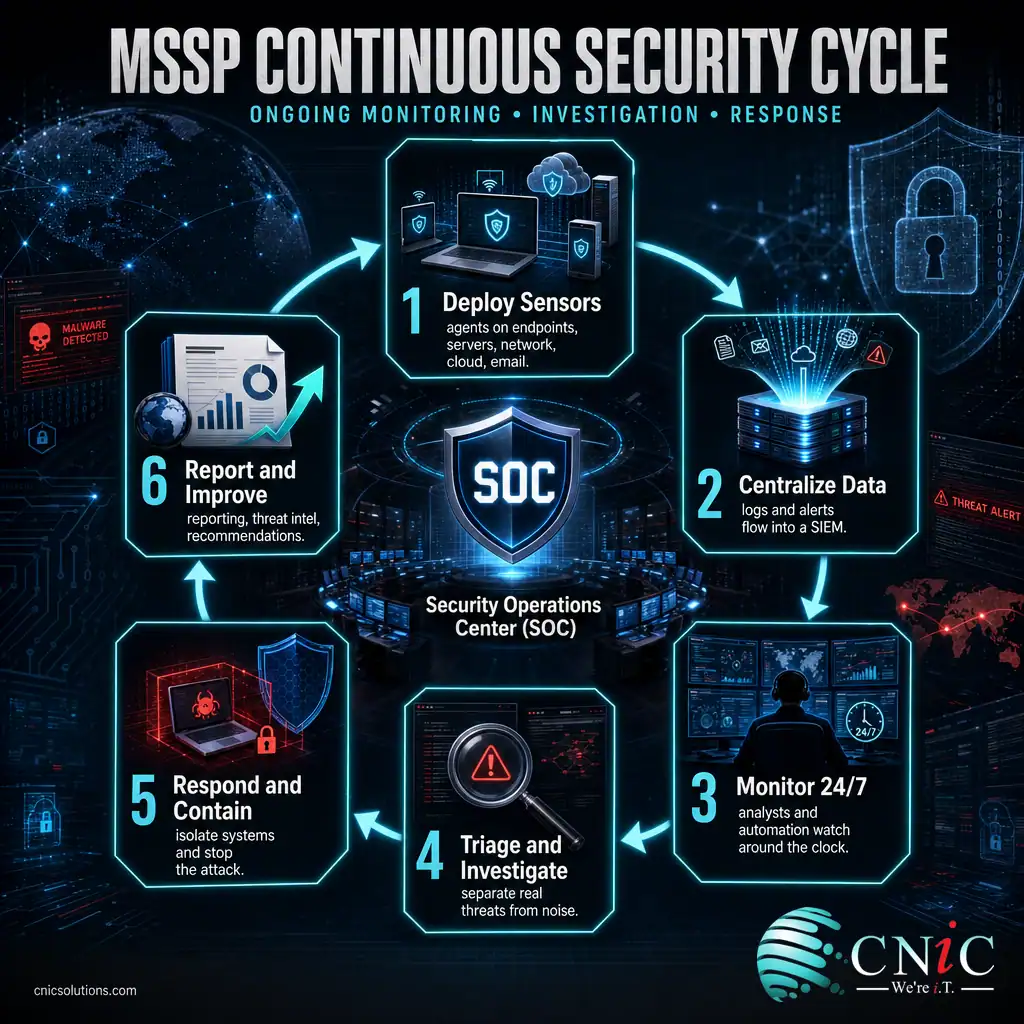
- Deploy sensors and agents. Lightweight software and monitoring is placed across your endpoints, servers, network, cloud accounts, and email to collect security data.
- Centralize the data. Those logs and alerts flow into a security information and event management (SIEM) platform inside a security operations center.
- Monitor around the clock. Analysts and automated detection watch that data 24 hours a day, every day, including nights, weekends, and holidays when attacks often land.
- Triage and investigate. Real threats are separated from the flood of harmless noise, and genuine incidents are investigated to understand what is happening and how far it has spread.
- Respond and contain. The team isolates affected systems, stops the attack, and guides recovery. This active detection-and-response layer is what managed detection and response (MDR) adds on top of plain monitoring.
- Report and improve. You get regular reporting, threat intelligence updates, and recommendations to close the gaps that let the incident happen.
A simple way to picture it: an MSSP is like a 24/7 alarm-monitoring company, but for your digital environment instead of a building. Sensors sit on every door and window (your devices and accounts), a staffed monitoring center watches the feeds at all hours (the SOC), and a response team is dispatched the moment an alarm trips (incident response). You do not have to watch the cameras yourself, and you are not on your own at 2 a.m. when something goes wrong.
Source: NIST Computer Security Resource Center glossary
MSSP vs MSP: Clearing Up the Confusion
The single biggest point of confusion is the difference between an MSSP and an MSP. The two names look almost identical, and plenty of businesses use them interchangeably. They are not the same thing. The difference comes down to one word: security.
An MSP (managed service provider) is responsible for keeping your technology working. Its focus is uptime, productivity, and support. An MSSP (managed security service provider) is responsible for keeping your technology protected. Its focus is threats, detection, and response. One keeps the lights on; the other keeps the intruders out.
| Attribute | MSP (Managed IT) | MSSP (Managed Security) |
|---|---|---|
| Primary goal | Keep systems running and users productive | Keep systems protected from cyber threats |
| Core delivery | Help desk, patching, backups, infrastructure | Security operations center, monitoring, detection, response |
| Team | IT technicians and systems engineers | Security analysts and threat responders |
| Typical hours | Business hours, with after-hours support | 24/7/365 security monitoring |
| Core tools | Remote monitoring, ticketing, management software | SIEM, endpoint detection, threat intelligence |
| Key question it answers | Is our technology working? | Is our technology under attack? |
In the real world the line is blurring, because businesses want both from one partner. Many providers now deliver managed IT and managed security together, so your help desk and your threat monitoring come from a single accountable team. That is the model CNiC uses, pairing tiered IT support with dedicated security services. If a provider only offers one side, it is worth knowing which half of the equation you still need to cover.

Why Managed Security Services Matter
Outsourcing security used to be optional. For most businesses it no longer is, and three realities explain why.
First, you almost certainly cannot hire your way out of the problem. Skilled security professionals are scarce and expensive, and the shortage is not improving. According to the ISC2 2024 Cybersecurity Workforce Study, the global cybersecurity workforce gap reached a record 4.8 million people even as the workforce itself stalled near 5.5 million. Competing for those hires, then retaining them, is beyond the reach of most small and midsize companies.
Second, the cost of getting security wrong keeps climbing. IBM’s annual Cost of a Data Breach Report put the global average at $4.88 million in 2024, the highest on record and about a 10% increase from the year before. For a smaller organization those numbers scale down, but the impact of downtime, lost data, and recovery can be existential rather than merely expensive.
Global Average Cost of a Data Breach by Year (IBM)
The global average breach cost has risen every year and hit a record in 2024. Source: IBM Cost of a Data Breach Report.
Third, the defenders who catch and stop attacks fastest are the ones with the right tools and people watching at all times. IBM found that organizations using security AI and automation extensively saved an average of $2.22 million per breach compared with those that used none. Those are exactly the capabilities a mature MSSP already runs at scale, spread across many clients, so you get the benefit without buying the platform or building the team.
Myth: my business is too small to be a target. Modern attacks are automated and opportunistic, and smaller companies are hit precisely because their defenses are thinner. Verizon’s 2024 Data Breach Investigations Report found the human element, such as phishing, error, or stolen credentials, was involved in 68% of breaches. Those tactics do not care how big you are, and a single tricked employee can open the door regardless of company size.
Source: IBM Cost of a Data Breach Report | ISC2 Cybersecurity Workforce Study | Verizon Data Breach Investigations Report
Types of Managed Security Services
“MSSP” is an umbrella term. Underneath it sits a menu of services, and providers package them differently. You can buy one, several, or a full stack. These are the most common building blocks.
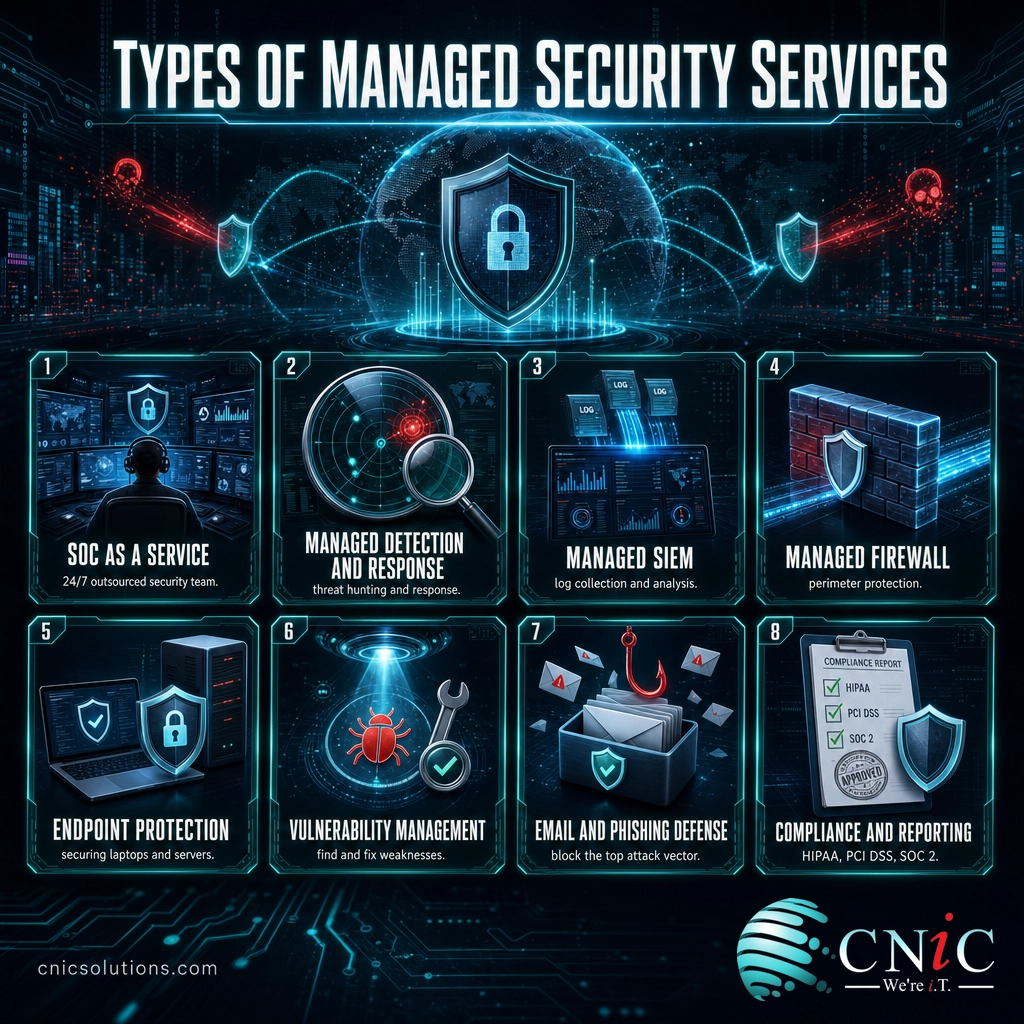
- Security operations center as a service (SOCaaS): an outsourced, always-staffed team and platform that watch your environment 24/7, the engine behind most other services.
- Managed detection and response (MDR): active threat hunting plus hands-on response, not just alerts. This is the service that actually stops an attack in progress.
- Managed SIEM and log management: collecting and analyzing security logs from across your systems to spot patterns a single device would miss.
- Managed firewall: configuring, monitoring, and maintaining the firewall that guards your network perimeter. Learn more about how a managed firewall service works.
- Managed endpoint protection: securing the laptops, desktops, and servers where most attacks land, often through endpoint detection and response tools built for smaller teams.
- Vulnerability and patch management: continuously finding and fixing the weaknesses attackers look for, before they are exploited.
- Email security and phishing defense: filtering malicious mail and training staff against the single most common way attackers get in.
- Compliance and reporting: the evidence, controls, and documentation needed for HIPAA, PCI DSS, SOC 2, and cyber insurance requirements.
You do not need every service on day one. A common path is to start with monitoring and response across your endpoints and email, then layer on managed firewall, vulnerability management, and compliance support as your risk and requirements grow.
How to Choose an MSSP
Not all providers labeled “MSSP” deliver the same thing. Some resell a monitoring tool and forward you the alerts. A real security partner investigates, responds, and helps you get better over time. When you evaluate options, these are the questions that separate the two.
- Is the SOC genuinely 24/7? Ask whether monitoring is staffed around the clock or only during business hours. Attackers favor nights and weekends for a reason.
- Do they respond, or just alert? Confirm there is real detection and response with defined service levels, not a dashboard you are expected to watch yourself.
- Do they know your industry’s compliance? A provider fluent in the rules that govern healthcare, finance, or legal work saves you from expensive gaps.
- Will it integrate with your IT? Security works best when it is connected to the team running your systems, which is why combined managed IT and security is often cleaner than two separate vendors.
- Is reporting clear? You should be able to understand what is being protected, what was caught, and what needs attention, without a security degree.
Cost matters too, and the good news is that managed security follows the same predictable, subscription-based model as managed IT. For a full breakdown of how providers price these services, see our guide to managed IT and security pricing models. If your business already has some internal IT, a co-managed arrangement lets an MSSP reinforce your team rather than replace it. Government resources can help you set a baseline too: CISA’s cyber guidance for small and midsize businesses outlines the core protections every organization should have in place.
Explore Managed IT and Security Services
Source: Cybersecurity and Infrastructure Security Agency, small and midsize business resources
Common Questions About MSSPs
What does an MSSP do?
What is the difference between an MSP and an MSSP?
How much do managed security services cost?
Does a small business need an MSSP?
What is the difference between an MSSP and MDR?
Related Terms
- MSP (managed service provider): a company that runs and supports your everyday IT, from the help desk to infrastructure, keeping systems working rather than defending them.
- SOC (security operations center): the staffed, always-on team and command center that watches for and responds to threats, the core of most MSSP services.
- SIEM (security information and event management): the platform that collects and analyzes security data from across your systems to surface real threats.
- MDR (managed detection and response): a service that adds active threat hunting and hands-on response to plain monitoring.
- EDR (endpoint detection and response): tools that watch laptops, desktops, and servers for malicious behavior. See our roundup of EDR solutions for smaller businesses.
- Managed firewall: a firewall configured, monitored, and maintained by an outside security team, explained in our managed firewall guide.
- Co-managed IT: a model where a provider’s team reinforces your internal IT staff instead of replacing them.
- Vulnerability management: the ongoing process of finding, prioritizing, and fixing security weaknesses before attackers exploit them.
About This Guide
The definition of a managed security service provider follows the NIST Computer Security Resource Center glossary. Breach-cost figures, the year-over-year trend, and the security automation savings are drawn from IBM’s Cost of a Data Breach Report. The cybersecurity workforce gap is from the ISC2 Cybersecurity Workforce Study, and the human-element breach figure is from the Verizon Data Breach Investigations Report. Figures are cited to their original sources and used to illustrate the drivers behind managed security, not as guaranteed outcomes for any specific business.
Sources: NIST CSRC glossary | IBM Cost of a Data Breach Report | ISC2 Cybersecurity Workforce Study | Verizon DBIR | CISA small and midsize business resources
Get a Free Security Audit From CNiC



related posts
What Is ZTNA (Zero Trust Network Access)?
November 3, 2026Zero Trust Network Access (ZTNA) is a security service that grants a verified user access to…
Zero Trust Statistics for 2026: Adoption, Maturity, and Breach Impact
November 3, 2026Zero trust has become the default security strategy on paper, but not yet in practice. Okta's…
What Is XDR (Extended Detection and Response) and How Does It Protect…
November 2, 2026Extended detection and response (XDR) is a security platform that collects and correlates threat data from…
What Is Zero Trust Security? A Guide for Small Businesses
November 2, 2026Zero Trust security is a cybersecurity model built on one rule: never trust, always verify. Instead…