

Encryption in cybersecurity is the process of scrambling readable data into an unreadable code that only an authorized key can unlock. It protects the confidentiality of information both stored and in transit, so that even if attackers steal it, they see meaningless characters instead of usable data.
Most people know encryption as the padlock in their browser or a setting they switched on once and forgot. In cybersecurity, it is something more fundamental: the control that decides whether stolen data is a catastrophe or a non-event. When information is encrypted, a lost laptop, an intercepted email, or a breached database yields nothing an attacker can read. This guide explains what encryption actually does inside a security program, where it fits, what it protects, what it does not, and why it has become a baseline expectation for any business handling sensitive information.
Key Takeaways
- Encryption protects confidentiality. It turns readable data (plaintext) into unreadable data (ciphertext) so that intercepted or stolen information stays useless without the key.
- It is one control, not a whole security program. Encryption guards data secrecy, but it does not stop phishing, weak passwords, or ransomware on its own.
- Encryption and hashing are not the same. Encryption is reversible with a key; hashing is one-way. Confusing them is one of the most common mistakes in security.
- It is increasingly required, not optional. HIPAA, PCI-DSS, and GDPR all expect encryption, and strong encryption can even remove the duty to report a breach.
- The weakest link is key management, not the algorithm. How keys are stored and controlled determines whether encryption actually protects you.
What’s in This Guide
- How Encryption Works
- Encryption vs. Hashing vs. Encoding
- What Encryption Protects, and What It Doesn’t
- Where Encryption Protects Your Data
- Why Encryption Matters for Your Business
- The Quantum Threat and Post-Quantum Encryption
- What Your Business Actually Needs
- Frequently Asked Questions
- Related Terms
How Encryption Works
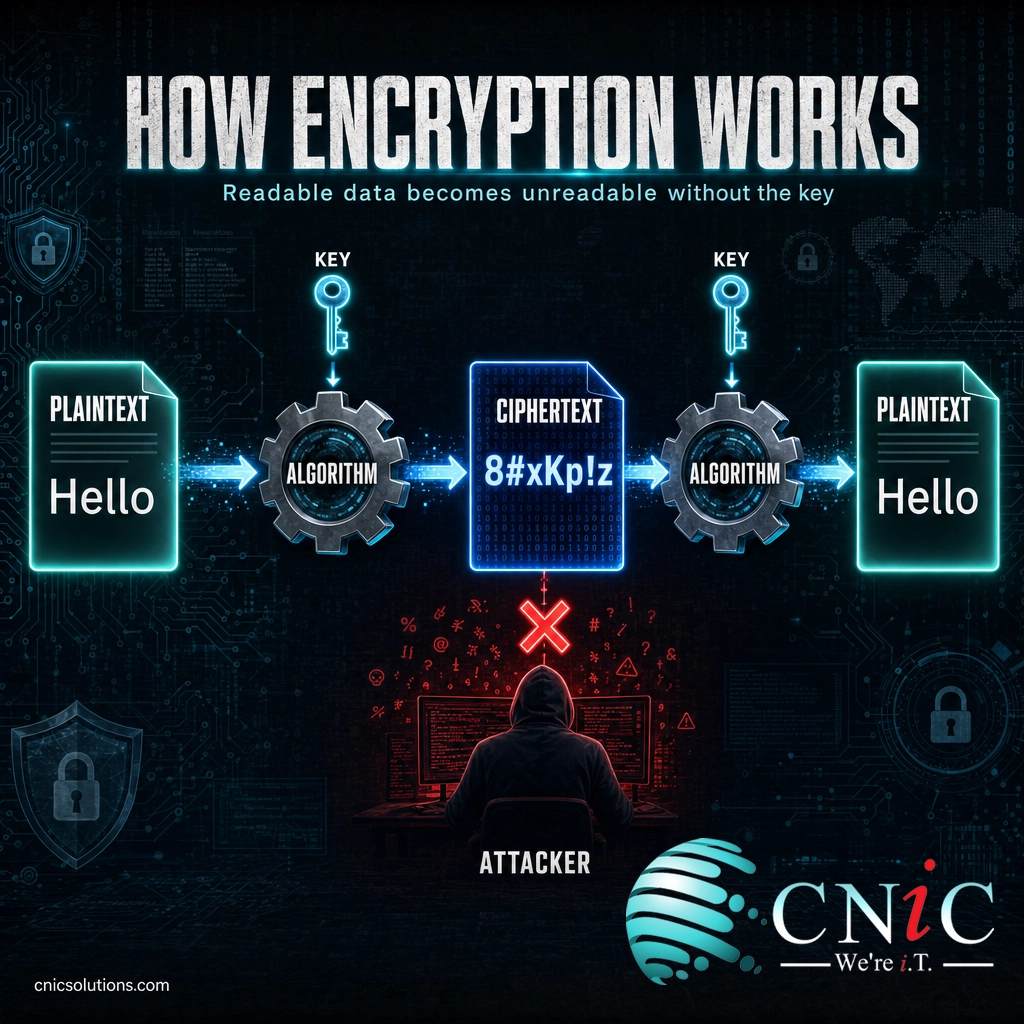
Encryption relies on two ingredients: an algorithm (the mathematical recipe for scrambling data) and a key (the secret value that controls the scrambling). Feed readable plaintext into the algorithm with a key and you get ciphertext, an unreadable jumble. Run that ciphertext back through with the correct key and the original data reappears. Anyone who intercepts the ciphertext without the key sees nothing usable.
A simple way to picture it: encryption is a locked safe. The algorithm is the locking mechanism and the key is what opens it. The safe can sit in plain view, but its contents stay private as long as the key is protected. That last point is the one businesses miss most often. The strongest lock in the world protects nothing if the key is taped to the door, which is why cybersecurity treats key management as seriously as the encryption itself.
There are two broad approaches. Symmetric encryption uses one shared key to lock and unlock, and it is fast enough for bulk data like drives and backups. Asymmetric encryption uses a public key to lock and a private key to unlock, which is how secure connections are established across the internet. Most real systems combine the two. For a full breakdown of the types, algorithms like AES and RSA, and the three states of data, see our deeper guide to the types and methods of data encryption.
Source: NIST FIPS 197, Advanced Encryption Standard
Encryption vs. Hashing vs. Encoding
The single most common confusion in security is treating encryption, hashing, and encoding as interchangeable. They solve different problems, and mixing them up leads to real mistakes, like “encrypting” a password when it should be hashed. Here is how the three compare.
| Technique | Reversible? | Purpose | Typical use |
|---|---|---|---|
| Encryption | Yes, with the key | Protect confidentiality of data you need to read back later | Encrypting files, disks, backups, and network traffic |
| Hashing | No, one-way | Verify integrity and store secrets you never need to un-scramble | Storing passwords, checking that a file was not altered |
| Encoding | Yes, no key needed | Change data format for compatibility, not for security | Base64 in emails, URL encoding, character sets |
The key distinctions: encryption is reversible but only with a secret key, which is what makes it a security control. Hashing is one-way, so it is used to prove a password is correct or a file is unchanged without ever storing the original. Encoding is reversible by anyone and provides no security at all; it simply reformats data so different systems can read it. Base64 is encoding, not encryption, even though it looks scrambled to the human eye.
Myth: “It looks scrambled, so it’s encrypted.”
Scrambled-looking output is not the same as protected data. Base64 and other encodings can be reversed by anyone in seconds with no key, and hashing cannot be reversed at all. Only encryption, using a properly managed key, actually keeps information confidential. Assuming encoded data is “secure” is a mistake that has exposed plenty of sensitive information.
Source: NIST Cryptography program
What Encryption Protects, and What It Doesn’t
Encryption is powerful precisely because it does one job extremely well: it keeps data confidential. But understanding its limits is what separates a real security strategy from a false sense of safety. In terms of the classic confidentiality, integrity, and availability model, encryption is primarily a confidentiality control.
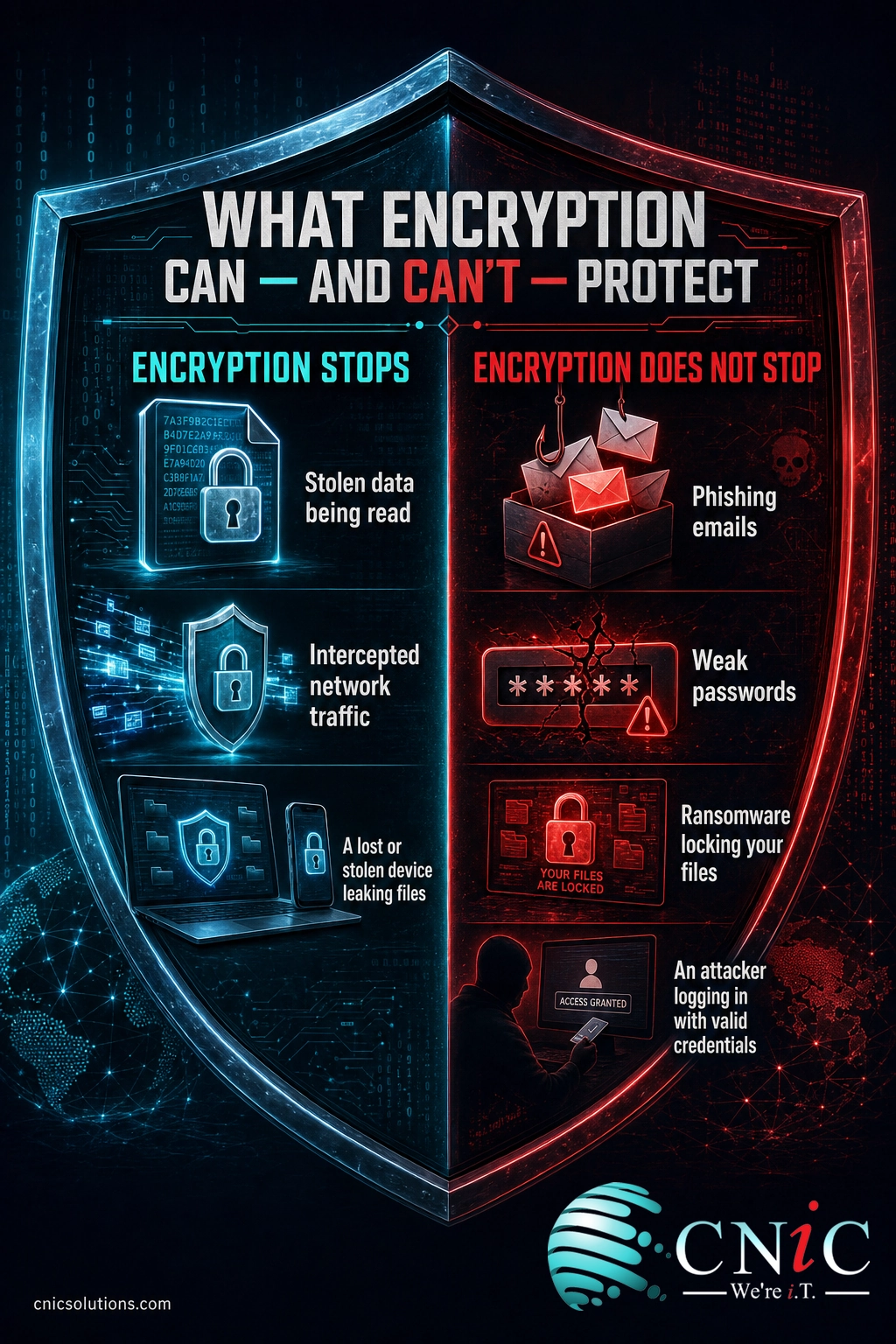
What encryption protects:
- Data that gets stolen or intercepted. An encrypted stolen laptop, a captured email, or an exfiltrated database is unreadable without the key.
- Data at rest and in transit. Information sitting on a drive and information moving across a network can both be kept private.
- Regulated and sensitive records. Customer, financial, and health data stay confidential even after a system is compromised.
What encryption does not do:
- It does not stop attackers from getting in. If someone tricks an employee through social engineering and logs in with valid credentials, the system decrypts data for them like any authorized user.
- It does not fix weak passwords or missing multi-factor authentication. Encryption protects data, not access to it.
- It does not stop ransomware. Ransomware turns encryption into a weapon, locking your files with a key you do not hold. Recovering from it depends on backups and detection, not on your own encryption.
- It does not catch a phishing email. Recognizing a fraudulent message is a human and email-security problem, not a cryptographic one.
This is why encryption is best understood as one layer inside a defense-in-depth strategy. It works alongside access controls, endpoint protection, monitoring, and training. Encryption is the safeguard that limits the damage when something else fails, which makes it essential but never sufficient on its own.
Source: CISA Cybersecurity Best Practices
Where Encryption Protects Your Data
In a real business, encryption is not one feature but a set of protections applied wherever sensitive data lives or travels. Data exists in states, and a complete approach covers each one.
- In transit: data moving across a network, such as a web session, an email, or a file upload. This is protected by TLS (the “S” in HTTPS) and by VPNs for remote workers. It is the most visible form of encryption, and it is now nearly universal on the web.
- At rest: data stored on a device, server, database, or backup. Full-disk encryption tools like BitLocker and FileVault, plus encrypted databases and backups, ensure that stolen hardware reveals nothing. Encrypted backups are especially important, since an unprotected backup is a breach waiting to happen.
- End-to-end: data encrypted so that only the sender and recipient can read it, with no intermediary, including the service provider, able to decrypt it. This is common in secure messaging and is increasingly expected for sensitive communication.
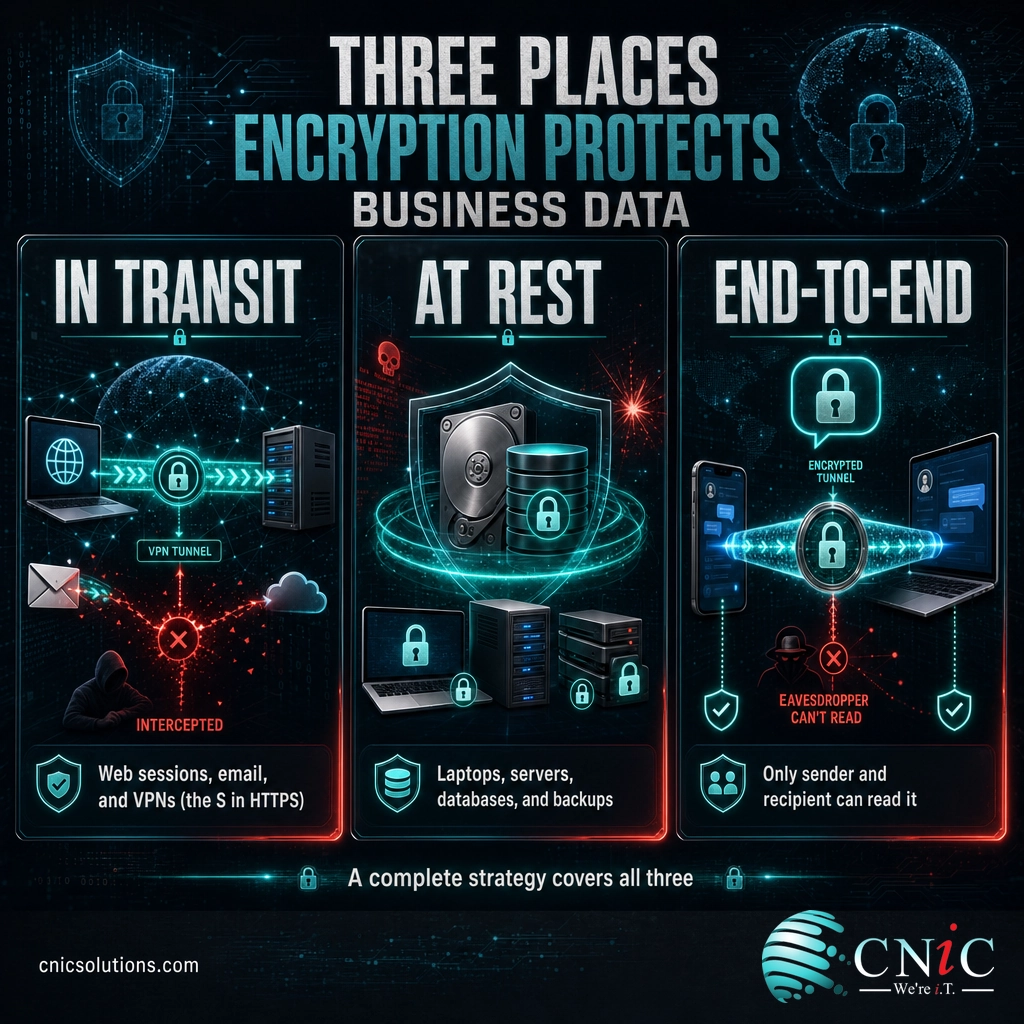
The frequent and dangerous mistake is protecting one state and assuming the job is done. Encrypting your laptops does nothing for sensitive data emailed in plaintext, and a perfectly secured connection does not help if the database on the other end is stored unprotected. Coverage across every state, verified rather than assumed, is what actually reduces risk. That fleet-wide consistency is a core reason businesses lean on a structured security assessment to find the gaps first.
Source: Google Transparency Report, HTTPS encryption on the web

Why Encryption Matters for Your Business
Encryption has moved from a technical nicety to a business expectation for three concrete reasons: breach economics, regulation, and trust.
First, breaches are expensive, and encryption is what caps the damage. The global average cost of a data breach reached a record high, and the single biggest factor in how bad a breach becomes is whether the stolen data was usable.
Second, encryption in transit is now the default state of the internet, and customers and regulators increasingly assume it. The overwhelming majority of web traffic is already encrypted, and a site or service that is not raises immediate red flags.
Third, encryption is written into the rules that regulated businesses must follow. Compliance frameworks treat it as a baseline safeguard: HIPAA lists encryption as an addressable safeguard for health data, PCI-DSS requires it for payment information in storage and in transit, and GDPR names it explicitly as a recommended protection measure. For many businesses, encryption is not a choice; it is a documented obligation.
The breach-notification safe harbor
There is a powerful, often overlooked benefit. Under the HIPAA Breach Notification Rule, if lost or stolen data was properly encrypted to recognized standards, it is considered unreadable and its exposure may not count as a reportable breach at all. Strong encryption can be the difference between a quiet non-event and a public, costly disclosure. Many state data-breach laws include a similar encryption safe harbor.
Secure your business data with managed cybersecurity
Source: IBM Cost of a Data Breach Report | HHS HIPAA Breach Notification Rule
The Quantum Threat and Post-Quantum Encryption
One forward-looking issue is worth knowing about, because it is already shaping security planning. Today’s asymmetric encryption, the kind that secures internet connections, relies on math that classical computers cannot solve in any reasonable time. A sufficiently powerful quantum computer could eventually break some of that math, which would undermine the encryption protecting data in transit.
The threat is not purely future-tense. Security agencies warn of a “harvest now, decrypt later” strategy, in which attackers capture encrypted data today and store it to decrypt once quantum computing matures. Data that must stay confidential for years, such as health, legal, or financial records, is the most exposed.
The response is already underway. In 2024, NIST finalized the first post-quantum encryption standards, new algorithms designed to resist quantum attacks. Most businesses do not need to act today, but it is a reminder that encryption is not “set and forget.” Standards evolve, and staying current is part of keeping the protection real.
Source: NIST, First Post-Quantum Encryption Standards (2024)
What Your Business Actually Needs
You do not need to become a cryptographer. You need to confirm that a short list of protections is actually in place, configured correctly, and verified rather than assumed. For most small and midsize businesses, that means:
- Full-disk encryption on every device, especially laptops and phones that can be lost or stolen.
- Encryption in transit everywhere sensitive data moves: TLS on your sites and apps, and a VPN for remote access.
- Encrypted backups, so your safety net is not itself a liability.
- Email encryption for messages carrying sensitive or regulated data.
- Disciplined key management, so the keys protecting everything above are generated, stored, rotated, and retired securely.
- Alignment with your compliance obligations, so your encryption choices satisfy HIPAA, PCI-DSS, or GDPR where they apply.
The hard part is rarely switching encryption on for one device. It is making sure it is enabled everywhere, kept current as standards shift, and proven under an audit. A single unencrypted laptop or a plaintext backup can undo an otherwise solid posture. This is the kind of ongoing oversight a managed IT and security partner is built to provide, turning encryption from a one-time toggle into a maintained discipline that holds up when an auditor asks for proof.
Make encryption a managed discipline with a Virtual CIO
Source: CISA Cybersecurity Best Practices
Frequently Asked Questions
What is encryption in cybersecurity?
What is the difference between encryption and hashing?
Can encrypted data be hacked?
Does encryption stop ransomware?
Is encryption required by law?
Related Terms
- Plaintext: readable, unencrypted information before it is scrambled.
- Ciphertext: the scrambled, unreadable output of encryption.
- Encryption key: the secret value that controls encryption and decryption; protecting it is the heart of security.
- AES-256: a widely used symmetric standard strong enough to protect classified data, and the workhorse of business encryption.
- TLS/SSL: the protocol that encrypts data in transit across the web, shown as the padlock in your browser.
- End-to-end encryption: encryption where only the communicating parties can read the data, not any intermediary.
- Hashing: a one-way function used to store passwords and verify data integrity, not to be confused with encryption.
- Key management: the practice of securely generating, storing, rotating, and retiring encryption keys.
- Post-quantum cryptography: new encryption standards designed to resist future quantum-computer attacks.
Sources
This explainer anchors its technical and factual claims to primary sources. The AES standard, key strength, and classified-data approval follow NIST’s Federal Information Processing Standard 197 and the NIST cryptography program. The average data-breach cost is from IBM’s Cost of a Data Breach Report 2024. HTTPS adoption figures are from Google’s Transparency Report. The breach-notification safe harbor reflects the HHS HIPAA Breach Notification Rule. Post-quantum standards reflect NIST’s 2024 releases. Best-practice framing on defense in depth and data states aligns with CISA cybersecurity guidance. Figures are cited to their original sources and used to illustrate encryption’s role, not as guaranteed outcomes for any specific business.
Primary and authoritative sources: NIST FIPS 197 (AES) | NIST Cryptography | IBM Cost of a Data Breach Report 2024 | Google Transparency Report (HTTPS) | HHS HIPAA Breach Notification Rule | NIST Post-Quantum Standards | CISA Cybersecurity Best Practices.
Get a Free Consultation on Your IT and Security



related posts
What Is FinOps? A Guide to Managing and Optimizing Cloud Costs
October 19, 2026FinOps is an operational framework and cultural practice for managing and optimizing cloud costs by bringing…
What Is Endpoint Security? How It Protects Your Business Devices
October 19, 2026Endpoint security is the practice of protecting the devices that connect to your network, such as…
What Is DNS? How the Internet’s Address Book Works
October 18, 2026DNS (Domain Name System) is the internet's address book. It translates the human-friendly domain names you…
What Is Data Loss Prevention (DLP) and Why Does Your Business Need…
October 17, 2026Data loss prevention (DLP) is a set of tools and policies that detect and stop sensitive…