

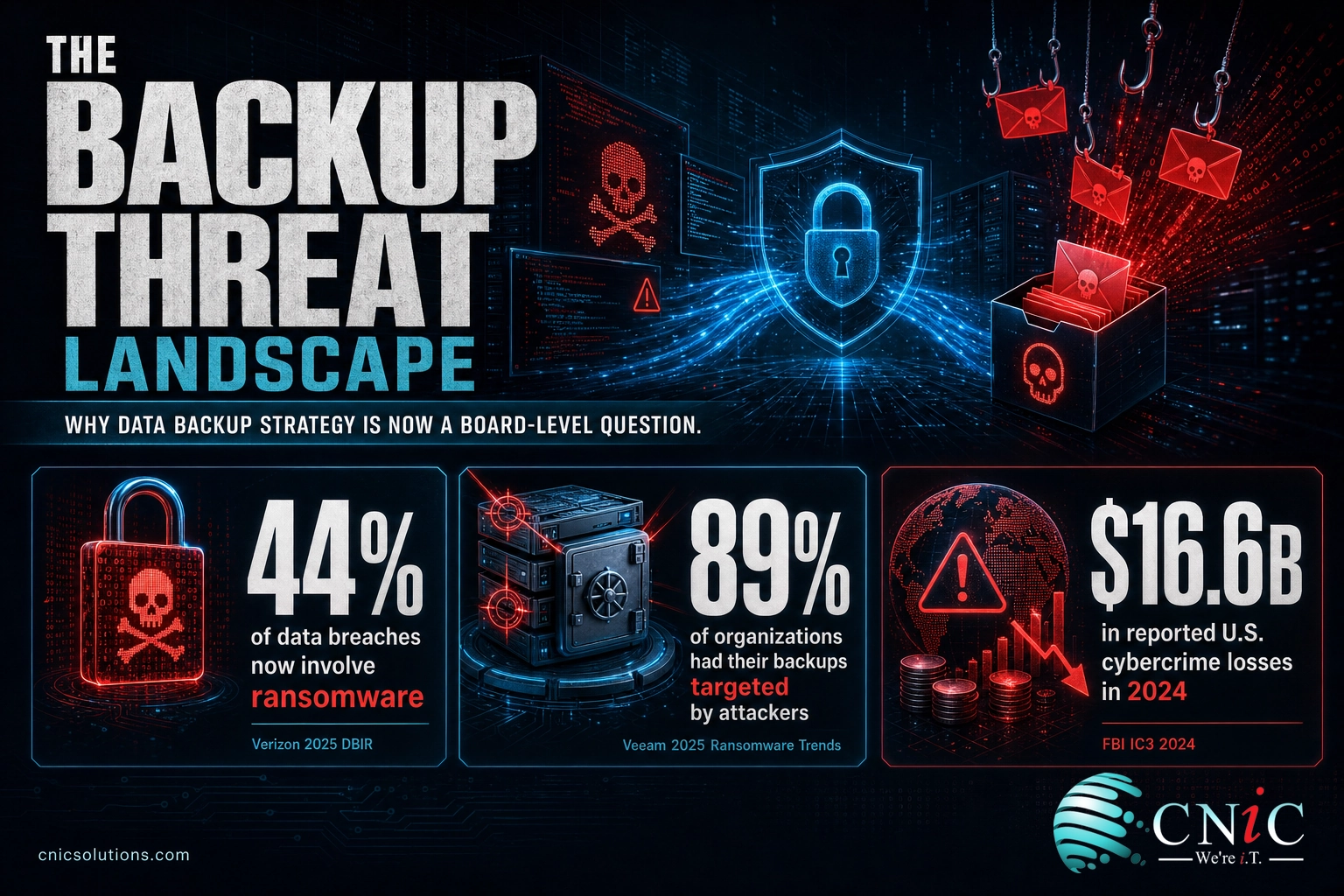
Nearly nine in ten organizations (89%) say attackers went after their backups during a ransomware incident, yet only about a third protect those backups with immutable storage (Veeam 2025 Ransomware Trends Report). That gap, more than any single tool, is why data backup strategy has become a board-level question rather than an IT afterthought.
Key Takeaways
- The 3-2-1 rule is the baseline: three copies of your data, on two types of media, with one copy offsite. It survives hardware failure, site disasters, and localized attacks in a single design.
- Backups are now a primary target: 89% of organizations reported attackers tried to compromise their backups, but only 32% use immutable repositories (Veeam 2025).
- Recovery is not guaranteed: only about 10% of ransomware victims recovered more than 90% of their data, and backup use to restore data fell to a four-year low of 53% (Veeam 2025; Sophos 2025).
- The cost of getting it wrong is steep: the average U.S. data breach hit an all-time high of $10.22 million, and 90% of larger enterprises say a single hour of downtime now exceeds $300,000 (IBM 2025; ITIC 2024).
- Testing separates real protection from false confidence: a backup that has never been restored is an assumption. Modern strategy extends 3-2-1 to 3-2-1-1-0, adding immutability and verified, error-free restores.
What’s in This Guide
- Why Backup Strategy Is a Business Decision, Not an IT Detail
- The 3-2-1 Backup Rule, Explained
- Beyond 3-2-1: The 3-2-1-1-0 Evolution
- Backup Best Practices That Actually Protect You
- What Happens When Backups Fail
- Building a Backup Strategy for Your Business
- Every Statistic in One Table
- Frequently Asked Questions
Why Backup Strategy Is a Business Decision, Not an IT Detail
Data loss is no longer a rare, freak event that happens to someone else. The threat environment that a backup strategy has to survive got measurably worse in the last two years, and the financial stakes climbed with it. When ransomware, hardware failure, and human error can each end a business, the copy of your data you can actually restore from becomes the difference between a bad week and a closed company.
The scale is documented in primary reporting. Verizon’s 2025 Data Breach Investigations Report analyzed 22,052 security incidents and found ransomware present in 44% of all breaches, up sharply from 32% the year before. For small and midsize businesses the picture is starker: 88% of SMB breaches involved ransomware. These are the organizations least likely to have a mature recovery plan and most likely to be targeted.
The FBI’s Internet Crime Complaint Center recorded $16.6 billion in reported losses across 859,532 complaints in 2024, and named ransomware the most pervasive threat to critical infrastructure. Ransomware complaints rose 9% year over year. Cost data tells the same story from the other side of the incident: IBM’s 2025 Cost of a Data Breach Report put the global average breach at $4.44 million and the United States average at an all-time high of $10.22 million.
Average Cost of a Data Breach, 2025 (IBM)
Myth: “We’re too small to be a target.”
The data says the opposite. Verizon found ransomware in 88% of SMB breaches versus 39% at large organizations, and the FBI’s own figures show attackers automate their way into whatever is exposed, regardless of company size. Small businesses are targeted more often precisely because their defenses and their backups are usually weaker. “Too small to target” is the belief that most reliably precedes a data-loss event.
None of this makes backups optional. It makes the quality of your backup strategy the thing that determines whether an attack is survivable. That is where the 3-2-1 rule comes in.
Source: Verizon 2025 DBIR | FBI IC3 2024 Internet Crime Report | IBM Cost of a Data Breach 2025
Protecting a business against this threat starts with the copy you can restore from, and extends to the layered defenses that keep an attacker from reaching it in the first place.
See how layered cybersecurity keeps attackers away from your data
The 3-2-1 Backup Rule, Explained
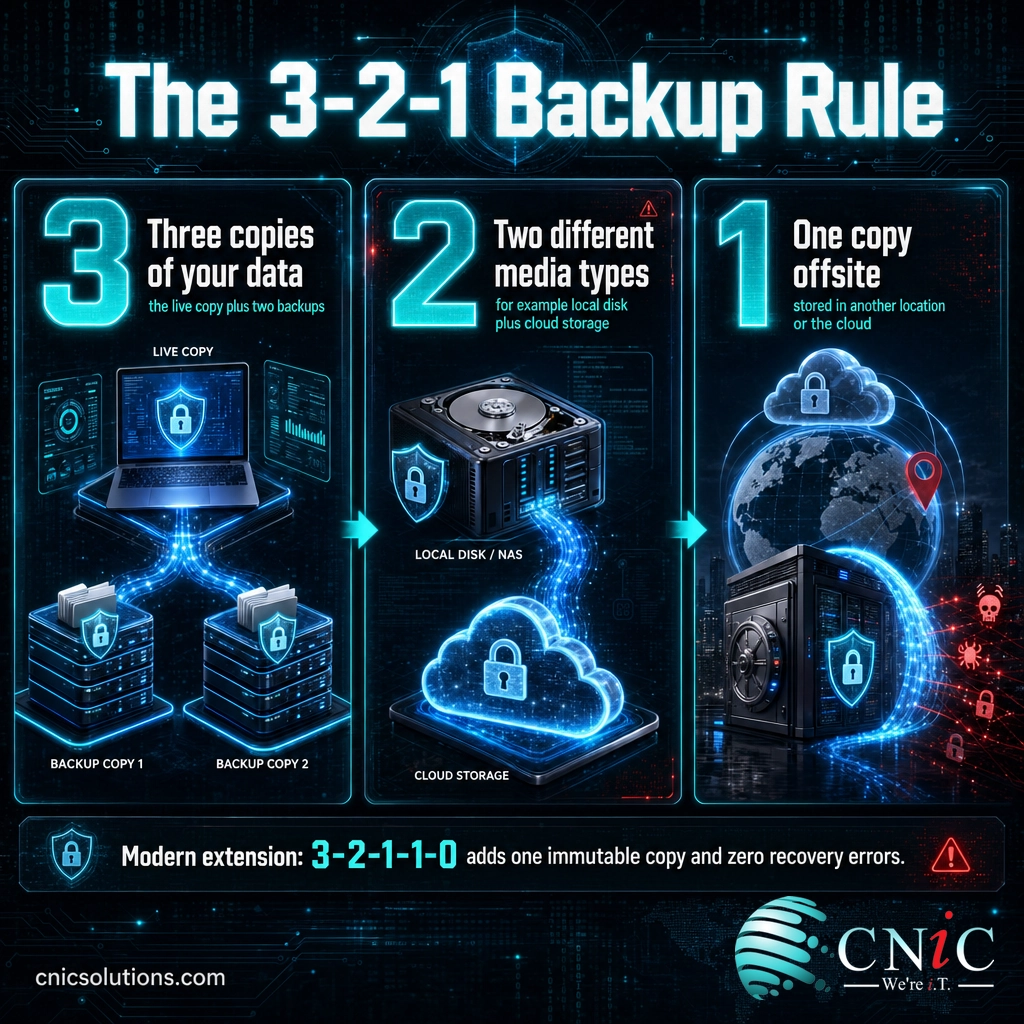
The 3-2-1 rule is the most widely referenced data protection standard in the industry, and it has aged well because it defends against three different failure modes at the same time. The rule originated with photographer and digital-asset-management writer Peter Krogh, whose framework was adopted across enterprise IT because it is simple enough to audit and strong enough to matter. The U.S. Cybersecurity and Infrastructure Security Agency (CISA) recommends the same 3-2-1 structure in its guidance for protecting against ransomware and data loss.
Here is what each number requires, and why it is there.
| Number | Rule | What it means | Failure it defends against |
|---|---|---|---|
| 3 | Three copies of your data | The live production copy plus two separate backups | A single corrupted or deleted file, and single-backup failure |
| 2 | Two different media types | For example local disk plus cloud object storage, or disk plus tape | A media-specific failure that wipes out every copy on one technology |
| 1 | One copy offsite | At least one backup stored in a different physical location or the cloud | Fire, flood, theft, or a site-wide event that destroys everything on premises |
The power of 3-2-1 is that no single event should be able to take out every copy. A ransomware infection that encrypts your servers should not reach the offsite copy. A failed storage array should not matter because a second media type still holds the data. A building fire should not end the company because a copy lives somewhere else entirely.
The reason backup use to recover fell to a four-year low is not that backups stopped working. It is that attackers learned to find and encrypt the backups too, so victims without a protected, offsite, or immutable copy had nothing clean to restore from. That is the exact scenario the “1 offsite” part of the rule exists to prevent, and the reason the modern version of the rule adds immutability on top.
Set your RPO and RTO before you choose tools
Two numbers turn a backup product into a recovery strategy:
- RPO (Recovery Point Objective): how much data you can afford to lose, measured in time. An RPO of one hour means you back up at least hourly, so you never lose more than an hour of work.
- RTO (Recovery Time Objective): how quickly systems must be back online. An RTO of four hours means your entire backup and restore design has to deliver a working environment within four hours.
Define both first. They dictate how often you back up, which media you choose, and whether you need standby infrastructure. Buying backup software before setting RPO and RTO is how businesses end up with backups that technically exist but cannot meet the recovery the business actually needs.
Source: Sophos State of Ransomware 2025 | CISA StopRansomware guidance
Get a managed backup and recovery plan built around your RPO and RTO
Beyond 3-2-1: The 3-2-1-1-0 Evolution
The 3-2-1 rule was written before ransomware routinely hunted for backup servers. Its structure still holds, but the data shows why leading teams extend it. When 89% of organizations report their backups were targeted, the “offsite” copy needs one more property: it has to be impossible to alter or delete, even by an attacker who has your admin credentials.
That is the 3-2-1-1-0 model. It keeps the original three requirements and adds two.
| Component | Requirement | Why it was added |
|---|---|---|
| 3 | Three copies of data | Baseline redundancy (unchanged from 3-2-1) |
| 2 | Two media types | Survives a media-specific failure (unchanged) |
| 1 | One copy offsite | Survives a site-wide disaster (unchanged) |
| 1 | One copy immutable or air-gapped | A copy that cannot be encrypted, altered, or deleted, even with stolen credentials |
| 0 | Zero errors on recovery verification | Backups are tested and confirmed to restore cleanly, not just assumed to work |
Immutability is delivered through write-once-read-many (WORM) storage, object-lock in cloud storage, or a genuine air gap where the copy is physically offline. The point is the same in every form: an attacker who compromises your network still cannot reach in and destroy that one copy. It is the single most effective answer to the backup-targeting trend, and the 68% of organizations that still lack immutable storage are the ones most exposed to it.
CNiC Solutions Analysis: The Immutability Gap
Two figures from the Veeam 2025 Ransomware Trends Report, read together, quantify how exposed most organizations are:
- Backups targeted by attackers: 89% of organizations
- Organizations using immutable repositories: 32%
Formula: 89% (backups targeted) minus 32% (protected by immutability) means roughly 57% of organizations face active backup-targeting attacks without an immutable copy to fall back on. More than half of the market is running the exact backups attackers have learned to destroy, with no locked copy behind them. Calculation and interpretation original to CNiC Solutions, from Veeam 2025 source data.
Source: Veeam 2025 Ransomware Trends Report
Add immutable cloud backups an attacker can’t reach
Backup Best Practices That Actually Protect You
A backup strategy is only as good as the day you have to use it. The organizations that recover fully are not the ones with the most storage; they are the ones with disciplined, tested processes. Five practices separate a backup that saves the business from one that quietly fails at the worst possible moment.
1. Automate the backup, and monitor it
Manual backups get skipped. A backup schedule that runs automatically and alerts a human when it fails removes the single most common cause of “we thought we had a backup.” Automation is also what makes a tight RPO realistic: hourly or continuous protection is not something a person remembers to do.
2. Test restores on a schedule
This is the practice most often skipped and most responsible for failed recoveries. Only about 10% of ransomware victims recovered more than 90% of their data (Veeam 2025), and untested or partial backups are a leading reason. A restore test, at minimum quarterly and after any major infrastructure change, is the only proof that your backups actually work.
3. Encrypt backups in transit and at rest
A backup copy is a full copy of your sensitive data. If it is stolen or intercepted unencrypted, you have handed the attacker the data you were trying to protect. Encryption is non-negotiable, especially for regulated data under HIPAA, PCI-DSS, or SOC 2 obligations.
4. Keep one copy immutable or offline
As the numbers above make clear, this is the practice that neutralizes the backup-targeting trend. If nothing else on this list is done perfectly, an immutable offsite copy still gives you a clean recovery point.
5. Set retention to match compliance and recovery needs
How long you keep backups is a business and legal decision, not a default setting. Some ransomware sits dormant for weeks before triggering, so a too-short retention window can mean every copy you hold is already infected. Match retention to your recovery needs and your regulatory obligations with a documented policy.
The decline in backup use to recover is worth reading carefully. In 2024, 73% of victims restored from backups; in 2025 that fell to 53%. The healthy read is that more attacks are being stopped before encryption (47%, up from 22% in 2023), so fewer organizations reach the restore stage at all. The unhealthy read, for anyone without protected backups, is that attackers reached the backups first. Which story applies to your business depends entirely on whether you followed the practices above.
Backup Use to Restore Encrypted Data (Sophos)
Source: Veeam 2025 Ransomware Trends Report | Sophos State of Ransomware 2025
Have a Virtual CIO set and enforce your backup policy
What Happens When Backups Fail
The argument for disciplined backups is not abstract. When recovery fails or drags on, the meter runs in real dollars, and for many businesses the bill is fatal. This is the section to bring to anyone who thinks backup spend is hard to justify.
Downtime alone is punishing. ITIC’s 2024 Hourly Cost of Downtime survey of more than 1,000 organizations found that a single hour of downtime now exceeds $300,000 for 90% of mid-size and large enterprises, and 44% said one hour can cost more than $1 million. Those figures exclude litigation and penalties. Every hour your systems are down because a backup would not restore is measured against that scale.
IBM’s 2025 data shows why speed of recovery, not just the existence of a backup, drives cost. Breaches contained in under 200 days averaged $3.61 million; those that ran longer averaged $5.49 million. A tested backup with a defined RTO is what keeps you on the cheaper side of that line. The slow, improvised recovery is the expensive one.
Average Breach Cost by Time to Contain (IBM 2025)
For smaller organizations, the outcome can be existential rather than merely expensive. The Federal Emergency Management Agency (FEMA) reports that roughly 40% of businesses never reopen after a disaster, and another 25% that do reopen fail within a year. A data disaster is a disaster: the business that cannot restore its records, its systems, and its customer data on time is the business that does not come back.
Read against the recovery data, the message is direct: the money you would lose in a single day of unplanned downtime typically dwarfs the annual cost of doing backups properly. This is the clearest ROI case in all of IT.
Source: ITIC 2024 Hourly Cost of Downtime Report | IBM Cost of a Data Breach 2025 | FEMA Ready.gov business continuity guidance
Reduce downtime risk with proactive managed IT
Building a Backup Strategy for Your Business
A strategy is more than a product. It is the sequence of decisions that connects your data to a recovery you can count on. Here is the order that works, and where each piece fits.
Start with a business impact analysis. Identify which systems and data are critical, and what an outage of each actually costs. A business impact analysis is what tells you where to spend, so you protect the systems that matter most first.
Set RPO and RTO per system. Not every system needs the same recovery target. Your accounting database may demand an RPO of minutes; an internal file share may tolerate a day. These targets drive every technical choice that follows.
Design to 3-2-1, then to 3-2-1-1-0. Put the three copies, two media, and one offsite copy in place, then add an immutable copy and a verification routine. This is the core of the plan.
Wrap backups in a recovery plan. Backups are the ingredients; a step-by-step disaster recovery plan is the recipe. It documents who does what, in what order, to hit your RTO. For many businesses, a fully managed option such as Disaster Recovery as a Service delivers a tested, standby environment without building it in-house.
Document retention and test on a calendar. Codify how long copies are kept in a data retention policy, and put restore tests on a recurring schedule so the plan is proven, not assumed. Pair the whole thing with a broader business continuity plan so people and operations, not just data, keep running.
Backup strategy is one part of a layered defense. It works alongside the controls that stop an attack early, which is why the sharpest 2025 figure is that 47% of attacks were now stopped before encryption. Prevention and recovery are two halves of the same job. For the full picture of what recovery looks like after an incident, our data on ransomware recovery timelines and costs shows exactly how the organizations with real backup discipline pull ahead.
The most expensive backup is the one you never tested
Every organization that discovered its backups were incomplete, encrypted, or unrestorable discovered it at the worst possible moment: mid-incident, with the clock running at hundreds of thousands of dollars an hour. The “0” in 3-2-1-1-0, zero errors on verification, exists because a backup you have not restored is a hope, not a plan. Test it before an attacker tests it for you.
Every Statistic in One Table
| Statistic | Figure | Source | Year |
|---|---|---|---|
| Data breaches involving ransomware | 44% | Verizon DBIR | 2025 |
| Prior-year breaches involving ransomware | 32% | Verizon DBIR | 2024 |
| SMB breaches involving ransomware | 88% | Verizon DBIR | 2025 |
| Large-org breaches involving ransomware | 39% | Verizon DBIR | 2025 |
| Total reported cybercrime losses | $16.6 billion | FBI IC3 Internet Crime Report | 2024 |
| Ransomware complaints to IC3 | 3,156 (up 9%) | FBI IC3 Internet Crime Report | 2024 |
| Global average data breach cost | $4.44 million | IBM Cost of a Data Breach | 2025 |
| U.S. average data breach cost (record high) | $10.22 million | IBM Cost of a Data Breach | 2025 |
| Breach cost when contained in over 200 days | $5.49 million | IBM Cost of a Data Breach | 2025 |
| Breach cost when contained in under 200 days | $3.61 million | IBM Cost of a Data Breach | 2025 |
| Organizations whose backups were targeted | 89% | Veeam Ransomware Trends | 2025 |
| Organizations using immutable repositories | 32% | Veeam Ransomware Trends | 2025 |
| Victims recovering more than 90% of data | ~10% | Veeam Ransomware Trends | 2025 |
| Victims using backups to restore data | 53% (four-year low) | Sophos State of Ransomware | 2025 |
| Backup-use rate the prior year | 73% | Sophos State of Ransomware | 2024 |
| Attacks stopped before encryption | 47% (up from 22% in 2023) | Sophos State of Ransomware | 2025 |
| Mean recovery cost, excluding ransom | $1.84 million | Sophos State of Ransomware | 2025 |
| Enterprises where 1 hour of downtime tops $300,000 | 90% | ITIC Hourly Cost of Downtime | 2024 |
| Enterprises where 1 hour of downtime tops $1 million | 44% | ITIC Hourly Cost of Downtime | 2024 |
| Businesses that never reopen after a disaster | ~40% | FEMA | Current guidance |
Frequently Asked Questions
What is the 3-2-1 backup rule?
Is the 3-2-1 rule still enough against ransomware?
What are RPO and RTO in a backup strategy?
How often should a business test its backups?
What is the difference between a backup and a disaster recovery plan?
Methodology & Sources
Every figure in this article traces to a named Tier 1 primary source. No blog-to-blog citations and no invented statistics were used. Figures are the most recent available at publication.
- Verizon 2025 Data Breach Investigations Report (DBIR): ransomware share of breaches, SMB versus large-organization breach composition. Based on analysis of 22,052 security incidents and 12,195 confirmed breaches.
- Federal Bureau of Investigation, Internet Crime Complaint Center (IC3) 2024 Internet Crime Report: total reported losses, complaint volume, and ransomware complaint trend.
- IBM Cost of a Data Breach Report 2025: global and U.S. average breach cost and cost by containment time.
- Veeam 2025 Ransomware Trends Report: backup targeting rate, immutable-repository adoption, and data-recovery completeness.
- Sophos State of Ransomware 2025: backup-based recovery rate, attacks stopped before encryption, and mean recovery cost. Based on a survey of 3,400 IT and cybersecurity leaders across 17 countries.
- ITIC 2024 Hourly Cost of Downtime Report: per-hour downtime cost thresholds. Based on a survey of more than 1,000 organizations worldwide.
- Federal Emergency Management Agency (FEMA): business reopening and survival rates after a disaster, from Ready.gov business continuity guidance.
- U.S. Cybersecurity and Infrastructure Security Agency (CISA): 3-2-1 backup guidance via the StopRansomware program.
Media and press usage: Journalists, analysts, and researchers are welcome to cite the statistics and the CNiC Solutions Analysis in this article with attribution to CNiC Solutions and a link to this page. For interviews or additional data on backup and disaster recovery for Texas businesses, contact CNiC Solutions.



related posts
What Is IT Monitoring? A Guide for Businesses
October 23, 2026IT monitoring is the continuous practice of collecting and analyzing data from a business's technology, its…
What Is Log Analysis? How It Works and Why It Matters
October 23, 2026Log analysis is the practice of reviewing and interpreting the log files that computers, applications, and…
What Is IT Asset Management (ITAM)? A Guide for Businesses
October 22, 2026IT asset management (ITAM) is the practice of tracking and managing an organization's hardware, software, and…
What Is ISO 27001? A Guide to the Information Security Standard
October 22, 2026ISO 27001 is the world's best-known standard for managing information security, and increasingly the certification customers…