

The CIS Critical Security Controls are a prioritized list of the cybersecurity actions that actually stop the attacks businesses face most often. The current release, version 8.1, sorts 153 specific safeguards into 18 controls and puts them in order, so you do the highest-impact work first instead of drowning in a checklist. That ordering matters more than it sounds: according to the Center for Internet Security, implementing just the foundational tier defends against 77 percent of the techniques behind the five most common attack types. This guide explains what the controls are, walks through the 18 of them, and gives you a step-by-step way to implement them without trying to boil the ocean.
Before You Begin
Implementing the CIS Controls is a project, not a purchase. A little preparation makes the whole thing go faster:
- Prerequisites: a rough idea of the data you handle (customer records, payment data, health information) and who in the business can approve time and budget.
- Tools you will want: an asset and software inventory (even a spreadsheet to start), and the free CIS Controls Self Assessment Tool to measure where you stand.
- Skill level: IG1 is designed for organizations with limited in-house security expertise. You do not need a security team to begin, though you will want expert help for the harder safeguards.
- Estimated time: reaching solid IG1 coverage typically takes a small business a few weeks to a few months, depending on your starting point.
- Pick your target first: decide which Implementation Group you are aiming for (almost certainly IG1) before you touch a single safeguard.
Key Takeaways
- The controls are prioritized, not just listed. CIS v8.1 orders 153 safeguards into 18 controls so you tackle the highest-impact actions first.
- Implementation Groups tell you where to start. IG1 (56 safeguards) is essential cyber hygiene; IG2 and IG3 build on top of it cumulatively.
- The essentials do most of the work. IG1 alone defends against 77 percent of the techniques used in the top five attack types.
- Start with inventory. Controls 1 and 2 (knowing your assets and software) are the foundation everything else depends on.
- Evidence and ownership matter. A control only counts when someone owns it and you can prove it is working.
What’s in This Guide
- What Are the CIS Critical Security Controls?
- The 18 CIS Controls at a Glance
- Implementation Groups: IG1, IG2, and IG3
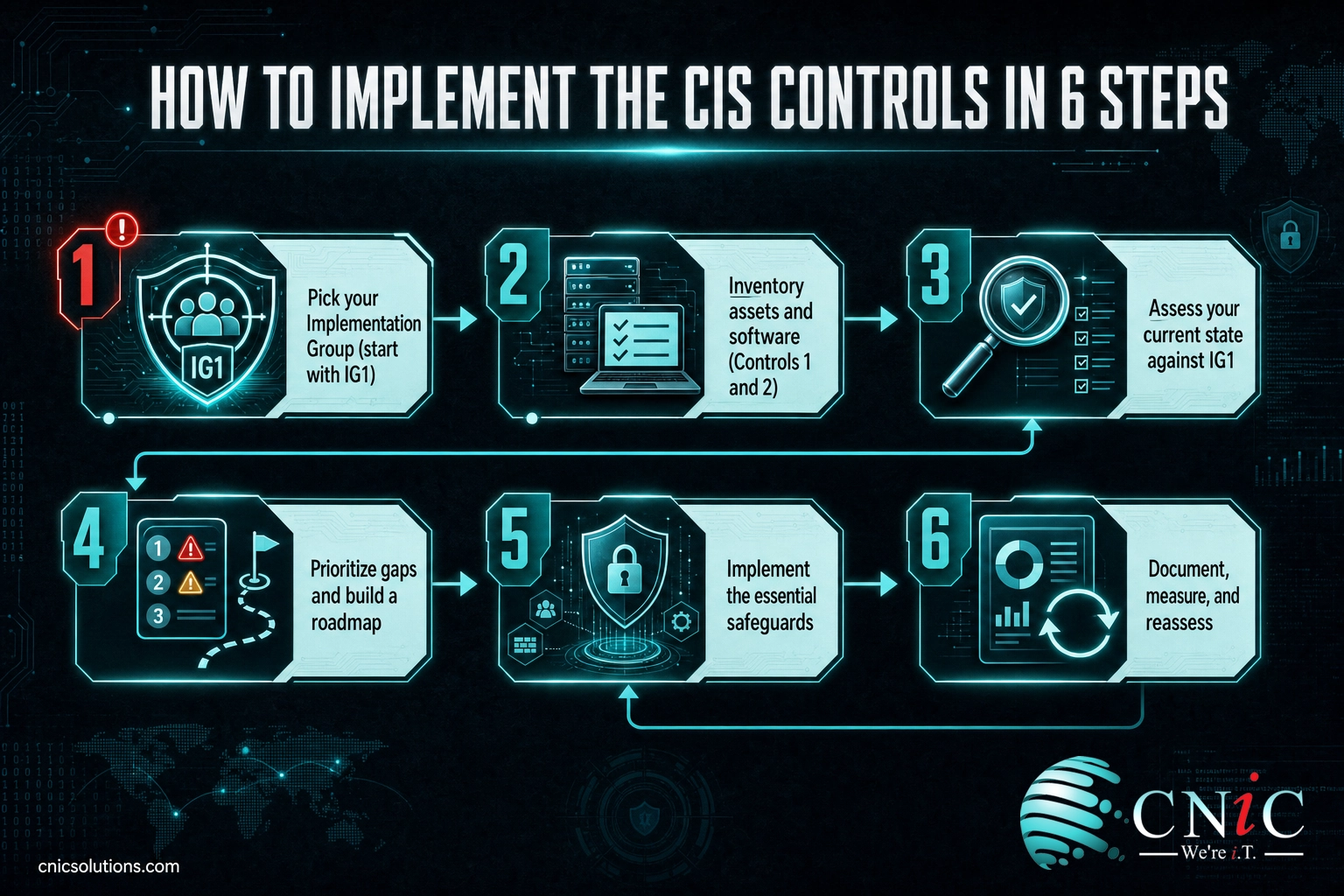
- Step 1: Pick Your Implementation Group
- Step 2: Inventory Your Assets and Software
- Step 3: Assess Your Current State Against IG1
- Step 4: Prioritize Gaps and Build a Roadmap
- Step 5: Implement the Essential Safeguards
- Step 6: Document, Measure, and Reassess
- When to Call a Professional
- Troubleshooting Common Problems
- Maintain and Monitor
- Frequently Asked Questions
What Are the CIS Critical Security Controls?
The CIS Critical Security Controls (often shortened to the CIS Controls) are a set of prioritized, prescriptive cybersecurity best practices maintained by the Center for Internet Security, a nonprofit that develops security standards used worldwide. They began as a community effort to answer a simple question: of everything a business could do to defend itself, which actions actually matter most?
The answer is what makes the controls so useful. Instead of a broad set of principles, you get a concrete list of safeguards ranked by impact. The current version, CIS Controls v8.1, is built around 18 controls containing 153 individual safeguards. Each control groups related safeguards under a theme, from asset inventory to incident response.
People sometimes ask whether the CIS Controls compete with the NIST Cybersecurity Framework or replace compliance obligations like HIPAA or PCI-DSS. They do neither. The controls are voluntary guidance that maps cleanly to those frameworks and regulations, which is why they are one of the most practical ways to make progress on compliance. If you are still sorting out which rules apply to your business, our overview of how to navigate IT compliance and regulations pairs well with this guide: that piece explains the obligations, and this one gives you the controls to satisfy them.
Source: Center for Internet Security, CIS Critical Security Controls
Put these controls to work with managed cybersecurity
The 18 CIS Controls at a Glance
Every safeguard in the framework lives under one of these 18 controls. The order is deliberate: the earlier controls are the foundation that later controls build on. Here is the full v8.1 list with what each one covers.
| # | Control | What it covers |
|---|---|---|
| 1 | Inventory and Control of Enterprise Assets | Know every device connected to your network so nothing is unmanaged. |
| 2 | Inventory and Control of Software Assets | Track all installed software and block what is unauthorized. |
| 3 | Data Protection | Identify, classify, and protect sensitive data at rest and in transit. |
| 4 | Secure Configuration of Enterprise Assets and Software | Harden default settings on devices, operating systems, and applications. |
| 5 | Account Management | Control the lifecycle of user, admin, and service accounts. |
| 6 | Access Control Management | Grant least-privilege access and enforce multi-factor authentication. |
| 7 | Continuous Vulnerability Management | Continuously find and remediate weaknesses before attackers use them. |
| 8 | Audit Log Management | Collect and keep the logs you need to detect and investigate incidents. |
| 9 | Email and Web Browser Protections | Reduce the attack surface of the two tools employees use most. |
| 10 | Malware Defenses | Prevent and detect malicious code across your endpoints. |
| 11 | Data Recovery | Maintain tested, recoverable backups of critical data. |
| 12 | Network Infrastructure Management | Securely manage and monitor routers, switches, and firewalls. |
| 13 | Network Monitoring and Defense | Watch network traffic for threats and respond to them. |
| 14 | Security Awareness and Skills Training | Train people to recognize and avoid social engineering. |
| 15 | Service Provider Management | Hold vendors and cloud providers to your security standards. |
| 16 | Application Software Security | Build and buy software securely across its lifecycle. |
| 17 | Incident Response Management | Have a plan to detect, respond to, and recover from incidents. |
| 18 | Penetration Testing | Test your defenses the way a real attacker would. |
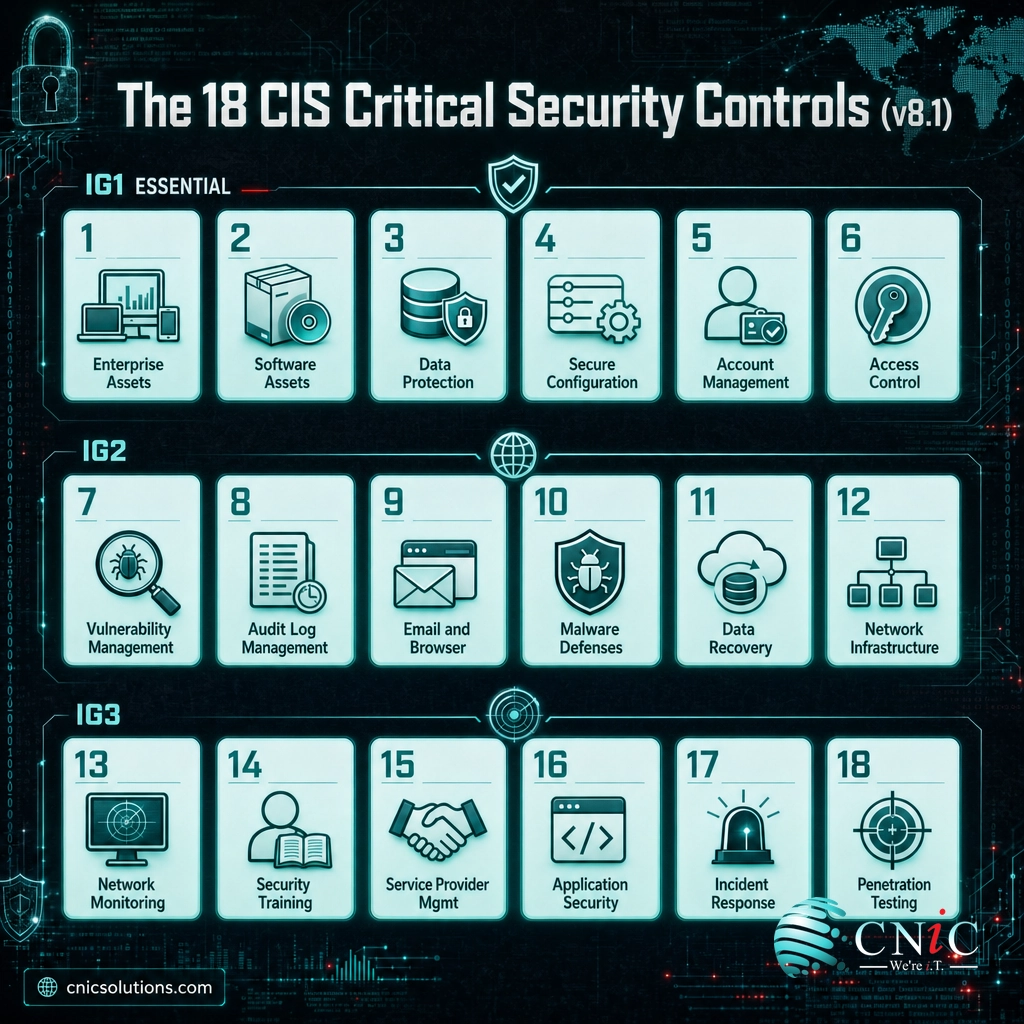
Reading all 18 at once can feel like a lot, which is exactly the problem the Implementation Groups solve. You are not meant to do all 153 safeguards at once.
Source: Center for Internet Security, CIS Controls v8.1 list
Implementation Groups: IG1, IG2, and IG3
Implementation Groups are the feature that turns an intimidating framework into a plan. CIS sorts the 153 safeguards into three cumulative tiers based on how much risk and complexity an organization faces. You pick the group that fits your business and implement the safeguards it contains.
- IG1, essential cyber hygiene (56 safeguards). The foundation every organization should have. It is aimed at small and midsize businesses with limited IT and security resources, and it defends against the general, non-targeted attacks that make up most real-world incidents.
- IG2, added operational complexity (130 safeguards total). IG1 plus 74 more safeguards, for organizations that manage more sensitive data, more systems, or departments with different risk profiles.
- IG3, advanced protection (153 safeguards total). IG2 plus the final 23 safeguards, for organizations that must defend against sophisticated, targeted attacks, often in regulated or high-value industries.
Because the groups are cumulative, IG2 already includes all of IG1, and IG3 includes everything. That means there is one correct starting line for nearly everyone: IG1.
Safeguards by Implementation Group (cumulative), CIS Controls v8.1
Myth: you have to implement all 153 safeguards
The most common reason businesses never start is the belief that CIS is all-or-nothing. It is not. IG1 is a complete, defensible security baseline on its own, and CIS explicitly designed it as the place for resource-limited organizations to begin. Its own research shows IG1 defends against 77 percent of the techniques used in the five most common attack types, and full implementation raises that to 91 percent. Chasing IG3 before you have IG1 in place is not more secure, it is just more expensive.
Source: CIS Implementation Groups | CIS Community Defense Model v2.0

1Pick Your Implementation Group
Your first decision is which tier you are implementing, because it defines the scope of everything that follows. For the large majority of small and midsize businesses, the answer is IG1.
What to do: assess three things about your business: the sensitivity of the data you hold, the resources you have to run security, and your tolerance for downtime. If you hold mostly employee and financial records, run lean, and have limited security staff, IG1 is your target. If you handle regulated or highly sensitive data across multiple departments, plan to reach IG2 after IG1 is solid.
Why this step matters: picking a target group keeps you from either under-protecting the business or wasting money implementing advanced safeguards you do not yet need.
What success looks like: a written, one-line decision such as “We are implementing IG1 now, with IG2 as a goal for next year,” approved by whoever owns the budget.
2Inventory Your Assets and Software
Controls 1 and 2 come first for a reason. You cannot secure, patch, or configure a device or an application you do not know exists, and unknown assets are exactly where attackers get in.
What to do: build a complete inventory of every device that connects to your network (Control 1) and every piece of software installed on them (Control 2). Start with whatever you can, even a spreadsheet, then move toward automated discovery so the list stays current. Flag anything unauthorized for removal.
Why this step matters: the inventory is the map the rest of your program is drawn on. Every later control references the assets and software you catalog here.
What success looks like: a maintained list of authorized devices and software, with a defined process for adding new ones and removing what should not be there.
Common mistake: a one-time inventory
An inventory taken once and never updated is stale within weeks as devices and apps come and go. Treat Controls 1 and 2 as ongoing processes, not a project you finish. This is the single most common place programs quietly fall apart.
3Assess Your Current State Against IG1
Before you fix anything, measure where you stand. You almost certainly already do some of the IG1 safeguards, and you need to know which ones so you are not redoing work or missing gaps.
What to do: go through the 56 IG1 safeguards and mark each as in place, partial, or missing. The free CIS Controls Self Assessment Tool (CSAT) is built for exactly this and lets you track progress and assign owners.
Why this step matters: an honest baseline turns a vague sense of “we should do better” into a specific, finite list of gaps you can actually close.
What success looks like: a scored assessment showing your current IG1 coverage and a clear list of the safeguards that are missing or only partly in place.
4Prioritize Gaps and Build a Roadmap
A list of gaps is not a plan. The next step is to sequence them so you close the highest-risk, lowest-effort gaps first and build momentum.
What to do: for each gap, note the risk it leaves open and the effort to fix it. Tackle high-risk, low-effort items immediately (enforcing multi-factor authentication is a classic example), then schedule the rest into a roadmap with an owner and a target date for every safeguard.
Why this step matters: prioritization is the whole point of the CIS Controls. Working the gaps in risk order gives you the most protection per hour and dollar spent.
What success looks like: a dated remediation roadmap where every open safeguard has a named owner and a deadline.
5Implement the Essential Safeguards
With a roadmap in hand, you work the safeguards. Across the IG1 set, most of your effort will land in a handful of high-value control areas. These are the ones that repay the work fastest.
- Access and account management (Controls 5 and 6): enforce multi-factor authentication everywhere it is supported, give each person only the access their role needs, and remove access promptly when people leave.
- Secure configuration (Control 4): change default passwords, disable unnecessary services, and harden the settings on devices and applications.
- Data protection (Control 3): classify your sensitive data and encrypt it at rest and in transit. If encryption is new to you, our explainer on what data encryption actually protects covers the basics.
- Malware defenses (Control 10): deploy and maintain endpoint protection on every device. Our guide to the best endpoint protection for small business compares the leading options.
- Data recovery (Control 11): keep automated, encrypted, tested backups so ransomware cannot end your business.
- Vulnerability, log, and awareness safeguards (Controls 7, 8, and 14): patch promptly, keep the logs reviewers and investigators need, and train your people to spot phishing.
Notice how much of IG1 overlaps with what auditors and cyber insurers already expect. Once these safeguards are in place, fold them into a recurring routine using our IT compliance checklist for small business, which turns the same controls into assignable, provable tasks.
Set up tested backup and disaster recovery
6Document, Measure, and Reassess
The last step is what separates a security program from a one-time cleanup. Implementation is not done when the safeguards are on, it is done when they are owned, documented, and reviewed.
What to do: for every safeguard, record who owns it and keep the evidence that proves it works, such as MFA reports, access-review records, patch history, and backup-restore results. Then set a cadence to reassess, at least annually and after any major change, and rescore against IG1 to catch drift.
Why this step matters: controls decay. People leave, systems change, and a safeguard that was solid last quarter can quietly lapse. Documentation and reassessment are what keep your baseline real, and they are also what turn “we do that” into proof for an audit or insurance renewal, where the financial stakes are high. Our cybersecurity compliance statistics show how costly the gap between doing and proving can be.
What success looks like: a living record of control ownership and evidence, plus a scheduled reassessment on the calendar.
When to Call a Professional
You can start the CIS Controls yourself, and IG1 is deliberately designed so a resource-limited business can. But there is a natural handoff point. If you reach the assessment step and realize you do not have the time to keep an asset inventory current, review logs, patch on a schedule, and maintain the evidence, that is the signal to bring in help rather than let the program stall.
This is exactly the work a managed IT and security partner is built to carry: continuous implementation, monitoring, and documentation of the controls, so your baseline stays real instead of decaying between audits. A Virtual CIO can also help you decide where IG1 ends and IG2 begins for your specific risk profile, and turn the framework into a budgeted, prioritized roadmap.
Build your roadmap with a Virtual CIO
Troubleshooting Common Problems
Most CIS implementations stall for a small number of predictable reasons. Here is how to get unstuck.
| Problem | Why it happens | How to fix it |
|---|---|---|
| “We don’t know where to start.” | Looking at all 153 safeguards at once. | Ignore everything but IG1, and within IG1 start with Controls 1 and 2 (inventory). |
| Our asset inventory is always out of date. | It is maintained by hand. | Move to automated asset and software discovery so the list updates itself. |
| We bought tools but still have gaps. | Tools are installed but not configured, enforced, or documented. | Map each tool to the safeguard it satisfies and keep evidence it is enforced everywhere. |
| Leadership won’t fund it. | Security is framed as cost, not risk. | Present the CIS Community Defense Model data: IG1 blocks most common attacks at modest cost. |
| We’re stuck choosing between IG1 and IG2. | Risk profile is unclear. | Base the decision on data sensitivity and regulatory scope, and finish IG1 first regardless. |
Maintain and Monitor
Reaching your target Implementation Group is a milestone, not the finish line. The CIS Controls assume an environment that changes constantly, which is why so many safeguards are continuous by nature: monitoring, patching, log review, access reviews, and reassessment all have to keep happening long after the initial rollout.
The businesses that stay secure treat the controls as an operating rhythm. They rescore against their Implementation Group on a schedule, they update the inventory as assets change, and they keep the evidence current so an audit or insurance renewal is a report to pull, not a fire drill. That steady, around-the-clock discipline is the hardest part to sustain in-house, and it is precisely where ongoing management pays for itself.

Hand ongoing control implementation to a managed IT partner
Frequently Asked Questions
What are the CIS Critical Security Controls?
How many CIS Controls are there?
What is the difference between IG1, IG2, and IG3?
Are the CIS Controls a law or the same as NIST?
Where should a small business start with the CIS Controls?
A Note on Sources
Control counts, safeguard counts, Implementation Group definitions, and the version reference in this guide come directly from the Center for Internet Security and its published CIS Implementation Groups documentation for CIS Controls v8.1. The figure that IG1 defends against 77 percent of the techniques in the five most common attack types (rising to 91 percent for full implementation) is from the CIS Community Defense Model v2.0. No statistics in this article are estimated or invented.



related posts
Zero Trust Statistics for 2026: Adoption, Maturity, and Breach Impact
November 3, 2026Zero trust has become the default security strategy on paper, but not yet in practice. Okta's…
What Is ZTNA (Zero Trust Network Access)?
November 3, 2026Zero Trust Network Access (ZTNA) is a security service that grants a verified user access to…
What Is XDR (Extended Detection and Response) and How Does It Protect…
November 2, 2026Extended detection and response (XDR) is a security platform that collects and correlates threat data from…
What Is Zero Trust Security? A Guide for Small Businesses
November 2, 2026Zero Trust security is a cybersecurity model built on one rule: never trust, always verify. Instead…