

If you do only one thing for your company’s security this year, turn on multi-factor authentication everywhere it is offered. It is free on most business platforms and, according to CISA, makes an account about 99% less likely to be hacked. The practices below build out from that foundation into a layered defense any small business can put in place, and they matter because small companies are now the preferred target: the Verizon 2025 Data Breach Investigations Report found ransomware in 88% of breaches at small and midsize businesses.
- Most breaches begin with a stolen password or a person being tricked, not a sophisticated hack. Verizon attributes 60% of breaches to the human element.
- Multi-factor authentication is the highest-impact, lowest-cost control available. Enable it first, on email above all.
- Backups are your last line of defense against ransomware, but only if they are off-line or immutable and you have tested a restore. Attackers now go after backups in 94% of attacks.
- Patching, least-privilege access, and phishing training close the doors attackers use most: credential theft and unpatched software.
- Security is layered, not a single product. A written incident response plan and cyber insurance turn a potential catastrophe into a manageable event.
Why Small Businesses Are Prime Targets
There is a persistent myth that criminals only chase large corporations. The data says the opposite. Small and midsize businesses hold valuable customer records, payment details, and access to bigger partners, yet they usually run leaner IT and thinner security budgets. That combination makes them efficient prey.
The scale of the problem is national. The FBI’s Internet Crime Complaint Center logged $16.6 billion in reported losses in 2024, a 33% jump over the prior year, with phishing the single most reported crime type. Business email compromise alone accounted for roughly $2.8 billion of those losses. For a small business, one successful attack can mean weeks of downtime and permanent damage to customer trust.
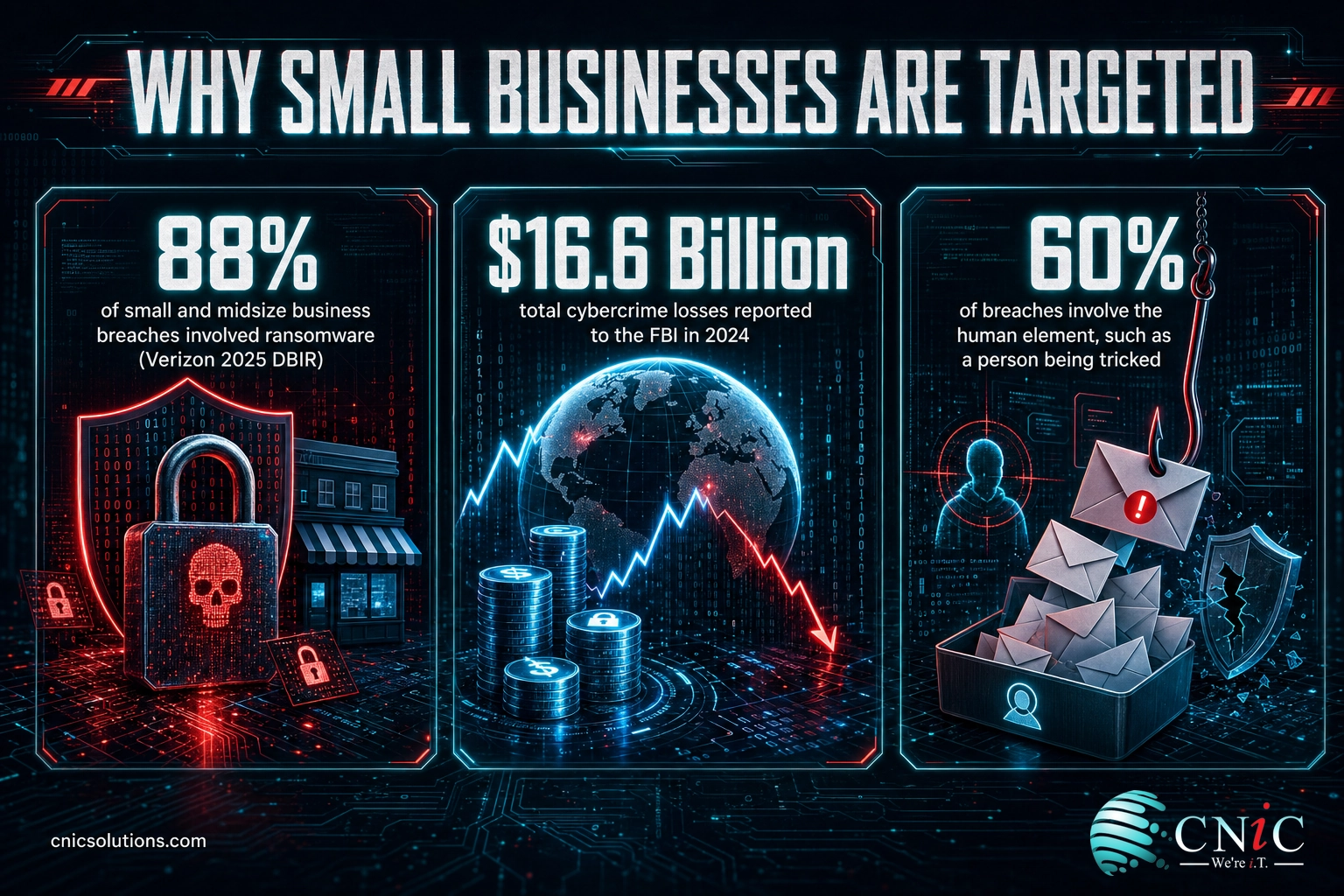
The good news is that the attacks hitting small businesses are rarely exotic. They lean on stolen passwords, unpatched software, and employees clicking the wrong link. That means a focused set of best practices, applied consistently, blocks the large majority of what you will actually face. If you want a broader introduction to the field first, our plain-English guide to what cybersecurity means for a business sets the stage, and this article turns it into an action list.
Source: FBI IC3 2024 Internet Crime Report | Verizon 2025 Data Breach Investigations Report
What’s in This Guide
- 1. Turn On Multi-Factor Authentication Everywhere
- 2. Require Strong, Unique Passwords and a Password Manager
- 3. Train Your Team to Spot Phishing
- 4. Keep Software Patched and Up to Date
- 5. Back Up Your Data With the 3-2-1 Rule
- 6. Use Modern Endpoint Protection, Not Just Antivirus
- 7. Secure Your Business Network and Wi-Fi
- 8. Limit Access With Least Privilege
- 9. Defend Email Against Business Email Compromise
- 10. Encrypt Sensitive Data
- 11. Build and Rehearse an Incident Response Plan
- 12. Carry Cyber Insurance and Know What It Covers
Put it to work:
1 Turn On Multi-Factor Authentication Everywhere
Multi-factor authentication (MFA) requires a second proof of identity, such as a code from an app or a tap on your phone, in addition to a password. It is the closest thing to a silver bullet in security, because it neutralizes the single most common attack: logging in with a stolen or guessed password. Stolen credentials were the entry point in 22% of breaches in the Verizon 2025 report.
Why it matters: passwords leak constantly through data breaches and phishing. Without a second factor, one leaked password is a wide-open door. With MFA, that same password is nearly useless to an attacker.
How to implement: turn MFA on for email and financial accounts first, then every other system that offers it. Prefer an authenticator app or a hardware security key over text-message codes, which can be intercepted. Make it mandatory, not optional, for every employee. If you are new to it, our overview of how multi-factor authentication protects your accounts walks through the options.
Source: CISA multi-factor authentication guidance | Verizon 2025 DBIR
2 Require Strong, Unique Passwords and a Password Manager
MFA is your safety net, but strong, unique passwords are the first wall. The danger is reuse: when an employee uses the same password across services, one breached site hands attackers the keys to your email, banking, and cloud apps through automated credential-stuffing.
Why it matters: reused and weak passwords are trivial for attackers to exploit at scale. A single reused credential can cascade into a full account takeover across every system that shares it.
How to implement: give every employee a reputable password manager so unique, long passwords become effortless. Set a policy for long passphrases over frequent forced resets, which the NIST guidelines now discourage. Review our roundup of the latest password habits and breach data to see why reuse remains the weak link, and consider passwordless options like passkeys where they are supported.
Source: NIST Digital Identity Guidelines (SP 800-63B)
3 Train Your Team to Spot Phishing
Technology stops a lot, but people remain the most targeted part of any business. Verizon attributes 60% of breaches to the human element: someone clicking a malicious link, entering a password on a fake page, or wiring money to a fraudster. Phishing was the most reported crime to the FBI in 2024.
Why it matters: attackers know it is easier to trick a person than to break encryption. A single convincing email to an untrained employee can bypass every technical control you own.
How to implement: run short, regular security awareness training and realistic simulated phishing tests rather than one annual slideshow. Teach staff to verify unexpected payment or credential requests through a second channel. Our practical guide to preventing phishing attacks and our deeper look at building an ongoing training program give you a framework to start.
This is the most dangerous assumption a small business can make. Attackers run automated campaigns that do not care how big you are, and they specifically favor smaller companies with lighter defenses. Verizon found ransomware in 88% of small and midsize business breaches. Assuming you are invisible is exactly what makes you an easy mark.
Source: Verizon 2025 DBIR | FBI IC3 2024 Report
4 Keep Software Patched and Up to Date
Every piece of software eventually reveals security flaws, and vendors release patches to fix them. Attackers race to exploit those flaws before businesses install the fix. Exploited vulnerabilities were the entry point in 20% of breaches in the Verizon 2025 report, and that share has been climbing.
Why it matters: an unpatched server, firewall, or laptop is a known, published doorway into your network. Attackers scan the internet for these gaps continuously.
How to implement: enable automatic updates where you safely can, and use a patch management process to track and apply updates across every device on a schedule. Do not forget firmware on routers, firewalls, and printers, which are frequently overlooked. Our guide to patch management best practices lays out a repeatable process, and a managed IT partner can automate the whole cycle for you.
Let Us Handle Patching and Monitoring
5 Back Up Your Data With the 3-2-1 Rule
Backups are what stand between a ransomware attack and a business-ending disaster. If your files are encrypted or destroyed, a clean backup lets you recover without paying a ransom. But attackers know this, which is why they now hunt for your backups first.
Why it matters: Sophos found that attackers attempted to compromise backups in 94% of ransomware attacks, and succeeded 57% of the time. A backup that is always connected and never tested may not be there when you need it, and recovery costs have soared to an average of $2.73 million.
How to implement: follow the 3-2-1 rule, three copies of your data on two types of media with one copy off-site or offline. Use immutable or air-gapped backups that ransomware cannot alter, and test a full restore on a regular schedule so you know it works. Our explainer on the 3-2-1 backup rule covers the details.
Explore Backup & Disaster Recovery
Source: Sophos State of Ransomware 2024
6 Use Modern Endpoint Protection, Not Just Antivirus
Traditional antivirus recognizes known malware by its signature. Today’s attacks increasingly use fileless techniques, legitimate tools turned against you, and stolen credentials that leave no signature to match. That is why endpoint detection and response (EDR) has become the standard for business devices.
Why it matters: EDR watches behavior, not just known files, so it can catch a novel attack in progress and isolate an infected laptop before it spreads across the network.
How to implement: deploy a reputable EDR or managed detection and response solution on every workstation, laptop, and server. Make sure someone is actually watching the alerts, whether an internal admin or a managed security provider. Our comparison of EDR versus traditional antivirus explains which one your business needs.
Midpoint check: the trend line behind these practices is not subtle. Reported losses to the FBI’s Internet Crime Complaint Center have risen every year, and the jump into 2024 was the steepest yet. The chart below shows why doing nothing gets more expensive each year.
Source: FBI Internet Crime Complaint Center (IC3) Annual Reports, 2022 through 2024.

7 Secure Your Business Network and Wi-Fi
Your network is the perimeter around everything else. A properly configured firewall filters malicious traffic, and a segmented network keeps a breach in one area from reaching your most sensitive systems. Too many small businesses still run a flat network where a single compromised device can touch everything.
Why it matters: without segmentation, one infected guest laptop or smart device can become a path straight to your servers and financial data.
How to implement: deploy a business-grade firewall and keep its firmware current. Put guests and internet-of-things devices on a separate Wi-Fi network from your business systems, and use WPA3 encryption with a strong passphrase. Disable remote access you do not use. Our overview of how a firewall protects your business network is a useful starting point.
8 Limit Access With Least Privilege
Not everyone needs access to everything. The principle of least privilege means each employee, and each application, gets only the access required to do the job, and nothing more. It directly limits the damage of a compromised account.
Why it matters: when stolen credentials drive so many breaches, the account that gets hijacked should be able to reach as little as possible. Over-permissioned accounts turn a small foothold into a full compromise.
How to implement: review who has administrator rights and remove access nobody uses. Remove accounts the moment an employee leaves. Adopt a zero trust mindset that verifies every request rather than trusting anything inside the network by default. Our guide to zero trust security for small businesses explains how to get there in practical steps.
9 Defend Email Against Business Email Compromise
Email is the number-one way attackers get in, so it deserves its own layer of defense. Business email compromise (BEC), where a criminal impersonates an executive or vendor to redirect a payment, is one of the costliest scams there is.
Why it matters: the FBI attributed roughly $2.8 billion in losses to business email compromise in 2024 alone. These attacks often use no malware at all, just a convincing message and an urgent request, so technical filters and human verification both matter.
How to implement: turn on advanced email filtering and anti-spoofing protections such as SPF, DKIM, and DMARC on your domain. Add a policy that any change to payment details or bank information must be confirmed by phone using a known number. Flag external emails with a visible banner so staff know when a message came from outside.
Source: FBI IC3 2024 Internet Crime Report
10 Encrypt Sensitive Data
Encryption scrambles data so that even if it is stolen, it is unreadable without the key. It is the difference between a lost laptop being an inconvenience and being a reportable data breach.
Why it matters: if a device is lost or a database is exfiltrated, encryption can render the stolen data useless to the thief and, in many regulations, reduce your breach-notification liability.
How to implement: enable full-disk encryption on every laptop and phone, which is built into modern Windows and macOS. Ensure your website and any customer portals use HTTPS, and confirm your cloud providers encrypt data both in transit and at rest. Protect the encryption keys themselves with tight access control. The FTC’s small business cybersecurity guidance reinforces encryption as a baseline safeguard.
11 Build and Rehearse an Incident Response Plan
Even strong defenses can be breached, so the question is not only how to prevent an incident but how fast you can respond. A written incident response plan tells everyone what to do in the first chaotic hours, when good decisions save the most money.
Why it matters: IBM found organizations took a mean of 241 days to identify and contain a breach, and the longer an intruder stays undetected, the higher the cost climbs. A rehearsed plan shortens that window dramatically.
How to implement: document who to call, how to isolate affected systems, how to communicate with customers, and where your backups are. Keep an offline copy of the plan in case your systems are locked. Practice it with a tabletop exercise at least once a year. Our step-by-step walkthrough on building a cybersecurity incident response plan gives you a template.
Source: IBM Cost of a Data Breach Report 2025
12 Carry Cyber Insurance and Know What It Covers
Cyber insurance is the financial backstop for everything the other practices cannot fully prevent. It can cover incident response, legal costs, customer notification, and business interruption after an attack. It is not a substitute for security, but a complement to it.
Why it matters: the out-of-pocket cost of a serious incident, from forensics to downtime to legal exposure, can exceed what a small business can absorb. Insurance turns an unpredictable catastrophe into a known, budgeted risk.
How to implement: get a policy sized to your data and revenue, and read the requirements closely. Insurers increasingly require MFA, backups, and EDR to qualify or to pay out, which means the practices above also lower your premium. Our guide to what cyber insurance covers explains what to look for.
How to Prioritize This List
Twelve practices can feel like a lot at once. You do not have to do everything this week. The table below ranks each practice by how urgent it is, how hard it is to implement, and how much protection it delivers, so you can start where it counts most.
| Practice | Priority | Difficulty | Impact |
|---|---|---|---|
| 1. Multi-factor authentication | Do first | Easy | Very high |
| 5. 3-2-1 backups | Do first | Moderate | Very high |
| 3. Phishing training | Do first | Easy | High |
| 4. Patch software | High | Moderate | High |
| 2. Password manager | High | Easy | High |
| 9. Email / BEC defense | High | Moderate | High |
| 6. Endpoint protection (EDR) | High | Moderate | High |
| 8. Least privilege | Medium | Moderate | Medium |
| 7. Network & Wi-Fi | Medium | Moderate | Medium |
| 10. Encrypt data | Medium | Easy | Medium |
| 11. Incident response plan | Medium | Moderate | High |
| 12. Cyber insurance | Medium | Easy | Medium |
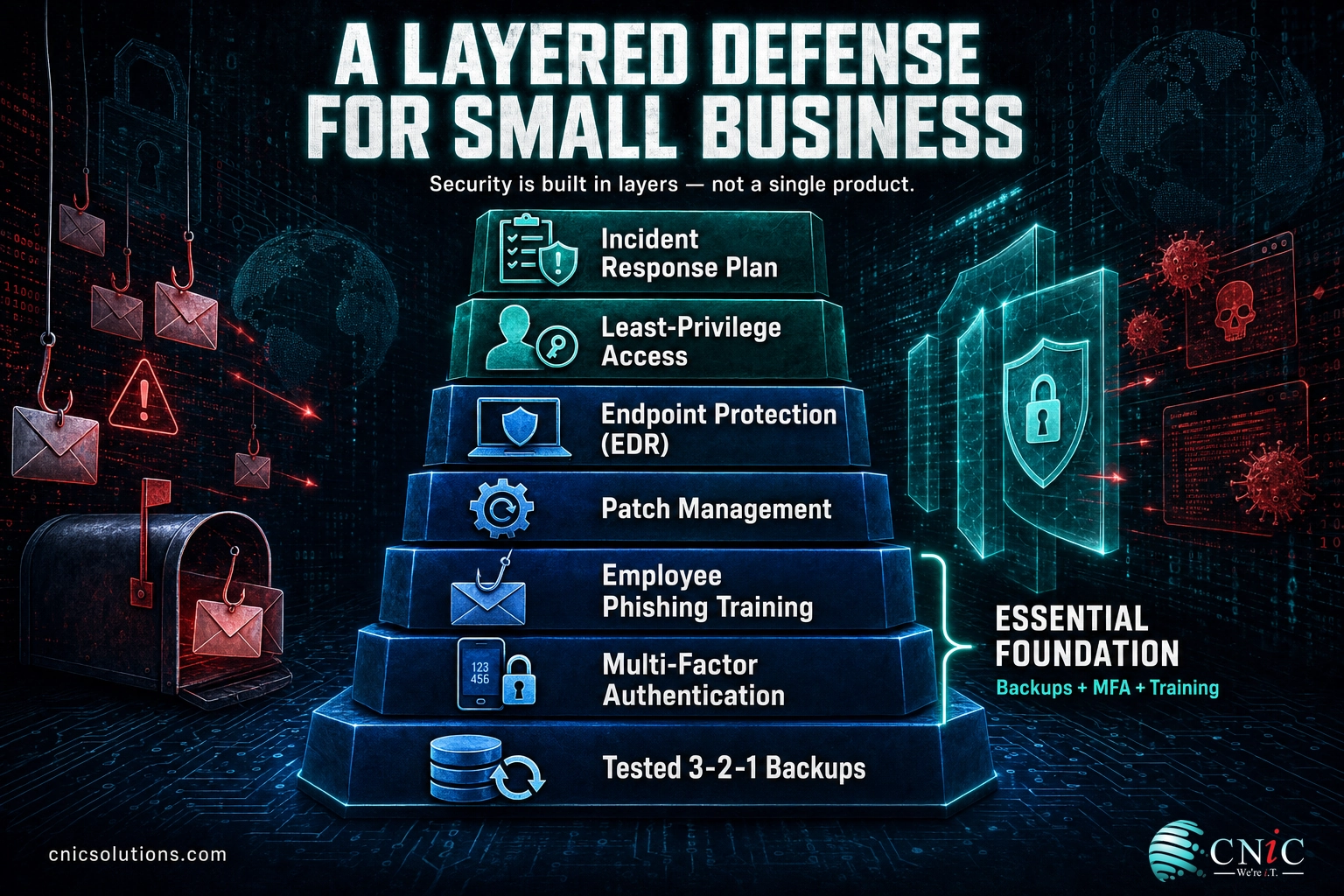
Building all of this in-house is a real challenge for a small team, which is why many small businesses partner with a managed IT and security provider to run it for them. A virtual CIO can help you sequence these investments against your budget and risk.
Best Practices Summary Table
| # | Best Practice | Why It Matters | Difficulty |
|---|---|---|---|
| 1 | Multi-factor authentication | Blocks stolen-password attacks, the most common breach path | Easy |
| 2 | Strong passwords & manager | Stops password reuse from cascading across systems | Easy |
| 3 | Phishing training | Addresses the 60% of breaches involving people | Easy |
| 4 | Patch software | Closes the published flaws attackers scan for | Moderate |
| 5 | 3-2-1 backups | Your last line of defense against ransomware | Moderate |
| 6 | Endpoint protection (EDR) | Catches modern attacks that antivirus misses | Moderate |
| 7 | Network & Wi-Fi security | Contains a breach and blocks malicious traffic | Moderate |
| 8 | Least privilege access | Limits the damage of any one compromised account | Moderate |
| 9 | Email / BEC defense | Guards the number-one entry point and costliest scam | Moderate |
| 10 | Encrypt sensitive data | Makes stolen data useless without the key | Easy |
| 11 | Incident response plan | Cuts response time, which cuts breach cost | Moderate |
| 12 | Cyber insurance | Financial backstop for what prevention cannot stop | Easy |
Frequently Asked Questions
What is the single most important cybersecurity practice for a small business?
Are small businesses really targeted by cybercriminals?
How much does a data breach cost a small business?
How often should a small business back up its data?
Do we need cybersecurity if we already have antivirus software?
Get Expert Help Securing Your Business
You do not have to build all of this alone. CNiC Solutions helps small and midsize businesses put these practices in place, from MFA and backups to round-the-clock threat monitoring, and starts with a free security audit to show you exactly where your gaps are. If you are ready to turn this list into a plan, we are ready to help.
Sources & Methodology
Every statistic in this article is drawn from a primary, first-party source published within the last two years. Figures were taken from the following reports and current at the time of writing:
- Verizon 2025 Data Breach Investigations Report — human element (60%), stolen credentials (22%) and exploited vulnerabilities (20%) as breach entry points, ransomware in 88% of SMB breaches.
- FBI Internet Crime Complaint Center (IC3) Annual Reports, 2022–2024 — total reported losses ($10.3B, $12.5B, $16.6B) and business email compromise losses ($2.8B).
- IBM Cost of a Data Breach Report 2025 — average U.S. breach cost ($10.22M) and mean time to identify and contain a breach (241 days).
- Sophos State of Ransomware 2024 — attackers attempted to compromise backups in 94% of attacks; average recovery cost ($2.73M).
- CISA and Microsoft Security — MFA effectiveness (99% and 99.9%).
- FTC Small Business Cybersecurity and NIST Digital Identity Guidelines — baseline safeguards and password guidance.



related posts
Zero Trust Statistics for 2026: Adoption, Maturity, and Breach Impact
November 3, 2026Zero trust has become the default security strategy on paper, but not yet in practice. Okta's…
What Is ZTNA (Zero Trust Network Access)?
November 3, 2026Zero Trust Network Access (ZTNA) is a security service that grants a verified user access to…
What Is XDR (Extended Detection and Response) and How Does It Protect…
November 2, 2026Extended detection and response (XDR) is a security platform that collects and correlates threat data from…
What Is Zero Trust Security? A Guide for Small Businesses
November 2, 2026Zero Trust security is a cybersecurity model built on one rule: never trust, always verify. Instead…