

Outsourcing IT services lets a small business hand its technology to a dedicated team of specialists for a predictable monthly fee, instead of stretching one overworked employee, or the owner, across security, support, and everything in between. The payoff is lower and steadier costs, stronger security, less downtime, and the freedom to spend your time on the business rather than on the network. This guide breaks down the real benefits, the types of services you can hand off, honest pricing, and the myths that keep owners from making the move.
Key Takeaways
- Outsourcing turns lumpy, unpredictable technology spending into a flat monthly cost you can budget around.
- You gain a full bench of specialists, security, cloud, networking, and help desk, for less than the loaded cost of one senior in-house hire.
- Proactive monitoring catches issues before they become downtime, so you stop paying to clean up failures after they happen.
- Security and compliance move from a part-time afterthought to a managed, documented discipline.
- Support scales up and down with your headcount and your busy seasons, with no hiring or layoffs.
- The talent shortage is real: the global cybersecurity workforce gap reached 4.8 million people in 2024, per ISC2, which is exactly the expertise a provider pools for you.
- The usual objections, too expensive, only for big companies, you lose control, do not hold up against the data.
- The strongest arrangement is strategic: a Virtual CIO partnership, not a break-fix hotline.
What’s in This Guide
- What IT Outsourcing Actually Means
- Why Managing IT In-House Keeps Getting Harder
- The Core Benefits of Outsourcing IT Services
- What You Can Outsource
- Predictable Pricing vs. Break-Fix Surprises
- Six Myths About Outsourced IT, Debunked
- How to Choose the Right IT Partner
- What to Do Next
- Benefits Summary Table
- Frequently Asked Questions
- Methodology and Sources
What IT Outsourcing Actually Means
IT outsourcing is the practice of paying an external provider to manage some or all of your technology, rather than building and maintaining that capability internally. In practice, that provider is usually a managed IT services provider, or MSP, that takes ownership of the day-to-day work: monitoring your systems, supporting your staff, securing your data, and planning what comes next.
The scope is broader than most owners expect. It can cover help desk support for your employees, network and server management, cybersecurity, cloud administration, data backup and recovery, compliance support, and high-level strategy. You can outsource all of it under one roof, or hand off only the pieces your internal staff cannot cover, an arrangement often called co-managed IT.
The distinction that matters most is philosophical. Traditional support is reactive: you call when something breaks, and you pay by the hour to fix it. Managed outsourcing is proactive: the provider is paid a flat fee to keep things from breaking, which changes the entire relationship. To understand the model in depth, see our explainer on what managed IT services include.
Why Managing IT In-House Keeps Getting Harder
Technology used to be a back-office concern. Today it is the operating system of the whole business: your revenue, your records, your communications, and your reputation all run on it. That raises the stakes of getting it right, and it exposes three structural problems that small businesses run into again and again.
Limited resources. Most small firms cannot justify a full-time internal IT team. They end up with one generalist, an outside contractor on speed dial, or an owner playing part-time technician at night. That works until it does not, and the gaps tend to show up at the worst possible moment.
The pace of change. Cloud platforms, security tooling, and compliance requirements shift constantly. Keeping one person current across all of it is nearly impossible, which is why the specialist model exists in the first place.
A widening talent gap. Even businesses willing to hire are competing for people who are in short supply. According to the ISC2 2024 Cybersecurity Workforce Study, the global cybersecurity workforce gap climbed to an estimated 4.8 million people, a 19 percent jump in a single year, and 90 percent of organizations reported a skills gap on their team. Hiring your way out of that shortage is expensive and slow.
Outsourcing exists precisely because these problems compound. A provider spreads the cost of scarce expertise and expensive tools across many clients, so each business gets capabilities that would be uneconomical to build alone. Our breakdown of small business cyber attack statistics shows why that expertise is no longer optional.
Source: ISC2 2024 Cybersecurity Workforce Study
The Core Benefits of Outsourcing IT Services
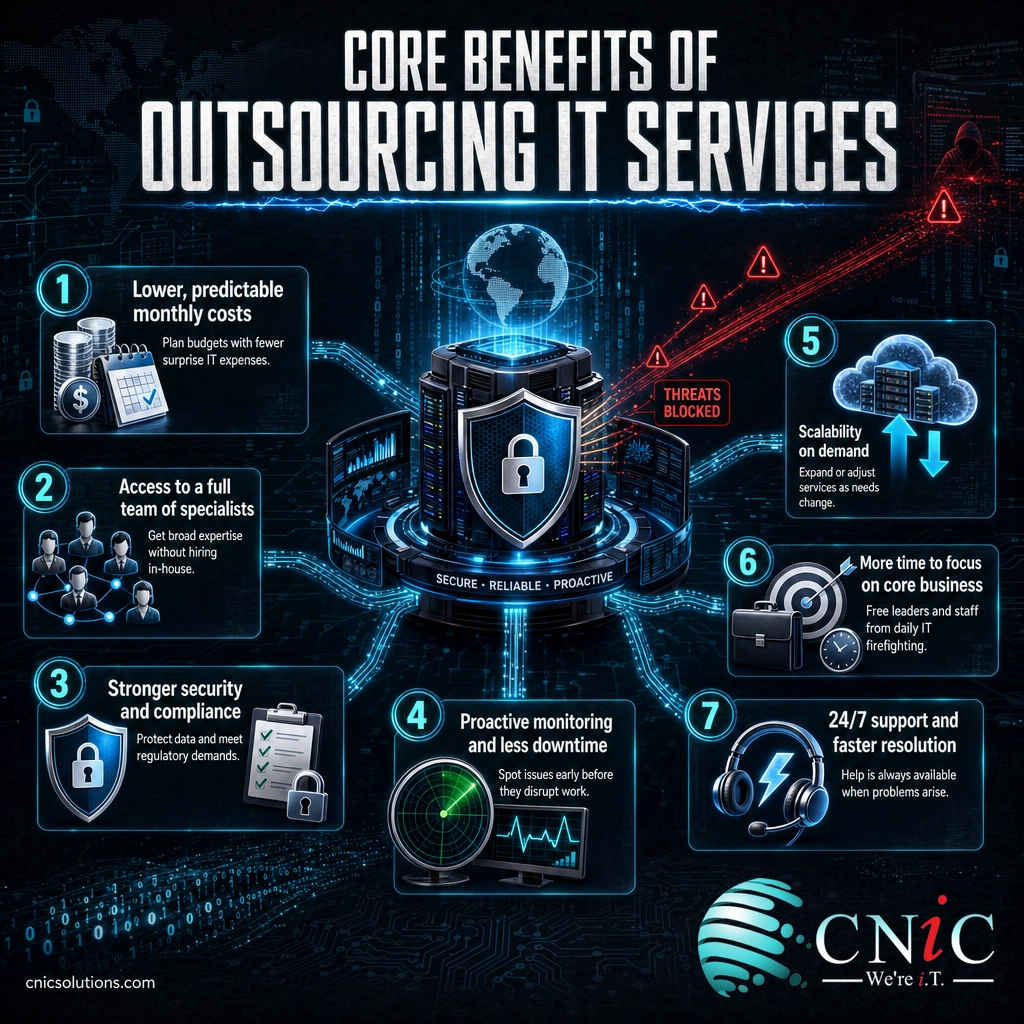
The advantages of outsourcing are not abstract. Each one maps to a specific cost you avoid, a risk you reduce, or a hour you get back. Here are the seven that matter most for a small business, developed in the order owners tend to feel them.
Lower and More Predictable Costs
The financial case is the one most owners lead with, and it holds up. Building IT in-house means salaries, benefits, recruiting, training, and the hardware and software licensing to back it up. Those are heavy fixed costs for a business that may only need a fraction of a full-time specialist’s time in any given week.
Outsourcing replaces that with a flat monthly fee. There is no infrastructure to buy outright, no idle capacity you are paying for, and no surprise invoice when something goes wrong. Because you pay for what you use, the model scales cleanly with your size. For a detailed look at real numbers, compare our guide to in-house versus outsourced IT costs.
Access to a Full Team of Specialists
When you hire one IT person, you get one skill set. When you outsource, you get a team: a security analyst, a cloud engineer, a network specialist, and a help desk, each doing what they do best. That depth is difficult and expensive to replicate internally, especially given the workforce gap described above.
Just as important, a provider stays current for you. Keeping up with new threats, platforms, and best practices is part of the service, not an extra training budget you have to fund. You inherit that knowledge without paying to build it.
Stronger Security and Compliance
Security is where the gap between a lone generalist and a specialist team shows most clearly. A provider runs continuous monitoring, manages firewalls and endpoint protection, patches vulnerabilities on a schedule, and has an incident response plan ready before anything happens.
The cost of getting this wrong is well documented. IBM’s Cost of a Data Breach 2024 report put the global average breach at 4.88 million dollars, a 10 percent increase over the prior year and the largest jump since the pandemic. Smaller organizations are not spared: in IBM’s 2023 analysis, the last year it broke out results by company size, businesses under 500 employees averaged 3.31 million dollars per breach.
Average Cost of a Data Breach (IBM)
The human factor is the reason so many of these incidents succeed. The Verizon 2024 Data Breach Investigations Report found that 68 percent of breaches involved a non-malicious human element, someone making a mistake or falling for a social engineering attack, and that 91 percent of breaches at small organizations came from external actors. Managed security is built around exactly those realities, layering monitoring, training, and controls so a single click does less damage. For the fundamentals, see our list of essential cybersecurity measures for small businesses.
For regulated industries, a provider also carries the weight of compliance. Frameworks such as HIPAA, PCI-DSS, and SOC 2 require documented controls, audits, and policies that are hard for a small team to maintain. Our IT compliance checklist for small business shows what that involves.
Source: IBM Cost of a Data Breach Report | Verizon 2024 DBIR
Explore Managed Cybersecurity Services
Proactive Monitoring and Less Downtime
The most expensive IT problems are the ones you never see coming. A failing drive, an unpatched server, or a quietly expiring certificate can take a business offline for hours or days. Proactive monitoring is designed to catch those signals early and resolve them before they surface as an outage.
This is the practical difference between paying to prevent problems and paying to recover from them. Recovery is always more expensive, in both direct cost and lost productivity, than prevention. Backup and disaster recovery close the loop: if something does go wrong, tested backups get you running again quickly rather than leaving you to rebuild. Our guide to data backup solutions for small business explains how that safety net is built.
See Backup and Disaster Recovery Options
Scalability That Matches Your Growth
Business needs are rarely flat. You add staff, open a location, launch a product, or ride a seasonal wave, and then you contract again. Internal IT struggles with that rhythm, because hiring and layoffs are slow and painful. Outsourced support flexes instead.
Adding users, expanding storage, or rolling out a new tool is usually a configuration change rather than a recruiting cycle. That means you can respond to opportunity in days, not months, and you never pay for capacity you are not using. If you already have some internal IT, a co-managed model lets you scale the provider’s role up or down around your own team.
More Time to Focus on Your Core Business
Every hour an owner or a key employee spends resetting passwords, chasing an outage, or researching software is an hour not spent serving customers or growing revenue. Outsourcing removes that tax. Technical problems get handled quickly by people whose job is to handle them, and your team gets its attention back.
This is the benefit that compounds. Reduced downtime plus fewer distractions equals higher productivity across the whole company, not just in the IT closet. For most small businesses, that reclaimed focus is worth as much as the direct cost savings.
24/7 Support and Faster Resolution
Problems do not keep business hours. Round-the-clock monitoring and support mean an issue at 2 a.m. gets attention before your staff arrives to find the system down. Much of that support is delivered remotely, so resolution is often faster than waiting for someone to drive out.
Structured support also means issues are triaged and escalated properly rather than landing on one overloaded person. Understanding how that works is easier with our overview of IT support tiers, level 1, 2, and 3.
Get a Free Managed IT Consultation
What You Can Outsource
Outsourcing is not all-or-nothing. You can hand off your entire technology function or just the specialties your team lacks. The table below maps the most common areas small businesses outsource and what each one covers.
| Service Area | What It Covers | Who Needs It Most |
|---|---|---|
| Managed IT and help desk | Day-to-day support, monitoring, patching, user management | Any business without a full internal team |
| Cybersecurity | Firewalls, endpoint protection, monitoring, incident response, training | Everyone, especially regulated industries |
| Cloud management | Migration, administration, and optimization of cloud platforms and apps | Businesses moving off aging on-site servers |
| Backup and disaster recovery | Automated, tested backups and a plan to restore fast after an incident | Any business that cannot afford data loss |
| Network and infrastructure | Design, management, and upkeep of networks, servers, and connectivity | Multi-location or growing offices |
| Compliance support | Controls, documentation, and audits for HIPAA, PCI-DSS, SOC 2, and more | Healthcare, legal, finance, and their vendors |
| Virtual CIO and strategy | Technology roadmap, budgeting, and executive-level planning | Businesses that want IT aligned to growth |
The cloud and strategy layers are where outsourcing shifts from a support cost to a growth lever. A move to modern cloud platforms can cut hardware spending and improve resilience at the same time, and a Virtual CIO relationship turns technology decisions into a planned roadmap instead of a series of emergencies.
Predictable Pricing vs. Break-Fix Surprises
One of the underrated benefits of outsourcing is what it does to your budget. Traditional break-fix support bills you every time something breaks, which makes your IT costs unpredictable and, worse, ties the provider’s revenue to your problems. The more you suffer, the more they earn.
Managed outsourcing flips that. A flat monthly fee covers monitoring, maintenance, and support, so the provider profits by keeping you stable, not by fixing recurring failures. That predictability makes planning easier and removes the fear of an unexpected five-figure invoice after a bad week. For the difference in plain terms, see our explainer on what break-fix IT is.
Pricing models vary by the number of users, devices, and the depth of coverage you choose. Rather than guess, it helps to see how providers actually structure their fees. Our guide to how much managed IT services cost lays out the common models, and our IT budgeting guide for small business helps you plan around them.
Predictable Cost, In Practice
A flat monthly agreement does more than smooth your cash flow. It removes the administrative burden of tracking hourly tickets, eliminates hidden fees, and lets you forecast IT spending accurately for the year ahead. That financial stability is one of the clearest, most immediate benefits owners report after making the switch.
Six Myths About Outsourced IT, Debunked
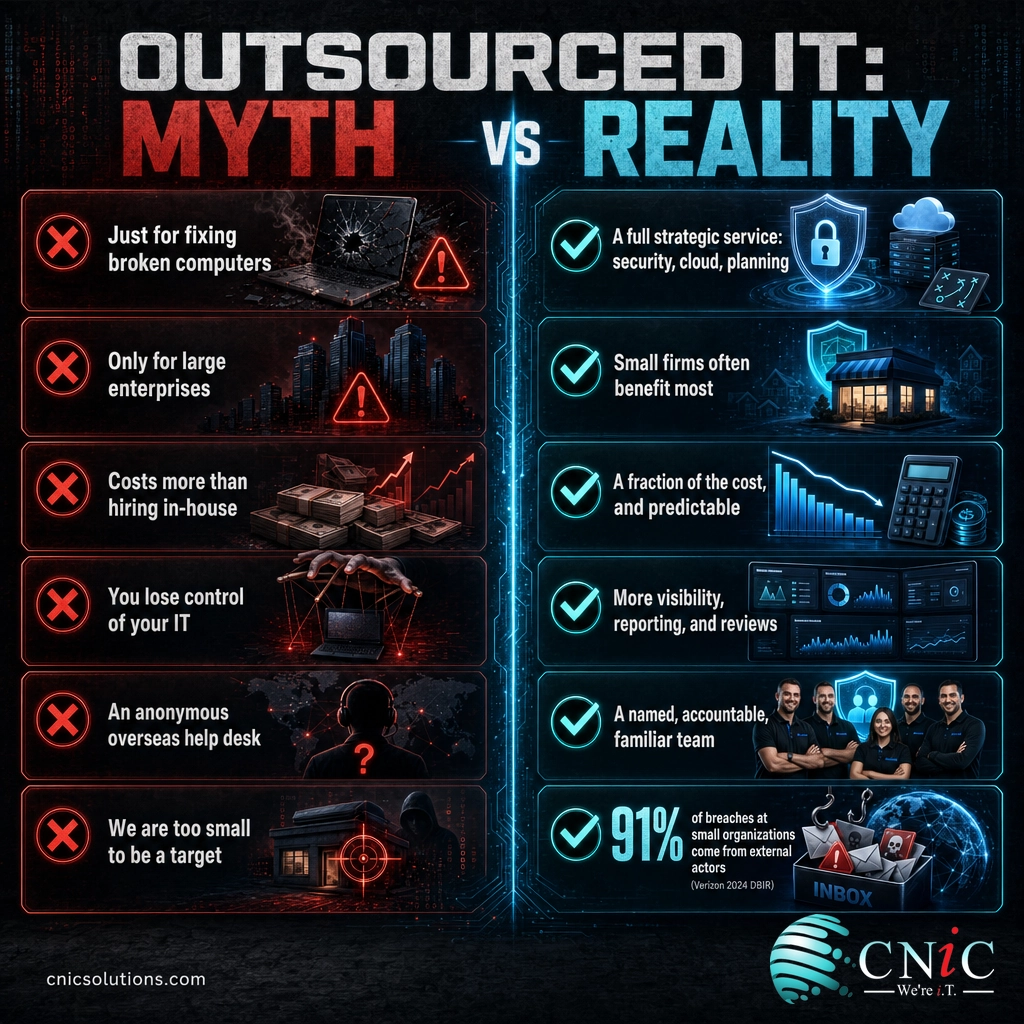
Plenty of small businesses delay outsourcing because of beliefs that once had some truth to them but no longer hold. Here are the six that come up most, and what the evidence actually says.
Myth 1: Outsourced IT Is Just for Fixing Broken Computers
The truth: Modern outsourcing is a comprehensive, strategic service, not a repair line. Yes, it includes support, but it also covers cybersecurity, cloud, compliance, backup, and long-term planning. Treating a capable provider as nothing more than a help desk leaves most of the value on the table. The best partners act as a strategic extension of your business, improving productivity and preventing problems, not just reacting to them.
Myth 2: It’s Only for Large Enterprises
The truth: Small businesses often benefit the most. They face the same threats, uptime expectations, and compliance rules as large firms, but rarely have the budget for a full internal team. Outsourcing is what levels that field. It gives a small organization access to enterprise-grade skills and tooling it could never justify buying outright, which is precisely the resource gap covered earlier in this guide.
Myth 3: Outsourcing Costs More Than Hiring In-House
The truth: For most small and midsize businesses, the opposite is true. An in-house department carries recruiting, salaries, benefits, training, and infrastructure costs, and a single senior hire is expensive. Outsourcing spreads a whole team and its tools across many clients, delivering specialized expertise for a fraction of that cost, and as a predictable monthly figure rather than a lumpy set of fixed expenses.
Myth 4: You Lose Control of Your IT
The truth: A good provider gives you more visibility, not less. You set the strategy and approve the budget, and you receive regular reporting, reviews, and documentation showing exactly what is happening and why. The provider handles execution; the decisions stay with you. A recurring quarterly business review with your provider is where that transparency becomes concrete.
Myth 5: Outsourcing Means an Anonymous Overseas Help Desk
The truth: Outsourcing and offshoring are not the same thing. Many providers deliver responsive, relationship-driven support with a named team that knows your environment. The point of a managed partnership is accountability and familiarity, not a faceless queue. Evaluate a provider on responsiveness and how well they understand your business, not on an outdated stereotype.
Myth 6: Our Business Is Too Small to Be a Target
The truth: Attackers favor small businesses precisely because they tend to be less defended. The Verizon 2024 DBIR found that 91 percent of breaches at small organizations came from external actors, overwhelmingly for financial gain. Being small is not protection; it is often the reason you are chosen. Managed security exists to close that exposure before it is exploited.
How to Choose the Right IT Partner
The benefits in this guide assume a capable provider. A weak one can undermine every advantage, so the selection matters. A few criteria separate a strategic partner from a commodity vendor.
- Proactive by design. Ask how they prevent problems, not just how fast they respond. Monitoring, patching, and planning should be built into the fee.
- Security and compliance depth. Confirm they can support the frameworks your industry requires and can document their controls.
- Transparent reporting. You should receive regular, readable reporting and a standing review, so you always know what you are getting.
- Strategic capability. The best providers offer roadmap and budgeting guidance, often through a Virtual CIO, rather than only closing tickets.
- The right engagement model. Decide whether you need fully managed support or a co-managed arrangement alongside internal staff.
For a deeper walkthrough of vetting candidates, read our guide on how to choose the right managed service provider.
What to Do Next
Moving to outsourced IT is easier when you approach it in stages rather than all at once. The roadmap below gives a sensible order of operations for a small business making the shift.
| Action | Priority | Timeline | Relevant Service |
|---|---|---|---|
| Assess current risks, gaps, and costs | High | Week 1 | Free security audit |
| Shore up security and backups first | High | Weeks 1 to 4 | Cybersecurity, backup and recovery |
| Move day-to-day support to a managed model | High | Month 1 to 2 | Managed IT services |
| Optimize cloud and infrastructure | Medium | Month 2 to 4 | Cloud solutions |
| Build a 12-month technology roadmap | Medium | Quarterly | Virtual CIO |
The first step costs you nothing and clarifies everything: a straightforward assessment of where your technology stands, what it is costing you, and where the real risks are. From there, every improvement builds on a known baseline.
Benefits Summary Table
A quick reference to the advantages covered in this guide and the business outcome each one drives.
| Benefit | What It Replaces | Business Outcome |
|---|---|---|
| Predictable monthly cost | Lumpy salaries plus surprise repair bills | Accurate budgeting and better cash flow |
| Full team of specialists | One overstretched generalist | Depth across security, cloud, and networking |
| Proactive monitoring | Reactive, pay-per-incident support | Fewer outages and less lost productivity |
| Managed security | Part-time, ad hoc protection | Lower breach risk and faster response |
| Compliance support | DIY documentation and audits | Audit readiness for HIPAA, PCI-DSS, SOC 2 |
| Backup and disaster recovery | Untested or missing backups | Fast recovery and protected data |
| Scalability on demand | Slow hiring and layoffs | Support that flexes with the business |
| Reclaimed focus | Owners and staff doing IT | More time on customers and revenue |
| 24/7 support | Business-hours-only coverage | Issues resolved before they spread |
| Access to current tools | Aging, under-licensed software | Modern capability with no capital outlay |
| Virtual CIO strategy | Reactive, unplanned tech decisions | A roadmap aligned to growth |
| Faster onboarding and offboarding | Manual, error-prone account changes | Cleaner security and less admin time |
Frequently Asked Questions
What does it mean to outsource IT services?
Is outsourcing IT cheaper than hiring an in-house team?
Is outsourced IT only for large companies?
Will I lose control of my technology if I outsource it?
What IT services can a small business outsource?
How is outsourced IT different from break-fix support?
How quickly can an outsourced IT provider scale with my business?
Does outsourcing IT help with compliance?
Methodology and Sources
This guide draws on primary research from recognized industry and analyst sources. Statistics are cited inline with their originating report. No figures are estimated or invented; where a source last published a specific breakout in a prior year, that year is stated explicitly.
Primary sources:
- IBM Cost of a Data Breach Report (2024 and 2023 editions)
- Verizon 2024 Data Breach Investigations Report
- ISC2 2024 Cybersecurity Workforce Study
Last Updated: August 2026



related posts
What Is ZTNA (Zero Trust Network Access)?
November 3, 2026Zero Trust Network Access (ZTNA) is a security service that grants a verified user access to…
Zero Trust Statistics for 2026: Adoption, Maturity, and Breach Impact
November 3, 2026Zero trust has become the default security strategy on paper, but not yet in practice. Okta's…
What Is Zero Trust Security? A Guide for Small Businesses
November 2, 2026Zero Trust security is a cybersecurity model built on one rule: never trust, always verify. Instead…
What Is XDR (Extended Detection and Response) and How Does It Protect…
November 2, 2026Extended detection and response (XDR) is a security platform that collects and correlates threat data from…