

Co-managed IT services are a shared support model where your internal IT team keeps ownership of its work while an external provider fills specific gaps, such as cybersecurity, after-hours coverage, or specialized projects. It sits between doing everything in-house and handing everything to a provider. The goal is to strengthen your team, not replace it.
Most conversations about outside IT help treat the choice as all or nothing: keep everything in-house, or outsource the whole department. Co-managed IT is the option in the middle, and for businesses that already have IT staff, it is frequently the smarter one. Instead of replacing the people who understand your systems, a co-managed arrangement adds the specialized skills, coverage, and capacity your team cannot realistically maintain alone. Understanding what co-managed IT is, and exactly when it beats full outsourcing, helps you buy the right kind of help rather than the most help.
Key Takeaways
- Co-managed IT is a partnership, not a takeover. Your internal team stays in charge of what it does well; the provider covers defined gaps.
- The difference from full outsourcing is who owns the work. Co-managed shares responsibility; full outsourcing transfers it entirely to the provider.
- The skills gap is the main driver. The global cybersecurity workforce is short an estimated 4.8 million people, and 90 percent of organizations report skills gaps on their teams, which no single small IT department can fill on its own.
- Understaffing is expensive. Organizations with a severe security skills shortage paid an average of 1.76 million dollars more per data breach, according to IBM.
- Co-managed beats full outsourcing when you have capable internal staff worth keeping, need specialized expertise, and want to retain institutional knowledge and control while still closing coverage gaps.
What’s in This Guide
How Co-Managed IT Works
Co-managed IT is best understood as a division of labor. You already have someone, or a small team, handling technology inside your business. A co-managed arrangement brings in an outside provider to work alongside them, with each side owning the parts they are best positioned to handle. Nothing is torn out and rebuilt from scratch, and no one is pushed aside.
Think of it like a small medical practice that employs its own nurses and general physicians but refers patients to specialists for anything outside their scope. The practice does not stop being a practice, and it does not hire a cardiologist full time to sit idle most days. It keeps its own staff for day-to-day care and calls in specialized expertise exactly when it is needed. Co-managed IT works the same way.
In practice, a co-managed relationship usually takes shape like this:
- You map what your team already does well. Help desk, user onboarding, and knowledge of how your business actually runs typically stay in-house.
- You identify the gaps. These are the areas your team lacks the time, tools, or specialized skills to cover reliably, such as security monitoring, patching at scale, or cloud migrations.
- The provider fills those gaps. The external team takes ownership of the agreed responsibilities, backed by enterprise-grade tools your business would not buy on its own.
- Responsibilities are documented. A clear split, often written into the agreement, defines who handles what so nothing falls through the cracks and no one duplicates effort.
- Both sides share tooling and visibility. Your internal staff and the provider work from the same monitoring, ticketing, and documentation systems, so the arrangement functions as one team rather than two.
The defining trait is shared ownership. Unlike full outsourcing, your people do not step back from the work. Unlike a purely in-house setup, they are not left to cover every discipline alone. The provider extends the team’s reach, and the team keeps the context that only comes from working inside your business every day.
Source: CompTIA: Buying Guide for Managed Services
Co-Managed IT vs Fully Outsourced IT
The term co-managed IT is most often confused with fully outsourced or fully managed IT, where a provider takes over the entire environment. The two models solve different problems, and the difference comes down to a single question: who owns the work.
In a fully outsourced model, the provider becomes your IT department. This is the right fit for a business with no internal staff, or one that would rather not build a technology team at all. In a co-managed model, you keep your internal people and add outside help for specific gaps. You are not replacing a department; you are reinforcing one. For a deeper look at the pure outsourcing side of this decision, our breakdown of in-house versus outsourced IT costs compares the two ends of the spectrum directly.
| Factor | Co-Managed IT | Fully Outsourced IT |
|---|---|---|
| Internal IT staff | Kept and supported | Minimal or none |
| Who owns the work | Shared between team and provider | Provider owns everything |
| Institutional knowledge | Stays inside the business | Held mostly by the provider |
| What you buy | Specific skills and coverage you lack | A complete IT department |
| Day-to-day control | You retain it | Delegated to the provider |
| Best fit | Businesses with capable internal IT | Businesses with no internal IT |
| Scaling | Add or reduce provider scope as needed | Renegotiate the full contract |
Neither model is inherently better. A business with no IT staff and no desire to hire is usually better served by full outsourcing or, further along the spectrum, a traditional managed IT services agreement. A business that already employs competent IT people is the one that stands to gain the most from keeping them and adding co-managed support around them.
What Co-Managed IT Typically Covers
There is no fixed template for a co-managed arrangement, which is part of the point. The split is designed around what your team already handles and where it needs reinforcement. That said, certain responsibilities land on each side more often than not, because they play to the natural strengths of internal staff versus an external provider.
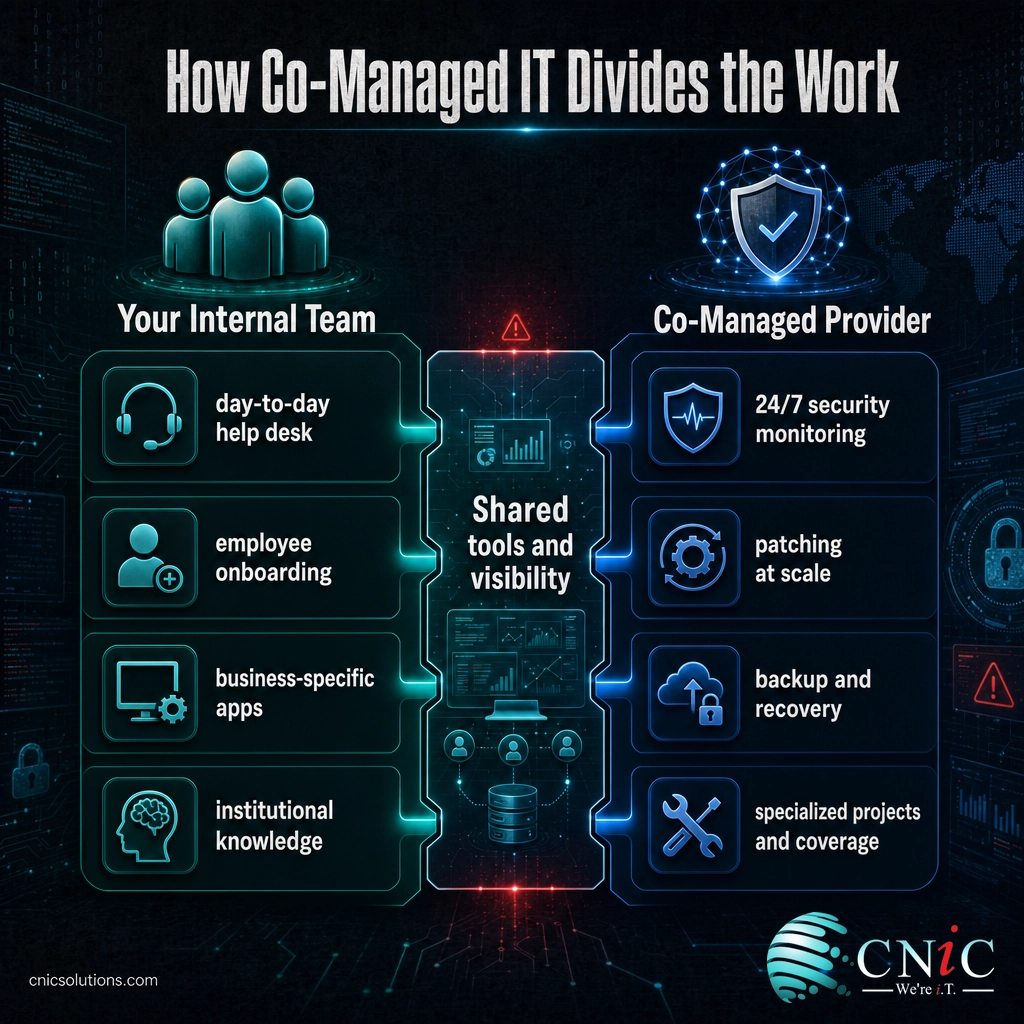
| Usually kept in-house | Usually handled by the provider |
|---|---|
| Day-to-day help desk and user support | 24/7 security monitoring and threat response |
| Onboarding and offboarding employees | Patch management and updates at scale |
| Knowledge of business-specific applications | Backup, disaster recovery, and business continuity |
| Vendor relationships and internal requests | Specialized projects like cloud migrations |
| Front-line troubleshooting | After-hours, overflow, and vacation coverage |
| Decisions requiring institutional knowledge | Compliance tooling and audit-ready documentation |
The most common gap that pushes businesses toward co-managed IT is security. Threats never sleep, and continuous monitoring is difficult for a small internal team to sustain without burning out. A provider brings around-the-clock cybersecurity coverage and tooling that would be expensive to build in-house, while your team continues to handle the work that requires knowing your people and processes. Coverage is the second driver: a two-person IT team cannot realistically provide nights, weekends, and holidays without either overtime or gaps, and a provider fills that window cleanly.
Source: CompTIA: Buying Guide for Managed Services
Why Co-Managed IT Matters Right Now
Co-managed IT is not a passing label for an old idea. It has grown because the demands on internal IT teams have outrun what those teams can staff for, and the numbers behind that gap are stark.
The clearest pressure is talent. According to the 2024 ISC2 Cybersecurity Workforce Study, the global cybersecurity workforce gap reached an estimated 4.8 million people, a 19 percent increase year over year, while 90 percent of surveyed organizations reported skills gaps on their teams. For a small or midsize business, this means the specialists you need are scarce, expensive, and hard to retain even when you find them.
That shortage is not just an inconvenience. It has a measurable price when something goes wrong. IBM’s 2024 Cost of a Data Breach report found that 53 percent of breached organizations were dealing with a severe security staffing shortage, and those understaffed organizations paid an average of 1.76 million dollars more per breach than well-staffed peers: 5.74 million dollars versus 3.98 million dollars.
Average Data Breach Cost by Security Staffing Level (IBM, 2024)
Understaffed organizations paid $1.76M more per breach. Source: IBM Cost of a Data Breach 2024.
Downtime raises the stakes further. In an ITIC survey on the cost of downtime, 98 percent of organizations said a single hour of downtime would cost them more than 100,000 dollars, and 81 percent put the figure above 300,000 dollars per hour. A stretched internal team that cannot monitor around the clock is exactly the setup where a preventable outage slips through. Co-managed IT exists to close that specific gap without forcing you to dismantle the team you already have.
Source: ISC2 2024 Cybersecurity Workforce Study | IBM Cost of a Data Breach 2024
When Co-Managed IT Beats Full Outsourcing
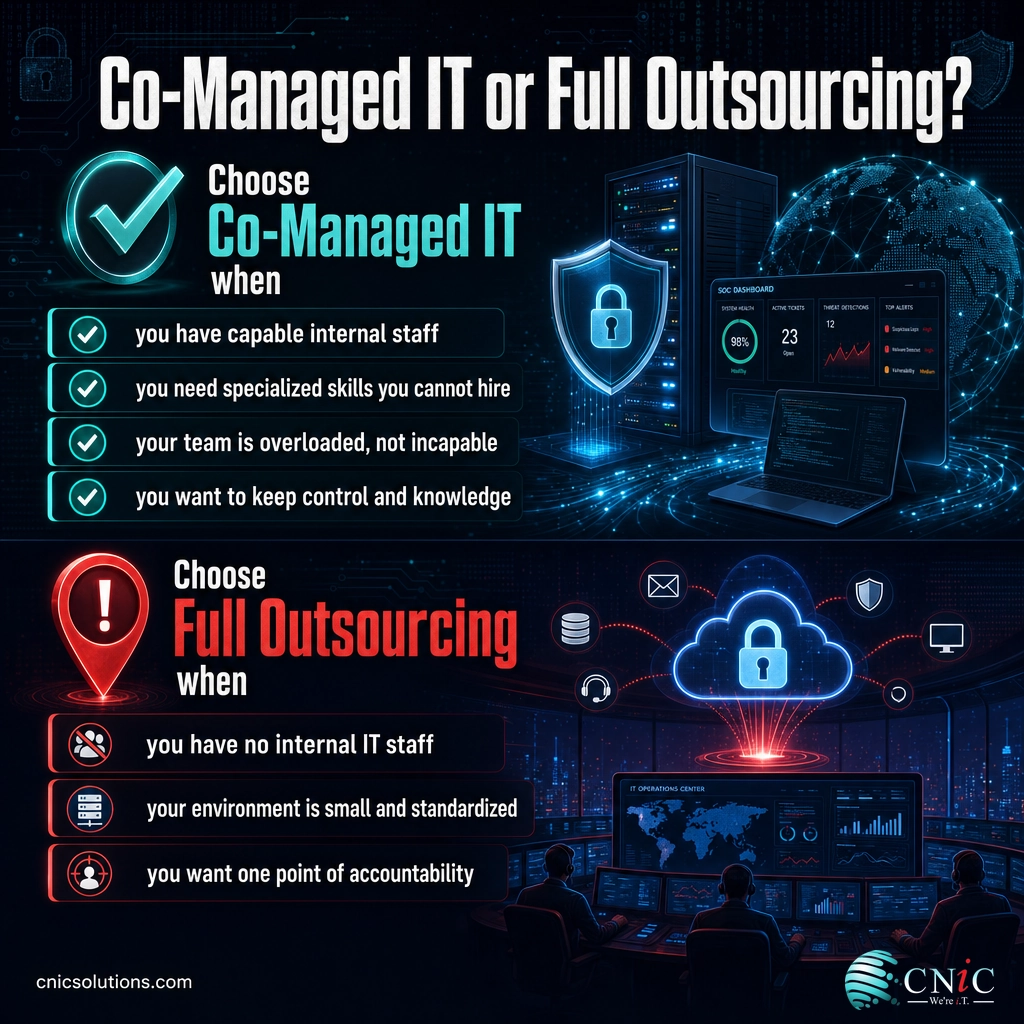
Co-managed IT is the stronger choice in a specific and increasingly common situation: you already have internal IT worth keeping, but that team cannot cover everything alone. When that describes your business, handing the whole function to an outside provider would mean paying to replace knowledge you already own. Co-managed protects that knowledge and adds only what is missing. Look for these signals.
You have capable internal staff you want to keep
If your IT person or team knows your systems, your people, and your quirks, that knowledge is an asset, not a redundancy. Full outsourcing risks losing it. Co-managed keeps your staff in place and gives them backup, which is almost always cheaper than rebuilding that context inside a provider.
You need specialized skills you cannot hire for
Security, cloud architecture, and compliance require specialists that a small business cannot justify employing full time and often cannot find given the workforce shortage. Co-managed IT lets you rent that expertise precisely when you need it, without a full-time salary or the risk of that specialist leaving.
Your team is overloaded, not incapable
When a competent team is drowning in tickets and cannot get to strategic work, the problem is capacity, not skill. Full outsourcing solves the wrong problem. Co-managed offloads the routine and the overflow so your people can focus on the work that moves the business forward. Many arrangements pair this with a Virtual CIO to align technology decisions with where the business is headed.
You need coverage a small team cannot sustain
Nights, weekends, holidays, and vacations create gaps that a lean internal team cannot fill without overtime or risk. A co-managed provider covers those windows so your business stays monitored and supported around the clock, while your team keeps normal hours.
You want to keep control and institutional knowledge
Some businesses, especially in regulated industries, need to keep decision-making and sensitive knowledge in-house for accountability and compliance. Co-managed IT lets you retain that control while still bringing in outside tooling and expertise, a balance that full outsourcing does not offer.
When Full Outsourcing Is the Better Choice
Co-managed IT is not the answer for everyone, and pretending otherwise would be the same mistake in reverse. There are clear situations where handing the entire function to a provider is the smarter, cheaper move.
Myth: co-managed IT always saves money because you keep staff in-house. Not true. If you do not already have internal IT, co-managed is often the more expensive path, because you would be paying to build and maintain a team and paying a provider on top of it. The model only saves money when there is an existing team worth supporting. Without one, full outsourcing or a traditional managed services plan is usually the better value.
Full outsourcing tends to win when you have no internal IT staff and no plans to hire, when your environment is small and standardized enough that one provider can run it end to end, or when you specifically want a single point of accountability rather than a shared arrangement. It can also be the pragmatic choice when your internal IT is a single person whose departure would leave you exposed, since a provider removes that key-person risk entirely. In these cases, a fully managed relationship, sometimes replacing an older break-fix arrangement, gives you complete coverage without the overhead of maintaining a team. The honest rule is simple: co-managed IT reinforces a team you already have, while full outsourcing supplies the team you do not.
How to Get Started with Co-Managed IT
Moving to a co-managed model does not require a disruptive overhaul. Because the point is to support your existing team rather than replace it, the transition is usually gradual and low-risk. A sensible path looks like this:
- Audit what your team covers today. List the responsibilities your internal staff handle well and the areas that are consistently rushed, skipped, or outside their expertise.
- Prioritize the gaps by risk. Security monitoring and backup usually top the list, because they carry the highest cost when neglected.
- Define the split clearly. Agree with the provider on exactly who owns what, and put it in writing so there is no ambiguity or duplicated effort.
- Start with the highest-value gap. Many businesses begin with security or after-hours coverage, prove the arrangement works, then expand the provider’s scope over time.
- Review and adjust. As your team and needs change, the split can shift. That flexibility is one of co-managed IT’s core advantages over an all-or-nothing contract.
The right provider will spend more time understanding your existing team than pitching to replace it. If a conversation starts with what they would take over rather than what your team should keep, that is a sign the fit is wrong.
Strengthen your internal team with co-managed IT support
Related Terms
- Managed IT Services: The model where an external provider takes ongoing ownership of your IT for a flat monthly fee.
- Managed Service Provider (MSP): The company that delivers managed or co-managed IT services and the tooling behind them.
- Break-Fix IT: A reactive model where you pay only when something breaks, with no ongoing coverage.
- Virtual CIO (vCIO): A strategic technology advisor service that handles IT planning and budgeting without a full-time executive hire.
- Service Level Agreement (SLA): A contract that defines the response and resolution times a provider guarantees.
- What Managed IT Includes: A breakdown of the services a full managed IT engagement typically covers.
Frequently Asked Questions
What are co-managed IT services?
What is the difference between co-managed and fully outsourced IT?
When does co-managed IT beat full outsourcing?
Is co-managed IT more expensive than full outsourcing?
Does co-managed IT replace my internal IT staff?
Sources
The workforce and skills-gap figures come from the ISC2 2024 Cybersecurity Workforce Study. The breach-cost and security-staffing figures come from IBM’s 2024 Cost of a Data Breach report. The downtime-cost figures come from ITIC’s survey on the hourly cost of downtime. The managed-services context draws on CompTIA’s research on managed services. The model definitions and decision criteria reflect the established, widely documented distinction between in-house, co-managed, and fully outsourced IT support.
Primary and authoritative sources: ISC2 2024 Cybersecurity Workforce Study, IBM Cost of a Data Breach 2024, and CompTIA Buying Guide for Managed Services.



related posts
What Is ZTNA (Zero Trust Network Access)?
November 3, 2026Zero Trust Network Access (ZTNA) is a security service that grants a verified user access to…
Zero Trust Statistics for 2026: Adoption, Maturity, and Breach Impact
November 3, 2026Zero trust has become the default security strategy on paper, but not yet in practice. Okta's…
What Is Zero Trust Security? A Guide for Small Businesses
November 2, 2026Zero Trust security is a cybersecurity model built on one rule: never trust, always verify. Instead…
What Is XDR (Extended Detection and Response) and How Does It Protect…
November 2, 2026Extended detection and response (XDR) is a security platform that collects and correlates threat data from…