

Cloud repatriation is the move of applications, data, or workloads out of the public cloud and back to on-premises hardware, a private cloud, or a colocation facility. It is one of the most talked-about shifts in IT right now, but the reality is more measured than the headlines suggest: businesses are moving specific workloads back, not abandoning the cloud.
Is cloud repatriation worth it? For the right workload, yes, and increasingly so. For your entire cloud footprint, almost never. The honest answer is that repatriation makes sense as a targeted, workload-by-workload decision, not a wholesale retreat, and the businesses getting real value from it are the ones treating it as a cost-and-architecture question rather than a trend to follow. This guide gives you the verdict up front, the evidence behind it, the cases where moving back is a mistake, and a practical framework for deciding.
Key Takeaways
- Repatriation is real and growing. In a Barclays CIO Survey, 83% of CIOs planned to move at least one workload back from public cloud in 2024, up from 43% in late 2020.
- But full exits are rare. IDC data indicates only about 8 to 9 percent of organizations pursue full-scale repatriation. The rest move back selected workloads and stay hybrid.
- Cost is the main driver, alongside performance and data sovereignty. Roughly 27% of cloud spend is wasted on average, per Flexera’s 2025 State of the Cloud Report.
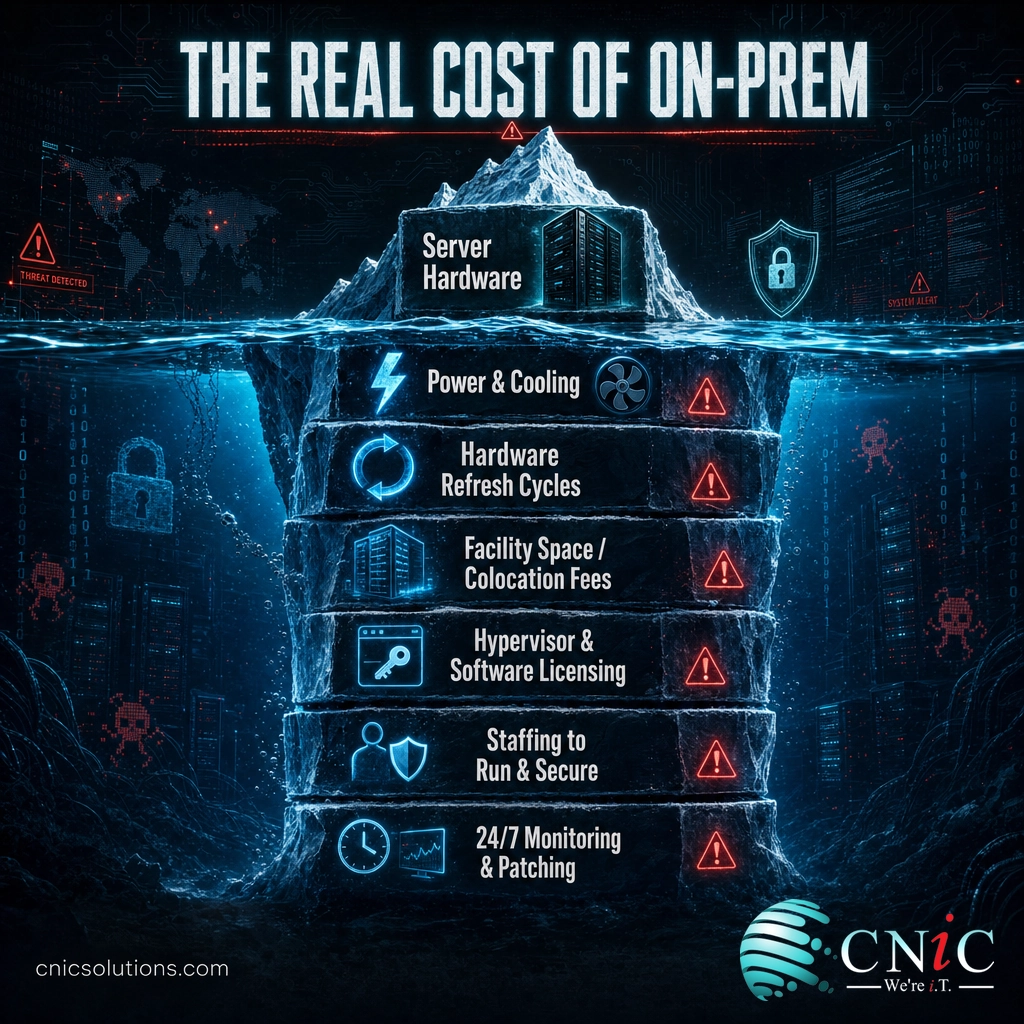
- It is not free to move back. On-premises and colocation carry hardware, power, licensing, and staffing costs that any honest comparison must include.
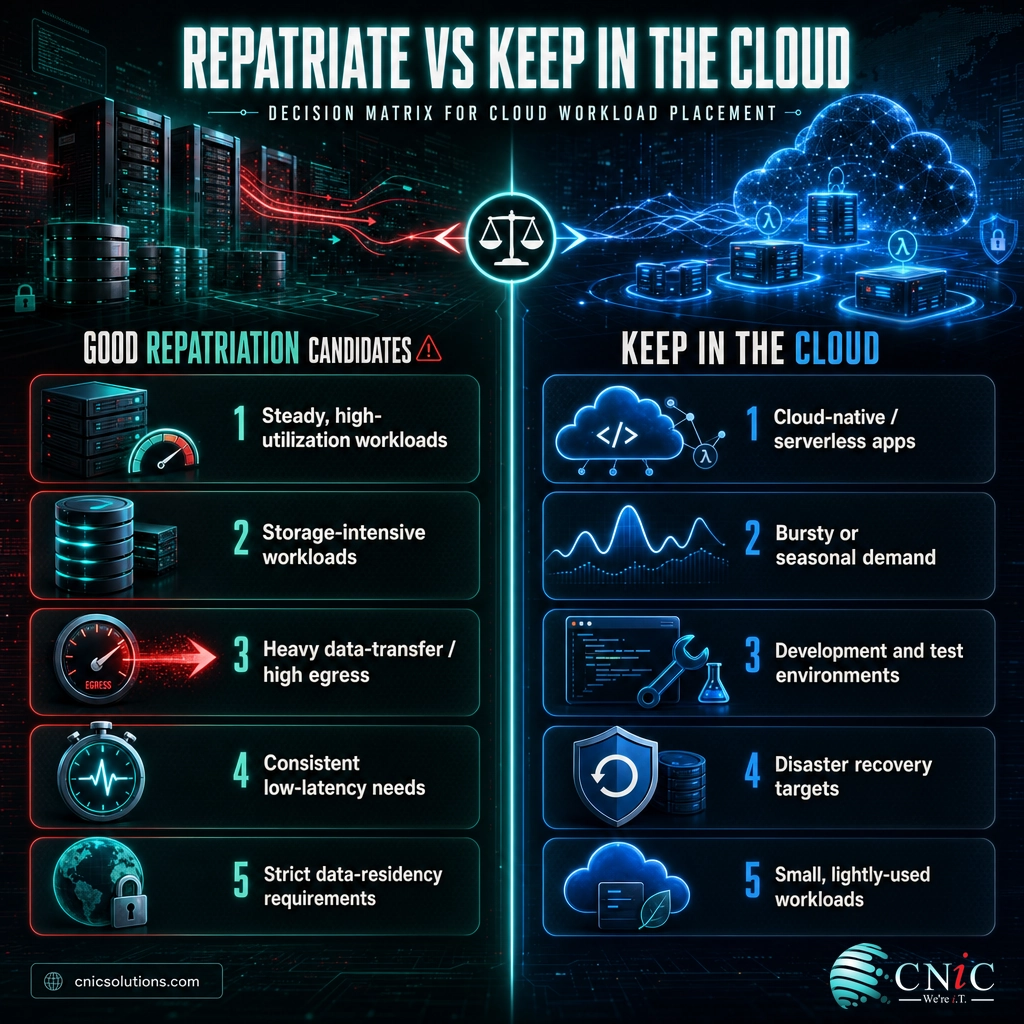
- Decide per workload. Steady, storage-heavy, egress-heavy, or latency-sensitive workloads are the best candidates; cloud-native and bursty workloads usually should stay put.
What’s in This Guide
Is Cloud Repatriation Worth It? The Short Answer
It depends on the workload, and that distinction is the whole game. Moving a steady, predictable, storage-heavy workload out of the public cloud and onto owned or colocated hardware can cut its running cost by a third to a half while improving performance. Moving a bursty, cloud-native, or lightly-used workload back usually costs you more and buys you headaches. Repatriation is worth it as a surgical decision applied to the workloads that fit; it is almost never worth it as a blanket “leave the cloud” strategy, especially for a small or midsize business that would inherit an entire data-center’s worth of operational overhead.
What Cloud Repatriation Actually Is (and Isn’t)
Cloud repatriation (also called reverse cloud migration) means taking a workload that currently runs in a public cloud like AWS, Azure, or Google Cloud and moving it back to infrastructure you control: on-premises servers, a private cloud, or space in a colocation facility. That is the simple part. The confusing part is the scale of the trend, because the numbers get quoted in ways that make it sound like everyone is fleeing.
They are not. The high percentages you see refer to organizations moving at least one workload back. A 2024 Citrix survey of IT leaders found that 93% had already shifted some workloads out of the public cloud in the previous three years. In a Barclays CIO Survey, 83% planned to repatriate at least one workload in 2024. Both are true, and both describe selective moves, not shutdowns.
Myth: “Everyone is abandoning the cloud”
This is the most common misreading of the repatriation story. IDC’s research shows that while a large share of companies repatriate some compute or storage each year, only around 8 to 9 percent plan full-scale repatriation. What is actually happening is a maturing of cloud strategy: after a decade of cloud-first defaults, businesses are asking a smarter question, which workloads truly belong in the cloud, and which are just paying a premium for someone else’s hardware? The endpoint is hybrid, not on-premises.
Reframed that way, repatriation stops being a referendum on cloud computing and becomes what it should have been all along: a routine architecture and cost decision, made one workload at a time.
Source: IDC via Network World | Citrix 2024 hybrid cloud research
Why Businesses Move Workloads Back
When repatriation does pay off, a few clear reasons drive it. Understanding them tells you whether your own workloads are candidates.
1. Cost, especially for steady, predictable workloads
The public cloud is priced for elasticity. That is a bargain when your demand spikes and dips, and an expensive way to rent capacity you use constantly. For a workload that runs at high, steady utilization month after month, owned or colocated hardware often wins on total cost. Andreessen Horowitz’s widely-cited analysis put it bluntly: at scale, repatriation can deliver equivalent workloads at one-third to one-half the cost of running them in the cloud.
You do not have to be Dropbox for the math to matter. The software company 37signals, maker of Basecamp and HEY, spent about $3.2 million on cloud services in 2022, then moved seven applications onto its own hardware. It reported saving close to $2 million per year afterward, having spent roughly $600,000 on servers to do it, an investment it recouped in under 18 months. Those are mid-market numbers, and the logic scales down: a predictable workload with a heavy, constant footprint is exactly where the cloud premium bites hardest.
2. Cloud waste and unpredictable bills
Even when the cloud is the right home, most organizations overpay for it. Idle resources, oversized instances, forgotten storage, and surprise egress fees add up.
Waste alone is usually an argument for better cloud cost management (FinOps), not repatriation. But when a workload’s steady baseline cost is high and it drags heavy data-transfer fees, moving it can eliminate both problems at once. This is closely tied to how a business plans its overall spending, which is why repatriation belongs in the same conversation as your annual IT budget.
3. Performance, latency, and data gravity
Some workloads need to sit close to where their data lives or where it is used. Applications that move enormous volumes of data, or that require consistent low-latency response, can perform better and more predictably on dedicated infrastructure than on shared, multi-tenant cloud. The rise of data-heavy AI workloads has sharpened this: when the data is large and gravity-bound, hauling it in and out of the cloud repeatedly is both slow and expensive.
4. Data sovereignty and compliance
For businesses in regulated industries, where data physically resides can be a legal requirement, not a preference. Keeping sensitive data on infrastructure you control, in a known location, can simplify compliance and reduce risk.
Source: Andreessen Horowitz, The Cost of Cloud | Flexera 2025 State of the Cloud Report | 37signals cloud-exit results, reported by The Register
When Cloud Repatriation Is Not Worth It
The case against repatriation is just as important, because moving the wrong workload back is an expensive mistake. Here is where the cloud usually wins, and where a “bring it home” instinct will cost you.
- Cloud-native workloads. Anything built on serverless functions, managed databases, or a cloud provider’s proprietary services would need to be re-architected to run elsewhere. The engineering cost of unwinding that can dwarf years of hosting savings.
- Bursty or unpredictable demand. If your load spikes for a sale, a season, or a launch and then falls off, elasticity is the entire value of the cloud. Owned hardware sized for the peak sits idle the rest of the year.
- Development and test environments. These benefit from rapid, on-demand provisioning and teardown. Keeping permanent hardware for temporary environments wastes money.
- Disaster recovery targets. The cloud’s geographic reach makes it an excellent, low-overhead place to keep recovery copies. This is why cloud-based approaches like disaster recovery as a service remain a strong fit even for businesses repatriating other workloads.
- Small, lightly-used footprints. If a workload is modest and inconsistent, the cloud premium is small and the operational simplicity is worth it.
The bill you eliminate is not pure savings
The most common repatriation miscalculation is comparing the cloud invoice you cancel against the price of the servers you buy, and stopping there. That ignores the real cost of running infrastructure yourself: hardware refresh cycles every few years, power and cooling, facility space or colocation fees, hypervisor and software licensing, and, above all, the skilled staff needed to monitor, patch, and secure it around the clock. For a small or midsize business without a full infrastructure team, that operational burden is often the deciding factor, and the reason a managed partner or colocation model exists.
This is exactly the total-cost-of-ownership trap we cover in our breakdown of in-house versus outsourced IT costs: the sticker price is never the real price on either side of an infrastructure decision.

How to Decide: A Workload-by-Workload Framework
Because the answer changes per workload, the decision has to be made per workload. Here is a practical sequence any business can follow, whether it has one questionable cloud bill or a hundred.
- 1. Inventory your workloads. List what actually runs in the cloud and what each piece does. You cannot evaluate what you have not mapped.
- 2. Score each workload on the fit factors. For every workload, rate its utilization pattern (steady or bursty), data volume and egress, latency sensitivity, compliance requirements, and how tightly it is coupled to cloud-native services. High-utilization, storage-heavy, egress-heavy, latency-sensitive, or compliance-bound workloads rise to the top of the candidate list. Cloud-native and bursty ones drop off it.
- 3. Build a true total-cost comparison for the top candidates. Put the full cloud cost of the workload next to the full owned or colocated cost, and make the second number honest: hardware, refresh, power, space, licensing, and staffing included. Compare like for like.
- 4. Pilot one workload before committing. Move a single strong candidate first, measure the real cost and performance, and validate your assumptions before touching anything else.
- 5. Keep the rest in the cloud, and plan for hybrid. The goal is not to empty your cloud account. It is to place each workload where it runs best, which for most businesses means a deliberate blend of cloud, private infrastructure, and colocation.
For many businesses, the destination for repatriated workloads is not a server closet but a colocation facility, which provides the power, cooling, and physical security of a data center without the capital cost of building one. That middle path captures much of the cost benefit while offloading the hardest parts of running infrastructure.
The framework is simple to describe and easy to get wrong, because the total-cost math and the workload scoring both reward experience. This is where a Virtual CIO or a managed infrastructure partner earns its keep: running the analysis objectively, without a bias toward any one answer.
Talk to CNiC about the right home for each workload
Our Verdict: Is Cloud Repatriation Worth It?
Yes, when it is applied surgically, and no, when it is treated as a movement. Cloud repatriation is a genuine, evidence-backed way to cut cost and improve performance for the specific workloads that fit it, and the businesses doing it well are saving real money. But the same evidence shows that wholesale exits are rare for good reason: the cloud remains the better home for elastic, cloud-native, and lightly-used workloads, and running infrastructure yourself carries costs the cloud used to hide from you.
By audience, the decision tends to break down like this:
- Small businesses with modest, variable workloads: stay in the cloud, and focus on cutting waste before you consider moving anything. Repatriation is rarely worth the operational overhead at this size.
- Growing businesses with heavy, predictable workloads: this is the sweet spot. Score your workloads, and repatriate the steady, storage-heavy, or egress-heavy ones to colocation or private infrastructure while keeping the rest in the cloud.
- Compliance-bound businesses: let data-residency requirements lead. Repatriate what the rules require, and use the cloud for everything else.
- Cloud-native software companies: think hard before moving. Re-architecting away from managed services can cost more than it saves unless the workload is large and steady.
The through-line is the same in every case: the answer is a workload-by-workload total-cost decision, not an all-or-nothing move. Get that framework right and repatriation becomes a tool you use when it helps, rather than a trend you follow or ignore. CNiC Solutions helps small and midsize businesses run exactly this analysis, then execute it, whether the right home for a workload turns out to be public cloud, private infrastructure, or colocation.
Get a free workload-by-workload cost review

Frequently Asked Questions
What is cloud repatriation?
Is cloud repatriation worth it for a small business?
Are most companies really leaving the cloud?
Which workloads are the best candidates for repatriation?
What are the hidden costs of moving back on-premises?
What is the difference between cloud repatriation and a hybrid cloud strategy?
How do I decide whether to repatriate a workload?
About This Guide and Sources
This guide draws on published survey and analyst data on cloud repatriation and cloud spending. The adoption figures come from the Barclays CIO Survey (83% of CIOs planning to repatriate at least one workload in 2024, up from 43% in late 2020) and a 2024 Citrix survey of IT leaders (93% having moved some workloads back over three years). The finding that full-scale repatriation is rare (roughly 8 to 9 percent of organizations) comes from IDC. Cloud-waste and cloud-spend-management figures are from Flexera’s 2025 State of the Cloud Report. The cost-of-cloud comparison (one-third to one-half the cost at scale) and the Dropbox example are from Andreessen Horowitz’s analysis and Dropbox’s own S-1 filing; the 37signals figures are that company’s publicly reported results. Percentages that describe workloads moving back refer to selective, workload-level moves, not full cloud exits. Every business should build its own total-cost comparison from its actual workloads and requirements rather than relying on a general figure.



related posts
What Is a Hypervisor? Types and How They Work
October 7, 2026A hypervisor is software that lets a single physical computer run many separate virtual machines at…
What Is a Load Balancer? How It Keeps Applications Fast and Reliable
October 7, 2026A load balancer is a device or piece of software that sits in front of your…
What Is a Firmware Update and Why It Matters for Security
October 6, 2026A firmware update is a manufacturer-issued revision to the low-level software built into a device, such…
What Is a Human Firewall? Turning Employees Into Your Best Defense
October 6, 2026A human firewall is the group of employees who, through security awareness and good habits, act…