

A server is a powerful computer, or software running on one, that stores data and delivers services to other devices called clients over a network. When your email, website, or shared files load, a server received the request and sent back the answer. Servers run continuously so your business tools stay available.
Almost everything your business does online runs through a server. Open your email, load a customer record, print to the shared printer, or visit any website, and a server somewhere received that request and answered it in milliseconds. Yet most owners and managers have never seen one and are not sure what actually makes a server different from the laptop on their desk. This guide explains what a server is in plain English, how it works, the main types and the roles they play, and why the machines behind the scenes are worth understanding when you plan and budget for technology.
- A server serves. Its whole job is to answer requests from other devices (clients) and hand back data or services over a network, all day, every day.
- Servers are built to be shared and always on. Unlike a desktop, a server is engineered for many simultaneous users, continuous uptime, and redundant parts that survive a single failure.
- One machine, many roles. Through virtualization, a single physical server commonly runs several virtual servers, each handling a different job like web, file, database, or email.
- The cloud is still servers. Moving to the cloud does not remove servers from your business, it moves them into a provider’s data center that you rent instead of own.
- When servers stop, business stops. Uptime Institute found 54% of organizations said their most recent significant outage cost more than $100,000, which is why server reliability is a business issue, not just an IT one.
What’s in This Guide
What Is a Server?
A server is a computer that provides a service to other computers. That is the whole idea in a sentence. The devices that ask for the service are called clients, and the server is the machine that answers them. This back-and-forth is known as the client-server model, and it is the foundation that most business software and the entire web are built on. The word “server” can refer to the physical hardware, the software doing the serving, or both together, which is part of why the term feels slippery.
The name comes straight from what it does: it serves. A waiter takes many orders and brings back many plates without being confused about who asked for what. A server does the same with data. It listens for requests, figures out who asked and what they need, and returns the right response, whether that is a web page, a file, a database record, or an email. The U.S. National Institute of Standards and Technology, in its computer security glossary, defines a server as a computer or device on a network that manages network resources for other devices, which is the same idea stated formally.
What makes a machine a server is its job, not its size. A server can be a rack-mounted unit the size of a pizza box humming in a data center, a tower quietly running in an office closet, or a slice of a much larger machine rented from a cloud provider. What they share is purpose: they exist to respond to other devices, reliably and continuously, rather than to sit in front of one person doing one task.
Source: NIST Computer Security Resource Center glossary
How a Server Works
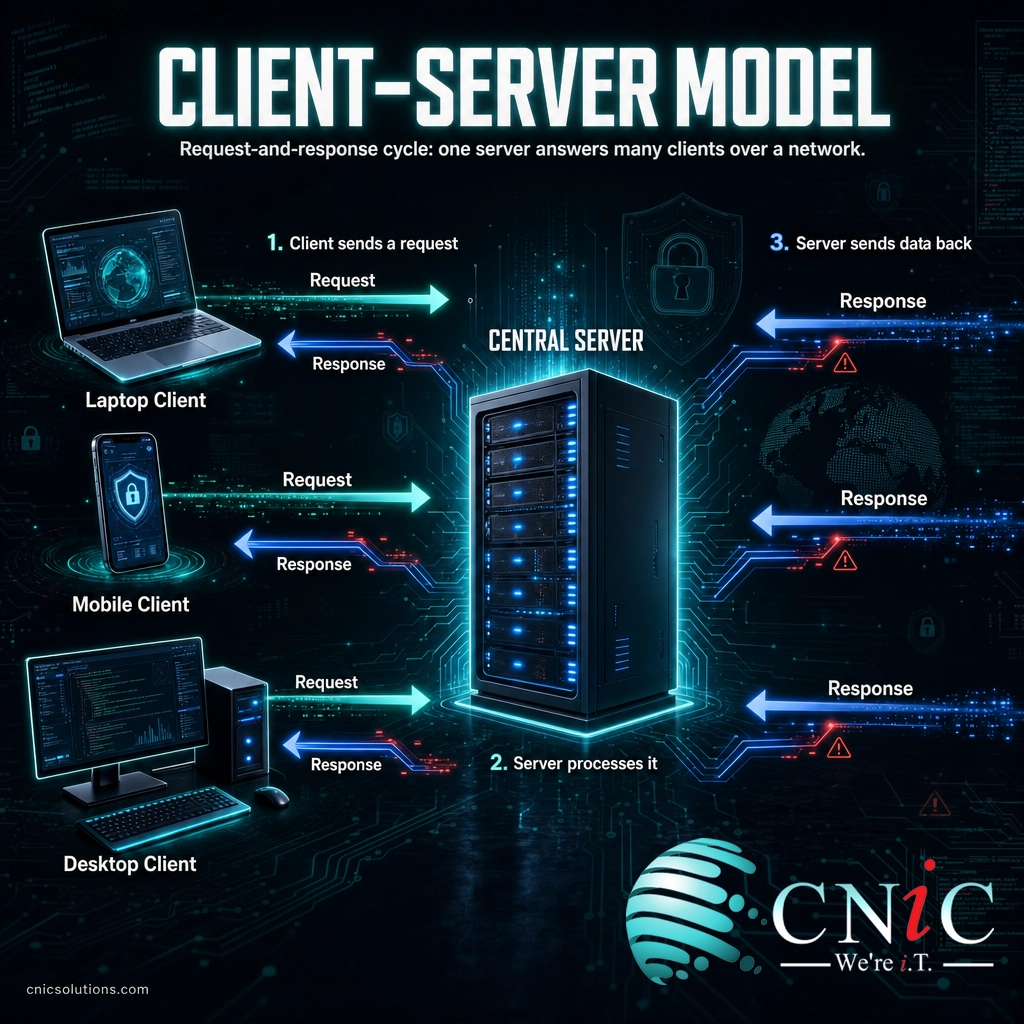
The mechanics are simpler than they sound. Every interaction follows the same request-and-response cycle, usually completed in a fraction of a second. Here is what happens when you load a page or open a file:
- A client makes a request. Your laptop, phone, or app sends a message across the network asking for something specific, such as a web page, a document, or a login check.
- The network routes it. The request travels over the local network or the internet to the address of the server responsible for that service.
- The server processes the request. The server confirms who is asking, checks that they are allowed, finds or generates the data, and prepares a response.
- The server sends the response back. The requested page, file, or record travels back to your device, which displays it. The whole loop typically takes milliseconds.
Think of it like a restaurant kitchen. You (the client) place an order with the kitchen (the server). You do not need to know how the kitchen is organized, who is at which station, or where the ingredients are stored. You just place a clear order and receive a finished plate. The kitchen handles many tables at once without mixing them up, and it stays open and staffed for the whole service. A server does the same for data: it hides all the internal complexity and returns exactly what each client asked for, over and over, for many users at the same time.
The reason a server can do this for dozens or thousands of users at once, when your laptop would grind to a halt, comes down to how it is built. That is the next thing worth understanding.
Server vs. Desktop Computer: What’s the Difference?
This is the single most common point of confusion. A server and a desktop are both computers with a processor, memory, and storage, so people reasonably assume any decent PC can act as a server. It can, technically, but the two are engineered for opposite goals. A desktop is optimized for one person doing one thing at a time. A server is optimized to serve many users continuously without failing. Here is how they compare.
| Attribute | Desktop Computer | Server |
|---|---|---|
| Built for | One user, one set of tasks | Many users and requests at once |
| Uptime | Turned on and off as needed | Runs continuously, often for years |
| Hardware | Single processor, consumer parts | Multiple processors, error-correcting memory, redundant drives and power |
| Failure tolerance | One failed part usually stops the machine | Redundant parts let it keep running through a failure |
| Interface | Monitor, keyboard, mouse | Usually managed remotely, no monitor attached |
| Location | On a desk | A rack, closet, or data center with cooling and backup power |
The redundancy is the part that matters most for business. Server-grade hardware is designed so that a single failed drive, memory module, or power supply does not take the whole system offline, because the server is often responsible for something the entire company depends on. That engineering for reliability, not raw speed, is what separates a real server from a repurposed desktop, and it is why servers cost more and are worth it when uptime is on the line.
Types of Servers and Their Roles
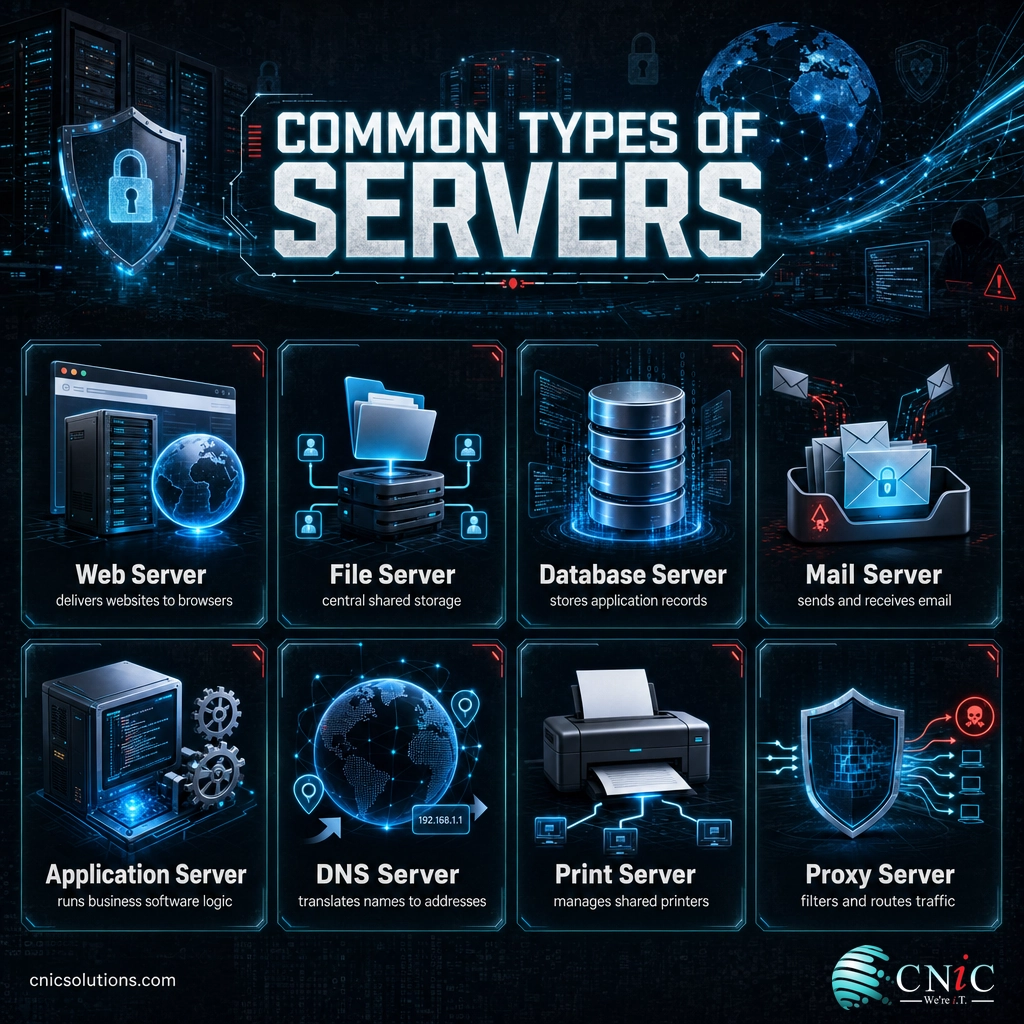
“Server” is a category, not a single product. Servers are usually named for the role they play, meaning the type of request they answer. A single business might rely on a dozen server roles without anyone in the office ever naming them. Here are the ones you are most likely to encounter and what each one does.
| Server type | What it does | Everyday example |
|---|---|---|
| Web server | Stores and delivers websites and web apps to browsers | Loading your company website |
| File server | Central storage for shared documents and folders | The shared drive your team saves to |
| Database server | Stores and retrieves structured data for applications | Your CRM or accounting system’s records |
| Mail server | Sends, receives, and stores email | Company email arriving in your inbox |
| Application server | Runs the business logic behind software | Your line-of-business or ERP application |
| DNS server | Translates domain names into network addresses | Turning a website name into the right destination |
| Print server | Manages shared printers across the network | Sending a document to the office printer |
| Proxy server | Sits between users and the internet to filter and route traffic | Blocking risky sites and caching common requests |
Two clarifications save a lot of confusion here. First, one physical machine can run many of these roles at the same time. A single server in a small office might act as the file server, print server, and database server all at once. Second, these roles are logical, not physical, so “adding a server” often means standing up another role, not buying another box. A proxy server and its business uses is a good example of a role that filters and routes traffic without necessarily being its own dedicated machine.
Physical, Virtual, and Cloud Servers
Beyond their roles, servers also differ in where they live and how they are provisioned. This is where a lot of business technology decisions actually get made, so it is worth being clear on the three forms.
Physical servers
A physical server is a real, dedicated machine, the hardware itself. It might sit in your office or in a rented space in a data center. You get full control and consistent performance, but you also own the maintenance, the power and cooling, and the hardware refresh every few years. Businesses that keep servers on the premises but want professional facilities often move them to a colocation data center, where the building provides power, cooling, and security while the company still owns the equipment.
Virtual servers
A virtual server is a software-defined server that runs alongside others on a single physical machine. Special software called a hypervisor splits one powerful physical server into several independent virtual ones, each with its own operating system and role. This is how a business can run a web server, a file server, and a database server as three separate systems on one piece of hardware, using resources far more efficiently and spinning up a new server in minutes instead of ordering a new box.
Cloud servers
A cloud server is a virtual server that a provider owns, operates, and rents to you over the internet. You get computing power on demand without buying or maintaining any hardware, and you scale up or down as your needs change. This model is why cloud computing has reshaped business technology, but it is important to be clear about what it does and does not change.
Myth: moving to the cloud means you no longer have servers. The cloud is not serverless magic, it is other people’s servers. Your data and applications still run on physical machines, they just live in a provider’s data center instead of your closet, and you rent capacity instead of owning hardware. That shift is real and often smart, but it changes who maintains the server, not whether one exists. You still need to think about access, backups, and reliability, because the responsibility for your data does not disappear when the hardware moves offsite.

Why Servers Matter for Your Business
Servers are easy to ignore right up until one stops. Because they sit out of sight, it is tempting to treat them as a background utility. But three realities make servers a business concern, not just a technical one: their scale, their cost when they fail, and how central they have become to everything a company does.
Start with scale. The global market for server hardware reached $235.7 billion in 2024, and IDC projects it will climb to roughly $366 billion in 2025, a 55% jump driven largely by demand for AI computing. That is not an abstract number. It reflects how much of modern business, from the smallest app to the largest platform, ultimately runs on servers someone had to buy, house, and maintain.
That hardware also has a physical footprint. The data centers full of servers that power the internet and cloud consumed an estimated 415 terawatt-hours of electricity in 2024, about 1.5% of the world’s total, and the International Energy Agency projects that demand will more than double to around 945 terawatt-hours by 2030. The machines answering your everyday requests are, collectively, one of the fastest-growing loads on the global grid.
Global Data Center Electricity Use: 2024 vs. 2030 Projection (IEA)
Data centers used about 1.5% of global electricity in 2024, projected to reach just under 3% by 2030. Source: IEA, Energy and AI (2025).
Then there is the cost of failure, which is where servers stop being abstract for any business owner. When a server that runs your email, files, or line-of-business software goes down, work stops for everyone who depends on it. Uptime Institute’s most recent annual outage analysis found that 54% of organizations said their last significant outage cost more than $100,000, and roughly one in five said it cost more than $1 million. Outages have grown less frequent but more expensive, because more of the business now sits on top of these systems.
Put those three together and the takeaway is simple. Servers are the infrastructure your business runs on, they represent real capital and operating cost, and their reliability directly protects your revenue. That is exactly why professional server and infrastructure management exists: to keep the machines your business depends on secure, patched, monitored, and available.
Source: IDC Worldwide Quarterly Server Tracker | IEA, Energy and AI report | Uptime Institute Annual Outage Analysis
How to Manage Servers the Right Way
Whether your servers are physical, virtual, or in the cloud, keeping them healthy comes down to a handful of disciplines. You do not need to master them yourself, but knowing what good server management looks like helps you judge whether yours is being handled well.
- Monitoring. Someone should be watching server health continuously, so problems are caught before users feel them, not after.
- Patching and updates. Servers need regular security updates. Unpatched servers are one of the most common ways attackers get in.
- Backups and recovery. A server’s data must be backed up and, just as important, the recovery must be tested. Reliable backup and disaster recovery is the difference between a bad afternoon and a lost business.
- Security. Access controls, network segmentation, and threat protection keep servers from becoming an open door into everything they hold.
- Capacity planning. Servers need enough headroom to handle growth, and a plan for the eventual hardware or contract refresh.
For most small and midsize businesses, doing all of this in-house is impractical, because it means staffing specialized skills that are only needed part of the time. This is the core reason companies hand server upkeep to a managed IT provider, which monitors, patches, secures, and backs up the whole environment as a service. If you are weighing whether to keep servers on-site, move to the cloud, or run a hybrid of both, that decision is best made with a clear view of your applications, data, and reliability needs.
Explore Cloud and Hosting Options
See How Managed IT Covers Your Servers
Common Questions About Servers
What is a server in simple terms?
What is the difference between a server and a regular computer?
What are the main types of servers?
Does moving to the cloud mean I no longer have a server?
Does a small business need its own server?
Related Terms
- Client: any device, such as a laptop or phone, that requests data or services from a server. The two together make up the client-server model.
- Data center: a purpose-built facility with power, cooling, and security that houses many servers, whether owned by a company or a cloud provider.
- Virtualization: software that splits one physical server into multiple independent virtual servers, each running its own role.
- Hypervisor: the software layer that creates and manages virtual servers on a physical machine.
- Cloud server: a virtual server rented from a provider and delivered over the internet, part of the broader shift to cloud computing for business.
- Proxy server: a server that sits between users and the internet to filter, cache, and route traffic.
- Uptime: the percentage of time a server or service is available and working, the core measure of reliability.
- Redundancy: duplicate hardware or systems that keep a server running when one component fails.
About This Guide
The definition of a server follows the U.S. National Institute of Standards and Technology (NIST) computer security glossary. Server market figures are from IDC’s Worldwide Quarterly Server Tracker. Data center electricity figures are from the International Energy Agency’s Energy and AI report. Outage cost figures are from Uptime Institute’s Annual Outage Analysis. Statistics are cited to their original sources and used to illustrate the scale and business importance of server infrastructure, not as a forecast for any specific business.
Sources: NIST CSRC glossary | IDC Worldwide Quarterly Server Tracker | IEA, Energy and AI | Uptime Institute Annual Outage Analysis
Get a Free Consultation on Your Server Infrastructure



related posts
What Is IT Asset Management (ITAM)? A Guide for Businesses
October 22, 2026IT asset management (ITAM) is the practice of tracking and managing an organization's hardware, software, and…
What Is ISO 27001? A Guide to the Information Security Standard
October 22, 2026ISO 27001 is the world's best-known standard for managing information security, and increasingly the certification customers…
What Is Infrastructure as Code (IaC)? A Guide for Businesses
October 21, 2026Infrastructure as Code (IaC) is the practice of managing and provisioning IT infrastructure, such as servers,…
What Is Infrastructure Security? A Guide for Businesses
October 21, 2026Infrastructure security is the practice of protecting the core technology systems a business runs on: its…