

A proxy server is an intermediary computer that sits between a user’s device and the internet, forwarding requests and returning responses on the user’s behalf. It can hide a device’s IP address, filter and cache traffic, and shield internal systems. Businesses use proxies to control web access, improve performance, and strengthen security.
Every time an employee opens a website, that request can travel straight to the destination, or it can pass through a checkpoint that inspects, filters, and speeds it up first. That checkpoint is a proxy server. Proxies quietly run some of the most important jobs on a business network, from blocking dangerous sites and caching pages to protecting the company’s own web applications from attack. Understanding what a proxy is, the difference between the two main kinds, and where each one fits tells you a great deal about how a modern, secure network is actually built.
- A proxy is a middleman. It receives your traffic, evaluates it, and forwards it under its own identity, so the far end never deals with your device directly.
- Forward vs reverse is the key split. A forward proxy represents users going out; a reverse proxy represents servers taking traffic in. Almost everything else is a variation on those two.
- A proxy is not a VPN. Both hide your IP, but a VPN encrypts all of your traffic in a tunnel, while a plain proxy usually handles one app and often adds no encryption.
- Reverse proxies are everywhere. About 28.8% of all websites sit behind a reverse proxy, and a single provider, Cloudflare, accounts for the large majority of that, per W3Techs.
- The business value is control. Proxies filter risky sites, block malware, cache content to save bandwidth, balance server load, and log activity for security and compliance.
What’s in This Guide
What Is a Proxy Server?
A proxy server is a system that stands between a client, such as a laptop or a browser, and the servers it wants to reach. Rather than letting the client connect directly to a website or application, the proxy receives the request, acts on it, and returns the result. The formal definition is deliberately broad. The U.S. National Institute of Standards and Technology defines a proxy as a server that services the requests of its clients by forwarding those requests to other servers. That single idea, forwarding on behalf of someone else, is the foundation for everything a proxy does.
Because the proxy makes the onward connection itself, the destination sees the proxy’s address and characteristics instead of the original client’s. That property is what makes a proxy so useful. Sitting in the middle of the conversation, it gets to decide what passes, what gets blocked, what gets logged, and what gets stored for next time. A proxy is not just a relay; it is a control point.
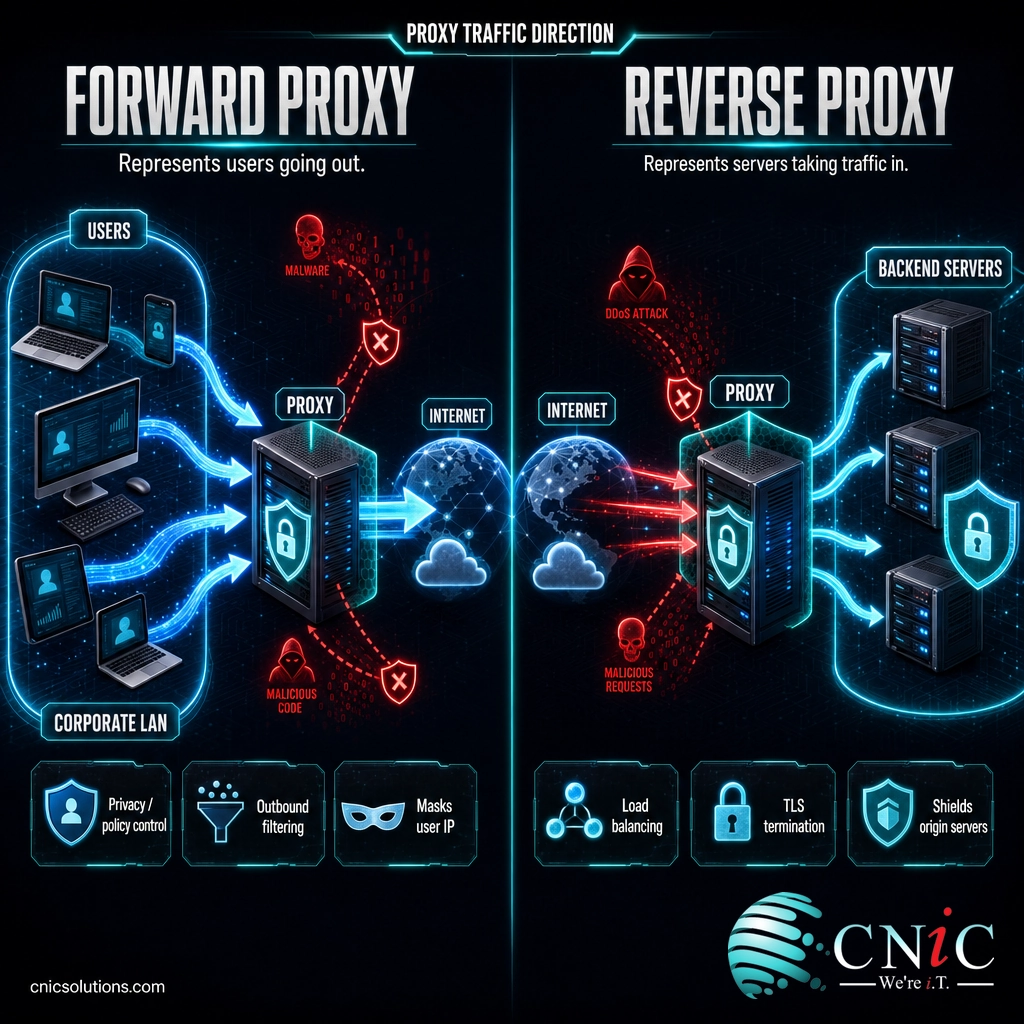
Proxies come in two broad orientations, and almost every specific product is a version of one of them. A forward proxy faces outward and works on behalf of the users inside a network. A reverse proxy faces inward and works on behalf of the servers behind it. Keeping that direction straight is the single most useful thing you can learn about proxies, and the next sections build on it.
Source: NIST Computer Security Resource Center glossary (CNSSI 4009-2015)
How a Proxy Server Works
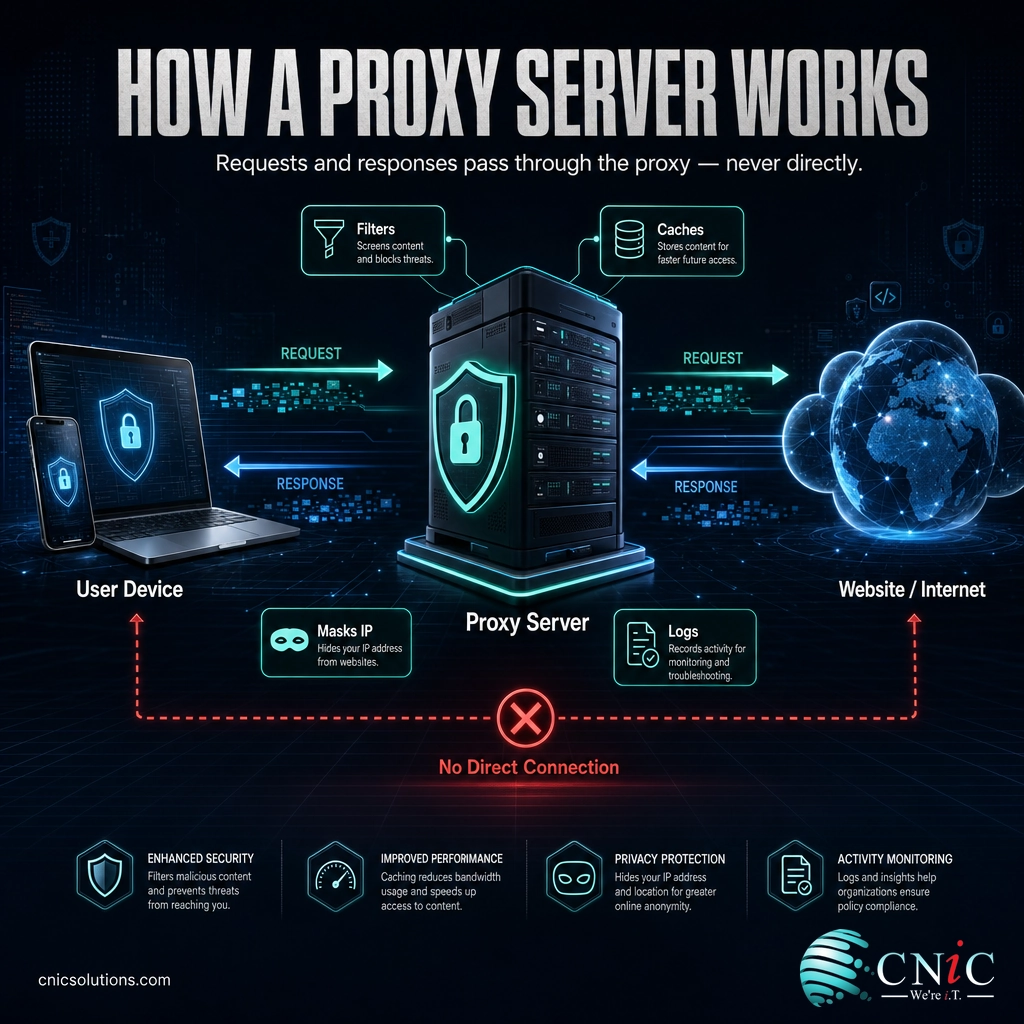
The mechanics are simpler than the jargon suggests. When a proxy is in place, a request does not go directly from your device to the website. It takes a detour through the proxy, which handles the outside connection for you. The typical flow looks like this:
- You send a request. Your device asks to open a page or reach an application, but the request goes to the proxy first instead of straight to the destination.
- The proxy applies its rules. It checks the request against policy: is this site allowed, is the content already cached, does this traffic need to be logged or inspected?
- The proxy forwards the request. If the request passes, the proxy connects to the destination server using its own IP address, not yours.
- The destination replies to the proxy. The response comes back to the proxy, which can inspect it, filter it, or store a copy for future requests.
- The proxy hands you the result. You receive the content as if you had fetched it directly, while the destination only ever saw the proxy.
A useful way to picture it is a corporate mailroom. Employees do not put their home addresses on outgoing packages and they do not receive deliveries at their desks. Everything flows through one central room that sends and receives on everyone’s behalf. To the outside world, the whole company has a single mailing address, and the mailroom can screen what comes in, log what goes out, and keep copies of anything worth keeping. A proxy server is that mailroom for network traffic.
This position in the middle is exactly why proxies are so valuable on a business network. The same detour that hides an internal address also creates the opportunity to filter threats, enforce policy, cache popular content, and record activity, all in one place. It is a natural companion to the other equipment that governs traffic at the network edge, which is why proxies often sit alongside a monitored firewall that controls what is allowed in and out.
Proxy Server vs. VPN: Clearing Up the Confusion
The term a proxy is most often confused with is VPN, because both can hide your IP address and route your traffic through an intermediary. The difference is what happens to the traffic in between, and it matters a great deal for security.
A VPN, or virtual private network, creates an encrypted tunnel that carries all of your device’s traffic to a remote endpoint. Everything is protected in transit and every application is covered, which is why VPNs are the standard tool for secure remote access. A standard proxy is lighter. It usually works at the level of a single application or browser, and unless it is specifically handling encrypted connections, it does not encrypt your data on its own. A proxy is built to filter, cache, and route; a VPN is built to create a private, encrypted connection.
| Factor | Proxy Server | VPN |
|---|---|---|
| Primary job | Intermediary for filtering, caching, and routing | Private, encrypted connection |
| Encryption | Not by default; depends on the connection | Encrypts all traffic in a tunnel |
| Scope | Usually one app or browser at a time | The entire device and all its traffic |
| Hides your IP | Yes | Yes |
| Typical business use | Content filtering, monitoring, load balancing, caching | Secure remote and site-to-site access |
| Performance | Often faster, and can accelerate cached content | Small overhead from encryption |
Myth: a proxy hides everything and makes you anonymous. It does not. A basic proxy can hide your IP address from the website you visit, but the proxy operator can still see your traffic, and most plain proxies add no encryption of their own. Anyone positioned between your device and the proxy could observe unencrypted data. Real privacy comes from pairing a proxy with encryption and sound configuration, not from the proxy alone. Treat “proxy” and “anonymous” as two separate things.
Types of Proxy Servers
Once you have the forward and reverse distinction, the many proxy types on the market stop being confusing. Each one is a forward or reverse proxy tuned for a particular job or a particular level of privacy. Start with the two foundations.
1Forward Proxy
A forward proxy sits at the edge of a network and represents the users inside it. When your team browses the web through a forward proxy, their requests leave through that single gateway, which applies policy, filters content, and masks the internal addresses on the way out. This is the proxy most people picture: the one a company uses to control and monitor employee internet access. Forward proxies are the backbone of web content filtering and secure web gateways.
2Reverse Proxy
A reverse proxy does the opposite. It sits in front of your servers and represents them to the outside world. Incoming requests from the internet hit the reverse proxy first, which decides which internal server should handle each one, then returns the response. Along the way it can balance load across several servers, cache content to serve pages faster, terminate encryption, and absorb attacks before they reach the application. As Cloudflare’s explanation of reverse proxies describes, this is how large sites gain protection, speed, and reliability. If your company runs a website or a customer portal, a reverse proxy is very likely part of the picture, whether you set it up or your platform did.
3Other Proxy Types You Will Hear About
Beyond the two foundations, most named proxy types describe either how much they reveal about the user or where their IP addresses come from:
- Transparent proxy: intercepts traffic without the user configuring anything or even knowing it is there. Common in schools, offices, and public Wi-Fi for filtering and caching.
- Anonymous proxy: hides the user’s real IP address from the destination but identifies itself as a proxy.
- High-anonymity (elite) proxy: hides the user’s IP and does not advertise that it is a proxy at all, offering the strongest concealment of the group.
- Distorting proxy: hides the real IP and reports a deliberately false one to the destination.
- Residential proxy: routes traffic through IP addresses assigned to real consumer devices, so requests look like ordinary home users.
- Datacenter proxy: uses IP addresses from data centers rather than consumer connections. Fast and inexpensive, but easier for sites to recognize as a proxy.
You will also see proxies described by protocol, such as an HTTP or HTTPS proxy for web traffic and a SOCKS proxy for a wider range of traffic types. These are implementation details layered on top of the forward or reverse role, not a separate category to memorize.
Source: NIST glossary: proxy server | Cloudflare on reverse proxies

Business Uses of Proxy Servers
Proxies are not an academic concept. They do real, daily work on business networks, and most of that work falls into a handful of practical jobs. Understanding them helps you recognize where a proxy is already earning its keep and where one might solve a problem you have.
Web Content Filtering and Acceptable Use
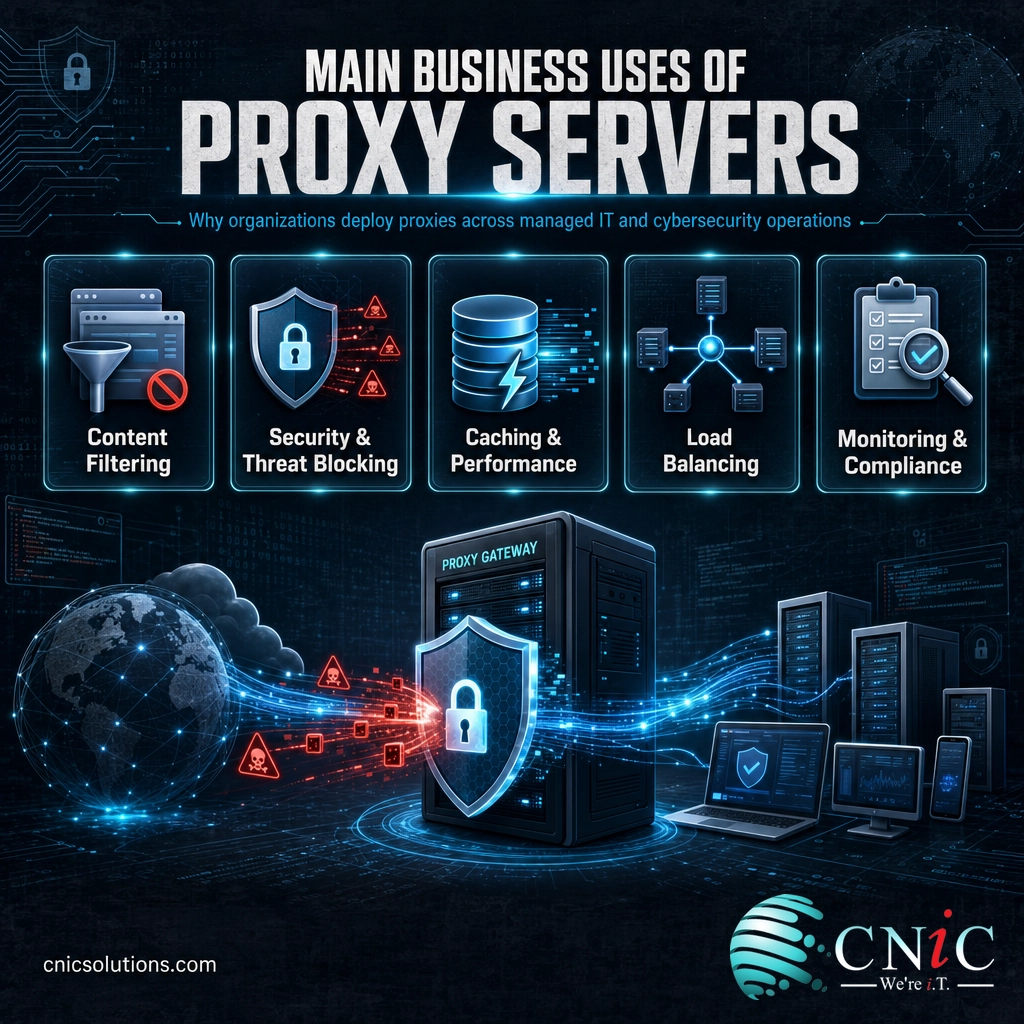
The classic forward-proxy job is controlling where employees can and cannot go online. A proxy can block categories of sites, enforce an acceptable use policy, and stop access to known-malicious domains. Because every request passes through it, the proxy can apply one consistent rule to the whole organization instead of trusting each device to police itself.
Security and Threat Blocking
Sitting in the traffic path, a proxy is a natural place to stop threats before they land. A secure web gateway, which is a security-focused forward proxy, inspects outbound and inbound web traffic, blocks phishing and malware sites, and can prevent sensitive data from leaving the network. On the inbound side, a reverse proxy shields your applications by absorbing malicious requests and hiding the real servers from attackers. Both are pieces of the same goal, which is why proxy policy usually lives inside a broader strategy for filtering malicious web traffic and protecting company data.
Performance Through Caching
Proxies can store copies of frequently requested content and serve it locally the next time it is needed. When many people request the same file or page, caching returns it from the proxy instead of fetching it across the internet again, which reduces bandwidth use and speeds up the experience. Reverse proxies use the same trick in the other direction to serve your website’s static content quickly to visitors.
Load Balancing and High Availability
A reverse proxy can spread incoming traffic across several backend servers so no single machine is overwhelmed. If one server fails, the proxy routes around it, keeping the site or application available. This is a core reason busy websites place a reverse proxy in front of their infrastructure, and it ties directly into how a resilient network is designed and managed end to end.
Monitoring, Logging, and Compliance
Because it sees the traffic, a proxy can log it. That record supports troubleshooting, security investigations, and compliance requirements that call for visibility into network activity. For regulated businesses, that centralized log can be the difference between answering an auditor’s question in minutes and reconstructing it from scattered devices.
Why Proxy Servers Matter for Your Business
Proxies can feel invisible, which is exactly why they are easy to overlook. But they are not a fringe technology. Reverse proxies in particular have become a standard layer of the public internet, and the odds are high that your own website already depends on one.
According to W3Techs usage statistics, roughly 28.8% of all websites sit behind a reverse proxy service, and that share keeps climbing as businesses adopt them for security and speed. The market is also strikingly concentrated: Cloudflare alone is used by about 24.3% of all websites, which works out to around 84% of the entire reverse proxy market.
Reverse Proxy Adoption Across All Websites (W3Techs, August 2026)
Nearly all reverse proxy usage runs through a single provider: Cloudflare accounts for about 84% of the reverse proxy market. Source: W3Techs, August 2026.
The takeaway for a business owner is not which vendor leads. It is that a proxy layer has quietly become part of how normal, well-run sites operate. If a proxy already governs your company’s inbound and outbound web traffic, it is worth knowing it is there, understanding what it controls, and making sure it is configured for your security and performance rather than left on defaults.
Source: W3Techs, Usage Statistics of Reverse Proxy Services
How to Choose and Deploy a Proxy
You rarely deploy a proxy in a vacuum. The right choice follows from a specific goal, so start with the problem you are trying to solve rather than the product.
- To control and secure employee web access: look at a forward proxy or a secure web gateway with content filtering and threat blocking.
- To protect and speed up your own website or application: a reverse proxy, often bundled into a content delivery or security platform, provides caching, load balancing, and attack protection.
- To meet visibility or compliance needs: prioritize logging and reporting features so the proxy produces the records your auditors expect.
The harder part is not picking a product but fitting it cleanly into the network you already run, so it improves security and performance without becoming a new bottleneck or a single point of failure. That is a design decision, and it connects to the rest of your infrastructure, from your firewall to the boundary between your local and wide area networks. If you are mapping that out, our guide to how local and wide area networks fit together is a useful companion. For most small and midsize businesses, the practical path is to have the whole stack designed and managed as one system.
Design and Manage Your Network the Right Way
Common Questions About Proxy Servers
What is a proxy server in simple terms?
What is the difference between a forward proxy and a reverse proxy?
Is a proxy server the same as a VPN?
Why would a business use a proxy server?
Does a proxy server make you anonymous?
Related Terms
- Forward proxy: a proxy that represents users on a network, controlling and masking their outbound traffic as it leaves.
- Reverse proxy: a proxy that sits in front of servers, handling incoming requests with load balancing, caching, and attack protection.
- VPN (virtual private network): an encrypted tunnel that carries all of a device’s traffic to a remote endpoint for secure access.
- Firewall: the device that decides which traffic is allowed in and out of a network. See how a managed firewall service works.
- Secure web gateway: a security-focused forward proxy that filters web traffic and blocks malware and phishing.
- Load balancer: a system that distributes traffic across multiple servers; a core function of many reverse proxies.
- Content delivery network (CDN): a distributed set of reverse proxies that cache content close to users for speed and resilience.
- LAN and WAN: the local and wide area networks a proxy bridges. Learn the difference between the two.
About This Guide
Definitions in this article follow primary and authoritative sources rather than secondary write-ups. The core definition of a proxy server is drawn from the U.S. National Institute of Standards and Technology (NIST) glossary. Reverse proxy behavior is described in line with Cloudflare’s technical documentation. Adoption figures come from W3Techs usage statistics, which survey the technologies in use across websites. CNiC Solutions is a Houston-based managed IT and networking provider; this article is educational and not a substitute for a network assessment of your specific environment.
Sources:
NIST CSRC glossary: proxy server (CNSSI 4009-2015) |
Cloudflare: What Is a Reverse Proxy? |
W3Techs: Usage Statistics of Reverse Proxy Services
Get a Free Consultation on Your Network



related posts
What Is a Distributed System? How It Works and Why It Matters
October 5, 2026A distributed system is a collection of independent computers, called nodes, that are connected over a…
What Is a Firewall? How It Protects Your Business Network
October 5, 2026A firewall is a network security device or software that monitors incoming and outgoing traffic and…
What Is a DDoS Attack? How DDoS Attacks Work and How to…
October 4, 2026A DDoS attack (distributed denial-of-service attack) is an attempt to take a website, application, or network…
What Is a Data Center? Types, Components, and How They Work
October 4, 2026A data center is a physical facility that houses the servers, storage, and networking equipment a…