

Virtual desktop infrastructure (VDI) is technology that hosts full desktop operating systems on centralized servers in a data center and streams them to users on almost any device. Because the desktop and its data live in the data center rather than on the endpoint, VDI centralizes control, strengthens security, and makes remote and hybrid work far easier to manage.
Your work desktop does not have to live on your laptop. With virtual desktop infrastructure, the operating system, the applications, and the files all run on servers in a data center, and your device only displays the result. That single shift, moving the desktop off the endpoint and into the data center, is what makes VDI so useful for remote teams, regulated data, and any business tired of managing dozens of individual machines. This guide explains what VDI is, how it works, how it differs from DaaS and a VPN, and whether it fits your business.
- The desktop runs in the data center, not on your device. VDI streams a full operating system to your screen while all the computing and data stay centralized.
- Four pieces make it work. A hypervisor, host servers, a connection broker, and a display protocol together deliver and route each virtual desktop.
- VDI and DaaS are the same idea, hosted differently. VDI is self-hosted in your data center; DaaS is the cloud subscription version a provider runs for you.
- Two flavors: persistent and non-persistent. Persistent desktops save each user’s setup; non-persistent desktops reset to a clean image at every login.
- Security is the headline benefit. When data never lands on the endpoint, a lost or stolen laptop is a hardware problem, not a data breach.
What’s in This Guide
What Is VDI?
Virtual desktop infrastructure is a form of desktop virtualization. Instead of installing Windows and your applications on each employee’s physical computer, the desktop operating system runs as a virtual machine on servers in a data center, and its screen is delivered over the network to whatever device the person is using. As TechTarget’s definition of VDI puts it, the desktop operating system runs and is managed centrally, then is delivered to endpoint devices where the user interacts with it as if it were local.
The key mental shift is that the endpoint stops being the computer. A cheap thin client, an aging laptop, a tablet, or a home PC all become windows into a standardized desktop that actually runs somewhere else. That is very different from the traditional model, where each machine is its own island that IT has to patch, secure, and repair one at a time.
Major platforms built entire products on this idea. Microsoft’s Azure Virtual Desktop documentation describes it as a desktop and app virtualization service that delivers a full Windows experience to users on any device, which is VDI delivered from the cloud. VMware (now Omnissa) Horizon and Citrix are the long-standing on-premises platforms that popularized the approach.
Source: TechTarget, VDI definition | Microsoft, Azure Virtual Desktop overview
How VDI Works
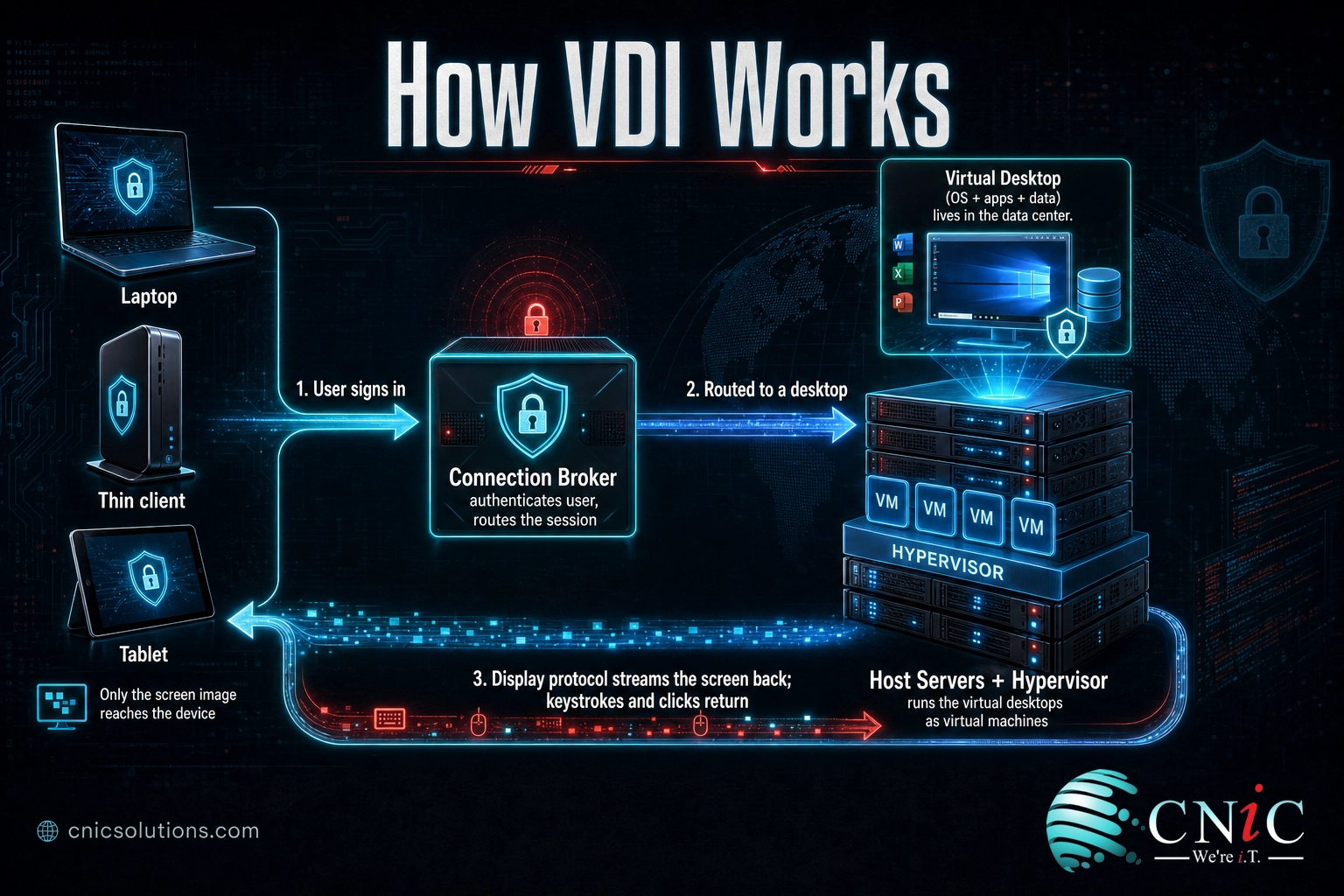
Think of VDI like streaming a movie instead of downloading it. When you stream, the film plays on a distant server and only the picture reaches your screen. Nothing is stored on your device. VDI does the same thing with a whole desktop: the operating system runs in the data center, and only the display is streamed to you, while your keystrokes and clicks travel back the other way.
Under the hood, four components make that possible:
- The hypervisor. Software such as VMware ESXi, Microsoft Hyper-V, or Citrix Hypervisor that creates and runs the virtual machines. Each virtual desktop is one of these virtual machines.
- Host servers. The physical servers in the data center whose processing power, memory, and storage are pooled to run many virtual desktops at once.
- The connection broker. The traffic controller. It authenticates each user and routes them to an available virtual desktop, then monitors those sessions.
- The display protocol. The technology that streams the screen to the device and returns input. Common protocols include RDP, PCoIP, Blast Extreme, and Citrix HDX.
Put together, a typical session flows like this: a user signs in from any endpoint, the connection broker verifies who they are and hands them a virtual desktop running on the hypervisor, and the display protocol streams that desktop to their screen. All the real computing, and all the data, stay in the data center. The device is just glass.
Why the endpoint barely matters. Because the desktop runs centrally, a five-year-old laptop can deliver the same experience as a new one, and IT can replace, wipe, or re-provision a device without touching the desktop or its files. The heavy lifting never happens on the endpoint.
Source: TechTarget, how VDI works
VDI vs DaaS: Clearing Up the Biggest Confusion
The single most common question about VDI is how it differs from DaaS, short for Desktop as a Service. The honest answer is that they are the same underlying technology, delivered under two different ownership models. VDI is the do-it-yourself version you host and manage in your own data center. DaaS is that same virtual desktop, but hosted in the cloud and rented from a provider who runs the back-end infrastructure for you. Microsoft’s Azure Virtual Desktop and Amazon WorkSpaces are well-known DaaS offerings.
| Attribute | VDI (self-hosted) | DaaS (cloud subscription) |
|---|---|---|
| Where it runs | Your own on-premises or colocation data center | The provider’s cloud infrastructure |
| Who manages the back end | Your IT team or managed provider | The DaaS provider |
| Cost model | Up-front capital cost for servers, then maintenance | Predictable per-user monthly subscription |
| Scaling | Requires buying and provisioning more hardware | Add or remove users on demand |
| Best fit | Strict control needs, existing data center investment | Fast setup, variable headcount, limited IT staff |
A related point of confusion is whether VDI is just a VPN. It is not. A VPN builds a secure tunnel so your local machine can reach company systems, but the work still happens on your device and data can be copied to it. VDI keeps the desktop and its data in the data center and streams only the picture. Many businesses use both, with a VPN or reverse connection securing the path to the virtual desktop.
Types of VDI: Persistent vs Non-Persistent
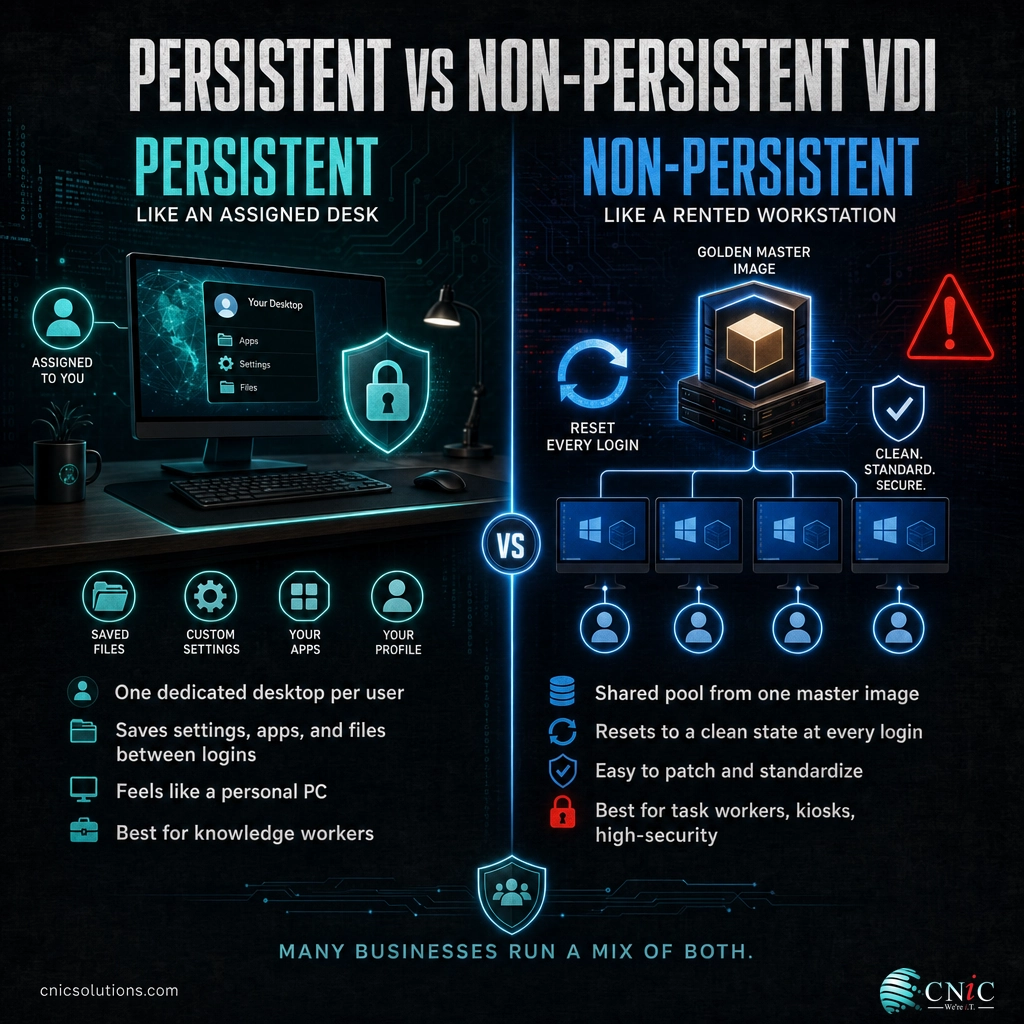
Beyond where it is hosted, VDI comes in two operational styles, and the difference matters for cost, management, and how personal the experience feels.
1Persistent VDI
In a persistent setup, each user is assigned their own dedicated virtual desktop, a one-to-one arrangement. Settings, installed applications, and files are saved between sessions, so the desktop looks and behaves the same every time the person logs in. It is the closest match to owning a physical PC, which makes it comfortable for knowledge workers who customize their environment. The tradeoff is that individual desktops take more storage and are a bit more work to manage.
2Non-Persistent VDI
In a non-persistent setup, users connect to a shared pool of identical desktops built from a single master image, a many-to-one arrangement. At each login the desktop resets to that clean state, so nothing a user changes carries over. Think of it as a rented workstation rather than an assigned desk. Non-persistent desktops are efficient, easy to patch (you update one image), and inherently tidy, which suits task workers, shift workers, kiosks, and high-security environments where a fresh, controlled desktop every session is a feature.
Which to choose. Many organizations run both: persistent desktops for staff who need a personalized, stable environment, and non-persistent desktops for standardized roles, temporary workers, and locked-down use cases. The right mix depends on how much personalization your users genuinely need versus how much standardization your security and IT team want.
Why VDI Matters for Small and Midsize Businesses
VDI used to be an enterprise-only technology, but two shifts, the normalization of remote work and the arrival of affordable cloud DaaS, have brought it within reach of much smaller companies. Three points explain why it is worth understanding now.
First, remote and hybrid work is no longer the exception. Pew Research Center found that as of early 2022, 59% of U.S. workers whose jobs can be done from home were working from home all or most of the time, up from just 23% who teleworked frequently before the pandemic. That is a durable change in how businesses operate, and VDI is one of the cleanest ways to give a distributed team a secure, standardized desktop from any location.
Second, security improves when data leaves the endpoint. Because a virtual desktop and its files live in the data center, a laptop that is lost, stolen, or infected does not automatically become a data breach. There is no company data sitting on it. Microsoft notes that Azure Virtual Desktop connects users through reverse connections, so no inbound ports need to be opened to the desktops, which shrinks the attack surface further. For regulated industries such as healthcare, legal, and financial services, keeping data centralized is often a compliance advantage on its own.
Third, adoption is accelerating, and the market reflects it. Precedence Research valued the global virtual desktop infrastructure market at about $19.37 billion in 2025 and projects it will reach roughly $115.41 billion by 2035, a compound annual growth rate near 19.5%, driven largely by hybrid work and cloud-based DaaS.
Global VDI Market Size, 2025 vs 2035 Projection (Precedence Research)
Projected growth at a compound annual rate near 19.5% from 2026 to 2035. Source: Precedence Research.
Myth: VDI is only for large enterprises. That was true when VDI meant buying and running your own servers. Cloud DaaS changed the math by turning that capital cost into a per-user monthly subscription. A small business can now provision a handful of virtual desktops through a managed provider without owning any of the underlying infrastructure, so the barrier today is planning and fit, not company size.
Source: Pew Research Center, remote work data | Precedence Research, VDI market forecast
How to Get Started With VDI
Rolling out virtual desktops is less about the technology and more about planning it around your actual users. A sound sequence looks like this:
- Define the use cases. Identify who benefits most: remote and hybrid staff, contractors, bring-your-own-device users, or teams handling regulated data that must stay centralized.
- Choose VDI or DaaS. Decide whether to host it yourself in a data center or subscribe to cloud desktops. Most small and midsize businesses lean toward DaaS to avoid the up-front hardware cost.
- Pick persistent or non-persistent. Match the desktop style to each role, personalized where users need it, standardized where they do not.
- Plan the network and endpoints. VDI depends on reliable bandwidth and low latency. Confirm your connectivity, and decide whether to reuse existing devices or deploy thin clients.
- Pilot, then scale. Start with one team, measure the experience, then expand. This is exactly where a managed provider earns its keep, sizing, securing, and supporting the environment so it performs.
Because virtual desktops sit at the intersection of servers, storage, networking, and security, they are usually delivered as part of broader cloud computing for business and infrastructure planning rather than as a standalone project. If you are weighing where those desktops should run, the same tradeoffs that shape a colocation or data center decision apply here too.
Explore Managed Cloud Solutions
Talk to a Managed IT Team
Common Questions About VDI
What is VDI in simple terms?
What is the difference between VDI and DaaS?
Is VDI the same as a VPN?
What are persistent and non-persistent virtual desktops?
Is VDI worth it for a small business?
Related Terms
- Desktop as a Service (DaaS): cloud-hosted VDI delivered as a subscription, where the provider runs and maintains the back-end infrastructure for you.
- Hypervisor: the software layer that creates and runs the virtual machines each virtual desktop lives on.
- Connection broker: the component that authenticates users and routes each one to an available virtual desktop.
- Thin client: a lightweight endpoint device built mainly to connect to a virtual desktop rather than to do heavy local computing.
- Remote Desktop Services (RDS): a session-based Windows Server model for delivering desktops and apps, and a common predecessor to modern VDI.
- Cloud computing: delivering computing resources over the internet, the broader model that VDI and DaaS belong to.
- Cloud repatriation: moving workloads back from the cloud to on-premises when it makes financial or operational sense, a tradeoff worth understanding before you decide where workloads should live.
- DRaaS: Disaster Recovery as a Service, a related cloud-delivered model that protects systems and data. Learn what DRaaS covers.
- Virtual CIO: a strategic IT advisor who helps decide whether technologies like VDI fit your roadmap. See what a virtual CIO does.
About This Guide
Definitions and the technical description of how VDI works are drawn from TechTarget and Microsoft’s Azure Virtual Desktop documentation. Remote work figures are from the Pew Research Center’s 2022 study on work in America. Market size and growth figures are from Precedence Research. Figures are cited to their original sources and used to illustrate the technology and its adoption, not as guaranteed outcomes for any specific business.
Sources: TechTarget, VDI definition | Microsoft, Azure Virtual Desktop | Pew Research Center, remote work | Precedence Research, VDI market
Get a Free Consultation on Your IT Infrastructure



related posts
What Is Mobile Device Management (MDM)? A Guide for Businesses
October 24, 2026Mobile Device Management (MDM) is software that lets an organization remotely enroll, configure, secure, and monitor…
What Is MFA? How Multi-Factor Authentication Protects Your Accounts
October 24, 2026Multi-factor authentication (MFA) is a security method that requires two or more separate proofs of identity…
What Is Log Analysis? How It Works and Why It Matters
October 23, 2026Log analysis is the practice of reviewing and interpreting the log files that computers, applications, and…
What Is IT Monitoring? A Guide for Businesses
October 23, 2026IT monitoring is the continuous practice of collecting and analyzing data from a business's technology, its…