

Managed IT services typically cost $100 to $250 per user per month in the United States, so a 25-person business usually pays between $2,500 and $6,250 monthly for fully managed support. The exact figure depends on the pricing model, the scope of services, and how much security and compliance your business requires.
Pricing is the question every business asks first and the one most providers answer last. Search for managed IT pricing and you get a wall of “it depends” and “contact us for a quote,” which helps no one who is trying to budget. This guide does the opposite. It gives you the real ranges, explains the five pricing models you will actually be quoted, breaks down exactly what drives the number up or down, and shows you the add-on costs that catch buyers off guard. By the end you will be able to read any managed IT quote and know whether it is fair, thin, or padded.
Key Takeaways
- The working range is $100 to $250 per user per month for fully managed IT, with most standard contracts landing between $125 and $200 per user.
- Per-user pricing is the market default because it scales with your team and covers all of a person’s devices, but per-device, tiered, flat-rate, and monitoring-only models each fit specific situations.
- Scope, security depth, response-time guarantees, and after-hours coverage are what separate a $120 per-user quote from a $220 one, not provider greed.
- Hidden costs are real but predictable. Onboarding, project work, hardware pass-through, and compliance tooling commonly add 20 to 50 percent on top of the base monthly fee in the first year.
- The cost of managed IT is small next to the cost of not having it. The global average data breach reached $4.44 million in 2025, and most organizations say a single hour of downtime costs them more than $100,000.
What’s in This Guide
The Quick Answer: Managed IT Price Ranges
For a fully managed relationship, where a provider takes ongoing ownership of your technology, the prevailing U.S. market rate is $100 to $250 per user per month. That number covers the whole person: their laptop, phone, email, help-desk support, security, and monitoring, not each piece of hardware separately. Where a specific business lands inside that range comes down to how much support and protection it needs, which the rest of this guide unpacks in detail.
Fully managed IT, quick price bands (per user, per month):
- Entry level ($100 to $150): monitoring, patching, help desk, and standard endpoint protection for a straightforward environment.
- Standard ($150 to $200): everything above plus proactive maintenance, layered security, backup, and defined response-time guarantees. Where most businesses land.
- Premium ($200 to $250 and up): 24/7 coverage, advanced cybersecurity, compliance documentation, and strategic technology planning for regulated or high-uptime businesses.
Those bands describe fully managed support. A business that only needs monitoring, or only wants help with a single project, will pay far less because it is buying far less. Understanding which model you are being quoted is the first step to comparing prices honestly, so that is where we start.
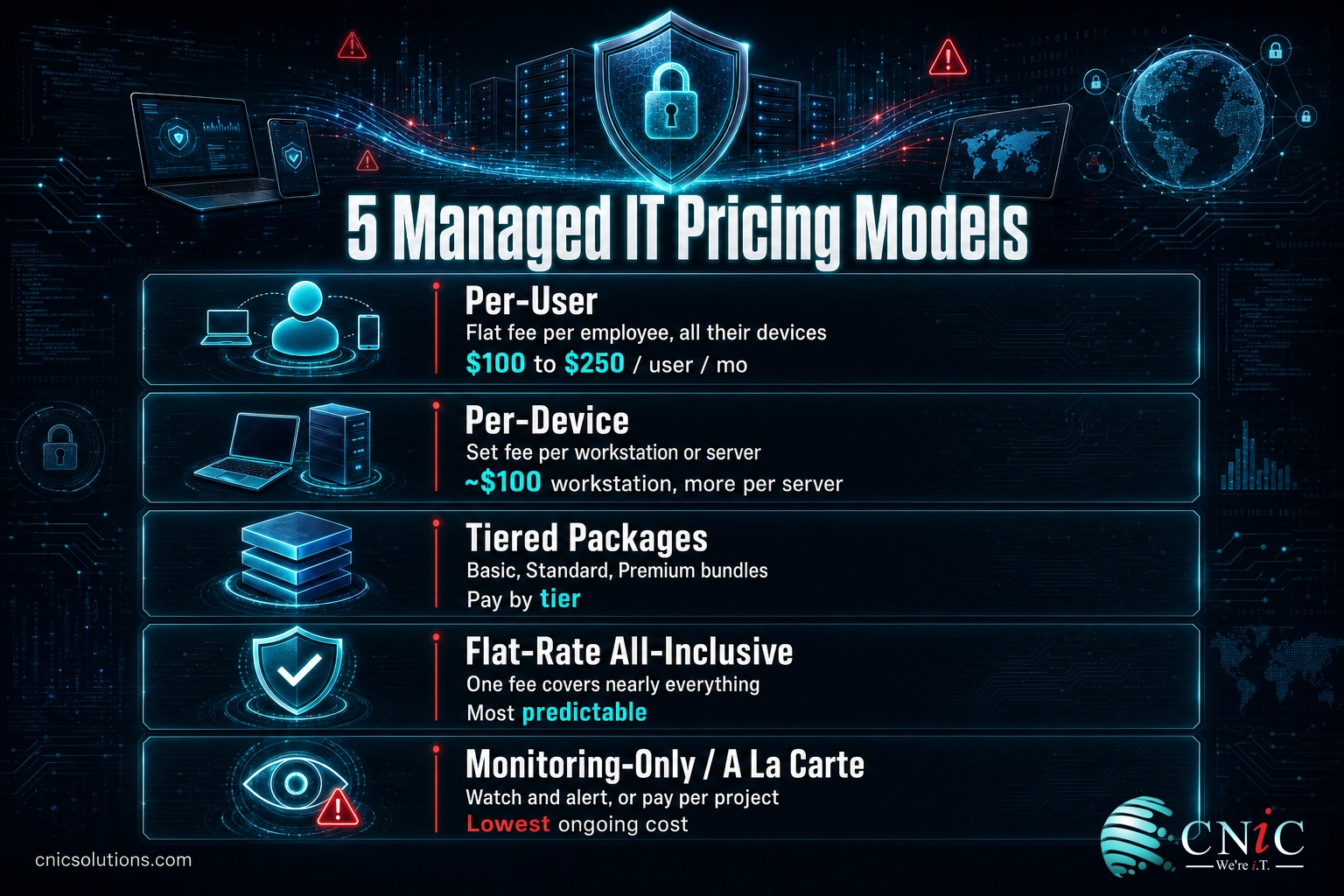
The 5 Managed IT Pricing Models Explained
Almost every managed IT quote is built on one of five pricing models. They are not interchangeable, and a low headline number in one model can cost more than a higher number in another once the full scope is counted. Knowing how each one works is what lets you compare two proposals that look nothing alike on paper.
1. Per-User Pricing
You pay a flat monthly fee for each employee, and that fee covers all of the devices, support, and core services that person uses. One user with a laptop, a desktop, a phone, and a tablet is billed once. Per-user is the most common model today because people, not machines, are how modern businesses actually grow, and it makes budgeting simple: hire a person, add a known cost. Typical range is $100 to $250 per user per month for full management.
Best for: most small and midsize offices, especially where employees carry multiple devices.
2. Per-Device Pricing
You pay a set fee for each piece of hardware under management. A workstation commonly runs around $100 per month, and a server considerably more, often several hundred, because it carries more risk and more maintenance. Per-device pricing is transparent and easy to audit, but the bill climbs every time you add equipment, and it can undercount cost in environments where one person uses four devices.
Best for: businesses with shared workstations, device-heavy operations, or a stable, well-documented hardware count.
3. Tiered Packages
The provider bundles services into named plans, usually something like Basic, Standard, and Premium. Each tier includes a defined set of services, and higher tiers add proactive monitoring, advanced security, and strategic guidance. Tiered pricing makes the trade-offs visible and lets you start lower and move up, but the tier that fits you perfectly rarely exists, so you often pay for a few things you do not need to get the one thing you do.
Best for: businesses that want a clear menu and expect their needs to grow in predictable steps.
4. Flat-Rate (All-Inclusive) Pricing
One monthly fee covers nearly everything, so support calls, incidents, and routine work never raise the bill. This model is the easiest to budget because it is genuinely predictable, and it aligns the provider’s incentives with yours: they make more when your systems run smoothly and generate fewer tickets, not when things break. The trade-off is that all-inclusive plans price in the risk of a heavy month, so a very quiet environment can feel like it is overpaying.
Best for: businesses that value budget certainty and want the provider motivated to prevent problems, not bill for them.
5. Monitoring-Only (and A La Carte)
The cheapest option, and the one most likely to be misunderstood. The provider watches your systems and alerts you to problems, but your team, or a separate call, does the actual fixing. A la carte and project-based work sits alongside this: you pay only for a specific engagement, such as a cloud migration or a security assessment, with no ongoing relationship. These models cost little up front, but they leave the resolution, and the risk, with you.
Best for: businesses with capable internal IT that need extra eyes, or those testing a provider before committing to full management. If this describes you, the choice between adding outside help and handing over the whole function is covered in our guide to co-managed versus fully outsourced IT.
The comparison that matters: a $110 per-device quote and a $170 per-user quote are not really $60 apart. If your average employee uses two managed devices, the per-device model is $220 per person, making the per-user quote the cheaper of the two. Always convert competing quotes to the same unit before you judge the price.
For a fuller picture of what a complete engagement includes before you weigh the price, see our breakdown of what managed IT services actually cover.
What Factors Affect the Cost?
Two providers can quote the same business a $130 per-user rate and a $210 per-user rate, and both can be fair. The difference is almost always in what the number includes. These are the levers that move a managed IT price, in rough order of impact.
Number of users and devices
Scale works in your favor. Per-user and per-device rates usually step down as the count rises, because onboarding, tooling, and account management spread across more seats. A 10-person company often pays a higher per-user rate than a 100-person company for the same service depth.
Scope of services
The single biggest driver. A plan that covers only monitoring and patching costs a fraction of one that adds a staffed help desk, backup and disaster recovery, cloud management, and vendor coordination. When a quote looks cheap, the scope is usually where the difference lives.
Security and compliance depth
Baseline endpoint protection is one thing; 24/7 threat monitoring, managed detection and response, security awareness training, and audit-ready documentation are another. Businesses in regulated industries such as healthcare, finance, and legal pay more because frameworks like HIPAA, PCI-DSS, and SOC 2 require controls and evidence that take real work to maintain. Compliance support commonly adds 20 to 40 percent on top of a standard plan. This is also where the highest return sits, which is why serious cybersecurity protection for your business is rarely the place to cut.
Response times and after-hours coverage
A guaranteed one-hour response costs more than a next-business-day one, and round-the-clock coverage costs more than business hours. Service level agreements are priced, not free: if a provider promises fast, 24/7 response, that promise is built into the rate.
The condition of your current environment
An outdated, poorly documented, or neglected network costs more to take over and stabilize than a clean one. Much of that shows up as one-time onboarding, but a genuinely fragile environment can carry a higher ongoing rate until it is brought up to standard.
Roughly How Much Each Factor Moves a Per-User Price
Relative influence of each factor on a managed IT per-user rate. Illustrative, based on prevailing U.S. market pricing.
Notice that none of these factors is the provider’s brand or a markup for its own sake. A higher managed IT price nearly always buys more work, more protection, or a firmer guarantee. The goal is not the lowest number; it is the right scope at a fair rate.
Pricing Tiers Explained
Because the tiered model is so common, it helps to see what each level usually contains and who it fits. The names vary by provider, but the ladder is remarkably consistent across the market.
| Tier | Typical cost (per user / mo) | What’s usually included | Best for |
|---|---|---|---|
| Essential | $100 to $150 | Remote monitoring, patching, help desk, standard endpoint protection, basic backup | Small, low-risk offices with simple needs |
| Standard | $150 to $200 | Everything in Essential plus proactive maintenance, layered security, managed backup and recovery, defined SLAs | The majority of small and midsize businesses |
| Premium | $200 to $250+ | Everything in Standard plus 24/7 monitoring and response, advanced cybersecurity, compliance documentation, strategic technology planning | Regulated industries and businesses where downtime is costly |
The right tier is the one whose included services match your actual risk and uptime needs, not the cheapest one that technically keeps the lights on. A law firm handling client records and a five-person design studio have genuinely different requirements, and paying for the wrong tier, in either direction, is where businesses waste money. If technology decisions like this feel out of your depth, a Virtual CIO service provides the strategic guidance to match spend to need without a full-time executive hire.
Hidden Costs to Watch For
The monthly per-user fee is the headline, not the whole bill. None of the following is dishonest when disclosed; the problem is when a buyer assumes the base rate is all-in and gets surprised. Ask about each one before you sign.
Watch for these add-ons on top of the base monthly fee:
- Onboarding and transition: a one-time fee to document, stabilize, and take over your environment. Larger or messier setups cost more to bring under management.
- Project work: anything outside the agreement, such as a cloud migration, office move, or major upgrade, is usually quoted separately.
- Hardware and software pass-through: new equipment and licenses are billed at cost on top of the service fee, not absorbed into it.
- Compliance tooling and audits: the software and documentation behind HIPAA, PCI-DSS, or SOC 2 can be a line item of its own.
- Overage and per-ticket charges: on non-flat-rate plans, support beyond a set threshold, or after-hours calls, can carry extra fees.
Realistically, these extras add 20 to 50 percent on top of the base fee in the first year, front-loaded by onboarding and any cleanup your environment needs, then taper as the relationship settles. A transparent provider will lay all of this out before you commit, which is exactly why the all-inclusive flat-rate model appeals to businesses that would rather never wonder what a given month will cost. The real comparison is not the base rate alone; it is the total first-year cost with every add-on included.
Managed IT Cost vs the Cost of Not Having It
A managed IT bill is easy to see. The cost of inadequate IT is invisible right up until it is catastrophic, which is why so many businesses under-invest until an incident forces the issue. Put the two side by side and the math shifts.
Start with security. IBM’s Cost of a Data Breach report put the global average breach at $4.44 million in 2025. Even scaled down dramatically for a small business, a single serious incident, ransomware, a wire-fraud email, a database exposure, can eclipse years of managed IT fees in one event. Managed IT is not only about convenience; it is the continuous monitoring, patching, and response that make that event far less likely.
Then add downtime. In ITIC’s survey on the hourly cost of downtime, 98 percent of organizations said a single hour of downtime would cost them more than $100,000, and a majority put the figure well above $300,000. Most small businesses are smaller than that sample, but the direction is the same: when systems are down, revenue, payroll-hour productivity, and customer trust drain by the minute. Proactive monitoring exists to keep those hours from happening.
Monthly Managed IT Cost vs a Single Bad Event
The recurring cost of prevention is a fraction of a single incident. Sources: IBM Cost of a Data Breach 2025; ITIC downtime survey; prevailing U.S. managed IT market rates.
There is a budgeting frame worth knowing, too. Across industries, businesses commonly spend somewhere between 2 and 10 percent of revenue on IT, with regulated and technology-driven sectors at the higher end and manufacturing and non-profits at the lower, per Gartner IT Key Metrics Data and Avasant benchmarks. Managed IT does not add a new expense so much as convert an unpredictable, understaffed one into a fixed, professionally run line item, often for less than the fully loaded cost of a single in-house hire. Our in-house versus outsourced IT cost comparison runs those numbers directly.
Source: IBM Cost of a Data Breach 2025 | Gartner Worldwide IT Spending Forecast
How to Get an Accurate Quote
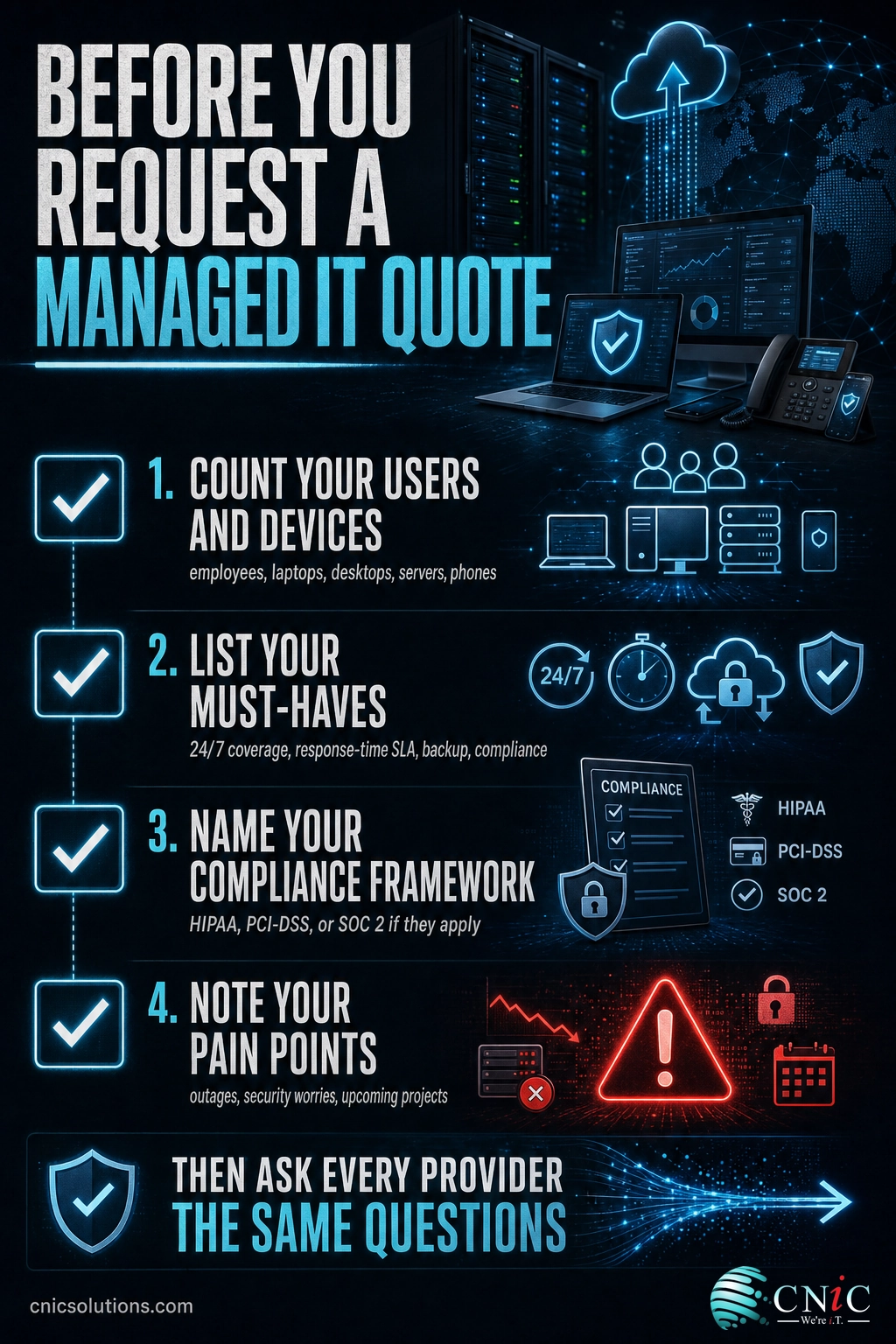
A vague request gets a vague number. The more precisely you can describe your environment, the more accurate, and comparable, the quotes you receive. Before you reach out to any provider, gather the following.
- Your headcount and device count. How many employees, and roughly how many laptops, desktops, servers, and phones they use. This alone determines which pricing model fits.
- Your must-haves. Do you need 24/7 coverage, a guaranteed response time, backup and disaster recovery, or specific compliance support? These are the scope items that move the price.
- Your compliance obligations. If you handle health records, cardholder data, or client financials, name the framework. HIPAA, PCI-DSS, and SOC 2 each carry real requirements a provider must price in.
- Your pain points. Recurring outages, a specific security worry, a looming project. These tell a provider what problem you are actually buying a solution to.
Then ask every provider the same short list, so their answers are comparable: What exactly is included in the monthly fee? What is billed separately? What is your guaranteed response time? Is support 24/7 or business hours? What does onboarding cost, and how long does it take? A provider that answers these plainly, in writing, is showing you how it will operate once you are a client. One that will not put specifics in writing is telling you something too.
Get a transparent managed IT quote for your business
Managed IT Pricing at a Glance
The complete reference for every model, range, and consideration covered above, in one place to keep as you compare proposals.
| Pricing model | How you’re billed | Typical range | Budget predictability | Best fit |
|---|---|---|---|---|
| Per-user | Flat fee per employee, covers all their devices | $100 to $250 / user / mo | High | Most offices; multi-device users |
| Per-device | Set fee per workstation, server, or device | ~$100 / workstation; several hundred / server | Medium; rises with hardware | Shared or device-heavy setups |
| Tiered packages | Named plans (Basic, Standard, Premium) | $100 to $250+ / user / mo by tier | Medium to high | Businesses wanting a clear menu |
| Flat-rate all-inclusive | One fee covers nearly everything | Priced from your user/device count | Highest | Budget certainty; prevention-focused |
| Monitoring-only / a la carte | Watch-and-alert, or pay per project | Lowest ongoing; project fees vary | Low for incidents | Capable internal IT; project needs |
Frequently Asked Questions
How much do managed IT services cost per month?
What are the main managed IT services pricing models?
Why do managed IT quotes vary so much?
Are there hidden costs in managed IT services?
Is managed IT cheaper than hiring an in-house IT team?
Sources and Methodology
The dollar ranges in this guide reflect prevailing U.S. managed-services market rates as of 2026. They are stated as ranges, not single-source figures, because managed IT is priced by scope and no two engagements are identical; treat them as planning benchmarks, then confirm with a scoped quote for your environment. The breach-cost, downtime, and IT-budget figures are drawn from primary sources: the global average data breach cost of $4.44 million in 2025 comes from IBM’s Cost of a Data Breach report; the finding that most organizations lose more than $100,000 per hour of downtime comes from ITIC’s hourly cost of downtime survey; and the 2-to-10-percent-of-revenue IT budget range reflects Gartner IT Key Metrics Data and Avasant Computer Economics benchmarks. Compliance references to HIPAA, PCI-DSS, and SOC 2 describe the frameworks accurately and are not tied to any invented figure.
Primary and authoritative sources: IBM Cost of a Data Breach 2025 and Gartner Worldwide IT Spending Forecast.



related posts
Zero Trust Statistics for 2026: Adoption, Maturity, and Breach Impact
November 3, 2026Zero trust has become the default security strategy on paper, but not yet in practice. Okta's…
What Is ZTNA (Zero Trust Network Access)?
November 3, 2026Zero Trust Network Access (ZTNA) is a security service that grants a verified user access to…
What Is XDR (Extended Detection and Response) and How Does It Protect…
November 2, 2026Extended detection and response (XDR) is a security platform that collects and correlates threat data from…
What Is Zero Trust Security? A Guide for Small Businesses
November 2, 2026Zero Trust security is a cybersecurity model built on one rule: never trust, always verify. Instead…